An unofficial WhatsApp desktop application for Linux.
C++
1,164
529 commits
updated Oct 22, 2024
An unofficial WhatsApp desktop application for Linux.
[!NOTE] We are looking for flatpak and snap maintainers. Please get in touch if you are interested!




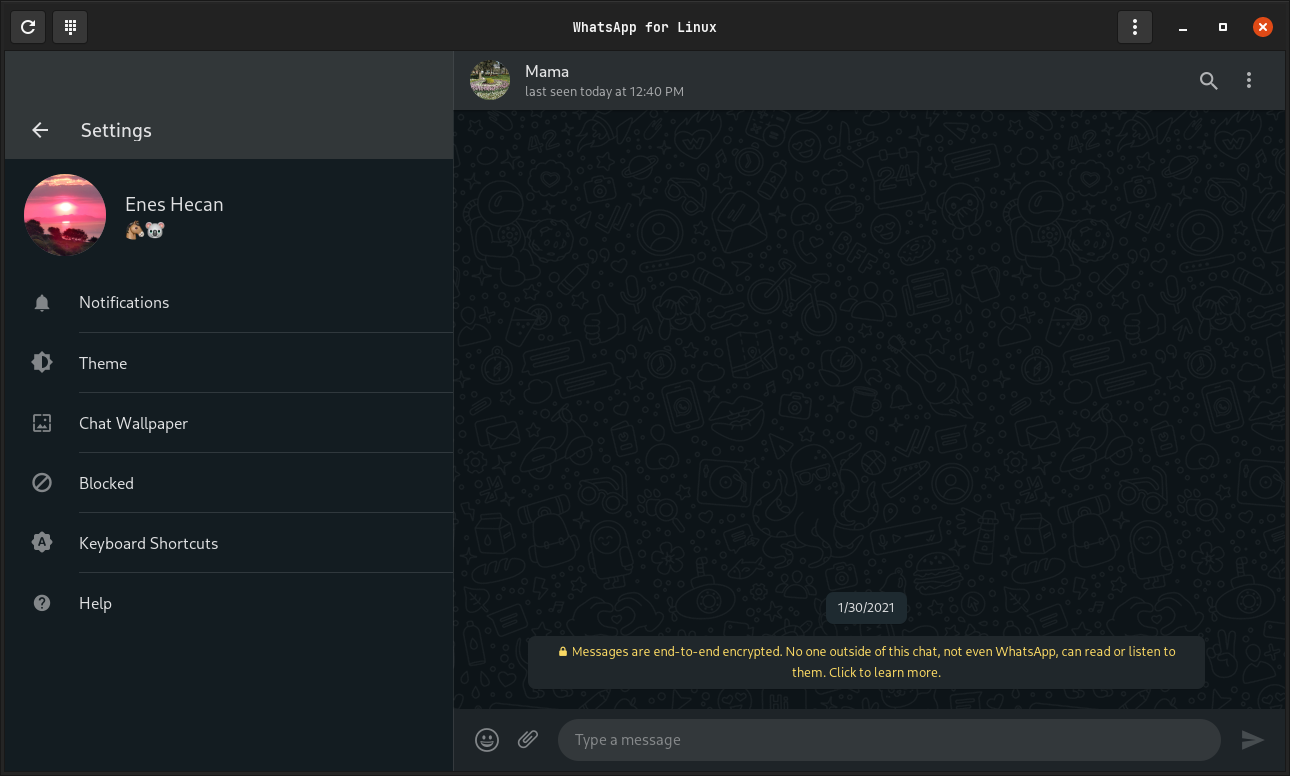
WasIstLos is an unofficial WhatsApp desktop application written in C++ with the help of gtkmm and WebKitGtk libraries. Check out wiki for further details.
hunspell-en_us package for US EnglishThe application is available from a number of Linux distributions:

# Create a debug build directory and go into it
mkdir -p build/debug && cd build/debug

# Build the project
cmake -DCMAKE_BUILD_TYPE=Debug -DCMAKE_INSTALL_PREFIX=/usr ../..
make -j4

# Optionally, to update the default translation file
make update-translation

# Run
./wasistlos
# Run inside the build directory once the application is built
# You'll probably need administrator privileges for this
make install
# Run inside the build directory if you want to uninstall all files
# install_manifest.txt file is created when you run make install
xargs rm < install_manifest.txt
# Don't forget to update the version number (0) in debian/changelog before this
# Build the package.
dpkg-buildpackage -uc -us -ui
# Build the package. Pass --use-lxd option in a virtual environment
snapcraft
# Make sure that the application is installed into the `<Project Root>/AppDir` directory
make install DESTDIR=../../AppDir

# Build the package
appimage-builder --skip-test --recipe ./appimage/AppImageBuilder.yml
Please read contributing.
234 followers · starred Sep 2022
10 followers · starred Aug 2023
214 followers · starred Jun 2022
35 followers · starred Jul 2023
An unofficial WhatsApp desktop application for Linux.
C++
1,164
529 commits
updated Oct 22, 2024
An unofficial WhatsApp desktop application for Linux.
[!NOTE] We are looking for flatpak and snap maintainers. Please get in touch if you are interested!
WasIstLos is an unofficial WhatsApp desktop application written in C++ with the help of gtkmm and WebKitGtk libraries. Check out wiki for further details.
hunspell-en_us package for US EnglishThe application is available from a number of Linux distributions:
# Create a debug build directory and go into it
mkdir -p build/debug && cd build/debug

# Build the project
cmake -DCMAKE_BUILD_TYPE=Debug -DCMAKE_INSTALL_PREFIX=/usr ../..
make -j4

# Optionally, to update the default translation file
make update-translation

# Run
./wasistlos
# Run inside the build directory once the application is built
# You'll probably need administrator privileges for this
make install
# Run inside the build directory if you want to uninstall all files
# install_manifest.txt file is created when you run make install
xargs rm < install_manifest.txt
# Don't forget to update the version number (0) in debian/changelog before this
# Build the package.
dpkg-buildpackage -uc -us -ui
# Build the package. Pass --use-lxd option in a virtual environment
snapcraft
# Make sure that the application is installed into the `<Project Root>/AppDir` directory
make install DESTDIR=../../AppDir

# Build the package
appimage-builder --skip-test --recipe ./appimage/AppImageBuilder.yml
Please read contributing.
234 followers · starred Sep 2022
10 followers · starred Aug 2023
214 followers · starred Jun 2022
35 followers · starred Jul 2023





