ASTRA (Advanced Solvation Transformer for Rational Additives) is a unified dual-loop framework combining Transformer-based models (BERT and GPT) with Active Learning to accelerate the discovery of next-generation electrolyte additives for Li-ion batteries.
Python
0
3 commits
updated Jul 28, 2026
%20%7C%20macOS%20%7C%20Windows-lightgrey?style=plastic&logo=linux&logoColor=white)








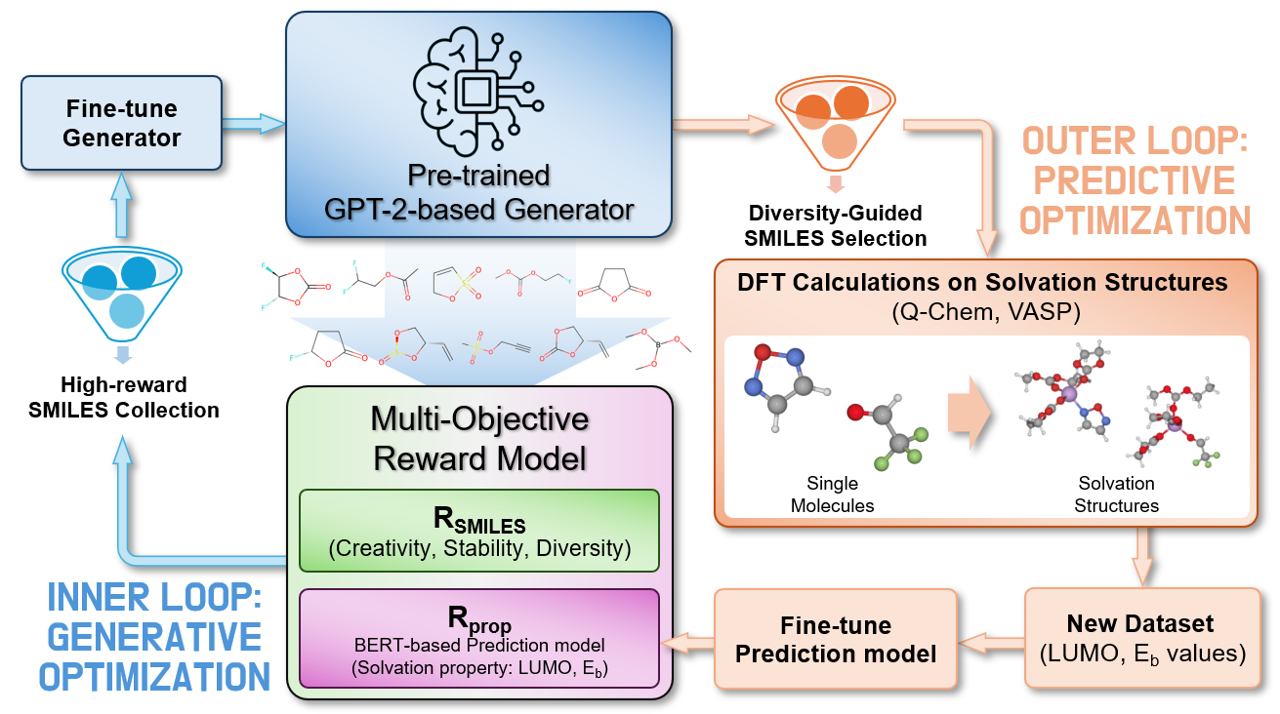
ASTRA (Advanced Solvation Transformer for Rational Additives) is a unified dual-loop framework combining Transformer-based models (BERT and GPT) with Active Learning to accelerate the discovery of next-generation electrolyte additives for Li-ion batteries. It enables end-to-end active optimization by autonomously generating molecular structures, filtering them based on critical electronic and thermodynamic criteria (such as LUMO levels and binding energies), and continuously fine-tuning the generative policy. This continuous cycle allows researchers to rationally design optimal candidate molecules for complex electrochemical interfaces.
astra/setup.py)The repository is structured to separate the core framework (astra/) from the datasets (dataset/) and example (examples/) scripts.
astra/
├── astra/                  # Core Python package
│   ├── data/               # Data processing, loading, and SMILES permutation scripts
│   ├── model/              # PyTorch implementations of BERT, GPT based models, and Embedding tuning models
│   ├── optimize/           # Active Learning utilities, reward calculation, and policy optimization
│   ├── tasks/              # Task execution logic (training, prediction, generation, etc.)
│   ├── tokenizer/          # Custom SMILES Tokenizer and vocabulary utilities
│   ├── utils/              # General helper functions (logging, configuration, etc.)
│   ├── main_loop.py        # CLI entry point for the autonomous active learning loop (`astra_loop`)
│   ├── main_task.py        # CLI entry point for individual tasks (`astra_task`)
│   └── setup.py            # Package installation script
├── dataset/                # Initial training datasets
├── examples/               # Tutorial scripts
│   ├── cli_scripts/        # Bash (.sh) examples
│   └── python_scripts/     # Python (.py) examples
├── images/                 # Architecture figures
└── README.md               # This file
The dataset/ directory contains the initial training data used for pre-training the models and finetuning the downstream property predictors. All datasets are provided as compressed .tar.gz archives containing .csv files.
Canonical_SMILES_under20.tar.gz: Canonical SMILES dataset of molecules with atom count under 20.Canonical_SMILES_under40.tar.gz: Canonical SMILES dataset of molecules with atom count under 40.IsolatedMolecule_FrontierOrbital.tar.gz: Frontier orbital energies (LUMO, HOMO) calculated for isolated molecules.QM9_FrontierOrbital.tar.gz: A processed subset of the standard QM9 database focusing on frontier orbital properties.SolvationStructure_Eb.tar.gz: Binding energies (Eb) evaluating the interaction strength within solvation structures.SolvationStructure_FrontierOrbital.tar.gz: Frontier orbital energies calculated for the solvation structures.We provide pre-trained and finetuned models hosted on Hugging Face. You can easily download them or load them directly using the transformers library.
| Stage | Target / Task | Model Name | Link |
|---|---|---|---|
| Initial | CausalLM (Large-scale SMILES) | astra-generator-initial |  |
| Final | Optimized Generator (After AL) | astra-generator-final |  |
| Stage | Target / Task | Model Name | Link |
|---|---|---|---|
| Pre-trained | MLM (Large-scale SMILES) | astra-bert-mlm |  |
| Initial | LUMO / Eb (Before AL) | astra-predictor-initial-lumo astra-predictor-initial-eb |   |
| Final | LUMO / Eb (After AL) | astra-predictor-final-lumo astra-predictor-final-eb |   |
If you do not have Miniconda installed, download it from Miniconda Downloads and follow the installation instructions for your OS.
conda create -n astra python=3.12 -y
conda activate astra
git clone https://github.com/wkdghdus23/astra.git
cd astra
pip install -e .
Note: Ensure that your GPU's CUDA version is compatible with your PyTorch installation. Check your CUDA version using nvidia-smi and PyTorch support via python -c "import torch; print(torch.version.cuda)".
PYTHONPATH every time the environment is activated:mkdir -p $CONDA_PREFIX/etc/conda/activate.d
echo "export PYTHONPATH=\$PYTHONPATH:$(pwd)" >> $CONDA_PREFIX/etc/conda/activate.d/env_vars.sh
PYTHONPATH when the environment is deactivated:mkdir -p $CONDA_PREFIX/etc/conda/deactivate.d
echo "unset PYTHONPATH" >> $CONDA_PREFIX/etc/conda/deactivate.d/env_vars.sh
conda deactivate
conda activate astra
python -c "import astra; print('ASTRA package installed successfully.')"
The ASTRA package provides two primary command-line interfaces: astra_task (for running individual modular steps) and astra_loop (for the fully autonomous active learning loop).
--task: The specific module to run in astra_task. Options include:
mlm: Masked Language Modeling for BERT encoder pre-training.downstream: Train downstream surrogate model for property prediction.embtuning: Perform embedding tuning on a pre-trained prediction model.causallm: Train/fine-tune the GPT-based SMILES generator.generate: Use the GPT2 model to generate pool of SMILES.predict: Run inference on SMILES using a trained property predictor.evaluate: Calculate reward scores on SMILES.--pretrained: Path to a pre-trained model directory.--dataset: Path to the dataset file in .csv format.--vocabfile: Path to the vocabulary file used for tokenization.--target: Chemical properties to predict during regression (e.g., --target LUMO Eb).# 1. MLM Pre-training
astra_task --task mlm --masking 0.15 --batchsize 256 --epochs 10 --dataset ./data.csv > mlm.log
# 2. Downstream Fine-tuning
astra_task --task downstream --target LUMO --batchsize 128 --epochs 10 --dataset ./data.csv --pretrained (/path/to/mlm/results/model/) > downstream.log
astra_task --task causallm --batchsize 128 --epochs 10 --dataset ./data.csv > causallm.log
import torch
import pandas as pd
from astra.tokenizer import initial_gpt_tokenizer_with_vocabulary
from astra.model import GPTForCausalLM
from astra.tasks import generate, sort_generated_smiles

device = torch.device("cuda" if torch.cuda.is_available() else "cpu")

# Paths (Replace with your actual paths)
pretrained_gpt_path = "./results/generator/"
trained_data_path = "<path/to/pretrain_dataset.csv>"
vocab_file = "./vocab.txt"

tokenizer = initial_gpt_tokenizer_with_vocabulary(path=vocab_file)

trained_df = pd.read_csv(trained_data_path)
trained_smiles_set = set(trained_df['input'].tolist())

model = GPTForCausalLM.from_pretrained(pretrained_gpt_path)
model.to(device)

print("Starting Molecular Generation...")
generated_smiles = generate(model=model,
     tokenizer=tokenizer,
     generation_size=1000,
     batch_size=256,
     max_length_of_smiles=60,
     temperature=1.5,
     top_k=50,
     top_p=1.0,
     device=device)

print(f"Total Generated: {len(generated_smiles)}")
print("Generation completed")
import torch
import pandas as pd
from astra.tokenizer import initial_bert_tokenizer_with_vocabulary
from astra.model import BertForDownstream, EmbeddingTunedModel
from astra.tasks import predict

device = torch.device("cuda" if torch.cuda.is_available() else "cpu")

# Paths (Replace with your actual paths)
dataset_path = "<path/to/generated_smiles.csv>"
pretrained_model_path = "<path/to/pre-trained/model>"
vocab_file = "./vocab.txt"

target_name = ["LUMO"]

tokenizer = initial_bert_tokenizer_with_vocabulary(path=vocab_file)
df = pd.read_csv(dataset_path)


model = BertForDownstream.from_pretrained_model(pretrained_path=pretrained_model_path,
                                                tokenizer=tokenizer,
                                                target_name=target_name)

model.to(device)

print(f"Starting Prediction for {target_name}...")
predictions = predict(model=model,
     input_df=df,
     vocab_file=vocab_file,
     tokenizer=tokenizer,
     max_len=256,
     batch_size=256,
     target_name=target_name,
     num_workers=0,
     device=device)

print(predictions)
print("Prediction completed and saved.")
examples/ directory)For highly detailed, please refer to the examples/ directory in this repository. It provides a complete 1:1 mapping of Bash (.sh) scripts and Python (.py) scripts for:
MLM: Training the BERT encoder via Masked Language Modeling taskDownstream: Training surrogate model for property predictionEmbeddingTuning: Training the embedding tuning block in predictorCausalLM: Training the GPT2-based generator for SMILES generationGeneration: SMILES generation taskPrediction: Property prediction taskEvaluation: Multi-objective reward calculationLoop: Full autonomous active learning loopBertForMLM, BertForDownstream, EmbeddingTunedModel, and GPTForCausalLM.astra_loop runs an active learning sequence (Generate -> Predict -> Evaluate Reward -> Fine-tune) continuously.astra_task, astra_loop) and Python APIs.multiprocess_permutation).If you use ASTRA in your research or find this tutorial helpful, please cite our work:
@article{astra2026,
  title={ASTRA: Data-Driven Rational Design of Electrolyte Additives via a Dual-Loop Active Learning Framework},
  author={Ho Yeon Jang and Jamin Kim and Hyun-seung Kim and Seoin Back},
  journal={arXiv preprint arXiv:XXXX.XXXXX},
  year={2026}
}
This project is licensed under the MIT License.
ASTRA (Advanced Solvation Transformer for Rational Additives) is a unified dual-loop framework combining Transformer-based models (BERT and GPT) with Active Learning to accelerate the discovery of next-generation electrolyte additives for Li-ion batteries.
Python
0
3 commits
updated Jul 28, 2026
ASTRA (Advanced Solvation Transformer for Rational Additives) is a unified dual-loop framework combining Transformer-based models (BERT and GPT) with Active Learning to accelerate the discovery of next-generation electrolyte additives for Li-ion batteries. It enables end-to-end active optimization by autonomously generating molecular structures, filtering them based on critical electronic and thermodynamic criteria (such as LUMO levels and binding energies), and continuously fine-tuning the generative policy. This continuous cycle allows researchers to rationally design optimal candidate molecules for complex electrochemical interfaces.
astra/setup.py)The repository is structured to separate the core framework (astra/) from the datasets (dataset/) and example (examples/) scripts.
astra/
├── astra/                  # Core Python package
│   ├── data/               # Data processing, loading, and SMILES permutation scripts
│   ├── model/              # PyTorch implementations of BERT, GPT based models, and Embedding tuning models
│   ├── optimize/           # Active Learning utilities, reward calculation, and policy optimization
│   ├── tasks/              # Task execution logic (training, prediction, generation, etc.)
│   ├── tokenizer/          # Custom SMILES Tokenizer and vocabulary utilities
│   ├── utils/              # General helper functions (logging, configuration, etc.)
│   ├── main_loop.py        # CLI entry point for the autonomous active learning loop (`astra_loop`)
│   ├── main_task.py        # CLI entry point for individual tasks (`astra_task`)
│   └── setup.py            # Package installation script
├── dataset/                # Initial training datasets
├── examples/               # Tutorial scripts
│   ├── cli_scripts/        # Bash (.sh) examples
│   └── python_scripts/     # Python (.py) examples
├── images/                 # Architecture figures
└── README.md               # This file
The dataset/ directory contains the initial training data used for pre-training the models and finetuning the downstream property predictors. All datasets are provided as compressed .tar.gz archives containing .csv files.
Canonical_SMILES_under20.tar.gz: Canonical SMILES dataset of molecules with atom count under 20.Canonical_SMILES_under40.tar.gz: Canonical SMILES dataset of molecules with atom count under 40.IsolatedMolecule_FrontierOrbital.tar.gz: Frontier orbital energies (LUMO, HOMO) calculated for isolated molecules.QM9_FrontierOrbital.tar.gz: A processed subset of the standard QM9 database focusing on frontier orbital properties.SolvationStructure_Eb.tar.gz: Binding energies (Eb) evaluating the interaction strength within solvation structures.SolvationStructure_FrontierOrbital.tar.gz: Frontier orbital energies calculated for the solvation structures.We provide pre-trained and finetuned models hosted on Hugging Face. You can easily download them or load them directly using the transformers library.
| Stage | Target / Task | Model Name | Link |
|---|---|---|---|
| Initial | CausalLM (Large-scale SMILES) | astra-generator-initial | |
| Final | Optimized Generator (After AL) | astra-generator-final | |
| Stage | Target / Task | Model Name | Link |
|---|---|---|---|
| Pre-trained | MLM (Large-scale SMILES) | astra-bert-mlm | |
| Initial | LUMO / Eb (Before AL) | astra-predictor-initial-lumo astra-predictor-initial-eb | |
| Final | LUMO / Eb (After AL) | astra-predictor-final-lumo astra-predictor-final-eb | |
If you do not have Miniconda installed, download it from Miniconda Downloads and follow the installation instructions for your OS.
conda create -n astra python=3.12 -y
conda activate astra
git clone https://github.com/wkdghdus23/astra.git
cd astra
pip install -e .
Note: Ensure that your GPU's CUDA version is compatible with your PyTorch installation. Check your CUDA version using nvidia-smi and PyTorch support via python -c "import torch; print(torch.version.cuda)".
PYTHONPATH every time the environment is activated:mkdir -p $CONDA_PREFIX/etc/conda/activate.d
echo "export PYTHONPATH=\$PYTHONPATH:$(pwd)" >> $CONDA_PREFIX/etc/conda/activate.d/env_vars.sh
PYTHONPATH when the environment is deactivated:mkdir -p $CONDA_PREFIX/etc/conda/deactivate.d
echo "unset PYTHONPATH" >> $CONDA_PREFIX/etc/conda/deactivate.d/env_vars.sh
conda deactivate
conda activate astra
python -c "import astra; print('ASTRA package installed successfully.')"
The ASTRA package provides two primary command-line interfaces: astra_task (for running individual modular steps) and astra_loop (for the fully autonomous active learning loop).
--task: The specific module to run in astra_task. Options include:
mlm: Masked Language Modeling for BERT encoder pre-training.downstream: Train downstream surrogate model for property prediction.embtuning: Perform embedding tuning on a pre-trained prediction model.causallm: Train/fine-tune the GPT-based SMILES generator.generate: Use the GPT2 model to generate pool of SMILES.predict: Run inference on SMILES using a trained property predictor.evaluate: Calculate reward scores on SMILES.--pretrained: Path to a pre-trained model directory.--dataset: Path to the dataset file in .csv format.--vocabfile: Path to the vocabulary file used for tokenization.--target: Chemical properties to predict during regression (e.g., --target LUMO Eb).# 1. MLM Pre-training
astra_task --task mlm --masking 0.15 --batchsize 256 --epochs 10 --dataset ./data.csv > mlm.log
# 2. Downstream Fine-tuning
astra_task --task downstream --target LUMO --batchsize 128 --epochs 10 --dataset ./data.csv --pretrained (/path/to/mlm/results/model/) > downstream.log
astra_task --task causallm --batchsize 128 --epochs 10 --dataset ./data.csv > causallm.log
import torch
import pandas as pd
from astra.tokenizer import initial_gpt_tokenizer_with_vocabulary
from astra.model import GPTForCausalLM
from astra.tasks import generate, sort_generated_smiles

device = torch.device("cuda" if torch.cuda.is_available() else "cpu")

# Paths (Replace with your actual paths)
pretrained_gpt_path = "./results/generator/"
trained_data_path = "<path/to/pretrain_dataset.csv>"
vocab_file = "./vocab.txt"

tokenizer = initial_gpt_tokenizer_with_vocabulary(path=vocab_file)

trained_df = pd.read_csv(trained_data_path)
trained_smiles_set = set(trained_df['input'].tolist())

model = GPTForCausalLM.from_pretrained(pretrained_gpt_path)
model.to(device)

print("Starting Molecular Generation...")
generated_smiles = generate(model=model,
     tokenizer=tokenizer,
     generation_size=1000,
     batch_size=256,
     max_length_of_smiles=60,
     temperature=1.5,
     top_k=50,
     top_p=1.0,
     device=device)

print(f"Total Generated: {len(generated_smiles)}")
print("Generation completed")
import torch
import pandas as pd
from astra.tokenizer import initial_bert_tokenizer_with_vocabulary
from astra.model import BertForDownstream, EmbeddingTunedModel
from astra.tasks import predict

device = torch.device("cuda" if torch.cuda.is_available() else "cpu")

# Paths (Replace with your actual paths)
dataset_path = "<path/to/generated_smiles.csv>"
pretrained_model_path = "<path/to/pre-trained/model>"
vocab_file = "./vocab.txt"

target_name = ["LUMO"]

tokenizer = initial_bert_tokenizer_with_vocabulary(path=vocab_file)
df = pd.read_csv(dataset_path)


model = BertForDownstream.from_pretrained_model(pretrained_path=pretrained_model_path,
                                                tokenizer=tokenizer,
                                                target_name=target_name)

model.to(device)

print(f"Starting Prediction for {target_name}...")
predictions = predict(model=model,
     input_df=df,
     vocab_file=vocab_file,
     tokenizer=tokenizer,
     max_len=256,
     batch_size=256,
     target_name=target_name,
     num_workers=0,
     device=device)

print(predictions)
print("Prediction completed and saved.")
examples/ directory)For highly detailed, please refer to the examples/ directory in this repository. It provides a complete 1:1 mapping of Bash (.sh) scripts and Python (.py) scripts for:
MLM: Training the BERT encoder via Masked Language Modeling taskDownstream: Training surrogate model for property predictionEmbeddingTuning: Training the embedding tuning block in predictorCausalLM: Training the GPT2-based generator for SMILES generationGeneration: SMILES generation taskPrediction: Property prediction taskEvaluation: Multi-objective reward calculationLoop: Full autonomous active learning loopBertForMLM, BertForDownstream, EmbeddingTunedModel, and GPTForCausalLM.astra_loop runs an active learning sequence (Generate -> Predict -> Evaluate Reward -> Fine-tune) continuously.astra_task, astra_loop) and Python APIs.multiprocess_permutation).If you use ASTRA in your research or find this tutorial helpful, please cite our work:
@article{astra2026,
  title={ASTRA: Data-Driven Rational Design of Electrolyte Additives via a Dual-Loop Active Learning Framework},
  author={Ho Yeon Jang and Jamin Kim and Hyun-seung Kim and Seoin Back},
  journal={arXiv preprint arXiv:XXXX.XXXXX},
  year={2026}
}
This project is licensed under the MIT License.





