


Deep learning for molecular discovery with a simple sklearn-style interface
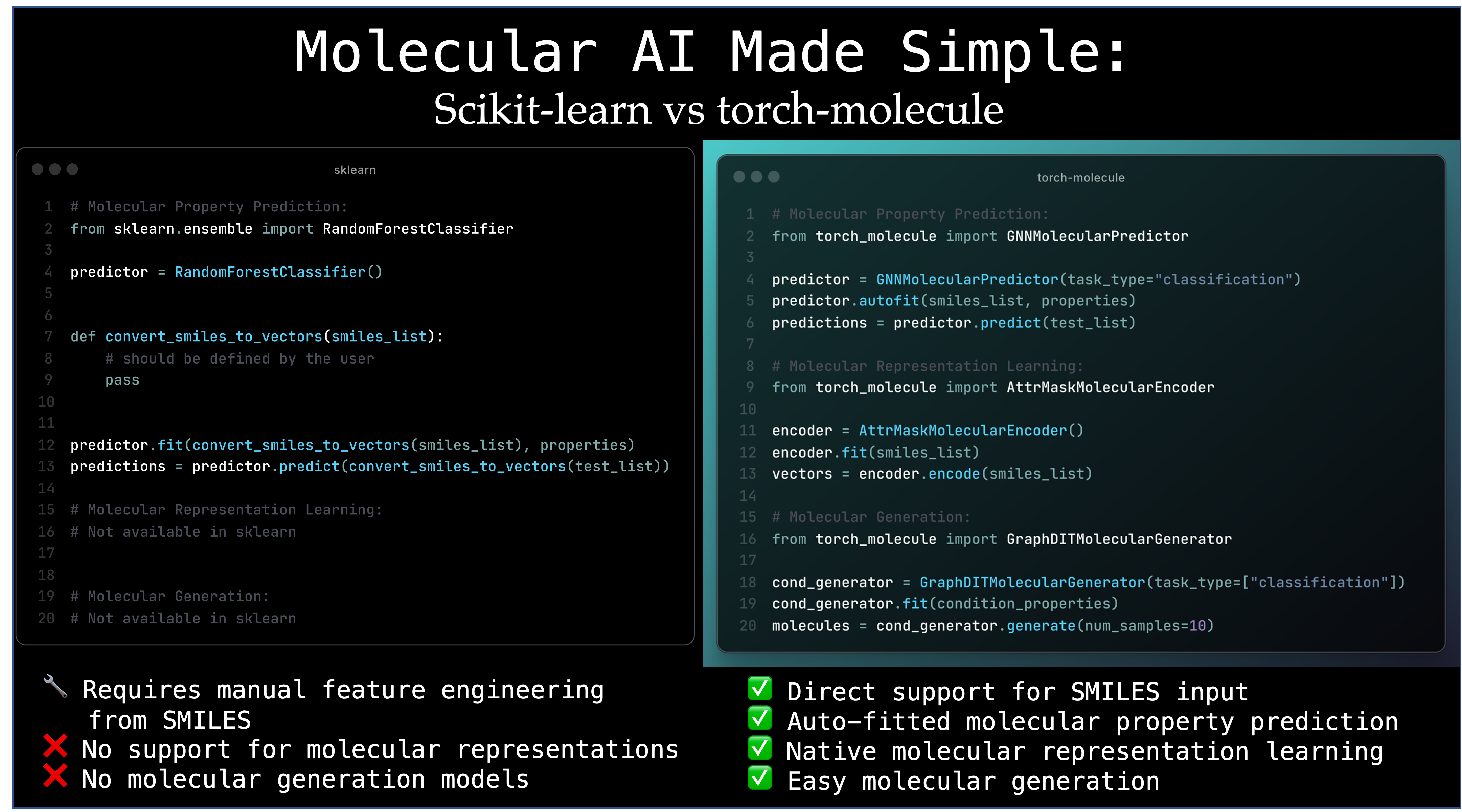
torch-molecule is a package that facilitates molecular discovery through deep learning, featuring a user-friendly, sklearn-style interface. It includes model checkpoints for efficient deployment and benchmarking across a range of molecular tasks. The package focuses on three main components: Predictive Models, Generative Models, and Representation Models, which make molecular AI models easy to implement and deploy.
See the List of Supported Models section for all available models.
Create a Conda environment:
conda create --name torch_molecule python=3.11.7
conda activate torch_molecule
Install using pip:
pip install torch-molecule
Install from source for the latest version:
Clone the repository:
git clone https://github.com/liugangcode/torch-molecule
cd torch-molecule
Install:
pip install .
| Model | Required Packages |
|---|---|
| HFPretrainedMolecularEncoder | transformers |
| BFGNNMolecularPredictor | torch-scatter |
| GRINMolecularPredictor | torch-scatter |
GRINMolecularPredictor (if enable repetition_augmentation=True) | CombineMols |
For models that require torch-scatter: Install using the following command: pip install torch-scatter -f https://data.pyg.org/whl/torch-${TORCH}+${CUDA}.html, e.g.,
pip install torch-scatter -f https://data.pyg.org/whl/torch-2.7.1+cu128.html
For models that require transformers: pip install transformers
This repository also contains a local RPPD-to-GRIN workflow and a single web application for serving all trained polymer-property models. The source code is organized as follows:
data_process/   RPPD inspection, cleaning, and leakage-safe data preparation
train_grin/     standardized multi-property GRIN training and evaluation
model_evaluation/ fingerprint baselines and leakage-safe GRIN cross-validation
polymer_api/    GRIN prediction, Graph-DiT generation, and structure rendering
grin_frontend/  Predictor interface served by the API
polySIM/         pSMILES-to-chain construction, xTB optimization, and box packing
The repository includes the source RPPD export, cleaned dataset, and first standardized model run required for server deployment. Temporary prepared splits and future timestamped training runs are excluded from Git until deliberately selected for a release.
conda create --name torch-molecule python=3.11.7 -y
conda activate torch-molecule
python -m pip install --upgrade pip setuptools wheel
python -m pip install -r requirements.txt
python -m pip install --no-build-isolation torch-scatter
torch-scatter must be installed after PyTorch. On CUDA servers, use the wheel
matching the installed PyTorch/CUDA versions from the
PyG installation guide.
The H20 should use a CUDA-enabled PyTorch build. Check the installed NVIDIA driver
first with nvidia-smi, then select a supported CUDA wheel from the
PyTorch installation page. For a
CUDA 12.8 deployment:
conda create --name torch-molecule python=3.11.7 -y
conda activate torch-molecule
python -m pip install --upgrade pip setuptools wheel
python -m pip install torch --index-url https://download.pytorch.org/whl/cu128
python -m pip install -r requirements.txt

TORCH_VERSION=$(python -c 'import torch; print(torch.__version__.split("+")[0])')
python -m pip install torch-scatter \
  -f "https://data.pyg.org/whl/torch-${TORCH_VERSION}+cu128.html"
Confirm that PyTorch can see the H20:
python -c "import torch; print(torch.cuda.is_available(), torch.cuda.get_device_name(0))"
Place the RPPD CSV in data/, then run:
python data_process/clean_rppd.py data/20260920_rppd.csv
python train_grin/train.py --list-properties
python train_grin/train.py --all --device cpu  # use --device cuda on the H20
For a fair five-fold GRIN evaluation on the H20, with progress saved after every fold:
python model_evaluation/evaluate_grin_cv.py \
  --all \
  --device cuda \
  --output-root model_evaluation/output/grin_cv_server
If the server job is interrupted, append --resume to the same command. See
model_evaluation/README.md for outputs and evaluation details.
Training standardizes each target using training-split statistics and saves the
inverse-transform parameters with every checkpoint. Each timestamped property
directory also contains original-unit MAE, MSE, RMSE and R² metrics, prediction
CSVs, a scatter plot, and a training-loss plot. Train selected targets with one
or more --property arguments instead of --all.
GRIN_MODEL_RUN_DIR="$PWD/train_grin/output_standardized/run_20260921_003803" \
POLYMER_API_DEVICE=cpu \
GRAPHDIT_MODEL_ROOT="$PWD/train_graphdit/output/rppd_finetuned" \
GRAPHDIT_UNCONDITIONAL_MODEL_DIR="$PWD/train_graphdit/pretrained/llamole_pretrained_graphdit" \
python -m uvicorn polymer_api.app:app \
  --host 127.0.0.1 --port 8000 --reload \
  --reload-dir polymer_api --reload-dir grin_frontend
Set POLYMER_API_DEVICE=cuda when serving on the H20.
Open http://127.0.0.1:8000. The same process hosts the API, frontend, all
available GRIN predictors, configured Graph-DiT generators, and RDKit structure
drawing. The page is delivered as
one self-contained HTML response, so a separate static-file server is unnecessary.
Model inference is local and does not require Hugging Face access.
polySIM converts a two-ended repeat-unit pSMILES into a hydrogen-terminated
finite chain, generates and MMFF-optimizes a 3D conformer, performs optional
single-chain GFN-FF/GFN-xTB calculations, and packs rigid chain copies into an
approximate periodic box. The assembled multi-chain system is not optimized.
python -m polySIM.build_system \
  --psmiles-file polySIM/examples/pvdf.psmiles.txt \
  --repeat-units 50 \
  --chains 30 \
  --xtb-method gfn2 \
  --output-directory polySIM/output/pvdf_30x50
See data_process/README.md,
train_grin/README.md, and
polymer_api/README.md for model and application
details. See polySIM/README.md for polymer-building
options and output descriptions.
More examples can be found in the
examplesandtestsfolders.
torch-molecule supports applications in broad domains from chemistry, biology, to materials science. To get started, you can load prepared datasets from torch_molecule.datasets (updated after v0.1.3):
| Dataset | Description | Function |
|---|---|---|
| qm9 | Quantum chemical properties (DFT level) | load_qm9 |
| chembl2k | Bioactive molecules with drug-like properties | load_chembl2k |
| broad6k | Bioactive molecules with drug-like properties | load_broad6k |
| toxcast | Toxicity of chemical compounds | load_toxcast |
| admet | Chemical absorption, distribution, metabolism, excretion, and toxicity | load_admet |
| gasperm | Six gas permeability properties for polymeric materials | load_gasperm |
| zinc250k | A common subset of ZINC dataset, which does not have labels and could be used for unconditional generation or virtual screening | load_zinc250k |
from torch_molecule.datasets import load_qm9

# local_dir is the local path where the dataset will be saved
molecular_data = load_qm9(local_dir='torchmol_data')
smiles_list, property_np_array = molecular_data.data, molecular_data.target

# len(smiles_list): 133885
# Property array shape: (133885, 1)

# load_qm9 returns the target "gap" by default, but you can adjust it by passing new target_cols
target_cols = ['homo', 'lumo', 'gap']
molecular_data = load_qm9(local_dir='torchmol_data', target_cols=target_cols)
smiles_list, property_np_array = molecular_data.data, molecular_data.target

# the target could be None if loading an unlabeled dataset
from torch_molecule.datasets import load_zinc250k
molecular_data = load_zinc250k(local_dir='torchmol_data')
smiles_list = molecular_data.data
assert molecular_data.target is None
(We are actively adding more datasets. We welcome your suggestions and contributions on your datasets!)
After preparing the dataset, we can easily fit a model similar to how we use sklearn (actually, the coding is even simpler than sklearn, as we still need to do feature engineering in sklearn to convert molecule SMILES into vectors):
from torch_molecule import GREAMolecularPredictor

split = int(0.8 * len(smiles_list))

grea = GREAMolecularPredictor(
    num_task=num_task,
    task_type="regression",
    evaluate_higher_better=False,
    verbose="progress_bar" #or "print_statement" recommended for jupyter notebooks, or "none"
)

# Fit with automatic hyperparameter tuning with 10 attempts, or implement .fit() with the default/manual hyperparameters
grea.autofit(
    X_train=smiles_list[:split],
    y_train=property_np_array[:split],
    X_val=smiles_list[split:],
    y_val=property_np_array[split:],
    n_trials=10,
)
torch-molecule provides checkpoint functions that can be interacted with on Hugging Face:
from torch_molecule import GREAMolecularPredictor

repo_id = "user/repo_id"  # replace with your own Hugging Face username and repo_id

# Save the trained model to Hugging Face
grea.save_to_hf(
    repo_id=repo_id,
    task_id="qm9_grea",
    commit_message="Upload qm9_grea",
    private=False
)

# Load a pretrained checkpoint from Hugging Face
model = GREAMolecularPredictor()
model.load_from_hf(repo_id=repo_id, local_cache=f"{model_dir}/GREA_{task_name}.pt")

# Adjust model parameters and make predictions
model.set_params(verbose='none')
predictions = model.predict(smiles_list)
Or you can save the model to a local path:
grea.save_to_local("qm9_grea.pt")

new_model = GREAMolecularPredictor()
new_model.load_from_local("qm9_grea.pt")
The project template was adapted from https://github.com/lwaekfjlk/python-project-template. We thank the authors for their contribution to the open-source community.
Deep learning for molecular discovery with a simple sklearn-style interface
torch-molecule is a package that facilitates molecular discovery through deep learning, featuring a user-friendly, sklearn-style interface. It includes model checkpoints for efficient deployment and benchmarking across a range of molecular tasks. The package focuses on three main components: Predictive Models, Generative Models, and Representation Models, which make molecular AI models easy to implement and deploy.
See the List of Supported Models section for all available models.
Create a Conda environment:
conda create --name torch_molecule python=3.11.7
conda activate torch_molecule
Install using pip:
pip install torch-molecule
Install from source for the latest version:
Clone the repository:
git clone https://github.com/liugangcode/torch-molecule
cd torch-molecule
Install:
pip install .
| Model | Required Packages |
|---|---|
| HFPretrainedMolecularEncoder | transformers |
| BFGNNMolecularPredictor | torch-scatter |
| GRINMolecularPredictor | torch-scatter |
GRINMolecularPredictor (if enable repetition_augmentation=True) | CombineMols |
For models that require torch-scatter: Install using the following command: pip install torch-scatter -f https://data.pyg.org/whl/torch-${TORCH}+${CUDA}.html, e.g.,
pip install torch-scatter -f https://data.pyg.org/whl/torch-2.7.1+cu128.html
For models that require transformers: pip install transformers
This repository also contains a local RPPD-to-GRIN workflow and a single web application for serving all trained polymer-property models. The source code is organized as follows:
data_process/   RPPD inspection, cleaning, and leakage-safe data preparation
train_grin/     standardized multi-property GRIN training and evaluation
model_evaluation/ fingerprint baselines and leakage-safe GRIN cross-validation
polymer_api/    GRIN prediction, Graph-DiT generation, and structure rendering
grin_frontend/  Predictor interface served by the API
polySIM/         pSMILES-to-chain construction, xTB optimization, and box packing
The repository includes the source RPPD export, cleaned dataset, and first standardized model run required for server deployment. Temporary prepared splits and future timestamped training runs are excluded from Git until deliberately selected for a release.
conda create --name torch-molecule python=3.11.7 -y
conda activate torch-molecule
python -m pip install --upgrade pip setuptools wheel
python -m pip install -r requirements.txt
python -m pip install --no-build-isolation torch-scatter
torch-scatter must be installed after PyTorch. On CUDA servers, use the wheel
matching the installed PyTorch/CUDA versions from the
PyG installation guide.
The H20 should use a CUDA-enabled PyTorch build. Check the installed NVIDIA driver
first with nvidia-smi, then select a supported CUDA wheel from the
PyTorch installation page. For a
CUDA 12.8 deployment:
conda create --name torch-molecule python=3.11.7 -y
conda activate torch-molecule
python -m pip install --upgrade pip setuptools wheel
python -m pip install torch --index-url https://download.pytorch.org/whl/cu128
python -m pip install -r requirements.txt

TORCH_VERSION=$(python -c 'import torch; print(torch.__version__.split("+")[0])')
python -m pip install torch-scatter \
  -f "https://data.pyg.org/whl/torch-${TORCH_VERSION}+cu128.html"
Confirm that PyTorch can see the H20:
python -c "import torch; print(torch.cuda.is_available(), torch.cuda.get_device_name(0))"
Place the RPPD CSV in data/, then run:
python data_process/clean_rppd.py data/20260920_rppd.csv
python train_grin/train.py --list-properties
python train_grin/train.py --all --device cpu  # use --device cuda on the H20
For a fair five-fold GRIN evaluation on the H20, with progress saved after every fold:
python model_evaluation/evaluate_grin_cv.py \
  --all \
  --device cuda \
  --output-root model_evaluation/output/grin_cv_server
If the server job is interrupted, append --resume to the same command. See
model_evaluation/README.md for outputs and evaluation details.
Training standardizes each target using training-split statistics and saves the
inverse-transform parameters with every checkpoint. Each timestamped property
directory also contains original-unit MAE, MSE, RMSE and R² metrics, prediction
CSVs, a scatter plot, and a training-loss plot. Train selected targets with one
or more --property arguments instead of --all.
GRIN_MODEL_RUN_DIR="$PWD/train_grin/output_standardized/run_20260921_003803" \
POLYMER_API_DEVICE=cpu \
GRAPHDIT_MODEL_ROOT="$PWD/train_graphdit/output/rppd_finetuned" \
GRAPHDIT_UNCONDITIONAL_MODEL_DIR="$PWD/train_graphdit/pretrained/llamole_pretrained_graphdit" \
python -m uvicorn polymer_api.app:app \
  --host 127.0.0.1 --port 8000 --reload \
  --reload-dir polymer_api --reload-dir grin_frontend
Set POLYMER_API_DEVICE=cuda when serving on the H20.
Open http://127.0.0.1:8000. The same process hosts the API, frontend, all
available GRIN predictors, configured Graph-DiT generators, and RDKit structure
drawing. The page is delivered as
one self-contained HTML response, so a separate static-file server is unnecessary.
Model inference is local and does not require Hugging Face access.
polySIM converts a two-ended repeat-unit pSMILES into a hydrogen-terminated
finite chain, generates and MMFF-optimizes a 3D conformer, performs optional
single-chain GFN-FF/GFN-xTB calculations, and packs rigid chain copies into an
approximate periodic box. The assembled multi-chain system is not optimized.
python -m polySIM.build_system \
  --psmiles-file polySIM/examples/pvdf.psmiles.txt \
  --repeat-units 50 \
  --chains 30 \
  --xtb-method gfn2 \
  --output-directory polySIM/output/pvdf_30x50
See data_process/README.md,
train_grin/README.md, and
polymer_api/README.md for model and application
details. See polySIM/README.md for polymer-building
options and output descriptions.
More examples can be found in the
examplesandtestsfolders.
torch-molecule supports applications in broad domains from chemistry, biology, to materials science. To get started, you can load prepared datasets from torch_molecule.datasets (updated after v0.1.3):
| Dataset | Description | Function |
|---|---|---|
| qm9 | Quantum chemical properties (DFT level) | load_qm9 |
| chembl2k | Bioactive molecules with drug-like properties | load_chembl2k |
| broad6k | Bioactive molecules with drug-like properties | load_broad6k |
| toxcast | Toxicity of chemical compounds | load_toxcast |
| admet | Chemical absorption, distribution, metabolism, excretion, and toxicity | load_admet |
| gasperm | Six gas permeability properties for polymeric materials | load_gasperm |
| zinc250k | A common subset of ZINC dataset, which does not have labels and could be used for unconditional generation or virtual screening | load_zinc250k |
from torch_molecule.datasets import load_qm9

# local_dir is the local path where the dataset will be saved
molecular_data = load_qm9(local_dir='torchmol_data')
smiles_list, property_np_array = molecular_data.data, molecular_data.target

# len(smiles_list): 133885
# Property array shape: (133885, 1)

# load_qm9 returns the target "gap" by default, but you can adjust it by passing new target_cols
target_cols = ['homo', 'lumo', 'gap']
molecular_data = load_qm9(local_dir='torchmol_data', target_cols=target_cols)
smiles_list, property_np_array = molecular_data.data, molecular_data.target

# the target could be None if loading an unlabeled dataset
from torch_molecule.datasets import load_zinc250k
molecular_data = load_zinc250k(local_dir='torchmol_data')
smiles_list = molecular_data.data
assert molecular_data.target is None
(We are actively adding more datasets. We welcome your suggestions and contributions on your datasets!)
After preparing the dataset, we can easily fit a model similar to how we use sklearn (actually, the coding is even simpler than sklearn, as we still need to do feature engineering in sklearn to convert molecule SMILES into vectors):
from torch_molecule import GREAMolecularPredictor

split = int(0.8 * len(smiles_list))

grea = GREAMolecularPredictor(
    num_task=num_task,
    task_type="regression",
    evaluate_higher_better=False,
    verbose="progress_bar" #or "print_statement" recommended for jupyter notebooks, or "none"
)

# Fit with automatic hyperparameter tuning with 10 attempts, or implement .fit() with the default/manual hyperparameters
grea.autofit(
    X_train=smiles_list[:split],
    y_train=property_np_array[:split],
    X_val=smiles_list[split:],
    y_val=property_np_array[split:],
    n_trials=10,
)
torch-molecule provides checkpoint functions that can be interacted with on Hugging Face:
from torch_molecule import GREAMolecularPredictor

repo_id = "user/repo_id"  # replace with your own Hugging Face username and repo_id

# Save the trained model to Hugging Face
grea.save_to_hf(
    repo_id=repo_id,
    task_id="qm9_grea",
    commit_message="Upload qm9_grea",
    private=False
)

# Load a pretrained checkpoint from Hugging Face
model = GREAMolecularPredictor()
model.load_from_hf(repo_id=repo_id, local_cache=f"{model_dir}/GREA_{task_name}.pt")

# Adjust model parameters and make predictions
model.set_params(verbose='none')
predictions = model.predict(smiles_list)
Or you can save the model to a local path:
grea.save_to_local("qm9_grea.pt")

new_model = GREAMolecularPredictor()
new_model.load_from_local("qm9_grea.pt")
The project template was adapted from https://github.com/lwaekfjlk/python-project-template. We thank the authors for their contribution to the open-source community.



