Spotlight-style launcher for code on macOS, built on fsearch
Swift
0
1 commits
updated Oct 15, 2026
Ferret finds files, code and git changes on your Mac from one hotkey. It sits on top of fsearch, which keeps an index of the whole disk. On my Mac a search over 6.3 million files takes under a millisecond.
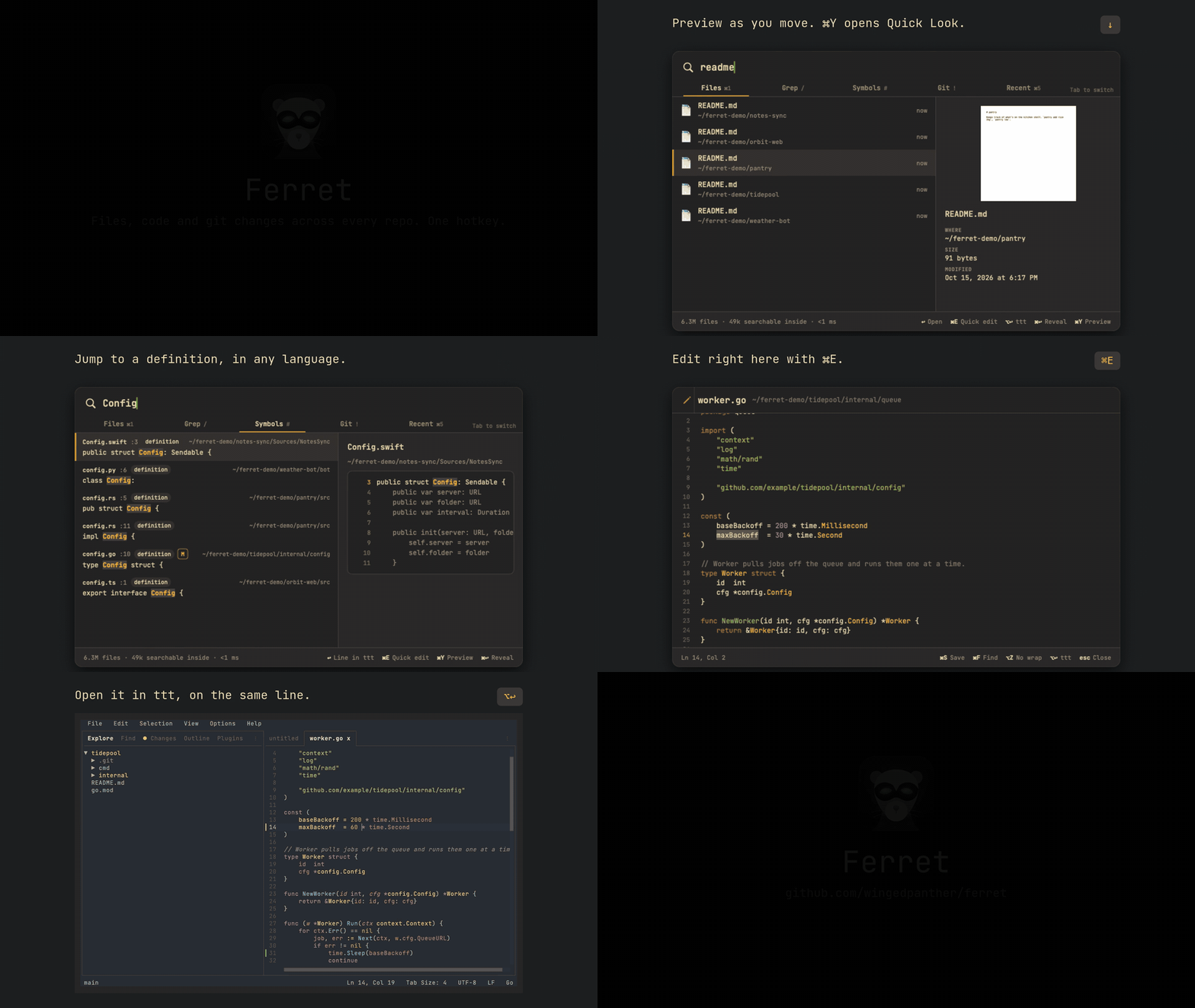
Press ⌥Space and type. Tab moves between five modes:
/: text inside every code and text file in your home folder.#: where a function, class or type is defined.!: your repos, each with its count of uncommitted files. ↩ lists them.Grep and Symbols take fsearch filters, like ext:swift in:~/Developer foo or regex:fn\s+\w+.
Download Ferret.zip from the latest release. Unzip it and move Ferret.app to Applications. You need macOS 14 or later on Apple Silicon.
The app isn't notarised yet, so macOS blocks the first launch. Go to System Settings → Privacy & Security and click Open Anyway.
Ferret then asks for Full Disk Access. Without it, fsearch skips Desktop, Documents and Downloads.
fsearch ships inside the app. If you already have it at ~/.local/bin/fsearch, Ferret uses yours.
If Raycast or another app already owns ⌥Space, pick a different hotkey in Settings (⌘,).
| Key | Action |
|---|---|
| ↩ | open the file, go to the line, or list a repo's changes |
| ⌥↩ | open in your editor at the line |
| ⌘↩ | reveal in Finder |
| ⌘T | open a terminal in that folder |
| ⌘Y | Quick Look |
| ⌘E | quick edit in the panel |
| ⌘C | copy the path |
| ⌘L or ⌘F | back to the search field, cursor at the end |
| Tab, or ⌘1 to ⌘5 | switch modes |
| Esc | go back, clear the query, or close |
If the search field loses focus, just type. Your keys go back to it.
⌘E opens the selected file inside the panel, at the matching line. Syntax colouring covers 17 languages.
⌘S saves, ⌘F finds, ⌥Z toggles wrap and Esc closes. Esc asks twice if you have unsaved changes. ⌥↩ hands the file to your editor at the cursor, once it's saved.
It won't open files over 1 MB or binary files.
Pick VS Code, Cursor, Zed or ttt in Settings.
ttt runs in Ghostty, Terminal or iTerm, with the file's git repo open as the project. Settings can install it with Homebrew.
If your editor isn't installed, Ferret uses the next one it finds, then the file's default app.
scripts/bundle.sh            # build/Ferret.app
scripts/bundle.sh --install  # copies it to ~/Applications
You need the Xcode command line tools with Swift 6. The script downloads fsearch's release build and puts it in the app.
Tests run against the live fsearch daemon:
DEVELOPER_DIR=/Applications/Xcode.app/Contents/Developer swift test
FERRET_SNAPSHOT=<dir> swift run renders each mode to a PNG.
scripts/demo/record.sh records the demo above. It builds five made-up repos in ~/ferret-demo and limits every search to that folder. If a frame shows a path outside it, the script stops. You need ffmpeg, ImageMagick, vhs and ttt.
The code has two parts. FSearchKit talks to the fsearch socket. Ferret is the menu bar app, in SwiftUI and AppKit.
fsearch is by Noah Dunnagan. ttt is by eugenioenko. The font is JetBrains Mono (OFL) and the colours are Gruvbox Dark.
MIT. See LICENSE.
Spotlight-style launcher for code on macOS, built on fsearch
Swift
0
1 commits
updated Oct 15, 2026
Ferret finds files, code and git changes on your Mac from one hotkey. It sits on top of fsearch, which keeps an index of the whole disk. On my Mac a search over 6.3 million files takes under a millisecond.
Press ⌥Space and type. Tab moves between five modes:
/: text inside every code and text file in your home folder.#: where a function, class or type is defined.!: your repos, each with its count of uncommitted files. ↩ lists them.Grep and Symbols take fsearch filters, like ext:swift in:~/Developer foo or regex:fn\s+\w+.
Download Ferret.zip from the latest release. Unzip it and move Ferret.app to Applications. You need macOS 14 or later on Apple Silicon.
The app isn't notarised yet, so macOS blocks the first launch. Go to System Settings → Privacy & Security and click Open Anyway.
Ferret then asks for Full Disk Access. Without it, fsearch skips Desktop, Documents and Downloads.
fsearch ships inside the app. If you already have it at ~/.local/bin/fsearch, Ferret uses yours.
If Raycast or another app already owns ⌥Space, pick a different hotkey in Settings (⌘,).
| Key | Action |
|---|---|
| ↩ | open the file, go to the line, or list a repo's changes |
| ⌥↩ | open in your editor at the line |
| ⌘↩ | reveal in Finder |
| ⌘T | open a terminal in that folder |
| ⌘Y | Quick Look |
| ⌘E | quick edit in the panel |
| ⌘C | copy the path |
| ⌘L or ⌘F | back to the search field, cursor at the end |
| Tab, or ⌘1 to ⌘5 | switch modes |
| Esc | go back, clear the query, or close |
If the search field loses focus, just type. Your keys go back to it.
⌘E opens the selected file inside the panel, at the matching line. Syntax colouring covers 17 languages.
⌘S saves, ⌘F finds, ⌥Z toggles wrap and Esc closes. Esc asks twice if you have unsaved changes. ⌥↩ hands the file to your editor at the cursor, once it's saved.
It won't open files over 1 MB or binary files.
Pick VS Code, Cursor, Zed or ttt in Settings.
ttt runs in Ghostty, Terminal or iTerm, with the file's git repo open as the project. Settings can install it with Homebrew.
If your editor isn't installed, Ferret uses the next one it finds, then the file's default app.
scripts/bundle.sh            # build/Ferret.app
scripts/bundle.sh --install  # copies it to ~/Applications
You need the Xcode command line tools with Swift 6. The script downloads fsearch's release build and puts it in the app.
Tests run against the live fsearch daemon:
DEVELOPER_DIR=/Applications/Xcode.app/Contents/Developer swift test
FERRET_SNAPSHOT=<dir> swift run renders each mode to a PNG.
scripts/demo/record.sh records the demo above. It builds five made-up repos in ~/ferret-demo and limits every search to that folder. If a frame shows a path outside it, the script stops. You need ffmpeg, ImageMagick, vhs and ttt.
The code has two parts. FSearchKit talks to the fsearch socket. Ferret is the menu bar app, in SwiftUI and AppKit.
fsearch is by Noah Dunnagan. ttt is by eugenioenko. The font is JetBrains Mono (OFL) and the colours are Gruvbox Dark.
MIT. See LICENSE.



