Instant fuzzy find any file on macOS
See the code[!WARNING] Commits to this repo have been paused because of blatant stealing. Work will continue privately.

Cling

Applications folderbrew install --cask thelowtechguys-cling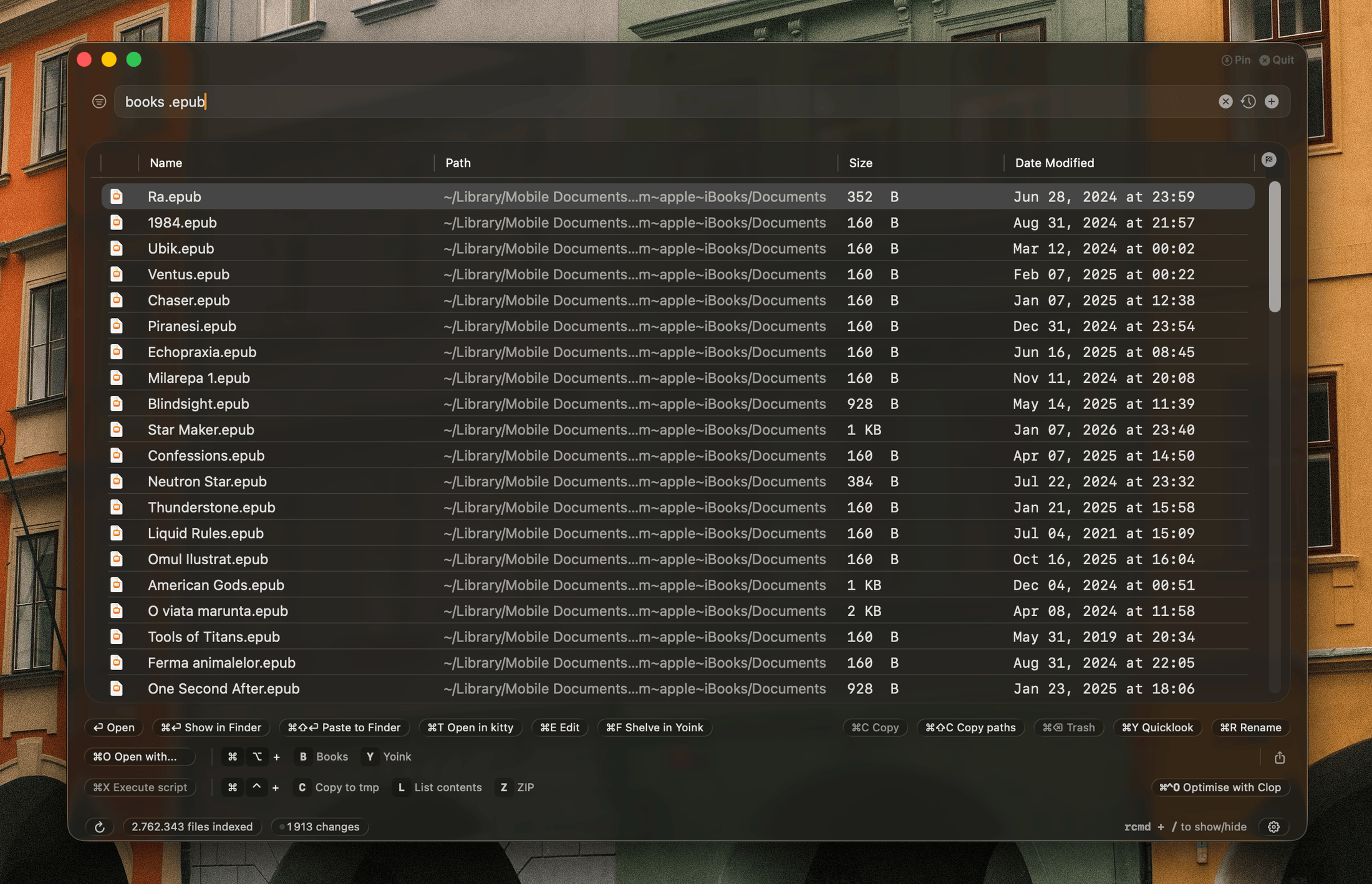
Up/Down arrow cycling, Tab completion, and Cmd+Down to browse all history.png icon or .pdf invoice.fsignore supportCling is free to use with Home, Library, Cloud Storage and Applications search scopes. A Cling Pro licence unlocks:
Cling starts with a 14-day free trial automatically, no payment details needed. After the trial, the app continues to work in Free mode with Home, Library, Cloud Storage and Applications scopes, up to 500 results.
A Pro license costs €15, one-time purchase, for life. It can be activated on up to 5 personal Mac devices.
Activating a 6th Mac automatically deactivates the oldest one, so the license can be used indefinitely as you change machines.
Cling's Raycast extension can fuzzy search files instantly, act on files and save often used queries from the same familiar Raycast interface.
Cling ships an Alfred workflow that fuzzy searches files with cl, opens them in the editor, terminal or shelf app set in Cling, and reindexes with clreindex. Install it from Settings > General in Cling.
Cling is similar to these apps in that it provides instant search results, but the key differences are:
Cling is very much not like these apps.
They are all file search apps that provide advanced search features, allowing you to craft complex queries using metadata and file content to dig deep into your filesystem and find as many files as possible.
Cling is for quickly finding one or more specific files by roughly knowing the name, and then doing something with the file immediately like:
Cling is not an app for finding all files that match a complex query.
Cling uses between 60 and 100 MB of memory with 1.6 million files indexed.
Each search scope and each drive has its own index, saved as a file on disk. Cling maps those files into memory instead of reading them in: macOS loads the pages a search needs straight from the file, and drops them again whenever it needs the room. A loaded index adds almost nothing to Cling's memory until something changes it.
What does count:
The Everything index stays on disk until you turn it on, and leaves memory 10 minutes after you turn it off or close the window. Turning Everything off in Settings > Search can also delete its saved index.
On disk, an index takes about 160 bytes per file. The index size view in the status bar shows each index's files, size on disk, memory and when it was last indexed in full.
The most CPU-intensive operations are:
When Cling launches, each index catches up by replaying the file changes made since it was saved. While Cling is closed, a small background job gathers those changes every few hours, waiting for a moment when you're not using the Mac, so the next launch has less to replay. It can be turned off with Watch file events while the app is quit in Settings > Search.
A scope is walked again from scratch only when there is no history to replay: after a macOS update, when its ignore rules changed while Cling was closed, or when macOS threw away its file change history. External drives follow their changes the same way while connected, and are walked again once a week by default, once the drive has gone a minute without changes. Both can be changed per drive in Settings > Drives & Volumes. A drive unplugged without ejecting is walked again only when you ask, from the offer to reindex it shown when you search it.
Searching will consume CPU in short bursts. In a Release build, a typical search across 9+ million files completes in under 100ms. When Cling is in background, it will pause searching and consume very little CPU for processing file changes.
The impact on battery is proportional to how many searches you do and how many file changes happen in the background.
Even though a search will look like it's consuming 100% CPU of multiple cores, it's a very fast operation and the battery energy used isn't that high in the long term.
Processing and indexing file changes is very efficient and barely touches battery life. Walking a scope again waits while the battery is under 30%.
Filesystem ──► fts_read (local) / FileManager (external)
                        │
                        ▼
              ┌───────────────────────┐
              │  Binary Index (.idx)  │  one per scope/volume
              │  parallel arrays:     │  persists across launches
              │   · path bytes (LC)   │  saved again after 20k changes or 6h
              │   · 64-bit bitmasks   │
              │   · basename bitmasks │
              │   · word boundaries   │
              │   · extension IDs     │
              └────────┬──────────────┘
                       │ mmap: pages read on demand,
                       │ copied only when a change writes them
                       ▼
              ┌───────────────────────┐
              │  Search Engines       │◄── FSEvents (live updates)
              │  · per-scope (Home,   │◄── replay since last save (launch)
              │    Apps, Library, …) │◄── catch-up journal (while closed)
              │  · per-volume         │◄── MDQuery  (recents)
              │  · Everything         │
              │  · recents            │
              └────────┬──────────────┘
                       │
                    query  →  parse into fuzzy / extension /
                              folder / dir-segment tokens
                       │
                       ▼
              Phase 1: Filter (parallel across cores)
               · 64-bit bitmask precheck
               · extension ID (UInt16 compare)
               · folder prefix (sorted index or byte scan)
               · dir-segment literal substring
               · excluded paths (O(1) set lookup)
               · QuickFilter pre-filtered pools
                       │
                       ▼
              Phase 2: Score (parallel across cores)
               · fzf fuzzy scoring (basename + full path)
               · multi-token independent scoring
               · SIMD byte search for long paths
               · boundary/camelCase/delimiter bonuses
               · typo pass: one letter extra, missing,
                 swapped or mistyped (two in long words)
                       │
                       ▼
              Every engine in parallel (TaskGroup)
               · merged once all of them finish
               · a search still running after 150ms
                 shows what the finished ones found
                       │
                       ▼
              Merge + Rank
               · quality gate (top-third filter)
               · composite rank: score, importance,
                 prefix match, basename match, depth
               · misspelt names after exact matches
               · deduplicate by path
                       │
                       ▼
                    Results
128 followers · starred Apr 2026
176 followers · starred Apr 2026
351 followers · starred Oct 2026
48 followers · starred May 2025
Instant fuzzy find any file on macOS
See the code[!WARNING] Commits to this repo have been paused because of blatant stealing. Work will continue privately.
Cling
Applications folderbrew install --cask thelowtechguys-cling
Up/Down arrow cycling, Tab completion, and Cmd+Down to browse all history.png icon or .pdf invoice.fsignore supportCling is free to use with Home, Library, Cloud Storage and Applications search scopes. A Cling Pro licence unlocks:
Cling starts with a 14-day free trial automatically, no payment details needed. After the trial, the app continues to work in Free mode with Home, Library, Cloud Storage and Applications scopes, up to 500 results.
A Pro license costs €15, one-time purchase, for life. It can be activated on up to 5 personal Mac devices.
Activating a 6th Mac automatically deactivates the oldest one, so the license can be used indefinitely as you change machines.
Cling's Raycast extension can fuzzy search files instantly, act on files and save often used queries from the same familiar Raycast interface.
Cling ships an Alfred workflow that fuzzy searches files with cl, opens them in the editor, terminal or shelf app set in Cling, and reindexes with clreindex. Install it from Settings > General in Cling.
Cling is similar to these apps in that it provides instant search results, but the key differences are:
Cling is very much not like these apps.
They are all file search apps that provide advanced search features, allowing you to craft complex queries using metadata and file content to dig deep into your filesystem and find as many files as possible.
Cling is for quickly finding one or more specific files by roughly knowing the name, and then doing something with the file immediately like:
Cling is not an app for finding all files that match a complex query.
Cling uses between 60 and 100 MB of memory with 1.6 million files indexed.
Each search scope and each drive has its own index, saved as a file on disk. Cling maps those files into memory instead of reading them in: macOS loads the pages a search needs straight from the file, and drops them again whenever it needs the room. A loaded index adds almost nothing to Cling's memory until something changes it.
What does count:
The Everything index stays on disk until you turn it on, and leaves memory 10 minutes after you turn it off or close the window. Turning Everything off in Settings > Search can also delete its saved index.
On disk, an index takes about 160 bytes per file. The index size view in the status bar shows each index's files, size on disk, memory and when it was last indexed in full.
The most CPU-intensive operations are:
When Cling launches, each index catches up by replaying the file changes made since it was saved. While Cling is closed, a small background job gathers those changes every few hours, waiting for a moment when you're not using the Mac, so the next launch has less to replay. It can be turned off with Watch file events while the app is quit in Settings > Search.
A scope is walked again from scratch only when there is no history to replay: after a macOS update, when its ignore rules changed while Cling was closed, or when macOS threw away its file change history. External drives follow their changes the same way while connected, and are walked again once a week by default, once the drive has gone a minute without changes. Both can be changed per drive in Settings > Drives & Volumes. A drive unplugged without ejecting is walked again only when you ask, from the offer to reindex it shown when you search it.
Searching will consume CPU in short bursts. In a Release build, a typical search across 9+ million files completes in under 100ms. When Cling is in background, it will pause searching and consume very little CPU for processing file changes.
The impact on battery is proportional to how many searches you do and how many file changes happen in the background.
Even though a search will look like it's consuming 100% CPU of multiple cores, it's a very fast operation and the battery energy used isn't that high in the long term.
Processing and indexing file changes is very efficient and barely touches battery life. Walking a scope again waits while the battery is under 30%.
Filesystem ──► fts_read (local) / FileManager (external)
                        │
                        ▼
              ┌───────────────────────┐
              │  Binary Index (.idx)  │  one per scope/volume
              │  parallel arrays:     │  persists across launches
              │   · path bytes (LC)   │  saved again after 20k changes or 6h
              │   · 64-bit bitmasks   │
              │   · basename bitmasks │
              │   · word boundaries   │
              │   · extension IDs     │
              └────────┬──────────────┘
                       │ mmap: pages read on demand,
                       │ copied only when a change writes them
                       ▼
              ┌───────────────────────┐
              │  Search Engines       │◄── FSEvents (live updates)
              │  · per-scope (Home,   │◄── replay since last save (launch)
              │    Apps, Library, …) │◄── catch-up journal (while closed)
              │  · per-volume         │◄── MDQuery  (recents)
              │  · Everything         │
              │  · recents            │
              └────────┬──────────────┘
                       │
                    query  →  parse into fuzzy / extension /
                              folder / dir-segment tokens
                       │
                       ▼
              Phase 1: Filter (parallel across cores)
               · 64-bit bitmask precheck
               · extension ID (UInt16 compare)
               · folder prefix (sorted index or byte scan)
               · dir-segment literal substring
               · excluded paths (O(1) set lookup)
               · QuickFilter pre-filtered pools
                       │
                       ▼
              Phase 2: Score (parallel across cores)
               · fzf fuzzy scoring (basename + full path)
               · multi-token independent scoring
               · SIMD byte search for long paths
               · boundary/camelCase/delimiter bonuses
               · typo pass: one letter extra, missing,
                 swapped or mistyped (two in long words)
                       │
                       ▼
              Every engine in parallel (TaskGroup)
               · merged once all of them finish
               · a search still running after 150ms
                 shows what the finished ones found
                       │
                       ▼
              Merge + Rank
               · quality gate (top-third filter)
               · composite rank: score, importance,
                 prefix match, basename match, depth
               · misspelt names after exact matches
               · deduplicate by path
                       │
                       ▼
                    Results
128 followers · starred Apr 2026
176 followers · starred Apr 2026
351 followers · starred Oct 2026
48 followers · starred May 2025