Dictation that runs on your own computer. Press a key, speak, and the text lands in the app you are using. Free and open source, for macOS, Windows, and Linux.
See the code

Sayso is a dictation app for macOS, Windows, and Linux. You press a key, speak, and Sayso writes the text into the app you are using. Speech recognition runs on your computer: on the Neural Engine of a Mac, and on the processor of a Windows or Linux computer. Nothing leaves the computer unless you choose a cloud model or turn on an AI style with a cloud provider.
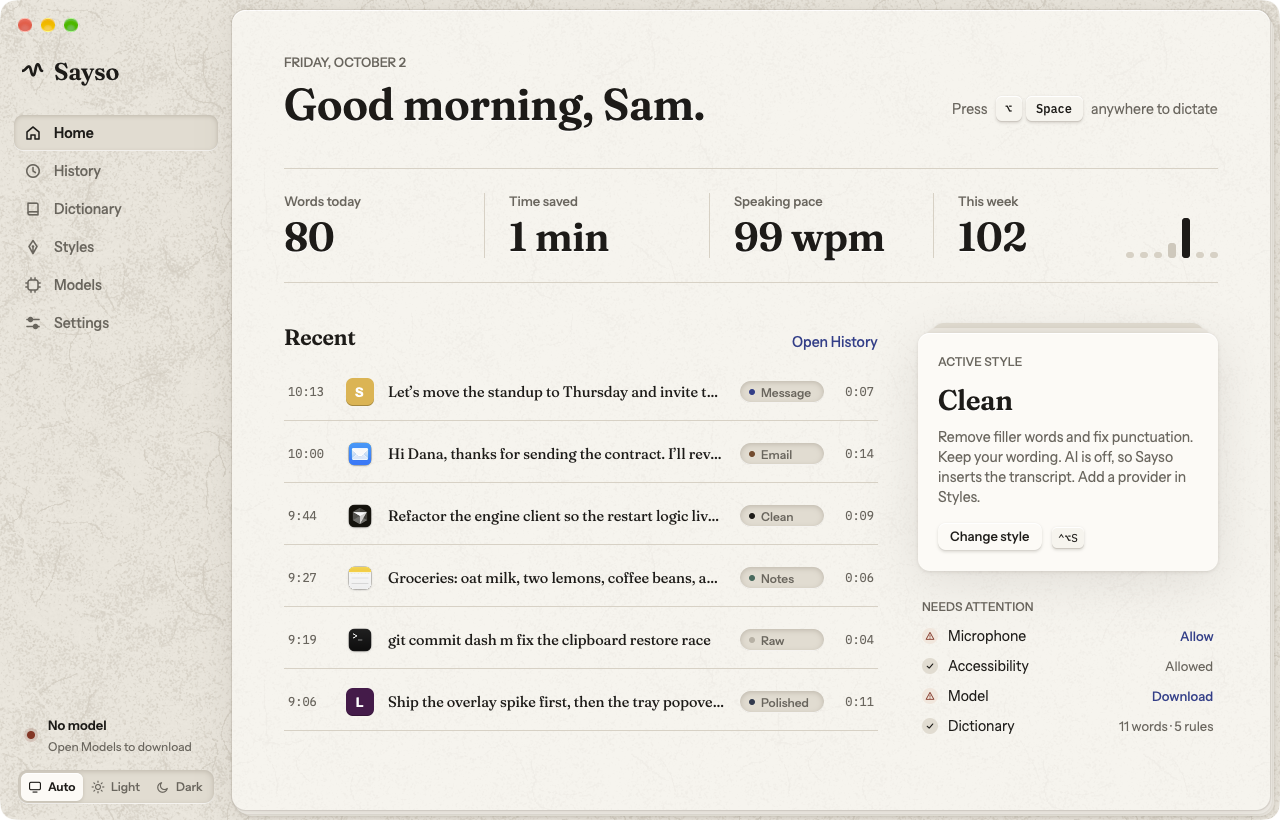
Sayso is written in Rust with GPUI. On macOS the speech engine is a Swift program that uses WhisperKit and FluidAudio. On Windows it is a Rust program that uses transcribe-rs (ONNX Runtime and whisper.cpp). On Linux it is a Rust program that uses sherpa-onnx. The same developer made Pindrop.
config.toml, and Sayso reloads the file when you save it.CONTEXT.md defines the terms.
Select a button to download the file of the newest release. The Releases page has all files, each with a .sha256 file.
| System | Versions | Download |
|---|---|---|
| macOS | 14 or later, on Apple Silicon |  brew install --cask watzon/tap/sayso |
| Windows | 10 (version 1809) or later, and 11, on a 64-bit Intel or AMD processor |  |
| Debian, Ubuntu | Debian 12 or later, Ubuntu 22.04 or later |   |
| Fedora, openSUSE, RHEL family | Fedora, Leap 15.6 or later, Tumbleweed, RHEL 10 |   |
| Linux with Flatpak | Any distribution |   |
| Other Linux | glibc 2.35 or later |     |
| Arch Linux | Current | sayso-bin on the AUR |
| NixOS | Flakes | nix run github:watzon/sayso |
Linux runs on X11 and on Wayland. docs/linux.md lists what works on each desktop.
With Homebrew:
brew install --cask watzon/tap/sayso
Or by hand:
Sayso-<version>-macos-arm64.dmg with the button above.The DMG is signed with the Developer ID of Watzon Ventures LLC and notarized by Apple. Each release also has a .sha256 file. To check your download:
shasum -a 256 -c Sayso-<version>-macos-arm64.dmg.sha256
Sayso-<version>-windows-x64-setup.exe with the button above.To check your download, compare the hash with the .sha256 file:
(Get-FileHash Sayso-<version>-windows-x64-setup.exe).Hash
If the installer is not signed, Windows SmartScreen asks first. Select More info › Run anyway.
Download the file for your system with a button above. Each file is sayso-<version>-linux-<arch> with one of these endings, and <arch> is x86_64 or aarch64.
| File | System | Install |
|---|---|---|
.deb | Debian 12 or later, Ubuntu 22.04 or later | sudo apt install ./sayso-<version>-linux-<arch>.deb |
.rpm | Fedora, openSUSE, and the RHEL 10 family | sudo dnf install ./sayso-<version>-linux-<arch>.rpm (openSUSE: sudo zypper install) |
| AUR | Arch Linux and systems based on it | yay -S sayso-bin, or another AUR helper |
| Nix flake | NixOS, and Nix on other distributions | nix run github:watzon/sayso. docs/linux.md has the NixOS configuration. |
.flatpak | Any distribution with Flatpak | flatpak install --user ./sayso-<version>-linux-<arch>.flatpak |
.AppImage | Other distributions, no install | chmod +x the file, then start it |
.tar.gz | Other distributions | Unpack it and run ./install.sh. Sayso goes to ~/.local. sudo ./install.sh --system installs it for all users, with the udev rule for Wayland key input. |
Open Sayso from your app menu, or start the AppImage. Onboarding starts.
The .deb, the .rpm, the AppImage, and the tarball need glibc 2.35 or later. The Flatpak brings its own libraries. docs/linux.md lists the tested distributions and has the details for each desktop.
With a local model and the Raw style, your speech and your text stay on the computer. There is no telemetry.
| You turn on | What leaves the computer | Where it goes |
|---|---|---|
| A cloud model | The audio of each dictation and your dictionary words | The speech provider that you added |
| An AI style | The transcript, the style prompt, and your dictionary words | The AI provider of that style |
The official build also looks for a new version when it starts and one time each day. It gets one file from the Releases page of this repository on GitHub. The request names your Sayso version and your system (for example Sayso/0.3.0 (macos; aarch64)), and GitHub sees your IP address. It has no identifier of you or your computer. To stop these checks, turn off Settings › General › Check for updates. A build from source makes no such request.
The Models page and the Styles page label each cloud destination. Your API keys are in the macOS Keychain, in Windows Credential Manager, or in the Secret Service keyring on Linux.
The source code is free software under the GNU General Public License, version 3. You can read it, change it, and build it for yourself at no cost.
The official build is the signed and notarized app. It is free, and it needs no license key. Sayso is paid for by the people who use it: the download page at justsayso.app asks what you want to pay, and $0 is a valid answer.
The name Sayso and the app icon are not part of the license. If you publish a changed version, give it another name and another icon.
Sayso has no price, no ads, and no telemetry. The people who use it pay for the work on it.
If you got Sayso from GitHub (a release file, the Nix flake, or a build from source), nothing asked you what you want to pay. If Sayso is useful to you, sponsor its developer:
A one-time amount and a monthly amount are both possible. A sponsorship gives you no extra features: each build of Sayso is the full app.
You need Xcode 16 or later and Rust 1.98.1. rust-toolchain.toml selects the Rust version.
git clone https://github.com/watzon/sayso.git
cd sayso
SAYSO_SIGN_IDENTITY=- scripts/bundle.sh
open build/Sayso.app
SAYSO_SIGN_IDENTITY=- makes an ad hoc signature, which needs no Apple developer account. With an ad hoc signature, macOS asks for the microphone and Accessibility again after each rebuild. To keep the grants, set SAYSO_SIGN_IDENTITY to the name of your own signing certificate.
You need the Visual Studio 2022 Build Tools (the "Desktop development with C++" workload and a Windows SDK), CMake, LLVM (for libclang; set LIBCLANG_PATH when it is not on PATH), and Rust 1.98.1.
git clone https://github.com/watzon/sayso.git
cd sayso
powershell -ExecutionPolicy Bypass -File scripts\bundle-windows.ps1
build\windows\Sayso\Sayso.exe
Add -Installer to also make the installer in dist\. That needs Inno Setup 6.
You need the packages in scripts/linux-deps.sh (Debian and Ubuntu names) and Rust 1.98.1.
git clone https://github.com/watzon/sayso.git
cd sayso
scripts/linux-deps.sh
scripts/bundle-linux.sh
The script makes build/sayso-<version>-linux-<arch>.tar.gz. Unpack it and run ./install.sh. To make the .deb, the .rpm, the AppImage, and the Flatpak from that tarball, run scripts/package-linux.sh build/sayso-<version>-linux-<arch>.tar.gz.
CONTRIBUTING.md has the development commands, the checks, and the layout of the code.
| Kind | macOS | Windows | Linux |
|---|---|---|---|
Config (config.toml, styles/) | ~/Library/Application Support/Sayso | %APPDATA%\Sayso | ~/.config/sayso |
| History, audio, models | ~/Library/Application Support/Sayso | %LOCALAPPDATA%\Sayso | ~/.local/share/sayso |
| Logs | ~/Library/Caches/Sayso/logs/sayso.log | %LOCALAPPDATA%\Sayso\Cache\logs\sayso.log | ~/.cache/sayso/logs/sayso.log |
On all three, ~/.config/sayso wins for the config when it exists, and $XDG_CONFIG_HOME, $XDG_DATA_HOME, and $XDG_CACHE_HOME win over all of them.
API keys are in the Keychain (macOS), in Windows Credential Manager, or in the Secret Service keyring (Linux), under dev.sayso.Sayso. The Windows uninstaller keeps your history, models, and settings. To remove them too, delete the two Sayso folders above.
Dictation that runs on your own computer. Press a key, speak, and the text lands in the app you are using. Free and open source, for macOS, Windows, and Linux.
See the code
Sayso is a dictation app for macOS, Windows, and Linux. You press a key, speak, and Sayso writes the text into the app you are using. Speech recognition runs on your computer: on the Neural Engine of a Mac, and on the processor of a Windows or Linux computer. Nothing leaves the computer unless you choose a cloud model or turn on an AI style with a cloud provider.
Sayso is written in Rust with GPUI. On macOS the speech engine is a Swift program that uses WhisperKit and FluidAudio. On Windows it is a Rust program that uses transcribe-rs (ONNX Runtime and whisper.cpp). On Linux it is a Rust program that uses sherpa-onnx. The same developer made Pindrop.
config.toml, and Sayso reloads the file when you save it.CONTEXT.md defines the terms.
Select a button to download the file of the newest release. The Releases page has all files, each with a .sha256 file.
| System | Versions | Download |
|---|---|---|
| macOS | 14 or later, on Apple Silicon | brew install --cask watzon/tap/sayso |
| Windows | 10 (version 1809) or later, and 11, on a 64-bit Intel or AMD processor | |
| Debian, Ubuntu | Debian 12 or later, Ubuntu 22.04 or later | |
| Fedora, openSUSE, RHEL family | Fedora, Leap 15.6 or later, Tumbleweed, RHEL 10 | |
| Linux with Flatpak | Any distribution | |
| Other Linux | glibc 2.35 or later | |
| Arch Linux | Current | sayso-bin on the AUR |
| NixOS | Flakes | nix run github:watzon/sayso |
Linux runs on X11 and on Wayland. docs/linux.md lists what works on each desktop.
With Homebrew:
brew install --cask watzon/tap/sayso
Or by hand:
Sayso-<version>-macos-arm64.dmg with the button above.The DMG is signed with the Developer ID of Watzon Ventures LLC and notarized by Apple. Each release also has a .sha256 file. To check your download:
shasum -a 256 -c Sayso-<version>-macos-arm64.dmg.sha256
Sayso-<version>-windows-x64-setup.exe with the button above.To check your download, compare the hash with the .sha256 file:
(Get-FileHash Sayso-<version>-windows-x64-setup.exe).Hash
If the installer is not signed, Windows SmartScreen asks first. Select More info › Run anyway.
Download the file for your system with a button above. Each file is sayso-<version>-linux-<arch> with one of these endings, and <arch> is x86_64 or aarch64.
| File | System | Install |
|---|---|---|
.deb | Debian 12 or later, Ubuntu 22.04 or later | sudo apt install ./sayso-<version>-linux-<arch>.deb |
.rpm | Fedora, openSUSE, and the RHEL 10 family | sudo dnf install ./sayso-<version>-linux-<arch>.rpm (openSUSE: sudo zypper install) |
| AUR | Arch Linux and systems based on it | yay -S sayso-bin, or another AUR helper |
| Nix flake | NixOS, and Nix on other distributions | nix run github:watzon/sayso. docs/linux.md has the NixOS configuration. |
.flatpak | Any distribution with Flatpak | flatpak install --user ./sayso-<version>-linux-<arch>.flatpak |
.AppImage | Other distributions, no install | chmod +x the file, then start it |
.tar.gz | Other distributions | Unpack it and run ./install.sh. Sayso goes to ~/.local. sudo ./install.sh --system installs it for all users, with the udev rule for Wayland key input. |
Open Sayso from your app menu, or start the AppImage. Onboarding starts.
The .deb, the .rpm, the AppImage, and the tarball need glibc 2.35 or later. The Flatpak brings its own libraries. docs/linux.md lists the tested distributions and has the details for each desktop.
With a local model and the Raw style, your speech and your text stay on the computer. There is no telemetry.
| You turn on | What leaves the computer | Where it goes |
|---|---|---|
| A cloud model | The audio of each dictation and your dictionary words | The speech provider that you added |
| An AI style | The transcript, the style prompt, and your dictionary words | The AI provider of that style |
The official build also looks for a new version when it starts and one time each day. It gets one file from the Releases page of this repository on GitHub. The request names your Sayso version and your system (for example Sayso/0.3.0 (macos; aarch64)), and GitHub sees your IP address. It has no identifier of you or your computer. To stop these checks, turn off Settings › General › Check for updates. A build from source makes no such request.
The Models page and the Styles page label each cloud destination. Your API keys are in the macOS Keychain, in Windows Credential Manager, or in the Secret Service keyring on Linux.
The source code is free software under the GNU General Public License, version 3. You can read it, change it, and build it for yourself at no cost.
The official build is the signed and notarized app. It is free, and it needs no license key. Sayso is paid for by the people who use it: the download page at justsayso.app asks what you want to pay, and $0 is a valid answer.
The name Sayso and the app icon are not part of the license. If you publish a changed version, give it another name and another icon.
Sayso has no price, no ads, and no telemetry. The people who use it pay for the work on it.
If you got Sayso from GitHub (a release file, the Nix flake, or a build from source), nothing asked you what you want to pay. If Sayso is useful to you, sponsor its developer:
A one-time amount and a monthly amount are both possible. A sponsorship gives you no extra features: each build of Sayso is the full app.
You need Xcode 16 or later and Rust 1.98.1. rust-toolchain.toml selects the Rust version.
git clone https://github.com/watzon/sayso.git
cd sayso
SAYSO_SIGN_IDENTITY=- scripts/bundle.sh
open build/Sayso.app
SAYSO_SIGN_IDENTITY=- makes an ad hoc signature, which needs no Apple developer account. With an ad hoc signature, macOS asks for the microphone and Accessibility again after each rebuild. To keep the grants, set SAYSO_SIGN_IDENTITY to the name of your own signing certificate.
You need the Visual Studio 2022 Build Tools (the "Desktop development with C++" workload and a Windows SDK), CMake, LLVM (for libclang; set LIBCLANG_PATH when it is not on PATH), and Rust 1.98.1.
git clone https://github.com/watzon/sayso.git
cd sayso
powershell -ExecutionPolicy Bypass -File scripts\bundle-windows.ps1
build\windows\Sayso\Sayso.exe
Add -Installer to also make the installer in dist\. That needs Inno Setup 6.
You need the packages in scripts/linux-deps.sh (Debian and Ubuntu names) and Rust 1.98.1.
git clone https://github.com/watzon/sayso.git
cd sayso
scripts/linux-deps.sh
scripts/bundle-linux.sh
The script makes build/sayso-<version>-linux-<arch>.tar.gz. Unpack it and run ./install.sh. To make the .deb, the .rpm, the AppImage, and the Flatpak from that tarball, run scripts/package-linux.sh build/sayso-<version>-linux-<arch>.tar.gz.
CONTRIBUTING.md has the development commands, the checks, and the layout of the code.
| Kind | macOS | Windows | Linux |
|---|---|---|---|
Config (config.toml, styles/) | ~/Library/Application Support/Sayso | %APPDATA%\Sayso | ~/.config/sayso |
| History, audio, models | ~/Library/Application Support/Sayso | %LOCALAPPDATA%\Sayso | ~/.local/share/sayso |
| Logs | ~/Library/Caches/Sayso/logs/sayso.log | %LOCALAPPDATA%\Sayso\Cache\logs\sayso.log | ~/.cache/sayso/logs/sayso.log |
On all three, ~/.config/sayso wins for the config when it exists, and $XDG_CONFIG_HOME, $XDG_DATA_HOME, and $XDG_CACHE_HOME win over all of them.
API keys are in the Keychain (macOS), in Windows Credential Manager, or in the Secret Service keyring (Linux), under dev.sayso.Sayso. The Windows uninstaller keeps your history, models, and settings. To remove them too, delete the two Sayso folders above.






