Local-first dictation for macOS: hold a key, speak, and the text lands where you were typing. On-device speech recognition, optional local Ollama cleanup, nothing leaves your Mac.
TypeScript
0
13 commits
updated Oct 9, 2026
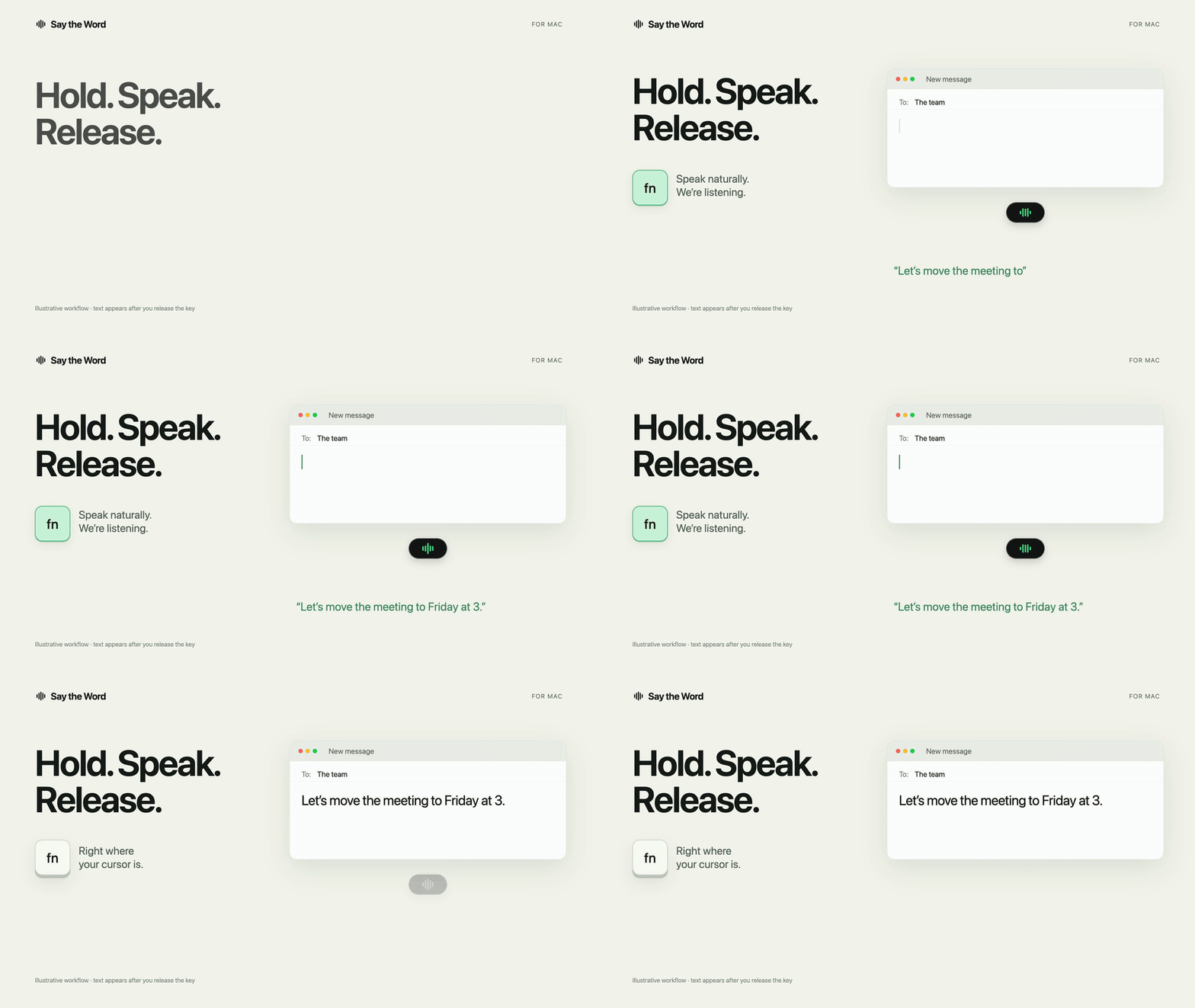
Hold a key, speak, and your words land where you were typing. Nothing leaves your Mac.
Free, open-source dictation for macOS. Speech recognition runs on your Mac, an optional local model tidies the text, and no audio or transcript is ever sent anywhere.


Watch the 36-second video · Features · How it compares · Privacy · Install · Product Hunt
Voice typing is one of the biggest productivity tools on a computer, and for people with RSI, carpal tunnel, dyslexia, limited mobility or chronic pain it may be the only comfortable way to write. The best dictation tools usually send every word you say to someone else's server, on a subscription. The ones built into the OS are private, but give you little control.
Say the Word gives you fast hold-to-talk dictation in every app, with every step running on your own Mac:
Cloud dictation apps such as Wispr Flow and Say the Word make different trade-offs. As of October 2026, from Wispr Flow's own pricing, privacy and language pages:
| Say the Word | Wispr Flow | |
|---|---|---|
| Where speech becomes text | On your Mac | In the cloud |
| Works offline | Yes, after a one-time model download | Needs a connection to transcribe |
| Price | Free, no word limit | Free up to 2,000 words a week on desktop; Pro $15 a month ($12 billed yearly) |
| Source code | Open (MIT) | Closed |
| Audio | In memory by default; saving is opt-in | Deleted once transcribed, unless you turn on cloud storage |
| Languages | 25 European languages | 100+ |
| Platforms | Mac with Apple Silicon | Mac, Windows, iOS and Android |
| For teams | No team admin or compliance certifications claimed | SOC 2 Type II, ISO 27001, HIPAA with a signed agreement, team admin |
If you want many languages, your phone, or team features, Wispr Flow is the stronger choice. If your words must never leave your Mac, or you want to read the code that handles them, choose Say the Word.
Fn, speak, let go: the text is pasted at your cursor.Fn twice (or Fn+Space, or click the pill) and speak with no key held. Press Fn again to stop.Esc cancels and Undo brings the dictation back while it is offered. Cmd+Ctrl+V pastes your last available dictation again. If a paste can't happen, the pill offers Copy. Recovery stays in memory until you quit.Fn key, or another app already uses it? Use Control+Option instead.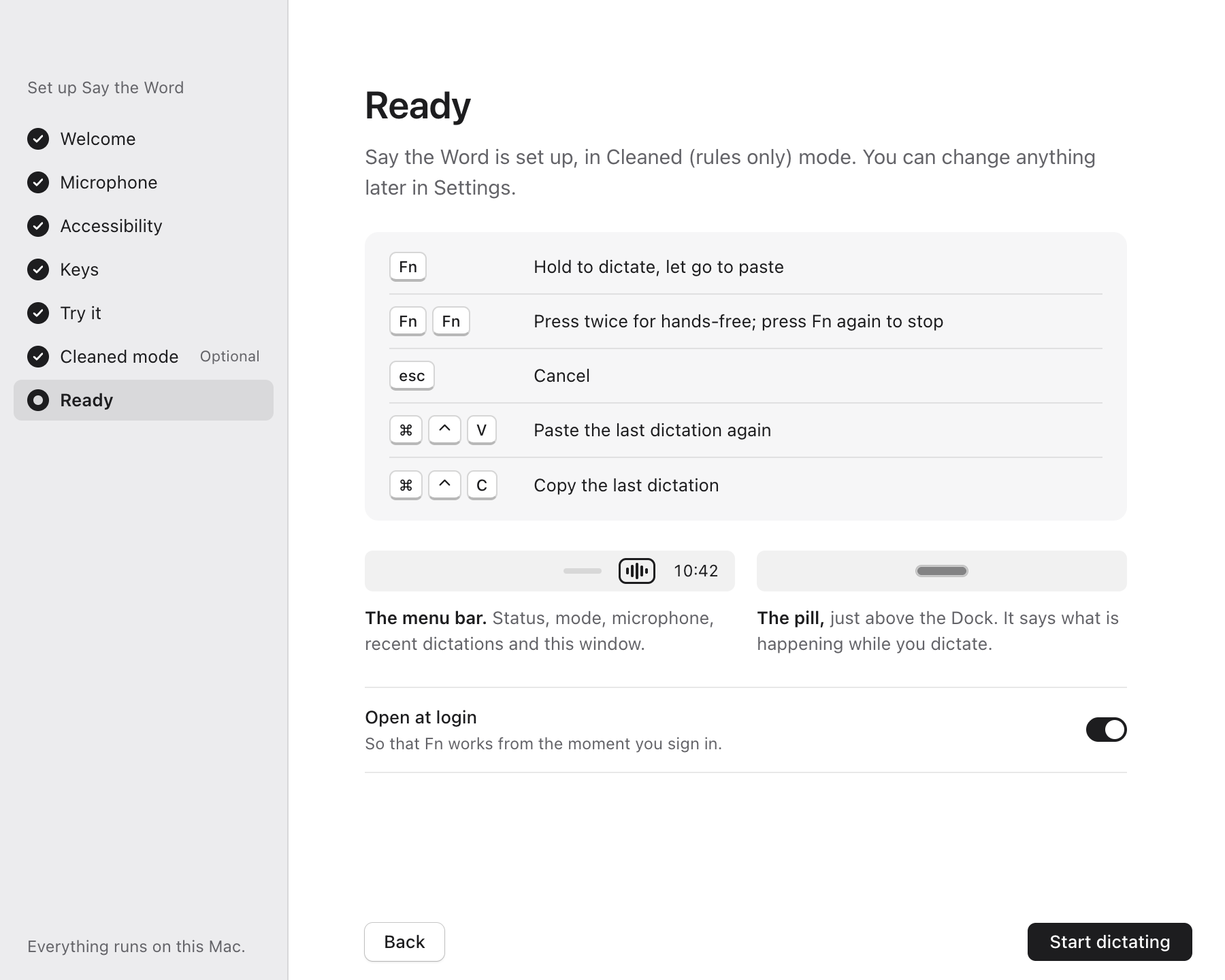 | 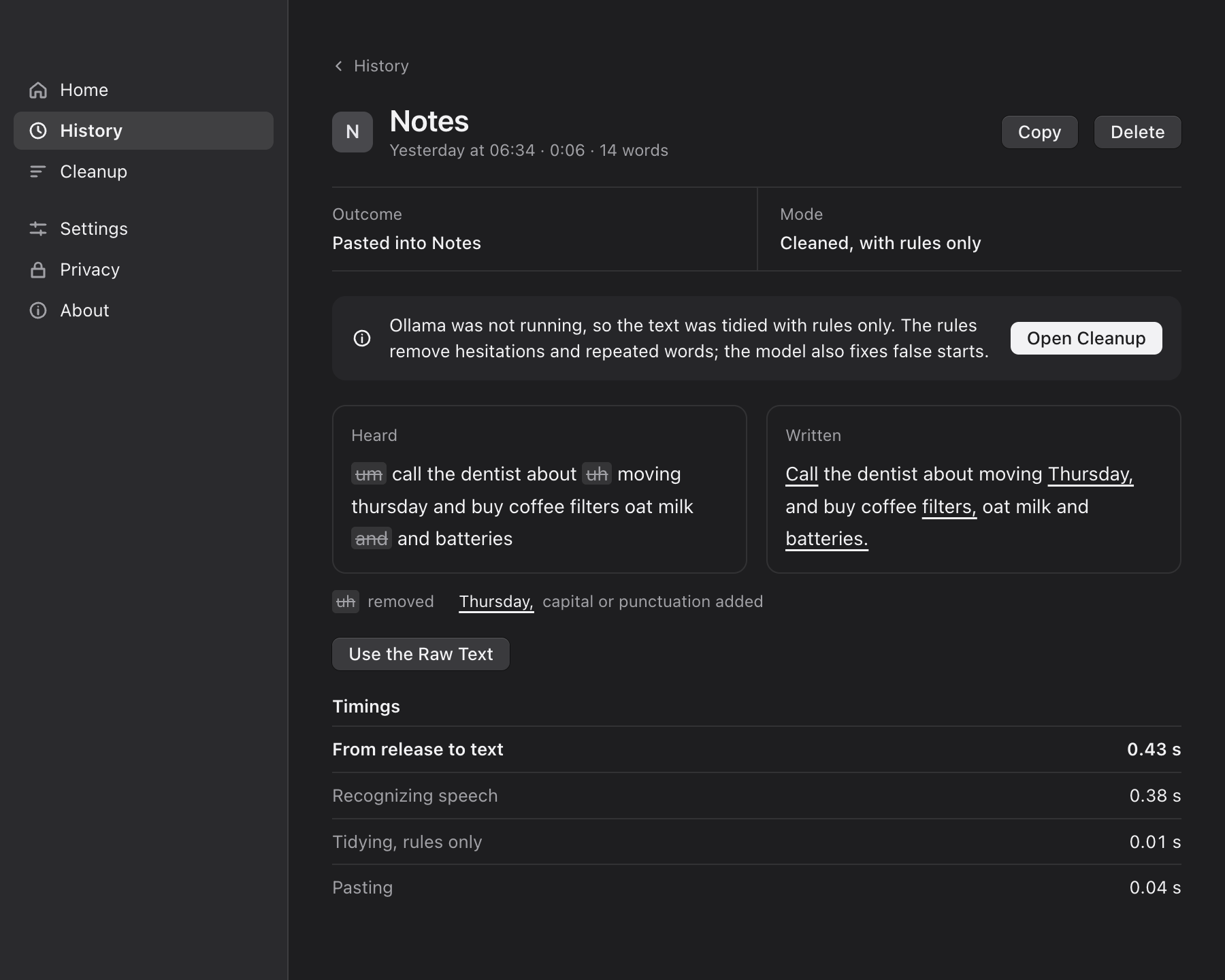 |
| Guided setup: learn the gestures and start dictating. | History: what was heard beside what was written, and how long each step took. |
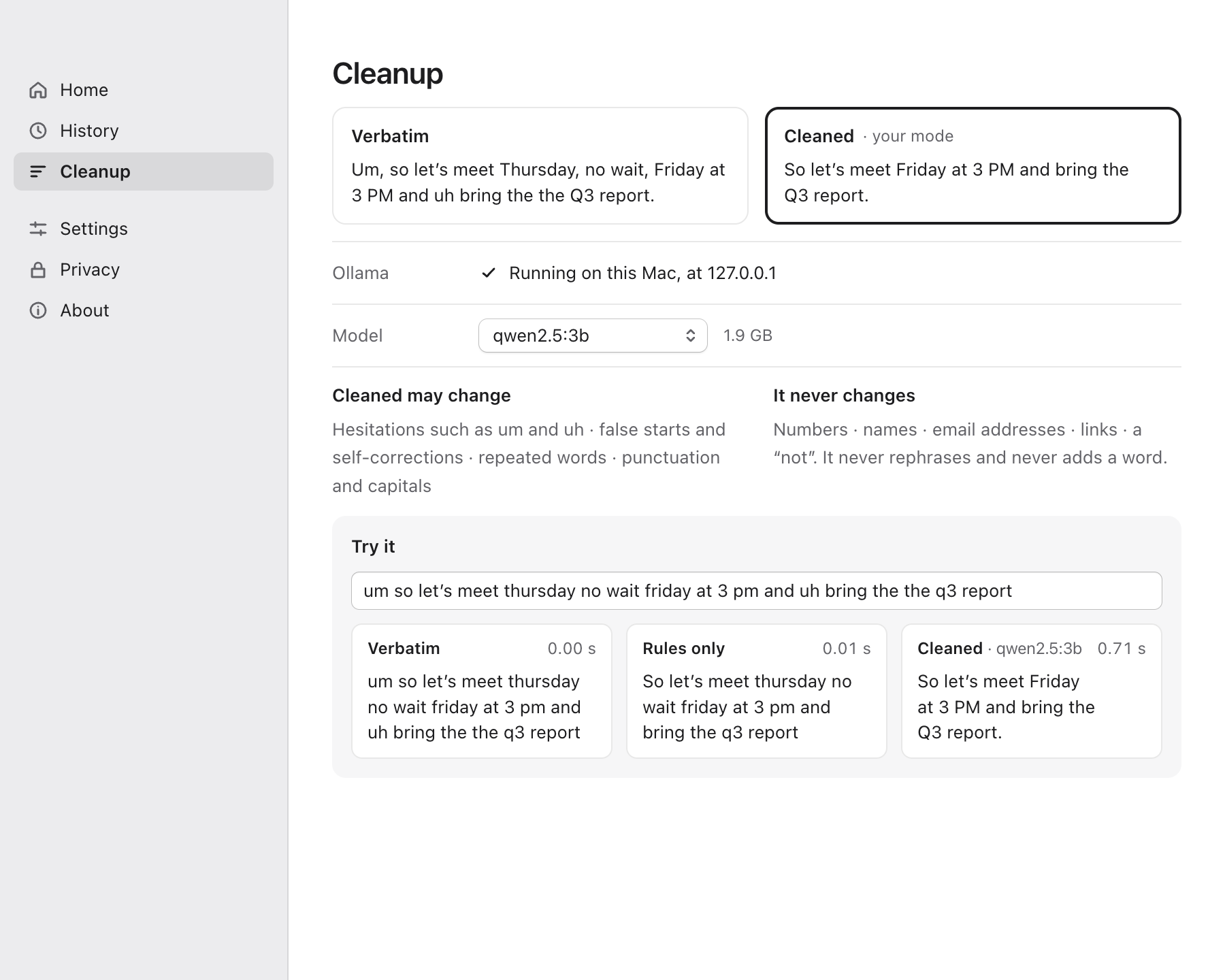 | 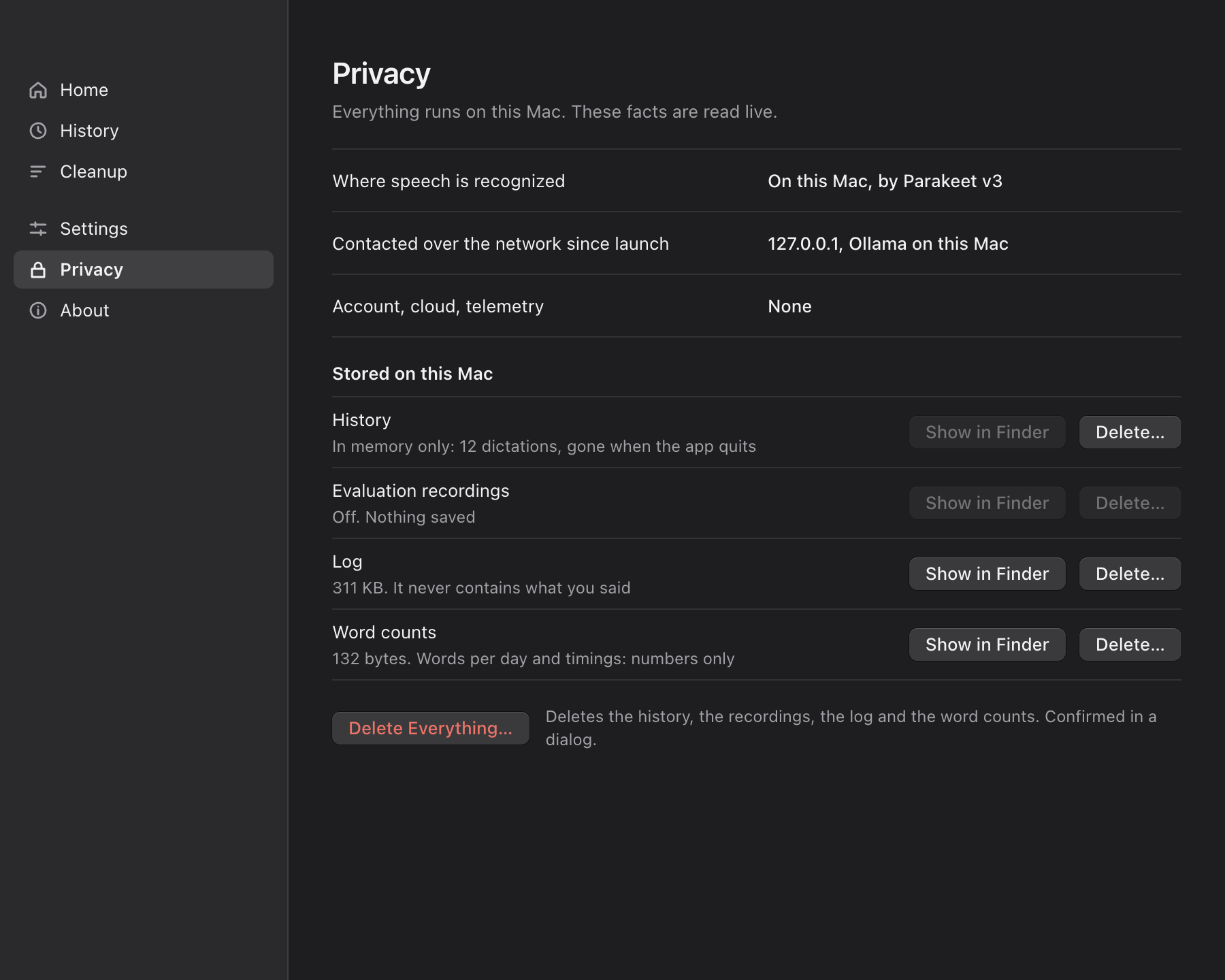 |
| Cleanup: choose Verbatim or Cleaned, and compare them. | Privacy: what is stored, and every address the app has contacted, read live. |
| Audio | Dictation audio is processed on your Mac and held in memory by default. Recordings and their text are saved only if you explicitly enable Advanced › Save Every Dictation for evaluation. |
| Transcripts | Kept in memory until you quit. To keep them for 7 days, 30 days or until you delete them, you choose it, and macOS asks you to confirm before anything is written. |
| Network | None in Verbatim mode. Cleaned mode talks only to Ollama on your own Mac (127.0.0.1). The speech model is downloaded once, when you ask. |
| Logs | Record what happened (key presses, states, why a paste was refused), never what you said. |
| Deleting | The Privacy page lists everything stored, with its size, and deletes any of it. |
These rules are enforced in code and covered by tests: see Architecture and behaviour.
Download Say the Word for macOS 14 or later on Apple Silicon (M1 or later). It is signed and notarized by Apple.
Fn, speak, and let go.Optional, for Cleaned mode: install Ollama, run ollama pull qwen3.5:4b, and pick the model on the Cleanup page.
Updates are not automatic yet. To update, download the latest release and replace the app; your settings and any history you chose to save stay. If you use another dictation app that listens to Fn, quit it first: two apps on the same key will fight over it.
Is it really free? Yes. It is MIT-licensed, with no account, no subscription and no paid tier.
Does it work on Intel Macs? No. It needs Apple Silicon (M1 or later) and macOS 14 or later.
Which languages does it understand? The speech model, NVIDIA's Parakeet v3, recognizes 25 European languages, including English, French, German, Spanish and Italian. The cleanup rules are tuned for English.
A dictation didn't arrive. What happened? The pill says why in a few words, and the History page explains it, with what you can do about it. If the text was recognized, use Copy on the pill, or press Cmd+Ctrl+V to paste your last available dictation. Recovery stays in memory until you quit; it cannot recover every failure. The log (menu-bar icon › Show Log) has the details, and never contains what you said.
It says "Secure Input is on: nothing was pasted". macOS reports that the app in front is taking a password, so automatic paste is refused. If your cursor isn't in a password field, macOS or that app has left Secure Input on. Copy the text from the pill and paste it yourself.
flowchart LR
    K["Fn key<br/>(Swift helper)"] --> M["Main process<br/>(TypeScript)"]
    M --> O["Overlay pill<br/>(microphone)"]
    O -- 16 kHz audio --> S["Speech worker<br/>Parakeet v3<br/>via sherpa-onnx"]
    S -- text --> C{"Cleaned?"}
    C -- no --> P
    C -- yes --> R["Rules + local Ollama<br/>+ guard"] --> P["Swift helper:<br/>paste into the<br/>app you were in"]
Fn key, posting the paste, reading Accessibility.Measured on a MacBook Air with an Apple M4, 16 GB and macOS 26.6 (benchmarks). The dictation timings use synthetic speech and intercepted paste requests; they do not measure accuracy on real voices or the time taken by every destination app. Results vary with your Mac, recording and cleanup model.
| Measure | Result |
|---|---|
| Dictation start to microphone live | median 108 ms, p95 119 ms |
| Key release to paste request, Verbatim | median 402 ms, p95 448 ms |
| Key release to paste request, Cleaned (4B) | median about 0.9 s |
You need macOS 14+ on Apple Silicon, Node 22.13+, and the Xcode command-line tools (Swift 6).
git clone https://github.com/yravinderkumar33/say-the-word.git
cd say-the-word
npm install
npm run models:download   # the speech model, about 670 MB, once
npm run dev               # builds the Swift helper and starts the app with hot reload
In development, macOS gives the Microphone and Accessibility permissions to the terminal that started the app. To test them as a user would, build a signed app: npm run setup:signing once, then npm run pack, then open dist/mac-arm64/Say the Word Dev.app.
| Command | What it does |
|---|---|
npm run check | Type-check, lint, format check, nearly 1,200 unit tests and 120 Swift tests. Run before every PR |
npm run test:app | Whole dictations in the running app, with injected faults; never touches your keyboard |
npm run test:e2e | The real key tap and paste into TextEdit (takes keyboard focus for about 45 s) |
npm run pack | A signed, verified .app in dist/ |
npm run release | The notarized DMG (needs a Developer ID certificate) |
The design and the decisions behind it are in docs/: research and decisions, architecture, implementation reference, and the progress log.
Contributions are welcome, especially:
Open an issue for a bug or an idea. Before a pull request, run npm run check and read the working agreements in CLAUDE.md. The privacy rules are requirements: never log what was said, use no network beyond the local Ollama and downloads the user starts, and copy no code from GPL or AGPL projects.
Say the Word builds on excellent open work: sherpa-onnx, NVIDIA's Parakeet, Ollama, Electron, React and Tailwind CSS. The native layer learned from these MIT-licensed dictation projects: Amical, OpenWhispr, Handy, hive and dictation-cleanup-rules. Every component and its licence is listed on the app's About page.
Say the Word is an independent project, not affiliated with Wispr Flow or any other dictation product.
Local-first dictation for macOS: hold a key, speak, and the text lands where you were typing. On-device speech recognition, optional local Ollama cleanup, nothing leaves your Mac.
TypeScript
0
13 commits
updated Oct 9, 2026
Hold a key, speak, and your words land where you were typing. Nothing leaves your Mac.
Free, open-source dictation for macOS. Speech recognition runs on your Mac, an optional local model tidies the text, and no audio or transcript is ever sent anywhere.
Watch the 36-second video · Features · How it compares · Privacy · Install · Product Hunt
Voice typing is one of the biggest productivity tools on a computer, and for people with RSI, carpal tunnel, dyslexia, limited mobility or chronic pain it may be the only comfortable way to write. The best dictation tools usually send every word you say to someone else's server, on a subscription. The ones built into the OS are private, but give you little control.
Say the Word gives you fast hold-to-talk dictation in every app, with every step running on your own Mac:
Cloud dictation apps such as Wispr Flow and Say the Word make different trade-offs. As of October 2026, from Wispr Flow's own pricing, privacy and language pages:
| Say the Word | Wispr Flow | |
|---|---|---|
| Where speech becomes text | On your Mac | In the cloud |
| Works offline | Yes, after a one-time model download | Needs a connection to transcribe |
| Price | Free, no word limit | Free up to 2,000 words a week on desktop; Pro $15 a month ($12 billed yearly) |
| Source code | Open (MIT) | Closed |
| Audio | In memory by default; saving is opt-in | Deleted once transcribed, unless you turn on cloud storage |
| Languages | 25 European languages | 100+ |
| Platforms | Mac with Apple Silicon | Mac, Windows, iOS and Android |
| For teams | No team admin or compliance certifications claimed | SOC 2 Type II, ISO 27001, HIPAA with a signed agreement, team admin |
If you want many languages, your phone, or team features, Wispr Flow is the stronger choice. If your words must never leave your Mac, or you want to read the code that handles them, choose Say the Word.
Fn, speak, let go: the text is pasted at your cursor.Fn twice (or Fn+Space, or click the pill) and speak with no key held. Press Fn again to stop.Esc cancels and Undo brings the dictation back while it is offered. Cmd+Ctrl+V pastes your last available dictation again. If a paste can't happen, the pill offers Copy. Recovery stays in memory until you quit.Fn key, or another app already uses it? Use Control+Option instead. | |
| Guided setup: learn the gestures and start dictating. | History: what was heard beside what was written, and how long each step took. |
| |
| Cleanup: choose Verbatim or Cleaned, and compare them. | Privacy: what is stored, and every address the app has contacted, read live. |
| Audio | Dictation audio is processed on your Mac and held in memory by default. Recordings and their text are saved only if you explicitly enable Advanced › Save Every Dictation for evaluation. |
| Transcripts | Kept in memory until you quit. To keep them for 7 days, 30 days or until you delete them, you choose it, and macOS asks you to confirm before anything is written. |
| Network | None in Verbatim mode. Cleaned mode talks only to Ollama on your own Mac (127.0.0.1). The speech model is downloaded once, when you ask. |
| Logs | Record what happened (key presses, states, why a paste was refused), never what you said. |
| Deleting | The Privacy page lists everything stored, with its size, and deletes any of it. |
These rules are enforced in code and covered by tests: see Architecture and behaviour.
Download Say the Word for macOS 14 or later on Apple Silicon (M1 or later). It is signed and notarized by Apple.
Fn, speak, and let go.Optional, for Cleaned mode: install Ollama, run ollama pull qwen3.5:4b, and pick the model on the Cleanup page.
Updates are not automatic yet. To update, download the latest release and replace the app; your settings and any history you chose to save stay. If you use another dictation app that listens to Fn, quit it first: two apps on the same key will fight over it.
Is it really free? Yes. It is MIT-licensed, with no account, no subscription and no paid tier.
Does it work on Intel Macs? No. It needs Apple Silicon (M1 or later) and macOS 14 or later.
Which languages does it understand? The speech model, NVIDIA's Parakeet v3, recognizes 25 European languages, including English, French, German, Spanish and Italian. The cleanup rules are tuned for English.
A dictation didn't arrive. What happened? The pill says why in a few words, and the History page explains it, with what you can do about it. If the text was recognized, use Copy on the pill, or press Cmd+Ctrl+V to paste your last available dictation. Recovery stays in memory until you quit; it cannot recover every failure. The log (menu-bar icon › Show Log) has the details, and never contains what you said.
It says "Secure Input is on: nothing was pasted". macOS reports that the app in front is taking a password, so automatic paste is refused. If your cursor isn't in a password field, macOS or that app has left Secure Input on. Copy the text from the pill and paste it yourself.
flowchart LR
    K["Fn key<br/>(Swift helper)"] --> M["Main process<br/>(TypeScript)"]
    M --> O["Overlay pill<br/>(microphone)"]
    O -- 16 kHz audio --> S["Speech worker<br/>Parakeet v3<br/>via sherpa-onnx"]
    S -- text --> C{"Cleaned?"}
    C -- no --> P
    C -- yes --> R["Rules + local Ollama<br/>+ guard"] --> P["Swift helper:<br/>paste into the<br/>app you were in"]
Fn key, posting the paste, reading Accessibility.Measured on a MacBook Air with an Apple M4, 16 GB and macOS 26.6 (benchmarks). The dictation timings use synthetic speech and intercepted paste requests; they do not measure accuracy on real voices or the time taken by every destination app. Results vary with your Mac, recording and cleanup model.
| Measure | Result |
|---|---|
| Dictation start to microphone live | median 108 ms, p95 119 ms |
| Key release to paste request, Verbatim | median 402 ms, p95 448 ms |
| Key release to paste request, Cleaned (4B) | median about 0.9 s |
You need macOS 14+ on Apple Silicon, Node 22.13+, and the Xcode command-line tools (Swift 6).
git clone https://github.com/yravinderkumar33/say-the-word.git
cd say-the-word
npm install
npm run models:download   # the speech model, about 670 MB, once
npm run dev               # builds the Swift helper and starts the app with hot reload
In development, macOS gives the Microphone and Accessibility permissions to the terminal that started the app. To test them as a user would, build a signed app: npm run setup:signing once, then npm run pack, then open dist/mac-arm64/Say the Word Dev.app.
| Command | What it does |
|---|---|
npm run check | Type-check, lint, format check, nearly 1,200 unit tests and 120 Swift tests. Run before every PR |
npm run test:app | Whole dictations in the running app, with injected faults; never touches your keyboard |
npm run test:e2e | The real key tap and paste into TextEdit (takes keyboard focus for about 45 s) |
npm run pack | A signed, verified .app in dist/ |
npm run release | The notarized DMG (needs a Developer ID certificate) |
The design and the decisions behind it are in docs/: research and decisions, architecture, implementation reference, and the progress log.
Contributions are welcome, especially:
Open an issue for a bug or an idea. Before a pull request, run npm run check and read the working agreements in CLAUDE.md. The privacy rules are requirements: never log what was said, use no network beyond the local Ollama and downloads the user starts, and copy no code from GPL or AGPL projects.
Say the Word builds on excellent open work: sherpa-onnx, NVIDIA's Parakeet, Ollama, Electron, React and Tailwind CSS. The native layer learned from these MIT-licensed dictation projects: Amical, OpenWhispr, Handy, hive and dictation-cleanup-rules. Every component and its licence is listed on the app's About page.
Say the Word is an independent project, not affiliated with Wispr Flow or any other dictation product.






