Build your own conspiracy wall in the browser. Pin up photos, clip newspaper articles, scribble on sticky notes, circle locations on maps, file documents in a case folder, then tie it all together with red thread.
Caseboard runs entirely in your browser: no account, no backend. Every board is saved locally in IndexedDB.
▶ Try it live: caseboard.myselfvishal.dev
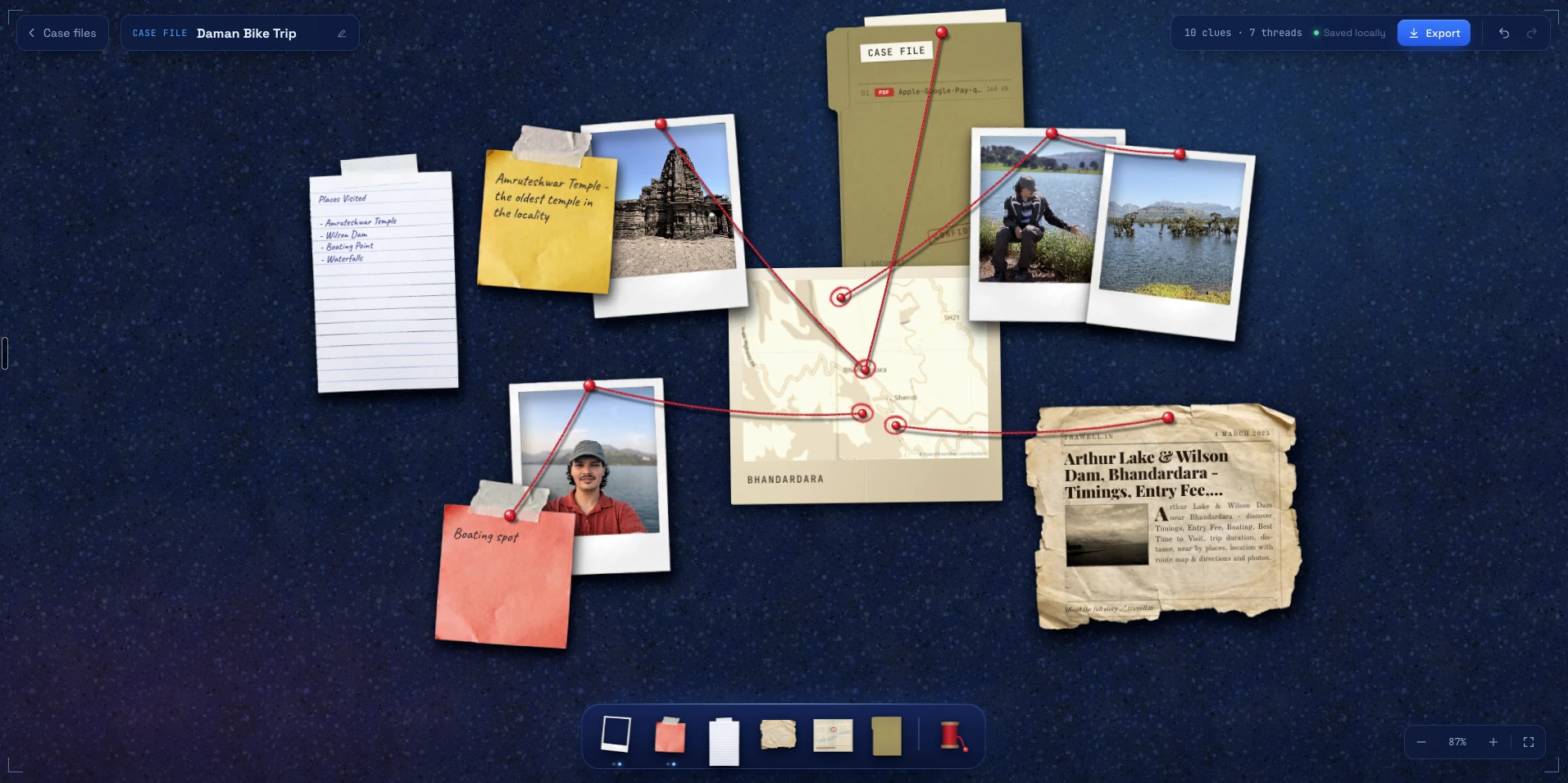
Just want to play? Open the live demo. Your boards stay in your own browser.
To run it locally:
Requirements: Node.js 20.19+ or 22.12+, and npm.
git clone https://github.com/vishalnaikawadi/detective-board.git
cd detective-board
npm install
npm run dev
Then open http://localhost:5173.
| Command | What it does |
|---|---|
npm run dev | Start the Vite dev server with hot reload |
npm run build | Type-check, then build a static site to dist/ |
npm run preview | Serve the production build locally |
npm run typecheck | Run the TypeScript compiler without emitting |
The production build is a plain static site. You can host dist/ on any static host, such as GitHub Pages, Netlify, Vercel or Cloudflare Pages.
| Action | How |
|---|---|
| Pan | Scroll, drag empty board space, or hold Space and drag |
| Zoom | ⌘/Ctrl + scroll, or pinch on a trackpad |
| Select / move | Click / drag an item |
| Rotate / resize | Use the handles on the selected item |
| Start a thread from a pin | Drag out of any push-pin |
| Cut a thread | Click the thread, then Cut thread or ⌫ |
| Item commands | Right-click an item, or use its floating toolbar |
| Shortcut | Action |
|---|---|
T | Thread mode (from the selected item) |
Enter | Edit the selected item's text |
⌫ / Delete | Delete the selected item or thread |
⌘D | Duplicate |
] / [ | Bring to front / send to back |
| Arrow keys | Nudge (hold Shift for 10px) |
⌘Z / ⇧⌘Z | Undo / redo |
⌘+ / ⌘− / ⌘0 | Zoom in / out / reset to 100% |
⇧1 | Zoom to fit |
⇧⌘E | Export the whole board as PNG |
Esc | Deselect / leave thread mode |
On Windows and Linux, use Ctrl in place of ⌘.
Boards, uploaded photos and documents are stored only in your browser (IndexedDB). Clearing site data deletes them, and they don't sync between browsers or devices.
A few features call free public services from your browser:
| Feature | Service | Notes |
|---|---|---|
| Newspaper link preview | Microlink | The article URL you paste is sent to Microlink. The free tier allows about 50 requests per day. |
| Map place search | Nominatim (OpenStreetMap) | Searches run only when you submit, never as you type, per the usage policy. |
| Map tiles | OpenStreetMap tile server | Map data © OpenStreetMap contributors. Fine for light personal use; use a commercial tile provider for heavy traffic. |
If you deploy Caseboard publicly, consider running your own link-preview proxy and using a tile provider with an API key.
Tested in recent Chrome, and it should work in other recent Chromium browsers and Firefox. PNG export draws the board through SVG foreignObject, which Safari may refuse; you'll see an error message instead of a file.
src/
├── App.tsx                  # Routes between the home grid and a board
├── types.ts                 # Board, element and thread types
├── lib/
│   ├── catalog.ts           # Dock tools, variants and asset geometry  ← start here to add assets
│   ├── db.ts                # IndexedDB wrapper (boards + blobs)
│   ├── elements.ts          # Factory for new board elements
│   ├── geometry.ts          # World/screen math, pin anchors, thread curves
│   ├── images.ts            # Photo and document storage
│   ├── linkPreview.ts       # Article metadata via Microlink
│   ├── map.ts               # Web Mercator math, tiles, place search
│   ├── router.ts            # Tiny hash router
│   └── texture.ts           # Procedural cork texture
├── store/
│   ├── boards.ts            # Persisted boards, undo/redo history, content ops
│   └── editor.ts            # UI state: selection, thread mode, dock drag…
├── components/
│   ├── home/                # Board grid, cards, live thumbnails
│   ├── board/
│   │   ├── BoardPage.tsx    # Board shell: shortcuts, paste, dock drop, export
│   │   ├── Canvas.tsx       # Pan/zoom, drag, rotate, resize, threading gestures
│   │   ├── Scene.tsx        # Renders elements, threads and pins in world space
│   │   ├── Dock.tsx         # Magnifying dock and variant picker
│   │   ├── exportBoard.tsx  # PNG export without external libraries
│   │   └── elements/        # Photo, TextNote, Article, MapClipping, Folder
│   └── ui/                  # Icons, dialogs
└── styles/                  # Plain CSS, split by area
public/assets/               # Paper, frame and folder artwork
translate + scale transform for the viewport, so panning and zooming never touch element data.Scene renders elements, red thread and pins. The live board, the home-page thumbnails and the PNG export all use it, so they always match.src/lib/catalog.ts describes every tool and variant: the image, its natural size, where text or photos go (in percent of the element) and where the push-pin sits. Text inside elements uses CSS container-query units (cqw/cqh), so it scales when an element is resized.boards holds the persisted content and per-board undo history, and saves to IndexedDB on a debounce. editor holds transient UI state.Put a PNG with a transparent background in public/assets/. Crop the transparent padding and keep it around 1000px on the longest side.
Add a variant to the right tool in src/lib/catalog.ts:
{
  id: 'blue',
  label: 'Blue',
  src: '/assets/sticky_note_blue.png',
  natural: { w: 686, h: 820 },        // pixel size of the PNG
  width: 210,                         // default width on the board
  pin: [0.5, 0.2],                    // push-pin spot, as a fraction of the box
  text: { left: 11, top: 27, width: 76, height: 61, rotate: 2.5 }, // writing area, in %
}
It shows up in the dock's variant picker automatically. Set random: true on a tool to give each new element a random variant instead of a picker, as the newspaper does.
New element types need a type in src/types.ts, a case in src/lib/elements.ts, a component in src/components/board/elements/, and a line in ElementView.tsx. Folder.tsx is a compact example to copy.
Issues and pull requests are welcome. Before opening a PR:
npm run build # type-checks and builds
Please keep the zero-backend, local-first approach, and match the existing code style: plain CSS, small focused components, and comments that explain why.
MIT © 2026 vishalnaikawadi
The artwork in public/assets/ (photo frames, notes, papers, folder) is original work by the author and is released under the same MIT license. Fonts are from Fontsource under their own open licenses (SIL OFL). Map data © OpenStreetMap contributors.
Build your own conspiracy wall in the browser. Pin up photos, clip newspaper articles, scribble on sticky notes, circle locations on maps, file documents in a case folder, then tie it all together with red thread.
Caseboard runs entirely in your browser: no account, no backend. Every board is saved locally in IndexedDB.
▶ Try it live: caseboard.myselfvishal.dev
Just want to play? Open the live demo. Your boards stay in your own browser.
To run it locally:
Requirements: Node.js 20.19+ or 22.12+, and npm.
git clone https://github.com/vishalnaikawadi/detective-board.git
cd detective-board
npm install
npm run dev
Then open http://localhost:5173.
| Command | What it does |
|---|---|
npm run dev | Start the Vite dev server with hot reload |
npm run build | Type-check, then build a static site to dist/ |
npm run preview | Serve the production build locally |
npm run typecheck | Run the TypeScript compiler without emitting |
The production build is a plain static site. You can host dist/ on any static host, such as GitHub Pages, Netlify, Vercel or Cloudflare Pages.
| Action | How |
|---|---|
| Pan | Scroll, drag empty board space, or hold Space and drag |
| Zoom | ⌘/Ctrl + scroll, or pinch on a trackpad |
| Select / move | Click / drag an item |
| Rotate / resize | Use the handles on the selected item |
| Start a thread from a pin | Drag out of any push-pin |
| Cut a thread | Click the thread, then Cut thread or ⌫ |
| Item commands | Right-click an item, or use its floating toolbar |
| Shortcut | Action |
|---|---|
T | Thread mode (from the selected item) |
Enter | Edit the selected item's text |
⌫ / Delete | Delete the selected item or thread |
⌘D | Duplicate |
] / [ | Bring to front / send to back |
| Arrow keys | Nudge (hold Shift for 10px) |
⌘Z / ⇧⌘Z | Undo / redo |
⌘+ / ⌘− / ⌘0 | Zoom in / out / reset to 100% |
⇧1 | Zoom to fit |
⇧⌘E | Export the whole board as PNG |
Esc | Deselect / leave thread mode |
On Windows and Linux, use Ctrl in place of ⌘.
Boards, uploaded photos and documents are stored only in your browser (IndexedDB). Clearing site data deletes them, and they don't sync between browsers or devices.
A few features call free public services from your browser:
| Feature | Service | Notes |
|---|---|---|
| Newspaper link preview | Microlink | The article URL you paste is sent to Microlink. The free tier allows about 50 requests per day. |
| Map place search | Nominatim (OpenStreetMap) | Searches run only when you submit, never as you type, per the usage policy. |
| Map tiles | OpenStreetMap tile server | Map data © OpenStreetMap contributors. Fine for light personal use; use a commercial tile provider for heavy traffic. |
If you deploy Caseboard publicly, consider running your own link-preview proxy and using a tile provider with an API key.
Tested in recent Chrome, and it should work in other recent Chromium browsers and Firefox. PNG export draws the board through SVG foreignObject, which Safari may refuse; you'll see an error message instead of a file.
src/
├── App.tsx                  # Routes between the home grid and a board
├── types.ts                 # Board, element and thread types
├── lib/
│   ├── catalog.ts           # Dock tools, variants and asset geometry  ← start here to add assets
│   ├── db.ts                # IndexedDB wrapper (boards + blobs)
│   ├── elements.ts          # Factory for new board elements
│   ├── geometry.ts          # World/screen math, pin anchors, thread curves
│   ├── images.ts            # Photo and document storage
│   ├── linkPreview.ts       # Article metadata via Microlink
│   ├── map.ts               # Web Mercator math, tiles, place search
│   ├── router.ts            # Tiny hash router
│   └── texture.ts           # Procedural cork texture
├── store/
│   ├── boards.ts            # Persisted boards, undo/redo history, content ops
│   └── editor.ts            # UI state: selection, thread mode, dock drag…
├── components/
│   ├── home/                # Board grid, cards, live thumbnails
│   ├── board/
│   │   ├── BoardPage.tsx    # Board shell: shortcuts, paste, dock drop, export
│   │   ├── Canvas.tsx       # Pan/zoom, drag, rotate, resize, threading gestures
│   │   ├── Scene.tsx        # Renders elements, threads and pins in world space
│   │   ├── Dock.tsx         # Magnifying dock and variant picker
│   │   ├── exportBoard.tsx  # PNG export without external libraries
│   │   └── elements/        # Photo, TextNote, Article, MapClipping, Folder
│   └── ui/                  # Icons, dialogs
└── styles/                  # Plain CSS, split by area
public/assets/               # Paper, frame and folder artwork
translate + scale transform for the viewport, so panning and zooming never touch element data.Scene renders elements, red thread and pins. The live board, the home-page thumbnails and the PNG export all use it, so they always match.src/lib/catalog.ts describes every tool and variant: the image, its natural size, where text or photos go (in percent of the element) and where the push-pin sits. Text inside elements uses CSS container-query units (cqw/cqh), so it scales when an element is resized.boards holds the persisted content and per-board undo history, and saves to IndexedDB on a debounce. editor holds transient UI state.Put a PNG with a transparent background in public/assets/. Crop the transparent padding and keep it around 1000px on the longest side.
Add a variant to the right tool in src/lib/catalog.ts:
{
  id: 'blue',
  label: 'Blue',
  src: '/assets/sticky_note_blue.png',
  natural: { w: 686, h: 820 },        // pixel size of the PNG
  width: 210,                         // default width on the board
  pin: [0.5, 0.2],                    // push-pin spot, as a fraction of the box
  text: { left: 11, top: 27, width: 76, height: 61, rotate: 2.5 }, // writing area, in %
}
It shows up in the dock's variant picker automatically. Set random: true on a tool to give each new element a random variant instead of a picker, as the newspaper does.
New element types need a type in src/types.ts, a case in src/lib/elements.ts, a component in src/components/board/elements/, and a line in ElementView.tsx. Folder.tsx is a compact example to copy.
Issues and pull requests are welcome. Before opening a PR:
npm run build # type-checks and builds
Please keep the zero-backend, local-first approach, and match the existing code style: plain CSS, small focused components, and comments that explain why.
MIT © 2026 vishalnaikawadi
The artwork in public/assets/ (photo frames, notes, papers, folder) is original work by the author and is released under the same MIT license. Fonts are from Fontsource under their own open licenses (SIL OFL). Map data © OpenStreetMap contributors.



