
A brutalist, local-first task board for projects built with AI. Notes live in your project folder.
See the codeSee what people are saying
README
BRUTO
A brutalist task board for projects built with AI. Your notes live inside the project folder, where you and any AI can read and answer them.
Open Bruto · No account · No server · Works offline · Anonymous usage stats only
Why
Working on a project with an AI assistant means explaining the same things again and again, in a chat
that forgets. Bruto keeps the tasks of a project as notes in a file inside the project itself,
.bruto/workspace.json, so you and every AI you use work from the same source:
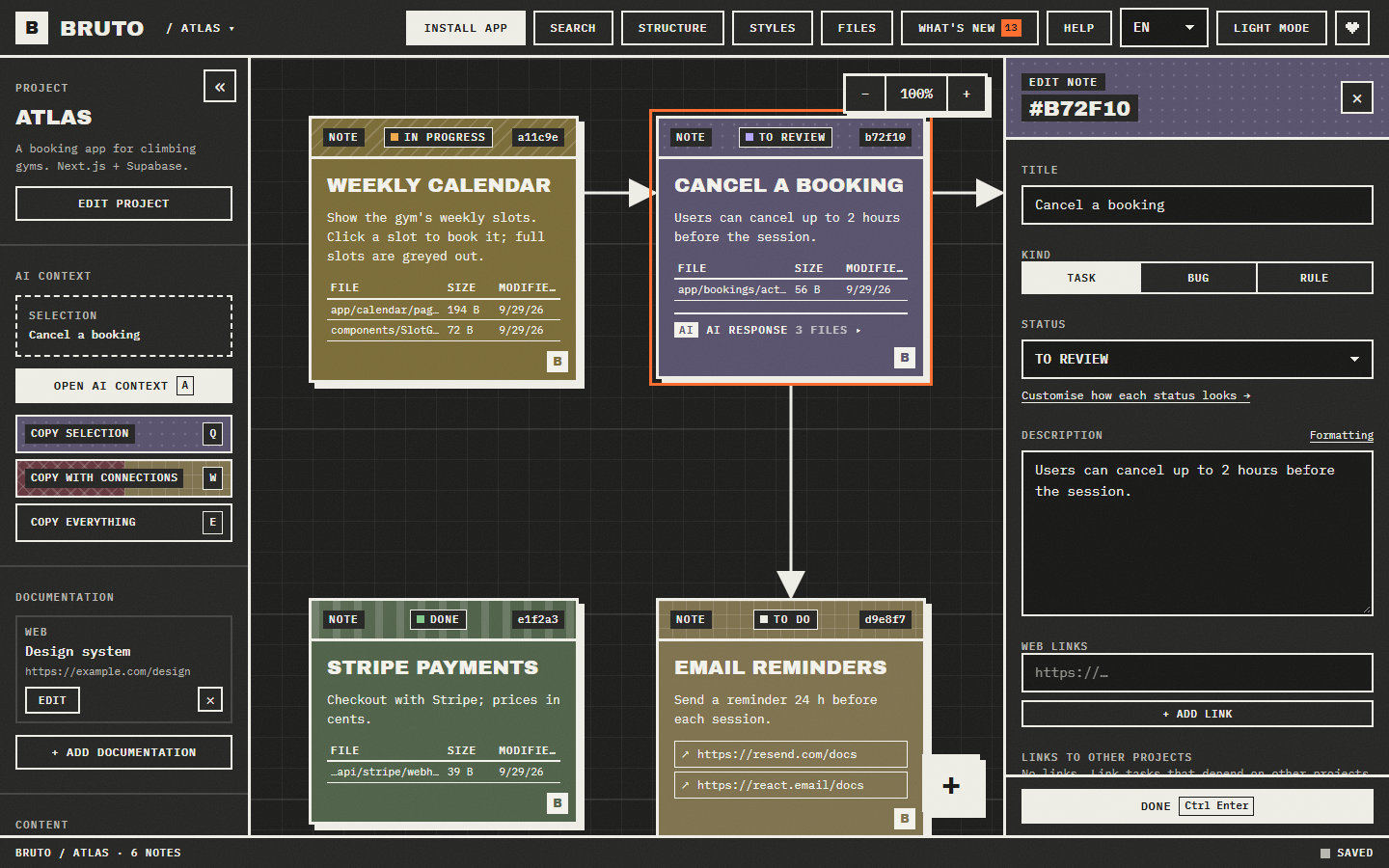
- You write tasks on the board: what is wrong, which files, links, screenshots.
- You copy exactly the context the AI needs with one key (
Q,WorE). - The AI answers inside the note and marks it for review, if it can edit files. Bruto picks up the change live, without overwriting anything you were typing.
Install
Nothing to download. Open jimy-k4.github.io/bruto in Chrome, Edge, Brave or Opera and press Install app in the top bar (or the install icon in the address bar). Bruto then opens in its own window, from the Start menu or the Dock, and works offline.
Just looking? Try an example project on the landing page, or go straight to it at jimy-k4.github.io/bruto/?demo: a small booking app with notes in every status and code for the structure view, kept only in your browser.
Prefer to run it yourself? See Development.
Features
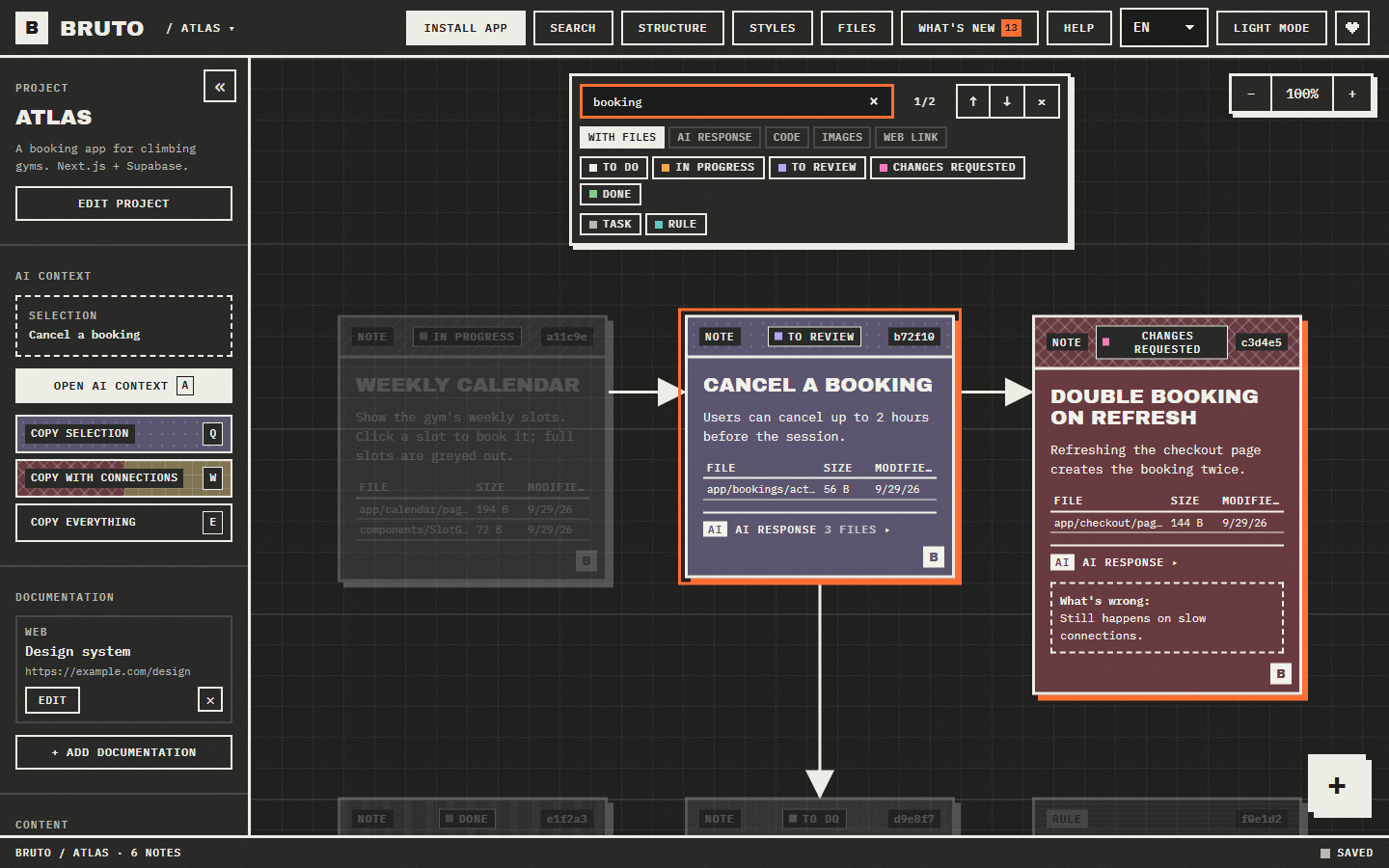
- Board. Notes with a status, description, files, links and screenshots. Drag them, connect them with arrows, select many at once and edit them together. Each project remembers where you left its board: zoom and position survive switching projects and reloading.
- Notes across projects. A note can block, be blocked by or relate to a note in another project (Front, CMS, database…). Both boards show the link; the blocked note wears hazard tape until the other one is closed, and one click opens the other project with that note in view.
- Formatting. Notes show Markdown; the editor's Formatting link opens a cheat sheet with each example next to how it looks.
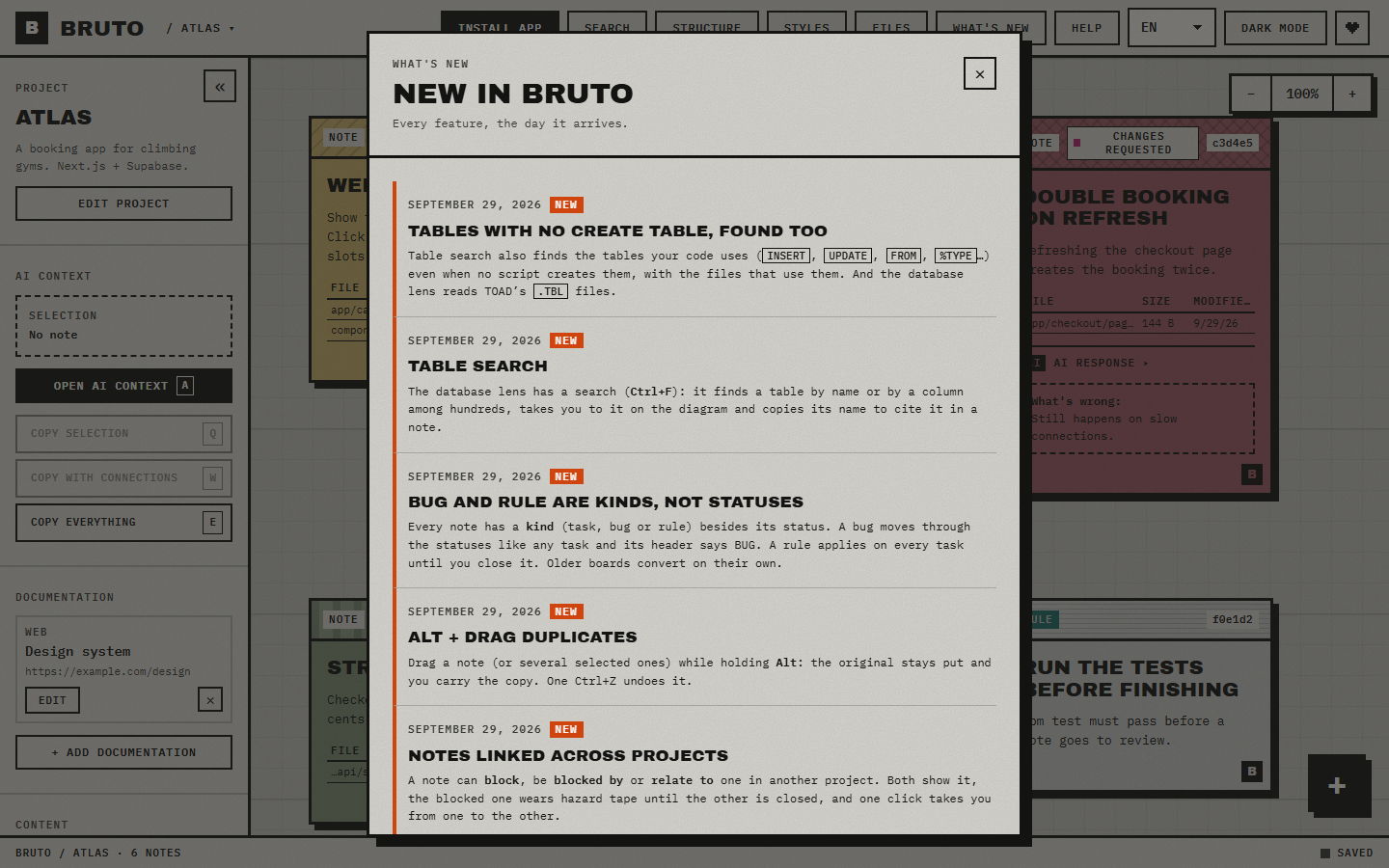
- What's new. Every feature gets an entry in the top bar's noticeboard the day it ships, with a count of the ones you haven't read.
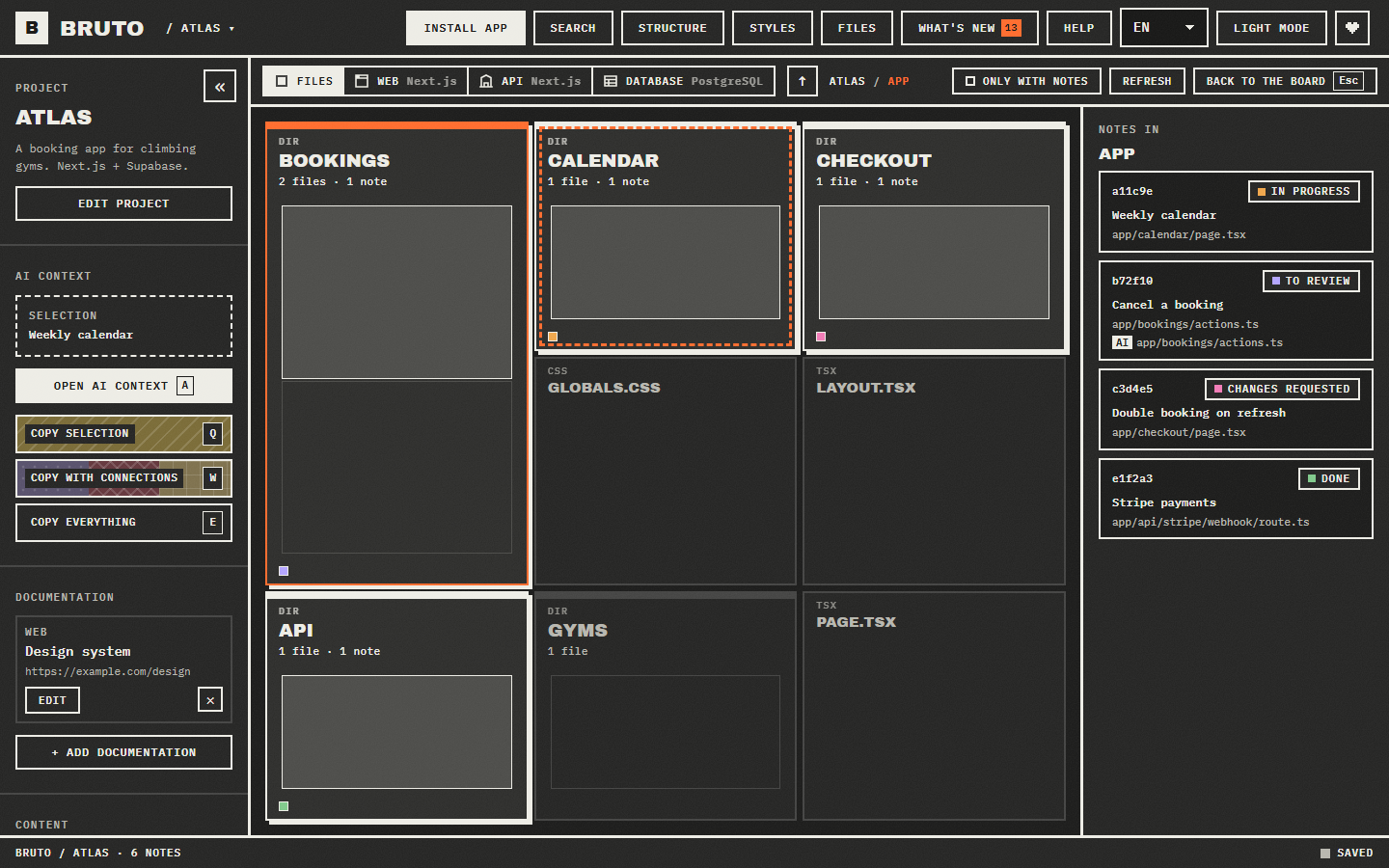
- Structure view. The project's folders and files as blocks sized by how many files they hold, marked with the notes that point at them. It shows where the work is, and lists links to files that no longer exist. Only with notes hides everything no note points at, here, in the lenses and in the files window.
- Search.
Ctrl Ffinds notes by text, path or id, and filters them by status and by what they have or lack: files, an AI response, code, images, a web link. - Lenses. When Bruto recognises the project, the structure view offers it drawn by what its files
are, still with the notes on each element:
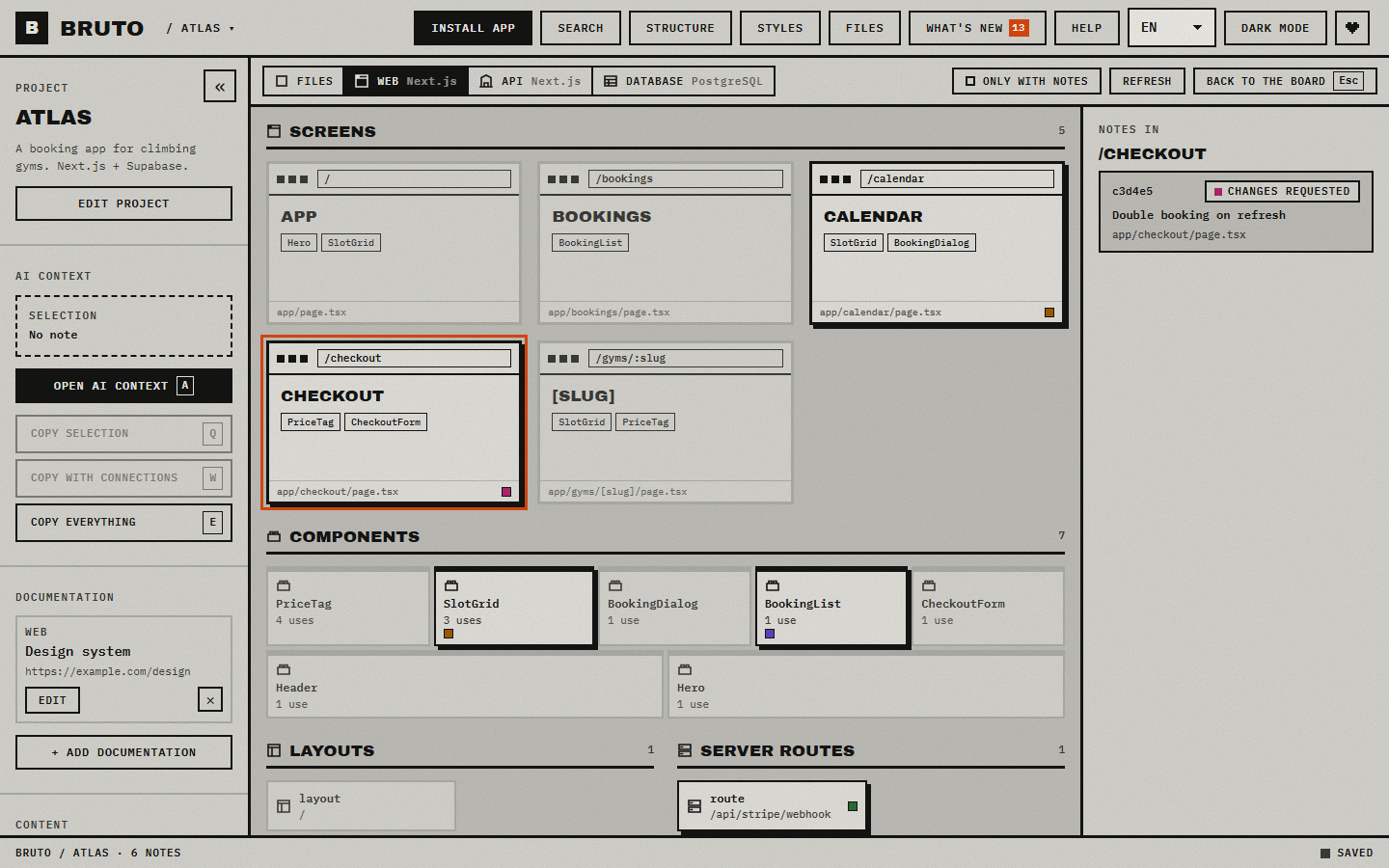
- Web (React, Vue, Svelte, Next.js, Nuxt, SvelteKit, Astro, Angular): pages as browser windows with their route and the components on them, a wall of components sized by use, then layouts, server routes, hooks, state and services.
- API (.NET, NestJS, Express, Fastify, Next.js, FastAPI, Flask, Spring): controllers and
routers as resources listing their endpoints, verb, route and authorization, with the services
they depend on; then services, repositories, data, models and middleware. In Next.js, route
handlers,
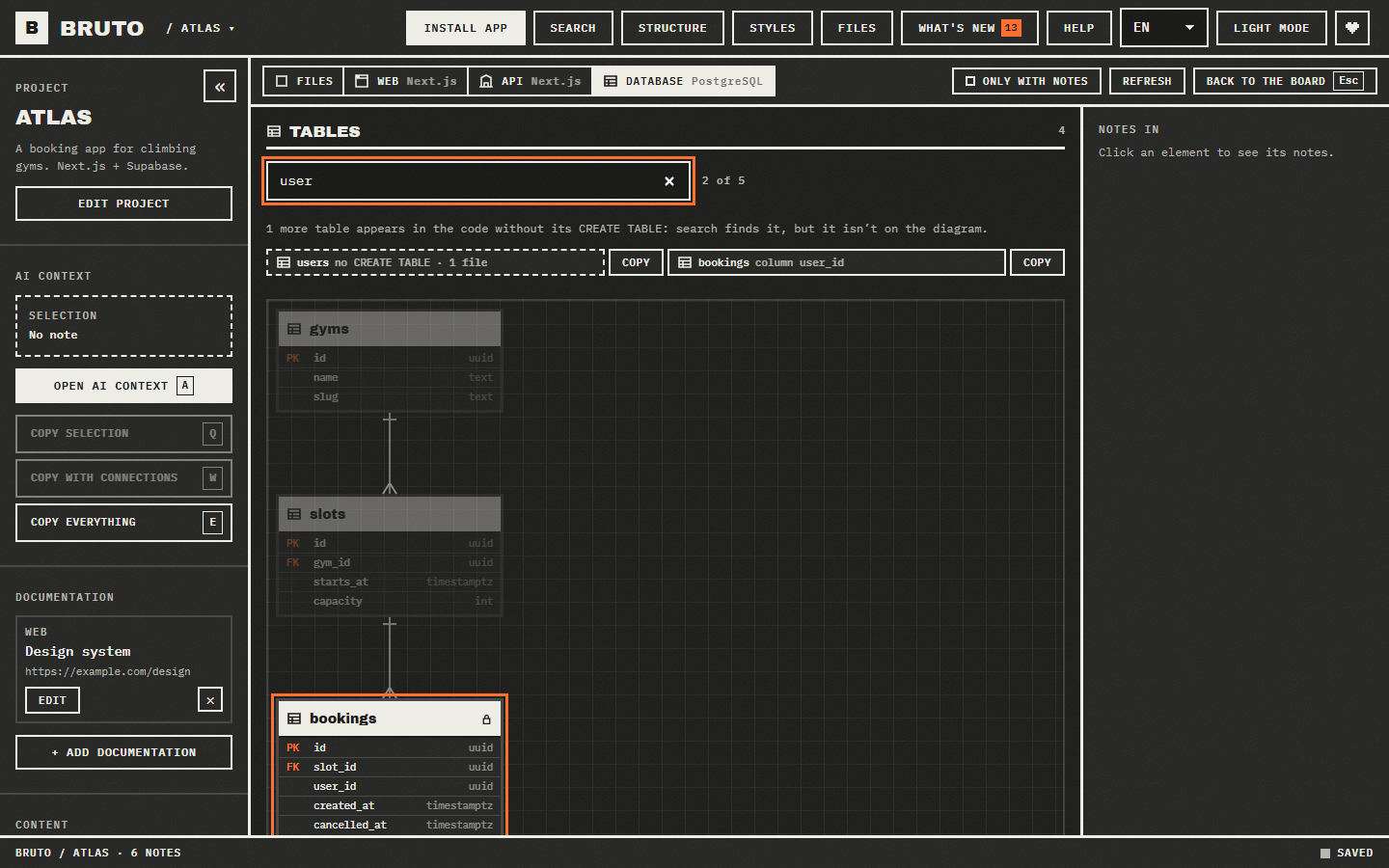
pages/apiand server actions, locked when they check the caller or a middleware covering them does. - Database (Oracle PL/SQL, PostgreSQL and Supabase, plain SQL, Prisma, Drizzle): tables with their
columns and keys as an entity-relationship diagram, following migrations in order; packages split
into specification and body, row level security and its policies, then views, triggers,
procedures, functions and sequences.
Ctrl Ffinds a table by name or column among hundreds and copies its name to cite it in a note; it also finds the tables the code writes, reads or anchors types to when no script creates them (a schema versioned as packages and data scripts only). Reads.sql,.ddland the files Oracle tools save, TOAD's.TBLincluded.
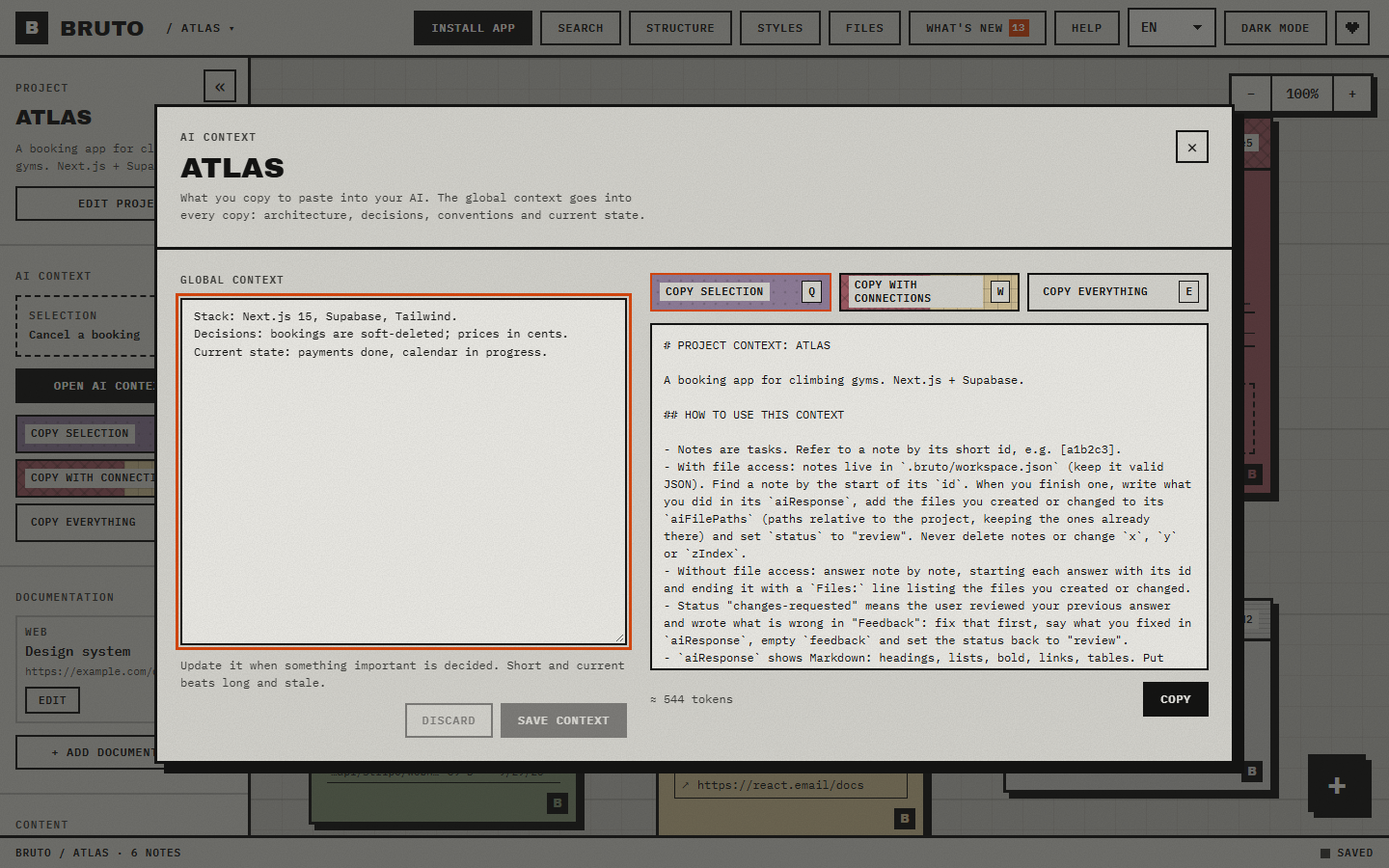
- AI context. Copy the selection, the selection plus everything it points to, or the whole project, as clean Markdown with short instructions for the model. A preview shows exactly what gets copied and roughly how many tokens it is.
- Answers in the note. Each note has an AI response, the files the AI touched and a What's wrong field, so review loops stay attached to the task.
- Safe with other tools. Every save reads the file first and merges changes made elsewhere, note by note and field by field. A broken file is never overwritten: Bruto shows what is wrong and offers the latest backup (one is kept each time a project is opened).
- Keyboard first and accessible. Every action has a shortcut, notes are reachable with Tab, dialogs trap focus and everything has a readable name for screen readers.
- Nine languages, light and dark themes, a colour and pattern per status, installable, works offline, and tells an open window when a new version is out.
- Local only. The app is a static page: it has no server and no storage of its own. The published site counts visits and which features get used (opening a project, a lens, copying AI context), anonymously and without cookies (Superveil, a small self-hosted counter): nothing about your projects or notes ever leaves your browser. Your notes never leave your folders.
Working with an AI
Paste the copy into any chat (Claude, ChatGPT, Gemini, DeepSeek…). It starts with instructions like these, so the model knows how to answer:
## HOW TO USE THIS CONTEXT

- Notes are tasks. Refer to a note by its short id, e.g. [a1b2c3].
- With file access: notes live in `.bruto/workspace.json` (keep it valid JSON). Find a note by the
  start of its `id`. When you finish one, write what you did in its `aiResponse`, add the files you
  created or changed to its `aiFilePaths` (paths relative to the project, keeping the ones already
  there) and set `status` to "review". Never delete notes or change `x`, `y` or `zIndex`.
- Without file access: answer note by note, starting each answer with its id and ending it with a
  `Files:` line listing the files you created or changed.
- Status "changes-requested" means the user reviewed your previous answer and wrote what is wrong
  in "Feedback": fix that first, say what you fixed in `aiResponse`, empty `feedback` and set the
  status back to "review".
- `aiResponse` shows Markdown: headings, lists, bold, links, tables. Put commands and code the user
  has to run or paste inside code blocks (```): the note shows each one with a copy button.
Answers read as written. Notes show Markdown: headings, lists, bold, italic, links, tables, quotes. Code in answers shows in its own box with a copy button, in the note and in the editor: a command the AI wants you to run is one click away.
Files the AI touched go in their own list, aiFilePaths, apart from the files and images you
gave the note. Reviewing an old note, what you asked for and what the AI changed stay easy to tell
apart; the structure view places both on the project map.
Kinds and standing rules. Besides its status, a note has a kind: a task (the default), a
bug, or a rule. A bug still goes through the statuses like any task, and the header says it's
a bug. A rule isn't a task: "update the README on every change", "run the tests before finishing". It
goes into every copy under ## STANDING RULES, even when it isn't selected, and the model is told to
apply it on each task and never answer it. Closing a rule (done, won't fix) retires it.
Coding agents that work in your repository can also be pointed at the file directly, for example with
one line in AGENTS.md or CLAUDE.md:
Tasks for this project are in `.bruto/workspace.json`. Work on notes whose status is "todo", and
always apply the notes whose kind is "rule".
As an MCP server
Agents that speak MCP (Claude Code, Claude Desktop, Cursor, Windsurf…) can use the board through tools instead of editing the file: list and search the notes, read the context, mark one in progress, answer it and send it to review, propose new ones. It runs on your machine, and once added works in every project with a board:
claude mcp add --scope user bruto -- npx -y bruto-mcp
Every change is on record. The server only ever touches the board: it has no tool that deletes,
and agents can't write, answer or change standing rules. Each note an agent answers, moves or creates
is stamped with who did it: the client from the MCP handshake (claude-code), the agent or subagent id
it passes, if any, and when. Every write, refused ones included, is also appended to
.bruto/log.jsonl: the tool, the note, the arguments, the result, the commit the project was on and
a SHA-256 of each file the agent says it touched, so an answer stays tied to the exact code it
describes. A note marked Read only for agents can be read but never answered or moved.
Other clients, Windows and every tool: mcp/README.md.
The workspace file
Plain JSON, meant to be read and edited by people and tools alike. Bruto fills in anything missing, keeps
fields it does not know about, and accepts common status words such as "pending" or "completed".
{
  "version": 4,
  "title": "ATLAS",
  "description": "What the project is. Heads every copy for the AI.",
  "aiContext": "Stack, decisions, conventions, current state.",
  "documentation": [{ "id": "…", "name": "Design system", "url": "https://…", "type": "web" }],
  "notes": [
    {
      "id": "b72f10aa-…",
      "title": "Cancel a booking",
      "description": "Users can cancel up to 2 hours before the session.",
      "status": "review", // idea · todo · in-progress · review · changes-requested · done · blocked · wontfix
      "kind": "bug", // bug · rule; left out for a task. Up to v3, "bug" and "loop" were statuses: both still read.
      "filePaths": ["app/bookings/actions.ts"], // relative to the project
      "webUrls": ["https://…"], // docs, a ticket, a design…
      "images": [".bruto/images/b72f10-20260924-ab12.png"],
      "aiResponse": "Added cancelBooking() with the 2h rule.",
      "aiFilePaths": ["app/bookings/cancel.ts"], // what the AI created or changed
      "feedback": "Still possible after the deadline on mobile.",
      // Who last changed it through the MCP server: answer · status · create.
      "agent": {
        "client": "claude-code",
        "id": "reviewer",
        "action": "answer",
        "at": "2026-09-30T09:14:00Z",
      },
      "agentAccess": "read", // agents may read it, never answer or move it; left out otherwise
      "x": 420,
      "y": 60,
      "zIndex": 2,
      "colorTheme": "plum",
      "pattern": "dots",
    },
  ],
  "connections": [{ "id": "…", "from": "<note id>", "to": "<note id>" }],
  "statusStyles": { "review": { "color": "plum", "pattern": "dots" } },
}
Add .bruto/ to your .gitignore if the notes should stay on your machine.
Shortcuts
| Keys | Action | Keys | Action |
|---|---|---|---|
N | New note | Q / W / E | Copy selection / with connections / everything |
A | AI context window | C | Connect the selected note |
Enter | Open the focused note | ←↑→↓ | Move notes (Shift for bigger steps) |
Ctrl C / Ctrl V | Copy and paste notes, or a screenshot | Ctrl D | Duplicate |
Del | Delete (undoable) | Ctrl Z / Ctrl Y | Undo / redo |
F | Centre the view | Alt 1…9 | Switch open project |
M | Structure view | Backspace | Up one folder in the structure view |
Ctrl F / / | Search notes (text, path or id) | Enter | Next result (Shift for the previous one) |
0 | Reset zoom and position | Esc | Close or cancel |
Press ? in the app for the full list.
Browser support
Bruto opens folders with the File System Access API, available in Chrome, Edge, Brave and Opera on desktop. Firefox and Safari can't open local folders yet.
Development
npm install
npm run dev        # http://localhost:5173
npm run check      # format, lint, types and unit tests
npm run test:e2e   # browser tests (uses the installed Chrome)
npm run shots      # screenshots for the landing page, this README and the link preview
npm run video      # the launch video, driven over the example project (launch/bruto-launch.webm)
npm run build
npm run prerender  # after build: the English landing written into index.html, for crawlers
src/
  domain/     pure logic: workspace format, merge, AI context, search, structure (unit tested)
  storage/    the project folder: workspace file, backups, images, recent projects
  state/      in-memory workspace with undo, and the engine that keeps it in sync with disk
  board/      the canvas: notes, connections, pan, zoom, selection, search
  structure/  the structure view and its file map
  lenses/     reading web, API and database code of many stacks, and drawing each kind
  workspace/  the project screen: actions, shortcuts, UI state
  panels/     editors and dialogs
  layout/     top bar, sidebar, status bar, landing
  shortcuts/  one keymap for the keyboard handler and the help window
  i18n/       one dictionary per language, checked by tests
  ui/         shared pieces: dialogs, toasts, pickers
  styles/     design tokens and styles
e2e/          browser tests against a real (private) file system
Support
Bruto is free, with no ads, no accounts and no personal tracking. If it saves you time, you can buy me a coffee on Ko-fi: it's also the heart in the top bar. What's new goes out on X too: @brutoboard.
Privacy
Bruto runs in your browser: projects and notes are read from and saved to your folders and never sent anywhere. The published site counts visits and which features get used, with Superveil, a small self-hosted counter:
- Measured: the page, the site a visit came from, the approximate country, the kind of device, and events such as opening a project or a lens. Never anything a project or a note contains.
- Not measured: no cookies, nothing stored in your browser, no IP address kept. A visitor is an anonymous identifier that changes every day, so nobody can be followed from one day to the next.
- Kept: on Vercel and Supabase, deleted after 13 months.
The landing page has the same notice under Privacy. Development builds, previews and tests never count.
License
Similar repos


Languages
TypeScript
91.9%
CSS
7.1%
A brutalist, local-first task board for projects built with AI. Notes live in your project folder.
See the codeSee what people are saying
README
BRUTO
A brutalist task board for projects built with AI. Your notes live inside the project folder, where you and any AI can read and answer them.
Open Bruto · No account · No server · Works offline · Anonymous usage stats only
Why
Working on a project with an AI assistant means explaining the same things again and again, in a chat
that forgets. Bruto keeps the tasks of a project as notes in a file inside the project itself,
.bruto/workspace.json, so you and every AI you use work from the same source:
- You write tasks on the board: what is wrong, which files, links, screenshots.
- You copy exactly the context the AI needs with one key (
Q,WorE). - The AI answers inside the note and marks it for review, if it can edit files. Bruto picks up the change live, without overwriting anything you were typing.
Install
Nothing to download. Open jimy-k4.github.io/bruto in Chrome, Edge, Brave or Opera and press Install app in the top bar (or the install icon in the address bar). Bruto then opens in its own window, from the Start menu or the Dock, and works offline.
Just looking? Try an example project on the landing page, or go straight to it at jimy-k4.github.io/bruto/?demo: a small booking app with notes in every status and code for the structure view, kept only in your browser.
Prefer to run it yourself? See Development.
Features
- Board. Notes with a status, description, files, links and screenshots. Drag them, connect them with arrows, select many at once and edit them together. Each project remembers where you left its board: zoom and position survive switching projects and reloading.
- Notes across projects. A note can block, be blocked by or relate to a note in another project (Front, CMS, database…). Both boards show the link; the blocked note wears hazard tape until the other one is closed, and one click opens the other project with that note in view.
- Formatting. Notes show Markdown; the editor's Formatting link opens a cheat sheet with each example next to how it looks.
- What's new. Every feature gets an entry in the top bar's noticeboard the day it ships, with a count of the ones you haven't read.
- Structure view. The project's folders and files as blocks sized by how many files they hold, marked with the notes that point at them. It shows where the work is, and lists links to files that no longer exist. Only with notes hides everything no note points at, here, in the lenses and in the files window.
- Search.
Ctrl Ffinds notes by text, path or id, and filters them by status and by what they have or lack: files, an AI response, code, images, a web link. - Lenses. When Bruto recognises the project, the structure view offers it drawn by what its files
are, still with the notes on each element:
- Web (React, Vue, Svelte, Next.js, Nuxt, SvelteKit, Astro, Angular): pages as browser windows with their route and the components on them, a wall of components sized by use, then layouts, server routes, hooks, state and services.
- API (.NET, NestJS, Express, Fastify, Next.js, FastAPI, Flask, Spring): controllers and
routers as resources listing their endpoints, verb, route and authorization, with the services
they depend on; then services, repositories, data, models and middleware. In Next.js, route
handlers,
pages/apiand server actions, locked when they check the caller or a middleware covering them does. - Database (Oracle PL/SQL, PostgreSQL and Supabase, plain SQL, Prisma, Drizzle): tables with their
columns and keys as an entity-relationship diagram, following migrations in order; packages split
into specification and body, row level security and its policies, then views, triggers,
procedures, functions and sequences.
Ctrl Ffinds a table by name or column among hundreds and copies its name to cite it in a note; it also finds the tables the code writes, reads or anchors types to when no script creates them (a schema versioned as packages and data scripts only). Reads.sql,.ddland the files Oracle tools save, TOAD's.TBLincluded.
- AI context. Copy the selection, the selection plus everything it points to, or the whole project, as clean Markdown with short instructions for the model. A preview shows exactly what gets copied and roughly how many tokens it is.
- Answers in the note. Each note has an AI response, the files the AI touched and a What's wrong field, so review loops stay attached to the task.
- Safe with other tools. Every save reads the file first and merges changes made elsewhere, note by note and field by field. A broken file is never overwritten: Bruto shows what is wrong and offers the latest backup (one is kept each time a project is opened).
- Keyboard first and accessible. Every action has a shortcut, notes are reachable with Tab, dialogs trap focus and everything has a readable name for screen readers.
- Nine languages, light and dark themes, a colour and pattern per status, installable, works offline, and tells an open window when a new version is out.
- Local only. The app is a static page: it has no server and no storage of its own. The published site counts visits and which features get used (opening a project, a lens, copying AI context), anonymously and without cookies (Superveil, a small self-hosted counter): nothing about your projects or notes ever leaves your browser. Your notes never leave your folders.
Working with an AI
Paste the copy into any chat (Claude, ChatGPT, Gemini, DeepSeek…). It starts with instructions like these, so the model knows how to answer:
## HOW TO USE THIS CONTEXT

- Notes are tasks. Refer to a note by its short id, e.g. [a1b2c3].
- With file access: notes live in `.bruto/workspace.json` (keep it valid JSON). Find a note by the
  start of its `id`. When you finish one, write what you did in its `aiResponse`, add the files you
  created or changed to its `aiFilePaths` (paths relative to the project, keeping the ones already
  there) and set `status` to "review". Never delete notes or change `x`, `y` or `zIndex`.
- Without file access: answer note by note, starting each answer with its id and ending it with a
  `Files:` line listing the files you created or changed.
- Status "changes-requested" means the user reviewed your previous answer and wrote what is wrong
  in "Feedback": fix that first, say what you fixed in `aiResponse`, empty `feedback` and set the
  status back to "review".
- `aiResponse` shows Markdown: headings, lists, bold, links, tables. Put commands and code the user
  has to run or paste inside code blocks (```): the note shows each one with a copy button.
Answers read as written. Notes show Markdown: headings, lists, bold, italic, links, tables, quotes. Code in answers shows in its own box with a copy button, in the note and in the editor: a command the AI wants you to run is one click away.
Files the AI touched go in their own list, aiFilePaths, apart from the files and images you
gave the note. Reviewing an old note, what you asked for and what the AI changed stay easy to tell
apart; the structure view places both on the project map.
Kinds and standing rules. Besides its status, a note has a kind: a task (the default), a
bug, or a rule. A bug still goes through the statuses like any task, and the header says it's
a bug. A rule isn't a task: "update the README on every change", "run the tests before finishing". It
goes into every copy under ## STANDING RULES, even when it isn't selected, and the model is told to
apply it on each task and never answer it. Closing a rule (done, won't fix) retires it.
Coding agents that work in your repository can also be pointed at the file directly, for example with
one line in AGENTS.md or CLAUDE.md:
Tasks for this project are in `.bruto/workspace.json`. Work on notes whose status is "todo", and
always apply the notes whose kind is "rule".
As an MCP server
Agents that speak MCP (Claude Code, Claude Desktop, Cursor, Windsurf…) can use the board through tools instead of editing the file: list and search the notes, read the context, mark one in progress, answer it and send it to review, propose new ones. It runs on your machine, and once added works in every project with a board:
claude mcp add --scope user bruto -- npx -y bruto-mcp
Every change is on record. The server only ever touches the board: it has no tool that deletes,
and agents can't write, answer or change standing rules. Each note an agent answers, moves or creates
is stamped with who did it: the client from the MCP handshake (claude-code), the agent or subagent id
it passes, if any, and when. Every write, refused ones included, is also appended to
.bruto/log.jsonl: the tool, the note, the arguments, the result, the commit the project was on and
a SHA-256 of each file the agent says it touched, so an answer stays tied to the exact code it
describes. A note marked Read only for agents can be read but never answered or moved.
Other clients, Windows and every tool: mcp/README.md.
The workspace file
Plain JSON, meant to be read and edited by people and tools alike. Bruto fills in anything missing, keeps
fields it does not know about, and accepts common status words such as "pending" or "completed".
{
  "version": 4,
  "title": "ATLAS",
  "description": "What the project is. Heads every copy for the AI.",
  "aiContext": "Stack, decisions, conventions, current state.",
  "documentation": [{ "id": "…", "name": "Design system", "url": "https://…", "type": "web" }],
  "notes": [
    {
      "id": "b72f10aa-…",
      "title": "Cancel a booking",
      "description": "Users can cancel up to 2 hours before the session.",
      "status": "review", // idea · todo · in-progress · review · changes-requested · done · blocked · wontfix
      "kind": "bug", // bug · rule; left out for a task. Up to v3, "bug" and "loop" were statuses: both still read.
      "filePaths": ["app/bookings/actions.ts"], // relative to the project
      "webUrls": ["https://…"], // docs, a ticket, a design…
      "images": [".bruto/images/b72f10-20260924-ab12.png"],
      "aiResponse": "Added cancelBooking() with the 2h rule.",
      "aiFilePaths": ["app/bookings/cancel.ts"], // what the AI created or changed
      "feedback": "Still possible after the deadline on mobile.",
      // Who last changed it through the MCP server: answer · status · create.
      "agent": {
        "client": "claude-code",
        "id": "reviewer",
        "action": "answer",
        "at": "2026-09-30T09:14:00Z",
      },
      "agentAccess": "read", // agents may read it, never answer or move it; left out otherwise
      "x": 420,
      "y": 60,
      "zIndex": 2,
      "colorTheme": "plum",
      "pattern": "dots",
    },
  ],
  "connections": [{ "id": "…", "from": "<note id>", "to": "<note id>" }],
  "statusStyles": { "review": { "color": "plum", "pattern": "dots" } },
}
Add .bruto/ to your .gitignore if the notes should stay on your machine.
Shortcuts
| Keys | Action | Keys | Action |
|---|---|---|---|
N | New note | Q / W / E | Copy selection / with connections / everything |
A | AI context window | C | Connect the selected note |
Enter | Open the focused note | ←↑→↓ | Move notes (Shift for bigger steps) |
Ctrl C / Ctrl V | Copy and paste notes, or a screenshot | Ctrl D | Duplicate |
Del | Delete (undoable) | Ctrl Z / Ctrl Y | Undo / redo |
F | Centre the view | Alt 1…9 | Switch open project |
M | Structure view | Backspace | Up one folder in the structure view |
Ctrl F / / | Search notes (text, path or id) | Enter | Next result (Shift for the previous one) |
0 | Reset zoom and position | Esc | Close or cancel |
Press ? in the app for the full list.
Browser support
Bruto opens folders with the File System Access API, available in Chrome, Edge, Brave and Opera on desktop. Firefox and Safari can't open local folders yet.
Development
npm install
npm run dev        # http://localhost:5173
npm run check      # format, lint, types and unit tests
npm run test:e2e   # browser tests (uses the installed Chrome)
npm run shots      # screenshots for the landing page, this README and the link preview
npm run video      # the launch video, driven over the example project (launch/bruto-launch.webm)
npm run build
npm run prerender  # after build: the English landing written into index.html, for crawlers
src/
  domain/     pure logic: workspace format, merge, AI context, search, structure (unit tested)
  storage/    the project folder: workspace file, backups, images, recent projects
  state/      in-memory workspace with undo, and the engine that keeps it in sync with disk
  board/      the canvas: notes, connections, pan, zoom, selection, search
  structure/  the structure view and its file map
  lenses/     reading web, API and database code of many stacks, and drawing each kind
  workspace/  the project screen: actions, shortcuts, UI state
  panels/     editors and dialogs
  layout/     top bar, sidebar, status bar, landing
  shortcuts/  one keymap for the keyboard handler and the help window
  i18n/       one dictionary per language, checked by tests
  ui/         shared pieces: dialogs, toasts, pickers
  styles/     design tokens and styles
e2e/          browser tests against a real (private) file system
Support
Bruto is free, with no ads, no accounts and no personal tracking. If it saves you time, you can buy me a coffee on Ko-fi: it's also the heart in the top bar. What's new goes out on X too: @brutoboard.
Privacy
Bruto runs in your browser: projects and notes are read from and saved to your folders and never sent anywhere. The published site counts visits and which features get used, with Superveil, a small self-hosted counter:
- Measured: the page, the site a visit came from, the approximate country, the kind of device, and events such as opening a project or a lens. Never anything a project or a note contains.
- Not measured: no cookies, nothing stored in your browser, no IP address kept. A visitor is an anonymous identifier that changes every day, so nobody can be followed from one day to the next.
- Kept: on Vercel and Supabase, deleted after 13 months.
The landing page has the same notice under Privacy. Development builds, previews and tests never count.
License
Similar repos
Languages
TypeScript
91.9%
CSS
7.1%