RefMod Pilot: ComfyUI workflows for MiniMax H3 character references, by LoRA Pilot.
JavaScript
5
11 commits
updated Oct 9, 2026


Simple and intuitive ComfyUI workflows for MiniMax H3 character references, by LoRA Pilot.
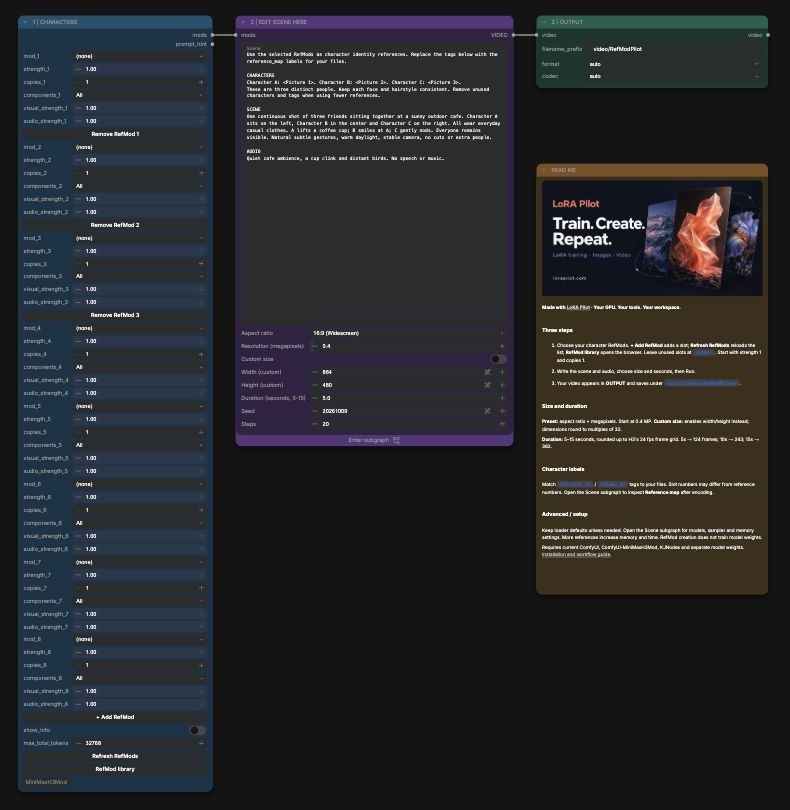
The inference canvas has four elements:
The original RefMod loader stays on the main canvas so its management buttons remain available. Model loading, reference encoding, sampling and decoding live inside the Scene subgraph. Open that subgraph to reach the advanced settings. RefMod Pilot provides workflows and a small ComfyUI frontend extension for photo uploads. No browser add-on is required.
Each element has its own color. The Markdown README includes a clickable LoRA Pilot banner loaded from lorapilot.com; the image needs internet access and adds no Python dependency. The original loader also exposes upstream advanced controls.
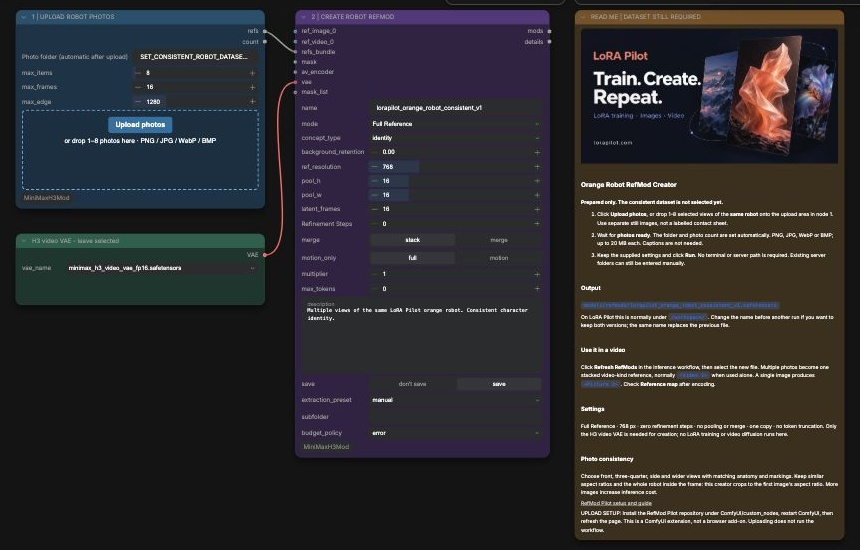
Create a RefMod: upload your photos and save a reusable reference. The screenshot shows the Orange Robot creator with its upload control.
Generate a video: choose references, edit the scene and settings, and view the output.
Install RefMod Pilot once to enable Upload photos and drag-and-drop:
ComfyUI/custom_nodes/ (the folder must contain __init__.py directly).This installs into ComfyUI, not Chrome or Firefox. The uploader uses standard browser file APIs, uploads to your ComfyUI server, and needs no extra Python packages. Its existing H3 dependencies below are still required. You can also install this repository by URL through a ComfyUI Manager version that supports Git URL installs.
Use a current ComfyUI with native MiniMax H3 support and subgraphs. Development targets ComfyUI 0.34.0 and frontend 1.49.6.
Install these custom-node packs through ComfyUI Manager, including their dependencies, then restart ComfyUI:
f9462081e28794389b5a6c5067eb327412ad8ee7; upstream interfaces are evolving.RefMod Python dependencies are torch, safetensors, numpy and Pillow. Keep the CUDA-compatible PyTorch supplied by your working ComfyUI installation. The requirements file lists the remaining packages; it does not install ComfyUI, custom-node packs, or model weights.
If the packages are missing, run this with ComfyUI's Python:
python -m pip install -r requirements.txt
For the standard LoRA Pilot pod environment:
/opt/venvs/core/bin/python -m pip install -r requirements.txt
KJNodes has its own requirements, installed by its installer/Manager. Optional video-file inputs to the folder creator may require opencv-python or imageio; still-image creation does not need them.
Download these weights from Comfy-Org/MiniMax-H3 into the corresponding ComfyUI model folders:
| Folder | File |
|---|---|
models/diffusion_models | minimax_h3_ref2va_pruned_int8_convrot.safetensors |
models/text_encoders | qwen3vl_32b_minimax_h3_nvfp4_awq.safetensors |
models/vae | minimax_h3_video_vae_fp16.safetensors |
models/vae | minimax_h3_audio_vae_fp32.safetensors |
The creator only needs the video VAE. The inference workflow needs all four files and saved RefMods under models/refmods/. Model licenses and requirements belong to their upstream projects.
Open Character-RefMod-Creator.json in ComfyUI.
To create another orange robot reference, use Orange-Robot-RefMod-Creator.json. It starts with an unset photo folder and Full Reference at 768 px. A finished R01 example is included below; the source dataset ZIP is not bundled.
ComfyUI/models/refmods/ (normally /workspace/models/refmods/ on LoRA Pilot).Uploads accept PNG, JPG, WebP and BMP, up to 20 MB each. Each batch gets its own folder and preserves selection order; the workflow sets the folder and photo count automatically. ZIPs, HEIC and videos are not accepted by this photo uploader.
If an upload fails, the previous folder is restored. Retry the selection; partially uploaded files remain unused in ComfyUI/input/refmod-pilot/. Photo uploads do not start encoding or video generation.
Advanced users can still enter an existing server folder. That loader takes the first eight media files alphabetically; it does not rank image quality. Use still images with similar aspect ratios and keep faces inside the crop. The simple creator crops references to the first photo's aspect ratio and stacks them into one video-kind reference when using multiple photos.
Full Reference mode preserves the VAE reference rather than compressing it to a small grid. No LoRA or H3 model weights are trained. More reference photos increase the cost of subsequent video generation.
ComfyUI/models/refmods/.lpr01robot_r01_v1, edit the scene, and Run.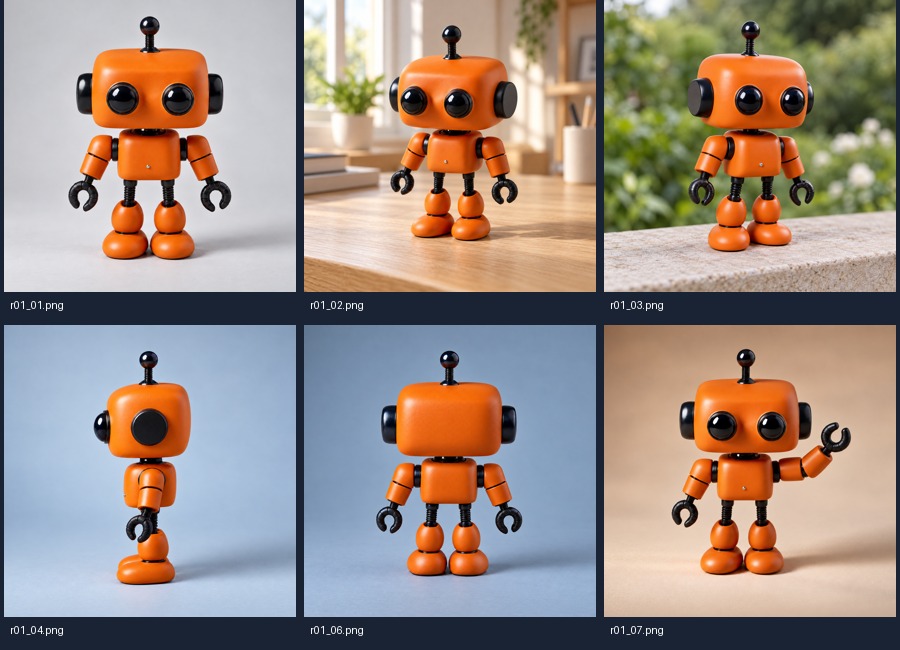
This example uses six views from the user-provided r01-eight-image-dataset-v1.zip
(lpr01robot): front, both front angles, side, back and waving. The redundant rear
angle and cropped close-up were omitted. The original eight-image dataset is unchanged.
Source hashes and settings record the selection.
Full Reference at 768 px produces one stacked video-kind reference with six latent
frames and 3,456 tokens. Use <Video 1> when it is the only selected RefMod.
Creation completed in 5.7 seconds on an RTX PRO 6000 Blackwell 48 GB MIG instance;
this is a single observed encoding time, not a general performance guarantee.
No model weights were trained. Video likeness and motion remain untested.
The supplied images are synthetic reference-guided R01 views. Minor proportion, surface and perspective differences remain; they do not establish exact 3D consistency.
Open RefMod-Pilot-Inference.json.
ComfyUI/output/video/RefModPilot* (the pod may map output elsewhere).RefMod files may contain one picture, several independent pictures, or a stacked video reference. The three slot numbers are not necessarily the three picture numbers.
Open the Scene subgraph and inspect Reference map after encoding. Use its <Picture n> and <Video n> labels in your prompt. For example, three multi-photo files from the supplied creator normally use <Video 1>, <Video 2> and <Video 3>. Separate-image bundles use picture labels for each view. The example prompt's picture labels are placeholders to replace for your files.
Development preview. The original generation path passed live text/vision encoding with three bundles (24 independent images). This does not establish video likeness or identity separation. The compact subgraph workflow's validation results are recorded in VALIDATION.md.
Built on ComfyUI, ComfyUI-MiniMaxH3Mod by Luisacaotica, and ComfyUI-KJNodes. RefMod Pilot supplies super-easy workflow configuration and usability guidance.
Part of Lora Pilot family
RefMod Pilot: ComfyUI workflows for MiniMax H3 character references, by LoRA Pilot.
JavaScript
5
11 commits
updated Oct 9, 2026
Simple and intuitive ComfyUI workflows for MiniMax H3 character references, by LoRA Pilot.
The inference canvas has four elements:
The original RefMod loader stays on the main canvas so its management buttons remain available. Model loading, reference encoding, sampling and decoding live inside the Scene subgraph. Open that subgraph to reach the advanced settings. RefMod Pilot provides workflows and a small ComfyUI frontend extension for photo uploads. No browser add-on is required.
Each element has its own color. The Markdown README includes a clickable LoRA Pilot banner loaded from lorapilot.com; the image needs internet access and adds no Python dependency. The original loader also exposes upstream advanced controls.
Create a RefMod: upload your photos and save a reusable reference. The screenshot shows the Orange Robot creator with its upload control.
Generate a video: choose references, edit the scene and settings, and view the output.
Install RefMod Pilot once to enable Upload photos and drag-and-drop:
ComfyUI/custom_nodes/ (the folder must contain __init__.py directly).This installs into ComfyUI, not Chrome or Firefox. The uploader uses standard browser file APIs, uploads to your ComfyUI server, and needs no extra Python packages. Its existing H3 dependencies below are still required. You can also install this repository by URL through a ComfyUI Manager version that supports Git URL installs.
Use a current ComfyUI with native MiniMax H3 support and subgraphs. Development targets ComfyUI 0.34.0 and frontend 1.49.6.
Install these custom-node packs through ComfyUI Manager, including their dependencies, then restart ComfyUI:
f9462081e28794389b5a6c5067eb327412ad8ee7; upstream interfaces are evolving.RefMod Python dependencies are torch, safetensors, numpy and Pillow. Keep the CUDA-compatible PyTorch supplied by your working ComfyUI installation. The requirements file lists the remaining packages; it does not install ComfyUI, custom-node packs, or model weights.
If the packages are missing, run this with ComfyUI's Python:
python -m pip install -r requirements.txt
For the standard LoRA Pilot pod environment:
/opt/venvs/core/bin/python -m pip install -r requirements.txt
KJNodes has its own requirements, installed by its installer/Manager. Optional video-file inputs to the folder creator may require opencv-python or imageio; still-image creation does not need them.
Download these weights from Comfy-Org/MiniMax-H3 into the corresponding ComfyUI model folders:
| Folder | File |
|---|---|
models/diffusion_models | minimax_h3_ref2va_pruned_int8_convrot.safetensors |
models/text_encoders | qwen3vl_32b_minimax_h3_nvfp4_awq.safetensors |
models/vae | minimax_h3_video_vae_fp16.safetensors |
models/vae | minimax_h3_audio_vae_fp32.safetensors |
The creator only needs the video VAE. The inference workflow needs all four files and saved RefMods under models/refmods/. Model licenses and requirements belong to their upstream projects.
Open Character-RefMod-Creator.json in ComfyUI.
To create another orange robot reference, use Orange-Robot-RefMod-Creator.json. It starts with an unset photo folder and Full Reference at 768 px. A finished R01 example is included below; the source dataset ZIP is not bundled.
ComfyUI/models/refmods/ (normally /workspace/models/refmods/ on LoRA Pilot).Uploads accept PNG, JPG, WebP and BMP, up to 20 MB each. Each batch gets its own folder and preserves selection order; the workflow sets the folder and photo count automatically. ZIPs, HEIC and videos are not accepted by this photo uploader.
If an upload fails, the previous folder is restored. Retry the selection; partially uploaded files remain unused in ComfyUI/input/refmod-pilot/. Photo uploads do not start encoding or video generation.
Advanced users can still enter an existing server folder. That loader takes the first eight media files alphabetically; it does not rank image quality. Use still images with similar aspect ratios and keep faces inside the crop. The simple creator crops references to the first photo's aspect ratio and stacks them into one video-kind reference when using multiple photos.
Full Reference mode preserves the VAE reference rather than compressing it to a small grid. No LoRA or H3 model weights are trained. More reference photos increase the cost of subsequent video generation.
ComfyUI/models/refmods/.lpr01robot_r01_v1, edit the scene, and Run.
This example uses six views from the user-provided r01-eight-image-dataset-v1.zip
(lpr01robot): front, both front angles, side, back and waving. The redundant rear
angle and cropped close-up were omitted. The original eight-image dataset is unchanged.
Source hashes and settings record the selection.
Full Reference at 768 px produces one stacked video-kind reference with six latent
frames and 3,456 tokens. Use <Video 1> when it is the only selected RefMod.
Creation completed in 5.7 seconds on an RTX PRO 6000 Blackwell 48 GB MIG instance;
this is a single observed encoding time, not a general performance guarantee.
No model weights were trained. Video likeness and motion remain untested.
The supplied images are synthetic reference-guided R01 views. Minor proportion, surface and perspective differences remain; they do not establish exact 3D consistency.
Open RefMod-Pilot-Inference.json.
ComfyUI/output/video/RefModPilot* (the pod may map output elsewhere).RefMod files may contain one picture, several independent pictures, or a stacked video reference. The three slot numbers are not necessarily the three picture numbers.
Open the Scene subgraph and inspect Reference map after encoding. Use its <Picture n> and <Video n> labels in your prompt. For example, three multi-photo files from the supplied creator normally use <Video 1>, <Video 2> and <Video 3>. Separate-image bundles use picture labels for each view. The example prompt's picture labels are placeholders to replace for your files.
Development preview. The original generation path passed live text/vision encoding with three bundles (24 independent images). This does not establish video likeness or identity separation. The compact subgraph workflow's validation results are recorded in VALIDATION.md.
Built on ComfyUI, ComfyUI-MiniMaxH3Mod by Luisacaotica, and ComfyUI-KJNodes. RefMod Pilot supplies super-easy workflow configuration and usability guidance.
Part of Lora Pilot family





