
See what people are saying
README
🎬 MiniMax H3 for Forge Neo




Extension for Stable Diffusion WebUI Forge - Neo
Generate videos with sound with MiniMax H3 inside Forge Neo, using the checkpoint, preset and Generate button you already know - describe the scene and its sounds, start from a picture, or give it pictures of the people and things to show, and get an MP4 with picture and audio made together.

"You shall run... on sixteen gigabytes of VRAM... on Forge Neo!" - made by this extension on a 16 GB card with 32 GB of RAM (first frame from Krea 2, 8 seconds with sound). Click for the MP4.
[!Important] Work in progress. Text-to-video with sound, first/last frame and reference pictures work. Tested on a 48 GB A40, a 24 GB RTX 4090 and a 16 GB RTX 2000 Ada with 32 GB of system RAM, using the smaller files. Cards under 16 GB have not been tested yet.
This extension requires an up-to-date Forge Neo (the
neobranch, revisiond70373eof 3 October 2026 or later, with comfy-kitchen 0.2.37). On an older version it stays disabled and tells you so in the console - Forge Neo itself keeps working as usual.
📋 Table of Contents
🆕 What's New
v0.6.0 - Reference Pictures and 16 GB Cards
- Reference pictures (Ref2VA) - up to 9 pictures of people, places and objects, kept in a new scene, with a Ref2VA checkpoint and Forge's ImageStitch Integrated
- 16 GB cards with 32 GB of RAM - weights that leave VRAM point back to their file on disk instead of being copied into system RAM, so H3's 15 GB text encoder no longer runs a 32 GB machine out of memory
--use-ck-attention- Forge Neo's INT8 attention now runs H3 (comfy-kitchen 0.2.37 or later), 3-10% faster- Writing prompts - MiniMax's prompt layouts, the instruction lines for first and last frame and the reference format, on a new wiki page
v0.5.0 - Smaller Files and 24 GB Cards
- Tested on a 24 GB card - an RTX 4090 made 10-second clips at 960×544 and 576×768 with Forge's own memory management, no Never OOM needed
- Smaller files, same quality - Kijai's W4A8 checkpoint (12.5 GB) and an INT4 text encoder (14.9 GB) use about half the system RAM of the INT8 set, and are faster on 24 GB cards
- GGUF checkpoints - Q2_K to Q8_0 GGUF diffusion models load as they are
- Real format names - the Components list shows what each file actually is (W4A8, INT4, GGUF...)
v0.4.0 - Faster Attention, Sharper Preview, More Sound Control
- Sparse Attention made for H3 - with Sparse Attention Integrated on, H3 keeps the prompt and the soundtrack exact and speeds up long clips by up to a quarter
- FastH3 at full speed - its own sparse attention (VSA), about 25% faster on long clips
- Sharp live preview - choose TAESD to watch a clear frame of the clip while it is generated
- Audio shift - a new slider that changes the delivery and timing of the sound
- Faster turbo LoRAs in fp16 LoRA mode - half the extra cost of applying a LoRA on the fly
v0.3.0 - Pictures, Faster Models and Live Preview
- First and last frame - tested and working: start a video from a picture, end it on another, or both
- FastH3 - the 8-step distilled checkpoint by FastVideo, no LoRA needed
- Community checkpoints - H3 fine-tunes in INT8 and W4A8 formats load as they are
- Smaller video VAE - Kijai's INT8 video VAE, with the same picture
- Live preview - watch the middle frame of the clip while it is generated
- Safe model switching - leaving H3 for another model no longer runs out of system RAM
- Turbo LoRAs on long clips - 15-second clips with a turbo LoRA, using Forge's Automatic (fp16 LoRA) mode
v0.2.0 - Native Forge Neo Support
- Much faster - H3 runs on Forge Neo's own engine: a short clip that took 5 minutes now takes under one
- Nothing extra to install - no packages are added to Forge Neo
- h3 UI preset and turbo LoRAs with the usual
<lora:name:weight>syntax
v0.1.2 - First Public Preview
- Text-to-video with sound inside Forge Neo
🎥 Examples
Made inside Forge Neo, with sound. The previews are silent - click one to download the MP4 with sound.
| Bus stop, 15 s | Neon alley, 15 s | Bicycle, from a picture |
|---|---|---|
 | 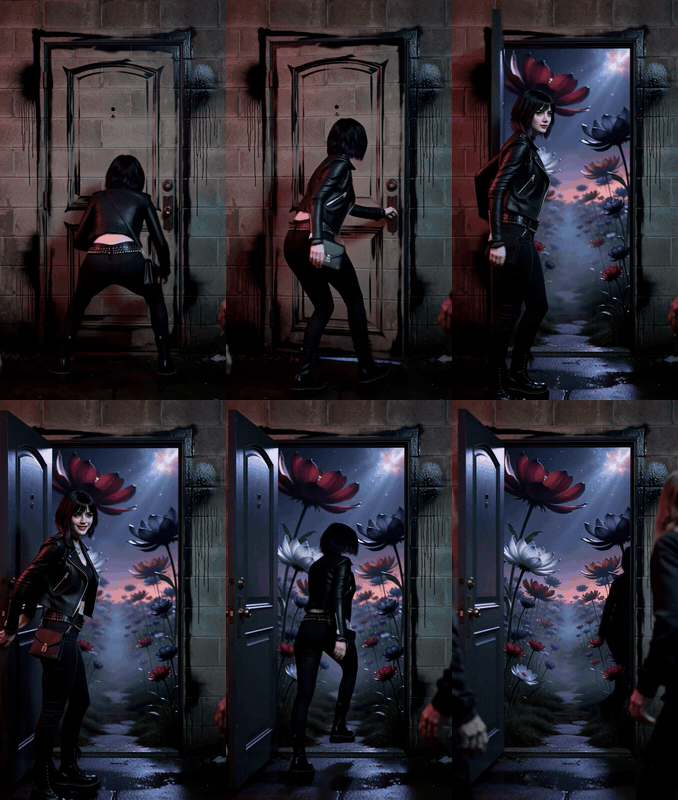 |  |
| Turbo LoRA, 8 steps | 20 steps | img2img, first frame |
| Motorcycle, 8 s | Night train, from a picture | Cooking dinner, with speech |
|---|---|---|
 |  | 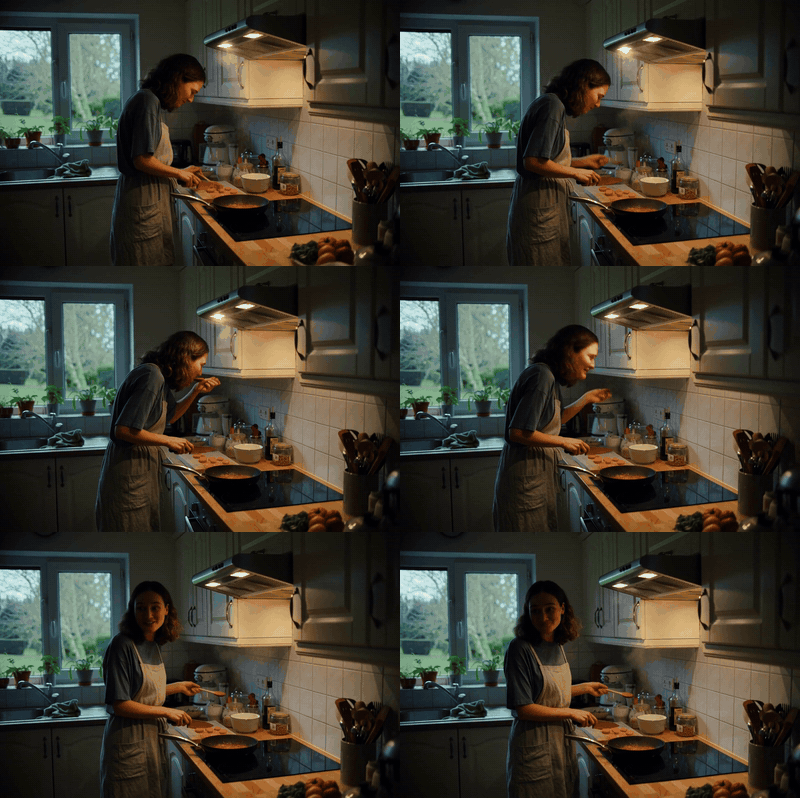 |
| Synthwave soundtrack and engine | img2img, first frame | Dialogue and kitchen sounds |
| Puppy, 5 s | Two friends, in Portuguese | Village festival, 10 s |
|---|---|---|
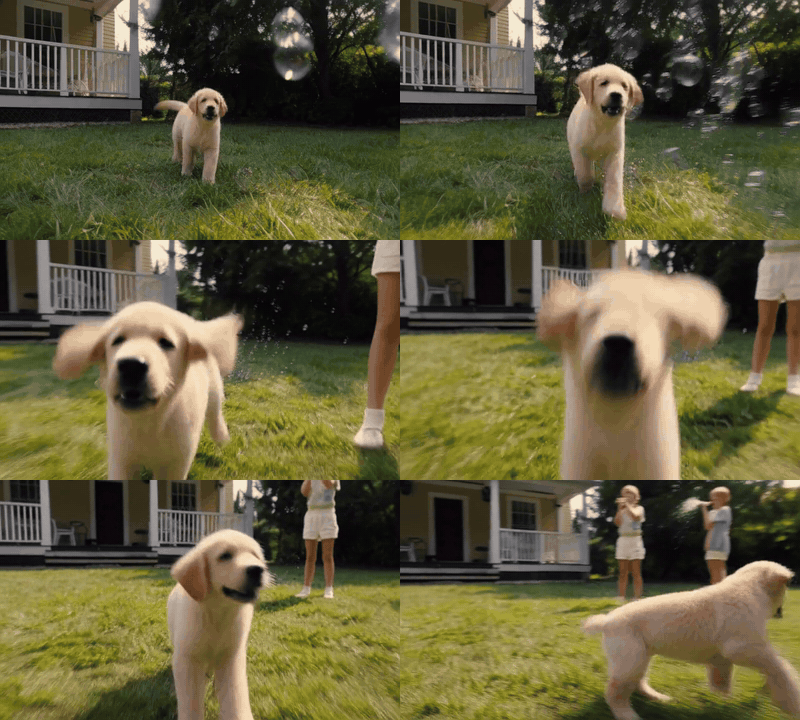 |  | 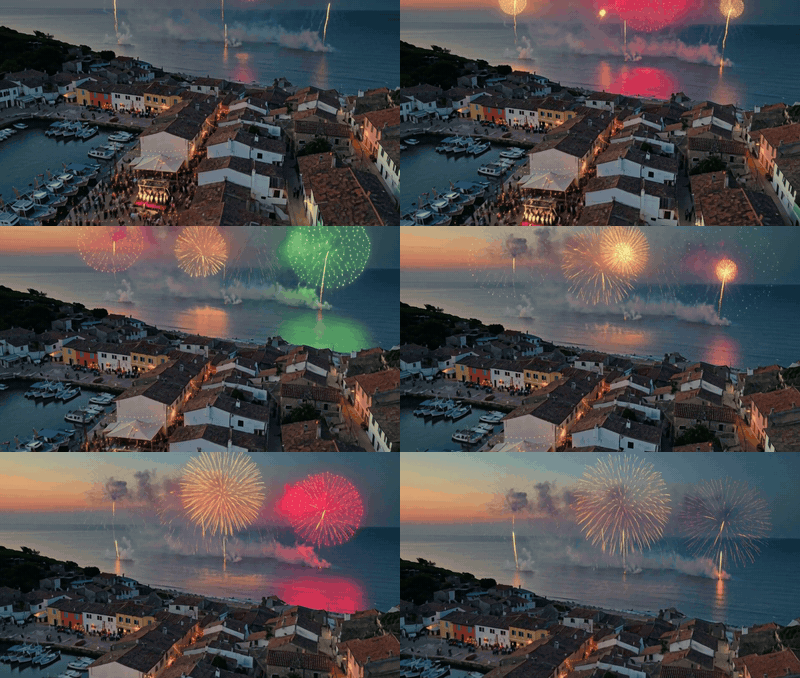 |
| RTX 4090 (24 GB), smaller files | RTX 4090, 10 s, dialogue | RTX 4090, 960×544 |
Every prompt, the exact settings and the generation times - plus more clips, FastH3 and a community checkpoint - are in the Examples page of the wiki.
🎯 Features
[!Tip] Step-by-step guides, every setting explained and measured times are in the wiki.
🔊 Video and Sound Together
- Describe what happens and what it sounds like in one prompt - footsteps, rain, engines, music, a line of dialogue
- Audio shift slider to vary how speech and sound are delivered
- Picture and sound are generated together and saved as one MP4, shown in Forge's usual result area
- Up to 15 seconds per clip, at 24 frames per second
- Include generated audio checkbox for a silent video
- Still image output for a single picture from the model
🖼️ First and Last Frame
- img2img - your input image becomes the first frame of the video
- Last frame - turn on ImageStitch Integrated, which Forge Neo already has, and add one image to its gallery
- Use both in img2img for a video that goes from one picture to the other; in txt2img the gallery image is the ending
- Works the same way as Wan 2.2 in Forge Neo
🧩 Reference Pictures (Ref2VA)
- Up to 9 pictures of people, places and objects, kept in a new scene - a face, a workshop, a pocket watch, a cat
- Select a Ref2VA checkpoint and add the pictures to ImageStitch Integrated; in img2img the input image is the first one
- Pictures of any proportions, in the order the prompt numbers them (
<Picture 1>,<Picture 2>...) - Prompts in MiniMax's full-reference format, with lines in any language
🎛️ Familiar Forge Controls
- Runs inside txt2img and img2img - no separate tab, no extra program
- Works with the Forge Neo model folders and the VAE / Text Encoder selector you already use
- Frames takes the place of Batch Size and shows the length of the video
- Steps stays the quality control, as with any model
- The h3 UI preset sets the sampler, schedule, steps, CFG and Shift
- A small MiniMax H3 panel holds the video options
⚡ Faster Generation
- Turbo LoRAs - 8 steps instead of 20, about twice as fast
- FastH3 - a distilled 8-step checkpoint, no LoRA needed, with the sparse attention it was trained with
- Community turbo checkpoints that already include the distillation
- Sparse Attention Integrated - long clips up to a quarter faster, with the prompt and the soundtrack kept exact
- Live preview of the clip while it is generated, sharp with the TAESD method
🧠 Forge Memory Management
- The model stays loaded between generations, like any Forge checkpoint
- 24 GB cards work with Forge's own offloading - 10-second clips on an RTX 4090 without Never OOM
- Never OOM Integrated works with H3 - a 6-second clip in about 22 GB of VRAM
- Smaller formats - W4A8 and INT4 files and GGUF checkpoints, for less RAM and disk
- Switching from H3 to another model releases it first, so system RAM does not run out
🛡️ Safe by Design
- Changes no Forge Neo file - remove the extension and everything is as it was
- Checks your Forge Neo at startup and stays disabled if something it needs is missing
- Checks every model file before loading it, and explains clearly when something is not supported
- Other models are not affected
📦 Installation
- Open Forge Neo WebUI
- Go to Extensions → Install from URL
- Paste:
https://github.com/eduardoabreu81/minimax-h3-forge-neo - Click Install and restart the WebUI
- Place the H3 files in the usual folders:
| Part | File | Folder |
|---|---|---|
| H3 checkpoint | minimax_h3_fl2va_pruned_int8_convrot | models/Stable-diffusion |
| Text encoder | qwen3vl_32b_minimax_h3_int8_convrot | models/text_encoder |
| Video VAE | minimax_h3_video_vae_fp16 | models/VAE |
| Audio VAE | minimax_h3_audio_vae_fp32 | models/VAE |
| Turbo LoRA (optional) | minimax_h3_fl2v_turbo_8step_v1.0_comfyui_bf16 | models/Lora |
For a 24 GB or 16 GB card, or to use less system RAM, swap the checkpoint and the text encoder for these smaller files (same folders, same VAEs):
| Part | File | Size |
|---|---|---|
| H3 checkpoint | minimax_h3_fl2va_pruned_w4a8_mixed (Kijai) | 12.5 GB |
| Text encoder | qwen3vl_32b_minimax_h3_int4_convrot (Merserk) | 14.9 GB |
- Make sure FFmpeg is installed (or set its path in Settings → MiniMax H3)
- Pick the h3 UI preset, the checkpoint, and all three of the text encoder, the video VAE and the audio VAE under VAE / Text Encoder
[!Tip] On a 16 GB card, start Forge Neo with
--cuda-malloc(for example inwebui-user.bat). Without it, the memory left behind by the text encoder is too fragmented for the checkpoint and the first step runs out of VRAM. With it, the smaller set ran a 3-second 640×384 clip without Never OOM; for longer or larger clips turn on Never OOM Integrated. See the 16 GB page.
[!Note] H3 is a large model and Forge keeps its files in system RAM. With the smaller set, a 16 GB card ran with 32 GB of RAM; on a 24 GB RTX 4090, Forge used about 35 GB of RAM with the smaller set and about 67 GB with the INT8 checkpoint and the INT4 text encoder; on a 48 GB card the INT8 set peaked at about 46 GiB. Other files that work - FastH3, GGUF checkpoints, Kijai's INT8 video VAE, community checkpoints - and the measurements are in the Models and Performance and Memory pages.
⚙️ Recommended Settings
| Setup | Sampler | Schedule type | Steps | CFG | Shift |
|---|---|---|---|---|---|
| Regular (the h3 preset) | Res Multistep | Simple | 20 | 1 | 12 |
| Turbo LoRA at weight 1 | Res Multistep | Simple | 8, or 12 with speech | 1 | 6 |
| FastH3 checkpoint | Res Multistep | Simple | 8 | 1 | 10 |
Start from the h3 preset and change the steps and Shift by hand for a turbo LoRA or FastH3.
Launch options - two Forge Neo flags worth adding for H3. They go in COMMANDLINE_ARGS, in webui-user.bat on Windows or webui-user.sh on Linux, for example set COMMANDLINE_ARGS=--cuda-malloc --use-ck-attention:
| Flag | What it does | When to use it |
|---|---|---|
--cuda-malloc | Lets the NVIDIA driver organize the graphics card's memory. H3 swaps very large parts in and out of the card (the text encoder, then the model), and the default organizer can leave the free memory in pieces too small to use | Always on 16 GB cards - without it the first step can run out of memory. Harmless elsewhere |
--use-ck-attention | A faster way to compute attention, the heaviest part of every step, using 8-bit math | Any time - 3-10% faster, same picture. Needs the comfy-kitchen that comes with Forge Neo from 3 October 2026 |
More about both on the wiki: 16 GB Cards and Speed Options.
Sparse Attention Integrated - speeds up long clips:
| Scene | Timestep Range | Extra Tokens | Saves |
|---|---|---|---|
| Simple motion (walking, running, talking) | 0.15 - 0.85 (the default) | 0 | about 25% |
| Turns, spins, flips, vehicles cornering | 0.50 - 1.00 | 256 | about 15% |
With the default range, a person or object turning on itself may "morph" instead of rotating; starting at 0.50 keeps the motion of the regular result. With FastH3 the same switch turns on its own sparse attention.
Width and Height must be multiples of 32. The model looks best at 768 on the short side - 1152x768, 768x1152, 1024x576 or 576x1024. Use at least 544 with a turbo LoRA.
Frames sets the length, at 24 frames per second:
| Frames | Length |
|---|---|
| 22 | about 1 second |
| 73 | about 3 seconds |
| 124 | about 5 seconds |
| 192 | 8 seconds |
| 362 | about 15 seconds (the maximum) |
💡 Tips
- Start with a short, small clip to check your setup, then go longer
- Describe the sounds you want, and say whether there should be dialogue or music - "No music, no subtitles" works well
- Give background sounds a moment and some weight - "At 3 seconds a train pulls in with a loud screech of brakes" is heard; "a train in the background" may not be. Use 20 steps when they matter
- Music can be described like a producer would - genre, tempo and instruments, for example "a K-pop trap beat at 160 BPM with a heavy 808 bass, below the voices"
- Try Audio shift 6 for a different delivery of the same line - neither value is better, they are different takes
- Put dialogue in quotes after who says it, and keep it short for the clip length. MiniMax's prompt guide shows the layout the model was trained with, with each line as
<d>[English] ...</d>after its speaker - Describe what every person wears - a detail given to one person may be copied to the others
- For several events, put them in order, give timings for long clips, and leave time for the last one
- At CFG 1 the negative prompt is not used - say what you do not want in the prompt itself
- From a picture, describe the motion and the sound, not what the picture already shows
- With first or last frame, start the prompt with the model's instruction line, which says where each picture sits in the clip - the lines are in the wiki's Writing Prompts
- With reference pictures, say in the prompt what each one should keep - face, hair, clothes, the shape of an object - and keep
ref2vain the checkpoint's file name, which is how the extension recognizes it - For first and last frame, use pictures with the same proportions as the video; the last frame is cropped to the video size
- With a turbo LoRA on long clips, set Diffusion in Low Bits to Automatic (fp16 LoRA) to save system RAM; on shorter clips the default Automatic is slightly faster
- For a sharp live preview, set Live Preview Method to TAESD in Forge's settings - the preview decoder downloads by itself
- Restart Forge before changing the text encoder
- Keep the same seed when comparing settings
- Keep the MP4 and the JSON file saved next to it - it records the settings
- Use the files listed above first; a checkpoint called H3 elsewhere may be a different format
- Commercial use of the videos needs a commercial license from MiniMax - check the model's license first
📄 Credits
- Forge Neo by Haoming02
- MiniMax H3 by MiniMax
- ComfyUI - reference implementation of the model
- Comfy-Org - the model files and the turbo LoRAs
- FastVideo - FastH3
- Kijai - the INT8 video VAE and the W4A8 checkpoints
- Merserk - the INT4 text encoder
- unsloth - GGUF checkpoints
- madebyollin - the taeh3 live preview decoder
- lightx2v - turbo LoRA settings
- Krea 2 - the reference pictures in the examples were made with Krea 2 Turbo in Forge Neo
📜 License
AGPL-3.0 - see LICENSE
Made with ❤️ for the Stable Diffusion community
Similar repos







See what people are saying
README
🎬 MiniMax H3 for Forge Neo
Extension for Stable Diffusion WebUI Forge - Neo
Generate videos with sound with MiniMax H3 inside Forge Neo, using the checkpoint, preset and Generate button you already know - describe the scene and its sounds, start from a picture, or give it pictures of the people and things to show, and get an MP4 with picture and audio made together.
"You shall run... on sixteen gigabytes of VRAM... on Forge Neo!" - made by this extension on a 16 GB card with 32 GB of RAM (first frame from Krea 2, 8 seconds with sound). Click for the MP4.
[!Important] Work in progress. Text-to-video with sound, first/last frame and reference pictures work. Tested on a 48 GB A40, a 24 GB RTX 4090 and a 16 GB RTX 2000 Ada with 32 GB of system RAM, using the smaller files. Cards under 16 GB have not been tested yet.
This extension requires an up-to-date Forge Neo (the
neobranch, revisiond70373eof 3 October 2026 or later, with comfy-kitchen 0.2.37). On an older version it stays disabled and tells you so in the console - Forge Neo itself keeps working as usual.
📋 Table of Contents
🆕 What's New
v0.6.0 - Reference Pictures and 16 GB Cards
- Reference pictures (Ref2VA) - up to 9 pictures of people, places and objects, kept in a new scene, with a Ref2VA checkpoint and Forge's ImageStitch Integrated
- 16 GB cards with 32 GB of RAM - weights that leave VRAM point back to their file on disk instead of being copied into system RAM, so H3's 15 GB text encoder no longer runs a 32 GB machine out of memory
--use-ck-attention- Forge Neo's INT8 attention now runs H3 (comfy-kitchen 0.2.37 or later), 3-10% faster- Writing prompts - MiniMax's prompt layouts, the instruction lines for first and last frame and the reference format, on a new wiki page
v0.5.0 - Smaller Files and 24 GB Cards
- Tested on a 24 GB card - an RTX 4090 made 10-second clips at 960×544 and 576×768 with Forge's own memory management, no Never OOM needed
- Smaller files, same quality - Kijai's W4A8 checkpoint (12.5 GB) and an INT4 text encoder (14.9 GB) use about half the system RAM of the INT8 set, and are faster on 24 GB cards
- GGUF checkpoints - Q2_K to Q8_0 GGUF diffusion models load as they are
- Real format names - the Components list shows what each file actually is (W4A8, INT4, GGUF...)
v0.4.0 - Faster Attention, Sharper Preview, More Sound Control
- Sparse Attention made for H3 - with Sparse Attention Integrated on, H3 keeps the prompt and the soundtrack exact and speeds up long clips by up to a quarter
- FastH3 at full speed - its own sparse attention (VSA), about 25% faster on long clips
- Sharp live preview - choose TAESD to watch a clear frame of the clip while it is generated
- Audio shift - a new slider that changes the delivery and timing of the sound
- Faster turbo LoRAs in fp16 LoRA mode - half the extra cost of applying a LoRA on the fly
v0.3.0 - Pictures, Faster Models and Live Preview
- First and last frame - tested and working: start a video from a picture, end it on another, or both
- FastH3 - the 8-step distilled checkpoint by FastVideo, no LoRA needed
- Community checkpoints - H3 fine-tunes in INT8 and W4A8 formats load as they are
- Smaller video VAE - Kijai's INT8 video VAE, with the same picture
- Live preview - watch the middle frame of the clip while it is generated
- Safe model switching - leaving H3 for another model no longer runs out of system RAM
- Turbo LoRAs on long clips - 15-second clips with a turbo LoRA, using Forge's Automatic (fp16 LoRA) mode
v0.2.0 - Native Forge Neo Support
- Much faster - H3 runs on Forge Neo's own engine: a short clip that took 5 minutes now takes under one
- Nothing extra to install - no packages are added to Forge Neo
- h3 UI preset and turbo LoRAs with the usual
<lora:name:weight>syntax
v0.1.2 - First Public Preview
- Text-to-video with sound inside Forge Neo
🎥 Examples
Made inside Forge Neo, with sound. The previews are silent - click one to download the MP4 with sound.
| Bus stop, 15 s | Neon alley, 15 s | Bicycle, from a picture |
|---|---|---|
| | |
| Turbo LoRA, 8 steps | 20 steps | img2img, first frame |
| Motorcycle, 8 s | Night train, from a picture | Cooking dinner, with speech |
|---|---|---|
| | |
| Synthwave soundtrack and engine | img2img, first frame | Dialogue and kitchen sounds |
| Puppy, 5 s | Two friends, in Portuguese | Village festival, 10 s |
|---|---|---|
| | |
| RTX 4090 (24 GB), smaller files | RTX 4090, 10 s, dialogue | RTX 4090, 960×544 |
Every prompt, the exact settings and the generation times - plus more clips, FastH3 and a community checkpoint - are in the Examples page of the wiki.
🎯 Features
[!Tip] Step-by-step guides, every setting explained and measured times are in the wiki.
🔊 Video and Sound Together
- Describe what happens and what it sounds like in one prompt - footsteps, rain, engines, music, a line of dialogue
- Audio shift slider to vary how speech and sound are delivered
- Picture and sound are generated together and saved as one MP4, shown in Forge's usual result area
- Up to 15 seconds per clip, at 24 frames per second
- Include generated audio checkbox for a silent video
- Still image output for a single picture from the model
🖼️ First and Last Frame
- img2img - your input image becomes the first frame of the video
- Last frame - turn on ImageStitch Integrated, which Forge Neo already has, and add one image to its gallery
- Use both in img2img for a video that goes from one picture to the other; in txt2img the gallery image is the ending
- Works the same way as Wan 2.2 in Forge Neo
🧩 Reference Pictures (Ref2VA)
- Up to 9 pictures of people, places and objects, kept in a new scene - a face, a workshop, a pocket watch, a cat
- Select a Ref2VA checkpoint and add the pictures to ImageStitch Integrated; in img2img the input image is the first one
- Pictures of any proportions, in the order the prompt numbers them (
<Picture 1>,<Picture 2>...) - Prompts in MiniMax's full-reference format, with lines in any language
🎛️ Familiar Forge Controls
- Runs inside txt2img and img2img - no separate tab, no extra program
- Works with the Forge Neo model folders and the VAE / Text Encoder selector you already use
- Frames takes the place of Batch Size and shows the length of the video
- Steps stays the quality control, as with any model
- The h3 UI preset sets the sampler, schedule, steps, CFG and Shift
- A small MiniMax H3 panel holds the video options
⚡ Faster Generation
- Turbo LoRAs - 8 steps instead of 20, about twice as fast
- FastH3 - a distilled 8-step checkpoint, no LoRA needed, with the sparse attention it was trained with
- Community turbo checkpoints that already include the distillation
- Sparse Attention Integrated - long clips up to a quarter faster, with the prompt and the soundtrack kept exact
- Live preview of the clip while it is generated, sharp with the TAESD method
🧠 Forge Memory Management
- The model stays loaded between generations, like any Forge checkpoint
- 24 GB cards work with Forge's own offloading - 10-second clips on an RTX 4090 without Never OOM
- Never OOM Integrated works with H3 - a 6-second clip in about 22 GB of VRAM
- Smaller formats - W4A8 and INT4 files and GGUF checkpoints, for less RAM and disk
- Switching from H3 to another model releases it first, so system RAM does not run out
🛡️ Safe by Design
- Changes no Forge Neo file - remove the extension and everything is as it was
- Checks your Forge Neo at startup and stays disabled if something it needs is missing
- Checks every model file before loading it, and explains clearly when something is not supported
- Other models are not affected
📦 Installation
- Open Forge Neo WebUI
- Go to Extensions → Install from URL
- Paste:
https://github.com/eduardoabreu81/minimax-h3-forge-neo - Click Install and restart the WebUI
- Place the H3 files in the usual folders:
| Part | File | Folder |
|---|---|---|
| H3 checkpoint | minimax_h3_fl2va_pruned_int8_convrot | models/Stable-diffusion |
| Text encoder | qwen3vl_32b_minimax_h3_int8_convrot | models/text_encoder |
| Video VAE | minimax_h3_video_vae_fp16 | models/VAE |
| Audio VAE | minimax_h3_audio_vae_fp32 | models/VAE |
| Turbo LoRA (optional) | minimax_h3_fl2v_turbo_8step_v1.0_comfyui_bf16 | models/Lora |
For a 24 GB or 16 GB card, or to use less system RAM, swap the checkpoint and the text encoder for these smaller files (same folders, same VAEs):
| Part | File | Size |
|---|---|---|
| H3 checkpoint | minimax_h3_fl2va_pruned_w4a8_mixed (Kijai) | 12.5 GB |
| Text encoder | qwen3vl_32b_minimax_h3_int4_convrot (Merserk) | 14.9 GB |
- Make sure FFmpeg is installed (or set its path in Settings → MiniMax H3)
- Pick the h3 UI preset, the checkpoint, and all three of the text encoder, the video VAE and the audio VAE under VAE / Text Encoder
[!Tip] On a 16 GB card, start Forge Neo with
--cuda-malloc(for example inwebui-user.bat). Without it, the memory left behind by the text encoder is too fragmented for the checkpoint and the first step runs out of VRAM. With it, the smaller set ran a 3-second 640×384 clip without Never OOM; for longer or larger clips turn on Never OOM Integrated. See the 16 GB page.
[!Note] H3 is a large model and Forge keeps its files in system RAM. With the smaller set, a 16 GB card ran with 32 GB of RAM; on a 24 GB RTX 4090, Forge used about 35 GB of RAM with the smaller set and about 67 GB with the INT8 checkpoint and the INT4 text encoder; on a 48 GB card the INT8 set peaked at about 46 GiB. Other files that work - FastH3, GGUF checkpoints, Kijai's INT8 video VAE, community checkpoints - and the measurements are in the Models and Performance and Memory pages.
⚙️ Recommended Settings
| Setup | Sampler | Schedule type | Steps | CFG | Shift |
|---|---|---|---|---|---|
| Regular (the h3 preset) | Res Multistep | Simple | 20 | 1 | 12 |
| Turbo LoRA at weight 1 | Res Multistep | Simple | 8, or 12 with speech | 1 | 6 |
| FastH3 checkpoint | Res Multistep | Simple | 8 | 1 | 10 |
Start from the h3 preset and change the steps and Shift by hand for a turbo LoRA or FastH3.
Launch options - two Forge Neo flags worth adding for H3. They go in COMMANDLINE_ARGS, in webui-user.bat on Windows or webui-user.sh on Linux, for example set COMMANDLINE_ARGS=--cuda-malloc --use-ck-attention:
| Flag | What it does | When to use it |
|---|---|---|
--cuda-malloc | Lets the NVIDIA driver organize the graphics card's memory. H3 swaps very large parts in and out of the card (the text encoder, then the model), and the default organizer can leave the free memory in pieces too small to use | Always on 16 GB cards - without it the first step can run out of memory. Harmless elsewhere |
--use-ck-attention | A faster way to compute attention, the heaviest part of every step, using 8-bit math | Any time - 3-10% faster, same picture. Needs the comfy-kitchen that comes with Forge Neo from 3 October 2026 |
More about both on the wiki: 16 GB Cards and Speed Options.
Sparse Attention Integrated - speeds up long clips:
| Scene | Timestep Range | Extra Tokens | Saves |
|---|---|---|---|
| Simple motion (walking, running, talking) | 0.15 - 0.85 (the default) | 0 | about 25% |
| Turns, spins, flips, vehicles cornering | 0.50 - 1.00 | 256 | about 15% |
With the default range, a person or object turning on itself may "morph" instead of rotating; starting at 0.50 keeps the motion of the regular result. With FastH3 the same switch turns on its own sparse attention.
Width and Height must be multiples of 32. The model looks best at 768 on the short side - 1152x768, 768x1152, 1024x576 or 576x1024. Use at least 544 with a turbo LoRA.
Frames sets the length, at 24 frames per second:
| Frames | Length |
|---|---|
| 22 | about 1 second |
| 73 | about 3 seconds |
| 124 | about 5 seconds |
| 192 | 8 seconds |
| 362 | about 15 seconds (the maximum) |
💡 Tips
- Start with a short, small clip to check your setup, then go longer
- Describe the sounds you want, and say whether there should be dialogue or music - "No music, no subtitles" works well
- Give background sounds a moment and some weight - "At 3 seconds a train pulls in with a loud screech of brakes" is heard; "a train in the background" may not be. Use 20 steps when they matter
- Music can be described like a producer would - genre, tempo and instruments, for example "a K-pop trap beat at 160 BPM with a heavy 808 bass, below the voices"
- Try Audio shift 6 for a different delivery of the same line - neither value is better, they are different takes
- Put dialogue in quotes after who says it, and keep it short for the clip length. MiniMax's prompt guide shows the layout the model was trained with, with each line as
<d>[English] ...</d>after its speaker - Describe what every person wears - a detail given to one person may be copied to the others
- For several events, put them in order, give timings for long clips, and leave time for the last one
- At CFG 1 the negative prompt is not used - say what you do not want in the prompt itself
- From a picture, describe the motion and the sound, not what the picture already shows
- With first or last frame, start the prompt with the model's instruction line, which says where each picture sits in the clip - the lines are in the wiki's Writing Prompts
- With reference pictures, say in the prompt what each one should keep - face, hair, clothes, the shape of an object - and keep
ref2vain the checkpoint's file name, which is how the extension recognizes it - For first and last frame, use pictures with the same proportions as the video; the last frame is cropped to the video size
- With a turbo LoRA on long clips, set Diffusion in Low Bits to Automatic (fp16 LoRA) to save system RAM; on shorter clips the default Automatic is slightly faster
- For a sharp live preview, set Live Preview Method to TAESD in Forge's settings - the preview decoder downloads by itself
- Restart Forge before changing the text encoder
- Keep the same seed when comparing settings
- Keep the MP4 and the JSON file saved next to it - it records the settings
- Use the files listed above first; a checkpoint called H3 elsewhere may be a different format
- Commercial use of the videos needs a commercial license from MiniMax - check the model's license first
📄 Credits
- Forge Neo by Haoming02
- MiniMax H3 by MiniMax
- ComfyUI - reference implementation of the model
- Comfy-Org - the model files and the turbo LoRAs
- FastVideo - FastH3
- Kijai - the INT8 video VAE and the W4A8 checkpoints
- Merserk - the INT4 text encoder
- unsloth - GGUF checkpoints
- madebyollin - the taeh3 live preview decoder
- lightx2v - turbo LoRA settings
- Krea 2 - the reference pictures in the examples were made with Krea 2 Turbo in Forge Neo
📜 License
AGPL-3.0 - see LICENSE
Made with ❤️ for the Stable Diffusion community