🥰 Building AI-based conversational avatars lightning fast ⚡️💬
Python
692
929 commits
updated Oct 17, 2026
🥰 Building AI-based conversational avatars lightning fast ⚡️💬
⚡️ Ultra-low latency — streaming and parallel throughout the pipeline, even running STT speculatively and giving a spoken nod before the answer itself. <1s from end of speech to first audio, measured.
💬 Semantic turn management — turn end, turn taking, and even the wakeword are judged by meaning, not just by silence or keywords. A thinking pause doesn't cut the user off, a backchannel doesn't interrupt the avatar, and picking up where the last conversation left off wakes it without saying its name.
🧩 Modular architecture — VAD, STT, LLM, and TTS are swappable parts: popular providers are built in, and a small interface covers the rest. A more natural voice or a smarter model ships — your avatar levels up with it.
🦜 AI Agent native — tool calls and MCP, of course. Tools load only when needed, so a large catalog never confuses the model, and slow ones never stall the conversation: background execution, or a reply straight from a template.
🥳 Multimodal and expressive — accepts speech, text, images, and files; replies with voice, facial expressions, animations, and on-screen artifacts. A chart or a map appears just as the avatar mentions it.
🌐 Omnichannel — web, phone, LINE, metaverse, and local devices all run off one pipeline, and the conversation follows the user rather than the channel: hang up the phone, open LINE, and it is still there.
📦 Ready for production — Admin Panel for config, logs, metrics, and evaluation, plus Langfuse tracing. Retune a running pipeline without restarting. Guardrails run in parallel and can interrupt the avatar mid-sentence to correct what it just said.
Requirements: Python 3.11+, an OpenAI API key, and a reachable VOICEVOX-compatible server at its default URL.
Install AIAvatarKit.
pip install aiavatar
Start the built-in default application.
export OPENAI_API_KEY=sk-xxx
aiavatar
The built-in application uses Namo Turn semantic VAD. When its optional dependencies are missing, the command asks whether to install them:
Additional dependencies are required to enable Semantic VAD. Install them now? [y/N]:
Answer y to install aiavatar[namo-turn] into the current Python environment and continue startup automatically. Answer n to start without the Namo Turn gate; Silero VAD and the filler gate remain enabled.
Open http://127.0.0.1:8000/ and enjoy the conversation! The Admin Panel is available at http://127.0.0.1:8000/admin/.
Or, write your own application script when you need full, fine-grained control over components, routes, and application lifecycle. Save the following as run.py.
import os

from fastapi import FastAPI
from fastapi.staticfiles import StaticFiles
from aiavatar.adapter.websocket.server import AIAvatarWebSocketServer
from aiavatar.admin import setup_admin_panel
from aiavatar.util import download_example

# Download example UI if not exists
html_dir = download_example("websocket/html")

# Build Speech-to-Speech pipeline with WebSocket adapter
aiavatar_app = AIAvatarWebSocketServer(
    openai_api_key=os.environ["OPENAI_API_KEY"]
)

app = FastAPI()
app.include_router(aiavatar_app.get_websocket_router())

# Admin panel (optional)
setup_admin_panel(app, adapter=aiavatar_app)

# Serve the UI at "/". This catch-all mount must come after the routes above.
app.mount("/", StaticFiles(directory=html_dir, html=True), name="ui")
Start the server. Don't forget to launch VOICEVOX beforehand.
python -m uvicorn run:app
Same URLs as before: http://127.0.0.1:8000/ for the avatar, /admin/ for the Admin Panel.
See Getting started for the CLI options, script mode, and every setting of the built-in application.
NOTE: If the steps in technical blogs don't work as expected, the blog may be based on a version prior to v0.6. Some features may be limited, but you can try downgrading with pip install aiavatar==0.5.8 to match the environment described in the blog.
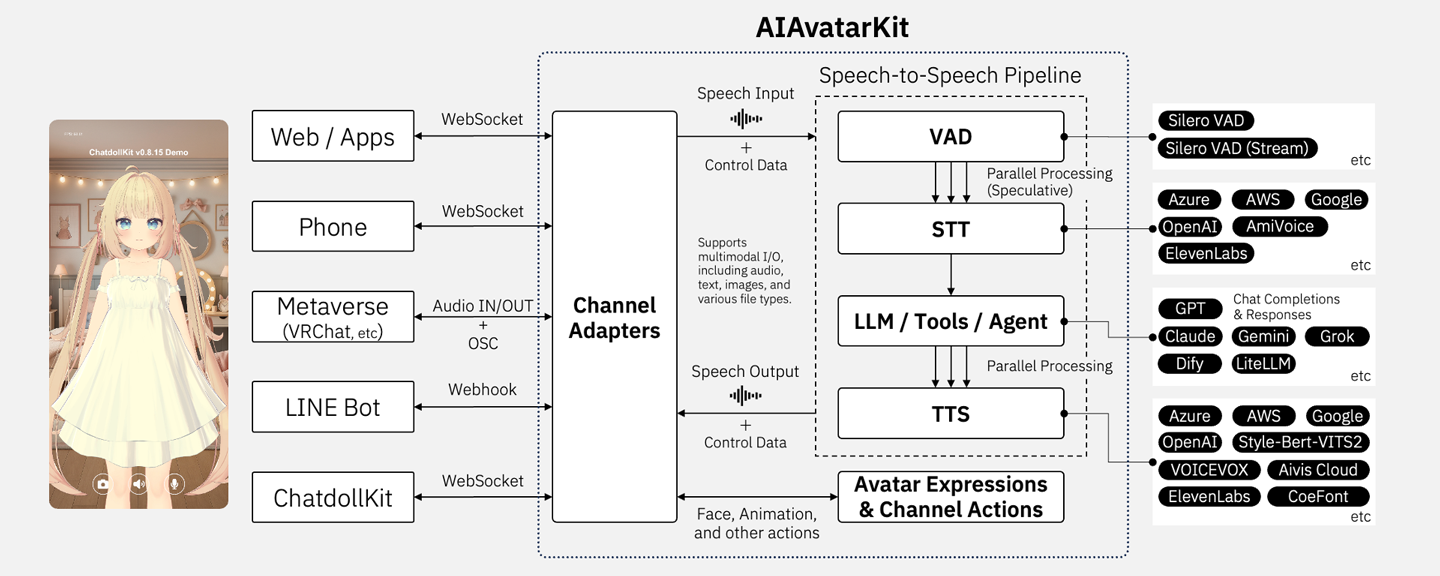
A single STSPipeline turns what the user says into what the avatar says and does. Each stage is a replaceable module, and each stage streams into the next.
flowchart LR
    CH["Web / App · Phone<br/>Metaverse · LINE · Device"]
    AD(["Channel<br/>Adapter"])
    CH <--> AD
    AD <--> STS
    subgraph STS ["Speech-to-Speech Pipeline"]
        direction LR
        VAD --> STT --> LLM["LLM / Tools / Agent"] --> TTS
        LLM --> ACT["face · animation<br/>artifacts"]
    end
An Adapter wraps the pipeline for one channel — WebSocket, HTTP, telephony, messaging — and owns only transport concerns. Multiple adapters can attach to the same pipeline instance, so a user can move between channels within one conversation.
Every component is a swappable module, and these are the implementations that ship with it:
| Component | Services |
|---|---|
| Voice Activity Detection | Silero VAD · Silero VAD (streaming) · Azure Speech · Amazon Transcribe · Parapper · volume threshold |
| Turn-end gates | Smart Turn · Namo Turn · Jev · OpenAI Decisions · LLM-based · filler-only · session hold · custom |
| Turn-taking gates | Jev · OpenAI Decisions · wakeword · session allowance · multiple gates · custom |
| Speech-to-Text | Azure Speech · Google Cloud Speech-to-Text · OpenAI · AmiVoice, and any OpenAI-compatible endpoint |
| LLM | OpenAI Chat Completions · Azure OpenAI · OpenAI Responses API · Anthropic Claude · Google Gemini · xAI Grok · OpenRouter · LM Studio · Dify · LiteLLM |
| Text-to-Speech | VOICEVOX · AivisSpeech · Azure · Google · OpenAI · VOISONA · SpeechGateway · Style-Bert-VITS2 · Aivis Cloud API · ElevenLabs · Kotodama · CoeFont · Amazon Polly · COEIROINK |
| Channels | WebSocket · HTTP (SSE) · LINE Bot · Twilio Voice and SMS · Asterisk · OpenAI-compatible endpoint · speech recognition only |
Between OpenRouter and LiteLLM, practically any commercially available model — GPT, Claude, Gemini, Grok, Llama, Qwen, DeepSeek, Mistral, and others — can be used without writing an integration.
Any TTS service that exposes an HTTP endpoint can be added the same way, without writing a synthesizer class. Several of the services above are supported exactly like that.
from aiavatar.sts.llm.claude import ClaudeService

llm = ClaudeService(
    anthropic_api_key=ANTHROPIC_API_KEY,
    model="claude-sonnet-4-5",
    system_prompt="You are my cat.",
)

aiavatar_app = AIAvatarWebSocketServer(
    llm=llm,
    openai_api_key=OPENAI_API_KEY,  # still used for STT
)
Or reach any model through an OpenAI-compatible endpoint such as OpenRouter:
from aiavatar.sts.llm.chatgpt import ChatGPTService

llm = ChatGPTService(
    openai_api_key=OPENROUTER_API_KEY,
    base_url="https://openrouter.ai/api/v1",
    model=OPENROUTER_MODEL,
    system_prompt="You are my cat.",
)
from aiavatar.sts.tts.voicevox import VoicevoxSpeechSynthesizer

# AivisSpeech exposes a VOICEVOX-compatible API
tts = VoicevoxSpeechSynthesizer(
    base_url="http://127.0.0.1:10101",
    speaker="888753761",  # Anneli
    cache_dir="./tts_cache/aivisspeech",
)

aiavatar_app = AIAvatarWebSocketServer(tts=tts, openai_api_key=OPENAI_API_KEY)
Or wrap any HTTP TTS endpoint without writing a class:
from aiavatar.sts.tts import create_instant_synthesizer

tts = create_instant_synthesizer(
    method="POST",
    url=f"https://api.elevenlabs.io/v1/text-to-speech/{voice_id}",
    headers={"xi-api-key": ELEVENLABS_API_KEY},
    params={"output_format": "wav_16000"},   # Query parameter, not body
    json={
        "text": "{text}",  # Placeholder for processed text
        "model_id": "eleven_v3",
    },
)
weather_tool_spec = {
    "type": "function",
    "function": {
        "name": "get_weather",
        "description": "Get the current weather and forecast for a location",
        "parameters": {
            "type": "object",
            "properties": {"location": {"type": "string"}},
            "required": ["location"],
        },
    },
}

@aiavatar_app.sts.llm.tool(weather_tool_spec)
async def get_weather(location: str):
    return await weather_api(location=location)
@llm.tool() stores the spec as given, so it must already be in that provider's format.
To write one spec and use it anywhere, register through add_tool() instead — it converts
between the Chat Completions, Gemini, and Claude shapes for you:
from aiavatar.sts.llm import Tool

aiavatar_app.sts.llm.add_tool(
    Tool("get_weather", weather_tool_spec, get_weather)
)
from contextlib import asynccontextmanager

from fastapi import FastAPI
from aiavatar.sts.llm.tools.mcp import StreamableHttpMCP

mcp = StreamableHttpMCP(url=MCP_URL)
mcp.for_each_tool = aiavatar_app.sts.llm.add_tool

@asynccontextmanager
async def lifespan(app: FastAPI):
    try:
        await mcp.initialize()   # Connects and registers the server's tools
        yield
    finally:
        await mcp.close()

app = FastAPI(lifespan=lifespan)
app.include_router(aiavatar_app.get_websocket_router())
for_each_tool is the callback; initialize() is what connects to the server and runs it.
Setting the callback alone registers nothing.
Every stage chosen explicitly: Azure for recognition, streaming Silero for turn detection, GPT for generation, and Aivis Cloud for the voice.
import os

from fastapi import FastAPI
from aiavatar.sts import STSPipeline
from aiavatar.sts.stt.azure import AzureSpeechRecognizer
from aiavatar.sts.vad.stream import SileroStreamSpeechDetector
from aiavatar.sts.llm.openai_responses_websocket import OpenAIResponsesWebSocketService
from aiavatar.sts.tts import AudioConverter, create_instant_synthesizer
from aiavatar.adapter.websocket.server import AIAvatarWebSocketServer

# Speech-to-Text
stt = AzureSpeechRecognizer(
    azure_api_key=os.environ["AZURE_API_KEY"],
    azure_region=os.environ["AZURE_REGION"],
    language="ja-JP",
)

# Voice activity detection, recognizing segments while the user is still speaking
vad = SileroStreamSpeechDetector(
    speech_recognizer=stt,
    silence_duration_threshold=0.5,
    segment_silence_threshold=0.2,
    min_duration=0.2,
    min_text_length=2,  # Accept a shorter utterance if partial text has at least 2 characters
)

# LLM
llm = OpenAIResponsesWebSocketService(
    openai_api_key=os.environ["OPENAI_API_KEY"],
    model="gpt-5.6-terra",
    system_prompt="You are my cat.",
    reasoning_effort="none",
)

# Text-to-Speech, wrapping the Aivis Cloud HTTP endpoint
tts = create_instant_synthesizer(
    method="POST",
    url="https://api.aivis-project.com/v1/tts/synthesize",
    headers={
        "Content-Type": "application/json",
        "Authorization": f"Bearer {os.environ['AIVIS_API_KEY']}",
    },
    json={
        "model_uuid": "22e8ed77-94fe-4ef2-871f-a86f94e9a579",   # Kohaku
        "text": "{text}",
    },
    response_parser=AudioConverter().convert,
)

# The pipeline owns the conversation; the adapter owns the transport
sts = STSPipeline(vad=vad, stt=stt, llm=llm, tts=tts)

aiavatar_app = AIAvatarWebSocketServer(sts=sts)

app = FastAPI()
app.include_router(aiavatar_app.get_websocket_router())
Aivis Cloud returns encoded audio, so AudioConverter().convert transcodes it — that path
shells out to ffmpeg, which must be installed separately.
The recognizer is passed twice on purpose. SileroStreamSpeechDetector uses it to transcribe
segments mid-utterance, and the pipeline keeps it for requests that arrive as audio rather
than as already-recognised text.
At a silence-based turn end, streaming Silero accepts nonempty recognised text when
the recording duration excluding trailing silence reaches min_duration (default
0.2 seconds) or the partial text length reaches min_text_length (default 2). Text validation
and turn-taking gates still apply. Keep these thresholds no higher than their
on_recording_started_min_duration and on_recording_started_min_text_length
counterparts; this relationship is not enforced. See VAD input thresholds.
Silero VAD runs on CPU using ONNX Runtime. For a local hub directory or a custom
.onnx model, see Local Silero models.
Take the sts built above and hand the same instance to every adapter. One conversation,
one set of components, several ways in.
from aiavatar.adapter.websocket.server import AIAvatarWebSocketServer
from aiavatar.adapter.linebot.server import AIAvatarLineBotServer

websocket_adapter = AIAvatarWebSocketServer(
    sts=sts,
    channel="websocket",
)

line_adapter = AIAvatarLineBotServer(
    sts=sts,
    channel_access_token=os.environ["LINEBOT_CHANNEL_ACCESS_TOKEN"],
    channel_secret=os.environ["LINEBOT_CHANNEL_SECRET"],
    api_key=os.environ["LINEBOT_ADMIN_API_KEY"],
    channel="linebot",
)

app.include_router(websocket_adapter.get_websocket_router(path="/ws"))
app.include_router(line_adapter.get_api_router(), prefix="/line")
Sharing the pipeline shares its components and its conversation storage. To have the same person resume their conversation when they switch channels, add a channel context bridge.
aiavatar command, .env settings, Admin Panel, script modeon_recording_started, custom trigger conditions, custom detectors@llm.tool versus add_tool, one definition across GPT, Gemini, and Claudecontinue_chain, structured content for the clientAvatarControlRequest, control tags, browser and Python clientsget_image_url, sending camera or screen images with a requestMemorySearchTool, shared context/chat-messages endpoint, standalone STT and TTS endpointsApache License 2.0. See LICENSE.
257 followers · starred Apr 2025
158 followers · starred May 2024
1,238 followers · starred Apr 2025
137 followers · starred Jan 2026
🥰 Building AI-based conversational avatars lightning fast ⚡️💬
Python
692
929 commits
updated Oct 17, 2026
🥰 Building AI-based conversational avatars lightning fast ⚡️💬
⚡️ Ultra-low latency — streaming and parallel throughout the pipeline, even running STT speculatively and giving a spoken nod before the answer itself. <1s from end of speech to first audio, measured.
💬 Semantic turn management — turn end, turn taking, and even the wakeword are judged by meaning, not just by silence or keywords. A thinking pause doesn't cut the user off, a backchannel doesn't interrupt the avatar, and picking up where the last conversation left off wakes it without saying its name.
🧩 Modular architecture — VAD, STT, LLM, and TTS are swappable parts: popular providers are built in, and a small interface covers the rest. A more natural voice or a smarter model ships — your avatar levels up with it.
🦜 AI Agent native — tool calls and MCP, of course. Tools load only when needed, so a large catalog never confuses the model, and slow ones never stall the conversation: background execution, or a reply straight from a template.
🥳 Multimodal and expressive — accepts speech, text, images, and files; replies with voice, facial expressions, animations, and on-screen artifacts. A chart or a map appears just as the avatar mentions it.
🌐 Omnichannel — web, phone, LINE, metaverse, and local devices all run off one pipeline, and the conversation follows the user rather than the channel: hang up the phone, open LINE, and it is still there.
📦 Ready for production — Admin Panel for config, logs, metrics, and evaluation, plus Langfuse tracing. Retune a running pipeline without restarting. Guardrails run in parallel and can interrupt the avatar mid-sentence to correct what it just said.
Requirements: Python 3.11+, an OpenAI API key, and a reachable VOICEVOX-compatible server at its default URL.
Install AIAvatarKit.
pip install aiavatar
Start the built-in default application.
export OPENAI_API_KEY=sk-xxx
aiavatar
The built-in application uses Namo Turn semantic VAD. When its optional dependencies are missing, the command asks whether to install them:
Additional dependencies are required to enable Semantic VAD. Install them now? [y/N]:
Answer y to install aiavatar[namo-turn] into the current Python environment and continue startup automatically. Answer n to start without the Namo Turn gate; Silero VAD and the filler gate remain enabled.
Open http://127.0.0.1:8000/ and enjoy the conversation! The Admin Panel is available at http://127.0.0.1:8000/admin/.
Or, write your own application script when you need full, fine-grained control over components, routes, and application lifecycle. Save the following as run.py.
import os

from fastapi import FastAPI
from fastapi.staticfiles import StaticFiles
from aiavatar.adapter.websocket.server import AIAvatarWebSocketServer
from aiavatar.admin import setup_admin_panel
from aiavatar.util import download_example

# Download example UI if not exists
html_dir = download_example("websocket/html")

# Build Speech-to-Speech pipeline with WebSocket adapter
aiavatar_app = AIAvatarWebSocketServer(
    openai_api_key=os.environ["OPENAI_API_KEY"]
)

app = FastAPI()
app.include_router(aiavatar_app.get_websocket_router())

# Admin panel (optional)
setup_admin_panel(app, adapter=aiavatar_app)

# Serve the UI at "/". This catch-all mount must come after the routes above.
app.mount("/", StaticFiles(directory=html_dir, html=True), name="ui")
Start the server. Don't forget to launch VOICEVOX beforehand.
python -m uvicorn run:app
Same URLs as before: http://127.0.0.1:8000/ for the avatar, /admin/ for the Admin Panel.
See Getting started for the CLI options, script mode, and every setting of the built-in application.
NOTE: If the steps in technical blogs don't work as expected, the blog may be based on a version prior to v0.6. Some features may be limited, but you can try downgrading with pip install aiavatar==0.5.8 to match the environment described in the blog.
A single STSPipeline turns what the user says into what the avatar says and does. Each stage is a replaceable module, and each stage streams into the next.
flowchart LR
    CH["Web / App · Phone<br/>Metaverse · LINE · Device"]
    AD(["Channel<br/>Adapter"])
    CH <--> AD
    AD <--> STS
    subgraph STS ["Speech-to-Speech Pipeline"]
        direction LR
        VAD --> STT --> LLM["LLM / Tools / Agent"] --> TTS
        LLM --> ACT["face · animation<br/>artifacts"]
    end
An Adapter wraps the pipeline for one channel — WebSocket, HTTP, telephony, messaging — and owns only transport concerns. Multiple adapters can attach to the same pipeline instance, so a user can move between channels within one conversation.
Every component is a swappable module, and these are the implementations that ship with it:
| Component | Services |
|---|---|
| Voice Activity Detection | Silero VAD · Silero VAD (streaming) · Azure Speech · Amazon Transcribe · Parapper · volume threshold |
| Turn-end gates | Smart Turn · Namo Turn · Jev · OpenAI Decisions · LLM-based · filler-only · session hold · custom |
| Turn-taking gates | Jev · OpenAI Decisions · wakeword · session allowance · multiple gates · custom |
| Speech-to-Text | Azure Speech · Google Cloud Speech-to-Text · OpenAI · AmiVoice, and any OpenAI-compatible endpoint |
| LLM | OpenAI Chat Completions · Azure OpenAI · OpenAI Responses API · Anthropic Claude · Google Gemini · xAI Grok · OpenRouter · LM Studio · Dify · LiteLLM |
| Text-to-Speech | VOICEVOX · AivisSpeech · Azure · Google · OpenAI · VOISONA · SpeechGateway · Style-Bert-VITS2 · Aivis Cloud API · ElevenLabs · Kotodama · CoeFont · Amazon Polly · COEIROINK |
| Channels | WebSocket · HTTP (SSE) · LINE Bot · Twilio Voice and SMS · Asterisk · OpenAI-compatible endpoint · speech recognition only |
Between OpenRouter and LiteLLM, practically any commercially available model — GPT, Claude, Gemini, Grok, Llama, Qwen, DeepSeek, Mistral, and others — can be used without writing an integration.
Any TTS service that exposes an HTTP endpoint can be added the same way, without writing a synthesizer class. Several of the services above are supported exactly like that.
from aiavatar.sts.llm.claude import ClaudeService

llm = ClaudeService(
    anthropic_api_key=ANTHROPIC_API_KEY,
    model="claude-sonnet-4-5",
    system_prompt="You are my cat.",
)

aiavatar_app = AIAvatarWebSocketServer(
    llm=llm,
    openai_api_key=OPENAI_API_KEY,  # still used for STT
)
Or reach any model through an OpenAI-compatible endpoint such as OpenRouter:
from aiavatar.sts.llm.chatgpt import ChatGPTService

llm = ChatGPTService(
    openai_api_key=OPENROUTER_API_KEY,
    base_url="https://openrouter.ai/api/v1",
    model=OPENROUTER_MODEL,
    system_prompt="You are my cat.",
)
from aiavatar.sts.tts.voicevox import VoicevoxSpeechSynthesizer

# AivisSpeech exposes a VOICEVOX-compatible API
tts = VoicevoxSpeechSynthesizer(
    base_url="http://127.0.0.1:10101",
    speaker="888753761",  # Anneli
    cache_dir="./tts_cache/aivisspeech",
)

aiavatar_app = AIAvatarWebSocketServer(tts=tts, openai_api_key=OPENAI_API_KEY)
Or wrap any HTTP TTS endpoint without writing a class:
from aiavatar.sts.tts import create_instant_synthesizer

tts = create_instant_synthesizer(
    method="POST",
    url=f"https://api.elevenlabs.io/v1/text-to-speech/{voice_id}",
    headers={"xi-api-key": ELEVENLABS_API_KEY},
    params={"output_format": "wav_16000"},   # Query parameter, not body
    json={
        "text": "{text}",  # Placeholder for processed text
        "model_id": "eleven_v3",
    },
)
weather_tool_spec = {
    "type": "function",
    "function": {
        "name": "get_weather",
        "description": "Get the current weather and forecast for a location",
        "parameters": {
            "type": "object",
            "properties": {"location": {"type": "string"}},
            "required": ["location"],
        },
    },
}

@aiavatar_app.sts.llm.tool(weather_tool_spec)
async def get_weather(location: str):
    return await weather_api(location=location)
@llm.tool() stores the spec as given, so it must already be in that provider's format.
To write one spec and use it anywhere, register through add_tool() instead — it converts
between the Chat Completions, Gemini, and Claude shapes for you:
from aiavatar.sts.llm import Tool

aiavatar_app.sts.llm.add_tool(
    Tool("get_weather", weather_tool_spec, get_weather)
)
from contextlib import asynccontextmanager

from fastapi import FastAPI
from aiavatar.sts.llm.tools.mcp import StreamableHttpMCP

mcp = StreamableHttpMCP(url=MCP_URL)
mcp.for_each_tool = aiavatar_app.sts.llm.add_tool

@asynccontextmanager
async def lifespan(app: FastAPI):
    try:
        await mcp.initialize()   # Connects and registers the server's tools
        yield
    finally:
        await mcp.close()

app = FastAPI(lifespan=lifespan)
app.include_router(aiavatar_app.get_websocket_router())
for_each_tool is the callback; initialize() is what connects to the server and runs it.
Setting the callback alone registers nothing.
Every stage chosen explicitly: Azure for recognition, streaming Silero for turn detection, GPT for generation, and Aivis Cloud for the voice.
import os

from fastapi import FastAPI
from aiavatar.sts import STSPipeline
from aiavatar.sts.stt.azure import AzureSpeechRecognizer
from aiavatar.sts.vad.stream import SileroStreamSpeechDetector
from aiavatar.sts.llm.openai_responses_websocket import OpenAIResponsesWebSocketService
from aiavatar.sts.tts import AudioConverter, create_instant_synthesizer
from aiavatar.adapter.websocket.server import AIAvatarWebSocketServer

# Speech-to-Text
stt = AzureSpeechRecognizer(
    azure_api_key=os.environ["AZURE_API_KEY"],
    azure_region=os.environ["AZURE_REGION"],
    language="ja-JP",
)

# Voice activity detection, recognizing segments while the user is still speaking
vad = SileroStreamSpeechDetector(
    speech_recognizer=stt,
    silence_duration_threshold=0.5,
    segment_silence_threshold=0.2,
    min_duration=0.2,
    min_text_length=2,  # Accept a shorter utterance if partial text has at least 2 characters
)

# LLM
llm = OpenAIResponsesWebSocketService(
    openai_api_key=os.environ["OPENAI_API_KEY"],
    model="gpt-5.6-terra",
    system_prompt="You are my cat.",
    reasoning_effort="none",
)

# Text-to-Speech, wrapping the Aivis Cloud HTTP endpoint
tts = create_instant_synthesizer(
    method="POST",
    url="https://api.aivis-project.com/v1/tts/synthesize",
    headers={
        "Content-Type": "application/json",
        "Authorization": f"Bearer {os.environ['AIVIS_API_KEY']}",
    },
    json={
        "model_uuid": "22e8ed77-94fe-4ef2-871f-a86f94e9a579",   # Kohaku
        "text": "{text}",
    },
    response_parser=AudioConverter().convert,
)

# The pipeline owns the conversation; the adapter owns the transport
sts = STSPipeline(vad=vad, stt=stt, llm=llm, tts=tts)

aiavatar_app = AIAvatarWebSocketServer(sts=sts)

app = FastAPI()
app.include_router(aiavatar_app.get_websocket_router())
Aivis Cloud returns encoded audio, so AudioConverter().convert transcodes it — that path
shells out to ffmpeg, which must be installed separately.
The recognizer is passed twice on purpose. SileroStreamSpeechDetector uses it to transcribe
segments mid-utterance, and the pipeline keeps it for requests that arrive as audio rather
than as already-recognised text.
At a silence-based turn end, streaming Silero accepts nonempty recognised text when
the recording duration excluding trailing silence reaches min_duration (default
0.2 seconds) or the partial text length reaches min_text_length (default 2). Text validation
and turn-taking gates still apply. Keep these thresholds no higher than their
on_recording_started_min_duration and on_recording_started_min_text_length
counterparts; this relationship is not enforced. See VAD input thresholds.
Silero VAD runs on CPU using ONNX Runtime. For a local hub directory or a custom
.onnx model, see Local Silero models.
Take the sts built above and hand the same instance to every adapter. One conversation,
one set of components, several ways in.
from aiavatar.adapter.websocket.server import AIAvatarWebSocketServer
from aiavatar.adapter.linebot.server import AIAvatarLineBotServer

websocket_adapter = AIAvatarWebSocketServer(
    sts=sts,
    channel="websocket",
)

line_adapter = AIAvatarLineBotServer(
    sts=sts,
    channel_access_token=os.environ["LINEBOT_CHANNEL_ACCESS_TOKEN"],
    channel_secret=os.environ["LINEBOT_CHANNEL_SECRET"],
    api_key=os.environ["LINEBOT_ADMIN_API_KEY"],
    channel="linebot",
)

app.include_router(websocket_adapter.get_websocket_router(path="/ws"))
app.include_router(line_adapter.get_api_router(), prefix="/line")
Sharing the pipeline shares its components and its conversation storage. To have the same person resume their conversation when they switch channels, add a channel context bridge.
aiavatar command, .env settings, Admin Panel, script modeon_recording_started, custom trigger conditions, custom detectors@llm.tool versus add_tool, one definition across GPT, Gemini, and Claudecontinue_chain, structured content for the clientAvatarControlRequest, control tags, browser and Python clientsget_image_url, sending camera or screen images with a requestMemorySearchTool, shared context/chat-messages endpoint, standalone STT and TTS endpointsApache License 2.0. See LICENSE.
257 followers · starred Apr 2025
158 followers · starred May 2024
1,238 followers · starred Apr 2025
137 followers · starred Jan 2026



