2026.02 Update 📆
Linly-Talker-Stream is the real-time streaming architecture version of Linly-Talker. It upgrades traditional turn-based QA into a more human-like full-duplex conversational system:
If you want to build AI assistants, digital human front desks, interactive guides, or live Q&A scenarios, this project can serve as a practical real-time interaction engineering baseline.
On top of Linly-Talker’s multimodal pipeline (ASR / LLM / TTS / Avatar), this project references LiveTalking for real-time communication design and performs a streaming pipeline refactor. Continuous optimization is planned.
[!NOTE]
- Linly-Talker demo video: https://www.bilibili.com/video/BV1rN4y1a76x/
- Linly-Talker-Stream demo video: TODO (to be added)
Linly-Talker-Stream is positioned as the “real-time streaming version,” reusing and extending Linly-Talker’s multimodal digital human capabilities:
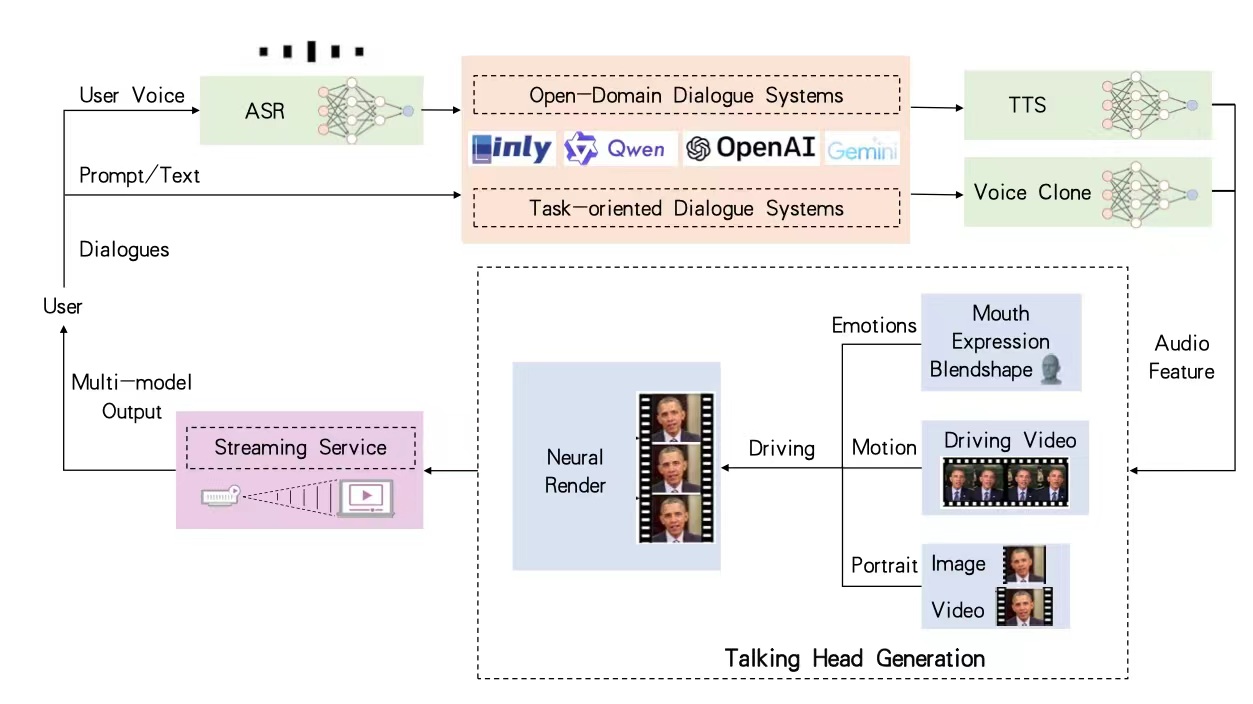
System Architecture
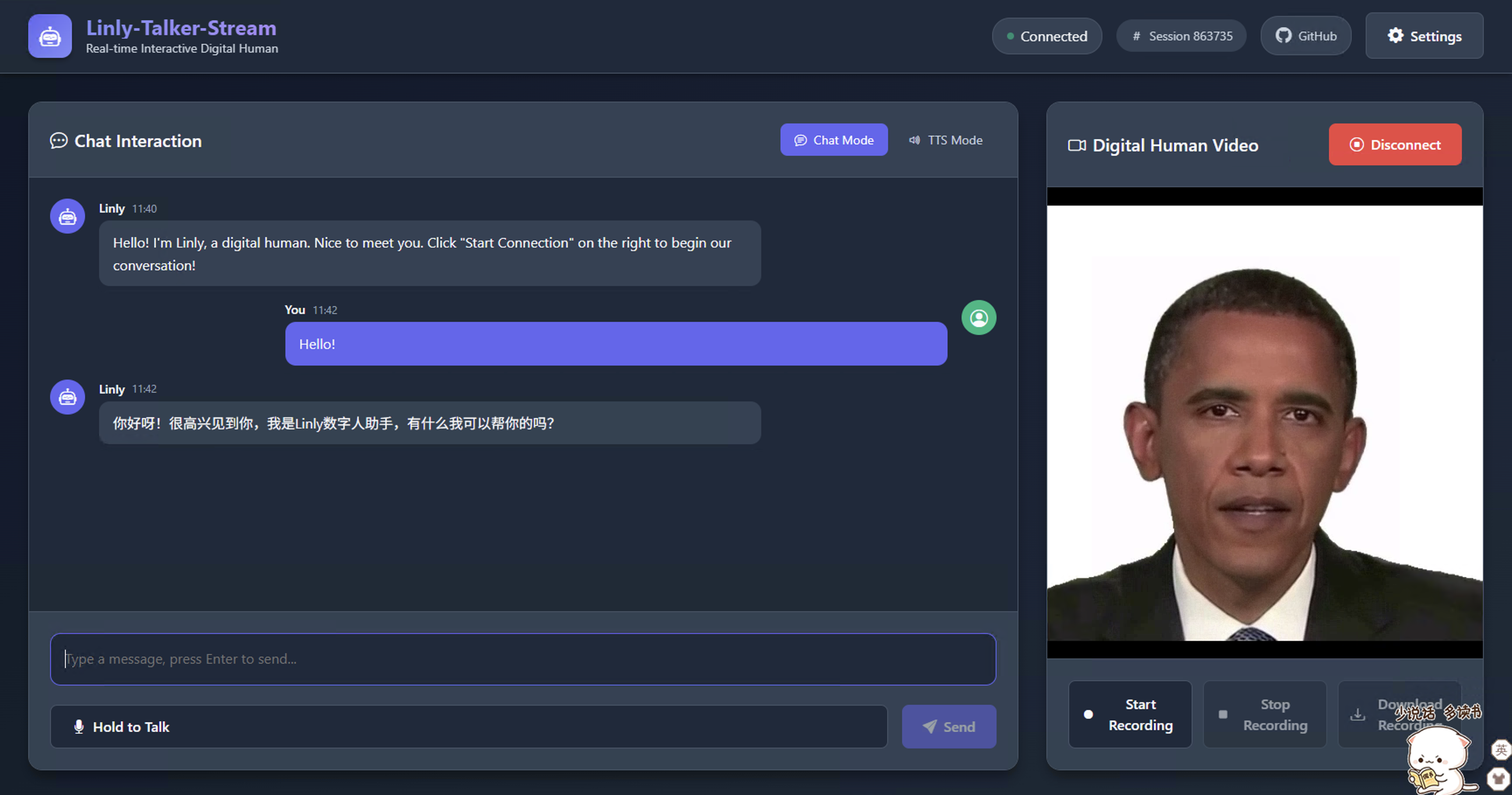
Web UI Preview
ASR + LLM + TTS into a more complete end-to-end pipeline.[!IMPORTANT] This project is under active iteration. PRs and Issues are welcome.
wav2lip (2D)musetalk (2D)ernerf (3D)talkinggaussian (3D)Linly-Talker-Stream/
├── pyproject.toml # Root project config (core dependencies)
├── config/ # Runtime config files (YAML)
├── scripts/ # Environment setup / startup scripts
├── models/ # Model weights
├── data/ # Avatar assets / recorded files
├── web/ # Vue frontend
└── src/
├── server/ # Backend (WebRTC + APIs)
├── asr/ # Speech recognition engines
├── llm/ # LLM adapters
├── tts/ # Speech synthesis engines
└── avatars/ # Avatar engines (2D/3D)
# 1) Clone repository
git clone https://github.com/Kedreamix/Linly-Talker-Stream.git
cd Linly-Talker-Stream

# 2) One-click environment setup (auto install uv + create .venv + install dependencies)
bash scripts/setup-env.sh wav2lip

# 3) Configure API key (default using Alibaba Cloud Bailian's Qwen-plus interface)
export DASHSCOPE_API_KEY="your_api_key_here"

# 4) One-click start backend + frontend
bash scripts/start-all.sh config/config_wav2lip.yaml
Open in browser: http://localhost:3000
Notes
- Supported avatars:
wav2lip,musetalk,ernerf,talkinggaussian- DashScope API key application: Alibaba Cloud Bailian Console (free quota available)
- For detailed installation of uv / Node.js, see FAQ.md
# Backend dependencies
uv venv --python 3.10.19
uv sync
uv pip install -e src/avatars/wav2lip/

# Frontend dependencies
cd web && npm install && cd ..

# Environment variable
export DASHSCOPE_API_KEY="your_api_key_here"

# Start services
bash scripts/start-all.sh config/config_wav2lip.yaml
Microphone access for remote usage requires HTTPS:
bash scripts/create_ssl_certs.sh
Then set app.ssl: true in config and access with https://localhost:3000.
# TalkingGaussian
uv pip install -e src/avatars/talkinggaussian/
uv pip install -e src/avatars/talkinggaussian/submodules/diff-gaussian-rasterization/ --no-build-isolation
uv pip install -e src/avatars/talkinggaussian/submodules/simple-knn/ --no-build-isolation
uv pip install -e src/avatars/talkinggaussian/gridencoder/ --no-build-isolation

# MuseTalk (requires additional dependencies and post-processing)
uv pip install chumpy==0.70 --no-build-isolation
uv pip install -e src/avatars/musetalk/
uv run mim install mmengine
uv run mim install mmcv==2.2.0 --no-build-isolation
uv run mim install mmdet==3.1.0
uv run mim install mmpose==1.3.2
bash scripts/post_musetalk_install.sh
# Backend
bash scripts/start-backend.sh config/config_wav2lip.yaml
# or
uv run python src/server/app.py --config config/config_wav2lip.yaml

# Frontend
bash scripts/start-frontend.sh config/config_wav2lip.yaml
bash scripts/start-all.sh config/config_wav2lip.yaml
Default ports:
http://localhost:8010http://localhost:3000All configs are in config/*.yaml. Common fields:
app.listenport: backend port (default 8010)app.ssl: whether to enable HTTPS (recommended for remote recording)model.type: avatar type (wav2lip / musetalk / ernerf / talkinggaussian)tts.type: TTS engine (e.g. edgetts, azuretts, gpt-sovits, cosyvoice)asr.mode: browser (recommended) / server / autollm.*: LLM config (defaults to Qwen-plus on DashScope)Default config reads:
export DASHSCOPE_API_KEY="YOUR_KEY_HERE"
⚠️ Important: LLM features require an API key from Alibaba Cloud Bailian, which provides free usage quota.
The repository provides runnable config presets with modular installation:
| Status | Config File | Avatar Type | 2D/3D | One-Click Setup Command |
|---|---|---|---|---|
| ✅ | config/config_wav2lip.yaml | wav2lip | 2D | bash scripts/setup-env.sh wav2lip |
| ✅ | config/config_musetalk.yaml | musetalk | 2D | bash scripts/setup-env.sh musetalk |
| ✅ | config/config_talkinggaussian.yaml | talkinggaussian | 3D | bash scripts/setup-env.sh talkinggaussian |
| ⬜ | config/config_ernerf.yaml | ernerf | 3D | bash scripts/setup-env.sh ernerf |
Recommended engine switch procedure:
config/config_*.yaml.| Avatar | Type | Download Method |
|---|---|---|
| Wav2Lip | 2D | Download wav2lip256.pth + wav2lip256_avatar1.tar.gz from Quark Drive (from LiveTalking) |
| MuseTalk | 2D | bash scripts/download_musetalk_weights.sh |
| TalkingGaussian | 3D | 🔗 TBD |
| ER-NeRF | 3D | 🔗 TBD |
Placement Instructions
# Wav2Lip
# 1. Rename wav2lip256.pth to wav2lip.pth and place it in models/
# 2. Extract wav2lip256_avatar1.tar.gz to data/avatars/

# MuseTalk (auto download to correct path)
bash scripts/download_musetalk_weights.sh

# TalkingGaussian
# Extract talkinggaussian_obama.tar.gz to data/avatars/
💡 Advanced usage: for custom avatar assets, directory structure details, and config path setup, see FAQ.md.
Main endpoints (see src/server/server.py):
POST /offer: WebRTC SDP handshakePOST /human: text dialogue (type=chat calls LLM, type=echo for text playback)POST /asr: upload audio → ASR → LLM → drive avatar speechPOST /humanaudio: upload audio file to drive avatar speechPOST /record: start/stop recordingGET /download/{filename}: download recorded filesGET /health: health checkSee FAQ.md.
You can also refer to Linly-Talker and LiveTalking for additional context.
This repository uses Apache License 2.0 (consistent with LiveTalking).
[!CAUTION] Please comply with local laws and regulations when using or deploying this project (copyright, privacy, data protection, etc.).
See LICENSE and NOTICE for details.
2026.02 Update 📆
Linly-Talker-Stream is the real-time streaming architecture version of Linly-Talker. It upgrades traditional turn-based QA into a more human-like full-duplex conversational system:
If you want to build AI assistants, digital human front desks, interactive guides, or live Q&A scenarios, this project can serve as a practical real-time interaction engineering baseline.
On top of Linly-Talker’s multimodal pipeline (ASR / LLM / TTS / Avatar), this project references LiveTalking for real-time communication design and performs a streaming pipeline refactor. Continuous optimization is planned.
[!NOTE]
- Linly-Talker demo video: https://www.bilibili.com/video/BV1rN4y1a76x/
- Linly-Talker-Stream demo video: TODO (to be added)
Linly-Talker-Stream is positioned as the “real-time streaming version,” reusing and extending Linly-Talker’s multimodal digital human capabilities:
System Architecture
Web UI Preview
ASR + LLM + TTS into a more complete end-to-end pipeline.[!IMPORTANT] This project is under active iteration. PRs and Issues are welcome.
wav2lip (2D)musetalk (2D)ernerf (3D)talkinggaussian (3D)Linly-Talker-Stream/
├── pyproject.toml # Root project config (core dependencies)
├── config/ # Runtime config files (YAML)
├── scripts/ # Environment setup / startup scripts
├── models/ # Model weights
├── data/ # Avatar assets / recorded files
├── web/ # Vue frontend
└── src/
├── server/ # Backend (WebRTC + APIs)
├── asr/ # Speech recognition engines
├── llm/ # LLM adapters
├── tts/ # Speech synthesis engines
└── avatars/ # Avatar engines (2D/3D)
# 1) Clone repository
git clone https://github.com/Kedreamix/Linly-Talker-Stream.git
cd Linly-Talker-Stream

# 2) One-click environment setup (auto install uv + create .venv + install dependencies)
bash scripts/setup-env.sh wav2lip

# 3) Configure API key (default using Alibaba Cloud Bailian's Qwen-plus interface)
export DASHSCOPE_API_KEY="your_api_key_here"

# 4) One-click start backend + frontend
bash scripts/start-all.sh config/config_wav2lip.yaml
Open in browser: http://localhost:3000
Notes
- Supported avatars:
wav2lip,musetalk,ernerf,talkinggaussian- DashScope API key application: Alibaba Cloud Bailian Console (free quota available)
- For detailed installation of uv / Node.js, see FAQ.md
# Backend dependencies
uv venv --python 3.10.19
uv sync
uv pip install -e src/avatars/wav2lip/

# Frontend dependencies
cd web && npm install && cd ..

# Environment variable
export DASHSCOPE_API_KEY="your_api_key_here"

# Start services
bash scripts/start-all.sh config/config_wav2lip.yaml
Microphone access for remote usage requires HTTPS:
bash scripts/create_ssl_certs.sh
Then set app.ssl: true in config and access with https://localhost:3000.
# TalkingGaussian
uv pip install -e src/avatars/talkinggaussian/
uv pip install -e src/avatars/talkinggaussian/submodules/diff-gaussian-rasterization/ --no-build-isolation
uv pip install -e src/avatars/talkinggaussian/submodules/simple-knn/ --no-build-isolation
uv pip install -e src/avatars/talkinggaussian/gridencoder/ --no-build-isolation

# MuseTalk (requires additional dependencies and post-processing)
uv pip install chumpy==0.70 --no-build-isolation
uv pip install -e src/avatars/musetalk/
uv run mim install mmengine
uv run mim install mmcv==2.2.0 --no-build-isolation
uv run mim install mmdet==3.1.0
uv run mim install mmpose==1.3.2
bash scripts/post_musetalk_install.sh
# Backend
bash scripts/start-backend.sh config/config_wav2lip.yaml
# or
uv run python src/server/app.py --config config/config_wav2lip.yaml

# Frontend
bash scripts/start-frontend.sh config/config_wav2lip.yaml
bash scripts/start-all.sh config/config_wav2lip.yaml
Default ports:
http://localhost:8010http://localhost:3000All configs are in config/*.yaml. Common fields:
app.listenport: backend port (default 8010)app.ssl: whether to enable HTTPS (recommended for remote recording)model.type: avatar type (wav2lip / musetalk / ernerf / talkinggaussian)tts.type: TTS engine (e.g. edgetts, azuretts, gpt-sovits, cosyvoice)asr.mode: browser (recommended) / server / autollm.*: LLM config (defaults to Qwen-plus on DashScope)Default config reads:
export DASHSCOPE_API_KEY="YOUR_KEY_HERE"
⚠️ Important: LLM features require an API key from Alibaba Cloud Bailian, which provides free usage quota.
The repository provides runnable config presets with modular installation:
| Status | Config File | Avatar Type | 2D/3D | One-Click Setup Command |
|---|---|---|---|---|
| ✅ | config/config_wav2lip.yaml | wav2lip | 2D | bash scripts/setup-env.sh wav2lip |
| ✅ | config/config_musetalk.yaml | musetalk | 2D | bash scripts/setup-env.sh musetalk |
| ✅ | config/config_talkinggaussian.yaml | talkinggaussian | 3D | bash scripts/setup-env.sh talkinggaussian |
| ⬜ | config/config_ernerf.yaml | ernerf | 3D | bash scripts/setup-env.sh ernerf |
Recommended engine switch procedure:
config/config_*.yaml.| Avatar | Type | Download Method |
|---|---|---|
| Wav2Lip | 2D | Download wav2lip256.pth + wav2lip256_avatar1.tar.gz from Quark Drive (from LiveTalking) |
| MuseTalk | 2D | bash scripts/download_musetalk_weights.sh |
| TalkingGaussian | 3D | 🔗 TBD |
| ER-NeRF | 3D | 🔗 TBD |
Placement Instructions
# Wav2Lip
# 1. Rename wav2lip256.pth to wav2lip.pth and place it in models/
# 2. Extract wav2lip256_avatar1.tar.gz to data/avatars/

# MuseTalk (auto download to correct path)
bash scripts/download_musetalk_weights.sh

# TalkingGaussian
# Extract talkinggaussian_obama.tar.gz to data/avatars/
💡 Advanced usage: for custom avatar assets, directory structure details, and config path setup, see FAQ.md.
Main endpoints (see src/server/server.py):
POST /offer: WebRTC SDP handshakePOST /human: text dialogue (type=chat calls LLM, type=echo for text playback)POST /asr: upload audio → ASR → LLM → drive avatar speechPOST /humanaudio: upload audio file to drive avatar speechPOST /record: start/stop recordingGET /download/{filename}: download recorded filesGET /health: health checkSee FAQ.md.
You can also refer to Linly-Talker and LiveTalking for additional context.
This repository uses Apache License 2.0 (consistent with LiveTalking).
[!CAUTION] Please comply with local laws and regulations when using or deploying this project (copyright, privacy, data protection, etc.).
See LICENSE and NOTICE for details.