
A treemap for finding and removing what fills your disk, for Omarchy. Rust + GPUI.
Rust
405
16 commits
updated Sep 24, 2026
See what people are saying
README
disktree
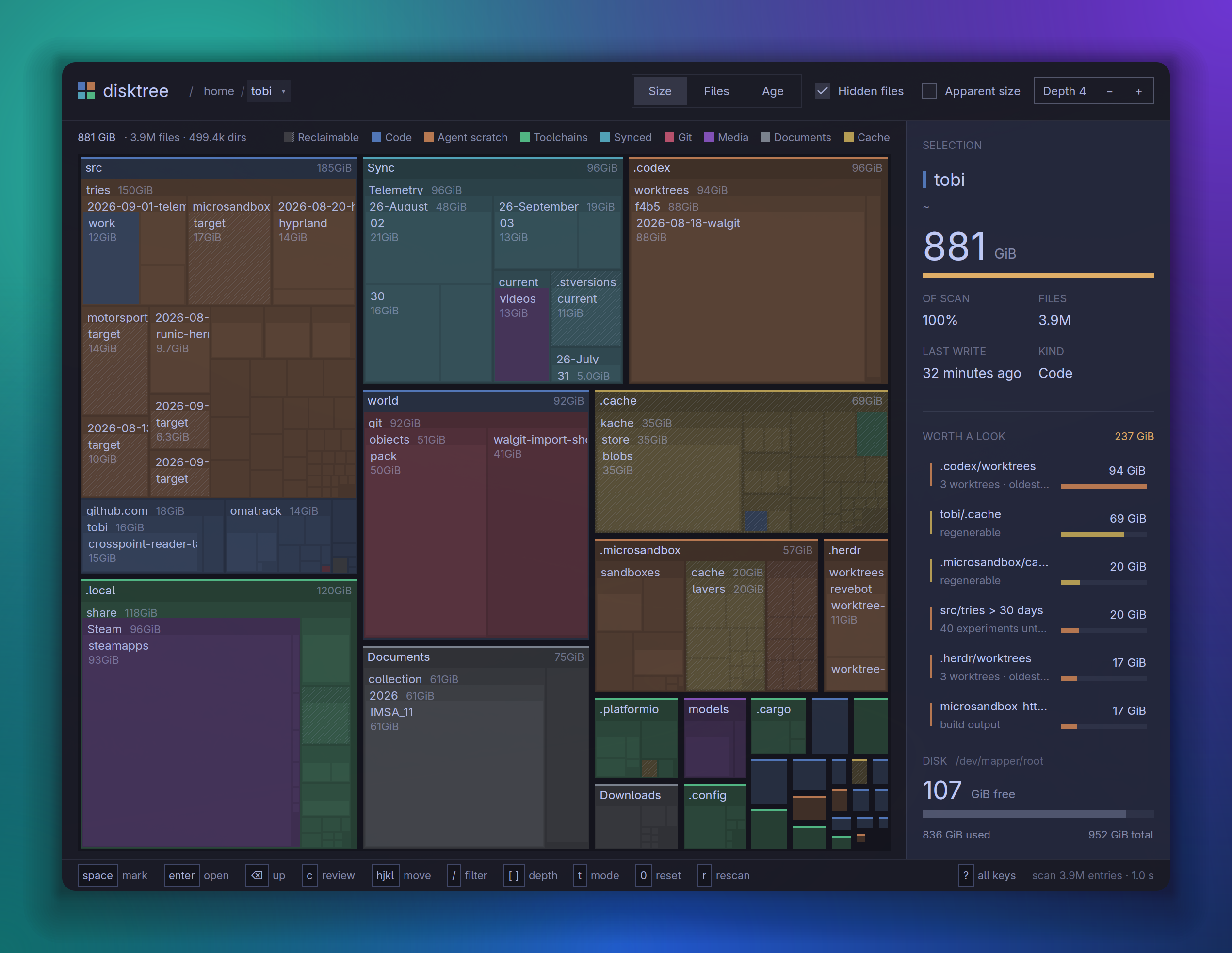
Find what is filling a disk, mark what should go, and remove it — with the volume's free space in view the whole time.
disktree is a treemap for Omarchy. It scans your home directory by default, draws every directory as a nested mosaic sized by what it really costs on disk, and lets you walk into it with the keyboard or the mouse. Mark as much as you like; nothing happens until you review the list and commit, and the permanent path always asks first.
Built with GPUI through gpui-omarchy, so it follows your Omarchy theme and behaves like the rest of the desktop.
Install
Download disktree-*-x86_64-linux.tar.gz from the
latest release, unpack
it, and run ./install.sh inside (or just copy disktree onto your
PATH). Or build it:
git clone https://github.com/tobi/disktree
cd disktree
make install
make install builds a release binary and puts three things under ~/.local
(no root needed):
~/.local/bin/disktree- a desktop entry, so disktree is in the launcher and in a file manager's Open with for a directory (it adds a handler; it never becomes the default)
- an icon
sudo make install PREFIX=/usr/local installs system-wide; make uninstall
removes exactly what was installed.
You need Rust 1.97 or newer and a Wayland or X11 session with a GPU that GPUI can drive (Vulkan).
Use
disktree            # scan the home directory
disktree --disk     # the whole disk it lives on
disktree ~/src      # or any directory
disktree --help     # options: apparent size, follow links, skip hidden, …
The screen
- Top: the trail from
/, then what is measured — Size, Files or Age, Hidden files, Apparent size, and the depth drawn. In the tree a crumb goes there, and its ▾ lists its siblings, largest first with their share and size, to jump sideways (arrows and Enter work too). Above the scanned root a crumb is dimmer, and clicking it widens the scan to there (see below). - Under it: the scan totals, the filter when one is typed, and the legend.
- Mosaic: colour is the kind of data — code, agent scratch, toolchains, synced files, git, media, documents, caches — at one muted level, lighter with depth. A diagonal hatch is space that can be had back (caches, sync history, package stores, build output), independent of colour. Top-level directories carry a strip of their colour and a name band; deeper open directories a slim label row. In Age mode colour is the last write instead, from this week to older.
- Panel: the selection (its size set large, share of the scan, files, last write, and for a checkout what git says — changes, stashes, unpushed commits); Worth a look, the largest things that could plausibly go; what is marked; and the disk, free now and after the marks, with the way to the review screen. Drag its left edge to resize it; double-click the edge to reset.
One colour is kept apart: amber marks the selection, the main action, and what can be had back.
The kinds come from directory names and a few shapes (a bare git repository,
target beside a Cargo.toml). Some of the names are specific to one
machine; see crates/disktree-core/src/classify.rs.
Marking
Space, X, Enter and the arrows act on the tile under the mouse if the mouse moved last, and on the keyboard selection after you use an arrow or Tab.
A marked tile takes the danger colour, and so does everything inside it: removing a directory takes its contents with it. Marking a directory absorbs any marks already inside it, and something inside a marked directory cannot be marked or kept on its own; its panel offers to unmark the directory instead. Marking is reversible — press it again — and the saving is never counted twice.
Zooming and going in
Scroll to magnify toward the pointer. The wheel magnifies until the directory
under the pointer fills the view, and the next notch goes into it — one
continuous motion, with the directory's contents growing into place. Scroll the
other way to come back out. Enter goes into the selected directory at any
depth, and Backspace or Escape goes up one level. + and - magnify without
going in; 0 resets.
Removing
c (or Review…) opens the list of everything marked. Unmark anything
there, then choose:
- Move to trash — the default when a trash is available (
trash-putfrom trash-cli, thengio trash, then a built-in XDG trash). Recoverable until the trash is emptied, so it commits directly. - Delete permanently —
rm -rfsemantics. It always asks first, in a dialog that names what goes and how much comes back.
When it finishes, disktree scans again so the numbers on screen match the disk, and shows how much free space was actually gained.
Keys
| key | does |
|---|---|
space / x | mark or unmark the tile you point at |
ctrl-click | mark without moving the selection |
enter | open that directory, at any depth |
⌫ / esc | go up one directory |
← ↑ ↓ → | move between tiles at this level |
tab | next largest sibling |
| scroll | zoom toward a directory, then go into it |
shift-scroll | pan the magnified view |
[ ] | draw fewer or more levels at once |
- = 0 | magnify, shrink, reset the view |
ctrl = ctrl - ctrl 0 | interface zoom |
/ | filter by name: only matches keep their colour; enter shows only them, esc clears |
c | review the marked list |
t | rank by size or by file count |
d | disk usage or apparent size |
i | include or skip hidden entries |
r | scan again |
g | the whole disk |
p | show or hide the selection line |
? | every key |
q | quit |
On the review screen: m trash, p permanent, ! unmark all, enter
commits, esc goes back.
What it measures
- Disk usage by default:
st_blocks × 512, the numberdureports and the space that actually comes back when a file is deleted. Apparent size (whatls -lshows) is one toggle away. - Hardlinks once. Two names for one inode cost one file.
- Hidden entries included, because
~/.cacheis often the biggest thing in a home directory. Symlinks are not followed.
The scan follows dust's approach: one rayon scope per root, a completion counter per directory so no directory is built before its last subdirectory lands, and one bottom-up pass that aggregates sizes and removes duplicate hardlinks.
The whole disk
Click / (or any directory above the scanned root) in the trail, press
g, run disktree --disk, or use the launcher's Scan the whole disk
action. g and --disk scan the disk your home directory lives on — /
on Omarchy.
Widening is memoized: the tree already measured is handed to the wider walk
and reused where it is reached, so going from ~ to / reads only what is
outside ~ (on this machine, seconds instead of a full rescan). The current
view stays on screen until the wider tree lands, which then opens with the
directory you came from selected. Going back down is just navigation.
A scan stays on one volume, and a volume is the mount source, not the
device number: btrfs gives each subvolume its own st_dev, so /home,
/var/log and /var/cache/pacman/pkg are included, while /proc,
/sys, /run, tmpfs, /boot, other disks, network shares and automount
points are left out (checked by path, so an automounted NAS is never
mounted just to be measured). Snapshot subvolumes are left out too: their
files share blocks with the live ones, and counting them would count the disk
twice. -X crosses into everything.
Without root, some system directories cannot be read; they are counted as unreadable in the top bar rather than guessed at.
What it refuses to do
The removal rules live in crates/disktree-core/src/removal.rs, and each one is
tested:
- only paths under the scanned root can be removed;
- the filesystem root, the scanned root and your home directory are refused;
- a mount point is refused, since removing it would reach into another filesystem;
- system trees (
/usr,/etc,/boot,/var/lib,/nix/store, …) are refused even where permissions would allow it: packages own them, and pacman, paccache orjournalctl --vacuumare the tools; - a symlink is unlinked, never followed;
- nothing is passed through a shell — a file called
-rfis just a file.
On Hyprland
Hyprland tiles new windows, so disktree opens into whatever tile it is given. It is designed for a roomy window; float it, or give it a rule:
windowrule = float, class:^(disktree)$
windowrule = size 1400 900, class:^(disktree)$
Develop
make run      # release build, scanning $HOME
make lint     # rustfmt --check, then clippy with every warning an error
make test     # scanner, layout and removal tests, plus window-harness tests
make ci       # lint, then test
The lint gate is strict on purpose: clippy::all and clippy::pedantic are
errors, and every exception is written down with its reason in Cargo.toml.
The window-harness tests draw real frames and press real keys — including one
that marks a directory, confirms the deletion and checks that the files are
gone while their neighbours are not.
| path | what lives there |
|---|---|
crates/disktree-core | scanning, the tree, the squarified layout, free space and removal — no UI |
crates/disktree-app/src/state.rs | every action the interface can take, and the key map |
crates/disktree-app/src/views.rs | the screens |
crates/disktree-app/src/treemap_view.rs | painting the mosaic and its labels |
crates/disktree-app/src/ui.rs | the spacing, type and size scale, in rem |
crates/disktree-app/src/tests.rs | end-to-end tests through a real window |
packaging/, assets/, Makefile | the desktop entry, the icon, and install |
The interface follows the
GPUI Kit design guides:
every size is on one rem scale so interface zoom keeps its proportions,
primary is reserved for what Enter does, and the only question the app asks is
the one it cannot take back.
License
MIT
Contributors

16 commits
Similar repos


Languages
Rust
99.1%
A treemap for finding and removing what fills your disk, for Omarchy. Rust + GPUI.
Rust
405
16 commits
updated Sep 24, 2026
See what people are saying
README
disktree
Find what is filling a disk, mark what should go, and remove it — with the volume's free space in view the whole time.
disktree is a treemap for Omarchy. It scans your home directory by default, draws every directory as a nested mosaic sized by what it really costs on disk, and lets you walk into it with the keyboard or the mouse. Mark as much as you like; nothing happens until you review the list and commit, and the permanent path always asks first.
Built with GPUI through gpui-omarchy, so it follows your Omarchy theme and behaves like the rest of the desktop.
Install
Download disktree-*-x86_64-linux.tar.gz from the
latest release, unpack
it, and run ./install.sh inside (or just copy disktree onto your
PATH). Or build it:
git clone https://github.com/tobi/disktree
cd disktree
make install
make install builds a release binary and puts three things under ~/.local
(no root needed):
~/.local/bin/disktree- a desktop entry, so disktree is in the launcher and in a file manager's Open with for a directory (it adds a handler; it never becomes the default)
- an icon
sudo make install PREFIX=/usr/local installs system-wide; make uninstall
removes exactly what was installed.
You need Rust 1.97 or newer and a Wayland or X11 session with a GPU that GPUI can drive (Vulkan).
Use
disktree            # scan the home directory
disktree --disk     # the whole disk it lives on
disktree ~/src      # or any directory
disktree --help     # options: apparent size, follow links, skip hidden, …
The screen
- Top: the trail from
/, then what is measured — Size, Files or Age, Hidden files, Apparent size, and the depth drawn. In the tree a crumb goes there, and its ▾ lists its siblings, largest first with their share and size, to jump sideways (arrows and Enter work too). Above the scanned root a crumb is dimmer, and clicking it widens the scan to there (see below). - Under it: the scan totals, the filter when one is typed, and the legend.
- Mosaic: colour is the kind of data — code, agent scratch, toolchains, synced files, git, media, documents, caches — at one muted level, lighter with depth. A diagonal hatch is space that can be had back (caches, sync history, package stores, build output), independent of colour. Top-level directories carry a strip of their colour and a name band; deeper open directories a slim label row. In Age mode colour is the last write instead, from this week to older.
- Panel: the selection (its size set large, share of the scan, files, last write, and for a checkout what git says — changes, stashes, unpushed commits); Worth a look, the largest things that could plausibly go; what is marked; and the disk, free now and after the marks, with the way to the review screen. Drag its left edge to resize it; double-click the edge to reset.
One colour is kept apart: amber marks the selection, the main action, and what can be had back.
The kinds come from directory names and a few shapes (a bare git repository,
target beside a Cargo.toml). Some of the names are specific to one
machine; see crates/disktree-core/src/classify.rs.
Marking
Space, X, Enter and the arrows act on the tile under the mouse if the mouse moved last, and on the keyboard selection after you use an arrow or Tab.
A marked tile takes the danger colour, and so does everything inside it: removing a directory takes its contents with it. Marking a directory absorbs any marks already inside it, and something inside a marked directory cannot be marked or kept on its own; its panel offers to unmark the directory instead. Marking is reversible — press it again — and the saving is never counted twice.
Zooming and going in
Scroll to magnify toward the pointer. The wheel magnifies until the directory
under the pointer fills the view, and the next notch goes into it — one
continuous motion, with the directory's contents growing into place. Scroll the
other way to come back out. Enter goes into the selected directory at any
depth, and Backspace or Escape goes up one level. + and - magnify without
going in; 0 resets.
Removing
c (or Review…) opens the list of everything marked. Unmark anything
there, then choose:
- Move to trash — the default when a trash is available (
trash-putfrom trash-cli, thengio trash, then a built-in XDG trash). Recoverable until the trash is emptied, so it commits directly. - Delete permanently —
rm -rfsemantics. It always asks first, in a dialog that names what goes and how much comes back.
When it finishes, disktree scans again so the numbers on screen match the disk, and shows how much free space was actually gained.
Keys
| key | does |
|---|---|
space / x | mark or unmark the tile you point at |
ctrl-click | mark without moving the selection |
enter | open that directory, at any depth |
⌫ / esc | go up one directory |
← ↑ ↓ → | move between tiles at this level |
tab | next largest sibling |
| scroll | zoom toward a directory, then go into it |
shift-scroll | pan the magnified view |
[ ] | draw fewer or more levels at once |
- = 0 | magnify, shrink, reset the view |
ctrl = ctrl - ctrl 0 | interface zoom |
/ | filter by name: only matches keep their colour; enter shows only them, esc clears |
c | review the marked list |
t | rank by size or by file count |
d | disk usage or apparent size |
i | include or skip hidden entries |
r | scan again |
g | the whole disk |
p | show or hide the selection line |
? | every key |
q | quit |
On the review screen: m trash, p permanent, ! unmark all, enter
commits, esc goes back.
What it measures
- Disk usage by default:
st_blocks × 512, the numberdureports and the space that actually comes back when a file is deleted. Apparent size (whatls -lshows) is one toggle away. - Hardlinks once. Two names for one inode cost one file.
- Hidden entries included, because
~/.cacheis often the biggest thing in a home directory. Symlinks are not followed.
The scan follows dust's approach: one rayon scope per root, a completion counter per directory so no directory is built before its last subdirectory lands, and one bottom-up pass that aggregates sizes and removes duplicate hardlinks.
The whole disk
Click / (or any directory above the scanned root) in the trail, press
g, run disktree --disk, or use the launcher's Scan the whole disk
action. g and --disk scan the disk your home directory lives on — /
on Omarchy.
Widening is memoized: the tree already measured is handed to the wider walk
and reused where it is reached, so going from ~ to / reads only what is
outside ~ (on this machine, seconds instead of a full rescan). The current
view stays on screen until the wider tree lands, which then opens with the
directory you came from selected. Going back down is just navigation.
A scan stays on one volume, and a volume is the mount source, not the
device number: btrfs gives each subvolume its own st_dev, so /home,
/var/log and /var/cache/pacman/pkg are included, while /proc,
/sys, /run, tmpfs, /boot, other disks, network shares and automount
points are left out (checked by path, so an automounted NAS is never
mounted just to be measured). Snapshot subvolumes are left out too: their
files share blocks with the live ones, and counting them would count the disk
twice. -X crosses into everything.
Without root, some system directories cannot be read; they are counted as unreadable in the top bar rather than guessed at.
What it refuses to do
The removal rules live in crates/disktree-core/src/removal.rs, and each one is
tested:
- only paths under the scanned root can be removed;
- the filesystem root, the scanned root and your home directory are refused;
- a mount point is refused, since removing it would reach into another filesystem;
- system trees (
/usr,/etc,/boot,/var/lib,/nix/store, …) are refused even where permissions would allow it: packages own them, and pacman, paccache orjournalctl --vacuumare the tools; - a symlink is unlinked, never followed;
- nothing is passed through a shell — a file called
-rfis just a file.
On Hyprland
Hyprland tiles new windows, so disktree opens into whatever tile it is given. It is designed for a roomy window; float it, or give it a rule:
windowrule = float, class:^(disktree)$
windowrule = size 1400 900, class:^(disktree)$
Develop
make run      # release build, scanning $HOME
make lint     # rustfmt --check, then clippy with every warning an error
make test     # scanner, layout and removal tests, plus window-harness tests
make ci       # lint, then test
The lint gate is strict on purpose: clippy::all and clippy::pedantic are
errors, and every exception is written down with its reason in Cargo.toml.
The window-harness tests draw real frames and press real keys — including one
that marks a directory, confirms the deletion and checks that the files are
gone while their neighbours are not.
| path | what lives there |
|---|---|
crates/disktree-core | scanning, the tree, the squarified layout, free space and removal — no UI |
crates/disktree-app/src/state.rs | every action the interface can take, and the key map |
crates/disktree-app/src/views.rs | the screens |
crates/disktree-app/src/treemap_view.rs | painting the mosaic and its labels |
crates/disktree-app/src/ui.rs | the spacing, type and size scale, in rem |
crates/disktree-app/src/tests.rs | end-to-end tests through a real window |
packaging/, assets/, Makefile | the desktop entry, the icon, and install |
The interface follows the
GPUI Kit design guides:
every size is on one rem scale so interface zoom keeps its proportions,
primary is reserved for what Enter does, and the only question the app asks is
the one it cannot take back.
License
MIT
Similar repos
Contributors
16 commits
Languages
Rust
99.1%