
README

Excise





A terminal tool for understanding and removing exactly the files and folders you choose.
Excise combines an interactive storage map with careful space accounting, clear resource limits, safe handling of unusual file names, and a deliberate review before permanent deletion.
It is an independent fork and spiritual successor to Diskonaut. Diskonaut history and release tags remain preserved, while Excise has its own product and release line.
[!WARNING] Excise permanently deletes selected files and folders. There is no trash or undo. Use it only with data you can safely remove.
Quick Start
Install
Homebrew for macOS
brew tap findyourexit/tap
brew install findyourexit/tap/excise
excise --version  # excise 1.2.4
crates.io
cargo install excise --version 1.2.4 --locked
excise --version  # excise 1.2.4
X-CMD
Alternatively, install it with x-cmd, which downloads the pre-built binary from GitHub Releases:
x eget use findyourexit/excise
Pre-built Binaries
Download the v1.2.4 release for macOS, Linux, and Windows on Apple silicon, Intel, or Arm systems.
Only x86_64 Linux, AArch64 macOS, and x86_64 Windows have full platform support because they are tested on those platforms. The other archives are build-only and best effort. See the Support Policy.
Build From Source
git clone --branch v1.2.4 --depth 1 https://github.com/findyourexit/excise.git
cd excise
cargo install --path . --locked
excise --version
Nix users can run the tagged release without changing its lock file:
nix run github:findyourexit/excise/v1.2.4 -- --format table /path/to/inspect
Start Excise
Open the terminal interface with the simplest command:
excise
The default interface starts in the current folder. Keep the default deletion confirmation enabled until you understand the review flow. Never start in a home directory, a filesystem root, a mounted volume, or another path containing data you cannot lose.
Usage
Start the Terminal Interface
Run Excise without arguments to open the interface in the current folder:
excise
Other Ways to Use Excise
# Readable output for people
excise --format table /path/to/inspect

# Machine-readable JSON report
excise --format json --output scan.json /path/to/inspect

# Keep the scan on one filesystem and skip build output
excise --exclude target/ --exclude .git/ /path/to/inspect
Configuration takes values in this order: command line, environment, versioned TOML file, and defaults. Configuration version must be 1. Unknown fields and unsupported versions are rejected. See Configuration for the file format and examples.
What Excise Does
- Careful space accounting: Excise keeps the disk space assigned to files separate from their file length. It counts files with more than one name once and keeps unknown values unknown.
- Clear limits: Scan queues, worker counts, memory use, per-session temporary storage, reports, and interface history have explicit limits.
- Safe review before deletion: Deletion plans record the files and folders that were reviewed. Excise does not follow links, checks for changes before deletion, and never includes new entries silently.
- Reliable terminal behavior: The terminal is restored after normal exit, errors, panics, cancellation, and forced interruption.
- Accessible interaction: Keyboard controls, narrow layouts, plain ASCII output, monochrome output, and reduced motion preserve the important safety information.
- Useful reports: Table output is intended for people to read. JSON output uses stable, versioned formats for scan results, deletion history, and file paths.
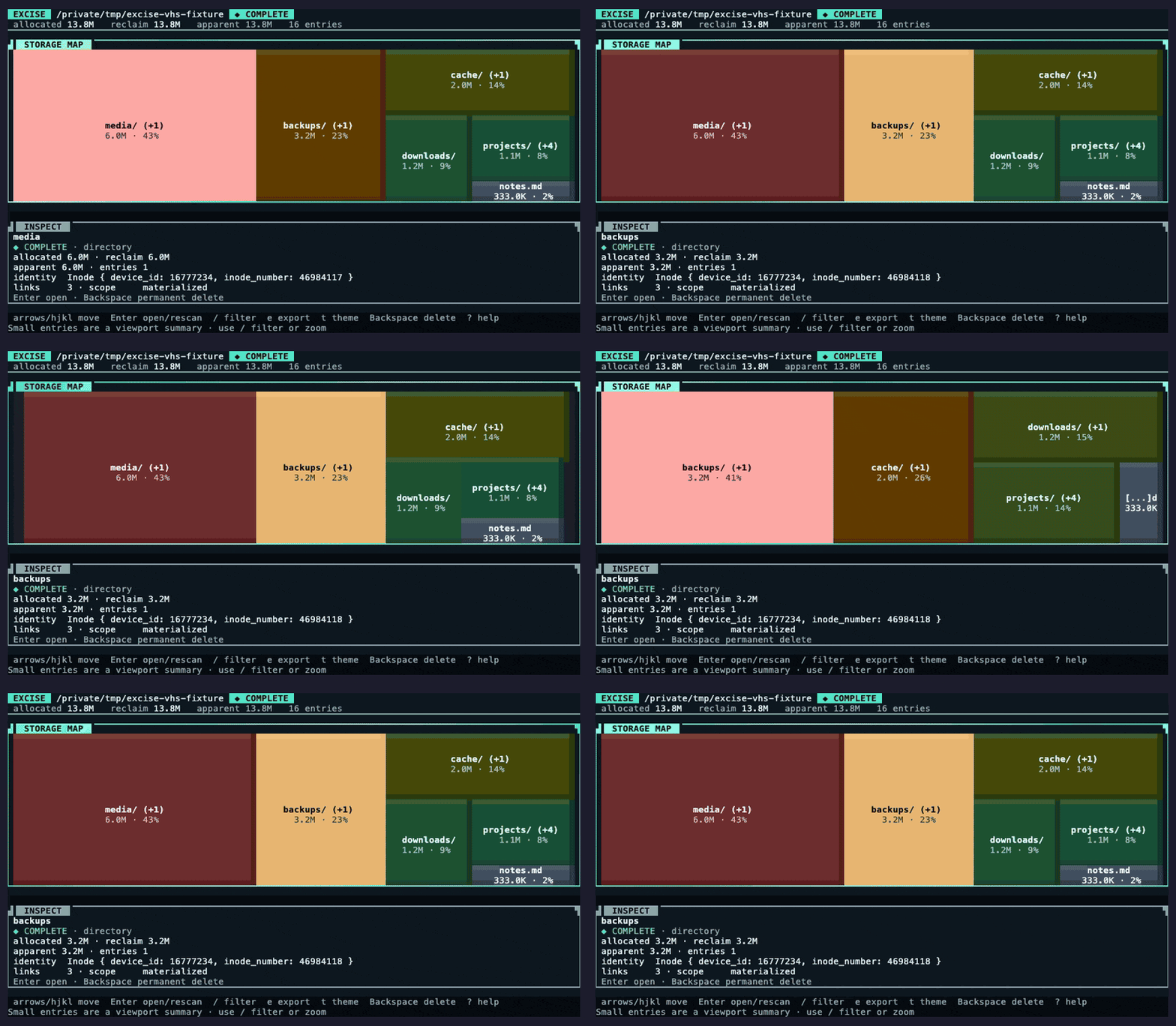
- Readable maps: The interface uses allocated space by default. Ordinary entries receive colours based on their relative size in the visible folder. Uncertain, shared, and summary entries keep their own meaning. Entries that do not fit remain visible as an overflow summary instead of making a folder look empty.
Terminal Controls
| Key | Action |
|---|---|
| Arrow keys | Move the selection |
h j k l | Use the Vim movement preset |
Enter | Open a folder or rescan it |
Esc | Go back or cancel the current action |
/ | Filter the current view |
+, -, 0 | Zoom in, zoom out, or reset zoom |
e | Export the current scan or deletion history |
t | Cycle themes |
? | Open the built-in help |
Backspace | Begin a permanent deletion plan |
q, Ctrl-C | Exit or interrupt safely |
The interactive interface needs standard input and output connected to a terminal, terminal color and control support, a separate screen for the interface, and a window at least 32 x 8. Use table or JSON mode for redirection, pipelines, continuous integration, and terminals without those capabilities. --output FILE works only with table or JSON mode.
Safety Model
Excise offers deletion only for complete entries that it has fully examined on a platform with tested deletion support. Fully examined entries are deletable while the initial scan is still running; you do not need to wait for the full scan to finish. Deletion is locked during focused rescanning. It refuses filesystem roots and summary entries. Before execution, it compares the live files and folders with the reviewed plan. It checks every planned entry again immediately before deletion.
Changed, replaced, missing, newly created, permission-blocked, and uncertain entries are never silently deleted. A soft cancellation reports the work completed so far. A forced cancellation restores the terminal immediately and reports that the final filesystem state may be uncertain. There is no recovery or undo mechanism.
Read the permanent deletion contract, space accounting contract, and threat model before relying on destructive behavior.
Support Policy
| Target | v1 stable status | Evidence |
|---|---|---|
x86_64 Linux (x86_64-unknown-linux-gnu) | Supported | Testing on Linux, terminal testing, and release archive |
AArch64 macOS (aarch64-apple-darwin) | Supported | Testing on macOS, terminal testing, and release archive |
x86_64 Windows (x86_64-pc-windows-msvc) | Supported | Testing on Windows, terminal testing, and release archive |
x86_64 macOS (x86_64-apple-darwin) | Build-only and best effort | Release compilation and archive only |
AArch64 Linux (aarch64-unknown-linux-gnu) | Build-only and best effort | Release compilation and archive only |
AArch64 Windows (aarch64-pc-windows-msvc) | Build-only and best effort | Release compilation and archive only |
Only the first three targets have full platform support. The remaining archives are published for people who want to experiment, but a successful download or build does not prove that the program runs correctly on that target.
Behavior can vary with file system types, access rules, network file systems, files that share storage with copies, compression, and shared physical storage. These cases remain best effort unless they have separate evidence. Unknown allocated space remains explicit. See SUPPORT.md for limitations and troubleshooting.
Documentation
- Getting Started
- Configuration
- Reports and JSON Formats
- Permanent Deletion Contract
- Space Accounting Contract
- Architecture and Threat Model
- Development
- Release Process
- Support Policy
- Security Policy
- Governance
Development
Excise requires Rust 1.98 or later and uses the 2024 edition. Rust 1.98.0 is the pinned toolchain and the lowest compiler version tested in CI. Run the complete local verification gate with:
cargo verify
This checks formatting, workflows, dependency rules, documentation links, compilation, supported builds, Rust lint checks, unit and snapshot tests, terminal behavior, package contents, limited fuzz testing, benchmarks, generated files, JSON formats, distribution templates, and release binary size.
The current main demonstration is generated with cargo demo. See Development before refreshing the VHS recording. The committed assets/demo-main.gif is the current demonstration, while assets/demo.gif remains the historical 0.1.2 recording.
Community & License
Contributions are welcome. Read CONTRIBUTING.md, use GitHub Discussions for questions, and follow SECURITY.md for private vulnerability or data-loss reports.
MIT. See LICENSE.
Contributors


Similar repos


Languages
Rust
99.6%
README
Excise
A terminal tool for understanding and removing exactly the files and folders you choose.
Excise combines an interactive storage map with careful space accounting, clear resource limits, safe handling of unusual file names, and a deliberate review before permanent deletion.
It is an independent fork and spiritual successor to Diskonaut. Diskonaut history and release tags remain preserved, while Excise has its own product and release line.
[!WARNING] Excise permanently deletes selected files and folders. There is no trash or undo. Use it only with data you can safely remove.
Quick Start
Install
Homebrew for macOS
brew tap findyourexit/tap
brew install findyourexit/tap/excise
excise --version  # excise 1.2.4
crates.io
cargo install excise --version 1.2.4 --locked
excise --version  # excise 1.2.4
X-CMD
Alternatively, install it with x-cmd, which downloads the pre-built binary from GitHub Releases:
x eget use findyourexit/excise
Pre-built Binaries
Download the v1.2.4 release for macOS, Linux, and Windows on Apple silicon, Intel, or Arm systems.
Only x86_64 Linux, AArch64 macOS, and x86_64 Windows have full platform support because they are tested on those platforms. The other archives are build-only and best effort. See the Support Policy.
Build From Source
git clone --branch v1.2.4 --depth 1 https://github.com/findyourexit/excise.git
cd excise
cargo install --path . --locked
excise --version
Nix users can run the tagged release without changing its lock file:
nix run github:findyourexit/excise/v1.2.4 -- --format table /path/to/inspect
Start Excise
Open the terminal interface with the simplest command:
excise
The default interface starts in the current folder. Keep the default deletion confirmation enabled until you understand the review flow. Never start in a home directory, a filesystem root, a mounted volume, or another path containing data you cannot lose.
Usage
Start the Terminal Interface
Run Excise without arguments to open the interface in the current folder:
excise
Other Ways to Use Excise
# Readable output for people
excise --format table /path/to/inspect

# Machine-readable JSON report
excise --format json --output scan.json /path/to/inspect

# Keep the scan on one filesystem and skip build output
excise --exclude target/ --exclude .git/ /path/to/inspect
Configuration takes values in this order: command line, environment, versioned TOML file, and defaults. Configuration version must be 1. Unknown fields and unsupported versions are rejected. See Configuration for the file format and examples.
What Excise Does
- Careful space accounting: Excise keeps the disk space assigned to files separate from their file length. It counts files with more than one name once and keeps unknown values unknown.
- Clear limits: Scan queues, worker counts, memory use, per-session temporary storage, reports, and interface history have explicit limits.
- Safe review before deletion: Deletion plans record the files and folders that were reviewed. Excise does not follow links, checks for changes before deletion, and never includes new entries silently.
- Reliable terminal behavior: The terminal is restored after normal exit, errors, panics, cancellation, and forced interruption.
- Accessible interaction: Keyboard controls, narrow layouts, plain ASCII output, monochrome output, and reduced motion preserve the important safety information.
- Useful reports: Table output is intended for people to read. JSON output uses stable, versioned formats for scan results, deletion history, and file paths.
- Readable maps: The interface uses allocated space by default. Ordinary entries receive colours based on their relative size in the visible folder. Uncertain, shared, and summary entries keep their own meaning. Entries that do not fit remain visible as an overflow summary instead of making a folder look empty.
Terminal Controls
| Key | Action |
|---|---|
| Arrow keys | Move the selection |
h j k l | Use the Vim movement preset |
Enter | Open a folder or rescan it |
Esc | Go back or cancel the current action |
/ | Filter the current view |
+, -, 0 | Zoom in, zoom out, or reset zoom |
e | Export the current scan or deletion history |
t | Cycle themes |
? | Open the built-in help |
Backspace | Begin a permanent deletion plan |
q, Ctrl-C | Exit or interrupt safely |
The interactive interface needs standard input and output connected to a terminal, terminal color and control support, a separate screen for the interface, and a window at least 32 x 8. Use table or JSON mode for redirection, pipelines, continuous integration, and terminals without those capabilities. --output FILE works only with table or JSON mode.
Safety Model
Excise offers deletion only for complete entries that it has fully examined on a platform with tested deletion support. Fully examined entries are deletable while the initial scan is still running; you do not need to wait for the full scan to finish. Deletion is locked during focused rescanning. It refuses filesystem roots and summary entries. Before execution, it compares the live files and folders with the reviewed plan. It checks every planned entry again immediately before deletion.
Changed, replaced, missing, newly created, permission-blocked, and uncertain entries are never silently deleted. A soft cancellation reports the work completed so far. A forced cancellation restores the terminal immediately and reports that the final filesystem state may be uncertain. There is no recovery or undo mechanism.
Read the permanent deletion contract, space accounting contract, and threat model before relying on destructive behavior.
Support Policy
| Target | v1 stable status | Evidence |
|---|---|---|
x86_64 Linux (x86_64-unknown-linux-gnu) | Supported | Testing on Linux, terminal testing, and release archive |
AArch64 macOS (aarch64-apple-darwin) | Supported | Testing on macOS, terminal testing, and release archive |
x86_64 Windows (x86_64-pc-windows-msvc) | Supported | Testing on Windows, terminal testing, and release archive |
x86_64 macOS (x86_64-apple-darwin) | Build-only and best effort | Release compilation and archive only |
AArch64 Linux (aarch64-unknown-linux-gnu) | Build-only and best effort | Release compilation and archive only |
AArch64 Windows (aarch64-pc-windows-msvc) | Build-only and best effort | Release compilation and archive only |
Only the first three targets have full platform support. The remaining archives are published for people who want to experiment, but a successful download or build does not prove that the program runs correctly on that target.
Behavior can vary with file system types, access rules, network file systems, files that share storage with copies, compression, and shared physical storage. These cases remain best effort unless they have separate evidence. Unknown allocated space remains explicit. See SUPPORT.md for limitations and troubleshooting.
Documentation
- Getting Started
- Configuration
- Reports and JSON Formats
- Permanent Deletion Contract
- Space Accounting Contract
- Architecture and Threat Model
- Development
- Release Process
- Support Policy
- Security Policy
- Governance
Development
Excise requires Rust 1.98 or later and uses the 2024 edition. Rust 1.98.0 is the pinned toolchain and the lowest compiler version tested in CI. Run the complete local verification gate with:
cargo verify
This checks formatting, workflows, dependency rules, documentation links, compilation, supported builds, Rust lint checks, unit and snapshot tests, terminal behavior, package contents, limited fuzz testing, benchmarks, generated files, JSON formats, distribution templates, and release binary size.
The current main demonstration is generated with cargo demo. See Development before refreshing the VHS recording. The committed assets/demo-main.gif is the current demonstration, while assets/demo.gif remains the historical 0.1.2 recording.
Community & License
Contributions are welcome. Read CONTRIBUTING.md, use GitHub Discussions for questions, and follow SECURITY.md for private vulnerability or data-loss reports.
MIT. See LICENSE.
Similar repos
Contributors
Languages
Rust
99.6%