
Aurora Audio Studio · Windows 与 macOS 本地 AI 音频创作工作台。音乐、配音与声音克隆、歌声转换、分轨、MIDI 与字幕。正式版 2.0.0;测试版:Windows 2.0.1-beta.2 / Mac 2.0.1-beta.1。
See the codeREADME
Aurora Audio Studio 2.0
让声音创作,回到创作本身。
Windows 与 macOS 的本地 AI 音频创作工作台





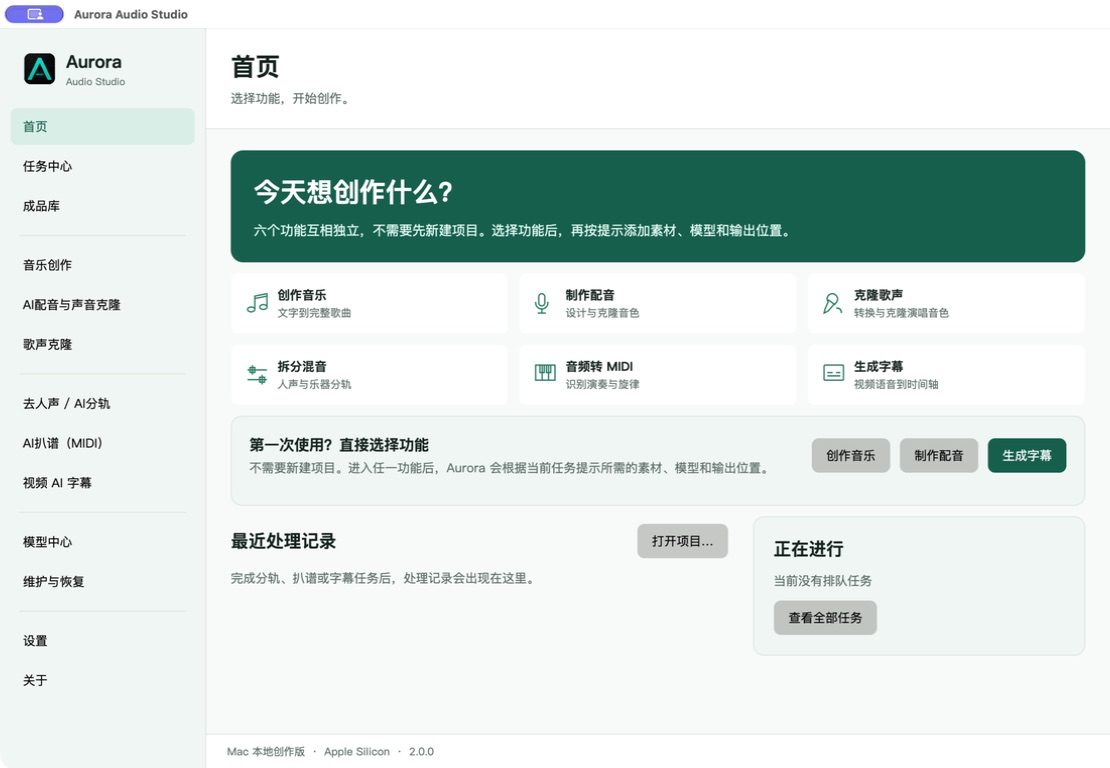
Aurora 2.0 面向 Windows 与 macOS 的本地音频创作。上图为 Mac 2.0.0 实机界面;各平台可下载版本见下表。
Aurora 将音乐生成、配音与声音克隆、歌声转换、音轨分离、MIDI 扒谱和字幕制作整合到一个本地工作台。选择所需功能即可开始,素材、任务与成品集中管理。
选择你的平台
| Windows | macOS | |
|---|---|---|
| 系统 | Windows 10 / 11 x64 | macOS 26+ · Apple Silicon |
| 安装包 | Aurora-Audio-Studio-2.0.0-Setup-x64.exe | Aurora-Audio-Studio-2.0.0-arm64.dmg |
| 获取 | 正式版下载 | Mac 2.0.0 正式版 |
| 安装 | 运行标准安装程序 | 打开 DMG,拖入 Applications |
| 加速 | NVIDIA RTX 推荐,依模型要求 | Apple Silicon 的 MPS / MLX 或 CPU,依模型实现 |
| 指南 | Windows 使用说明 | Mac 使用说明 |
请选择与你的系统匹配的安装包;同名 .sha256 文件用于校验下载完整性。Windows 与 Mac 当前正式版均为 2.0.0。模型按需安装,不随安装包捆绑。各平台签名说明见代码签名政策。
日常使用推荐下载正式版。如需体验预发布功能,可在更新设置中选择 Beta 通道。
当前下载区保留正式版与最新 Beta,旧测试版安装包和标签已整理;完整 Git 提交历史保留。详见版本保留说明。
Windows 与 Mac 可选 2.0.1-beta.2。Mac 版适用于 Apple Silicon / macOS 26+,已通过实机验收、Developer ID 签名与 Apple 公证;正式版仍为 2.0.0。Mac Beta 2 验收记录。
正式版与测试版更新
在设置中选择“应用更新通道”,保存后生效。默认“正式版”;主动选择“测试版(含正式版)”才会收到 Beta。检查到更新并经你确认后,Aurora 会下载、校验并启动对应平台的安装流程;系统权限确认仍需你处理。
日常使用推荐选择正式版;如需体验预发布版本,可选择 Beta 通道。切换通道不会自动降级。使用“回退到上一个正式版”可确认并安装适用于当前平台的较早正式版,正式版和 Beta 均可使用。回退保留模型与成品,但旧版可能无法读取新版配置或记录,请先备份重要数据。
应用更新成功后不再保留旧应用副本;安装失败时仍保留必要的恢复保护。历史备份不会自动删除,模型自身的备份与回退机制不变。
当前版本更新
当前源码版本 / Source version: 2.0.1-beta.2。实际可下载的平台安装包请以官网和 GitHub Releases 为准。 / See the website or Releases for available platform packages.
- Windows 与 Mac 均提供 2.0.1-beta.2。Mac Apple Silicon 安装包已完成实机验收、Developer ID 签名与 Apple 公证;正式版仍为 2.0.0。
- Windows 卸载仅清除明确的设置与任务历史文件,不递归删除配置目录,保护自定义目录中的模型、素材和成品。
- 修复取消后重试、更新失败缓存恢复,以及静音字幕连同识别记录导出;保留原有取消和完整性校验。
- 处理记录增加字段结构校验与原件保留,批量任务保存不再覆盖较新的任务和成果索引。
- Mac 增加工作台忙碌保护、分轨模式一致性,以及引擎身份和可操作界面就绪检查。
- Mac 环境修复在独立目录安装并通过检查后切换,失败保留旧环境;隔离不同版本的下载暂存,并明确权重更新检查范围。
- 修复窄窗口下工作台空白状态的居中和日语标题裁切,布局按实际可用空间适配。
- Windows 安装包未签名。Mac 实测覆盖代表性短样本,不代表所有模型、长素材或其他 macOS 版本均已验收。
模型中心分别显示文件状态和运行记录。成功完成任务后,会记录模型版本、时间及计算设备。“仅模型管理”表示支持下载与维护,但不能在 Aurora 内生成内容。可选模型的兼容性与运行表现取决于具体设备,请先使用短素材确认。
恢复任务时会使用保留的素材与参数重新处理,不会从中断步骤继续计算。模型下载在版本未变且来源支持续传时可继续;模型更新保留原文件与运行环境,以便回退,不自动删除旧模型。
音频可在成品库试听和导出;MIDI 显示音符信息并交给默认音乐软件编辑,Aurora 不内置 MIDI 合成器;SRT 可编辑后保存副本,已安装 Subtitle Edit 时也可直接交给它校对。
工作流
| 工作流 | 默认引擎 | 可选引擎 | 主要输出 |
|---|---|---|---|
| 音乐创作 | ACE-Step 1.5 XL Turbo | MiniMax-Music3(当前仅 Windows CUDA 后端) | 完整歌曲、纯音乐与草稿 |
| AI 配音与声音克隆 | Qwen3-TTS 1.7B | Qwen3-TTS 0.6B、F5-TTS | 配音与克隆音频 |
| 歌声克隆 | Seed-VC 44.1k | 按模型中心扩展 | 歌声与音色转换 |
| 去人声 / AI 分轨 | BS-RoFormer Vocals Revive V3e(二轨) | BS-RoFormer-SW 六轨、Demucs 4 | 独立 WAV 音轨 |
| AI 扒谱 | TransKun V2 | YourMT3+、ByteDance Piano、Basic Pitch | 标准 MIDI |
| 视频 AI 字幕 | Windows:Faster-Whisper XXL;Mac:原生 Whisper | Small、Large v3 Turbo、Large v3 | SRT 与转写数据 |
模型与第三方工具保留各自上游许可。模型大小、显存建议、语言能力和来源会在模型中心逐项显示。下表是共同模型目录:MiniMax-Music3 的当前 CUDA 后端及 Faster-Whisper XXL 二进制不支持 Mac;标注为“仅下载管理”的模型在 Windows 和 Mac 上均不支持生成内容。
全部模型接入状态 / All model interfaces
| 模型 / Model | 操作入口 / Interface | 上游许可 / License |
|---|---|---|
| ACE-Step 1.5 XL Turbo | 嵌入式工作台 / Embedded | Apache-2.0 |
| MiniMax-Music3 | 嵌入式工作台 / Embedded | MiniMax-Music3 Community License |
| HeartMuLa 3B · Happy New Year | 仅下载管理 / Download only | Apache-2.0 |
| Qwen3-TTS 1.7B · 声音克隆 | 嵌入式工作台 / Embedded | Apache-2.0 |
| Qwen3-TTS 1.7B · 专业音色 | 嵌入式工作台 / Embedded | Apache-2.0 |
| Qwen3-TTS 1.7B · 音色设计 | 嵌入式工作台 / Embedded | Apache-2.0 |
| Qwen3-TTS 0.6B · 轻量声音克隆 | 嵌入式工作台 / Embedded | Apache-2.0 |
| Qwen3-TTS 0.6B · 轻量专业音色 | 嵌入式工作台 / Embedded | Apache-2.0 |
| F5-TTS · 多语言声音克隆 | 嵌入式工作台 / Embedded | MIT code / CC-BY-NC-4.0 weights (noncommercial) |
| IndexTTS-2.5 · 可控配音 | 仅下载管理 / Download only | Bilibili Model License |
| Seed-VC 44.1k | 嵌入式工作台 / Embedded | Review upstream license |
| SoulX-Singer-SVC · 零样本歌声转换 | 仅下载管理 / Download only | Apache-2.0 |
| BS-RoFormer-SW · 多轨高质量 | 原生任务 / Native | Review upstream license |
| BS-RoFormer Vocals Revive V3e · 二轨 | 原生任务 / Native | Review upstream license |
| Demucs 4 · 通用四轨分离 | 原生任务 / Native | MIT |
| YourMT3+ Multi-Instrument | 原生任务 / Native | Review upstream license |
| TransKun V2 · 钢琴扒谱 | 原生任务 / Native | MIT |
| ByteDance Piano · 经典模型 | 原生任务 / Native | Review upstream license |
| Spotify Basic Pitch · 轻量扒谱 | 原生任务 / Native | Apache-2.0 |
| Faster-Whisper XXL | 共享组件 / Runtime | MIT |
| Faster-Whisper Small | 原生任务 / Native | MIT |
| Faster-Whisper Large v3 Turbo | 原生任务 / Native | MIT |
| Faster-Whisper Large v3 | 原生任务 / Native | MIT |
| Qwen3-ASR 0.6B · 快速识别 | 仅下载管理 / Download only | Apache-2.0 |
| Qwen3-ASR 1.7B · 高质量识别 | 仅下载管理 / Download only | Apache-2.0 |
| Qwen3 ForcedAligner 0.6B · 精确时间轴 | 仅下载管理 / Download only | Apache-2.0 |
| Subtitle Edit | 外部编辑器 / External editor | GPL-3.0 |
Windows 安装
系统要求
- Windows 10 或 Windows 11 x64
- 建议使用 NVIDIA RTX 显卡
- 模型根据实际工作流单独下载
- 大型模型安装前请预留模型中心建议的磁盘空间
标准安装
- 打开 Releases。
- 下载该版本的 Windows x64 安装包(文件名以
-Setup-x64.exe结尾)和同名.sha256文件。 - 运行安装程序,阅读并接受 GNU GPL v3.0,选择安装位置和桌面快捷方式。
- 首次打开 Aurora,直接选择需要的功能;需要时再确认模型、处理记录和成品目录。
默认安装位置是 C:\Program Files\Aurora Audio Studio。覆盖升级会保留用户设置、任务记录、模型、处理记录和成品;卸载时可选择是否清除个人配置。
第一次使用建议
- 在首页直接选择音乐、配音、歌声、分轨、扒谱或字幕功能,不需要先新建项目。
- Aurora 会根据当前功能提示所需模型;下载前会显示体积、目标位置和可用空间。
- 导入素材的功能会在进入后提示添加文件;音乐、配音和歌声工作台可直接选择引擎进入。
- 先处理一份 5–10 秒短样本。在成品库检查实际结果;分轨、扒谱和字幕可从原记录恢复参数后再次处理。
数据与隐私
Aurora 不提供云端生成服务,素材与结果保存在你指定的本地目录。下载应用更新或安装模型时,会连接 GitHub、Hugging Face 或模型列明的官方来源。
开发
两端均使用 .NET 10。Windows 使用 WinUI 3 / Windows App SDK,Mac 使用 Avalonia,并共享设置、任务和成果等服务。官网使用原生 HTML、CSS 与 ES Modules,部署到 GitHub Pages。Mac 的本地编译、签名和公证见 Mac 发布说明。
dotnet restore .\work\audio-studio\AuroraAudioStudio\AuroraAudioStudio.csproj --runtime win-x64
dotnet build .\work\audio-studio\AuroraAudioStudio\AuroraAudioStudio.csproj -c Release -p:Platform=x64
dotnet publish .\work\audio-studio\AuroraAudioStudio\AuroraAudioStudio.csproj -c Release -r win-x64 --self-contained true -p:Platform=x64 -o .\publish\Aurora-Audio-Studio
运行回归检查:
dotnet run --project .\work\audio-studio\AuroraAudioStudio.UpdateFlowTests\AuroraAudioStudio.UpdateFlowTests.csproj -- .\work\audio-studio\AuroraAudioStudio.iss
项目结构
docs/                                      官方网站
work/audio-studio/AuroraAudioStudio/       WinUI 3 桌面端
work/audio-studio/AuroraAudioStudio.Mac/   Avalonia Mac 桌面端
work/audio-studio/AuroraAudioStudio.Core/  共享服务与 Mac 运行时桥接
work/audio-studio/AuroraAudioStudio.iss    Inno Setup 安装脚本
model-manifest.json                        固定下载包的可验证模型更新清单
CHANGELOG.md                               中英双语更新日志
许可
Aurora Audio Studio 以 GNU General Public License v3.0 开源。模型、运行时和第三方组件遵循各自许可。
日语字体 Noto Sans JP 随附 OFL-1.1 许可。F5-TTS 官方模型权重 使用 CC-BY-NC-4.0,不能把代码的 MIT 许可理解为模型允许商用。
English
Aurora Audio Studio brings music, voice, singing, stem separation, MIDI transcription, and subtitles into one local workspace for Windows and macOS. Windows and Mac Stable are both 2.0.0. Screenshots show the Mac 2.0.0 interface. See the release page for available downloads. See the platform table above, the Mac guide, and the Mac build and distribution guide.
Choose Stable or Beta in Settings and save. Stable is the default; Beta includes prereleases and subsequent stable versions. Updates download and verify the package for your platform before installer handoff. Switching from Beta to Stable never silently downgrades. Beta releases are intended for users who want early access; back up important settings before upgrading.
Use “Revert to previous stable release” to review and install the latest stable version older than your current app, for your platform. This is available from both Stable and Beta and does not change your update channel. Models and results are preserved, but older versions may not read newer settings or records. Back up important data first.
Successful app installation no longer retains an old app copy. Replacement failures retain recovery protection. Existing backups and model-specific backup and rollback behavior are unchanged.
Current release notes
- Windows and Mac 2.0.1-beta.2 are available. The Mac Apple Silicon package has passed native acceptance, Developer ID signing and Apple notarization; Stable remains 2.0.0.
- Windows uninstall clears only explicitly listed preference and task-history files. It no longer recursively deletes the settings directory, preserving custom model, media and output folders.
- Fix explicit retry after cancellation, recovery from corrupt update caches, and silent-subtitle exports with recognition evidence. Cancellation and integrity protections remain in place.
- Validate processing-record fields while preserving invalid originals. Batch saves retain newer task and result indexes.
- Mac adds active-workbench protection, matching stem modes, and engine identity plus usable-interface readiness checks.
- Mac environment repair installs and validates an independent candidate before activation, preserving the old environment on failure. Download staging is separated by revision and weight-update coverage is stated explicitly.
- Fix empty-workbench alignment and clipped Japanese headings in compact windows using the actual available viewport.
- The Windows installer is unsigned. Mac acceptance covers representative short samples, not every model, long input, or other macOS version.
Read the capability matrix and Mac release requirements for exact scope. Download-only models are not runnable workbenches. Retrying an interrupted task restarts inference from its saved inputs and parameters. MIDI editing/playback requires your own music application; audio playback and subtitle-copy editing are available in Results.
Local by design
Aurora does not operate a cloud generation service. Media and generated output remain in the directories chosen by the user. App updates and model deployment connect only to GitHub, Hugging Face, or the official source identified for each model.
Install
- Open the latest Release.
- Download the Windows x64 installer for that release (ending in
-Setup-x64.exe) and its.sha256file. - Run Setup, review GNU GPL v3.0, and choose the destination and shortcut options.
- Choose a feature on first launch; confirm model, processing-record, and output folders only when needed.
Aurora defaults to C:\Program Files\Aurora Audio Studio. In-place upgrades preserve settings, task history, models, processing records, and output. Uninstall offers an optional personal-configuration cleanup.
Technology
- .NET 10
- WinUI 3
- Windows App SDK
- Inno Setup
- Native HTML, CSS, and ES Modules for the website
Aurora Audio Studio is licensed under the GNU General Public License v3.0. Models, runtimes, and third-party components retain their own licenses.
Noto Sans JP includes its OFL-1.1 license. F5-TTS model weights are CC-BY-NC-4.0; the code's MIT license does not grant commercial rights to the pretrained weights.
Similar repos


Languages
C#
80.2%
Python
10.6%
Inno Setup
4.1%
PowerShell
2.7%
Aurora Audio Studio · Windows 与 macOS 本地 AI 音频创作工作台。音乐、配音与声音克隆、歌声转换、分轨、MIDI 与字幕。正式版 2.0.0;测试版:Windows 2.0.1-beta.2 / Mac 2.0.1-beta.1。
See the codeREADME
Aurora Audio Studio 2.0
让声音创作,回到创作本身。
Windows 与 macOS 的本地 AI 音频创作工作台
Aurora 2.0 面向 Windows 与 macOS 的本地音频创作。上图为 Mac 2.0.0 实机界面;各平台可下载版本见下表。
Aurora 将音乐生成、配音与声音克隆、歌声转换、音轨分离、MIDI 扒谱和字幕制作整合到一个本地工作台。选择所需功能即可开始,素材、任务与成品集中管理。
选择你的平台
| Windows | macOS | |
|---|---|---|
| 系统 | Windows 10 / 11 x64 | macOS 26+ · Apple Silicon |
| 安装包 | Aurora-Audio-Studio-2.0.0-Setup-x64.exe | Aurora-Audio-Studio-2.0.0-arm64.dmg |
| 获取 | 正式版下载 | Mac 2.0.0 正式版 |
| 安装 | 运行标准安装程序 | 打开 DMG,拖入 Applications |
| 加速 | NVIDIA RTX 推荐,依模型要求 | Apple Silicon 的 MPS / MLX 或 CPU,依模型实现 |
| 指南 | Windows 使用说明 | Mac 使用说明 |
请选择与你的系统匹配的安装包;同名 .sha256 文件用于校验下载完整性。Windows 与 Mac 当前正式版均为 2.0.0。模型按需安装,不随安装包捆绑。各平台签名说明见代码签名政策。
日常使用推荐下载正式版。如需体验预发布功能,可在更新设置中选择 Beta 通道。
当前下载区保留正式版与最新 Beta,旧测试版安装包和标签已整理;完整 Git 提交历史保留。详见版本保留说明。
Windows 与 Mac 可选 2.0.1-beta.2。Mac 版适用于 Apple Silicon / macOS 26+,已通过实机验收、Developer ID 签名与 Apple 公证;正式版仍为 2.0.0。Mac Beta 2 验收记录。
正式版与测试版更新
在设置中选择“应用更新通道”,保存后生效。默认“正式版”;主动选择“测试版(含正式版)”才会收到 Beta。检查到更新并经你确认后,Aurora 会下载、校验并启动对应平台的安装流程;系统权限确认仍需你处理。
日常使用推荐选择正式版;如需体验预发布版本,可选择 Beta 通道。切换通道不会自动降级。使用“回退到上一个正式版”可确认并安装适用于当前平台的较早正式版,正式版和 Beta 均可使用。回退保留模型与成品,但旧版可能无法读取新版配置或记录,请先备份重要数据。
应用更新成功后不再保留旧应用副本;安装失败时仍保留必要的恢复保护。历史备份不会自动删除,模型自身的备份与回退机制不变。
当前版本更新
当前源码版本 / Source version: 2.0.1-beta.2。实际可下载的平台安装包请以官网和 GitHub Releases 为准。 / See the website or Releases for available platform packages.
- Windows 与 Mac 均提供 2.0.1-beta.2。Mac Apple Silicon 安装包已完成实机验收、Developer ID 签名与 Apple 公证;正式版仍为 2.0.0。
- Windows 卸载仅清除明确的设置与任务历史文件,不递归删除配置目录,保护自定义目录中的模型、素材和成品。
- 修复取消后重试、更新失败缓存恢复,以及静音字幕连同识别记录导出;保留原有取消和完整性校验。
- 处理记录增加字段结构校验与原件保留,批量任务保存不再覆盖较新的任务和成果索引。
- Mac 增加工作台忙碌保护、分轨模式一致性,以及引擎身份和可操作界面就绪检查。
- Mac 环境修复在独立目录安装并通过检查后切换,失败保留旧环境;隔离不同版本的下载暂存,并明确权重更新检查范围。
- 修复窄窗口下工作台空白状态的居中和日语标题裁切,布局按实际可用空间适配。
- Windows 安装包未签名。Mac 实测覆盖代表性短样本,不代表所有模型、长素材或其他 macOS 版本均已验收。
模型中心分别显示文件状态和运行记录。成功完成任务后,会记录模型版本、时间及计算设备。“仅模型管理”表示支持下载与维护,但不能在 Aurora 内生成内容。可选模型的兼容性与运行表现取决于具体设备,请先使用短素材确认。
恢复任务时会使用保留的素材与参数重新处理,不会从中断步骤继续计算。模型下载在版本未变且来源支持续传时可继续;模型更新保留原文件与运行环境,以便回退,不自动删除旧模型。
音频可在成品库试听和导出;MIDI 显示音符信息并交给默认音乐软件编辑,Aurora 不内置 MIDI 合成器;SRT 可编辑后保存副本,已安装 Subtitle Edit 时也可直接交给它校对。
工作流
| 工作流 | 默认引擎 | 可选引擎 | 主要输出 |
|---|---|---|---|
| 音乐创作 | ACE-Step 1.5 XL Turbo | MiniMax-Music3(当前仅 Windows CUDA 后端) | 完整歌曲、纯音乐与草稿 |
| AI 配音与声音克隆 | Qwen3-TTS 1.7B | Qwen3-TTS 0.6B、F5-TTS | 配音与克隆音频 |
| 歌声克隆 | Seed-VC 44.1k | 按模型中心扩展 | 歌声与音色转换 |
| 去人声 / AI 分轨 | BS-RoFormer Vocals Revive V3e(二轨) | BS-RoFormer-SW 六轨、Demucs 4 | 独立 WAV 音轨 |
| AI 扒谱 | TransKun V2 | YourMT3+、ByteDance Piano、Basic Pitch | 标准 MIDI |
| 视频 AI 字幕 | Windows:Faster-Whisper XXL;Mac:原生 Whisper | Small、Large v3 Turbo、Large v3 | SRT 与转写数据 |
模型与第三方工具保留各自上游许可。模型大小、显存建议、语言能力和来源会在模型中心逐项显示。下表是共同模型目录:MiniMax-Music3 的当前 CUDA 后端及 Faster-Whisper XXL 二进制不支持 Mac;标注为“仅下载管理”的模型在 Windows 和 Mac 上均不支持生成内容。
全部模型接入状态 / All model interfaces
| 模型 / Model | 操作入口 / Interface | 上游许可 / License |
|---|---|---|
| ACE-Step 1.5 XL Turbo | 嵌入式工作台 / Embedded | Apache-2.0 |
| MiniMax-Music3 | 嵌入式工作台 / Embedded | MiniMax-Music3 Community License |
| HeartMuLa 3B · Happy New Year | 仅下载管理 / Download only | Apache-2.0 |
| Qwen3-TTS 1.7B · 声音克隆 | 嵌入式工作台 / Embedded | Apache-2.0 |
| Qwen3-TTS 1.7B · 专业音色 | 嵌入式工作台 / Embedded | Apache-2.0 |
| Qwen3-TTS 1.7B · 音色设计 | 嵌入式工作台 / Embedded | Apache-2.0 |
| Qwen3-TTS 0.6B · 轻量声音克隆 | 嵌入式工作台 / Embedded | Apache-2.0 |
| Qwen3-TTS 0.6B · 轻量专业音色 | 嵌入式工作台 / Embedded | Apache-2.0 |
| F5-TTS · 多语言声音克隆 | 嵌入式工作台 / Embedded | MIT code / CC-BY-NC-4.0 weights (noncommercial) |
| IndexTTS-2.5 · 可控配音 | 仅下载管理 / Download only | Bilibili Model License |
| Seed-VC 44.1k | 嵌入式工作台 / Embedded | Review upstream license |
| SoulX-Singer-SVC · 零样本歌声转换 | 仅下载管理 / Download only | Apache-2.0 |
| BS-RoFormer-SW · 多轨高质量 | 原生任务 / Native | Review upstream license |
| BS-RoFormer Vocals Revive V3e · 二轨 | 原生任务 / Native | Review upstream license |
| Demucs 4 · 通用四轨分离 | 原生任务 / Native | MIT |
| YourMT3+ Multi-Instrument | 原生任务 / Native | Review upstream license |
| TransKun V2 · 钢琴扒谱 | 原生任务 / Native | MIT |
| ByteDance Piano · 经典模型 | 原生任务 / Native | Review upstream license |
| Spotify Basic Pitch · 轻量扒谱 | 原生任务 / Native | Apache-2.0 |
| Faster-Whisper XXL | 共享组件 / Runtime | MIT |
| Faster-Whisper Small | 原生任务 / Native | MIT |
| Faster-Whisper Large v3 Turbo | 原生任务 / Native | MIT |
| Faster-Whisper Large v3 | 原生任务 / Native | MIT |
| Qwen3-ASR 0.6B · 快速识别 | 仅下载管理 / Download only | Apache-2.0 |
| Qwen3-ASR 1.7B · 高质量识别 | 仅下载管理 / Download only | Apache-2.0 |
| Qwen3 ForcedAligner 0.6B · 精确时间轴 | 仅下载管理 / Download only | Apache-2.0 |
| Subtitle Edit | 外部编辑器 / External editor | GPL-3.0 |
Windows 安装
系统要求
- Windows 10 或 Windows 11 x64
- 建议使用 NVIDIA RTX 显卡
- 模型根据实际工作流单独下载
- 大型模型安装前请预留模型中心建议的磁盘空间
标准安装
- 打开 Releases。
- 下载该版本的 Windows x64 安装包(文件名以
-Setup-x64.exe结尾)和同名.sha256文件。 - 运行安装程序,阅读并接受 GNU GPL v3.0,选择安装位置和桌面快捷方式。
- 首次打开 Aurora,直接选择需要的功能;需要时再确认模型、处理记录和成品目录。
默认安装位置是 C:\Program Files\Aurora Audio Studio。覆盖升级会保留用户设置、任务记录、模型、处理记录和成品;卸载时可选择是否清除个人配置。
第一次使用建议
- 在首页直接选择音乐、配音、歌声、分轨、扒谱或字幕功能,不需要先新建项目。
- Aurora 会根据当前功能提示所需模型;下载前会显示体积、目标位置和可用空间。
- 导入素材的功能会在进入后提示添加文件;音乐、配音和歌声工作台可直接选择引擎进入。
- 先处理一份 5–10 秒短样本。在成品库检查实际结果;分轨、扒谱和字幕可从原记录恢复参数后再次处理。
数据与隐私
Aurora 不提供云端生成服务,素材与结果保存在你指定的本地目录。下载应用更新或安装模型时,会连接 GitHub、Hugging Face 或模型列明的官方来源。
开发
两端均使用 .NET 10。Windows 使用 WinUI 3 / Windows App SDK,Mac 使用 Avalonia,并共享设置、任务和成果等服务。官网使用原生 HTML、CSS 与 ES Modules,部署到 GitHub Pages。Mac 的本地编译、签名和公证见 Mac 发布说明。
dotnet restore .\work\audio-studio\AuroraAudioStudio\AuroraAudioStudio.csproj --runtime win-x64
dotnet build .\work\audio-studio\AuroraAudioStudio\AuroraAudioStudio.csproj -c Release -p:Platform=x64
dotnet publish .\work\audio-studio\AuroraAudioStudio\AuroraAudioStudio.csproj -c Release -r win-x64 --self-contained true -p:Platform=x64 -o .\publish\Aurora-Audio-Studio
运行回归检查:
dotnet run --project .\work\audio-studio\AuroraAudioStudio.UpdateFlowTests\AuroraAudioStudio.UpdateFlowTests.csproj -- .\work\audio-studio\AuroraAudioStudio.iss
项目结构
docs/                                      官方网站
work/audio-studio/AuroraAudioStudio/       WinUI 3 桌面端
work/audio-studio/AuroraAudioStudio.Mac/   Avalonia Mac 桌面端
work/audio-studio/AuroraAudioStudio.Core/  共享服务与 Mac 运行时桥接
work/audio-studio/AuroraAudioStudio.iss    Inno Setup 安装脚本
model-manifest.json                        固定下载包的可验证模型更新清单
CHANGELOG.md                               中英双语更新日志
许可
Aurora Audio Studio 以 GNU General Public License v3.0 开源。模型、运行时和第三方组件遵循各自许可。
日语字体 Noto Sans JP 随附 OFL-1.1 许可。F5-TTS 官方模型权重 使用 CC-BY-NC-4.0,不能把代码的 MIT 许可理解为模型允许商用。
English
Aurora Audio Studio brings music, voice, singing, stem separation, MIDI transcription, and subtitles into one local workspace for Windows and macOS. Windows and Mac Stable are both 2.0.0. Screenshots show the Mac 2.0.0 interface. See the release page for available downloads. See the platform table above, the Mac guide, and the Mac build and distribution guide.
Choose Stable or Beta in Settings and save. Stable is the default; Beta includes prereleases and subsequent stable versions. Updates download and verify the package for your platform before installer handoff. Switching from Beta to Stable never silently downgrades. Beta releases are intended for users who want early access; back up important settings before upgrading.
Use “Revert to previous stable release” to review and install the latest stable version older than your current app, for your platform. This is available from both Stable and Beta and does not change your update channel. Models and results are preserved, but older versions may not read newer settings or records. Back up important data first.
Successful app installation no longer retains an old app copy. Replacement failures retain recovery protection. Existing backups and model-specific backup and rollback behavior are unchanged.
Current release notes
- Windows and Mac 2.0.1-beta.2 are available. The Mac Apple Silicon package has passed native acceptance, Developer ID signing and Apple notarization; Stable remains 2.0.0.
- Windows uninstall clears only explicitly listed preference and task-history files. It no longer recursively deletes the settings directory, preserving custom model, media and output folders.
- Fix explicit retry after cancellation, recovery from corrupt update caches, and silent-subtitle exports with recognition evidence. Cancellation and integrity protections remain in place.
- Validate processing-record fields while preserving invalid originals. Batch saves retain newer task and result indexes.
- Mac adds active-workbench protection, matching stem modes, and engine identity plus usable-interface readiness checks.
- Mac environment repair installs and validates an independent candidate before activation, preserving the old environment on failure. Download staging is separated by revision and weight-update coverage is stated explicitly.
- Fix empty-workbench alignment and clipped Japanese headings in compact windows using the actual available viewport.
- The Windows installer is unsigned. Mac acceptance covers representative short samples, not every model, long input, or other macOS version.
Read the capability matrix and Mac release requirements for exact scope. Download-only models are not runnable workbenches. Retrying an interrupted task restarts inference from its saved inputs and parameters. MIDI editing/playback requires your own music application; audio playback and subtitle-copy editing are available in Results.
Local by design
Aurora does not operate a cloud generation service. Media and generated output remain in the directories chosen by the user. App updates and model deployment connect only to GitHub, Hugging Face, or the official source identified for each model.
Install
- Open the latest Release.
- Download the Windows x64 installer for that release (ending in
-Setup-x64.exe) and its.sha256file. - Run Setup, review GNU GPL v3.0, and choose the destination and shortcut options.
- Choose a feature on first launch; confirm model, processing-record, and output folders only when needed.
Aurora defaults to C:\Program Files\Aurora Audio Studio. In-place upgrades preserve settings, task history, models, processing records, and output. Uninstall offers an optional personal-configuration cleanup.
Technology
- .NET 10
- WinUI 3
- Windows App SDK
- Inno Setup
- Native HTML, CSS, and ES Modules for the website
Aurora Audio Studio is licensed under the GNU General Public License v3.0. Models, runtimes, and third-party components retain their own licenses.
Noto Sans JP includes its OFL-1.1 license. F5-TTS model weights are CC-BY-NC-4.0; the code's MIT license does not grant commercial rights to the pretrained weights.
Similar repos
Languages
C#
80.2%
Python
10.6%
Inno Setup
4.1%
PowerShell
2.7%