A markdown editor with a flavor called tagdown. Written in Rust.
See the codeA fast, local-first desktop editor for Tagdown notes — Markdown plus rich semantic blocks, tags, links, live queries, math, and diagrams.
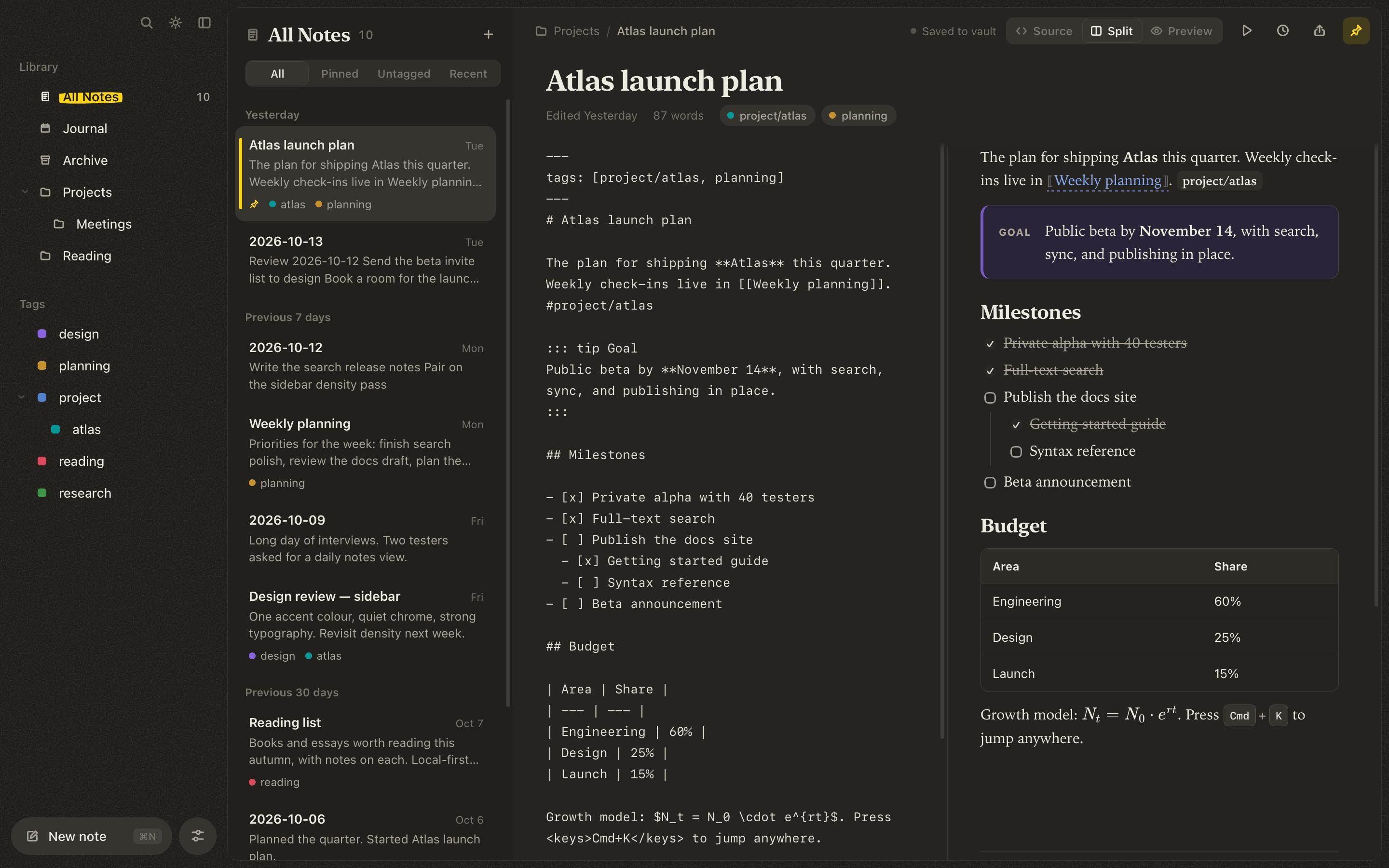
Tagdown Editor is a macOS-focused Tauri app for writing structured notes without giving up plain-text ownership. Notes are ordinary Markdown files on disk. They render instantly in a polished preview, link to each other, and can be exported, presented as slides, published as a website, or handed to an AI assistant.
Plain text in. Beautiful documents out.
Local vaults · Wikilinks · Live queries · Full-text search · Slides · Publishing · MCP
| Light | Dark |
|---|---|
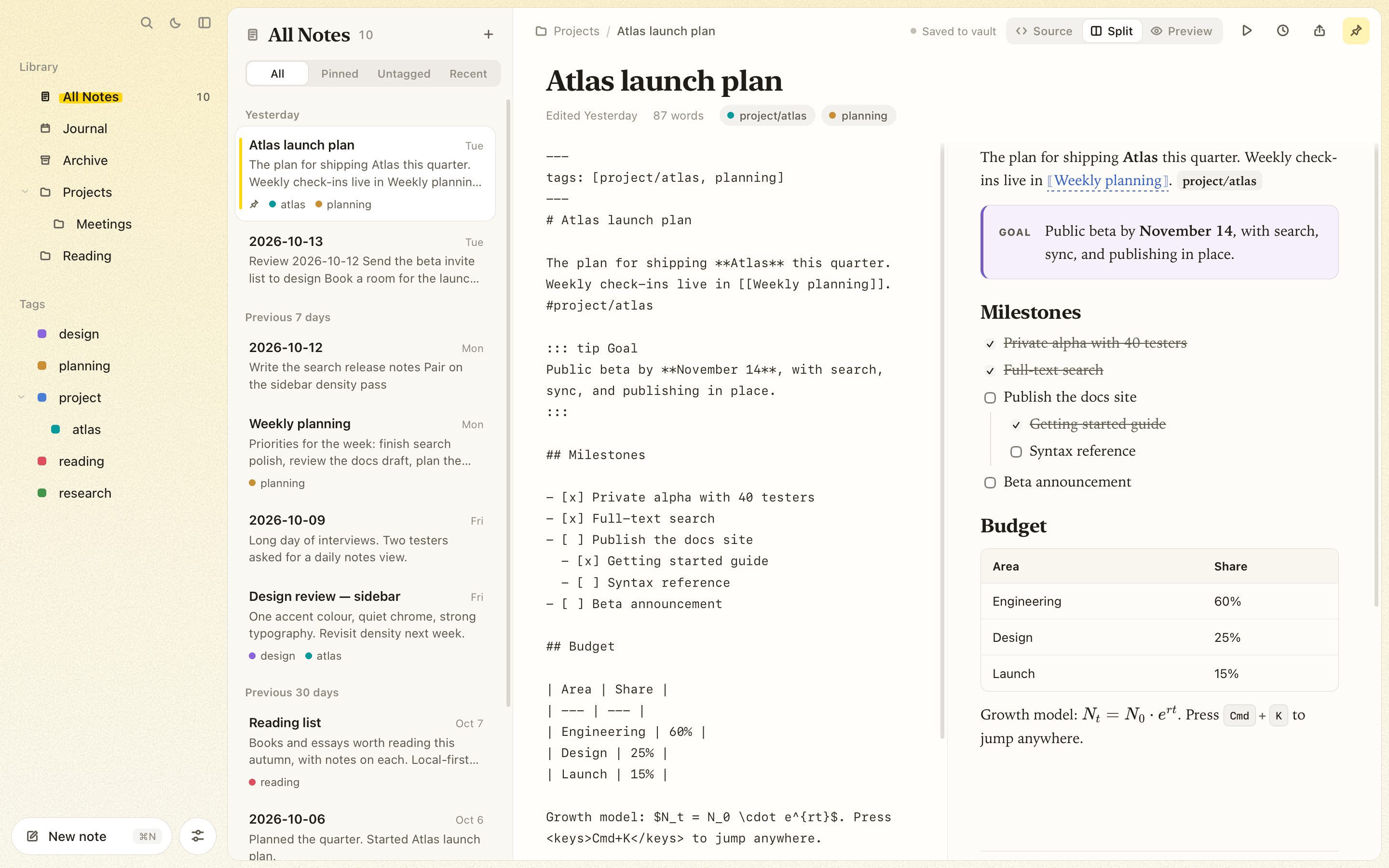 | |
Tagdown is a note format built on Markdown with extra structure for knowledge work:
#tags (nested with /) and [[wikilinks]] between notes<query /> blocks that list notes or tasks from across the vault# Atlas launch plan
The plan for shipping **Atlas** this quarter. #project/atlas
::: tip Goal
Public beta by **November 14**.
:::
<query tag:project show:tasks />
See the syntax guide for everything Tagdown adds.
/ to turn a line into a heading, list, or task, or to insert any component, a note link, or a date..md files in ~/Documents/Tagdown, with nested folders and an archive.[[2026-10-13]] date links, and a template for new days.tag:, title:, "phrases", and -exclusions.<query tag:project show:tasks />; tick tasks right in the list. ⌘⇧T shows every open task.--- starts a new slide, scaled to fit any screen.tagdown CLI searches, reads, creates, and appends to notes from the terminal.tagdown mcp is an MCP server, so assistants like Claude can search, read, and write rich Tagdown notes in your vault.Grab the latest .dmg from Releases. It's a universal build for Apple silicon and Intel Macs. Open it and drag Tagdown Editor into Applications.
The app isn't signed with an Apple Developer ID yet, so macOS blocks the first launch with a message like "Apple could not verify 'Tagdown Editor' is free of malware". To open it anyway:
If macOS instead says the app "is damaged and can't be opened", remove the download quarantine flag in Terminal:
xattr -dr com.apple.quarantine "/Applications/Tagdown Editor.app"
Prefer to check the code first? Build it yourself as described below.
You need Node.js 20+, Rust stable, and the Tauri prerequisites for macOS.
npm install
npm run tauri:dev
Build a release with:
npm run build
npm run tauri:build
On first launch the app creates a vault at ~/Documents/Tagdown with a few starter notes. More in Getting started.
cargo install --path src-tauri/core

tagdown search "tag:project budget"
tagdown new "Meeting notes" "Agenda for [[Project Atlas]]"
tagdown append "Meeting notes" "- [ ] Send recap"
tagdown tasks
Connect Claude Code to your vault:
claude mcp add tagdown -- tagdown mcp
Claude Desktop setup, every command, and the full list of MCP tools are in Command line and AI assistants.
The guides below are also published at sthix.github.io/tagdown.
| Getting started | Download, build from source, first launch |
| Writing notes | Workspace, view modes, toolbar, themes and accents |
| Tagdown syntax | Everything Tagdown adds to Markdown |
| Organizing your vault | Folders, tags, pinning, archive, search, wikilinks |
| Journal | Daily pages, date links, journal template |
| Queries and tasks | Live queries and the open-tasks view |
| Version history | Snapshots and restoring |
| Sharing your notes | HTML, PDF, slides, and website publishing |
| Command line and AI assistants | The tagdown CLI and MCP server |
| Keyboard shortcuts | Every shortcut on one page |
| Development | Architecture, layout, tests, releasing |
| Layer | Technology |
|---|---|
| Desktop shell | Tauri v2 |
| UI | Vanilla TypeScript + Vite |
| Vault, search, CLI, MCP | Rust (tagdown-core) |
| Search | Tantivy |
| Math rendering | KaTeX |
| Diagrams | Mermaid |
| Storage model | Local filesystem vault of Markdown files |
npm run build
cargo test --manifest-path src-tauri/Cargo.toml --workspace
cargo check --manifest-path src-tauri/Cargo.toml --workspace
node --test tests/*.mjs
Tagdown Editor is an active early-stage desktop app (v0.1.0). The writing workspace (with slash commands, outliner lists, and drag-to-reorder blocks), vault, full-text search, wikilinks and backlinks, the daily journal, live queries, version history, file watching, HTML/PDF export, slides, website publishing, and the CLI/MCP server are in place. Still to come: drag-and-drop Markdown import, more settings, and a full native menu bar.
See PROJECT_PLAN.md for the roadmap.
Most note apps force a tradeoff: beautiful rendered documents, or durable plain-text files. Tagdown aims for both. You write in a format that stays readable and portable, while the editor turns it into structured, presentation-quality notes.
A markdown editor with a flavor called tagdown. Written in Rust.
See the codeA fast, local-first desktop editor for Tagdown notes — Markdown plus rich semantic blocks, tags, links, live queries, math, and diagrams.
Tagdown Editor is a macOS-focused Tauri app for writing structured notes without giving up plain-text ownership. Notes are ordinary Markdown files on disk. They render instantly in a polished preview, link to each other, and can be exported, presented as slides, published as a website, or handed to an AI assistant.
Plain text in. Beautiful documents out.
Local vaults · Wikilinks · Live queries · Full-text search · Slides · Publishing · MCP
| Light | Dark |
|---|---|
| |
Tagdown is a note format built on Markdown with extra structure for knowledge work:
#tags (nested with /) and [[wikilinks]] between notes<query /> blocks that list notes or tasks from across the vault# Atlas launch plan
The plan for shipping **Atlas** this quarter. #project/atlas
::: tip Goal
Public beta by **November 14**.
:::
<query tag:project show:tasks />
See the syntax guide for everything Tagdown adds.
/ to turn a line into a heading, list, or task, or to insert any component, a note link, or a date..md files in ~/Documents/Tagdown, with nested folders and an archive.[[2026-10-13]] date links, and a template for new days.tag:, title:, "phrases", and -exclusions.<query tag:project show:tasks />; tick tasks right in the list. ⌘⇧T shows every open task.--- starts a new slide, scaled to fit any screen.tagdown CLI searches, reads, creates, and appends to notes from the terminal.tagdown mcp is an MCP server, so assistants like Claude can search, read, and write rich Tagdown notes in your vault.Grab the latest .dmg from Releases. It's a universal build for Apple silicon and Intel Macs. Open it and drag Tagdown Editor into Applications.
The app isn't signed with an Apple Developer ID yet, so macOS blocks the first launch with a message like "Apple could not verify 'Tagdown Editor' is free of malware". To open it anyway:
If macOS instead says the app "is damaged and can't be opened", remove the download quarantine flag in Terminal:
xattr -dr com.apple.quarantine "/Applications/Tagdown Editor.app"
Prefer to check the code first? Build it yourself as described below.
You need Node.js 20+, Rust stable, and the Tauri prerequisites for macOS.
npm install
npm run tauri:dev
Build a release with:
npm run build
npm run tauri:build
On first launch the app creates a vault at ~/Documents/Tagdown with a few starter notes. More in Getting started.
cargo install --path src-tauri/core

tagdown search "tag:project budget"
tagdown new "Meeting notes" "Agenda for [[Project Atlas]]"
tagdown append "Meeting notes" "- [ ] Send recap"
tagdown tasks
Connect Claude Code to your vault:
claude mcp add tagdown -- tagdown mcp
Claude Desktop setup, every command, and the full list of MCP tools are in Command line and AI assistants.
The guides below are also published at sthix.github.io/tagdown.
| Getting started | Download, build from source, first launch |
| Writing notes | Workspace, view modes, toolbar, themes and accents |
| Tagdown syntax | Everything Tagdown adds to Markdown |
| Organizing your vault | Folders, tags, pinning, archive, search, wikilinks |
| Journal | Daily pages, date links, journal template |
| Queries and tasks | Live queries and the open-tasks view |
| Version history | Snapshots and restoring |
| Sharing your notes | HTML, PDF, slides, and website publishing |
| Command line and AI assistants | The tagdown CLI and MCP server |
| Keyboard shortcuts | Every shortcut on one page |
| Development | Architecture, layout, tests, releasing |
| Layer | Technology |
|---|---|
| Desktop shell | Tauri v2 |
| UI | Vanilla TypeScript + Vite |
| Vault, search, CLI, MCP | Rust (tagdown-core) |
| Search | Tantivy |
| Math rendering | KaTeX |
| Diagrams | Mermaid |
| Storage model | Local filesystem vault of Markdown files |
npm run build
cargo test --manifest-path src-tauri/Cargo.toml --workspace
cargo check --manifest-path src-tauri/Cargo.toml --workspace
node --test tests/*.mjs
Tagdown Editor is an active early-stage desktop app (v0.1.0). The writing workspace (with slash commands, outliner lists, and drag-to-reorder blocks), vault, full-text search, wikilinks and backlinks, the daily journal, live queries, version history, file watching, HTML/PDF export, slides, website publishing, and the CLI/MCP server are in place. Still to come: drag-and-drop Markdown import, more settings, and a full native menu bar.
See PROJECT_PLAN.md for the roadmap.
Most note apps force a tradeoff: beautiful rendered documents, or durable plain-text files. Tagdown aims for both. You write in a format that stays readable and portable, while the editor turns it into structured, presentation-quality notes.



