Dataset curation for anime diffusion training: the caption master and every sidecar a training run reads, produced from a folder of images. It installs on its own — no DiT, no VAE, no training stack — and everything it writes is a plain file on disk.
New here? Start with the guidebook — the end-to-end walkthrough from a folder of images to a published dataset, and what the GUI's ☰ → 📖 opens (한국어 · 日本語 · 中文).
One line, no checkout — installs uv if missing, then
uv tool installs the latest release (torch and sam3 included; there are no
extras) and puts anime-tools-gui on PATH:
curl -fsSL https://github.com/sorryhyun/anime_tools/releases/latest/download/install.sh | sh
Windows (PowerShell)
irm https://github.com/sorryhyun/anime_tools/releases/latest/download/install.ps1 | iex
ANIME_TOOLS_VERSION=v0.7.12 pins a tag, TORCH_INDEX=https://download.pytorch.org/whl/cu128 picks
a torch
index (PyPI's Linux wheel is already CUDA; the Windows installer defaults to cu132, since PyPI's
win32 wheel is CPU-only).
Then, in your dataset folder:
anime-tools-gui --open # http://127.0.0.1:8790
The installer also leaves a double-clickable Anime Tools GUI launcher in the folder it ran in —
a .lnk on Windows, a .command on macOS, a .desktop entry elsewhere.
It opens the GUI on that folder no matter where you move the file (the desktop, say),
and anime-tools-shortcut makes one inside any other dataset folder.
Updating: the GUI's ☰ → Update pane compares the installed version with the latest release,
shows its notes and installs it in place (python -m anime_tools.update, which is the installer's
own uv tool install --force at the new tag); it checks GitHub on startup unless you turn that off,
and the GUI needs a restart afterwards. From a terminal, uv tool upgrade anime-tools does the same
thing. A git checkout updates with git pull && uv sync, and the pane says so instead of offering a
button.
As a library dependency:
uv add "anime-tools @ git+https://github.com/sorryhyun/anime_tools" # git dependency; no PyPI
The repo is the product (kohya-ss/sd-scripts style): pin a tag, or use a
[tool.uv.sources] path override for a live checkout.
sam3 pins numpy>=1.26,<2 and the pin is stale (see [tool.uv] in pyproject.toml), but uv
reads tool.uv only from the workspace root — a project that depends on anime-tools has to
repeat the override in its own pyproject.toml, or the resolve fails on numpy:
[tool.uv]
override-dependencies = ["numpy>=2.0"]
The installers above pass the same override on the command line.
| Sub-package | What it does | CLI |
|---|---|---|
captions | The caption grammar, tag taxonomy, Danbooru-KB correction, shuffle/dropout variants. Torch-free. | …captions.index |
tagger | The Anima Tagger: a vocab/threshold/sidecar head over the dbv4 caformer, emitting Anima-format tags. | …tagger.cli |
stages | The pipeline itself — resize, autotag, position clauses, correction, multiview audit, OCR, export. | …stages.cli.* |
grouping | Near-twin and same-concept grouping on PE-Spatial features. | …grouping.cli.* |
masking | SAM3 subject masks, with balloons and lettering as ignore prompts, and their merge. | …masking.cli.* |
ocr | The AnimeText text-block detector and the manga VL reader behind the OCR stage. | …stages.cli.ocr_captions |
gui | The web panel over all of the above. | anime-tools-gui |
Each CLI is a python -m anime_tools.… module; --help lists its flags.
cd <your dataset folder>   # (source_dir)/, workspace/, models/ live here
anime-tools-gui --open     # http://127.0.0.1:8790
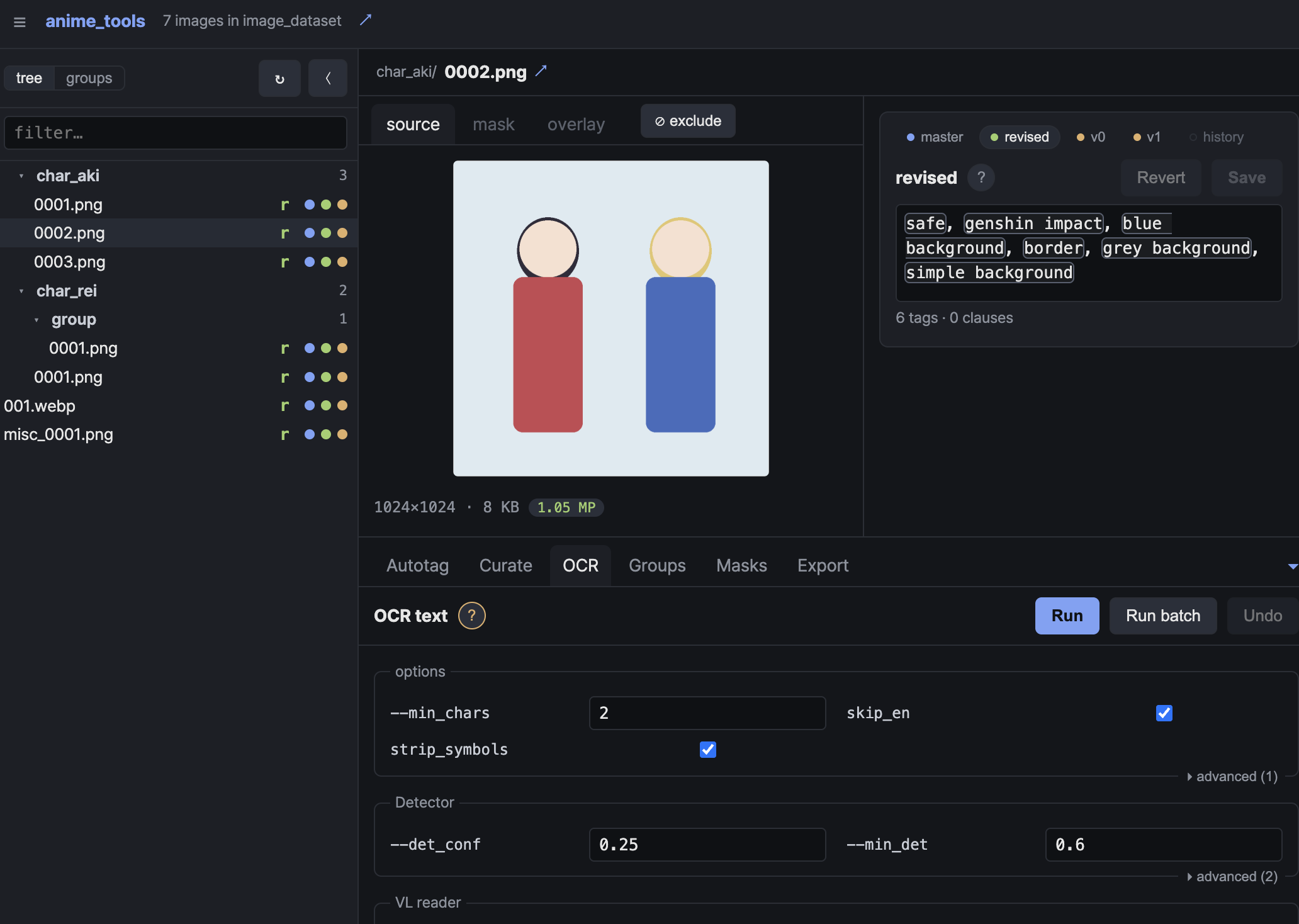
A small standalone panel on your dataset. The sidebar is the dataset: every
source image, and under each one its captions as a ladder — the hand-written
master, every version the revised caption used to be (revised@N), that
caption, then the generated v0…vN variants. master and revised are
editable; every write, by hand or by a stage, keeps what it replaced as a
version badge, and Undo puts it back from the run's report. The stage
runner is the bottom dock: its buttons are the stage list, the form is
generated from the CLI's own --help, and a Run works on the selected image or
the whole batch as one python -m … subprocess while the dataset stays on
screen. The ☰ menu holds four Settings dialogs (dataset roots, stage defaults,
models with a Download button and the Hugging Face sign-in, and the updater)
and a language switch (English, Korean, Japanese, Chinese). --host 0.0.0.0 exposes it on the
LAN for a headless GPU box (no auth — use your own tunnel), --home overrides
the curation home.
FastAPI + uvicorn are plain dependencies.
Every stage is a frozen dataclass whose fields are its CLI flags, plus a run_<stage> that takes
it. The request modules are torch-free; the model loads inside the runner.
from anime_tools.stages import AutotagRequest, run_autotag

req = AutotagRequest(mode="merge", min_confidence=0.35)  # dry run: report.json only
rows, stats = run_autotag(req)
req.to_argv()  # ['--mode', 'merge', '--min_confidence', '0.35'] — the CLI is a shell over this
apply=True writes. The library calls under the stages are usable on their own —
captions.parse_caption / compose_caption (never split(",") a caption),
tagger.AnimaTagger.predict, ocr.load_ocr().read(), masking._masks.mask_path_for.
examples/ is one runnable script per feature, API beside CLI, with the GUI panel that
runs the same thing named.
(source_dir)/<rel>.{png,txt}                    caption master   ← hand-written; read-only for the tools
workspace/                                       everything the tools write
  resized/<rel>.{png,txt,history.txt,variants.txt}  resized image, revised caption, its versions, shuffle / dropout variants
  master/<rel>.txt                                 revised master (Export publishes it back over the source tree)
  masks_sam/<rel>/  masks/<rel>/                   the SAM3 generator's tree, and the merge
  captions/<stage>/report.json  groups/groups.json  ocr/  export/report.json
  _excluded/excluded.json  _excluded/{resized,masks,ocr}/  images taken out of the pipeline, and their files
(export_target_dir)/resized/ masks/ _excluded/   the published dataset    ← written only by Export (originals from src; --resize_cap / --webp / --combine_ocr)
models/captioners/anima-tagger-dbv4/            tagger checkpoint (auto-fetched from sorryhyun/anima-tagger)
models/sam3/  models/pe/  models/animetext/       SAM3 / PE-Spatial / OCR text-block detector
models/paddleocr_vl_1.6*/                             the manga VL reader (VL-1.6 base + v4 tower LoRA/LM)
networks/calibration/sam3_girl_prompt.safetensors  SAM3 subject soft prompt (default `--prompt_embed`)
The two trees outside workspace/ are the src and out dataset roots, and
those names are only their defaults — ⚙ Settings points either one wherever your
dataset already lives.
python -m anime_tools.downloads --list says which weights are present and where each one goes.
Every artifact is a file. Paths resolve against the curation
home: ANIME_TOOLS_HOME → ANIMA_HOME → current directory
(ANIME_TOOLS_MODELS overrides the model dir).
docs/README.md is the index; the
guidebook is the walkthrough, and the
rest are per-piece references:
docs/anima_tagger.md — the tagger: vocab build, dbv4 backend,
sidecar head, calibration.docs/position_captions.md — position-clause grammar, rewrite rules,
gates and knobs.docs/multiview_audit.md — multi-view / multi-panel caption audit.docs/grouping.md — near-twin grouping, groups.json, the feature cache,
decensor match tools.docs/masking.md — SAM3 subject masks, merge, where a mask lives.comfyui/anima_tagger/ — the Anima Tagger ComfyUI node (loader +
captioner; link the directory into custom_nodes/)..claude/skills/captions/ — the Claude Code skill for the caption pipeline.examples/ — one runnable script per feature, API beside CLI.make install # install bun (frontend bundler) + uv sync
uv run pytest -q
make gui # dev server on http://127.0.0.1:8790, opens your browser
make frontend # rebuild anime_tools/gui/static/ from frontend/ (Solid, needs bun)
make frontend-dev # bun dev server with hot reload on :5173, proxying /api to `make gui`
Every target runs on Windows too, from cmd, PowerShell or Git Bash: the
Makefile pins PowerShell as its shell there (GNU Make otherwise falls back to
cmd.exe when Git Bash is absent, where the recipes mean something else) and
calls the .ps1 twin of each setup script — scripts/ensure_bun.ps1,
scripts/build_frontend.ps1. You still need GNU Make itself
(winget install GnuWin32.Make, or scoop/choco); everything else the targets
touch — uv, bun, python — is cross-platform.
The GUI frontend lives in frontend/ (TypeScript / Solid) and builds into
anime_tools/gui/static/ — index.html with script and CSS inlined, plus the
bundled Pretendard beside it — which is committed: git installs ship it
as-is, and CI fails if it drifts from frontend/src. Users never need bun. bun
is the whole toolchain (frontend/build.ts drives Bun.build); there is no
Vite, webpack or Rollup in the tree.
tests/test_boundary.py pins the package boundary: nothing here imports a
training stack (library.*, networks, train).
MIT (see LICENSE). The dbv4 backbone weights are GPL-3.0 and gated upstream —
they are fetched at load under the user's Hugging Face token, never vendored.
Dataset curation for anime diffusion training: the caption master and every sidecar a training run reads, produced from a folder of images. It installs on its own — no DiT, no VAE, no training stack — and everything it writes is a plain file on disk.
New here? Start with the guidebook — the end-to-end walkthrough from a folder of images to a published dataset, and what the GUI's ☰ → 📖 opens (한국어 · 日本語 · 中文).
One line, no checkout — installs uv if missing, then
uv tool installs the latest release (torch and sam3 included; there are no
extras) and puts anime-tools-gui on PATH:
curl -fsSL https://github.com/sorryhyun/anime_tools/releases/latest/download/install.sh | sh
Windows (PowerShell)
irm https://github.com/sorryhyun/anime_tools/releases/latest/download/install.ps1 | iex
ANIME_TOOLS_VERSION=v0.7.12 pins a tag, TORCH_INDEX=https://download.pytorch.org/whl/cu128 picks
a torch
index (PyPI's Linux wheel is already CUDA; the Windows installer defaults to cu132, since PyPI's
win32 wheel is CPU-only).
Then, in your dataset folder:
anime-tools-gui --open # http://127.0.0.1:8790
The installer also leaves a double-clickable Anime Tools GUI launcher in the folder it ran in —
a .lnk on Windows, a .command on macOS, a .desktop entry elsewhere.
It opens the GUI on that folder no matter where you move the file (the desktop, say),
and anime-tools-shortcut makes one inside any other dataset folder.
Updating: the GUI's ☰ → Update pane compares the installed version with the latest release,
shows its notes and installs it in place (python -m anime_tools.update, which is the installer's
own uv tool install --force at the new tag); it checks GitHub on startup unless you turn that off,
and the GUI needs a restart afterwards. From a terminal, uv tool upgrade anime-tools does the same
thing. A git checkout updates with git pull && uv sync, and the pane says so instead of offering a
button.
As a library dependency:
uv add "anime-tools @ git+https://github.com/sorryhyun/anime_tools" # git dependency; no PyPI
The repo is the product (kohya-ss/sd-scripts style): pin a tag, or use a
[tool.uv.sources] path override for a live checkout.
sam3 pins numpy>=1.26,<2 and the pin is stale (see [tool.uv] in pyproject.toml), but uv
reads tool.uv only from the workspace root — a project that depends on anime-tools has to
repeat the override in its own pyproject.toml, or the resolve fails on numpy:
[tool.uv]
override-dependencies = ["numpy>=2.0"]
The installers above pass the same override on the command line.
| Sub-package | What it does | CLI |
|---|---|---|
captions | The caption grammar, tag taxonomy, Danbooru-KB correction, shuffle/dropout variants. Torch-free. | …captions.index |
tagger | The Anima Tagger: a vocab/threshold/sidecar head over the dbv4 caformer, emitting Anima-format tags. | …tagger.cli |
stages | The pipeline itself — resize, autotag, position clauses, correction, multiview audit, OCR, export. | …stages.cli.* |
grouping | Near-twin and same-concept grouping on PE-Spatial features. | …grouping.cli.* |
masking | SAM3 subject masks, with balloons and lettering as ignore prompts, and their merge. | …masking.cli.* |
ocr | The AnimeText text-block detector and the manga VL reader behind the OCR stage. | …stages.cli.ocr_captions |
gui | The web panel over all of the above. | anime-tools-gui |
Each CLI is a python -m anime_tools.… module; --help lists its flags.
cd <your dataset folder>   # (source_dir)/, workspace/, models/ live here
anime-tools-gui --open     # http://127.0.0.1:8790
A small standalone panel on your dataset. The sidebar is the dataset: every
source image, and under each one its captions as a ladder — the hand-written
master, every version the revised caption used to be (revised@N), that
caption, then the generated v0…vN variants. master and revised are
editable; every write, by hand or by a stage, keeps what it replaced as a
version badge, and Undo puts it back from the run's report. The stage
runner is the bottom dock: its buttons are the stage list, the form is
generated from the CLI's own --help, and a Run works on the selected image or
the whole batch as one python -m … subprocess while the dataset stays on
screen. The ☰ menu holds four Settings dialogs (dataset roots, stage defaults,
models with a Download button and the Hugging Face sign-in, and the updater)
and a language switch (English, Korean, Japanese, Chinese). --host 0.0.0.0 exposes it on the
LAN for a headless GPU box (no auth — use your own tunnel), --home overrides
the curation home.
FastAPI + uvicorn are plain dependencies.
Every stage is a frozen dataclass whose fields are its CLI flags, plus a run_<stage> that takes
it. The request modules are torch-free; the model loads inside the runner.
from anime_tools.stages import AutotagRequest, run_autotag

req = AutotagRequest(mode="merge", min_confidence=0.35)  # dry run: report.json only
rows, stats = run_autotag(req)
req.to_argv()  # ['--mode', 'merge', '--min_confidence', '0.35'] — the CLI is a shell over this
apply=True writes. The library calls under the stages are usable on their own —
captions.parse_caption / compose_caption (never split(",") a caption),
tagger.AnimaTagger.predict, ocr.load_ocr().read(), masking._masks.mask_path_for.
examples/ is one runnable script per feature, API beside CLI, with the GUI panel that
runs the same thing named.
(source_dir)/<rel>.{png,txt}                    caption master   ← hand-written; read-only for the tools
workspace/                                       everything the tools write
  resized/<rel>.{png,txt,history.txt,variants.txt}  resized image, revised caption, its versions, shuffle / dropout variants
  master/<rel>.txt                                 revised master (Export publishes it back over the source tree)
  masks_sam/<rel>/  masks/<rel>/                   the SAM3 generator's tree, and the merge
  captions/<stage>/report.json  groups/groups.json  ocr/  export/report.json
  _excluded/excluded.json  _excluded/{resized,masks,ocr}/  images taken out of the pipeline, and their files
(export_target_dir)/resized/ masks/ _excluded/   the published dataset    ← written only by Export (originals from src; --resize_cap / --webp / --combine_ocr)
models/captioners/anima-tagger-dbv4/            tagger checkpoint (auto-fetched from sorryhyun/anima-tagger)
models/sam3/  models/pe/  models/animetext/       SAM3 / PE-Spatial / OCR text-block detector
models/paddleocr_vl_1.6*/                             the manga VL reader (VL-1.6 base + v4 tower LoRA/LM)
networks/calibration/sam3_girl_prompt.safetensors  SAM3 subject soft prompt (default `--prompt_embed`)
The two trees outside workspace/ are the src and out dataset roots, and
those names are only their defaults — ⚙ Settings points either one wherever your
dataset already lives.
python -m anime_tools.downloads --list says which weights are present and where each one goes.
Every artifact is a file. Paths resolve against the curation
home: ANIME_TOOLS_HOME → ANIMA_HOME → current directory
(ANIME_TOOLS_MODELS overrides the model dir).
docs/README.md is the index; the
guidebook is the walkthrough, and the
rest are per-piece references:
docs/anima_tagger.md — the tagger: vocab build, dbv4 backend,
sidecar head, calibration.docs/position_captions.md — position-clause grammar, rewrite rules,
gates and knobs.docs/multiview_audit.md — multi-view / multi-panel caption audit.docs/grouping.md — near-twin grouping, groups.json, the feature cache,
decensor match tools.docs/masking.md — SAM3 subject masks, merge, where a mask lives.comfyui/anima_tagger/ — the Anima Tagger ComfyUI node (loader +
captioner; link the directory into custom_nodes/)..claude/skills/captions/ — the Claude Code skill for the caption pipeline.examples/ — one runnable script per feature, API beside CLI.make install # install bun (frontend bundler) + uv sync
uv run pytest -q
make gui # dev server on http://127.0.0.1:8790, opens your browser
make frontend # rebuild anime_tools/gui/static/ from frontend/ (Solid, needs bun)
make frontend-dev # bun dev server with hot reload on :5173, proxying /api to `make gui`
Every target runs on Windows too, from cmd, PowerShell or Git Bash: the
Makefile pins PowerShell as its shell there (GNU Make otherwise falls back to
cmd.exe when Git Bash is absent, where the recipes mean something else) and
calls the .ps1 twin of each setup script — scripts/ensure_bun.ps1,
scripts/build_frontend.ps1. You still need GNU Make itself
(winget install GnuWin32.Make, or scoop/choco); everything else the targets
touch — uv, bun, python — is cross-platform.
The GUI frontend lives in frontend/ (TypeScript / Solid) and builds into
anime_tools/gui/static/ — index.html with script and CSS inlined, plus the
bundled Pretendard beside it — which is committed: git installs ship it
as-is, and CI fails if it drifts from frontend/src. Users never need bun. bun
is the whole toolchain (frontend/build.ts drives Bun.build); there is no
Vite, webpack or Rollup in the tree.
tests/test_boundary.py pins the package boundary: nothing here imports a
training stack (library.*, networks, train).
MIT (see LICENSE). The dbv4 backbone weights are GPL-3.0 and gated upstream —
they are fetched at load under the user's Hugging Face token, never vendored.



