
See what people are saying
README
TagScribeR
TagScribeR is a local, GPU-accelerated studio for building AI training datasets and training LoRAs on them. Browse and filter thousands of images, caption them with current vision-language models or booru taggers, fix and clean them, then train, all in one app.
It runs natively on AMD Radeon (ROCm, Windows and Linux) and NVIDIA (CUDA), with a CPU fallback. Nothing leaves your machine unless you point it at an API yourself.

Tested on one machine. This version was built and tested on Windows 11 with an AMD Radeon RX 7900 XT (20 GB) on ROCm. The NVIDIA (CUDA), Linux and CPU paths are written to work and are covered by automated tests where that is possible, but the author has no NVIDIA hardware to run them on. If something is wrong on your setup, please open an issue.
Contents
- What's new
- Features
- Installation: AMD Radeon · NVIDIA · Linux · No GPU
- Quick start
- Training a LoRA
- Your data is safe
- Troubleshooting
- Roadmap
- Contributing and feedback
- Credits and licence
🆕 What's new
This release is a rebuild of TagScribeR 2.1. The old app was a set of separate tabs around a caption box; this one is a dataset studio with training built in.
A new foundation
- Python 3.12,
uvand current PyTorch, with AMD's native ROCm wheels on Windows and Linux, CUDA on NVIDIA and a CPU fallback. The installer detects your GPU and picks the build. - One shared workspace. The folder you open is open in every tab. The grid is virtualised, so thousands of images scroll smoothly.
- Data safety everywhere. Atomic caption saves with daily backups, undo and redo, deletes to the Recycle Bin, copies that never overwrite, and API keys in the OS keychain instead of a file.
- Settings in
user_data\, which updates never touch. Old 2.1 settings, quick tags and API presets are imported.
Captioning
- Current vision models through Transformers 5 (Qwen3-VL, Qwen3.5, Gemma 4, JoyCaption and others), any OpenAI-compatible server, and the WD v3 taggers.
- A review queue with a word-level diff, so nothing an AI writes replaces your caption until you accept it.
- Caption recipes and presets: a required subject or trigger word, existing tags as hints, your own presets.
Dataset tools
- Search-style filters with saved filters per folder, batch tag editing and tag statistics.
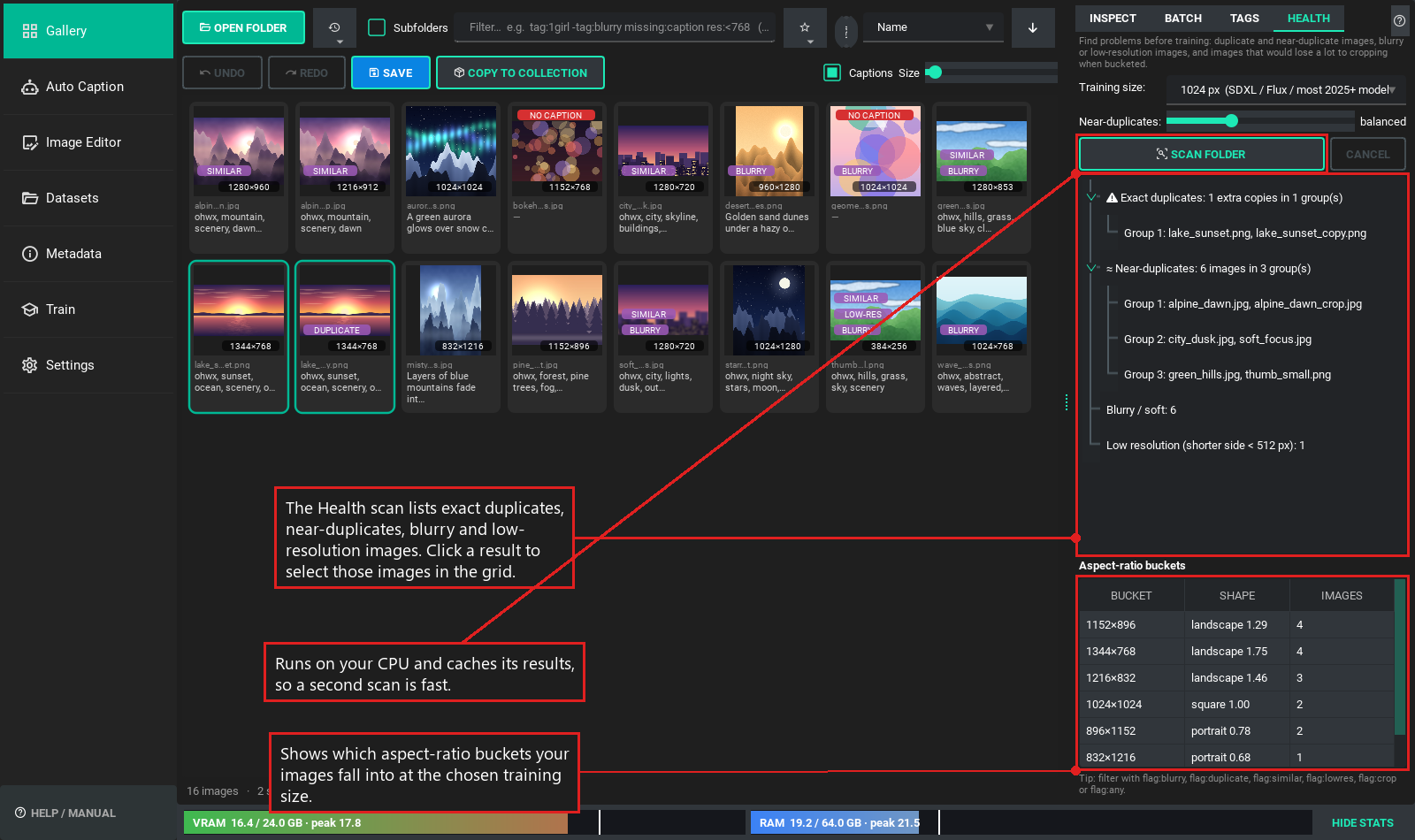
- Dataset health: duplicates and near-duplicates, blur, low resolution and a bucket preview.
- Metadata tools: a privacy audit, lossless cleanup, authorship templates and embedded prompts to captions.
- Image editor and export built on the same workspace, with metadata-preserving edits.
Training (new)
- Native LoRA training inside the app, ported from the Fizgig trainer: its presets, adaptive learning rate, per-image loss watch, EMA, pause and resume, previews and memory planning.
- Ten model families across six architectures. See Model families.
- fp8, INT8 and 4-bit bases chosen automatically from your free VRAM, with block swap as the last resort.
- A VRAM and RAM bar under every tab, with a marker for the peak of the current run.
- A fix for streaked previews on AMD. PyTorch's built-in attention gives wrong results on ROCm for the very wide attention head inside image VAEs. That left bright horizontal streaks in previews and made cached latents slightly inaccurate. TagScribeR computes that one layer itself. Measured on an RX 7900 XT against a CPU reference, the encode error fell from about 0.04-0.06 to 0.005.
Everyday use
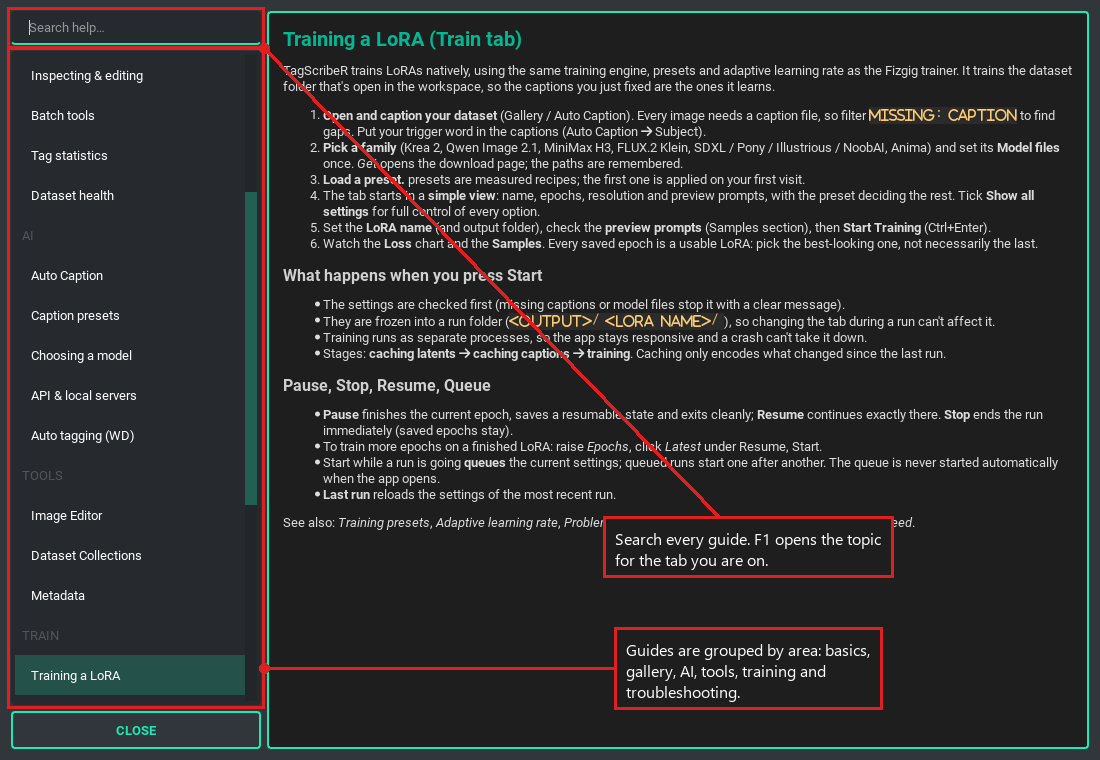
- Ctrl+K command palette, a searchable Help Center (F1 opens help for the current tab) and tooltips on every control. A simple view for beginners and "Show all settings" for everything else.
- About 350 automated tests, which never touch your GPU, so they are safe to run while you train.
✨ Features
Dataset workspace
One folder is open in every tab, so you can tag, caption, edit and train without reopening anything.
- Fast grid for thousands of images, with zoomable thumbnails (Ctrl + mouse wheel).
- Search-style filters:
tag:1girl -tag:blurry missing:caption res:<768. Save filters per folder. - Batch editing: add, remove, replace and reorder tags across a selection; tag statistics with rename and merge.
- Undo and redo for every caption change. Nothing is written until you save.

Dataset health
Finds exact and near-duplicates, blurry and low-resolution images, and previews the aspect-ratio buckets for your training resolution.
AI captioning
- Local vision models through Hugging Face Transformers: Qwen3-VL, Qwen3.5, Gemma 4, JoyCaption and other image-text-to-text models.
- Any OpenAI-compatible server: LM Studio, llama.cpp, Ollama or a cloud API (use this for GGUF models).
- WD auto-tagging: SmilingWolf v3 taggers with thresholds, a blacklist and presets.
- Recipes: a subject or trigger word the model must use, and each image's existing tags passed as hints.
- Review before applying: a word-level diff of each AI caption against the current one; accept or reject per image.
- Presets: built-in instruction presets plus your own.


Image editor
Rotate, flip, resize, crop to a size or aspect ratio, and convert, with a live before/after preview. Edits are saved as copies by default and keep their captions, colour profiles and EXIF.

Collections and export
Gather finished images and captions into training folders, or export a training-ready copy (resized to buckets, cleaned, with kohya-style folder names).

Metadata tools
A privacy audit (GPS, device serials, AI prompts and workflows), lossless cleanup that never re-encodes pixels, authorship templates, and embedded A1111 / ComfyUI / NovelAI / InvokeAI prompts turned into captions.

Native LoRA training
Train on the open dataset with the Fizgig trainer's engine, ported into TagScribeR. See Training a LoRA.

Built for speed and accessibility
A Ctrl+K command palette, a searchable Help Center (F1 opens help for the current tab), tooltips on every control, and interface scaling up to 200%.

🚀 Installation
You need: Windows 10/11 or Linux, Python 3.12, and Git.
git clone https://github.com/ArchAngelAries/TagScribeR.git
cd TagScribeR
install.bat
The installer creates a venv\ folder, detects your GPU and installs the matching PyTorch build. Then launch with start.bat.
| Your GPU | What gets installed |
|---|---|
| AMD Radeon on Windows | AMD's native ROCm wheels: torch 2.12.0+rocm7.15, built for your exact chip |
| AMD Radeon on Linux | AMD's multi-arch ROCm 7.14 wheels |
| NVIDIA | PyTorch with CUDA 12.8 (RTX 20 to 50 series) |
| None | CPU build |
AMD Radeon (ROCm)
Supported: RX 7000 and RX 9000 series, Radeon PRO W7000, and Ryzen AI APUs (including Strix Halo). RX 6000 cards are detected but are less tested.
-
Update to a current AMD Adrenalin driver.
-
Run
install.bat. It reads your GPU and picks its architecture (for examplegfx1100for the RX 7900 series,gfx1201for the RX 9070). -
If it can't tell which GPU you have, pass the architecture yourself:
install.bat --arch gfx1100
Other AMD options:
install.bat --no-bnb           :: skip bitsandbytes (8-bit optimizers and 8/4-bit model loading)
install.bat --experimental     :: use AMD's newest, unpinned ROCm nightlies
No separate ROCm or HIP SDK install is needed. The app sets the ROCm environment itself when it starts.
bitsandbytes is installed by default. On Windows with an AMD card it is a community ROCm build (0xDELUXA/bitsandbytes_win_rocm), the same pinned wheel the Fizgig trainer uses. It is built by neither AMD nor TagScribeR.
NVIDIA (CUDA)
- Update to a current NVIDIA driver.
- Run
install.bat. It installs the CUDA 12.8 build of PyTorch.
To force it (for example on a machine with both vendors):
install.bat --backend cuda
Linux
git clone https://github.com/ArchAngelAries/TagScribeR.git
cd TagScribeR
./install.sh        # same options as install.bat
./start.sh
On Debian and Ubuntu, Qt also needs sudo apt-get install libxcb-cursor0.
No GPU
install.bat --backend cpu
Captioning with a local model is slow on CPU. Use the API source in Auto Caption instead (LM Studio, Ollama or a cloud API). Training needs a GPU.
Updating
Run update.bat. It pulls the latest code and refreshes dependencies without touching your PyTorch build. Your settings live in user_data\, which git never touches.
Upgrading from TagScribeR 2.1? Run
install.batagain. Your old venv is renamed tovenv-old\(not deleted), and your settings, quick tags and API presets are imported on first launch. API keys move into Windows Credential Manager. Once you've checked that, delete the oldapi_presets.json, which held them in plain text.
🧭 Quick start
- Open a folder in the Gallery (Ctrl+O). It opens in every tab.
- Caption:
- Auto Caption for natural-language captions. Pick a model (Download fetches it and shows the size first), choose an instruction preset, press Caption (Ctrl+Enter).
- Gallery → Batch → Auto tag for booru-style tags.
- Refine in the Gallery: edit one image in Inspect, or many at once in Batch.
- Save with Ctrl+S.
- Check the set with Health, then train it in the Train tab.
Press Ctrl+K anywhere to find any action, filter or help topic by typing a few letters. Press F1 for help on the current tab.
Captions are stored the way trainers expect: image.png and image.txt side by side.
🎓 Training a LoRA
The Train tab trains the dataset folder you have open. It uses a port of Fizgig's training engine, so it has Fizgig's presets, adaptive learning rate and loss watch.
- Pick a family and set its model files once (each row has a Get button that opens the download page).
- Load a preset. The ✨ presets are Fizgig's measured recipes. You can save your own, and Fizgig preset files import as they are.
- Set the LoRA name, check the preview prompts, and press Start Training.
The tab opens in a simple view with only the essentials. Tick Show all settings to control every option.

What you get while it runs:
- Adaptive learning rate. You give a minimum and maximum; it probes up while the loss improves, backs off on a plateau, and rolls back if training turns unstable.
- Sample previews after each epoch, rendered with the LoRA so far. Every saved epoch is a usable LoRA.
- Memory bar. Live VRAM and RAM use at the bottom of the window, on every tab, with a marker for the peak.
- Problem Images. A loss watch flags images that never learn. Fix the caption in the window and the run picks it up at the next epoch. It can also re-caption stuck images for you.
- Pause and resume at any epoch, a run queue, and resumable state for training more epochs later.
- Automatic memory planning. It picks a base precision (bf16, 8-bit or 4-bit) and block swapping from your free VRAM.


Training runs as separate processes, so the app stays responsive and a crash can't take it down. Each run lives in its own folder: <output folder>\<LoRA name>\ with checkpoints, sample\, loss_log\ and run.log.
Model families
| Family | Recipe |
|---|---|
| Krea 2 | Fizgig's presets and measured settings |
| Qwen Image 2.1 (including edit LoRAs from before/after pairs) | Fizgig's presets and measured settings |
| MiniMax H3 (still images only) | Fizgig's presets |
| FLUX.2 Klein Base 9B | Fizgig's presets, with Model Area block targeting |
| SDXL 1.0, Pony Diffusion V6 XL, Illustrious-XL, NoobAI-XL (eps and v-pred) | Community starting points |
| Anima | Community starting points |
What has actually been run. Krea 2 has been trained end to end on real weights on the author's RX 7900 XT: an fp8-scaled RAW checkpoint on the INT8 base, 60 images at 0.25 MP, with checkpoints, resume states and both preview engines. On that card its step speed matched Fizgig's (about 4.9 s per step in the first minutes of the same run in each trainer). Every other family is experimental: the code is ported and unit-tested on small random models, but nobody has trained it on real weights yet. Reports are very welcome.
Fizgig has no code for the SDXL family or Anima, so their presets are community starting points, not measured recipes. Model weights are not included and have their own licences.
How much VRAM
On the author's 20 GB card, Krea 2 on the INT8 base held about 13 GB in use and 17.5 GB reserved at 0.25 MP, and 1024 x 1024 previews peaked at 19.5 GB. Training at 0.5 MP ran at the limit of the card. Watch the memory bar: if VRAM stays pinned at the top, training is spilling into system memory and each step gets much slower.
🛡️ Your data is safe
- Atomic saves with backups. The first version of every caption overwritten each day is copied to
user_data\caption_backups\<date>\. - Deletes go to the Recycle Bin. Copies never overwrite; name clashes get a
(2)suffix. - Image edits default to copies in
Image Edits\. - API keys are kept in Windows Credential Manager (or your OS keychain), not in files.
- Local by default. Images are only sent anywhere if you choose an API source.
🔧 Troubleshooting
- Logs:
user_data\logs\tagscriber.log. Settings → System & diagnostics shows the detected GPU and library versions (Copy report for bug reports). - Recovering a caption: look in
user_data\caption_backups\<date>\. - First image is slow (about 20 s) on AMD: one-time kernel selection after a model loads. Later images take about a second.
- Qwen3.5 logs "falling back to its reference PyTorch implementation": expected on ROCm. Output is correct. Use batch size 2 to 4, or Qwen3-VL for top speed.
- Out of GPU memory: lower Max image size, use a smaller model, or close ComfyUI / Forge, which keep models in VRAM. A failed batch is retried one image at a time.
- Training falls back from AdamW 8-bit to AdamW: bitsandbytes is missing. Run
update.bat, which installs it. - Training looks stuck at the start: the first steps and the first preview are the slowest. The console says so during the first two epochs. The status line above the console shows the live step, speed and ETA.
- Training is much slower than expected: check the memory bar. VRAM pinned at the top means the card is full. Lower Target megapixels, pick a smaller Base precision, or lower the preview size. Close other apps that hold VRAM, and avoid running anything else on the GPU during a run.
- The same run is slower than in another trainer: compare Target megapixels first. Twice the megapixels is far more than twice the work per step.
- Latents are encoded again though nothing changed: expected once after updating. Caches written before the VAE attention fix are replaced.
- Preview images show faint horizontal streaks (AMD): update. This was the VAE attention problem described under What's new. If you still see it, please open an issue with a preview attached.
- The VRAM bar says "stats unavailable": no reader works on this machine. On NVIDIA it uses NVML or
nvidia-smi; on AMD Windows a system performance counter; on AMD Linuxamd-smiorrocm-smi. - A model says it needs custom code: enable Allow custom model code in Model options, but only for sources you trust.
install.batcan't find Python 3.12: install it from python.org (orpy install 3.12) and run the installer again.
Developer notes: docs/ARCHITECTURE.md. Run the tests with venv\Scripts\python -m pytest.
🗺️ Roadmap
Planned, roughly in this order. Nothing here is promised by a date.
Finishing the Fizgig port
- The remaining FLUX.2 Klein settings (dropout, LoRA+, extra schedulers, logging, the Distilled preview model).
- The remaining Krea 2 features (the NVIDIA fp8 fast path, rotating full fine-tune, Turbo-checkpoint previews, reference modules).
- The remaining MiniMax H3 features (video clips, audio and voice, Turbo previews, 4-bit HQQ).
- Fizgig's workbench tools: face-aware tools and face likeness compare first, then LoRA comparison and repair.
- A tracker that follows Fizgig's repository, so its fixes and new model support can be picked up quickly.
Image editor
- A cleanup brush that removes unwanted objects, text overlays and marks from images you own or have the rights to, with automatic detection of marked images in Dataset Health.
- Background removal and replacement with clean edges (no halos or colour spill).
- Smart crop to the subject at training bucket ratios, upscaling and restoration, and repeatable batch edit recipes.
Datasets and training
- A bucket preview and a "will this fit, and how long will it take" check before a run starts.
- Dataset balance and caption consistency reports, find and replace across captions, and dataset versions tied to the run that used them.
- A guided first run, run comparison, a checkpoint tester across epochs, and a publish helper.
Support considerations
- NVIDIA, Linux and macOS need testers. See the note at the top of this page.
- New model families are added as plug-in style packages under
training/families/. Requests are welcome.
Tell us what you want, and what you don't: open an issue.
🙌 Contributing and feedback
Issues and pull requests are welcome, from bug reports to whole features.
- Found a bug? Open an issue with what you did, what
happened, and the report from Settings → System & diagnostics → Copy report. For training problems, attach the
run's
run.log. - Have an NVIDIA card or Linux? A report that something works is as useful as a report that it doesn't.
- Want a feature, or think one is unnecessary? Say so in an issue. The roadmap follows what people use.
- Sending a pull request? Run the tests first (
venv\Scripts\python -m pytest), and keep the notices in THIRD_PARTY_NOTICES.md accurate if you bring in code from another project.
Before sharing logs or screenshots, check them for folder names or anything else personal.
🤝 Credits and licence
- Training engine: ported from Fizgig (Apache-2.0, © 2026 Peter Neill), whose ROCm stack the environment also follows. TagScribeR's training would not exist without it. See THIRD_PARTY_NOTICES.md.
- Code that Fizgig and TagScribeR build on: musubi-tuner and sd-scripts (kohya-ss), ai-toolkit (Ostris), Diffusers (Hugging Face), FLUX (Black Forest Labs) and ComfyUI.
- GUI: PySide6, qt-material, QtAwesome.
- AI backend: Hugging Face Transformers, ONNX Runtime, WD Taggers.
- AMD support: ROCm for Windows.
Licence: TagScribeR is free software under the GNU General Public License v3.0. Use it, change it and share it freely; if you redistribute it or a modified version, keep the source open under the same licence. The licence covers the program only: the LoRAs, captions and images you make with it are yours. Code adapted from other projects keeps its original notices in THIRD_PARTY_NOTICES.md. Model weights are not included and have their own licences.
Created by ArchAngelAries.
Acknowledgement. The rebuild in this release (the shared workspace, the captioning and dataset tools, the port of Fizgig's training engine, the tests and this documentation) was written with Anthropic's Claude Opus 5.5 working alongside the author. Earlier versions were assisted by Google's Gemini and Anthropic's Claude.
Similar repos


See what people are saying
README
TagScribeR
TagScribeR is a local, GPU-accelerated studio for building AI training datasets and training LoRAs on them. Browse and filter thousands of images, caption them with current vision-language models or booru taggers, fix and clean them, then train, all in one app.
It runs natively on AMD Radeon (ROCm, Windows and Linux) and NVIDIA (CUDA), with a CPU fallback. Nothing leaves your machine unless you point it at an API yourself.
Tested on one machine. This version was built and tested on Windows 11 with an AMD Radeon RX 7900 XT (20 GB) on ROCm. The NVIDIA (CUDA), Linux and CPU paths are written to work and are covered by automated tests where that is possible, but the author has no NVIDIA hardware to run them on. If something is wrong on your setup, please open an issue.
Contents
- What's new
- Features
- Installation: AMD Radeon · NVIDIA · Linux · No GPU
- Quick start
- Training a LoRA
- Your data is safe
- Troubleshooting
- Roadmap
- Contributing and feedback
- Credits and licence
🆕 What's new
This release is a rebuild of TagScribeR 2.1. The old app was a set of separate tabs around a caption box; this one is a dataset studio with training built in.
A new foundation
- Python 3.12,
uvand current PyTorch, with AMD's native ROCm wheels on Windows and Linux, CUDA on NVIDIA and a CPU fallback. The installer detects your GPU and picks the build. - One shared workspace. The folder you open is open in every tab. The grid is virtualised, so thousands of images scroll smoothly.
- Data safety everywhere. Atomic caption saves with daily backups, undo and redo, deletes to the Recycle Bin, copies that never overwrite, and API keys in the OS keychain instead of a file.
- Settings in
user_data\, which updates never touch. Old 2.1 settings, quick tags and API presets are imported.
Captioning
- Current vision models through Transformers 5 (Qwen3-VL, Qwen3.5, Gemma 4, JoyCaption and others), any OpenAI-compatible server, and the WD v3 taggers.
- A review queue with a word-level diff, so nothing an AI writes replaces your caption until you accept it.
- Caption recipes and presets: a required subject or trigger word, existing tags as hints, your own presets.
Dataset tools
- Search-style filters with saved filters per folder, batch tag editing and tag statistics.
- Dataset health: duplicates and near-duplicates, blur, low resolution and a bucket preview.
- Metadata tools: a privacy audit, lossless cleanup, authorship templates and embedded prompts to captions.
- Image editor and export built on the same workspace, with metadata-preserving edits.
Training (new)
- Native LoRA training inside the app, ported from the Fizgig trainer: its presets, adaptive learning rate, per-image loss watch, EMA, pause and resume, previews and memory planning.
- Ten model families across six architectures. See Model families.
- fp8, INT8 and 4-bit bases chosen automatically from your free VRAM, with block swap as the last resort.
- A VRAM and RAM bar under every tab, with a marker for the peak of the current run.
- A fix for streaked previews on AMD. PyTorch's built-in attention gives wrong results on ROCm for the very wide attention head inside image VAEs. That left bright horizontal streaks in previews and made cached latents slightly inaccurate. TagScribeR computes that one layer itself. Measured on an RX 7900 XT against a CPU reference, the encode error fell from about 0.04-0.06 to 0.005.
Everyday use
- Ctrl+K command palette, a searchable Help Center (F1 opens help for the current tab) and tooltips on every control. A simple view for beginners and "Show all settings" for everything else.
- About 350 automated tests, which never touch your GPU, so they are safe to run while you train.
✨ Features
Dataset workspace
One folder is open in every tab, so you can tag, caption, edit and train without reopening anything.
- Fast grid for thousands of images, with zoomable thumbnails (Ctrl + mouse wheel).
- Search-style filters:
tag:1girl -tag:blurry missing:caption res:<768. Save filters per folder. - Batch editing: add, remove, replace and reorder tags across a selection; tag statistics with rename and merge.
- Undo and redo for every caption change. Nothing is written until you save.
Dataset health
Finds exact and near-duplicates, blurry and low-resolution images, and previews the aspect-ratio buckets for your training resolution.
AI captioning
- Local vision models through Hugging Face Transformers: Qwen3-VL, Qwen3.5, Gemma 4, JoyCaption and other image-text-to-text models.
- Any OpenAI-compatible server: LM Studio, llama.cpp, Ollama or a cloud API (use this for GGUF models).
- WD auto-tagging: SmilingWolf v3 taggers with thresholds, a blacklist and presets.
- Recipes: a subject or trigger word the model must use, and each image's existing tags passed as hints.
- Review before applying: a word-level diff of each AI caption against the current one; accept or reject per image.
- Presets: built-in instruction presets plus your own.
Image editor
Rotate, flip, resize, crop to a size or aspect ratio, and convert, with a live before/after preview. Edits are saved as copies by default and keep their captions, colour profiles and EXIF.
Collections and export
Gather finished images and captions into training folders, or export a training-ready copy (resized to buckets, cleaned, with kohya-style folder names).
Metadata tools
A privacy audit (GPS, device serials, AI prompts and workflows), lossless cleanup that never re-encodes pixels, authorship templates, and embedded A1111 / ComfyUI / NovelAI / InvokeAI prompts turned into captions.
Native LoRA training
Train on the open dataset with the Fizgig trainer's engine, ported into TagScribeR. See Training a LoRA.
Built for speed and accessibility
A Ctrl+K command palette, a searchable Help Center (F1 opens help for the current tab), tooltips on every control, and interface scaling up to 200%.
🚀 Installation
You need: Windows 10/11 or Linux, Python 3.12, and Git.
git clone https://github.com/ArchAngelAries/TagScribeR.git
cd TagScribeR
install.bat
The installer creates a venv\ folder, detects your GPU and installs the matching PyTorch build. Then launch with start.bat.
| Your GPU | What gets installed |
|---|---|
| AMD Radeon on Windows | AMD's native ROCm wheels: torch 2.12.0+rocm7.15, built for your exact chip |
| AMD Radeon on Linux | AMD's multi-arch ROCm 7.14 wheels |
| NVIDIA | PyTorch with CUDA 12.8 (RTX 20 to 50 series) |
| None | CPU build |
AMD Radeon (ROCm)
Supported: RX 7000 and RX 9000 series, Radeon PRO W7000, and Ryzen AI APUs (including Strix Halo). RX 6000 cards are detected but are less tested.
-
Update to a current AMD Adrenalin driver.
-
Run
install.bat. It reads your GPU and picks its architecture (for examplegfx1100for the RX 7900 series,gfx1201for the RX 9070). -
If it can't tell which GPU you have, pass the architecture yourself:
install.bat --arch gfx1100
Other AMD options:
install.bat --no-bnb           :: skip bitsandbytes (8-bit optimizers and 8/4-bit model loading)
install.bat --experimental     :: use AMD's newest, unpinned ROCm nightlies
No separate ROCm or HIP SDK install is needed. The app sets the ROCm environment itself when it starts.
bitsandbytes is installed by default. On Windows with an AMD card it is a community ROCm build (0xDELUXA/bitsandbytes_win_rocm), the same pinned wheel the Fizgig trainer uses. It is built by neither AMD nor TagScribeR.
NVIDIA (CUDA)
- Update to a current NVIDIA driver.
- Run
install.bat. It installs the CUDA 12.8 build of PyTorch.
To force it (for example on a machine with both vendors):
install.bat --backend cuda
Linux
git clone https://github.com/ArchAngelAries/TagScribeR.git
cd TagScribeR
./install.sh        # same options as install.bat
./start.sh
On Debian and Ubuntu, Qt also needs sudo apt-get install libxcb-cursor0.
No GPU
install.bat --backend cpu
Captioning with a local model is slow on CPU. Use the API source in Auto Caption instead (LM Studio, Ollama or a cloud API). Training needs a GPU.
Updating
Run update.bat. It pulls the latest code and refreshes dependencies without touching your PyTorch build. Your settings live in user_data\, which git never touches.
Upgrading from TagScribeR 2.1? Run
install.batagain. Your old venv is renamed tovenv-old\(not deleted), and your settings, quick tags and API presets are imported on first launch. API keys move into Windows Credential Manager. Once you've checked that, delete the oldapi_presets.json, which held them in plain text.
🧭 Quick start
- Open a folder in the Gallery (Ctrl+O). It opens in every tab.
- Caption:
- Auto Caption for natural-language captions. Pick a model (Download fetches it and shows the size first), choose an instruction preset, press Caption (Ctrl+Enter).
- Gallery → Batch → Auto tag for booru-style tags.
- Refine in the Gallery: edit one image in Inspect, or many at once in Batch.
- Save with Ctrl+S.
- Check the set with Health, then train it in the Train tab.
Press Ctrl+K anywhere to find any action, filter or help topic by typing a few letters. Press F1 for help on the current tab.
Captions are stored the way trainers expect: image.png and image.txt side by side.
🎓 Training a LoRA
The Train tab trains the dataset folder you have open. It uses a port of Fizgig's training engine, so it has Fizgig's presets, adaptive learning rate and loss watch.
- Pick a family and set its model files once (each row has a Get button that opens the download page).
- Load a preset. The ✨ presets are Fizgig's measured recipes. You can save your own, and Fizgig preset files import as they are.
- Set the LoRA name, check the preview prompts, and press Start Training.
The tab opens in a simple view with only the essentials. Tick Show all settings to control every option.
What you get while it runs:
- Adaptive learning rate. You give a minimum and maximum; it probes up while the loss improves, backs off on a plateau, and rolls back if training turns unstable.
- Sample previews after each epoch, rendered with the LoRA so far. Every saved epoch is a usable LoRA.
- Memory bar. Live VRAM and RAM use at the bottom of the window, on every tab, with a marker for the peak.
- Problem Images. A loss watch flags images that never learn. Fix the caption in the window and the run picks it up at the next epoch. It can also re-caption stuck images for you.
- Pause and resume at any epoch, a run queue, and resumable state for training more epochs later.
- Automatic memory planning. It picks a base precision (bf16, 8-bit or 4-bit) and block swapping from your free VRAM.
Training runs as separate processes, so the app stays responsive and a crash can't take it down. Each run lives in its own folder: <output folder>\<LoRA name>\ with checkpoints, sample\, loss_log\ and run.log.
Model families
| Family | Recipe |
|---|---|
| Krea 2 | Fizgig's presets and measured settings |
| Qwen Image 2.1 (including edit LoRAs from before/after pairs) | Fizgig's presets and measured settings |
| MiniMax H3 (still images only) | Fizgig's presets |
| FLUX.2 Klein Base 9B | Fizgig's presets, with Model Area block targeting |
| SDXL 1.0, Pony Diffusion V6 XL, Illustrious-XL, NoobAI-XL (eps and v-pred) | Community starting points |
| Anima | Community starting points |
What has actually been run. Krea 2 has been trained end to end on real weights on the author's RX 7900 XT: an fp8-scaled RAW checkpoint on the INT8 base, 60 images at 0.25 MP, with checkpoints, resume states and both preview engines. On that card its step speed matched Fizgig's (about 4.9 s per step in the first minutes of the same run in each trainer). Every other family is experimental: the code is ported and unit-tested on small random models, but nobody has trained it on real weights yet. Reports are very welcome.
Fizgig has no code for the SDXL family or Anima, so their presets are community starting points, not measured recipes. Model weights are not included and have their own licences.
How much VRAM
On the author's 20 GB card, Krea 2 on the INT8 base held about 13 GB in use and 17.5 GB reserved at 0.25 MP, and 1024 x 1024 previews peaked at 19.5 GB. Training at 0.5 MP ran at the limit of the card. Watch the memory bar: if VRAM stays pinned at the top, training is spilling into system memory and each step gets much slower.
🛡️ Your data is safe
- Atomic saves with backups. The first version of every caption overwritten each day is copied to
user_data\caption_backups\<date>\. - Deletes go to the Recycle Bin. Copies never overwrite; name clashes get a
(2)suffix. - Image edits default to copies in
Image Edits\. - API keys are kept in Windows Credential Manager (or your OS keychain), not in files.
- Local by default. Images are only sent anywhere if you choose an API source.
🔧 Troubleshooting
- Logs:
user_data\logs\tagscriber.log. Settings → System & diagnostics shows the detected GPU and library versions (Copy report for bug reports). - Recovering a caption: look in
user_data\caption_backups\<date>\. - First image is slow (about 20 s) on AMD: one-time kernel selection after a model loads. Later images take about a second.
- Qwen3.5 logs "falling back to its reference PyTorch implementation": expected on ROCm. Output is correct. Use batch size 2 to 4, or Qwen3-VL for top speed.
- Out of GPU memory: lower Max image size, use a smaller model, or close ComfyUI / Forge, which keep models in VRAM. A failed batch is retried one image at a time.
- Training falls back from AdamW 8-bit to AdamW: bitsandbytes is missing. Run
update.bat, which installs it. - Training looks stuck at the start: the first steps and the first preview are the slowest. The console says so during the first two epochs. The status line above the console shows the live step, speed and ETA.
- Training is much slower than expected: check the memory bar. VRAM pinned at the top means the card is full. Lower Target megapixels, pick a smaller Base precision, or lower the preview size. Close other apps that hold VRAM, and avoid running anything else on the GPU during a run.
- The same run is slower than in another trainer: compare Target megapixels first. Twice the megapixels is far more than twice the work per step.
- Latents are encoded again though nothing changed: expected once after updating. Caches written before the VAE attention fix are replaced.
- Preview images show faint horizontal streaks (AMD): update. This was the VAE attention problem described under What's new. If you still see it, please open an issue with a preview attached.
- The VRAM bar says "stats unavailable": no reader works on this machine. On NVIDIA it uses NVML or
nvidia-smi; on AMD Windows a system performance counter; on AMD Linuxamd-smiorrocm-smi. - A model says it needs custom code: enable Allow custom model code in Model options, but only for sources you trust.
install.batcan't find Python 3.12: install it from python.org (orpy install 3.12) and run the installer again.
Developer notes: docs/ARCHITECTURE.md. Run the tests with venv\Scripts\python -m pytest.
🗺️ Roadmap
Planned, roughly in this order. Nothing here is promised by a date.
Finishing the Fizgig port
- The remaining FLUX.2 Klein settings (dropout, LoRA+, extra schedulers, logging, the Distilled preview model).
- The remaining Krea 2 features (the NVIDIA fp8 fast path, rotating full fine-tune, Turbo-checkpoint previews, reference modules).
- The remaining MiniMax H3 features (video clips, audio and voice, Turbo previews, 4-bit HQQ).
- Fizgig's workbench tools: face-aware tools and face likeness compare first, then LoRA comparison and repair.
- A tracker that follows Fizgig's repository, so its fixes and new model support can be picked up quickly.
Image editor
- A cleanup brush that removes unwanted objects, text overlays and marks from images you own or have the rights to, with automatic detection of marked images in Dataset Health.
- Background removal and replacement with clean edges (no halos or colour spill).
- Smart crop to the subject at training bucket ratios, upscaling and restoration, and repeatable batch edit recipes.
Datasets and training
- A bucket preview and a "will this fit, and how long will it take" check before a run starts.
- Dataset balance and caption consistency reports, find and replace across captions, and dataset versions tied to the run that used them.
- A guided first run, run comparison, a checkpoint tester across epochs, and a publish helper.
Support considerations
- NVIDIA, Linux and macOS need testers. See the note at the top of this page.
- New model families are added as plug-in style packages under
training/families/. Requests are welcome.
Tell us what you want, and what you don't: open an issue.
🙌 Contributing and feedback
Issues and pull requests are welcome, from bug reports to whole features.
- Found a bug? Open an issue with what you did, what
happened, and the report from Settings → System & diagnostics → Copy report. For training problems, attach the
run's
run.log. - Have an NVIDIA card or Linux? A report that something works is as useful as a report that it doesn't.
- Want a feature, or think one is unnecessary? Say so in an issue. The roadmap follows what people use.
- Sending a pull request? Run the tests first (
venv\Scripts\python -m pytest), and keep the notices in THIRD_PARTY_NOTICES.md accurate if you bring in code from another project.
Before sharing logs or screenshots, check them for folder names or anything else personal.
🤝 Credits and licence
- Training engine: ported from Fizgig (Apache-2.0, © 2026 Peter Neill), whose ROCm stack the environment also follows. TagScribeR's training would not exist without it. See THIRD_PARTY_NOTICES.md.
- Code that Fizgig and TagScribeR build on: musubi-tuner and sd-scripts (kohya-ss), ai-toolkit (Ostris), Diffusers (Hugging Face), FLUX (Black Forest Labs) and ComfyUI.
- GUI: PySide6, qt-material, QtAwesome.
- AI backend: Hugging Face Transformers, ONNX Runtime, WD Taggers.
- AMD support: ROCm for Windows.
Licence: TagScribeR is free software under the GNU General Public License v3.0. Use it, change it and share it freely; if you redistribute it or a modified version, keep the source open under the same licence. The licence covers the program only: the LoRAs, captions and images you make with it are yours. Code adapted from other projects keeps its original notices in THIRD_PARTY_NOTICES.md. Model weights are not included and have their own licences.
Created by ArchAngelAries.
Acknowledgement. The rebuild in this release (the shared workspace, the captioning and dataset tools, the port of Fizgig's training engine, the tests and this documentation) was written with Anthropic's Claude Opus 5.5 working alongside the author. Earlier versions were assisted by Google's Gemini and Anthropic's Claude.