
Docent: your private AI assistant. Chat with your PDFs and Office files, search the web and connect MCP servers, running on your own machine.
See the codeSee what people are saying
README
Docent
Your private AI assistant. Chat with your PDFs and Office files, search the web, and connect MCP servers, all from the terminal. If no local agent is running, the CLI downloads the framework and models it needs and starts one itself.
It installs as both docent and smartloop; the two are the same command.
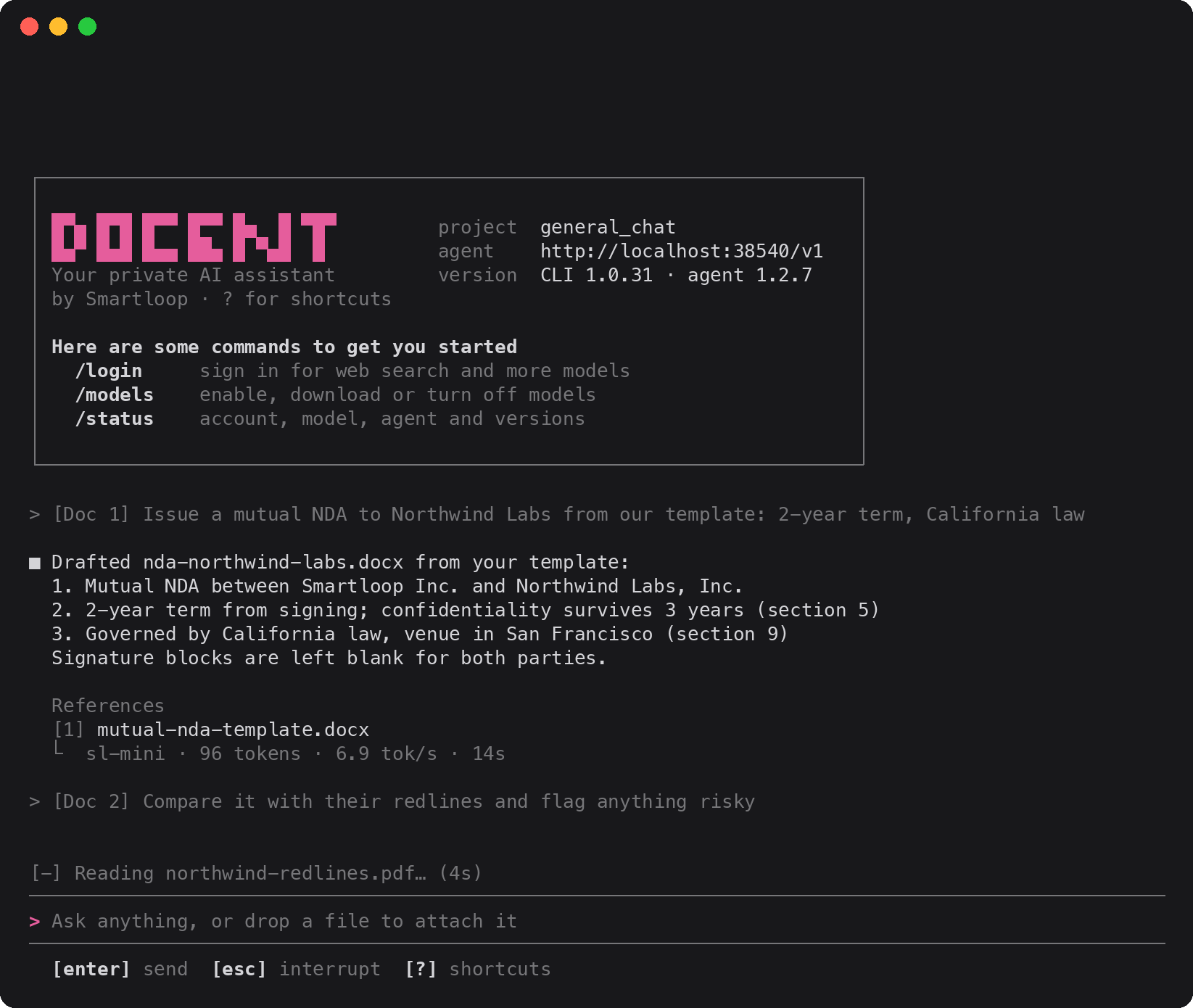
More at: docs.smartloop.ai
Install
macOS and Linux
curl -fsSL https://smartloop.ai/install | sh
Windows (PowerShell):
irm https://smartloop.ai/install.ps1 | iex
The binary goes to $CARGO_HOME/bin (~/.cargo/bin) when a Rust toolchain
already owns that directory, since it is on your PATH anyway; otherwise to
~/.local/bin. If the chosen directory is not on your PATH, the installer
appends an export line to the startup file for your shell — ~/.bashrc,
~/.zshrc, or fish_add_path in config.fish — so a new terminal picks it up.
Re-running the installer will not add that line twice.
On Windows the binary goes to %USERPROFILE%\.smartloop\bin and the installer
sets your user PATH through the registry. Restart the shell to pick it up.
Set SMARTLOOP_CLI_INSTALL_DIR to install elsewhere, or SMARTLOOP_CLI_VERSION
to pin a specific release.
Prebuilt binaries are published for Linux (x86_64, aarch64 — statically linked against musl), macOS (Apple Silicon and Intel) and Windows (x86_64).
From source
Requires Rust (2024 edition):
cargo install --path .
Usage
First run
Any command that talks to the agent starts it when none is running. It
listens on a free port it picks itself and writes it to
~/.smartloop/server.port, where the CLI reads it. On first use that means:
- Download the agent (SLP framework 1.2.8) from
https://dl.smartloop.ai/slp/1.2.8/into~/.smartloop/1.2.8/. Studio desktop uses the same folder and marker files, so the two share one install. - Start
slp agent startin the background withSLP_HOME=~/.smartloop, logging to~/.smartloop/server.log. The agent keeps running after the CLI exits. - Download the embedding model (
bge-m3-Q4_K_M.gguf, ~417 MB) into the workspace'smodels/embeddings/folder for document search. - Run the agent's bootstrap, which downloads the default base model, creates the default project and loads the model.
Each step is skipped when its files are already there. Progress shows as a checklist on stderr under the Docent banner that redraws in place, with the active download's bar in Smartloop pink:
[✓] Agent 1.2.8                        667 MB
[✓] Start agent                    port 50578
[✓] Embeddings (bge-m3)                417 MB
[•] Base model sl-mini
    ██████████████▋░░░░░░░░░░░░░░░   49%  377 MB/769 MB
[ ] Default project
[ ] Load model
[ ] Skills and connections
A step without a bar shows its elapsed time once it runs past a couple of
seconds, and it ends with ✓ Setup complete in 1min 12s.
When stderr isn't a terminal, each step prints one line as it finishes
instead. docent model enable shows the same checklist for its download.
To do this up front, or to stop the agent:
docent agent start
docent agent stop
Login
docent login
Opens app.smartloop.ai in the browser to sign in, the same way the desktop app does: once you're in, the page hands the session to the local agent, which stores it and uses it for every platform call. The command waits (up to five minutes) and prints the account it signed in as. If the browser doesn't open, visit the URL it prints.
To sign in with a token instead, run docent login --token and paste it at
the prompt (input is hidden), or use --token <token> or pipe it on stdin in
scripts. docent logout clears the stored credentials.
Projects
List projects:
docent project list
Output is rendered as a table showing each project's ID, name, and whether it is a system project.
Create a project from a blank template:
docent project create --name my-project
docent project create --name my-project --description "Research notes"
A blank project starts with no skills; the service seeds it with the workspace defaults. Everything the project stores — skills, documents, its index — lives under the service's own project directory, so there is no working directory to choose.
Import a project from an archive produced by an earlier export:
docent project create --import my-project.zip
docent project create --import my-project.zip --name restored-project
--name is optional here — pass it to rename the imported project. The import
gets a fresh project ID, and MCP OAuth credentials are stripped from the
archive on the way in.
Delete a project:
docent project delete --id <project-id>
Check which endpoint the CLI uses, whether the local agent is running there, which model it has loaded, and the per-project agents it has started:
docent agent status
Endpoint: http://localhost:50578
Status:   healthy
Model:    sl-mini (Q4_K_M, 32768 ctx, 769 MB)
Process:  pid 8738, 250 MB
+--------------+------+-------+-------+------+--------+
| Project      | PID  | Port  | Alive | Idle | Memory |
+--------------+------+-------+-------+------+--------+
| general_chat | 2668 | 62110 | true  | 94s  | 122 MB |
+--------------+------+-------+-------+------+--------+
Endpoint is the URL the CLI talks to (SMARTLOOP_API_URL, or the default).
The command exits with status 1 when the agent can't be reached there.
Start an interactive chat with the local agent:
docent
docent on its own is short for docent run. In a terminal this opens a full-screen app, laid out like Claude Code. While
a reply runs, a live status line above the prompt shows the agent's current
step (web search, document lookup, model selection) and for how long, with a
line per running download. The finished reply keeps its sources and the model
that answered:
> what is the capital of France?

■ Paris is the capital of France.

  References
  [1] https://en.wikipedia.org/wiki/Paris
  ⎿  sl-mini · 7 tokens · 0.4 tok/s · 16s

[-] Reading en.wikipedia.org… (4s)
╭──────────────────────────────────────────────────────────────────────╮
│ >                                                                    │
╰──────────────────────────────────────────────────────────────────────╯
  [enter] send  [esc] interrupt  [?] shortcuts
It chats in the server's current project, or the one given with --project.
On exit it prints the session id, to resume with --session.
| Key | Does |
|---|---|
? | shortcuts |
Shift+Enter, Alt+Enter, Ctrl+J | new line |
Esc | interrupt the reply |
wheel, PgUp/PgDn | scroll; drag to select and copy |
| drop a file | attach an image (PNG, JPEG) or document (PDF, Office, CSV, text) |
Ctrl+O | models: enable, disable, download |
Ctrl+S | web search on or off |
| Command | Does |
|---|---|
/login, /logout | sign in in the browser (--token to paste one) |
/models | enable, disable and download models |
/mcp | MCP servers; /mcp add <url> connects one |
/status | account, model, agent and versions |
/usage | web searches left, tokens and cost saved |
/upgrade | Pro plan: 1,000 web searches a month |
/clear | clear the chat and start a new session |
/help, /quit |
Pass an initial prompt to send immediately:
docent run "what are some things to do in madrid spain?"
Options:
docent run --project <project-id>   # chat in this project
docent run --session <session-id>   # resume an existing session; a new one is created when omitted
docent run --plain                  # line-by-line chat instead of the full-screen app
When stdin or stdout isn't a terminal, or with --plain, run chats line by
line instead: without --project it lists your projects and asks which one to
chat in (press Enter for the current one), then keeps reading prompts from
stdin until EOF, /quit, /exit, /q, or exit. The response streams token
by token on stdout, and the agent's progress is printed on stderr as
[step] message lines, so it doesn't interleave with the answer. When the
answer draws on documents or web pages, the sources it used follow it on
stdout as a numbered list:
References
[1] https://releases.rs/
Models
The orchestrator picks which model serves each turn from the models enabled for the project. List what's available and its state for the current project:
docent model list
Enable or disable a model:
docent model enable gemma4-e2b
docent model disable gemma4-e2b
enable downloads the weights first when they aren't on disk yet, showing
progress, and only then switches the model on. Weights are shared across
projects, so each model downloads once. Models marked (sign in) need
docent login first. disable also unloads the model from memory. All
three take --project <project-id> to act on a project other than the current
one. The sl-mini orchestrator is always on and isn't listed.
Configuration
The CLI connects to the local agent on whatever port it picked
(~/.smartloop/server.port). Point it elsewhere with SMARTLOOP_API_URL:
SMARTLOOP_API_URL=http://localhost:9000 docent project list
With SMARTLOOP_API_URL set, the CLI only connects: it never installs or starts
an agent for that URL.
| Variable | Default | Effect |
|---|---|---|
SLP_HOME | ~/.smartloop | Where the framework, workspace, models and logs live |
SLP_PORT | a free port | Pin the managed local agent to this port |
SLP_BASE_URL | https://dl.smartloop.ai | Where the framework archive is downloaded from |
License
Released under the MIT License.
Similar repos


Languages
Rust
93.2%
Shell
4.6%
PowerShell
2.1%
Docent: your private AI assistant. Chat with your PDFs and Office files, search the web and connect MCP servers, running on your own machine.
See the codeSee what people are saying
README
Docent
Your private AI assistant. Chat with your PDFs and Office files, search the web, and connect MCP servers, all from the terminal. If no local agent is running, the CLI downloads the framework and models it needs and starts one itself.
It installs as both docent and smartloop; the two are the same command.
More at: docs.smartloop.ai
Install
macOS and Linux
curl -fsSL https://smartloop.ai/install | sh
Windows (PowerShell):
irm https://smartloop.ai/install.ps1 | iex
The binary goes to $CARGO_HOME/bin (~/.cargo/bin) when a Rust toolchain
already owns that directory, since it is on your PATH anyway; otherwise to
~/.local/bin. If the chosen directory is not on your PATH, the installer
appends an export line to the startup file for your shell — ~/.bashrc,
~/.zshrc, or fish_add_path in config.fish — so a new terminal picks it up.
Re-running the installer will not add that line twice.
On Windows the binary goes to %USERPROFILE%\.smartloop\bin and the installer
sets your user PATH through the registry. Restart the shell to pick it up.
Set SMARTLOOP_CLI_INSTALL_DIR to install elsewhere, or SMARTLOOP_CLI_VERSION
to pin a specific release.
Prebuilt binaries are published for Linux (x86_64, aarch64 — statically linked against musl), macOS (Apple Silicon and Intel) and Windows (x86_64).
From source
Requires Rust (2024 edition):
cargo install --path .
Usage
First run
Any command that talks to the agent starts it when none is running. It
listens on a free port it picks itself and writes it to
~/.smartloop/server.port, where the CLI reads it. On first use that means:
- Download the agent (SLP framework 1.2.8) from
https://dl.smartloop.ai/slp/1.2.8/into~/.smartloop/1.2.8/. Studio desktop uses the same folder and marker files, so the two share one install. - Start
slp agent startin the background withSLP_HOME=~/.smartloop, logging to~/.smartloop/server.log. The agent keeps running after the CLI exits. - Download the embedding model (
bge-m3-Q4_K_M.gguf, ~417 MB) into the workspace'smodels/embeddings/folder for document search. - Run the agent's bootstrap, which downloads the default base model, creates the default project and loads the model.
Each step is skipped when its files are already there. Progress shows as a checklist on stderr under the Docent banner that redraws in place, with the active download's bar in Smartloop pink:
[✓] Agent 1.2.8                        667 MB
[✓] Start agent                    port 50578
[✓] Embeddings (bge-m3)                417 MB
[•] Base model sl-mini
    ██████████████▋░░░░░░░░░░░░░░░   49%  377 MB/769 MB
[ ] Default project
[ ] Load model
[ ] Skills and connections
A step without a bar shows its elapsed time once it runs past a couple of
seconds, and it ends with ✓ Setup complete in 1min 12s.
When stderr isn't a terminal, each step prints one line as it finishes
instead. docent model enable shows the same checklist for its download.
To do this up front, or to stop the agent:
docent agent start
docent agent stop
Login
docent login
Opens app.smartloop.ai in the browser to sign in, the same way the desktop app does: once you're in, the page hands the session to the local agent, which stores it and uses it for every platform call. The command waits (up to five minutes) and prints the account it signed in as. If the browser doesn't open, visit the URL it prints.
To sign in with a token instead, run docent login --token and paste it at
the prompt (input is hidden), or use --token <token> or pipe it on stdin in
scripts. docent logout clears the stored credentials.
Projects
List projects:
docent project list
Output is rendered as a table showing each project's ID, name, and whether it is a system project.
Create a project from a blank template:
docent project create --name my-project
docent project create --name my-project --description "Research notes"
A blank project starts with no skills; the service seeds it with the workspace defaults. Everything the project stores — skills, documents, its index — lives under the service's own project directory, so there is no working directory to choose.
Import a project from an archive produced by an earlier export:
docent project create --import my-project.zip
docent project create --import my-project.zip --name restored-project
--name is optional here — pass it to rename the imported project. The import
gets a fresh project ID, and MCP OAuth credentials are stripped from the
archive on the way in.
Delete a project:
docent project delete --id <project-id>
Check which endpoint the CLI uses, whether the local agent is running there, which model it has loaded, and the per-project agents it has started:
docent agent status
Endpoint: http://localhost:50578
Status:   healthy
Model:    sl-mini (Q4_K_M, 32768 ctx, 769 MB)
Process:  pid 8738, 250 MB
+--------------+------+-------+-------+------+--------+
| Project      | PID  | Port  | Alive | Idle | Memory |
+--------------+------+-------+-------+------+--------+
| general_chat | 2668 | 62110 | true  | 94s  | 122 MB |
+--------------+------+-------+-------+------+--------+
Endpoint is the URL the CLI talks to (SMARTLOOP_API_URL, or the default).
The command exits with status 1 when the agent can't be reached there.
Start an interactive chat with the local agent:
docent
docent on its own is short for docent run. In a terminal this opens a full-screen app, laid out like Claude Code. While
a reply runs, a live status line above the prompt shows the agent's current
step (web search, document lookup, model selection) and for how long, with a
line per running download. The finished reply keeps its sources and the model
that answered:
> what is the capital of France?

■ Paris is the capital of France.

  References
  [1] https://en.wikipedia.org/wiki/Paris
  ⎿  sl-mini · 7 tokens · 0.4 tok/s · 16s

[-] Reading en.wikipedia.org… (4s)
╭──────────────────────────────────────────────────────────────────────╮
│ >                                                                    │
╰──────────────────────────────────────────────────────────────────────╯
  [enter] send  [esc] interrupt  [?] shortcuts
It chats in the server's current project, or the one given with --project.
On exit it prints the session id, to resume with --session.
| Key | Does |
|---|---|
? | shortcuts |
Shift+Enter, Alt+Enter, Ctrl+J | new line |
Esc | interrupt the reply |
wheel, PgUp/PgDn | scroll; drag to select and copy |
| drop a file | attach an image (PNG, JPEG) or document (PDF, Office, CSV, text) |
Ctrl+O | models: enable, disable, download |
Ctrl+S | web search on or off |
| Command | Does |
|---|---|
/login, /logout | sign in in the browser (--token to paste one) |
/models | enable, disable and download models |
/mcp | MCP servers; /mcp add <url> connects one |
/status | account, model, agent and versions |
/usage | web searches left, tokens and cost saved |
/upgrade | Pro plan: 1,000 web searches a month |
/clear | clear the chat and start a new session |
/help, /quit |
Pass an initial prompt to send immediately:
docent run "what are some things to do in madrid spain?"
Options:
docent run --project <project-id>   # chat in this project
docent run --session <session-id>   # resume an existing session; a new one is created when omitted
docent run --plain                  # line-by-line chat instead of the full-screen app
When stdin or stdout isn't a terminal, or with --plain, run chats line by
line instead: without --project it lists your projects and asks which one to
chat in (press Enter for the current one), then keeps reading prompts from
stdin until EOF, /quit, /exit, /q, or exit. The response streams token
by token on stdout, and the agent's progress is printed on stderr as
[step] message lines, so it doesn't interleave with the answer. When the
answer draws on documents or web pages, the sources it used follow it on
stdout as a numbered list:
References
[1] https://releases.rs/
Models
The orchestrator picks which model serves each turn from the models enabled for the project. List what's available and its state for the current project:
docent model list
Enable or disable a model:
docent model enable gemma4-e2b
docent model disable gemma4-e2b
enable downloads the weights first when they aren't on disk yet, showing
progress, and only then switches the model on. Weights are shared across
projects, so each model downloads once. Models marked (sign in) need
docent login first. disable also unloads the model from memory. All
three take --project <project-id> to act on a project other than the current
one. The sl-mini orchestrator is always on and isn't listed.
Configuration
The CLI connects to the local agent on whatever port it picked
(~/.smartloop/server.port). Point it elsewhere with SMARTLOOP_API_URL:
SMARTLOOP_API_URL=http://localhost:9000 docent project list
With SMARTLOOP_API_URL set, the CLI only connects: it never installs or starts
an agent for that URL.
| Variable | Default | Effect |
|---|---|---|
SLP_HOME | ~/.smartloop | Where the framework, workspace, models and logs live |
SLP_PORT | a free port | Pin the managed local agent to this port |
SLP_BASE_URL | https://dl.smartloop.ai | Where the framework archive is downloaded from |
License
Released under the MIT License.
Similar repos
Languages
Rust
93.2%
Shell
4.6%
PowerShell
2.1%