View that imitates Ripple Effect on click which was introduced in Android L (for Android 2.3+)
Java
1,134
35 commits
updated Apr 18, 2017

View that imitates Ripple Effect on click which was introduced in Android L.
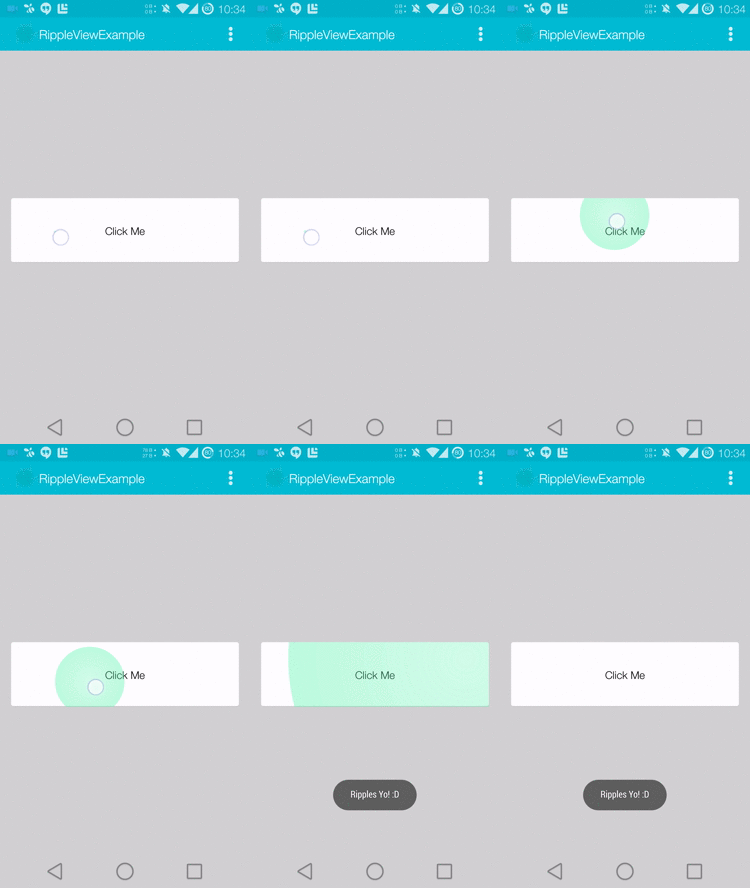
For a working implementation, Have a look at the Sample Project - RippleViewExample
Include the library as local library project.
Include the RippleView widget in your layout.
<com.indris.material.RippleView
        android:id="@+id/btn"
        android:layout_width="match_parent"
        android:layout_height="match_parent"
        ripple:alphaFactor="0.7"
        ripple:rippleColor="#58FAAC" >
</com.indris.material.RippleView>
In your onCreate method refer to the View and add 'OnClickListener' for the same.
mButton = (RippleView) findViewById(R.id.btn);
mButton.setOnClickListener(new View.OnClickListener() {
	@Override
	public void onClick(View v) {
		//your code
	}
});
There are three attributes which are applicable to RippleView.
rippleColor Color of the Ripple
alphaFactor Opacity of the Ripple
hover Hover effect on the button
You can also set these attributes from your java code by calling setRippleColor(rippleColor, alphaFactor) and setHover(enabled) respectively.
Copyright 2014 Muthuramakrishnan

Licensed under the Apache License, Version 2.0 (the "License");
you may not use this file except in compliance with the License.
You may obtain a copy of the License at

   http://www.apache.org/licenses/LICENSE-2.0

Unless required by applicable law or agreed to in writing, software
distributed under the License is distributed on an "AS IS" BASIS,
WITHOUT WARRANTIES OR CONDITIONS OF ANY KIND, either express or implied.
See the License for the specific language governing permissions and
limitations under the License.
2,619 followers · starred Dec 2014
121 followers · starred Nov 2014
View that imitates Ripple Effect on click which was introduced in Android L (for Android 2.3+)
Java
1,134
35 commits
updated Apr 18, 2017
View that imitates Ripple Effect on click which was introduced in Android L.
For a working implementation, Have a look at the Sample Project - RippleViewExample
Include the library as local library project.
Include the RippleView widget in your layout.
<com.indris.material.RippleView
        android:id="@+id/btn"
        android:layout_width="match_parent"
        android:layout_height="match_parent"
        ripple:alphaFactor="0.7"
        ripple:rippleColor="#58FAAC" >
</com.indris.material.RippleView>
In your onCreate method refer to the View and add 'OnClickListener' for the same.
mButton = (RippleView) findViewById(R.id.btn);
mButton.setOnClickListener(new View.OnClickListener() {
	@Override
	public void onClick(View v) {
		//your code
	}
});
There are three attributes which are applicable to RippleView.
rippleColor Color of the Ripple
alphaFactor Opacity of the Ripple
hover Hover effect on the button
You can also set these attributes from your java code by calling setRippleColor(rippleColor, alphaFactor) and setHover(enabled) respectively.
Copyright 2014 Muthuramakrishnan

Licensed under the Apache License, Version 2.0 (the "License");
you may not use this file except in compliance with the License.
You may obtain a copy of the License at

   http://www.apache.org/licenses/LICENSE-2.0

Unless required by applicable law or agreed to in writing, software
distributed under the License is distributed on an "AS IS" BASIS,
WITHOUT WARRANTIES OR CONDITIONS OF ANY KIND, either express or implied.
See the License for the specific language governing permissions and
limitations under the License.
2,619 followers · starred Dec 2014
121 followers · starred Nov 2014



