An in-game UI for exploring, debugging and modifying IL2CPP and Mono Unity games.
C#
3,152
1,094 commits
updated Mar 13, 2023

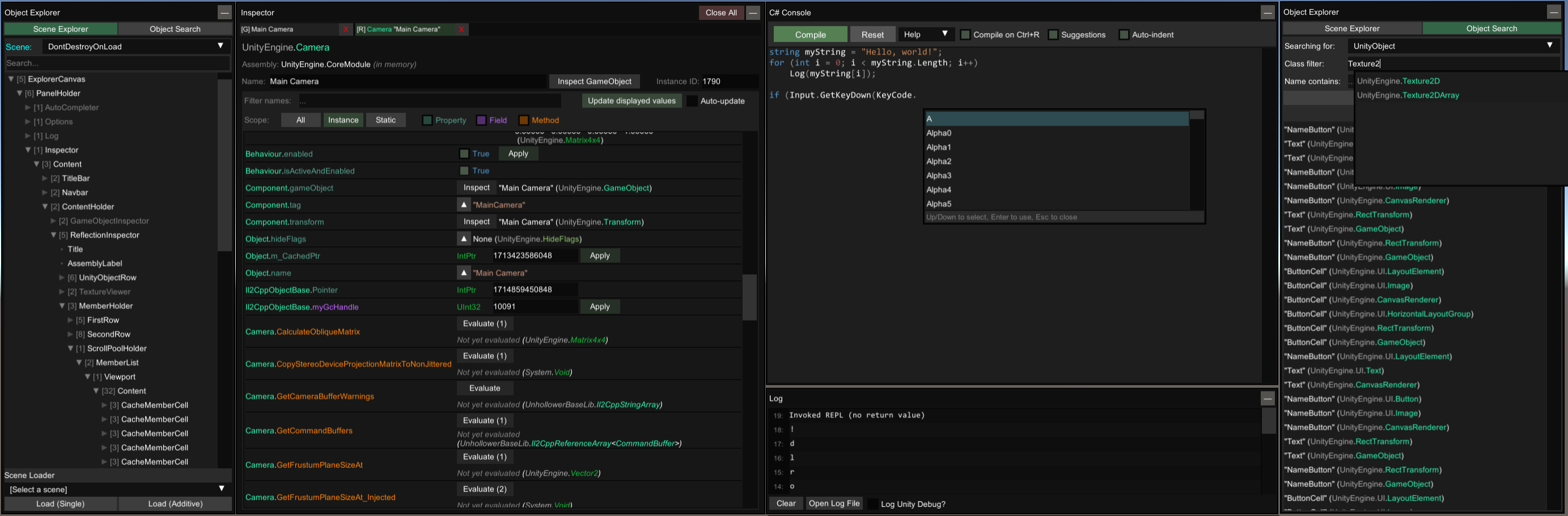
🔍 An in-game UI for exploring, debugging and modifying Unity games.
✔️ Supports most Unity versions from 5.2 to 2021+ (IL2CPP and Mono).
✨ Powered by UniverseLib




⚡ Thunderstore releases: BepInEx Mono | BepInEx IL2CPP | MelonLoader IL2CPP
Releases will be posted at most once per week, generally on weekends.
Nightly builds can be found here.
plugins/sinai-dev-UnityExplorer folder and place it in BepInEx/plugins/Note: BepInEx 6 is obtainable via builds.bepinex.dev
Mods folder into your MelonLoader Mods folderUserLibs folder into your MelonLoader UserLibs folderThe standalone release can be used with any injector or loader of your choice, but it requires you to load the dependencies manually.
UnityExplorer.Editor release if you need them.UnityExplorer.ExplorerStandalone.CreateInstance();ExplorerStandalone.OnLog event to handle logging if you wishUnityExplorer.Editor release.package.json file, or by manually dragging the folder into your Assets folder.Runtime/UnityExplorer prefab into your scene, or create a GameObject and add the Explorer Editor Behaviour script to it.Although UnityExplorer should work out of the box for most Unity games, in some cases you may need to tweak the settings for it to work properly.
To adjust the settings, open the config file:
BepInEx\config\com.sinai.unityexplorer.cfgUserData\MelonPreferences.cfgsinai-dev-UnityExplorer\config.cfgTry adjusting the following settings and see if it fixes your issues:
Startup_Delay_Time - increase to 5-10 seconds (or more as needed), can fix issues with UnityExplorer being destroyed or corrupted during startup.Disable_EventSystem_Override - if input is not working properly, try setting this to true.If these fixes do not work, please create an issue in this repo and I'll do my best to look into it.
If you want to inspect an object or Type from outside the C# console, use the InspectorManager class:
To inspect an object:
UnityExplorer.InspectorManager.Inspect(theObject);
To inspect a Type:
UnityExplorer.InspectorManager.Inspect(typeof(SomeClass));
UnityEngine.Object, with optional filtersThe inspector is used to see detailed information on objects of any type and manipulate their values, as well as to inspect C# Classes with static reflection.
[G]) is used to inspect a GameObject, and to see and manipulate its Transform and Components.
[R] and [S]) are used for everything else
▼ button to expand certain values such as strings, enums, lists, dictionaries, some structs, etcTexture2D, Image, Sprite and Material objects, there is a View Texture button at the top of the inspector which lets you view the Texture(s) and save them as a PNG file.AudioClip objects there is a Show Player button which opens an audio player widget. For clips which are loaded as DecompressOnLoad, there is also a button to save them to a .wav file.Mono.CSharp.Evaluator to define temporary classes or run immediate REPL code.startup.cs and placing it in the sinai-dev-UnityExplorer\Scripts\ folder (this folder will be created where you placed the DLL file).Prefix (which can return bool or void), Postfix, Finalizer (which can return Exception or void), and Transpiler (which must return IEnumerable<HarmonyLib.CodeInstruction>). You can define multiple patches if you wish.null)
Copy(obj) and Paste() for accessing the ClipboardBepInEx\config\com.sinai.unityexplorer.cfgUserData\MelonPreferences.cfg{DLL_location}\sinai-dev-UnityExplorer\config.cfgbuild.ps1 powershell script to build UnityExplorer. Releases are found in the Release folder.Building individual configurations from your IDE is fine, though note that the intial build process builds into Release/<version>/... instead of the subfolders that the powershell script uses. Batch building is not currently supported with the project.
Mono.CSharp reference for the C# Console.UnityExplorer is in no way associated with Unity Technologies. "Unity", Unity logos, and other Unity trademarks are trademarks or registered trademarks of Unity Technologies or its affiliates in the U.S. and elsewhere.
42 followers · starred Aug 2022
28 followers · starred Aug 2023
13 followers · starred Dec 2021
56 followers · starred Sep 2025
An in-game UI for exploring, debugging and modifying IL2CPP and Mono Unity games.
C#
3,152
1,094 commits
updated Mar 13, 2023
🔍 An in-game UI for exploring, debugging and modifying Unity games.
✔️ Supports most Unity versions from 5.2 to 2021+ (IL2CPP and Mono).
✨ Powered by UniverseLib
⚡ Thunderstore releases: BepInEx Mono | BepInEx IL2CPP | MelonLoader IL2CPP
Releases will be posted at most once per week, generally on weekends.
Nightly builds can be found here.
plugins/sinai-dev-UnityExplorer folder and place it in BepInEx/plugins/Note: BepInEx 6 is obtainable via builds.bepinex.dev
Mods folder into your MelonLoader Mods folderUserLibs folder into your MelonLoader UserLibs folderThe standalone release can be used with any injector or loader of your choice, but it requires you to load the dependencies manually.
UnityExplorer.Editor release if you need them.UnityExplorer.ExplorerStandalone.CreateInstance();ExplorerStandalone.OnLog event to handle logging if you wishUnityExplorer.Editor release.package.json file, or by manually dragging the folder into your Assets folder.Runtime/UnityExplorer prefab into your scene, or create a GameObject and add the Explorer Editor Behaviour script to it.Although UnityExplorer should work out of the box for most Unity games, in some cases you may need to tweak the settings for it to work properly.
To adjust the settings, open the config file:
BepInEx\config\com.sinai.unityexplorer.cfgUserData\MelonPreferences.cfgsinai-dev-UnityExplorer\config.cfgTry adjusting the following settings and see if it fixes your issues:
Startup_Delay_Time - increase to 5-10 seconds (or more as needed), can fix issues with UnityExplorer being destroyed or corrupted during startup.Disable_EventSystem_Override - if input is not working properly, try setting this to true.If these fixes do not work, please create an issue in this repo and I'll do my best to look into it.
If you want to inspect an object or Type from outside the C# console, use the InspectorManager class:
To inspect an object:
UnityExplorer.InspectorManager.Inspect(theObject);
To inspect a Type:
UnityExplorer.InspectorManager.Inspect(typeof(SomeClass));
UnityEngine.Object, with optional filtersThe inspector is used to see detailed information on objects of any type and manipulate their values, as well as to inspect C# Classes with static reflection.
[G]) is used to inspect a GameObject, and to see and manipulate its Transform and Components.
[R] and [S]) are used for everything else
▼ button to expand certain values such as strings, enums, lists, dictionaries, some structs, etcTexture2D, Image, Sprite and Material objects, there is a View Texture button at the top of the inspector which lets you view the Texture(s) and save them as a PNG file.AudioClip objects there is a Show Player button which opens an audio player widget. For clips which are loaded as DecompressOnLoad, there is also a button to save them to a .wav file.Mono.CSharp.Evaluator to define temporary classes or run immediate REPL code.startup.cs and placing it in the sinai-dev-UnityExplorer\Scripts\ folder (this folder will be created where you placed the DLL file).Prefix (which can return bool or void), Postfix, Finalizer (which can return Exception or void), and Transpiler (which must return IEnumerable<HarmonyLib.CodeInstruction>). You can define multiple patches if you wish.null)
Copy(obj) and Paste() for accessing the ClipboardBepInEx\config\com.sinai.unityexplorer.cfgUserData\MelonPreferences.cfg{DLL_location}\sinai-dev-UnityExplorer\config.cfgbuild.ps1 powershell script to build UnityExplorer. Releases are found in the Release folder.Building individual configurations from your IDE is fine, though note that the intial build process builds into Release/<version>/... instead of the subfolders that the powershell script uses. Batch building is not currently supported with the project.
Mono.CSharp reference for the C# Console.UnityExplorer is in no way associated with Unity Technologies. "Unity", Unity logos, and other Unity trademarks are trademarks or registered trademarks of Unity Technologies or its affiliates in the U.S. and elsewhere.
42 followers · starred Aug 2022
28 followers · starred Aug 2023
13 followers · starred Dec 2021
56 followers · starred Sep 2025



