
README
Mullion FileMan & folder-tools
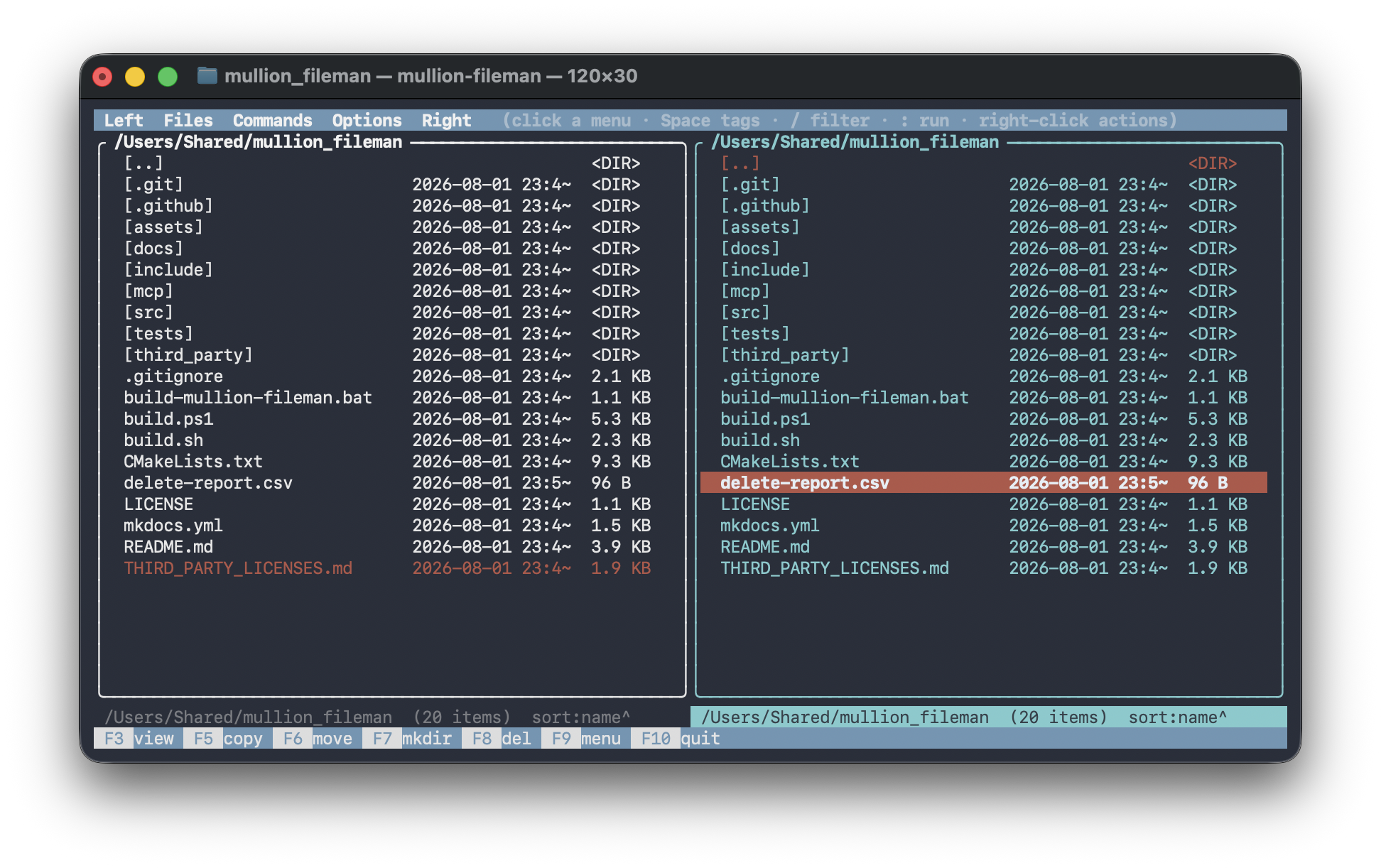
A small C++17 suite of folder-management tools plus mullion-fileman, a Norton Commander-style dual-pane TUI that drives them. The CLI tools are dependency-free standalone executables sharing a common core (recursive scanning, multi-core parallelism, a progress bar with ETA, CSV reports). mullion-fileman adds FTXUI (MIT).
Runs on Windows, macOS, and Linux.
Tools
| Tool | What it does |
|---|---|
folder_parity | Compare two folder trees, report differences to CSV, optionally sync |
folder_clean | Find and remove OS junk (.DS_Store, ._*, Thumbs.db, …) |
folder_copy / folder_move / folder_delete | Recursive, multi-threaded copy / move·rename / delete |
folder_view | Print a file as text or a hex dump |
folder_find | Find files by name, content, size, or age |
folder_rename | Bulk rename: prepend/append, literal, regex, and {token} patterns |
folder_attr | View/edit attributes, permissions (chmod), owner, and timestamps |
folder_sort | Organize files into a templated tree (by date / type / extension) |
folder_dupes | Find duplicate files by content (size + hash); optionally delete extras |
folder_du | Disk usage, biggest-first, with bars (a du with a treemap feel) |
folder_checksum | Write / verify content-checksum manifests |
folder_shred | Overwrite then delete files (dry-run by default) |
folder_scan | Scan text files for secrets (API keys, private keys, …) + custom regex |
folder_photos | Organize images by EXIF capture date into a templated tree |
folder_convert | Batch media conversion via ffmpeg |
folder_archive | Create / extract / list archives (via the system tar) |
folder_watch | Watch a folder and run a command when files appear / change |
folder_sysmon | CPU / memory / GPU usage monitor (one-shot, --watch, or --json) |
folder_proc | Process list / kill / priority manager |
bookmark_sync | Sync bookmarks between Chrome, Firefox, and (macOS) Safari |
mullion-fileman | Dual-pane TUI front-end for everything above (optional local AI + voice) |
mcp/ | MCP server exposing the tools to AI agents (Claude, etc.) |
Every capability is a standalone CLI tool you can script; mullion-fileman is only a
front-end. Destructive tools are dry-run by default (folder_clean,
folder_delete); folder_rename and folder_sort preview until --apply;
folder_parity never deletes.
Quick start
# Windows — CLI tools (auto-detects MSVC / MinGW / Clang), then the TUI
.\build.ps1
.\build-mullion-fileman.bat

# macOS / Linux
./build.sh                              # CLI tools
cmake -B build && cmake --build build   # everything, incl. mullion-fileman
folder_parity "J:\Photos" "I:\Photos" --hash --jobs -1 --ignore-system -o report.csv
mullion-fileman "J:\Photos" "I:\Photos"
Documentation
Full usage, options, and the mullion-fileman key map live in the docs (built with MkDocs Material, published via GitHub Pages):
- Docs site: https://sina5.github.io/mullion-fileman/
- Or run locally:
pip install -r docs/requirements.txt && mkdocs serve
Building & tests
See docs/building.md. In short: .\build.ps1 -Test or
./build.sh --test builds and runs the unit suite; CMake + ctest work on any
platform. mullion-fileman is built via CMake (it fetches FTXUI); -DBUILD_MULLION_FILEMAN=OFF
builds only the dependency-free CLI tools.
License
MIT License — see LICENSE and, for the bundled FTXUI
(MIT), THIRD_PARTY_LICENSES.md.
Contributors

1 commits
Similar repos


Languages
C++
94.6%
CMake
2.2%
PowerShell
1.3%
Python
1.1%
README
Mullion FileMan & folder-tools
A small C++17 suite of folder-management tools plus mullion-fileman, a Norton Commander-style dual-pane TUI that drives them. The CLI tools are dependency-free standalone executables sharing a common core (recursive scanning, multi-core parallelism, a progress bar with ETA, CSV reports). mullion-fileman adds FTXUI (MIT).
Runs on Windows, macOS, and Linux.
Tools
| Tool | What it does |
|---|---|
folder_parity | Compare two folder trees, report differences to CSV, optionally sync |
folder_clean | Find and remove OS junk (.DS_Store, ._*, Thumbs.db, …) |
folder_copy / folder_move / folder_delete | Recursive, multi-threaded copy / move·rename / delete |
folder_view | Print a file as text or a hex dump |
folder_find | Find files by name, content, size, or age |
folder_rename | Bulk rename: prepend/append, literal, regex, and {token} patterns |
folder_attr | View/edit attributes, permissions (chmod), owner, and timestamps |
folder_sort | Organize files into a templated tree (by date / type / extension) |
folder_dupes | Find duplicate files by content (size + hash); optionally delete extras |
folder_du | Disk usage, biggest-first, with bars (a du with a treemap feel) |
folder_checksum | Write / verify content-checksum manifests |
folder_shred | Overwrite then delete files (dry-run by default) |
folder_scan | Scan text files for secrets (API keys, private keys, …) + custom regex |
folder_photos | Organize images by EXIF capture date into a templated tree |
folder_convert | Batch media conversion via ffmpeg |
folder_archive | Create / extract / list archives (via the system tar) |
folder_watch | Watch a folder and run a command when files appear / change |
folder_sysmon | CPU / memory / GPU usage monitor (one-shot, --watch, or --json) |
folder_proc | Process list / kill / priority manager |
bookmark_sync | Sync bookmarks between Chrome, Firefox, and (macOS) Safari |
mullion-fileman | Dual-pane TUI front-end for everything above (optional local AI + voice) |
mcp/ | MCP server exposing the tools to AI agents (Claude, etc.) |
Every capability is a standalone CLI tool you can script; mullion-fileman is only a
front-end. Destructive tools are dry-run by default (folder_clean,
folder_delete); folder_rename and folder_sort preview until --apply;
folder_parity never deletes.
Quick start
# Windows — CLI tools (auto-detects MSVC / MinGW / Clang), then the TUI
.\build.ps1
.\build-mullion-fileman.bat

# macOS / Linux
./build.sh                              # CLI tools
cmake -B build && cmake --build build   # everything, incl. mullion-fileman
folder_parity "J:\Photos" "I:\Photos" --hash --jobs -1 --ignore-system -o report.csv
mullion-fileman "J:\Photos" "I:\Photos"
Documentation
Full usage, options, and the mullion-fileman key map live in the docs (built with MkDocs Material, published via GitHub Pages):
- Docs site: https://sina5.github.io/mullion-fileman/
- Or run locally:
pip install -r docs/requirements.txt && mkdocs serve
Building & tests
See docs/building.md. In short: .\build.ps1 -Test or
./build.sh --test builds and runs the unit suite; CMake + ctest work on any
platform. mullion-fileman is built via CMake (it fetches FTXUI); -DBUILD_MULLION_FILEMAN=OFF
builds only the dependency-free CLI tools.
License
MIT License — see LICENSE and, for the bundled FTXUI
(MIT), THIRD_PARTY_LICENSES.md.
Similar repos
Contributors
1 commits
Languages
C++
94.6%
CMake
2.2%
PowerShell
1.3%
Python
1.1%