
Dupster - The lazy way to find duplicates in your Terminal. Easily find duplicates, preview them and delete them. For Mac and Linux users
9
stars
38
commits
Python
primary language
Sep 12, 2026
updated
README
Dupster - The lazy way to find duplicates in your Terminal

Dupster is a fast open source duplicate file finder with a modern terminal UI for macOS and Linux.
Use it to scan folders, review duplicate files, copy full file paths, open files, and safely preview cleanup from the command line. Made from a lazy terminal guy, that got sick of remembering all commands.
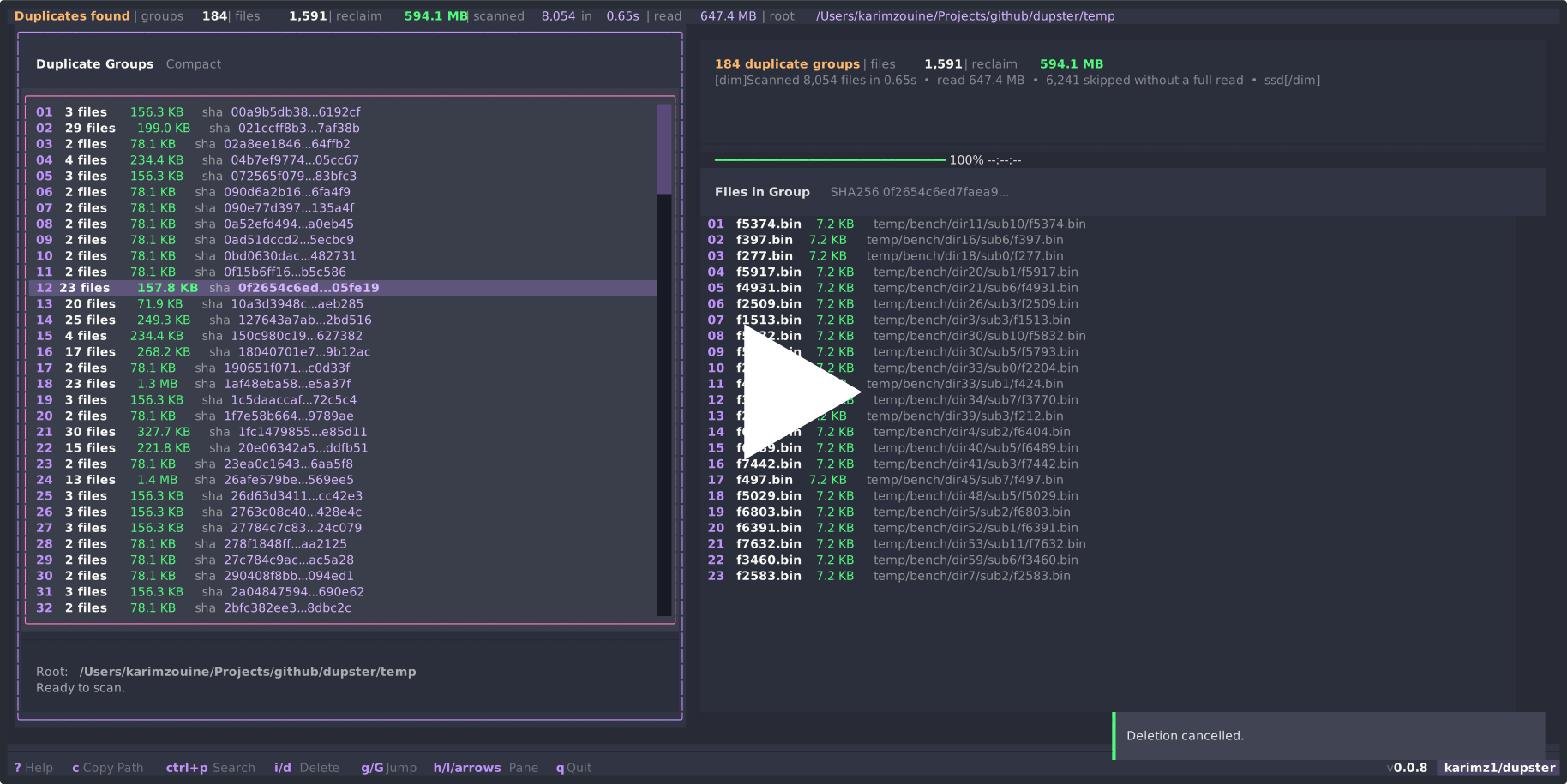








Dupster got Featured on LinuxLinks.
Why I Built This
I built Dupster because I wanted to actually see duplicate files before deleting them, without leaving the terminal. It is for people who like the speed of a CLI but still want the visual confidence of a small desktop app when cleaning real folders, servers, drives, media libraries, and backups.
I also wanted a duplicate file finder that does not make you memorize flags just to do the basic thing safely.
Features
- Fast duplicate file detection with staged reads.
- Modern keyboard and mouse friendly TUI built with Textual.
- Theme support, with Catppuccin Mocha as the default.
- Smooth terminal rendering with throttled progress updates.
- Safe delete previews before removing duplicate files.
- Copy full file paths for use in another terminal tab or editor.
- SHA-256 proof for files that are truly identical.
- Works well for disk cleanup on macOS, Linux, servers, project folders, media folders, and backups.
Install
Homebrew is recommended because it fetches the official build from the Dupster tap.
brew tap karimz1/dupster
brew install karimz1/dupster/dupster-cli
From source
git clone https://github.com/karimz1/dupster.git
cd dupster
pip install .
Usage
dupster ~/Downloads
dupster ~/Pictures --verify
dupster /mnt/backup --workers 1
dupster ~/src --min-size 1048576
dupster ~/src --follow-symlinks
Useful controls:
s: scan again.?: show or hide the right-side help and keys panel.h/lor left / right arrows: move between duplicate groups and files.g: jump to the top of the active list.G: jump to the bottom of the active list.ctrl+p: search commands.t: change theme.v: toggle between the default compact rows and detailed rows for duplicate groups and files.o: open selected file.c: copy selected file's full path.i: choose one file to keep, then preview deleting duplicates in the selected group.d: preview deleting duplicates across all groups, keeping one file per group.q: quit.
The footer stays compact by default with the most useful controls. Press ? to open the right-side help and keys panel. The footer also shows the version and a clickable karimz1/dupster GitHub button when there is enough terminal space.
Themes
Dupster supports Textual themes and starts with Catppuccin Mocha. Press t to open the theme picker. Moving through the list previews each theme across the full TUI after a short pause, so browsing stays smooth. Press Enter to keep the theme, or Escape to restore the previous one.
Your selected theme is saved in ~/.config/dupster/config.json.
Recommended Terminal
[!TIP] Dupster works in any modern terminal, but the TUI feels best in a GPU-accelerated terminal emulator. I personally use and recommend Ghostty for a fast, crisp, and modern terminal experience.
Performance Since 0.0.8
Version 0.0.8 made Dupster much faster by avoiding full reads for files that cannot be duplicates. The staged scanner checks size, inode, partial hashes, and only then full SHA-256. Benchmarks verify that the new scanner returns the same duplicate groups as the old full-read approach.
| Corpus | Files | Before 0.0.8 | Since 0.0.8 | Speedup | Bytes read |
|---|---|---|---|---|---|
~/Downloads, mostly large installers and media | 167 | 5.59 s | 0.07 s | 79.9x | 8.3 GB to 13.9 MB |
| Generated mixed tree | 8,003 | 6.06 s | 0.67 s | 9.1x | 4.5 GB to 647.3 MB |
| pnpm project tree, worst case | 81,377 | 15.14 s | 5.64 s | 2.7x | 1.8 GB to 986 MB |
On the generated benchmark, Dupster reads 7.2x less file data and a warm in-session rescan takes 0.30 s.
You can test the performance claim locally:
uv run tools/benchmark.py --generate temp/bench --files 8000
How It Works
Dupster is a Python duplicate finder that reduces disk I/O before doing expensive proof work:
- Group files by size.
- Collapse hardlinked files by inode.
- Hash the first 4 KB.
- Hash the middle and last 4 KB.
- Full SHA-256 only for files that still match.
- Optional byte-for-byte verification with
--verify.
SSD and NVMe drives get concurrent reads. Spinning disks get a single ordered reader to reduce seek overhead. You can override this with --workers or DUPSTER_DEVICE_TYPE=hdd.
Notes
- Symlinks are skipped by default. Use
--follow-symlinksif you need them. - Hardlinked files can appear as duplicate groups, but deleting them does not free extra disk space.
- Hashes are cached for the current session only.
- Terminal rendering depends on the emulator. Dupster keeps the UI responsive by avoiding unnecessary redraws.
- For huge non-interactive batch jobs, also compare tools like fclones, fdupes, and rdfind.
Development
uv sync --extra dev
uv run pytest -v
uv run tools/benchmark.py ~/Downloads
uv run tools/benchmark.py --generate temp/bench --files 8000
The scanner tests compare the staged pipeline against a brute-force reference over generated adversarial trees.
Thanks to everyone trying, packaging, starring, and sharing Dupster.
Author: Karim Zouine
License: Apache 2.0
Contributors

38 commits
See what people are saying
Similar repos


Languages
Python
99.8%
Dupster - The lazy way to find duplicates in your Terminal. Easily find duplicates, preview them and delete them. For Mac and Linux users
9
stars
38
commits
Python
primary language
Sep 12, 2026
updated
README
Dupster - The lazy way to find duplicates in your Terminal
Dupster is a fast open source duplicate file finder with a modern terminal UI for macOS and Linux.
Use it to scan folders, review duplicate files, copy full file paths, open files, and safely preview cleanup from the command line. Made from a lazy terminal guy, that got sick of remembering all commands.
Dupster got Featured on LinuxLinks.
Why I Built This
I built Dupster because I wanted to actually see duplicate files before deleting them, without leaving the terminal. It is for people who like the speed of a CLI but still want the visual confidence of a small desktop app when cleaning real folders, servers, drives, media libraries, and backups.
I also wanted a duplicate file finder that does not make you memorize flags just to do the basic thing safely.
Features
- Fast duplicate file detection with staged reads.
- Modern keyboard and mouse friendly TUI built with Textual.
- Theme support, with Catppuccin Mocha as the default.
- Smooth terminal rendering with throttled progress updates.
- Safe delete previews before removing duplicate files.
- Copy full file paths for use in another terminal tab or editor.
- SHA-256 proof for files that are truly identical.
- Works well for disk cleanup on macOS, Linux, servers, project folders, media folders, and backups.
Install
Homebrew is recommended because it fetches the official build from the Dupster tap.
brew tap karimz1/dupster
brew install karimz1/dupster/dupster-cli
From source
git clone https://github.com/karimz1/dupster.git
cd dupster
pip install .
Usage
dupster ~/Downloads
dupster ~/Pictures --verify
dupster /mnt/backup --workers 1
dupster ~/src --min-size 1048576
dupster ~/src --follow-symlinks
Useful controls:
s: scan again.?: show or hide the right-side help and keys panel.h/lor left / right arrows: move between duplicate groups and files.g: jump to the top of the active list.G: jump to the bottom of the active list.ctrl+p: search commands.t: change theme.v: toggle between the default compact rows and detailed rows for duplicate groups and files.o: open selected file.c: copy selected file's full path.i: choose one file to keep, then preview deleting duplicates in the selected group.d: preview deleting duplicates across all groups, keeping one file per group.q: quit.
The footer stays compact by default with the most useful controls. Press ? to open the right-side help and keys panel. The footer also shows the version and a clickable karimz1/dupster GitHub button when there is enough terminal space.
Themes
Dupster supports Textual themes and starts with Catppuccin Mocha. Press t to open the theme picker. Moving through the list previews each theme across the full TUI after a short pause, so browsing stays smooth. Press Enter to keep the theme, or Escape to restore the previous one.
Your selected theme is saved in ~/.config/dupster/config.json.
Recommended Terminal
[!TIP] Dupster works in any modern terminal, but the TUI feels best in a GPU-accelerated terminal emulator. I personally use and recommend Ghostty for a fast, crisp, and modern terminal experience.
Performance Since 0.0.8
Version 0.0.8 made Dupster much faster by avoiding full reads for files that cannot be duplicates. The staged scanner checks size, inode, partial hashes, and only then full SHA-256. Benchmarks verify that the new scanner returns the same duplicate groups as the old full-read approach.
| Corpus | Files | Before 0.0.8 | Since 0.0.8 | Speedup | Bytes read |
|---|---|---|---|---|---|
~/Downloads, mostly large installers and media | 167 | 5.59 s | 0.07 s | 79.9x | 8.3 GB to 13.9 MB |
| Generated mixed tree | 8,003 | 6.06 s | 0.67 s | 9.1x | 4.5 GB to 647.3 MB |
| pnpm project tree, worst case | 81,377 | 15.14 s | 5.64 s | 2.7x | 1.8 GB to 986 MB |
On the generated benchmark, Dupster reads 7.2x less file data and a warm in-session rescan takes 0.30 s.
You can test the performance claim locally:
uv run tools/benchmark.py --generate temp/bench --files 8000
How It Works
Dupster is a Python duplicate finder that reduces disk I/O before doing expensive proof work:
- Group files by size.
- Collapse hardlinked files by inode.
- Hash the first 4 KB.
- Hash the middle and last 4 KB.
- Full SHA-256 only for files that still match.
- Optional byte-for-byte verification with
--verify.
SSD and NVMe drives get concurrent reads. Spinning disks get a single ordered reader to reduce seek overhead. You can override this with --workers or DUPSTER_DEVICE_TYPE=hdd.
Notes
- Symlinks are skipped by default. Use
--follow-symlinksif you need them. - Hardlinked files can appear as duplicate groups, but deleting them does not free extra disk space.
- Hashes are cached for the current session only.
- Terminal rendering depends on the emulator. Dupster keeps the UI responsive by avoiding unnecessary redraws.
- For huge non-interactive batch jobs, also compare tools like fclones, fdupes, and rdfind.
Development
uv sync --extra dev
uv run pytest -v
uv run tools/benchmark.py ~/Downloads
uv run tools/benchmark.py --generate temp/bench --files 8000
The scanner tests compare the staged pipeline against a brute-force reference over generated adversarial trees.
Thanks to everyone trying, packaging, starring, and sharing Dupster.
Author: Karim Zouine
License: Apache 2.0
See what people are saying
Similar repos
Contributors
38 commits
Languages
Python
99.8%