iOS Component for creating a pulsing animation.
Objective-C
1,781
89 commits
updated Oct 12, 2021
PulsingHalo has been discontinued, and is no longer being maintained. Please check out Pulsator which is the new version of this written with Swift.



iOS component for creating a pulsing animation. It allows you to create halos.
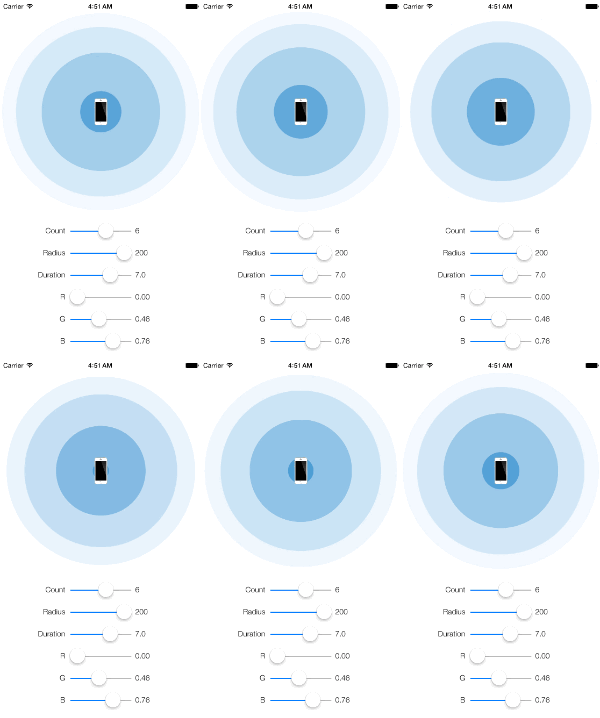
Great For:
Add into your Podfile.
pod "PulsingHalo"
Then $ pod install
Add into your Cartfile.
github "shu223/PulsingHalo"
Then $ carthage update
Add PulsingHaloLayer.h,m into your project.
Just initiate and add to your view layer.
let halo = PulsingHaloLayer()
halo.position = view.center
view.layer.addSublayer(halo)
halo.start()
PulsingHaloLayer *halo = [PulsingHaloLayer layer];
halo.position = self.view.center;
[self.view.layer addSublayer:halo];
[halo start];
Use haloLayerNumber property.
halo.haloLayerNumber = 3;
Use radius property.
self.halo.radius = 240.0;
Use backgroundColor property.
UIColor *color = [UIColor colorWithRed:0.7
                                 green:0.9
                                  blue:0.3
                                 alpha:1.0];

self.halo.backgroundColor = color.CGColor;
Use animationDuration or pulseInterval property.
Initialize using initWithRepeatCount: method, or set repeatCount property. The default value is INFINITY.
Use properties fromValueForRadius or keyTimeForHalfOpacity.
Use property useTimingFunction
You can try to change the radius and color properties with demo app.
Inspired by SVPulsingAnnotationView.
Shuichi Tsutsumi
iOS freelancer in Japan. Welcome works from abroad!

51 followers · starred Jun 2015
195 followers · starred May 2014
67 followers · starred Dec 2013
iOS Component for creating a pulsing animation.
Objective-C
1,781
89 commits
updated Oct 12, 2021
PulsingHalo has been discontinued, and is no longer being maintained. Please check out Pulsator which is the new version of this written with Swift.
iOS component for creating a pulsing animation. It allows you to create halos.
Great For:
Add into your Podfile.
pod "PulsingHalo"
Then $ pod install
Add into your Cartfile.
github "shu223/PulsingHalo"
Then $ carthage update
Add PulsingHaloLayer.h,m into your project.
Just initiate and add to your view layer.
let halo = PulsingHaloLayer()
halo.position = view.center
view.layer.addSublayer(halo)
halo.start()
PulsingHaloLayer *halo = [PulsingHaloLayer layer];
halo.position = self.view.center;
[self.view.layer addSublayer:halo];
[halo start];
Use haloLayerNumber property.
halo.haloLayerNumber = 3;
Use radius property.
self.halo.radius = 240.0;
Use backgroundColor property.
UIColor *color = [UIColor colorWithRed:0.7
                                 green:0.9
                                  blue:0.3
                                 alpha:1.0];

self.halo.backgroundColor = color.CGColor;
Use animationDuration or pulseInterval property.
Initialize using initWithRepeatCount: method, or set repeatCount property. The default value is INFINITY.
Use properties fromValueForRadius or keyTimeForHalfOpacity.
Use property useTimingFunction
You can try to change the radius and color properties with demo app.
Inspired by SVPulsingAnnotationView.
Shuichi Tsutsumi
iOS freelancer in Japan. Welcome works from abroad!
51 followers · starred Jun 2015
195 followers · starred May 2014
67 followers · starred Dec 2013



