


⚠️ Check out LoaderUI (ready to use with Swift Package Mananger supported) for SwiftUI implementation of this. 🎉
NVActivityIndicatorView is a collection of awesome loading animations.
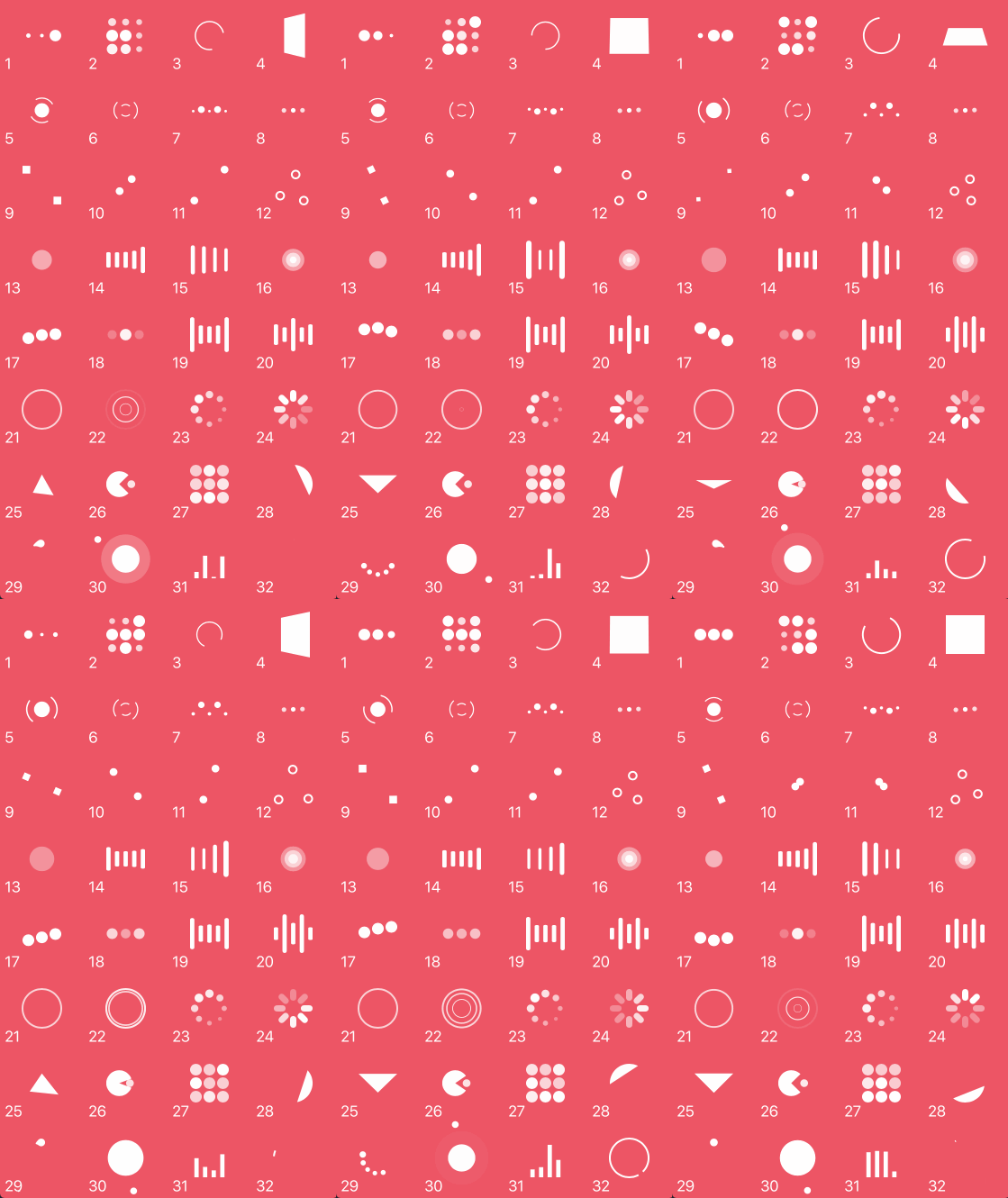
| Type | Type | Type | Type |
|---|---|---|---|
| 1. ballPulse | 2. ballGridPulse | 3. ballClipRotate | 4. squareSpin |
| 5. ballClipRotatePulse | 6. ballClipRotateMultiple | 7. ballPulseRise | 8. ballRotate |
| 9. cubeTransition | 10. ballZigZag | 11. ballZigZagDeflect | 12. ballTrianglePath |
| 13. ballScale | 14. lineScale | 15. lineScaleParty | 16. ballScaleMultiple |
| 17. ballPulseSync | 18. ballBeat | 19. lineScalePulseOut | 20. lineScalePulseOutRapid |
| 21. ballScaleRipple | 22. ballScaleRippleMultiple | 23. ballSpinFadeLoader | 24. lineSpinFadeLoader |
| 25. triangleSkewSpin | 26. pacman | 27. ballGridBeat | 28. semiCircleSpin |
| 29. ballRotateChase | 30. orbit | 31. audioEqualizer | 32. circleStrokeSpin |
Cocoapods is a dependency manager for Swift and Objective-C Cocoa projects. To use NVActivityIndicatorView with CocoaPods, add it in your Podfile.
pod 'NVActivityIndicatorView'
Carthage is intended to be the simplest way to add frameworks to your Cocoa application. To use NVActivityIndicatorView with Carthage, add it in your Cartfile.
github "ninjaprox/NVActivityIndicatorView"
The Swift Package Manager is a tool for managing the distribution of Swift code. To use NVActivityIndicatorView with Swift Package Manger, add it to dependencies in your Package.swift
dependencies: [
    .package(url: "https://github.com/ninjaprox/NVActivityIndicatorView.git")
]
Version 5.0.0 comes with breaking changes. Please refer to the release note for details.
Firstly, import NVActivityIndicatorView.
import NVActivityIndicatorView
Then, there are two ways you can create NVActivityIndicatorView:
UIView to NVActivityIndicatorView.Note: Set Module to NVActivityIndicatorView.
frame are optional and NVActivityIndicatorView.DEFAULT_* are used as default values.NVActivityIndicatorView(frame: frame, type: type, color: color, padding: padding)
Start animating.
activityIndicatorView.startAnimating()
Stop animating.
activityIndicatorView.stopAnimating()
Determine if it is animating.
animating = activityIndicatorView.isAnimating
In storyboard, you can change all properties in Attributes inspector tab of Utilities panel.
Note: Use one of values (case-insensitive) in Animation types for Type Name.
All properties are public so you can change them after initializing.
Note: All changes must be made before calling startAnimating().
https://nvactivityindicatorview.vinhis.me/
Thanks Connor Atherton for inspired Loaders.css and Danil Gontovnik for DGActivityIndicatorView.
The MIT License (MIT)
Copyright (c) 2016 Vinh Nguyen @ninjaprox
3,226 followers · starred Sep 2016
183 followers · starred Mar 2017
132 followers · starred Sep 2016
218 followers · starred Sep 2015
⚠️ Check out LoaderUI (ready to use with Swift Package Mananger supported) for SwiftUI implementation of this. 🎉
NVActivityIndicatorView is a collection of awesome loading animations.
| Type | Type | Type | Type |
|---|---|---|---|
| 1. ballPulse | 2. ballGridPulse | 3. ballClipRotate | 4. squareSpin |
| 5. ballClipRotatePulse | 6. ballClipRotateMultiple | 7. ballPulseRise | 8. ballRotate |
| 9. cubeTransition | 10. ballZigZag | 11. ballZigZagDeflect | 12. ballTrianglePath |
| 13. ballScale | 14. lineScale | 15. lineScaleParty | 16. ballScaleMultiple |
| 17. ballPulseSync | 18. ballBeat | 19. lineScalePulseOut | 20. lineScalePulseOutRapid |
| 21. ballScaleRipple | 22. ballScaleRippleMultiple | 23. ballSpinFadeLoader | 24. lineSpinFadeLoader |
| 25. triangleSkewSpin | 26. pacman | 27. ballGridBeat | 28. semiCircleSpin |
| 29. ballRotateChase | 30. orbit | 31. audioEqualizer | 32. circleStrokeSpin |
Cocoapods is a dependency manager for Swift and Objective-C Cocoa projects. To use NVActivityIndicatorView with CocoaPods, add it in your Podfile.
pod 'NVActivityIndicatorView'
Carthage is intended to be the simplest way to add frameworks to your Cocoa application. To use NVActivityIndicatorView with Carthage, add it in your Cartfile.
github "ninjaprox/NVActivityIndicatorView"
The Swift Package Manager is a tool for managing the distribution of Swift code. To use NVActivityIndicatorView with Swift Package Manger, add it to dependencies in your Package.swift
dependencies: [
    .package(url: "https://github.com/ninjaprox/NVActivityIndicatorView.git")
]
Version 5.0.0 comes with breaking changes. Please refer to the release note for details.
Firstly, import NVActivityIndicatorView.
import NVActivityIndicatorView
Then, there are two ways you can create NVActivityIndicatorView:
UIView to NVActivityIndicatorView.Note: Set Module to NVActivityIndicatorView.
frame are optional and NVActivityIndicatorView.DEFAULT_* are used as default values.NVActivityIndicatorView(frame: frame, type: type, color: color, padding: padding)
Start animating.
activityIndicatorView.startAnimating()
Stop animating.
activityIndicatorView.stopAnimating()
Determine if it is animating.
animating = activityIndicatorView.isAnimating
In storyboard, you can change all properties in Attributes inspector tab of Utilities panel.
Note: Use one of values (case-insensitive) in Animation types for Type Name.
All properties are public so you can change them after initializing.
Note: All changes must be made before calling startAnimating().
https://nvactivityindicatorview.vinhis.me/
Thanks Connor Atherton for inspired Loaders.css and Danil Gontovnik for DGActivityIndicatorView.
The MIT License (MIT)
Copyright (c) 2016 Vinh Nguyen @ninjaprox
3,226 followers · starred Sep 2016
183 followers · starred Mar 2017
132 followers · starred Sep 2016
218 followers · starred Sep 2015



