A simple GOG client for Linux
See the codeA simple GOG client for Linux.
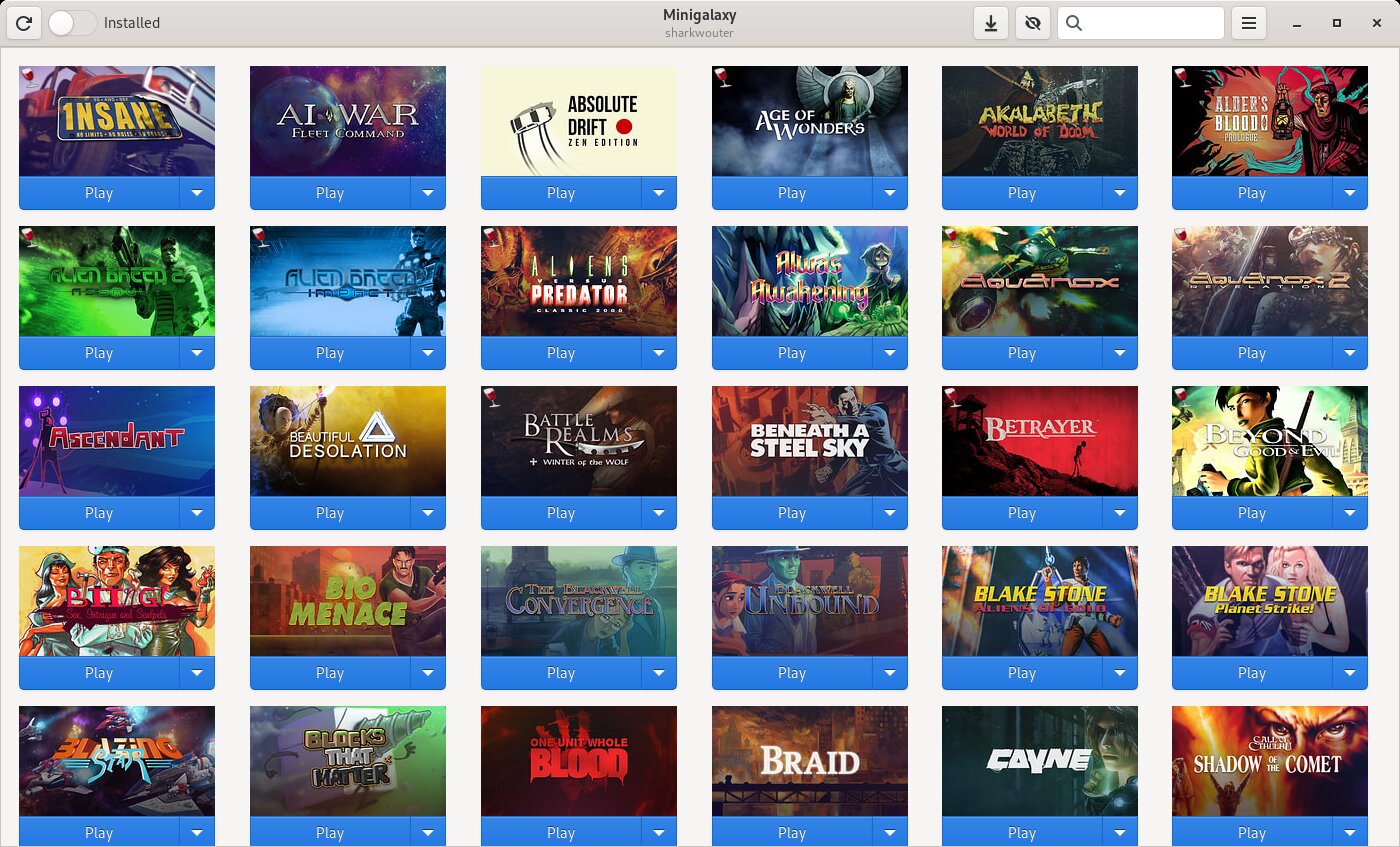
The most important features of Minigalaxy:
In addition to that, Minigalaxy also allows you to:
GOG has changed some of their API responses around May-July 2026 (exact point in time not known).
This required to change how Minigalaxy retrieves some pieces of data.
Any version of Minigalaxy from before the date mentioned above will NOT be able to show and install all linux and windows games correctly.
The first release working with the new APIs will be 1.4.2.
Minigalaxy version 1.3.2 and higher change some aspects of windows game installations through wine. It will try to adapt already installed games to the new concept when launched through Minigalaxy.
The windows installer in wine now uses a 2-step attempt to install games.
Currently, Minigalaxy can be displayed in the following languages:
Minigalaxy should work on the following distributions:
Minigalaxy does not ship for the following distributions because they do not contain the required version of PyGObject:
Other Linux distributions may work as well. Minigalaxy requires the following dependencies:

Available in the official repositories since Debian 11 and Ubuntu 21.04. You can install it with:
sudo apt install minigalaxy
You can also download the latest .deb package from the releases page and install it that way.
Available the AUR. You can use an AUR helper or use the following set of commands to install Minigalaxy on Arch:
git clone https://aur.archlinux.org/minigalaxy.git
cd minigalaxy
makepkg -si
Available in the official repositories since Fedora 31. You can install it with:
sudo dnf install minigalaxy
Available in the official repositories. You can install it with:
# pkg install games/minigalaxy
Available in the GURU overlay. You can enable the repository and install it with:
sudo emerge --ask app-eselect/eselect-repository
sudo eselect repository enable guru
sudo emaint sync -r guru
sudo emerge --ask games-util/minigalaxy
Available in the official repositories for openSUSE Tumbleweed and also Leap since 15.2. You can install it with:
sudo zypper in minigalaxy
Alternatively, you can use the following set of commands to install Minigalaxy on openSUSE from the devel project on OBS:
sudo zypper ar -f obs://games:tools gamestools
sudo zypper ref
sudo zypper in minigalaxy
Available in the official repository. Please use MX Package Installer or Synaptic instead of manually installing the .deb from the repo.
Available in the official repositories. You can install it with:
sudo eopkg it minigalaxy
Available in the official repositories. You can install it with:
sudo xbps-install -S minigalaxy
Available on Flathub. You can install it with:
flatpak install flathub io.github.sharkwouter.Minigalaxy
On other distributions, Minigalaxy can be downloaded and started with the following commands:
git clone https://github.com/sharkwouter/minigalaxy.git
cd minigalaxy
scripts/compile-translations.sh
bin/minigalaxy
This will be the development version. Alternatively, a tarball of a specific release can be downloaded from the releases page.
If you need any help using Minigalaxy, feel free to join the Minigalaxy Discord server. Bugs reports and feature requests can also be made here.
Currently, help is needed with the following:
Feel free to join the Minigalaxy Discord if you would like to help out.
Special thanks goes out to all contributors:
2,593 followers · starred Mar 2022
241 followers · starred Aug 2024
168 followers · starred Apr 2020
132 followers · starred Feb 2020
A simple GOG client for Linux
See the codeA simple GOG client for Linux.
The most important features of Minigalaxy:
In addition to that, Minigalaxy also allows you to:
GOG has changed some of their API responses around May-July 2026 (exact point in time not known).
This required to change how Minigalaxy retrieves some pieces of data.
Any version of Minigalaxy from before the date mentioned above will NOT be able to show and install all linux and windows games correctly.
The first release working with the new APIs will be 1.4.2.
Minigalaxy version 1.3.2 and higher change some aspects of windows game installations through wine. It will try to adapt already installed games to the new concept when launched through Minigalaxy.
The windows installer in wine now uses a 2-step attempt to install games.
Currently, Minigalaxy can be displayed in the following languages:
Minigalaxy should work on the following distributions:
Minigalaxy does not ship for the following distributions because they do not contain the required version of PyGObject:
Other Linux distributions may work as well. Minigalaxy requires the following dependencies:
Available in the official repositories since Debian 11 and Ubuntu 21.04. You can install it with:
sudo apt install minigalaxy
You can also download the latest .deb package from the releases page and install it that way.
Available the AUR. You can use an AUR helper or use the following set of commands to install Minigalaxy on Arch:
git clone https://aur.archlinux.org/minigalaxy.git
cd minigalaxy
makepkg -si
Available in the official repositories since Fedora 31. You can install it with:
sudo dnf install minigalaxy
Available in the official repositories. You can install it with:
# pkg install games/minigalaxy
Available in the GURU overlay. You can enable the repository and install it with:
sudo emerge --ask app-eselect/eselect-repository
sudo eselect repository enable guru
sudo emaint sync -r guru
sudo emerge --ask games-util/minigalaxy
Available in the official repositories for openSUSE Tumbleweed and also Leap since 15.2. You can install it with:
sudo zypper in minigalaxy
Alternatively, you can use the following set of commands to install Minigalaxy on openSUSE from the devel project on OBS:
sudo zypper ar -f obs://games:tools gamestools
sudo zypper ref
sudo zypper in minigalaxy
Available in the official repository. Please use MX Package Installer or Synaptic instead of manually installing the .deb from the repo.
Available in the official repositories. You can install it with:
sudo eopkg it minigalaxy
Available in the official repositories. You can install it with:
sudo xbps-install -S minigalaxy
Available on Flathub. You can install it with:
flatpak install flathub io.github.sharkwouter.Minigalaxy
On other distributions, Minigalaxy can be downloaded and started with the following commands:
git clone https://github.com/sharkwouter/minigalaxy.git
cd minigalaxy
scripts/compile-translations.sh
bin/minigalaxy
This will be the development version. Alternatively, a tarball of a specific release can be downloaded from the releases page.
If you need any help using Minigalaxy, feel free to join the Minigalaxy Discord server. Bugs reports and feature requests can also be made here.
Currently, help is needed with the following:
Feel free to join the Minigalaxy Discord if you would like to help out.
Special thanks goes out to all contributors:
2,593 followers · starred Mar 2022
241 followers · starred Aug 2024
168 followers · starred Apr 2020
132 followers · starred Feb 2020