Install and manage GE-Proton, Luxtorpeda & more for Steam and Wine-GE & more for Lutris with this graphical user interface.
See the code



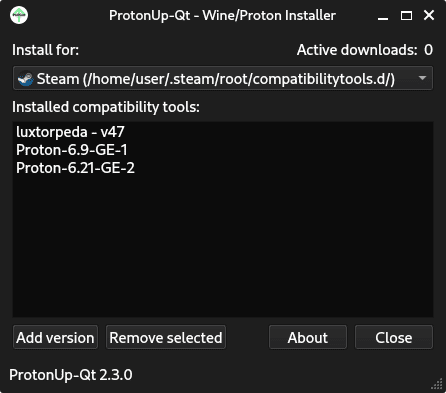
Install and manage GE-Proton and Luxtorpeda for Steam and Wine-GE for Lutris with this graphical user interface. Based on AUNaseef's ProtonUp, made with Python 3 and Qt 6.
Affiliation Note: ProtonUp-Qt is an independent tool for managing gaming compatibility tools. It is neither directly affiliated with the compatibility tool creators nor with the providers of the individual game launchers. However, we try to work with them where possible.
The official development takes place on GitHub at DavidoTek/ProtonUp-Qt, and the official website is https://davidotek.github.io/protonup-qt. We distribute ProtonUp-Qt as a Flatpak on Flathub and as an AppImage in the releases section of the GitHub repository. Additionally, we check the integrity of the AUR (protonup-qt and protonup-qt-bin) and Pacstall distribution on an irregular basis.


Website: https://davidotek.github.io/protonup-qt
Wiki/Support: https://github.com/DavidoTek/ProtonUp-Qt/wiki
https://aur.archlinux.org/packages/protonup-qt (Maintained by yochananmarqos)
https://aur.archlinux.org/packages/protonup-qt-bin (Maintained by R1yuu)
uv sync
uv run protonup-qt
nix build .#appimage
The AppImage and its .zsync file are placed in result/. The AppImage is built from the PyPI wheels in uv.lock (which bundle Qt) and a relocatable python-build-standalone interpreter, so it does not depend on /nix/store and runs on distributions with glibc 2.34 or newer.
Recommended: You can translate ProtonUp-Qt on Weblate: https://hosted.weblate.org/projects/protonup-qt/
Special thanks to the authors of all services that ProtonUp-Qt uses, including AreWeAntiCheatYet and ProtonDB.
| Project | License |
|---|---|
| ProtonUp-Qt | GPL-3.0 |
| ProtonUp | GPL-3.0 |
| PySide6 | LGPL-3.0/GPL-2.0 |
| inputs | BSD |
| pyxdg | LGPLv2 |
| vdf@solstice | MIT |
| steam@solstice | MIT |
| requests | Apache 2.0 |
| PyYAML | MIT |
1,075 followers · starred Sep 2026
1,110 followers · starred Feb 2026
228 followers · starred Jan 2026
70 followers · starred Jul 2025
Install and manage GE-Proton, Luxtorpeda & more for Steam and Wine-GE & more for Lutris with this graphical user interface.
See the code
Install and manage GE-Proton and Luxtorpeda for Steam and Wine-GE for Lutris with this graphical user interface. Based on AUNaseef's ProtonUp, made with Python 3 and Qt 6.
Affiliation Note: ProtonUp-Qt is an independent tool for managing gaming compatibility tools. It is neither directly affiliated with the compatibility tool creators nor with the providers of the individual game launchers. However, we try to work with them where possible.
The official development takes place on GitHub at DavidoTek/ProtonUp-Qt, and the official website is https://davidotek.github.io/protonup-qt. We distribute ProtonUp-Qt as a Flatpak on Flathub and as an AppImage in the releases section of the GitHub repository. Additionally, we check the integrity of the AUR (protonup-qt and protonup-qt-bin) and Pacstall distribution on an irregular basis.
Website: https://davidotek.github.io/protonup-qt
Wiki/Support: https://github.com/DavidoTek/ProtonUp-Qt/wiki
https://aur.archlinux.org/packages/protonup-qt (Maintained by yochananmarqos)
https://aur.archlinux.org/packages/protonup-qt-bin (Maintained by R1yuu)
uv sync
uv run protonup-qt
nix build .#appimage
The AppImage and its .zsync file are placed in result/. The AppImage is built from the PyPI wheels in uv.lock (which bundle Qt) and a relocatable python-build-standalone interpreter, so it does not depend on /nix/store and runs on distributions with glibc 2.34 or newer.
Recommended: You can translate ProtonUp-Qt on Weblate: https://hosted.weblate.org/projects/protonup-qt/
Special thanks to the authors of all services that ProtonUp-Qt uses, including AreWeAntiCheatYet and ProtonDB.
| Project | License |
|---|---|
| ProtonUp-Qt | GPL-3.0 |
| ProtonUp | GPL-3.0 |
| PySide6 | LGPL-3.0/GPL-2.0 |
| inputs | BSD |
| pyxdg | LGPLv2 |
| vdf@solstice | MIT |
| steam@solstice | MIT |
| requests | Apache 2.0 |
| PyYAML | MIT |
1,075 followers · starred Sep 2026
1,110 followers · starred Feb 2026
228 followers · starred Jan 2026
70 followers · starred Jul 2025



