[!IMPORTANT] I will not be available until early October 2026.

A GTK4 and libadwaita application for managing Windows compatibility tools on Linux.






Flathub · Releases · Issue tracker · Discord
ProtonPlus helps you install, update, remove, and organize compatibility tools used by Steam and other Linux game launchers. It discovers supported launcher installations, downloads releases from their upstream sources, and installs them into the layouts expected by each launcher.
Latest builds, update installed tools, remove old versions, and migrate games between tools where supported.
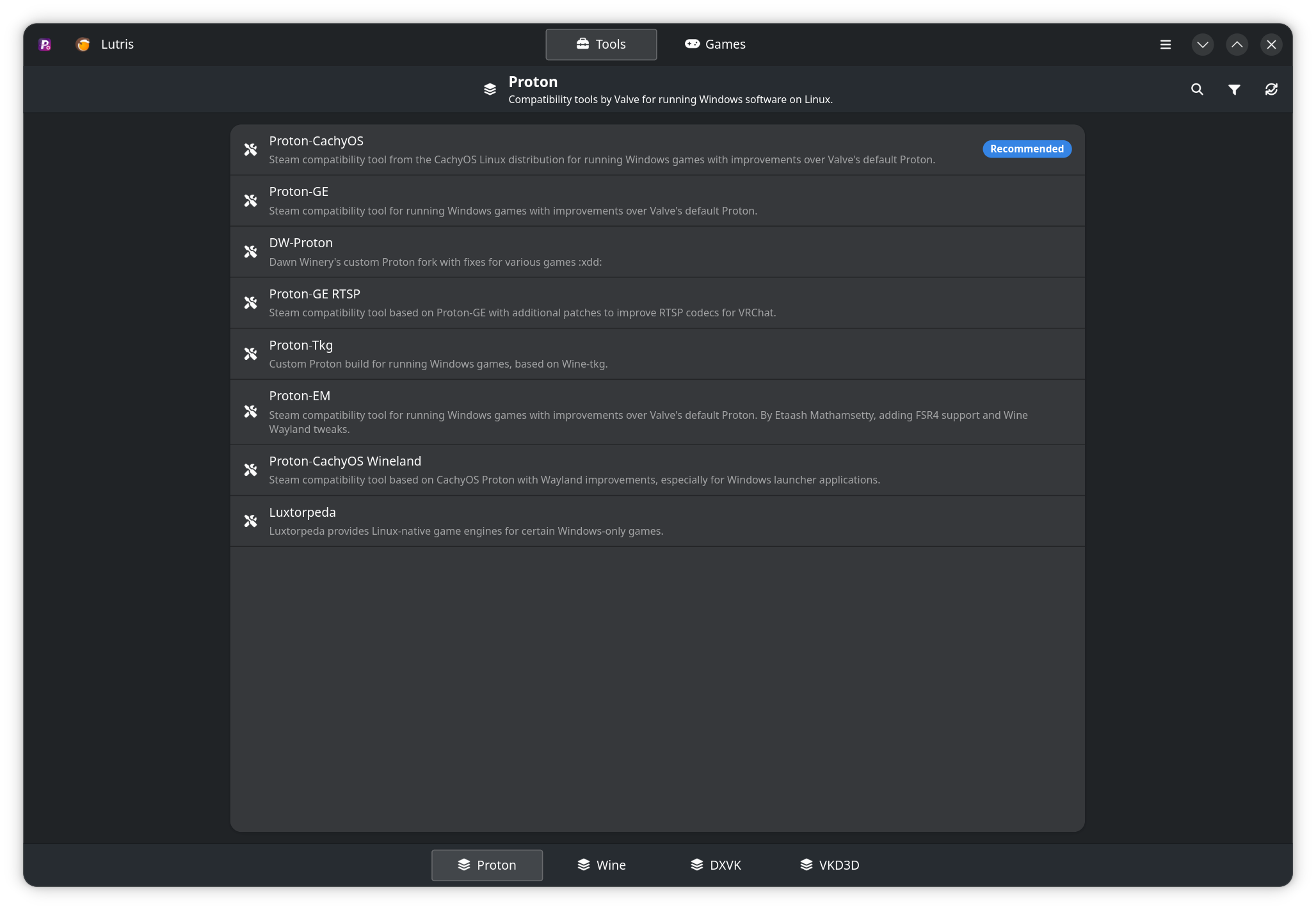
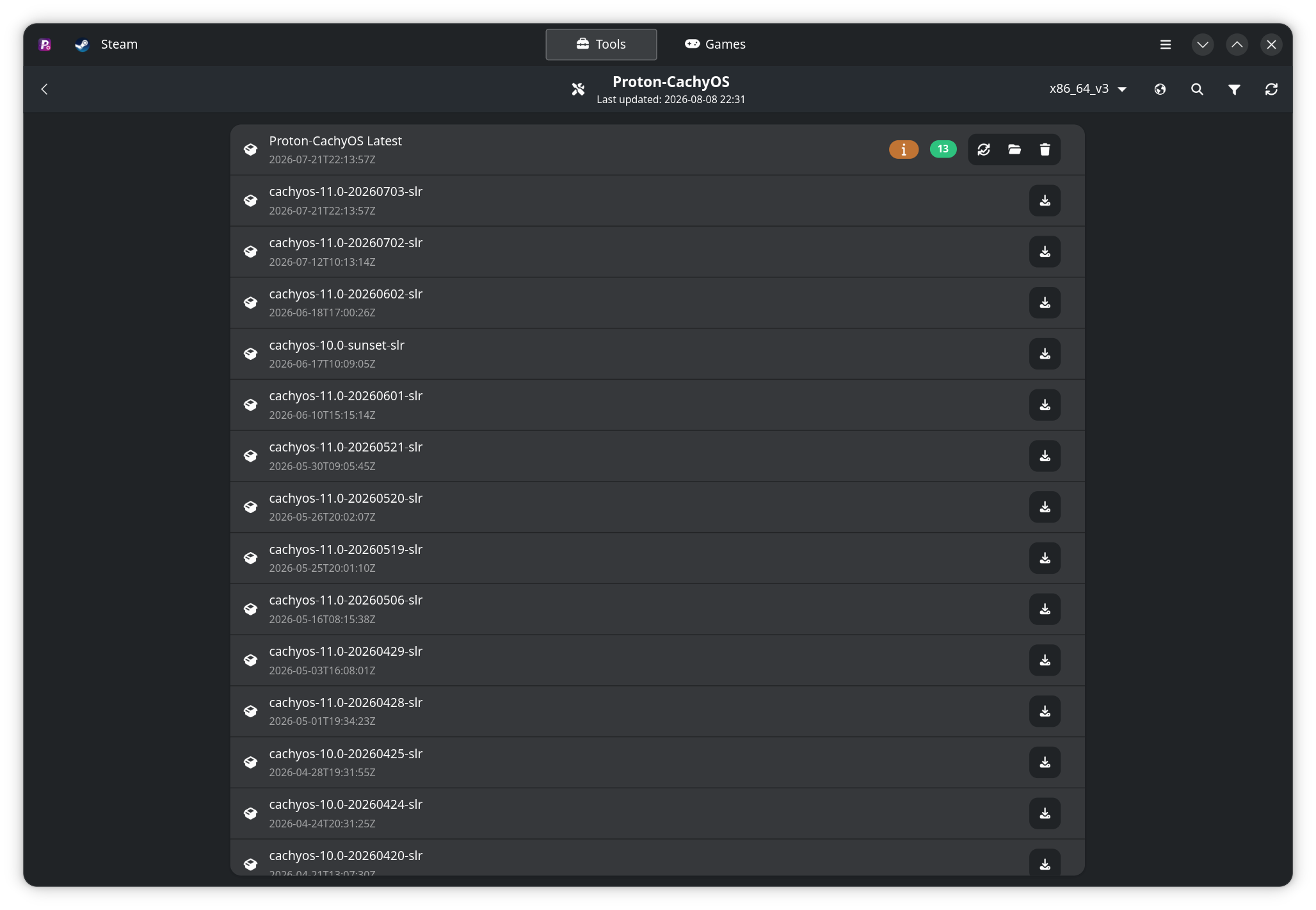
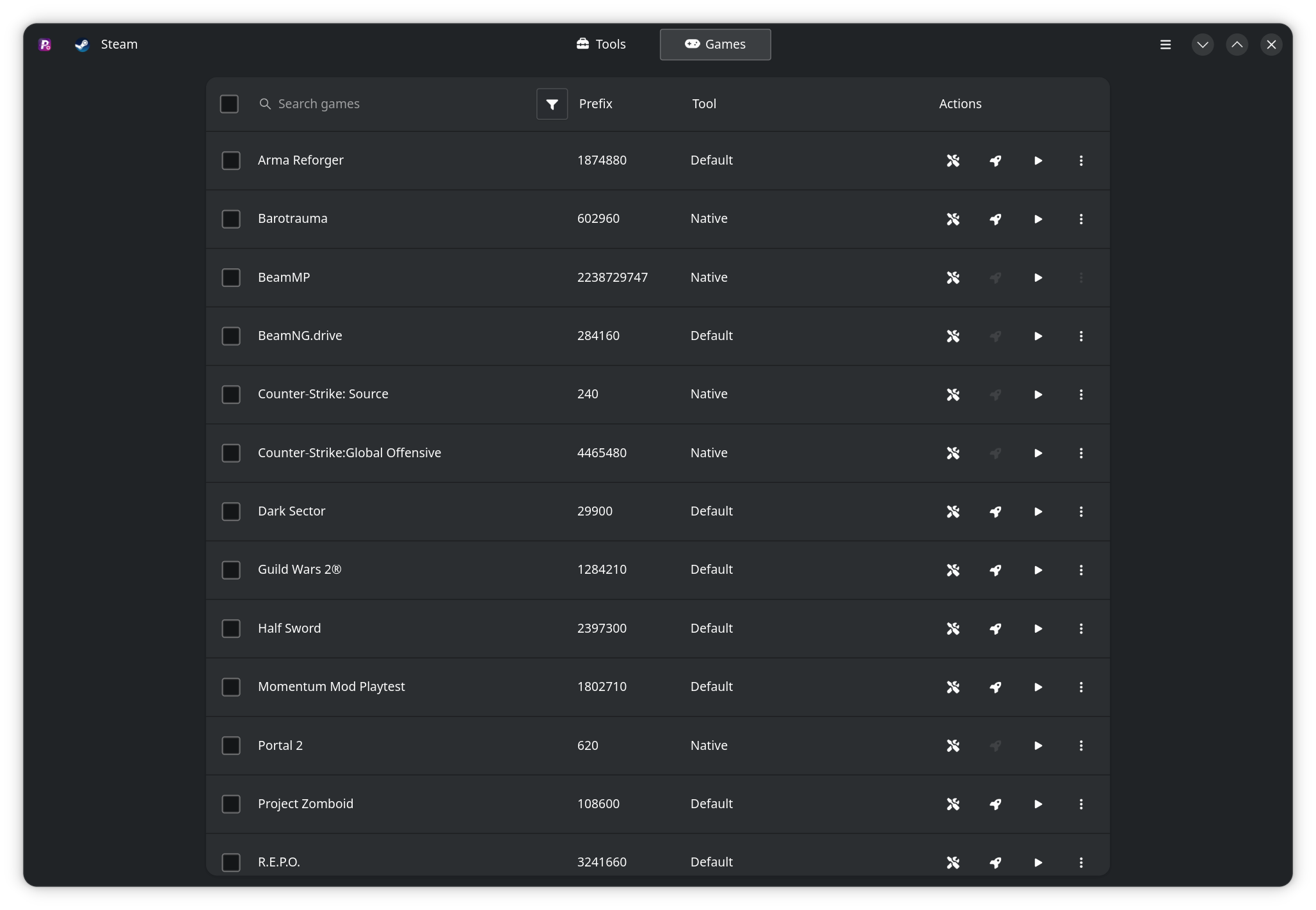
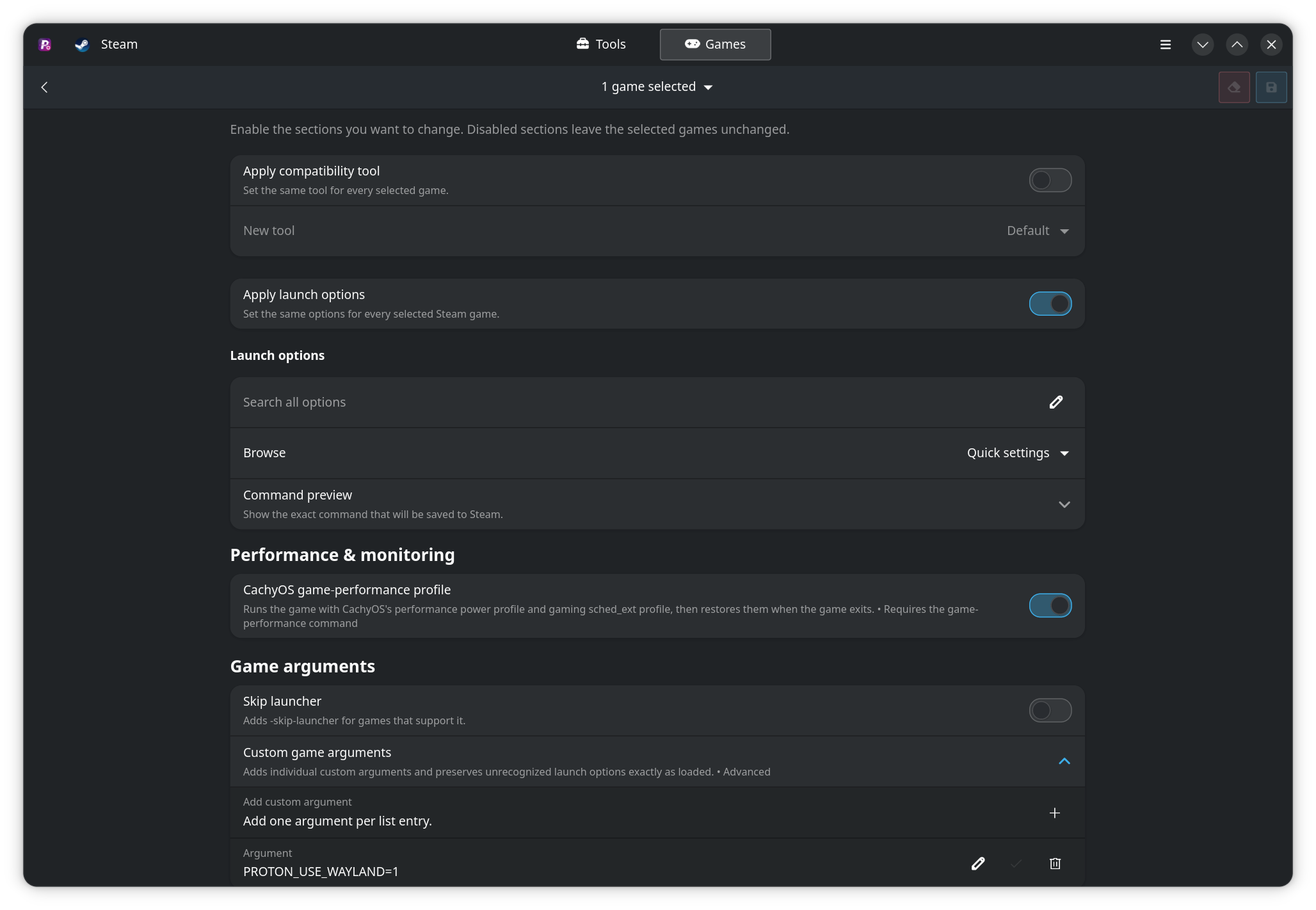
ProtonPlus runs on Linux. It is distributed as a Flatpak and can also be built and installed natively with Meson. The application includes detection for these launcher installations:
| Launcher | Supported installation types | Tool categories |
|---|---|---|
| Steam | System, Flatpak, Snap | Proton, including Steam Tinker Launch |
| Faugus Launcher | System, Flatpak | Selected Proton tools |
| Lutris | System, Flatpak | Proton, Wine, DXVK, VKD3D |
| Heroic Games Launcher | System, Flatpak | Proton, Wine |
| Bottles | System, Flatpak | Proton, Wine, DXVK |
| WineZGUI | System, Flatpak | Wine |
Only installed and detectable launchers are shown. Tool availability also depends on the launcher and installation type.
The built-in provider catalog currently contains:
Release data is obtained from upstream GitHub, GitLab, Forgejo, and GitHub Actions sources. Available versions and architecture variants are determined by each provider's upstream releases.
The Flathub package is the recommended installation method.
flatpak install flathub com.vysp3r.ProtonPlus
flatpak run com.vysp3r.ProtonPlus
If the Flathub remote is not configured yet:
flatpak remote-add --if-not-exists \
  flathub https://flathub.org/repo/flathub.flatpakrepo
The Flatpak uses host access required to find Steam libraries and launcher data, and requests access to the supported launcher Flatpak data directories. If a launcher is installed in an unsupported location or through a different packaging format, ProtonPlus may not be able to detect it.
The following packages are maintained by distribution packagers or community maintainers. They are not managed by the ProtonPlus project and may have different release timing or packaging defaults than Flathub.
| Distribution | Package source | Maintainer |
|---|---|---|
| Arch Linux | AUR | yochananmarqos |
| Fedora | Copr | wehagy |
| Fedora | Terra | Owen Zimmerman |
| NixOS | nixpkgs | Seth |
| Ubuntu | Pacstall | Vysp3r |
| openSUSE | OBS | rrahl0 |
| Void Linux | Official repository | xJayMorex |
| Gentoo | Overlay | amielke |
A native build requires a Linux development environment with:
Package names differ between distributions. The repository's scripts/get-dependencies.sh installs the native build dependencies on Arch Linux; it is intended for Arch-based build environments and should not be run unchanged on other distributions.
Clone and build the application with the project Makefile:
git clone https://github.com/Vysp3r/ProtonPlus.git
cd ProtonPlus
make build-run
If protonplus is not already available on PATH, make build-run installs
the native build before launching it.
To build without launching it, then install it system-wide:
make install
The native build is configured with /usr as its install prefix by the Makefile.
The local Flatpak manifest builds the source tree and installs the result for the current user. Flatpak, a configured Flathub remote, and network access are required.
make local-run
The local target installs the GNOME 50 SDK and runtime, the Vala SDK extension, and Flatpak Builder when they are missing. Use make local to build and install without launching the application.
Downloads and updates appear in the header indicator. ProtonPlus also sends desktop notifications when an operation finishes while the application is not active.
ProtonPlus supports gamepad navigation through SDL 3. Use the D-pad or left stick to move, the right stick to scroll, the configured confirm face button to activate controls, and the other face button to go back or close the active dialog or menu. Shoulder and dedicated controller buttons provide contextual page, section, search, filter, menu, and launcher shortcuts where available; the hint bar shows the actions supported by the current view.
On Steam Deck, focus a text field and use Steam + X to open the on-screen keyboard. Other systems may require a physical or system-provided keyboard for text entry.
Running protonplus without arguments opens the graphical interface. The CLI accepts these commands:
protonplus version
protonplus help
protonplus list [launcher_id]
protonplus install <launcher_id> <runner_id> [latest]
protonplus uninstall <launcher_id> <runner_id|all> [all]
protonplus update <all|launcher_id> [runner_id]
List detected launchers and installed tools first; the command output includes the IDs accepted by the other commands:
protonplus list
protonplus list steam-system
protonplus install steam-system proton-ge latest
protonplus update steam-system
protonplus update all
protonplus uninstall steam-system proton-ge
The latest argument selects the latest eligible release during installation. The all argument can remove all releases for a tool or all provider-tool releases for a launcher.
Application preferences are available from the preferences dialog. They include:
Native builds use the XDG user cache directory, normally ~/.cache/ProtonPlus. Flatpak builds use the corresponding sandboxed XDG directories.
Confirm that the launcher is installed and has been opened at least once, then refresh ProtonPlus. For Flatpak launchers, make sure the corresponding Flatpak application data exists and that ProtonPlus was installed with the official Flatpak package. Steam libraries on custom locations must also be visible to the ProtonPlus installation.
Check the network connection and the proxy setting in Preferences > Advanced > Network. GitHub and GitLab access tokens can be configured under API Tokens. An invalid token or an upstream API outage is reported separately from a missing release.
Close games that are using the compatibility tool. ProtonPlus refuses certain updates while a game is running to avoid modifying an active installation.
Use the cache deletion action in the preferences dialog, then retry the operation. This clears ProtonPlus's cached release data and downloaded archives; releases are fetched again from their upstream sources.
The provider may have published an asset in an unsupported or incomplete format. Refresh the release data and retry. If the problem persists, report the provider, release, and exact error in the issue tracker.
Run the test suite after making changes:
make tests
Useful maintenance commands are exposed through the Makefile:
make linter
make translations
make icons
make clean
Provider extension points and release-source architecture are documented in docs/provider-architecture.md.
Please read CONTRIBUTING.md before opening a pull request. Bug reports and feature requests belong in the issue tracker. Translation contributions are coordinated through Weblate.
AI tools, including OpenAI Codex, have been used to help advance ProtonPlus further. AI was used as a supporting engineering tool within a structured development process, under human direction and subject to code review, testing, and validation. Project decisions and final responsibility remain with the maintainers.
ProtonPlus is licensed under the GNU General Public License version 3 or later.
(top 24 of 25)
1,075 followers · starred Sep 2026
63 followers · starred May 2026
162 followers · starred Aug 2026
114 followers · starred Jun 2025
[!IMPORTANT] I will not be available until early October 2026.
A GTK4 and libadwaita application for managing Windows compatibility tools on Linux.
Flathub · Releases · Issue tracker · Discord
ProtonPlus helps you install, update, remove, and organize compatibility tools used by Steam and other Linux game launchers. It discovers supported launcher installations, downloads releases from their upstream sources, and installs them into the layouts expected by each launcher.
Latest builds, update installed tools, remove old versions, and migrate games between tools where supported.
ProtonPlus runs on Linux. It is distributed as a Flatpak and can also be built and installed natively with Meson. The application includes detection for these launcher installations:
| Launcher | Supported installation types | Tool categories |
|---|---|---|
| Steam | System, Flatpak, Snap | Proton, including Steam Tinker Launch |
| Faugus Launcher | System, Flatpak | Selected Proton tools |
| Lutris | System, Flatpak | Proton, Wine, DXVK, VKD3D |
| Heroic Games Launcher | System, Flatpak | Proton, Wine |
| Bottles | System, Flatpak | Proton, Wine, DXVK |
| WineZGUI | System, Flatpak | Wine |
Only installed and detectable launchers are shown. Tool availability also depends on the launcher and installation type.
The built-in provider catalog currently contains:
Release data is obtained from upstream GitHub, GitLab, Forgejo, and GitHub Actions sources. Available versions and architecture variants are determined by each provider's upstream releases.
The Flathub package is the recommended installation method.
flatpak install flathub com.vysp3r.ProtonPlus
flatpak run com.vysp3r.ProtonPlus
If the Flathub remote is not configured yet:
flatpak remote-add --if-not-exists \
  flathub https://flathub.org/repo/flathub.flatpakrepo
The Flatpak uses host access required to find Steam libraries and launcher data, and requests access to the supported launcher Flatpak data directories. If a launcher is installed in an unsupported location or through a different packaging format, ProtonPlus may not be able to detect it.
The following packages are maintained by distribution packagers or community maintainers. They are not managed by the ProtonPlus project and may have different release timing or packaging defaults than Flathub.
| Distribution | Package source | Maintainer |
|---|---|---|
| Arch Linux | AUR | yochananmarqos |
| Fedora | Copr | wehagy |
| Fedora | Terra | Owen Zimmerman |
| NixOS | nixpkgs | Seth |
| Ubuntu | Pacstall | Vysp3r |
| openSUSE | OBS | rrahl0 |
| Void Linux | Official repository | xJayMorex |
| Gentoo | Overlay | amielke |
A native build requires a Linux development environment with:
Package names differ between distributions. The repository's scripts/get-dependencies.sh installs the native build dependencies on Arch Linux; it is intended for Arch-based build environments and should not be run unchanged on other distributions.
Clone and build the application with the project Makefile:
git clone https://github.com/Vysp3r/ProtonPlus.git
cd ProtonPlus
make build-run
If protonplus is not already available on PATH, make build-run installs
the native build before launching it.
To build without launching it, then install it system-wide:
make install
The native build is configured with /usr as its install prefix by the Makefile.
The local Flatpak manifest builds the source tree and installs the result for the current user. Flatpak, a configured Flathub remote, and network access are required.
make local-run
The local target installs the GNOME 50 SDK and runtime, the Vala SDK extension, and Flatpak Builder when they are missing. Use make local to build and install without launching the application.
Downloads and updates appear in the header indicator. ProtonPlus also sends desktop notifications when an operation finishes while the application is not active.
ProtonPlus supports gamepad navigation through SDL 3. Use the D-pad or left stick to move, the right stick to scroll, the configured confirm face button to activate controls, and the other face button to go back or close the active dialog or menu. Shoulder and dedicated controller buttons provide contextual page, section, search, filter, menu, and launcher shortcuts where available; the hint bar shows the actions supported by the current view.
On Steam Deck, focus a text field and use Steam + X to open the on-screen keyboard. Other systems may require a physical or system-provided keyboard for text entry.
Running protonplus without arguments opens the graphical interface. The CLI accepts these commands:
protonplus version
protonplus help
protonplus list [launcher_id]
protonplus install <launcher_id> <runner_id> [latest]
protonplus uninstall <launcher_id> <runner_id|all> [all]
protonplus update <all|launcher_id> [runner_id]
List detected launchers and installed tools first; the command output includes the IDs accepted by the other commands:
protonplus list
protonplus list steam-system
protonplus install steam-system proton-ge latest
protonplus update steam-system
protonplus update all
protonplus uninstall steam-system proton-ge
The latest argument selects the latest eligible release during installation. The all argument can remove all releases for a tool or all provider-tool releases for a launcher.
Application preferences are available from the preferences dialog. They include:
Native builds use the XDG user cache directory, normally ~/.cache/ProtonPlus. Flatpak builds use the corresponding sandboxed XDG directories.
Confirm that the launcher is installed and has been opened at least once, then refresh ProtonPlus. For Flatpak launchers, make sure the corresponding Flatpak application data exists and that ProtonPlus was installed with the official Flatpak package. Steam libraries on custom locations must also be visible to the ProtonPlus installation.
Check the network connection and the proxy setting in Preferences > Advanced > Network. GitHub and GitLab access tokens can be configured under API Tokens. An invalid token or an upstream API outage is reported separately from a missing release.
Close games that are using the compatibility tool. ProtonPlus refuses certain updates while a game is running to avoid modifying an active installation.
Use the cache deletion action in the preferences dialog, then retry the operation. This clears ProtonPlus's cached release data and downloaded archives; releases are fetched again from their upstream sources.
The provider may have published an asset in an unsupported or incomplete format. Refresh the release data and retry. If the problem persists, report the provider, release, and exact error in the issue tracker.
Run the test suite after making changes:
make tests
Useful maintenance commands are exposed through the Makefile:
make linter
make translations
make icons
make clean
Provider extension points and release-source architecture are documented in docs/provider-architecture.md.
Please read CONTRIBUTING.md before opening a pull request. Bug reports and feature requests belong in the issue tracker. Translation contributions are coordinated through Weblate.
AI tools, including OpenAI Codex, have been used to help advance ProtonPlus further. AI was used as a supporting engineering tool within a structured development process, under human direction and subject to code review, testing, and validation. Project decisions and final responsibility remain with the maintainers.
ProtonPlus is licensed under the GNU General Public License version 3 or later.
(top 24 of 25)
1,075 followers · starred Sep 2026
63 followers · starred May 2026
162 followers · starred Aug 2026
114 followers · starred Jun 2025



