Run local image, text, speech, vision, music, and video workflows, plus model management and a loopback OpenAI-compatible API server. The repo ships the core libraries and the mere.run executable.
See the code
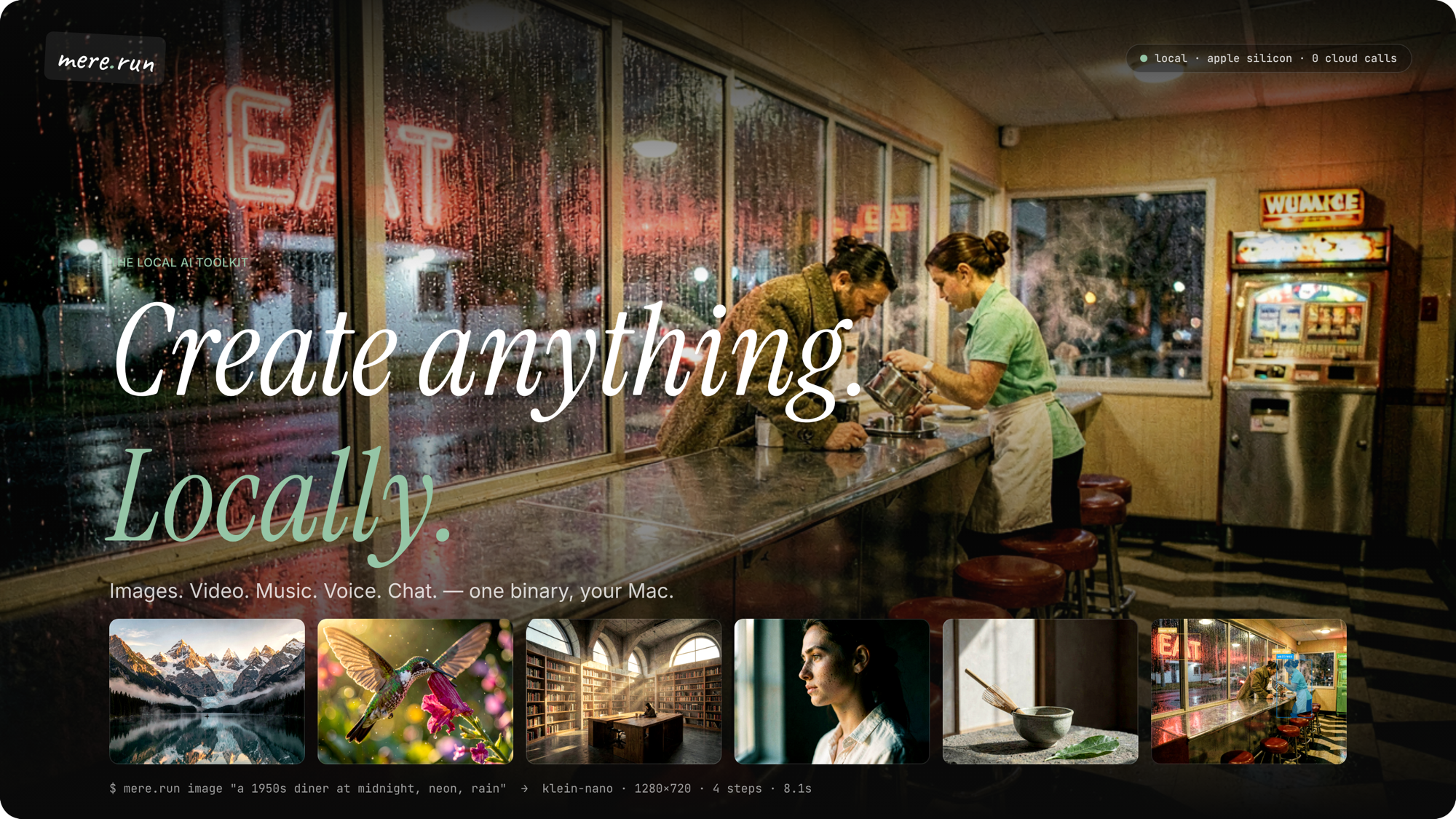
mere.run · Documentation · Command reference · Downloads · Relay and nodes · Plugins
mere.run is a local AI runtime for developers and creators. Use its command-line interface (CLI) to generate media, run language models, and analyze images or geospatial data. You can also train adapters, evaluate models, serve an OpenAI-compatible API, and run portable workflow graphs.
Apple Silicon macOS is the primary platform. Headless Linux CUDA packages are also available. The macOS Studio app uses the same CLI, model store, and run history. The iOS client connects to your machines and offers experimental image and chat inference on supported iPhones.
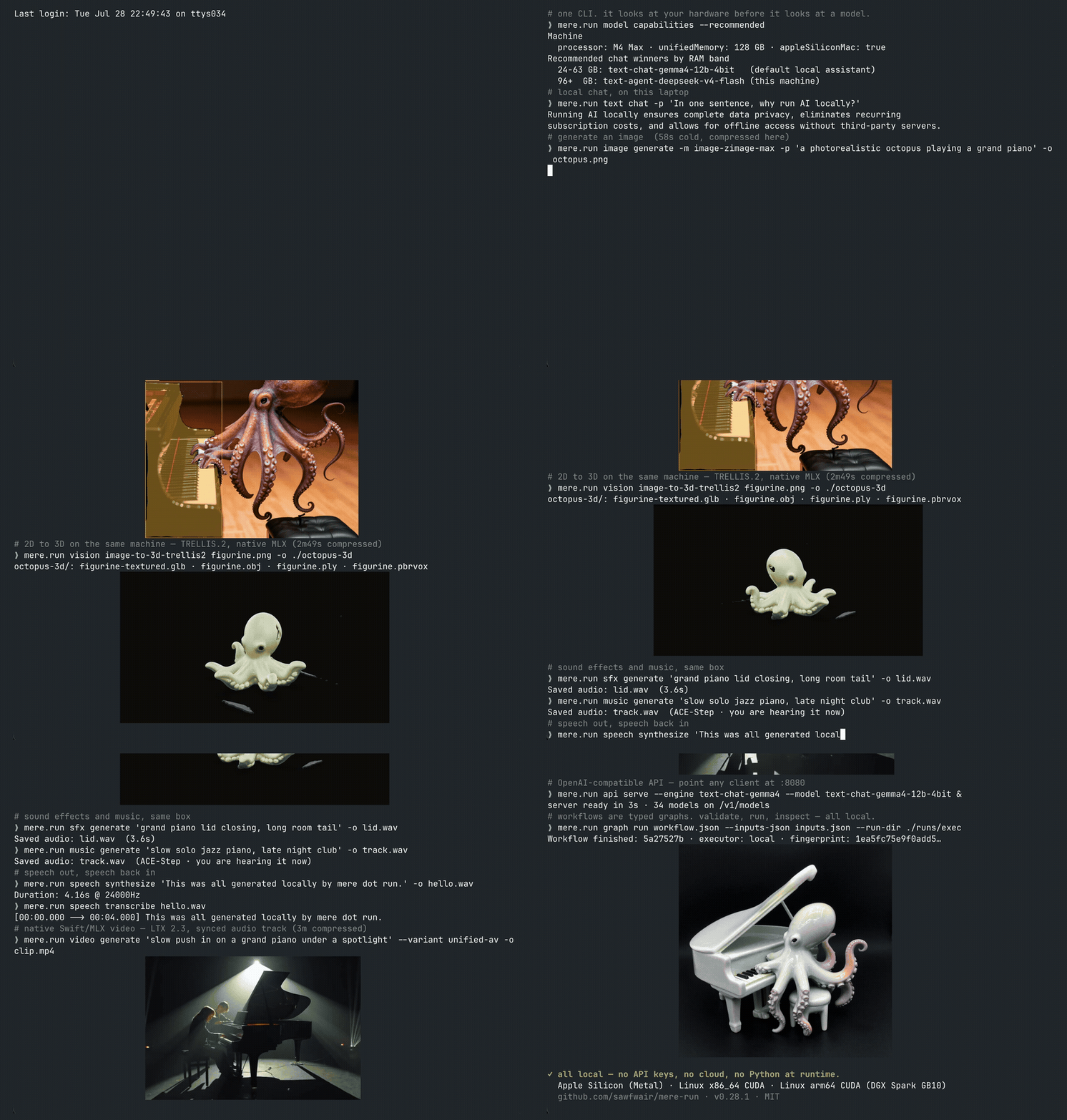
The demonstration shows a local terminal session on an M4 Max. The workflows include chat, image generation, grounding, 3D reconstruction, sound, speech, video, API serving, and a workflow graph.
Install the CLI before running the examples. To choose a guided agent setup or a manual setup path, run:
mere.run setup
Before downloading models, check your installed version, the machine's model recommendations, and the offline guides:
mere.run --version
mere.run model capabilities --recommended
mere.run guide --list
For every public command and subcommand, see the
complete command reference. Repository tests check
its generated tree against the CLI. For flags in your installed version,
run mere.run COMMAND --help. Replace COMMAND with a command path, such as
image generate.
To generate your first image:
Review the model download plan:
mere.run model pull image-zimage-nano --preflight --json
Download the model:
mere.run model pull image-zimage-nano
Generate mug.png in your working directory:
mere.run image generate \
  --model image-zimage-nano \
  --prompt "a ceramic mug in soft morning light" \
  --output ./mug.png
Model sizes, memory requirements, and licenses vary. Before downloading a
model, review its catalog entry and run a pull
preflight. After installation, mere.run model info MODEL_ID reports the
model's manifest and validation status. Replace MODEL_ID with its catalog ID.
Local inference doesn't require a hosted inference service after the models
are installed.
Use the following table to choose a workflow. Each guide lists model IDs, prerequisites, examples, and limits. Available inputs and controls depend on the selected model.
Some workflows use low-rank adaptation (LoRA) to train small adapters instead of updating all model weights.
| Area | Commands | Capabilities |
|---|---|---|
| Text, code, and agents | text chat, text code, text embed, text anonymize, text decide, agent | Chat, code generation, tool calls, structured responses, embeddings, personal information redaction, Laya decisions, D1 multimodal decisions, and Clef decisions, including native Omni decisions over mixed text, image, audio, and video input. Models include Gemma 4, DiffusionGemma, Qwen3.8, LFM2.5, Laguna, Inkling, Nemotron Lightning, Nemotron Bolt, DeepSeek V4 Flash, and Ornith. |
| Multimodal chat | text chat, vision caption, vision inspect, vision embed | Image understanding with Gemma, Qwen, LFM, Bonsai, and Muse Glimmer. Nemotron Nano Omni also supports audio and video understanding. Shared text and image embeddings support retrieval. EmbeddingGemma 2 adds native text, image, audio, and video vectors through text embed. PPLX Embed v2 adds token vectors for text/image retrieval and contextual chunk vectors, with ready-to-load packed 9B variants. |
| Images | image generate | Generation and editing with Klein, ZImage, HiDream O1, SenseNova U1.5, Krea 2, Qwen Image 2.1 and Turbo, Qwen Image Edit 2511, Ideogram 4, and Bonsai. Controls include ordered references, structured prompts, and LoRA adapters. |
| Video | video generate, video session, video animate, video prepare-masks | Synchronized audio and video with LTX 2.5 and 2.3. MiniMax-H3 supports keyframes and ordered media references. Other workflows include Wan 2.2 generation and SCAIL-2 subject animation with SAM masks. |
| Worlds | video cosmos3, world serve | Cosmos3-Edge generation, visual reasoning, and learned-action dynamics. DreamX and Cosmos3 support persistent world sessions. |
| Music | music generate, music analyze, music realtime, music transcribe, music serve | MiniMax Music 3 songs and composition. Experimental YuE2 songs with ABC scores. ACE-Step generation, covers, and editing. Magenta RT2 realtime MIDI performance and MuScriptor transcription of full mixes into MIDI. |
| Sound effects | sfx generate, sfx video generate, sfx clap, sfx ae | Woosh and MMAudio generation conditioned on text or video. Text and audio similarity scoring, plus audio latent encoding and decoding. |
| Speech | speech synthesize, speech transcribe, speech listen, speech diarize, speech profile | Qwen3 speech synthesis, saved voice profiles, Qwen3, Parakeet, and Whistle transcription, live microphone input, and Sortformer speaker timelines. |
| Audio generation and restoration | audio enhance, music separate, audio generate | AP-BWE speech bandwidth extension and UniverSR audio super-resolution. RoFormer stem separation, reverb removal, and noise removal. LTX 2.5 text-to-audio generation. |
| Vision | vision ground, vision segment, vision track, vision face, vision pose, vision flow, vision ocr | Falcon object grounding, SAM 3.1 masks and tracking, face analysis, body, hand, and face landmarks, and optical flow. LightOnOCR 3 (1B, 0.8B, and 4B), GLM, and Infinity extract text from images; LightOn grounding also returns labeled boxes and chart data. |
| Depth and 3D | vision depth, vision depth-video, vision geometry, vision geometry-multiview, image reconstruct-3d, image reconstruct-3d-trellis2, image reconstruct-3d-multiview | Depth, cameras, point clouds, meshes, and materials for physically based rendering. Models include Marigold V2, Video Depth Anything, MoGe-2, Depth Anything 3, TripoSR, TRELLIS.2, and InstantMesh. |
| Geospatial inference | geo flood, geo fire, geo tessera, geo olmoearth | TerraMind flood and fire class scores, TESSERA v2 Sentinel time-series embeddings, and OlmoEarth v1.2 multisensor spatial embeddings from prepared tensors. |
| Training and adapters | image train-lora, text train-lora, music train-adapter, adapter | Local image-generation, text, image-conditioned VLM, and music adapter training, named recipes, checkpoints, and public adapters verified by checksum. Support varies by model family. |
| Evaluation | eval pack validate, eval run, eval promote, model benchmark, gate | External text-chat and image-conditioned VLM evaluation packs, structured responses, matched model and adapter runs, resumable reports, promotion receipts, benchmarks, and installed-model checks. |
| API serving | api serve, open-webui quickstart, model runtime, status | OpenAI-compatible chat, embeddings, images, and speech, plus native vision routes. Model loading and pinning, idle expiry, memory limits, and runtime telemetry. |
| Portable workflows | graph, executor, relay, run | Typed graphs and immutable job bundles for local, SSH, or relay execution. Resumable runs, progress events, verified artifact downloads, cancellation, and retry. |
Geospatial commands accept prepared tensors. Your workflow remains responsible for raster acquisition, reprojection, tiling, georeferencing, and evidence review. Some checkpoints require the documented conversion step before native inference. Predictions remain candidates for review.
The vision track-live command records a camera clip before tracking it. It
doesn't run live frame-by-frame inference. Evaluation pack validation and
promotion receipts verify the declared pack and report checks. They don't
establish general model quality or operational approval.
For generated examples, see the showcase. Runtime support doesn't grant permission to use or redistribute a checkpoint. Review the model sources and licenses for those terms.
These examples use the installed CLI. From a source checkout, replace
mere.run with swift run mere.run. Supply your own input files, such as
reference.png. Model pulls download weights, and generation commands write
the named outputs.
To download the Gemma model and stream a response:
Install the model:
mere.run model pull text-chat-gemma4-12b-4bit
Send a prompt:
mere.run text chat \
  --model text-chat-gemma4-12b-4bit \
  --stream \
  --prompt "Explain unified memory for local inference."
The response appears in the terminal. To connect an agent, run
mere.run agent onboard. For Pi installation, other agent clients, and tool
permissions, see the agent guide.
Place an input image named reference.png in your working directory, then
follow these steps:
Install the model:
mere.run model pull image-sensenova-u1-5-8b-mot
Generate an edited image named sensenova-edit.png:
mere.run image generate \
  --model image-sensenova-u1-5-8b-mot \
  --input ./reference.png \
  --prompt "Turn this reference into a cinematic rainy-night scene" \
  --output ./sensenova-edit.png
For multiple references, structured prompts, Krea and Klein LoRA training, and 3D reconstruction, see the image guide.
This workflow uses a chat model to plan the song and a music model to generate the audio. First, install Gemma as described in Chat locally. Review the music model's terms and memory requirements before downloading it.
Install MiniMax Music 3 after accepting its terms:
mere.run model pull music-minimax-music3 --accept-license-terms
Compose and generate song.wav:
mere.run music generate \
  "slow-burn dream pop about leaving a familiar city and finding home" \
  --model music-minimax-music3 \
  --compose \
  --composer-model text-chat-gemma4-12b-4bit \
  --require-composer-installed \
  --duration 180 \
  --lyrics-preflight strict \
  --performance-mode q8-lm \
  --sampling-tier fast \
  --output ./song.wav
The command also saves composition metadata. The
--require-composer-installed option prevents an implicit composer download,
and --lyrics-preflight strict enables strict lyric-duration checks.
The q8-lm mode quantizes the global language model while retaining the
residual-depth decoder in BF16.
For supplied lyrics, ACE-Step covers, stem separation, MIDI transcription, and realtime performance, see the music guide.
Review the LTX model's terms and memory requirements before downloading it. Then follow these steps:
Install the complete distilled bundle after accepting its terms:
mere.run model pull video-ltx25-distilled-bf16 --accept-license-terms
Generate an MP4 file with video and audio:
mere.run video generate \
  "a small red robot walks across a wooden table, tiny mechanical footsteps" \
  --model video-ltx25-distilled-bf16 \
  --quality final \
  --output-mode audio-video \
  --fps 24 \
  --output ./robot.mp4
The bundle uses BF16 weights for the video pipeline and a Q4 text encoder. For the checksum-pinned MiniMax-H3 LightX2V 8-step workflow, MiniMax-H3 references, long-form generation, the full LTX pipeline, source audio, and SCAIL subject animation, see the video guide.
Install Gemma as described in Chat locally before starting the server. The following procedure uses a loopback address, which accepts connections from the serving machine:
Inspect the serving plan without starting the server:
mere.run api serve \
  --engine text-chat-gemma4 \
  --model text-chat-gemma4-12b-4bit \
  --preflight --json
Start the server:
mere.run api serve \
  --engine text-chat-gemma4 \
  --model text-chat-gemma4-12b-4bit
In another terminal, send a chat request:
curl http://127.0.0.1:8080/v1/chat/completions \
  -H 'Content-Type: application/json' \
  --data '{
    "model": "text-chat-gemma4-12b-4bit",
    "messages": [{
      "role": "user",
      "content": "Explain local inference in one sentence."
    }]
  }'
The server returns a JSON response containing the model's answer. To stop the server, press Control+C in its terminal.
When their models are installed, the server also exposes embeddings, image
generation and editing, speech, and native vision routes. The /v1/models
endpoint reports capabilities, tool support, input modalities, and active
limits. For authentication, model residency, and batching, see the
API guide. For a chat interface, see the
Open WebUI setup guide.
Choose an interface based on where you want to create and run work:
| Surface | Execution location | Main functions |
|---|---|---|
| macOS Studio | The local CLI or configured executors | Media creation, training, a local artifact library, run inspection, model management, API serving, and agents. Command previews and logs remain available. |
| iOS Studio | A paired machine, a relay fleet, or selected iPhones | Job submission, progress monitoring, verified artifact downloads, Live Activities, and experimental local image and chat inference. |
| Graph Studio | A configured executor | Visual authoring for portable workflows. |
| Relay and executors | Local, SSH, relay fleet, or direct machine | Execution of the same job bundle across supported hosts. Credentials and machine-specific settings stay outside the bundle. |
Local iPhone models depend on device memory. Simulator builds don't establish
physical-device inference or lifecycle behavior. Graph Studio also has separate
runtime and file-format versions: Graph v2 uses schema_version: 1 workflow
files.
The separate Relay and Node project manages fleet hosts. Official plugins add companion workflows and typed graph providers outside the inference process. To inspect an available plugin without installing it, run:
mere.run plugin list
mere.run plugin info mere-vfx-tools
Relay and Node source lives in sawfwair/relay-mere-run. Plugin contracts and
source live in mere-run-plugins.
This repository provides the local runtime and clients, not a hosted inference
backend. Remote execution sends work to the machine or fleet you select.
Local execution keeps the work on your device.
The default macOS model store is
~/Library/Application Support/MereRun/models. To select a different writable
store, set MERERUN_MODELS_DIR or pass --models-root. For example, this command
lists models in a store on an external volume:
mere.run --models-root /Volumes/Models/mere-run model list
To register models already organized as MODEL_ROOT/MODEL_ID, add their root
with model location add. This example uses /Volumes/Models as MODEL_ROOT:
mere.run model location add /Volumes/Models
mere.run model location list
The registration adds a read-only search root. Model pulls continue to write to the primary store. An explicit store override doesn't include registered roots.
To inspect disk usage and preview cache cleanup without deleting files, run:
mere.run model storage
mere.run model gc
The model gc command only prints a plan unless you pass --force. The
model remove command reclaims backing files only when no other model link
uses them. Its --keep-cache option retains those files.
Model pulls use a separate Hugging Face snapshot cache. To choose its location,
set MERERUN_HUB_CACHE or pass --cache-dir to model pull. Keep an external
cache volume connected while using models that link to its files.
For resolution order and cache details, see
model management and
configuration.
For agents, scripts, and other clients, inspect the capability metadata and command guides:
mere.run catalog --json
mere.run catalog resolve --json -- video generate "a wave" --model video-ltx25-full-bf16
mere.run guide video generate
mere.run video --help
The catalog declares, for each model-loading command, the runtime families that
run it and which options each family uses. Every command line is checked against
it before anything loads: an option the selected model refuses stops the run
with one message that names the models that take it, and an option the model
accepts but never reads prints a warning that it has no effect. catalog resolve reports that decision, with the family and model the command would run,
without loading anything.
On commands that support preflight, --preflight --json reports a plan before
loading a model or writing output. The --progress-json option provides
structured progress on supported commands. Check the command's help for
available options.
Portable workflows preserve immutable plans, checksums, events, and run
directories. To inspect or retrieve work, use run list, run inspect,
run watch, and run fetch.
For version-specific features, fixes, and qualification results, see the
project changelog. The
GitHub releases page lists the
published macOS and Linux artifacts for each release. To compare an installed
CLI with a release, run mere.run --version.
Choose the installation instructions for your platform. For workflows that
use FFmpeg, make ffmpeg and ffprobe available on PATH.
The MERERUN_FFMPEG and MERERUN_FFPROBE variables accept absolute paths to
those executables.
Use an Apple Silicon Mac with macOS 15 or later:
MereRun.app to the Applications folder.mere.run terminal command.
You can also install the use-mere-run skill there.The app runs its bundled CLI even if you don't install the terminal command. For a terminal-only installation, run the installer after mounting the disk image:
cd /Volumes/mere.run/.mere-run
./install.sh
The installer places the CLI and its runtime assets in /usr/local/bin. It
uses sudo only if the destination requires it. For app integrations, see the
preview and Library import deep links and the
Raycast integration.
Linux packages contain the headless CLI and runtime assets, not macOS Studio. Published Linux CUDA artifacts include x86_64 tarballs and Debian packages. Hosted CPU tests and release-hardware checks don't establish every model's compatibility on every Linux host.
For dependencies, CUDA setup, packaging, and validation limits, see the Linux quickstart.
The package uses Swift tools 6.0 and declares macOS 15 and iOS 18 platforms. For development on Apple Silicon macOS:
Install the validation tools:
brew install swiftlint ripgrep
From the repository root, build the package:
swift build
Run the tests:
swift test
Inspect the CLI:
swift run mere.run --help
To build and open the optional macOS app, run:
app_path="$(./scripts/build_mere_run_app.sh debug)"
open "$app_path"
Before opening a pull request, run ./scripts/check.sh. To add runtime smoke
tests, set MERERUN_RUN_E2E=core or MERERUN_RUN_E2E=installed.
Installed-model checks require the relevant assets and hardware.
To build the documentation, use Node.js 20 or later and the pnpm version
pinned in package.json:
pnpm install --frozen-lockfile
bash ./scripts/check-docs-examples.sh
pnpm docs:build
For contribution requirements and platform-specific work, see contributing, testing, and the iOS build instructions.
The default configuration requires explicit opt-in for higher-risk behavior:
MERERUN_API_KEY or --api-key. Configure authentication and rate limits
before exposing the server. Use the environment variable to keep the key
out of process arguments.--accept-license-terms or its alias --accept-model-license, review the
model's terms. Some models restrict commercial use or particular applications.--allow-external-scorer. Before
authorizing a scorer executable, validate its pack and review the dry-run plan.For the complete policies, see the security policy and the API guide.
These are the main entry points into the implementation, tests, and
documentation. Sources/ holds about thirty library targets in all; the
repository tour names every one of them and the
source layout reference gives each a
purpose.
| Path | Responsibility |
|---|---|
Sources/MereRunCLI | Public mere.run command tree and local API server |
Sources/MereRunCore | Runtime orchestration over the runtime libraries, model resolution, manifests, and training |
Sources/MereRunGemmaModel, Sources/MereRunQwenModel, Sources/MereRunLTXModel, and the other *Model targets | Per-family model computation, over the shared MereRunTensor, MereRunDecode, and MereRunKVCache |
Sources/MereRunModelKit, Sources/MereRunExecution, Sources/MereRunAdmission, Sources/MereRunResidency | Model identity and storage metadata, durable run records, inference admission, and runtime residency |
Sources/AudioCore, Sources/AudioCodecs, Sources/AudioSTT, Sources/AudioTTS, Sources/MediaIO | Audio and media primitives, codecs, speech runtimes, and media input and output |
Sources/MereRunContract | Typed command capability contract shared by the CLI and Studio |
Sources/MereRunEvaluation | External evaluation-pack schemas, hashing, and validation |
Sources/MereRunRelayKit | Portable relay client, executor profiles, workflow contracts, and bundle materialization |
apps/macos, apps/ios | Open-source Apple apps and tests |
Tests, scripts | Tests, quality checks, and packaging tools |
docs | VitePress documentation and runtime guides |
vendor | Bundled runtime artifacts with provenance in third-party notices |
For an introduction to the repository, start with the
documentation hub, repository tour,
or architecture map. For model-specific instructions,
use the offline cookbooks packaged in mere.run guide.
The Python MLX community's reference implementations informed this Swift runtime. These projects shaped model loading, inference, media generation, and command design:
For attribution and license terms for bundled third-party runtime artifacts, see third-party notices.
169 followers · starred Sep 2026
Run local image, text, speech, vision, music, and video workflows, plus model management and a loopback OpenAI-compatible API server. The repo ships the core libraries and the mere.run executable.
See the code
mere.run · Documentation · Command reference · Downloads · Relay and nodes · Plugins
mere.run is a local AI runtime for developers and creators. Use its command-line interface (CLI) to generate media, run language models, and analyze images or geospatial data. You can also train adapters, evaluate models, serve an OpenAI-compatible API, and run portable workflow graphs.
Apple Silicon macOS is the primary platform. Headless Linux CUDA packages are also available. The macOS Studio app uses the same CLI, model store, and run history. The iOS client connects to your machines and offers experimental image and chat inference on supported iPhones.
The demonstration shows a local terminal session on an M4 Max. The workflows include chat, image generation, grounding, 3D reconstruction, sound, speech, video, API serving, and a workflow graph.
Install the CLI before running the examples. To choose a guided agent setup or a manual setup path, run:
mere.run setup
Before downloading models, check your installed version, the machine's model recommendations, and the offline guides:
mere.run --version
mere.run model capabilities --recommended
mere.run guide --list
For every public command and subcommand, see the
complete command reference. Repository tests check
its generated tree against the CLI. For flags in your installed version,
run mere.run COMMAND --help. Replace COMMAND with a command path, such as
image generate.
To generate your first image:
Review the model download plan:
mere.run model pull image-zimage-nano --preflight --json
Download the model:
mere.run model pull image-zimage-nano
Generate mug.png in your working directory:
mere.run image generate \
  --model image-zimage-nano \
  --prompt "a ceramic mug in soft morning light" \
  --output ./mug.png
Model sizes, memory requirements, and licenses vary. Before downloading a
model, review its catalog entry and run a pull
preflight. After installation, mere.run model info MODEL_ID reports the
model's manifest and validation status. Replace MODEL_ID with its catalog ID.
Local inference doesn't require a hosted inference service after the models
are installed.
Use the following table to choose a workflow. Each guide lists model IDs, prerequisites, examples, and limits. Available inputs and controls depend on the selected model.
Some workflows use low-rank adaptation (LoRA) to train small adapters instead of updating all model weights.
| Area | Commands | Capabilities |
|---|---|---|
| Text, code, and agents | text chat, text code, text embed, text anonymize, text decide, agent | Chat, code generation, tool calls, structured responses, embeddings, personal information redaction, Laya decisions, D1 multimodal decisions, and Clef decisions, including native Omni decisions over mixed text, image, audio, and video input. Models include Gemma 4, DiffusionGemma, Qwen3.8, LFM2.5, Laguna, Inkling, Nemotron Lightning, Nemotron Bolt, DeepSeek V4 Flash, and Ornith. |
| Multimodal chat | text chat, vision caption, vision inspect, vision embed | Image understanding with Gemma, Qwen, LFM, Bonsai, and Muse Glimmer. Nemotron Nano Omni also supports audio and video understanding. Shared text and image embeddings support retrieval. EmbeddingGemma 2 adds native text, image, audio, and video vectors through text embed. PPLX Embed v2 adds token vectors for text/image retrieval and contextual chunk vectors, with ready-to-load packed 9B variants. |
| Images | image generate | Generation and editing with Klein, ZImage, HiDream O1, SenseNova U1.5, Krea 2, Qwen Image 2.1 and Turbo, Qwen Image Edit 2511, Ideogram 4, and Bonsai. Controls include ordered references, structured prompts, and LoRA adapters. |
| Video | video generate, video session, video animate, video prepare-masks | Synchronized audio and video with LTX 2.5 and 2.3. MiniMax-H3 supports keyframes and ordered media references. Other workflows include Wan 2.2 generation and SCAIL-2 subject animation with SAM masks. |
| Worlds | video cosmos3, world serve | Cosmos3-Edge generation, visual reasoning, and learned-action dynamics. DreamX and Cosmos3 support persistent world sessions. |
| Music | music generate, music analyze, music realtime, music transcribe, music serve | MiniMax Music 3 songs and composition. Experimental YuE2 songs with ABC scores. ACE-Step generation, covers, and editing. Magenta RT2 realtime MIDI performance and MuScriptor transcription of full mixes into MIDI. |
| Sound effects | sfx generate, sfx video generate, sfx clap, sfx ae | Woosh and MMAudio generation conditioned on text or video. Text and audio similarity scoring, plus audio latent encoding and decoding. |
| Speech | speech synthesize, speech transcribe, speech listen, speech diarize, speech profile | Qwen3 speech synthesis, saved voice profiles, Qwen3, Parakeet, and Whistle transcription, live microphone input, and Sortformer speaker timelines. |
| Audio generation and restoration | audio enhance, music separate, audio generate | AP-BWE speech bandwidth extension and UniverSR audio super-resolution. RoFormer stem separation, reverb removal, and noise removal. LTX 2.5 text-to-audio generation. |
| Vision | vision ground, vision segment, vision track, vision face, vision pose, vision flow, vision ocr | Falcon object grounding, SAM 3.1 masks and tracking, face analysis, body, hand, and face landmarks, and optical flow. LightOnOCR 3 (1B, 0.8B, and 4B), GLM, and Infinity extract text from images; LightOn grounding also returns labeled boxes and chart data. |
| Depth and 3D | vision depth, vision depth-video, vision geometry, vision geometry-multiview, image reconstruct-3d, image reconstruct-3d-trellis2, image reconstruct-3d-multiview | Depth, cameras, point clouds, meshes, and materials for physically based rendering. Models include Marigold V2, Video Depth Anything, MoGe-2, Depth Anything 3, TripoSR, TRELLIS.2, and InstantMesh. |
| Geospatial inference | geo flood, geo fire, geo tessera, geo olmoearth | TerraMind flood and fire class scores, TESSERA v2 Sentinel time-series embeddings, and OlmoEarth v1.2 multisensor spatial embeddings from prepared tensors. |
| Training and adapters | image train-lora, text train-lora, music train-adapter, adapter | Local image-generation, text, image-conditioned VLM, and music adapter training, named recipes, checkpoints, and public adapters verified by checksum. Support varies by model family. |
| Evaluation | eval pack validate, eval run, eval promote, model benchmark, gate | External text-chat and image-conditioned VLM evaluation packs, structured responses, matched model and adapter runs, resumable reports, promotion receipts, benchmarks, and installed-model checks. |
| API serving | api serve, open-webui quickstart, model runtime, status | OpenAI-compatible chat, embeddings, images, and speech, plus native vision routes. Model loading and pinning, idle expiry, memory limits, and runtime telemetry. |
| Portable workflows | graph, executor, relay, run | Typed graphs and immutable job bundles for local, SSH, or relay execution. Resumable runs, progress events, verified artifact downloads, cancellation, and retry. |
Geospatial commands accept prepared tensors. Your workflow remains responsible for raster acquisition, reprojection, tiling, georeferencing, and evidence review. Some checkpoints require the documented conversion step before native inference. Predictions remain candidates for review.
The vision track-live command records a camera clip before tracking it. It
doesn't run live frame-by-frame inference. Evaluation pack validation and
promotion receipts verify the declared pack and report checks. They don't
establish general model quality or operational approval.
For generated examples, see the showcase. Runtime support doesn't grant permission to use or redistribute a checkpoint. Review the model sources and licenses for those terms.
These examples use the installed CLI. From a source checkout, replace
mere.run with swift run mere.run. Supply your own input files, such as
reference.png. Model pulls download weights, and generation commands write
the named outputs.
To download the Gemma model and stream a response:
Install the model:
mere.run model pull text-chat-gemma4-12b-4bit
Send a prompt:
mere.run text chat \
  --model text-chat-gemma4-12b-4bit \
  --stream \
  --prompt "Explain unified memory for local inference."
The response appears in the terminal. To connect an agent, run
mere.run agent onboard. For Pi installation, other agent clients, and tool
permissions, see the agent guide.
Place an input image named reference.png in your working directory, then
follow these steps:
Install the model:
mere.run model pull image-sensenova-u1-5-8b-mot
Generate an edited image named sensenova-edit.png:
mere.run image generate \
  --model image-sensenova-u1-5-8b-mot \
  --input ./reference.png \
  --prompt "Turn this reference into a cinematic rainy-night scene" \
  --output ./sensenova-edit.png
For multiple references, structured prompts, Krea and Klein LoRA training, and 3D reconstruction, see the image guide.
This workflow uses a chat model to plan the song and a music model to generate the audio. First, install Gemma as described in Chat locally. Review the music model's terms and memory requirements before downloading it.
Install MiniMax Music 3 after accepting its terms:
mere.run model pull music-minimax-music3 --accept-license-terms
Compose and generate song.wav:
mere.run music generate \
  "slow-burn dream pop about leaving a familiar city and finding home" \
  --model music-minimax-music3 \
  --compose \
  --composer-model text-chat-gemma4-12b-4bit \
  --require-composer-installed \
  --duration 180 \
  --lyrics-preflight strict \
  --performance-mode q8-lm \
  --sampling-tier fast \
  --output ./song.wav
The command also saves composition metadata. The
--require-composer-installed option prevents an implicit composer download,
and --lyrics-preflight strict enables strict lyric-duration checks.
The q8-lm mode quantizes the global language model while retaining the
residual-depth decoder in BF16.
For supplied lyrics, ACE-Step covers, stem separation, MIDI transcription, and realtime performance, see the music guide.
Review the LTX model's terms and memory requirements before downloading it. Then follow these steps:
Install the complete distilled bundle after accepting its terms:
mere.run model pull video-ltx25-distilled-bf16 --accept-license-terms
Generate an MP4 file with video and audio:
mere.run video generate \
  "a small red robot walks across a wooden table, tiny mechanical footsteps" \
  --model video-ltx25-distilled-bf16 \
  --quality final \
  --output-mode audio-video \
  --fps 24 \
  --output ./robot.mp4
The bundle uses BF16 weights for the video pipeline and a Q4 text encoder. For the checksum-pinned MiniMax-H3 LightX2V 8-step workflow, MiniMax-H3 references, long-form generation, the full LTX pipeline, source audio, and SCAIL subject animation, see the video guide.
Install Gemma as described in Chat locally before starting the server. The following procedure uses a loopback address, which accepts connections from the serving machine:
Inspect the serving plan without starting the server:
mere.run api serve \
  --engine text-chat-gemma4 \
  --model text-chat-gemma4-12b-4bit \
  --preflight --json
Start the server:
mere.run api serve \
  --engine text-chat-gemma4 \
  --model text-chat-gemma4-12b-4bit
In another terminal, send a chat request:
curl http://127.0.0.1:8080/v1/chat/completions \
  -H 'Content-Type: application/json' \
  --data '{
    "model": "text-chat-gemma4-12b-4bit",
    "messages": [{
      "role": "user",
      "content": "Explain local inference in one sentence."
    }]
  }'
The server returns a JSON response containing the model's answer. To stop the server, press Control+C in its terminal.
When their models are installed, the server also exposes embeddings, image
generation and editing, speech, and native vision routes. The /v1/models
endpoint reports capabilities, tool support, input modalities, and active
limits. For authentication, model residency, and batching, see the
API guide. For a chat interface, see the
Open WebUI setup guide.
Choose an interface based on where you want to create and run work:
| Surface | Execution location | Main functions |
|---|---|---|
| macOS Studio | The local CLI or configured executors | Media creation, training, a local artifact library, run inspection, model management, API serving, and agents. Command previews and logs remain available. |
| iOS Studio | A paired machine, a relay fleet, or selected iPhones | Job submission, progress monitoring, verified artifact downloads, Live Activities, and experimental local image and chat inference. |
| Graph Studio | A configured executor | Visual authoring for portable workflows. |
| Relay and executors | Local, SSH, relay fleet, or direct machine | Execution of the same job bundle across supported hosts. Credentials and machine-specific settings stay outside the bundle. |
Local iPhone models depend on device memory. Simulator builds don't establish
physical-device inference or lifecycle behavior. Graph Studio also has separate
runtime and file-format versions: Graph v2 uses schema_version: 1 workflow
files.
The separate Relay and Node project manages fleet hosts. Official plugins add companion workflows and typed graph providers outside the inference process. To inspect an available plugin without installing it, run:
mere.run plugin list
mere.run plugin info mere-vfx-tools
Relay and Node source lives in sawfwair/relay-mere-run. Plugin contracts and
source live in mere-run-plugins.
This repository provides the local runtime and clients, not a hosted inference
backend. Remote execution sends work to the machine or fleet you select.
Local execution keeps the work on your device.
The default macOS model store is
~/Library/Application Support/MereRun/models. To select a different writable
store, set MERERUN_MODELS_DIR or pass --models-root. For example, this command
lists models in a store on an external volume:
mere.run --models-root /Volumes/Models/mere-run model list
To register models already organized as MODEL_ROOT/MODEL_ID, add their root
with model location add. This example uses /Volumes/Models as MODEL_ROOT:
mere.run model location add /Volumes/Models
mere.run model location list
The registration adds a read-only search root. Model pulls continue to write to the primary store. An explicit store override doesn't include registered roots.
To inspect disk usage and preview cache cleanup without deleting files, run:
mere.run model storage
mere.run model gc
The model gc command only prints a plan unless you pass --force. The
model remove command reclaims backing files only when no other model link
uses them. Its --keep-cache option retains those files.
Model pulls use a separate Hugging Face snapshot cache. To choose its location,
set MERERUN_HUB_CACHE or pass --cache-dir to model pull. Keep an external
cache volume connected while using models that link to its files.
For resolution order and cache details, see
model management and
configuration.
For agents, scripts, and other clients, inspect the capability metadata and command guides:
mere.run catalog --json
mere.run catalog resolve --json -- video generate "a wave" --model video-ltx25-full-bf16
mere.run guide video generate
mere.run video --help
The catalog declares, for each model-loading command, the runtime families that
run it and which options each family uses. Every command line is checked against
it before anything loads: an option the selected model refuses stops the run
with one message that names the models that take it, and an option the model
accepts but never reads prints a warning that it has no effect. catalog resolve reports that decision, with the family and model the command would run,
without loading anything.
On commands that support preflight, --preflight --json reports a plan before
loading a model or writing output. The --progress-json option provides
structured progress on supported commands. Check the command's help for
available options.
Portable workflows preserve immutable plans, checksums, events, and run
directories. To inspect or retrieve work, use run list, run inspect,
run watch, and run fetch.
For version-specific features, fixes, and qualification results, see the
project changelog. The
GitHub releases page lists the
published macOS and Linux artifacts for each release. To compare an installed
CLI with a release, run mere.run --version.
Choose the installation instructions for your platform. For workflows that
use FFmpeg, make ffmpeg and ffprobe available on PATH.
The MERERUN_FFMPEG and MERERUN_FFPROBE variables accept absolute paths to
those executables.
Use an Apple Silicon Mac with macOS 15 or later:
MereRun.app to the Applications folder.mere.run terminal command.
You can also install the use-mere-run skill there.The app runs its bundled CLI even if you don't install the terminal command. For a terminal-only installation, run the installer after mounting the disk image:
cd /Volumes/mere.run/.mere-run
./install.sh
The installer places the CLI and its runtime assets in /usr/local/bin. It
uses sudo only if the destination requires it. For app integrations, see the
preview and Library import deep links and the
Raycast integration.
Linux packages contain the headless CLI and runtime assets, not macOS Studio. Published Linux CUDA artifacts include x86_64 tarballs and Debian packages. Hosted CPU tests and release-hardware checks don't establish every model's compatibility on every Linux host.
For dependencies, CUDA setup, packaging, and validation limits, see the Linux quickstart.
The package uses Swift tools 6.0 and declares macOS 15 and iOS 18 platforms. For development on Apple Silicon macOS:
Install the validation tools:
brew install swiftlint ripgrep
From the repository root, build the package:
swift build
Run the tests:
swift test
Inspect the CLI:
swift run mere.run --help
To build and open the optional macOS app, run:
app_path="$(./scripts/build_mere_run_app.sh debug)"
open "$app_path"
Before opening a pull request, run ./scripts/check.sh. To add runtime smoke
tests, set MERERUN_RUN_E2E=core or MERERUN_RUN_E2E=installed.
Installed-model checks require the relevant assets and hardware.
To build the documentation, use Node.js 20 or later and the pnpm version
pinned in package.json:
pnpm install --frozen-lockfile
bash ./scripts/check-docs-examples.sh
pnpm docs:build
For contribution requirements and platform-specific work, see contributing, testing, and the iOS build instructions.
The default configuration requires explicit opt-in for higher-risk behavior:
MERERUN_API_KEY or --api-key. Configure authentication and rate limits
before exposing the server. Use the environment variable to keep the key
out of process arguments.--accept-license-terms or its alias --accept-model-license, review the
model's terms. Some models restrict commercial use or particular applications.--allow-external-scorer. Before
authorizing a scorer executable, validate its pack and review the dry-run plan.For the complete policies, see the security policy and the API guide.
These are the main entry points into the implementation, tests, and
documentation. Sources/ holds about thirty library targets in all; the
repository tour names every one of them and the
source layout reference gives each a
purpose.
| Path | Responsibility |
|---|---|
Sources/MereRunCLI | Public mere.run command tree and local API server |
Sources/MereRunCore | Runtime orchestration over the runtime libraries, model resolution, manifests, and training |
Sources/MereRunGemmaModel, Sources/MereRunQwenModel, Sources/MereRunLTXModel, and the other *Model targets | Per-family model computation, over the shared MereRunTensor, MereRunDecode, and MereRunKVCache |
Sources/MereRunModelKit, Sources/MereRunExecution, Sources/MereRunAdmission, Sources/MereRunResidency | Model identity and storage metadata, durable run records, inference admission, and runtime residency |
Sources/AudioCore, Sources/AudioCodecs, Sources/AudioSTT, Sources/AudioTTS, Sources/MediaIO | Audio and media primitives, codecs, speech runtimes, and media input and output |
Sources/MereRunContract | Typed command capability contract shared by the CLI and Studio |
Sources/MereRunEvaluation | External evaluation-pack schemas, hashing, and validation |
Sources/MereRunRelayKit | Portable relay client, executor profiles, workflow contracts, and bundle materialization |
apps/macos, apps/ios | Open-source Apple apps and tests |
Tests, scripts | Tests, quality checks, and packaging tools |
docs | VitePress documentation and runtime guides |
vendor | Bundled runtime artifacts with provenance in third-party notices |
For an introduction to the repository, start with the
documentation hub, repository tour,
or architecture map. For model-specific instructions,
use the offline cookbooks packaged in mere.run guide.
The Python MLX community's reference implementations informed this Swift runtime. These projects shaped model loading, inference, media generation, and command design:
For attribution and license terms for bundled third-party runtime artifacts, see third-party notices.
169 followers · starred Sep 2026



