
CLI-native local AI image and video generation for people, scripts, and agents — CUDA on Linux, Metal on macOS, plus desktop, web, iPhone, REST/SSE, and MCP.
See the codeREADME
mold



Local AI image and video generation on your own GPU. Mold supports NVIDIA CUDA and Apple Silicon Metal, with a CLI, native desktop app, web studio, mobile companions, Discord bot, and REST/SSE API built on the same engine.
Documentation · Models · Desktop guide · API
Install
Stable release:
curl -fsSL https://raw.githubusercontent.com/utensils/mold/main/install.sh | sh
Nightly CLI from the latest published main build:
curl -fsSL https://raw.githubusercontent.com/utensils/mold/main/install.sh | MOLD_CHANNEL=nightly sh
The installer selects a compatible build and verifies its checksum. See the installation guide for Nix, Arch, Windows, Android, and source builds. GH200, GB200, and GB300 require future linux/arm64 artifacts and are unsupported.
Mold no longer publishes new versions to crates.io. Existing registry versions are historical; use GitHub releases, Nix, Docker, AUR, or a source build for current versions.
Quick start
# Generate with the default model
mold run "a cat riding a motorcycle through neon-lit streets"

# Choose a model and reproducible seed
mold run flux-dev:q4 "a sunset over mountains" --seed 42

# Edit an image
mold run qwen-image-edit-2511:q4 "make the chair red" --image chair.png

# Edit from reference images (repeat --reference; order is semantic)
mold run flux2-klein:bf16 "the woman from image 1 wearing the glasses from image 2" \
  --reference person.jpg --reference glasses.jpg

# Generate video
mold run ltx-video-0.9.6-distilled:bf16 "a fox in the snow" --frames 25

# Turn a photo into a 3D mesh
mold run hunyuan3d-mini-turbo --image chair.png -o chair.glb
mold run hunyuan3d-2mv-turbo --front chair-front.png --left chair-left.png --back chair-back.png -o chair.glb

# Upscale a Library video as a durable framewise job
mold video-upscale create clip.mp4 --wait

# Launch the web studio and API
mold serve
Models download automatically on first use. Generated media is saved locally
with prompt, model, seed, and generation metadata.
Framewise video upscale also needs the host codec bridge: Nix packages and
CUDA containers include it, while raw binary installs must provide ffmpeg
and ffprobe on PATH before the server advertises that feature.
What it supports
- Models: FLUX.1, Flux.2, Stable Diffusion, Z-Image, Qwen-Image, Wuerstchen, LTX Video, Wan, MiniMax H3, and Hunyuan3D. See the model catalog for variants and hardware requirements. Wan's 1.3B BF16 and 5B Q8/FP16 paths are performance-qualified on Apple Metal as well as CUDA; fp8-scaled Wan checkpoints remain CUDA-only. MiniMax H3 forced-local execution accepts one FL2VA request; batches, sequences, and Ref2VA reference uploads require the server route.
- Images: text-to-image, image editing, inpainting, ControlNet, LoRA, identity photos, reference-image prompting, prompt expansion, and upscaling.
- Video and audio: text/image-to-video, sequences, clip continuation, lip dub, text-to-audio, and MP4 output with generated audio.
- 3D: single-image and named multiview-to-mesh with Hunyuan3D 2.0 and 2.1,
automatic background removal, optional highlight and lighting removal, and
Hunyuan3D Paint PBR materials in CUDA builds. Shape transformers can be
locally derived as qualified FP8/GGUF tiers with
mold quantize, which registers the derived tier on the host that made it. Results are published to the Library as binary glTF with a rendered poster tile, exportable as OBJ, an OBJ+PBR ZIP, STL, or PLY, or shared as a turntable GIF, APNG, or WebP. The web and desktop 3-D Studio also runs durable text-to-3D, supplied-mesh texturing, and Hunyuan3D 2.1 mesh-rebuild workflows through the shape VAE: each stage survives app or server restarts and can be resumed from its checkpoint. Its machine picker routes model discovery, workflow history, submission, progress, and results to one explicit connected host, including that host's API key. Painted prints expose their base-color, metallic-roughness, and normal maps as independent, digest-checked Library downloads on web, desktop, and mobile. - Multiple machines: connect local, LAN, Tailscale, and RunPod hosts, then route work and browse one combined Library.
- Organization: title, favorite, tag, collect, restore, and manage prints across the desktop and web apps.
Model weights keep their own licenses. See each model page for terms and current platform support.
Mold Studio
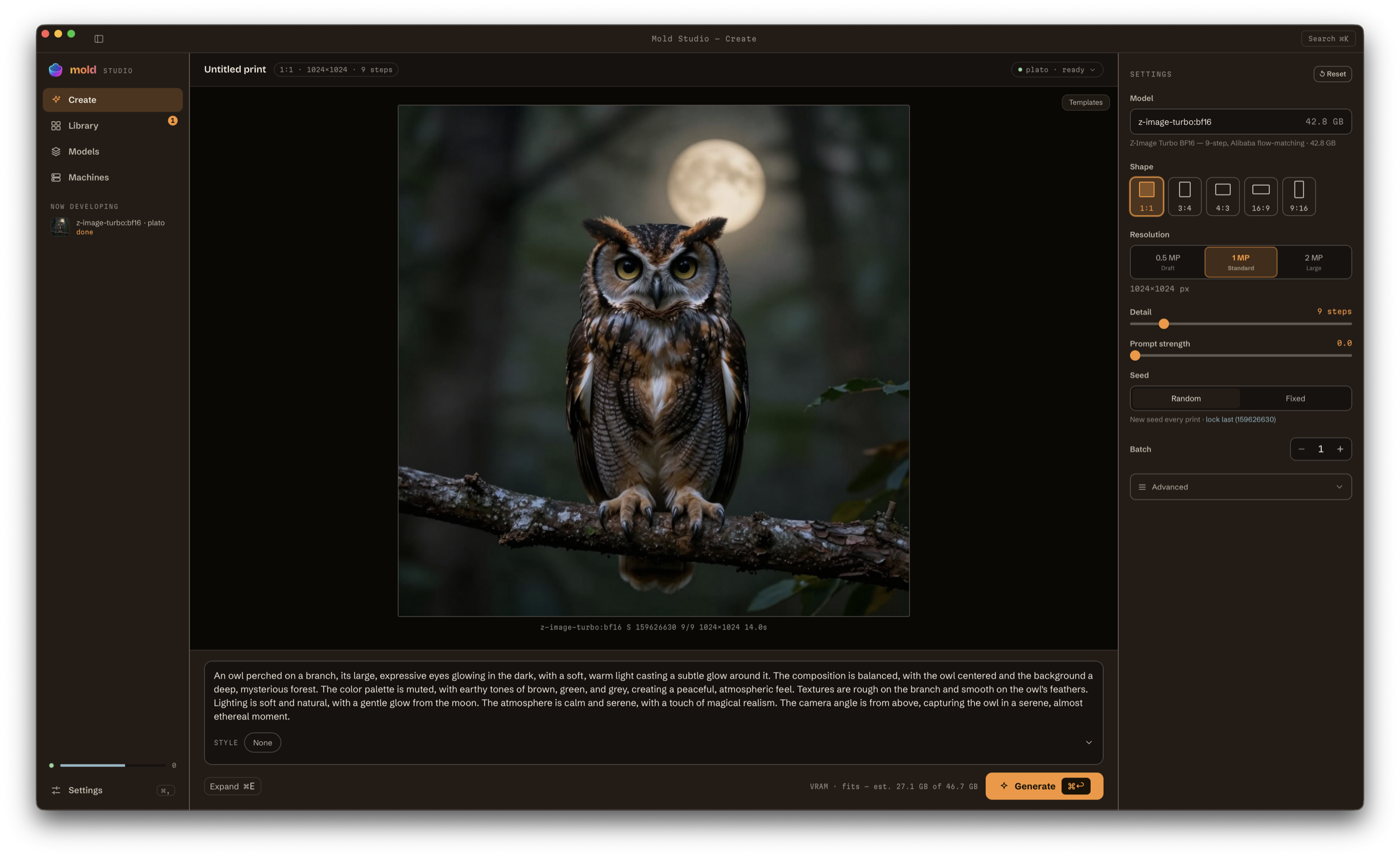
The desktop app puts New image, Queue, My images, Styles, Machines, and Settings in one window, in plain words, with six themes, for local and remote generation. It also pairs with the iPhone and Android companions.
Download Mold for macOS (Apple Silicon) · Explore the desktop app
Download Mold for Windows (x86_64)
— a self-signed NSIS installer. The published build is CPU / remote-hosts
only; see the desktop guide for the
CUDA recipe. Verify and explicitly trust the release's
mold-windows-self-signing.cert.cer before installing; the certificate is not
publicly trusted and does not suppress SmartScreen on its own.
Linux desktop builds are source/CI distributions for now — nix build .#mold-desktop or the devshell's desktop-build CUDA AppImage. See the
desktop guide.
Android uses the same remote-only Mold Studio mobile interface. Download the signed universal nightly APK directly; there is no zip to unpack:
Download nightly Android APK · Android installation guide
More ways to create
Preview generations directly in supported terminals:
mold run "a cat" --preview
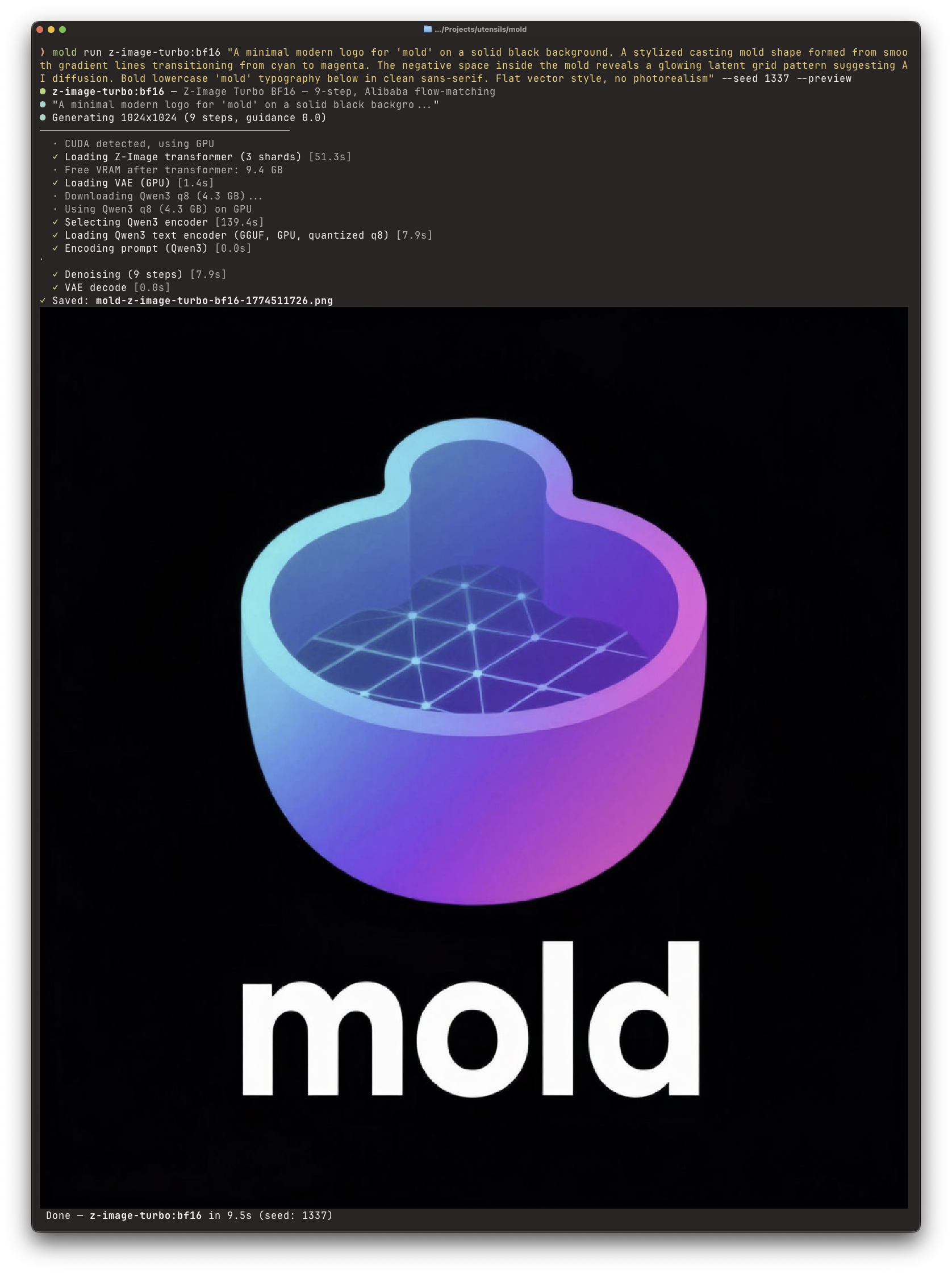
Inline image generation in Ghostty with --preview
Run the engine where the GPU lives and connect from another machine:
mold serve                                      # GPU machine
MOLD_HOST=http://gpu-server:7680 mold run "a cat"  # laptop
--offload also applies to remote renders and durable sequences on GPU hosts.
Add --no-save to keep one render out of a server's Library; the host still
publishes the print and moves it straight to trash, so mold trash restore
gets it back until retention sweeps it. It applies to renders a server
performs — a local render has no Library, and refuses the flag rather than
ignoring it.
Pass --fit beside --image when the source and the canvas disagree. Without
it the picture decides the canvas; with it the canvas is what you asked for and
the picture is resampled onto it — crop-fill trims the edges, pad-fit adds
black borders, lanczos-resize stretches.
mold run flux-dev:q4 "a lighthouse at dusk" --image wide.png --fit crop-fill --width 1024 --height 1024
A sequence of several clips is scripted, not composed in an app:
mold chain validate shot.toml
mold run --script shot.toml --output walk.mp4
mold jobs list
A 3-D render can be one shot or a durable workflow. A workflow keeps every stage — the picture it starts from, its matted and delighted copies, the shape, the paint — as its own retained artifact, reports each stage as it changes state, and resumes after a restart. It lives on the machine that runs it:
mold mesh-workflow create --prompt "a small ceramic fox" --texture --follow
mold mesh-workflow create --mesh chair.glb --image chair-albedo.png
mold mesh-workflow list
Find weights to install, and watch them arrive:
mold search "anime style" --kind lora
mold pull flux-dev:q4
mold downloads watch
See the remote workflow and
RunPod guides. Use
mold queue to manage remote work and mold library to browse and organize
the host's prints, including mold library source-media to recover the
conditioning image a print was made from and mold trash delete to remove one
permanently. To install Mold's Agent Skill for supported coding agents,
run:
mold skill install --detected
The installed bundle uses each agent's native metadata and discovery contract,
with a concise router, safety guidance, tested examples, and the prompting
corpus: a shared guide, one complete base guide per manifest family (prompt
style, syntax, generation context, examples, pitfalls, and that family's CLI
examples), task leaves for the distinct H3, Wan, and LTX-2 grammars, and model
leaves for checkpoints with quirks of their own. The corpus in
crates/mold-core/src/prompting/ is also what mold expand, mold remix,
--expand, the app Expand and Remix actions, and the MCP expand_prompt /
remix_prompt tools hand to the LLM, together with the exact model, canvas,
frame count, fps, and ordered references, so agents and the expander follow one
set of rules. Hunyuan3D's base guide is the one that tells an agent NOT to
write a prompt.
macOS Metal memory
Use mold system metal-memory status to inspect this Mac, or mold gpu list --json
for a running host. Explicit root-only set <MiB> / reset commands support an
optional boot policy with --persist. See the Metal memory guide
for budget accounting, local-only administration and rollback semantics.
Z-Image's Metal whole-decode path retries with tiles on memory errors and
preserves the eager CPU fallback. CPU/CUDA decode ordering is unchanged; see
the VAE qualification record.
Project
Mold is a Rust workspace built on candle. The documentation covers the CLI, configuration, deployment, and HTTP API.
Core contributors: James Brink and Jeffrey Dilley.
Licensed under the MIT License. Third-party components and model licenses are listed in THIRD_PARTY_NOTICES.md and the model documentation. InsightFace identity weights require separate acceptance and are limited to non-commercial research use.
Model checksums are verified when files are downloaded. Complete installed models queue and switch without full checksum scans, including after restart. To check existing bytes explicitly, run mold info MODEL --verify. Normal loading still checks file sizes and formats; it does not guarantee detection of same-size corruption.
The public website privacy policy describes Google Analytics on the documentation website. Analytics loads automatically without a popup; this integration is not included in Mold apps or servers.
Contributors


Similar repos


Languages
Rust
66.3%
TypeScript
20.3%
Vue
7.8%
Python
2.5%
Shell
1.8%
CLI-native local AI image and video generation for people, scripts, and agents — CUDA on Linux, Metal on macOS, plus desktop, web, iPhone, REST/SSE, and MCP.
See the codeREADME
mold
Local AI image and video generation on your own GPU. Mold supports NVIDIA CUDA and Apple Silicon Metal, with a CLI, native desktop app, web studio, mobile companions, Discord bot, and REST/SSE API built on the same engine.
Documentation · Models · Desktop guide · API
Install
Stable release:
curl -fsSL https://raw.githubusercontent.com/utensils/mold/main/install.sh | sh
Nightly CLI from the latest published main build:
curl -fsSL https://raw.githubusercontent.com/utensils/mold/main/install.sh | MOLD_CHANNEL=nightly sh
The installer selects a compatible build and verifies its checksum. See the installation guide for Nix, Arch, Windows, Android, and source builds. GH200, GB200, and GB300 require future linux/arm64 artifacts and are unsupported.
Mold no longer publishes new versions to crates.io. Existing registry versions are historical; use GitHub releases, Nix, Docker, AUR, or a source build for current versions.
Quick start
# Generate with the default model
mold run "a cat riding a motorcycle through neon-lit streets"

# Choose a model and reproducible seed
mold run flux-dev:q4 "a sunset over mountains" --seed 42

# Edit an image
mold run qwen-image-edit-2511:q4 "make the chair red" --image chair.png

# Edit from reference images (repeat --reference; order is semantic)
mold run flux2-klein:bf16 "the woman from image 1 wearing the glasses from image 2" \
  --reference person.jpg --reference glasses.jpg

# Generate video
mold run ltx-video-0.9.6-distilled:bf16 "a fox in the snow" --frames 25

# Turn a photo into a 3D mesh
mold run hunyuan3d-mini-turbo --image chair.png -o chair.glb
mold run hunyuan3d-2mv-turbo --front chair-front.png --left chair-left.png --back chair-back.png -o chair.glb

# Upscale a Library video as a durable framewise job
mold video-upscale create clip.mp4 --wait

# Launch the web studio and API
mold serve
Models download automatically on first use. Generated media is saved locally
with prompt, model, seed, and generation metadata.
Framewise video upscale also needs the host codec bridge: Nix packages and
CUDA containers include it, while raw binary installs must provide ffmpeg
and ffprobe on PATH before the server advertises that feature.
What it supports
- Models: FLUX.1, Flux.2, Stable Diffusion, Z-Image, Qwen-Image, Wuerstchen, LTX Video, Wan, MiniMax H3, and Hunyuan3D. See the model catalog for variants and hardware requirements. Wan's 1.3B BF16 and 5B Q8/FP16 paths are performance-qualified on Apple Metal as well as CUDA; fp8-scaled Wan checkpoints remain CUDA-only. MiniMax H3 forced-local execution accepts one FL2VA request; batches, sequences, and Ref2VA reference uploads require the server route.
- Images: text-to-image, image editing, inpainting, ControlNet, LoRA, identity photos, reference-image prompting, prompt expansion, and upscaling.
- Video and audio: text/image-to-video, sequences, clip continuation, lip dub, text-to-audio, and MP4 output with generated audio.
- 3D: single-image and named multiview-to-mesh with Hunyuan3D 2.0 and 2.1,
automatic background removal, optional highlight and lighting removal, and
Hunyuan3D Paint PBR materials in CUDA builds. Shape transformers can be
locally derived as qualified FP8/GGUF tiers with
mold quantize, which registers the derived tier on the host that made it. Results are published to the Library as binary glTF with a rendered poster tile, exportable as OBJ, an OBJ+PBR ZIP, STL, or PLY, or shared as a turntable GIF, APNG, or WebP. The web and desktop 3-D Studio also runs durable text-to-3D, supplied-mesh texturing, and Hunyuan3D 2.1 mesh-rebuild workflows through the shape VAE: each stage survives app or server restarts and can be resumed from its checkpoint. Its machine picker routes model discovery, workflow history, submission, progress, and results to one explicit connected host, including that host's API key. Painted prints expose their base-color, metallic-roughness, and normal maps as independent, digest-checked Library downloads on web, desktop, and mobile. - Multiple machines: connect local, LAN, Tailscale, and RunPod hosts, then route work and browse one combined Library.
- Organization: title, favorite, tag, collect, restore, and manage prints across the desktop and web apps.
Model weights keep their own licenses. See each model page for terms and current platform support.
Mold Studio
The desktop app puts New image, Queue, My images, Styles, Machines, and Settings in one window, in plain words, with six themes, for local and remote generation. It also pairs with the iPhone and Android companions.
Download Mold for macOS (Apple Silicon) · Explore the desktop app
Download Mold for Windows (x86_64)
— a self-signed NSIS installer. The published build is CPU / remote-hosts
only; see the desktop guide for the
CUDA recipe. Verify and explicitly trust the release's
mold-windows-self-signing.cert.cer before installing; the certificate is not
publicly trusted and does not suppress SmartScreen on its own.
Linux desktop builds are source/CI distributions for now — nix build .#mold-desktop or the devshell's desktop-build CUDA AppImage. See the
desktop guide.
Android uses the same remote-only Mold Studio mobile interface. Download the signed universal nightly APK directly; there is no zip to unpack:
Download nightly Android APK · Android installation guide
More ways to create
Preview generations directly in supported terminals:
mold run "a cat" --preview
Inline image generation in Ghostty with --preview
Run the engine where the GPU lives and connect from another machine:
mold serve                                      # GPU machine
MOLD_HOST=http://gpu-server:7680 mold run "a cat"  # laptop
--offload also applies to remote renders and durable sequences on GPU hosts.
Add --no-save to keep one render out of a server's Library; the host still
publishes the print and moves it straight to trash, so mold trash restore
gets it back until retention sweeps it. It applies to renders a server
performs — a local render has no Library, and refuses the flag rather than
ignoring it.
Pass --fit beside --image when the source and the canvas disagree. Without
it the picture decides the canvas; with it the canvas is what you asked for and
the picture is resampled onto it — crop-fill trims the edges, pad-fit adds
black borders, lanczos-resize stretches.
mold run flux-dev:q4 "a lighthouse at dusk" --image wide.png --fit crop-fill --width 1024 --height 1024
A sequence of several clips is scripted, not composed in an app:
mold chain validate shot.toml
mold run --script shot.toml --output walk.mp4
mold jobs list
A 3-D render can be one shot or a durable workflow. A workflow keeps every stage — the picture it starts from, its matted and delighted copies, the shape, the paint — as its own retained artifact, reports each stage as it changes state, and resumes after a restart. It lives on the machine that runs it:
mold mesh-workflow create --prompt "a small ceramic fox" --texture --follow
mold mesh-workflow create --mesh chair.glb --image chair-albedo.png
mold mesh-workflow list
Find weights to install, and watch them arrive:
mold search "anime style" --kind lora
mold pull flux-dev:q4
mold downloads watch
See the remote workflow and
RunPod guides. Use
mold queue to manage remote work and mold library to browse and organize
the host's prints, including mold library source-media to recover the
conditioning image a print was made from and mold trash delete to remove one
permanently. To install Mold's Agent Skill for supported coding agents,
run:
mold skill install --detected
The installed bundle uses each agent's native metadata and discovery contract,
with a concise router, safety guidance, tested examples, and the prompting
corpus: a shared guide, one complete base guide per manifest family (prompt
style, syntax, generation context, examples, pitfalls, and that family's CLI
examples), task leaves for the distinct H3, Wan, and LTX-2 grammars, and model
leaves for checkpoints with quirks of their own. The corpus in
crates/mold-core/src/prompting/ is also what mold expand, mold remix,
--expand, the app Expand and Remix actions, and the MCP expand_prompt /
remix_prompt tools hand to the LLM, together with the exact model, canvas,
frame count, fps, and ordered references, so agents and the expander follow one
set of rules. Hunyuan3D's base guide is the one that tells an agent NOT to
write a prompt.
macOS Metal memory
Use mold system metal-memory status to inspect this Mac, or mold gpu list --json
for a running host. Explicit root-only set <MiB> / reset commands support an
optional boot policy with --persist. See the Metal memory guide
for budget accounting, local-only administration and rollback semantics.
Z-Image's Metal whole-decode path retries with tiles on memory errors and
preserves the eager CPU fallback. CPU/CUDA decode ordering is unchanged; see
the VAE qualification record.
Project
Mold is a Rust workspace built on candle. The documentation covers the CLI, configuration, deployment, and HTTP API.
Core contributors: James Brink and Jeffrey Dilley.
Licensed under the MIT License. Third-party components and model licenses are listed in THIRD_PARTY_NOTICES.md and the model documentation. InsightFace identity weights require separate acceptance and are limited to non-commercial research use.
Model checksums are verified when files are downloaded. Complete installed models queue and switch without full checksum scans, including after restart. To check existing bytes explicitly, run mold info MODEL --verify. Normal loading still checks file sizes and formats; it does not guarantee detection of same-size corruption.
The public website privacy policy describes Google Analytics on the documentation website. Analytics loads automatically without a popup; this integration is not included in Mold apps or servers.
Similar repos
Contributors
Languages
Rust
66.3%
TypeScript
20.3%
Vue
7.8%
Python
2.5%
Shell
1.8%