
Native LLM inference server for Apple Silicon. OpenAI + Anthropic API compatible. No Python. Includes MLX Core macOS app with chat, agent mode, and tool calling.
1,245
stars
451
commits
Zig
primary language
Sep 13, 2026
updated
README
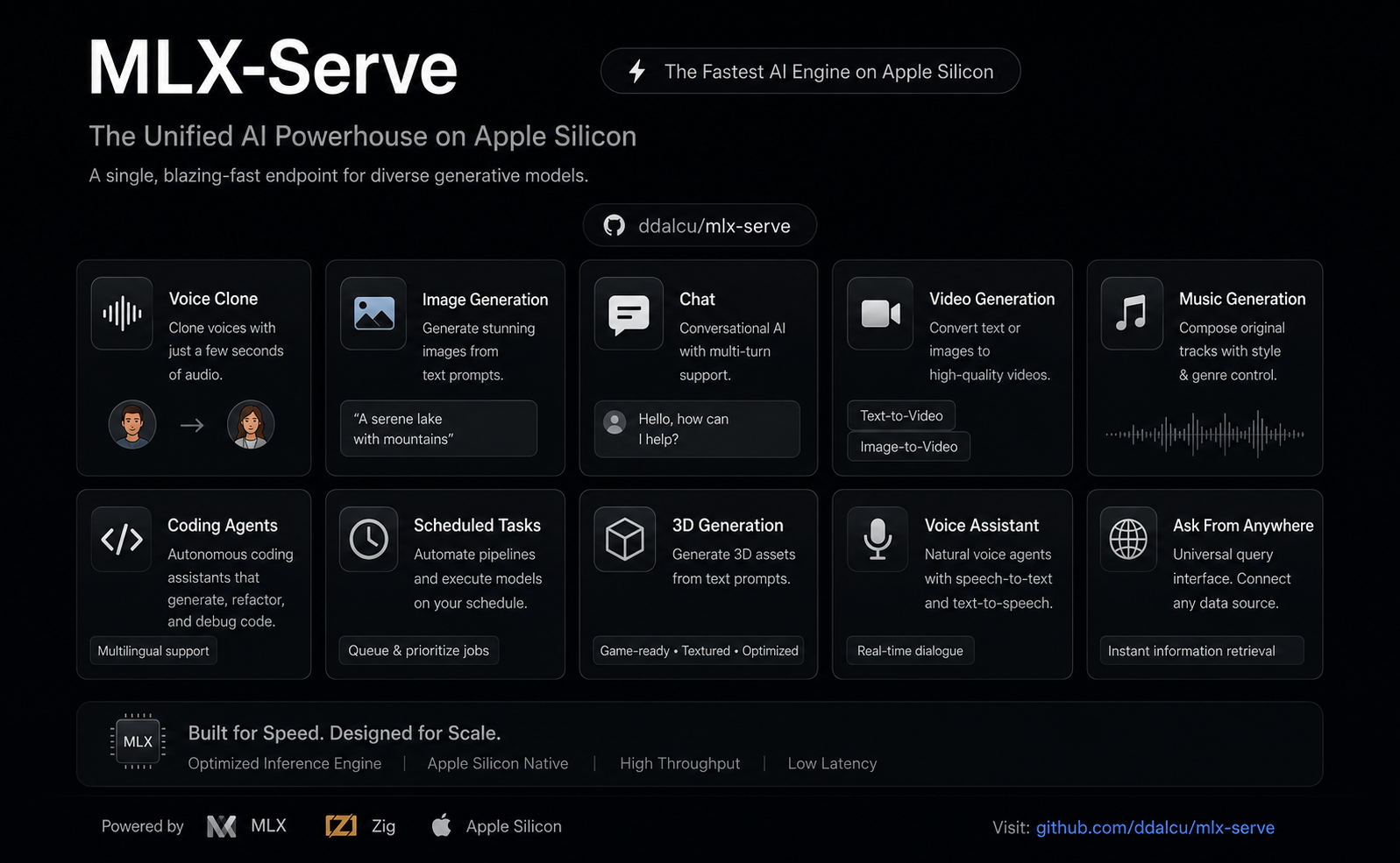
mlx-serve — run any LLM on your Mac
OpenAI- and Anthropic-compatible local inference for Apple Silicon — MLX and GGUF — faster than LM Studio on identical MLX weights. No Python. No cloud. No Electron.







mlxserve.com · Download MLX Core.app · Docs · Changelog
mlx-serve is a native Zig server that runs any LLM on Apple Silicon — MLX-format models and every GGUF on HuggingFace (Qwen, Llama, Mistral, Gemma, DeepSeek V4 Flash, thousands more). It exposes OpenAI-compatible and Anthropic-compatible HTTP APIs out of the box, so the same http://localhost:11234 works with Claude Code, the OpenAI SDK, Continue, Cursor, Open WebUI, and anything else that speaks one of those wires. Beyond text, the same server generates images, video, music, speech (with voice cloning), and 3D models — all natively on MLX. Ships with MLX Core, a macOS menu-bar app with chat, agent mode, MCP tool calling, and model management.
Get started
Needs macOS 26.2+ on Apple Silicon.
Use the app (recommended)
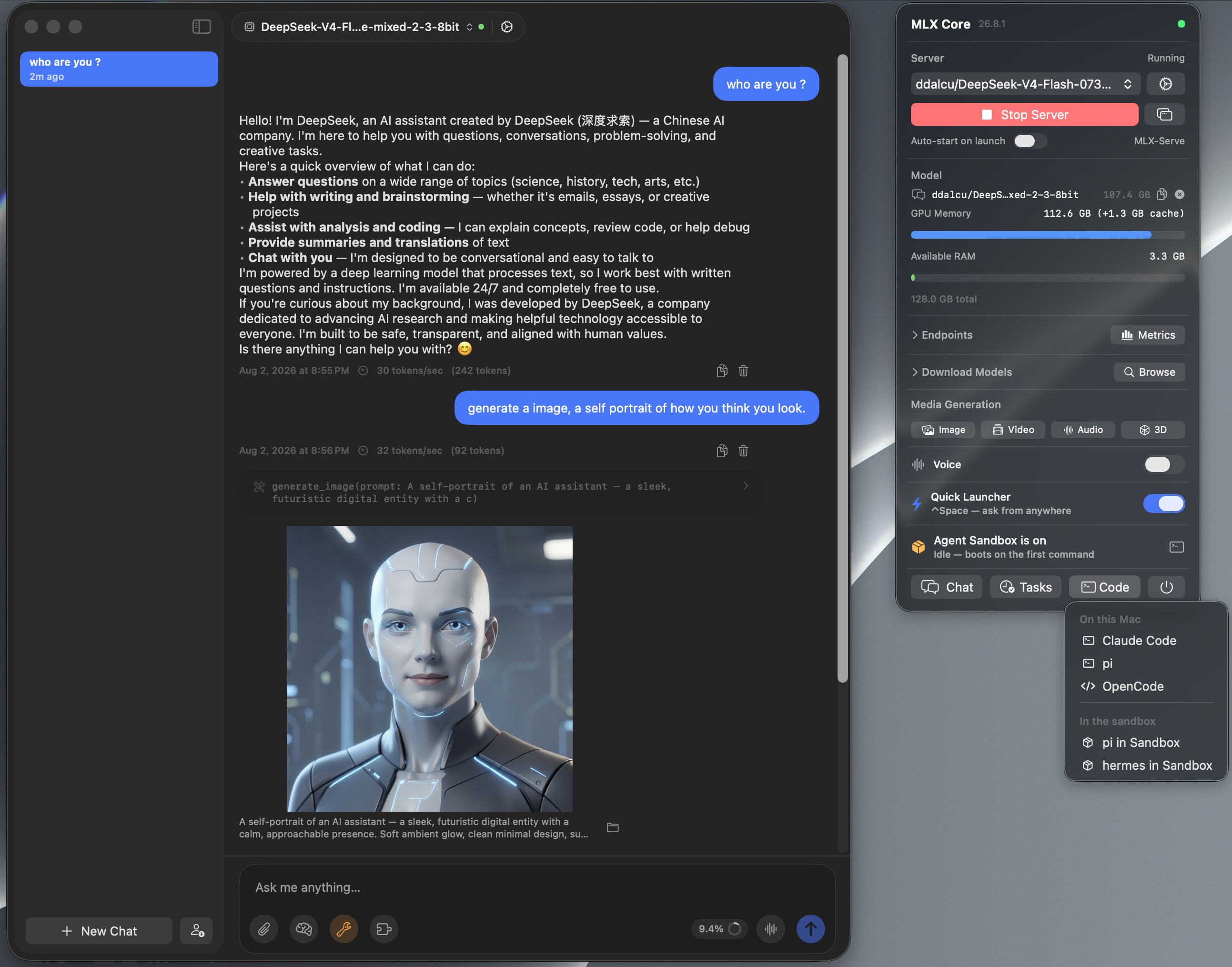
MLX Core is a signed, notarized macOS menu-bar app that bundles the server. Browse and download models with a progress UI, chat, run agent mode with MCP tools, generate images / video / music / speech / 3D, and tune every server flag from a Settings window. No terminal, nothing to configure. The server underneath is the same binary the CLI runs, on the same http://localhost:11234, so Claude Code and any OpenAI or Anthropic client can point at it while the app is running.
 Download MLX Core.app — latest release for macOS (Apple Silicon)
Install via Homebrew
brew tap ddalcu/mlx-serve https://github.com/ddalcu/mlx-serve
brew install --cask mlx-core   # the app (recommended)
brew install mlx-serve         # CLI + server only, no GUI
Prefer the terminal?
Ollama-style, if that's your habit:
mlx-serve run gemma4        # downloads Gemma 4 E4B (4-bit), serves it, chats right in your terminal
mlx-serve pull qwen3.6:27b  # just download (resumable, straight from Hugging Face)
mlx-serve list              # what's on disk
mlx-serve serve             # serve everything you've pulled — models load on demand by name
Short names, org/repo HuggingFace ids, and name:tag all work. Direct --model/--model-dir invocations for scripts and headless Macs, plus every server flag, are in docs/cli.md.
And because mlx-serve speaks the Ollama API (/api/chat, /api/generate, /api/tags, /api/embed, /api/pull, …) alongside OpenAI and Anthropic, your existing Ollama-connected tools — Raycast, Obsidian, Enchanted, Open WebUI, ollama-python/js — work unchanged: point them at http://localhost:11234 and keep your workflow, on a faster engine.
Build from source
Needs Xcode 26.2+ with the Metal Toolchain component (if xcrun -sdk macosx metal --version fails, run xcodebuild -downloadComponent MetalToolchain):
git clone --recurse-submodules https://github.com/ddalcu/mlx-serve && cd mlx-serve
brew bundle install --file=Brewfile   # cmake + webp
./app/build.sh                        # app + server, ad-hoc signed
That's the whole list. Zig, mlx and llama.cpp are pinned and fetched or built by the script, and there's no Python anywhere in the build. Server-only builds are in docs/building.md.
Why mlx-serve
If you're already on LM Studio, Ollama, or mlx-lm and wondering whether to switch — here's the short version, head-to-head:
| mlx-serve | LM Studio | Ollama | mlx-lm | |
|---|---|---|---|---|
| MLX models (native Apple) | ✅ | ✅ | 🟡 | ✅ |
| GGUF models (llama.cpp) | ✅ embedded | ✅ | ✅ | ❌ |
| OpenAI-compatible API | ✅ | ✅ | partial | ❌ |
| Anthropic Messages API | ✅ | 🟡 partial² | ❌ | ❌ |
| Ollama API (drop-in for Ollama clients) | ✅ | ❌ | ✅ native | ❌ |
run <model> CLI with auto-download + REPL | ✅ | ❌ | ✅ | ❌ |
| OpenAI Responses API + WebSockets | ✅ | 🟡 partial² | ❌ | ❌ |
| DeepSeek V4 Flash (284B) | ✅ via ds4 | ❌ | ❌ | ❌ |
| Speculative decoding (PLD + drafter + native MTP) | ✅ | ❌ | partial | drafter only |
| Decode speed (geomean vs LM Studio, identical weights) | +26% (MLX, shipping defaults) | baseline | ~−15% (GGUF, est.¹) | +11% (MLX) |
| KV-cache quantization (4/8-bit + TurboQuant) | ✅ | ❌ | partial | ✅ |
| Continuous batching | ✅ | ❌ | ✅ | ❌ |
| Built-in agent loop + MCP client | ✅ 10 tools | ❌ | ❌ | ❌ |
| Sandboxed agent shell (isolated Linux VM) | ✅ | ❌ | ❌ | ❌ |
| LAN model sharing (use another Mac's models) | ✅ | ❌ | ❌ | ❌ |
| One-click launchers (Claude Code, OpenCode, Pi) | ✅ | ❌ | ❌ | ❌ |
| Python required at runtime | ❌ | ❌ | ❌ | ✅ |
| Native menu-bar app (no Electron) | ✅ | ❌ Electron | ❌ | ❌ |
| Image generation + photo editing | ✅ | ❌ | ❌ | ❌ |
| Video generation (text / image / audio → video) | ✅ | ❌ | ❌ | ❌ |
| Speech + voice cloning | ✅ | ❌ | ❌ | ❌ |
| Music generation | ✅ | ❌ | ❌ | ❌ |
| 3D generation (image → textured 3D model) | ✅ | ❌ | ❌ | ❌ |
| License | MIT | proprietary | MIT | MIT |
¹ Ollama can't run MLX except a handful of NVFP4 conversions, so the comparison is GGUF-vs-GGUF.
² Recent LM Studio builds ship Anthropic /v1/messages and OpenAI /v1/responses compatibility endpoints, with partial coverage of each surface — mlx-serve additionally implements e.g. the Responses WebSocket transport and /v1/responses/compact.
Numbers and charts in Performance.
Highlights
- Any model: every supported MLX architecture plus the entire GGUF universe via embedded llama.cpp; DeepSeek V4 Flash through the dedicated antirez/ds4 engine.
- Four API surfaces on one port: OpenAI chat/completions and Responses (with a WebSocket transport), Anthropic Messages, and the Ollama API. Full reference in docs/api.md.
- The whole modern serving surface: streaming, tools with schema-driven auto-repair, JSON-schema constrained decoding, logprobs, vision, thinking as
reasoning_content. - Works with your coding agent: Claude Code, pi, oh-my-pi, OpenCode, OpenCode 2, Codex, hermes, aider, and editors like Zed. One-click from the app or
mlx-serve launch <agent>in the terminal, both preconfigured with the server's real context window. Setup for every tool in docs/integrations.md. - Fast: speculative decoding four ways (PLD, model-shipped draft companions, the Gemma 4 drafter, native Qwen MTP), custom Metal kernels, continuous batching, KV-cache quantization, prefix and tokenize caches. Numbers in docs/performance.md.
- Built-in web console: open
http://localhost:11234in a browser for a chat playground, live monitor, image and audio tools, and the API reference. - LAN model sharing: use another Mac's models over Bonjour with zero config; even Claude Code pointed at
localhostcan run on the Studio's 27B. - Media generation: image, video, music, speech with voice cloning, and 3D, natively on MLX, from the same server.
- No Python: a single ~7 MB Zig binary. The app ships everything signed and notarized.
Images, video, music, speech, 3D
One server, five modalities. In the app they are tray panels (click, download, generate); over HTTP they are the /v1/images, /v1/audio, /v1/video and /v1/3d endpoints. You can also ask for media straight in chat: request an image, a spoken line, a track or a clip and it renders inline in the conversation.
| Feature | Default | Other options | Approx. RAM |
|---|---|---|---|
| Image | FLUX.2-klein 4B 4-bit (mflux, ~5 GB pre-quantized) | FLUX.2-klein 9B (10 GB), Krea-2-Turbo, Mage-Flow Turbo / Edit 8-bit (8.5 / 9.1 GB) | 8 / 12 / 16 GB |
| Video | LTX-Video 2.5 4-bit (36 GB, bundled text encoder) | LTX-Video 2.5 8-bit (59 GB, sharper + diffusion decoder), LTX-Video 2.3, MiniMax-H3 (Hailuo 3.0) 4-bit / 8-bit, video and matching soundtrack in one pass | LTX 24 GB RAM; H3 26 GB (40 GB) or 44 GB (69 GB) |
| Speech | Qwen3-TTS 1.7b (voice cloning) | Qwen3-TTS 0.6b, Kokoro-82M (54 voices, ~345 MB) | 8 GB RAM, ~3.5 GB first-run download |
| Music | ACE-Step 1.5 XL Turbo 8-bit (fast, 8 steps) | MiniMax Music 3 8-bit (sings your lyrics, songs up to 6 min) | ACE 8 GB RAM, ~6.2 GB download; Music 3 ~20 GB RAM, 13.6 GB download |
| 3D | Hunyuan3D-2.1 8-bit (shape + PBR texture) | — | 16 GB RAM |
It goes well beyond text-to-X: photo editing by instruction, image-to-image, animating your photos, talking characters synced to real audio, voice cloning from seconds of audio, full music tracks, photo-to-GLB 3D models, and stacked style LoRAs. The full tour is in docs/app.md.
MLX Core (macOS app)
Menu-bar app that wraps the server with a full UI:
- Chat + agent mode: multi-session chat, PDFs and images, 10 built-in tools with per-tool approvals, an MCP marketplace, prompt-based skills, persistent memory, folder RAG.
- Agents: named assistants with their own personality, voice, model, tools, workspace and wake phrase.
- Agent Sandbox: one toggle and every agent shell command runs in an isolated Linux VM that boots in under a second. Your Mac stays untouched.
- Model browser: resumable multi-connection downloads, finds your existing LM Studio models so nothing re-downloads.
- Hands-free Voice Mode: say "Hey Loki" and talk; replies in 54 Kokoro voices or a clone of your own.
- Reach it from anywhere: ⌃Space Quick Launcher over any app, a Telegram bridge to your phone, scheduled tasks in plain English, LAN sharing between your Macs.
- Server management: every launch flag in an engine-aware Settings window, live logs, start/stop.
The full feature list is in docs/app.md.
Supported models
Native MLX dispatch for Gemma 3/4, DiffusionGemma, Qwen 3 / 3.5 / 3.6 / 3.8 / 3-Next, Meta's Muse-Glimmer-30B, inclusionAI Ling 3.0, DeepSeek V4 Flash (284B), Tencent Hunyuan 3 (295B), Thinking Machines Inkling Small (276B), poolside Laguna, Llama 3.x, Mistral, Nemotron-H, LFM2/2.5 (including the VL vision builds), plus embedding models (BERT, EmbeddingGemma, Qwen3-Embedding). Anything else runs as GGUF through the embedded llama.cpp, auto-routed by format. The full table with model_types, chat formats and vision support is in docs/models.md.
Performance
Apple M4 Max, identical weights per engine, every engine on its shipping defaults. benchmarks.md tracks decode tok/s release by release; methodology, speculative decoding details and the tuning guide are in docs/performance.md.
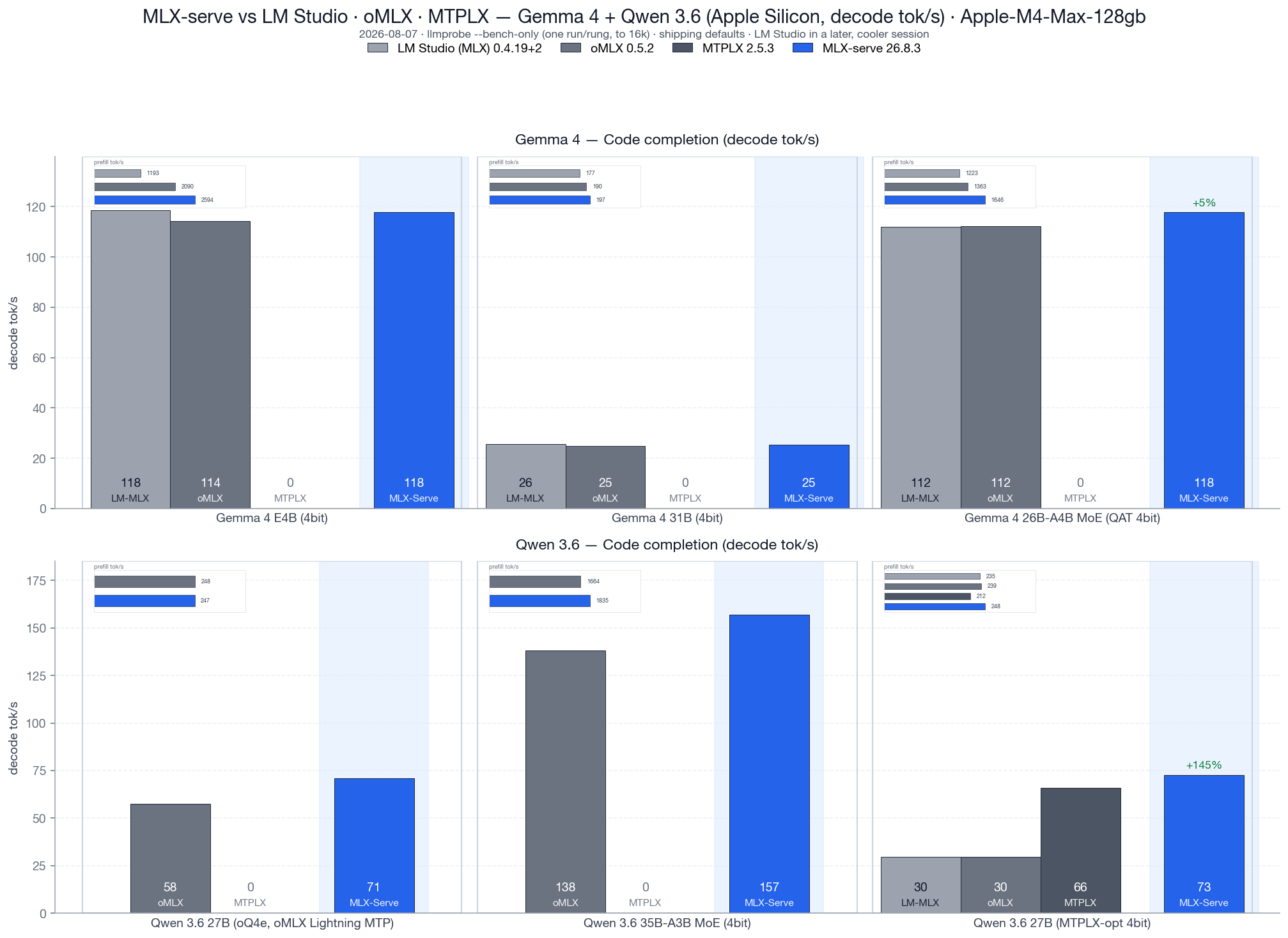
Code completion decode tok/s, v26.8.3, vs LM Studio 0.4.19+2, oMLX 0.5.2 and MTPLX 2.5.3, all four engines loading the identical MLX weight files. Geomean decode: +26% over LM Studio and +25% over oMLX, with prefill +36% and +10%. On the competitors' own checkpoints: +23% decode over oMLX on its oQ4e build, +10% decode / +17% prefill over MTPLX on its MTPLX-Optimized build.
Speculative decoding comes in four flavors (PLD, model-shipped draft companions, the Gemma 4 drafter, native Qwen MTP), all greedy-equivalent, with adaptive gates that keep novel-content workloads at parity. Details in docs/performance.md.
Docs
- docs/cli.md — CLI commands and every server flag
- docs/api.md — full HTTP API reference: OpenAI, Anthropic, Ollama, media endpoints
- docs/integrations.md — connect coding agents and editors: Claude Code, pi, oh-my-pi, OpenCode, Codex, hermes, aider, Zed, OpenClaw
- docs/models.md — supported model architectures
- docs/app.md — everything the MLX Core app does, including the media generation tour
- docs/performance.md — benchmarks, speculative decoding, tuning knobs
- docs/building.md — build from source
- docs/faq.md — frequently asked questions
FAQ
The short answers live in docs/faq.md. Most asked:
- Is mlx-serve faster than LM Studio?
- Does mlx-serve replace Ollama?
- Does mlx-serve work with Claude Code?
- Can my Macs share models over the network?
- Can mlx-serve run DeepSeek V4 Flash locally?
- Where does my data go?
Acknowledgements
mlx-serve stands on a lot of open-source shoulders: MLX · mlx-c · mlx-lm · llama.cpp · antirez/ds4 · jinja.cpp · nlohmann/json · stb_image · libwebp · HuggingFace tokenizers · Zig · Homebrew, plus the model and media architectures from Google, Qwen, Meta, Mistral AI, NVIDIA, Liquid, DeepSeek, Tencent, poolside, Thinking Machines, Black Forest Labs and Lightricks, and the Anthropic and MCP Swift SDKs in the app.
Some of the fastest Metal paths in the engine started as someone else's work, and the source says so at every one of them:
- MTPLX by Youssof Altoukhi (Apache-2.0), the verify-width split-K quantized matmul family and the M5 NAX tensor-ops tile. Their own preferred credit line: Powered by MTPLX by Youssof Altoukhi.
- dflash-mlx (Apache-2.0), the matmul2d convention the NAX tile is built on, reached through MTPLX.
- oMLX by jundot (Apache-2.0), the GatedDeltaNet blocked-sequence prefill kernel and the chunked-dispatch budget that keeps long-context prefill off the macOS preemption cliff.
- mlxfast-challenge by Layr Labs (MIT), the certified lm_head prune.
Full licenses and the required attributions are in NOTICE. If we missed you, please open a PR — happy to add anyone who landed code, fixtures, or a fix here.
Star history

Mac Studio fund
mlx-serve is built on a 16 GB M4 Mac mini and a 128 GB M4 Max, and lately the machines are the bottleneck rather than the code:
- Calibrated quants. Building an imatrix-calibrated mirror of a 284B model means holding the source weights and the output at the same time. They don't fit, so the converter downloads, converts and deletes one shard group at a time, and a single run takes most of a day. On a 512 GB box it's one pass.
- The big architectures. Inkling, Laguna, Hunyuan 3 and DeepSeek V4 Flash all load on 128 GB, but only leave room for a ~3K context beside the weights, so agent workloads on them can't really be tested here.
- Benchmarks. The release matrix is hours of wall clock, and thermal drift means it has to run alone with cooldowns between arms. A second machine means benchmarking stops blocking development.
So there's a fund for a Mac Studio Ultra. If mlx-serve replaced an API bill for you and you feel like chipping in, the button is here (or Buy Me a Coffee). Nothing gets paywalled either way: MIT now, MIT after.
Progress: ▱▱▱▱▱▱▱▱▱▱ 1%
Thanks to
@jcprichard @skudinov @davidfekke @lojza3d
Everyone who chips in gets a line here, with a link if they want one, or stays anonymous. (msg me) Thank you in advance.
Follow along
Builds, benchmarks and teardowns of what's under the hood:
- YouTube — @DavidDalcu
- X — @ddalcu
Subscribing, following, and starring the repo cost nothing and genuinely help the project reach people. It's the cheapest way to support it.
License
MIT, see LICENSE.
mlx-serve bundles third-party code that stays under its own license, including some Apache-2.0 Metal kernels and the Jinja engine that renders chat templates. NOTICE lists all of it with the required attributions, and LICENSE-APACHE-2.0 is the Apache License text.
★ Found this useful? Star the repo, subscribe on YouTube, follow on X. It really does help others discover it.
Contributors


Similar repos


Languages
Zig
53.0%
Swift
24.7%
C++
7.1%
Shell
6.6%
Python
4.1%
HTML
2.3%
Native LLM inference server for Apple Silicon. OpenAI + Anthropic API compatible. No Python. Includes MLX Core macOS app with chat, agent mode, and tool calling.
1,245
stars
451
commits
Zig
primary language
Sep 13, 2026
updated
README
mlx-serve — run any LLM on your Mac
OpenAI- and Anthropic-compatible local inference for Apple Silicon — MLX and GGUF — faster than LM Studio on identical MLX weights. No Python. No cloud. No Electron.
mlxserve.com · Download MLX Core.app · Docs · Changelog
mlx-serve is a native Zig server that runs any LLM on Apple Silicon — MLX-format models and every GGUF on HuggingFace (Qwen, Llama, Mistral, Gemma, DeepSeek V4 Flash, thousands more). It exposes OpenAI-compatible and Anthropic-compatible HTTP APIs out of the box, so the same http://localhost:11234 works with Claude Code, the OpenAI SDK, Continue, Cursor, Open WebUI, and anything else that speaks one of those wires. Beyond text, the same server generates images, video, music, speech (with voice cloning), and 3D models — all natively on MLX. Ships with MLX Core, a macOS menu-bar app with chat, agent mode, MCP tool calling, and model management.
Get started
Needs macOS 26.2+ on Apple Silicon.
Use the app (recommended)
MLX Core is a signed, notarized macOS menu-bar app that bundles the server. Browse and download models with a progress UI, chat, run agent mode with MCP tools, generate images / video / music / speech / 3D, and tune every server flag from a Settings window. No terminal, nothing to configure. The server underneath is the same binary the CLI runs, on the same http://localhost:11234, so Claude Code and any OpenAI or Anthropic client can point at it while the app is running.
Download MLX Core.app — latest release for macOS (Apple Silicon)
Install via Homebrew
brew tap ddalcu/mlx-serve https://github.com/ddalcu/mlx-serve
brew install --cask mlx-core   # the app (recommended)
brew install mlx-serve         # CLI + server only, no GUI
Prefer the terminal?
Ollama-style, if that's your habit:
mlx-serve run gemma4        # downloads Gemma 4 E4B (4-bit), serves it, chats right in your terminal
mlx-serve pull qwen3.6:27b  # just download (resumable, straight from Hugging Face)
mlx-serve list              # what's on disk
mlx-serve serve             # serve everything you've pulled — models load on demand by name
Short names, org/repo HuggingFace ids, and name:tag all work. Direct --model/--model-dir invocations for scripts and headless Macs, plus every server flag, are in docs/cli.md.
And because mlx-serve speaks the Ollama API (/api/chat, /api/generate, /api/tags, /api/embed, /api/pull, …) alongside OpenAI and Anthropic, your existing Ollama-connected tools — Raycast, Obsidian, Enchanted, Open WebUI, ollama-python/js — work unchanged: point them at http://localhost:11234 and keep your workflow, on a faster engine.
Build from source
Needs Xcode 26.2+ with the Metal Toolchain component (if xcrun -sdk macosx metal --version fails, run xcodebuild -downloadComponent MetalToolchain):
git clone --recurse-submodules https://github.com/ddalcu/mlx-serve && cd mlx-serve
brew bundle install --file=Brewfile   # cmake + webp
./app/build.sh                        # app + server, ad-hoc signed
That's the whole list. Zig, mlx and llama.cpp are pinned and fetched or built by the script, and there's no Python anywhere in the build. Server-only builds are in docs/building.md.
Why mlx-serve
If you're already on LM Studio, Ollama, or mlx-lm and wondering whether to switch — here's the short version, head-to-head:
| mlx-serve | LM Studio | Ollama | mlx-lm | |
|---|---|---|---|---|
| MLX models (native Apple) | ✅ | ✅ | 🟡 | ✅ |
| GGUF models (llama.cpp) | ✅ embedded | ✅ | ✅ | ❌ |
| OpenAI-compatible API | ✅ | ✅ | partial | ❌ |
| Anthropic Messages API | ✅ | 🟡 partial² | ❌ | ❌ |
| Ollama API (drop-in for Ollama clients) | ✅ | ❌ | ✅ native | ❌ |
run <model> CLI with auto-download + REPL | ✅ | ❌ | ✅ | ❌ |
| OpenAI Responses API + WebSockets | ✅ | 🟡 partial² | ❌ | ❌ |
| DeepSeek V4 Flash (284B) | ✅ via ds4 | ❌ | ❌ | ❌ |
| Speculative decoding (PLD + drafter + native MTP) | ✅ | ❌ | partial | drafter only |
| Decode speed (geomean vs LM Studio, identical weights) | +26% (MLX, shipping defaults) | baseline | ~−15% (GGUF, est.¹) | +11% (MLX) |
| KV-cache quantization (4/8-bit + TurboQuant) | ✅ | ❌ | partial | ✅ |
| Continuous batching | ✅ | ❌ | ✅ | ❌ |
| Built-in agent loop + MCP client | ✅ 10 tools | ❌ | ❌ | ❌ |
| Sandboxed agent shell (isolated Linux VM) | ✅ | ❌ | ❌ | ❌ |
| LAN model sharing (use another Mac's models) | ✅ | ❌ | ❌ | ❌ |
| One-click launchers (Claude Code, OpenCode, Pi) | ✅ | ❌ | ❌ | ❌ |
| Python required at runtime | ❌ | ❌ | ❌ | ✅ |
| Native menu-bar app (no Electron) | ✅ | ❌ Electron | ❌ | ❌ |
| Image generation + photo editing | ✅ | ❌ | ❌ | ❌ |
| Video generation (text / image / audio → video) | ✅ | ❌ | ❌ | ❌ |
| Speech + voice cloning | ✅ | ❌ | ❌ | ❌ |
| Music generation | ✅ | ❌ | ❌ | ❌ |
| 3D generation (image → textured 3D model) | ✅ | ❌ | ❌ | ❌ |
| License | MIT | proprietary | MIT | MIT |
¹ Ollama can't run MLX except a handful of NVFP4 conversions, so the comparison is GGUF-vs-GGUF.
² Recent LM Studio builds ship Anthropic /v1/messages and OpenAI /v1/responses compatibility endpoints, with partial coverage of each surface — mlx-serve additionally implements e.g. the Responses WebSocket transport and /v1/responses/compact.
Numbers and charts in Performance.
Highlights
- Any model: every supported MLX architecture plus the entire GGUF universe via embedded llama.cpp; DeepSeek V4 Flash through the dedicated antirez/ds4 engine.
- Four API surfaces on one port: OpenAI chat/completions and Responses (with a WebSocket transport), Anthropic Messages, and the Ollama API. Full reference in docs/api.md.
- The whole modern serving surface: streaming, tools with schema-driven auto-repair, JSON-schema constrained decoding, logprobs, vision, thinking as
reasoning_content. - Works with your coding agent: Claude Code, pi, oh-my-pi, OpenCode, OpenCode 2, Codex, hermes, aider, and editors like Zed. One-click from the app or
mlx-serve launch <agent>in the terminal, both preconfigured with the server's real context window. Setup for every tool in docs/integrations.md. - Fast: speculative decoding four ways (PLD, model-shipped draft companions, the Gemma 4 drafter, native Qwen MTP), custom Metal kernels, continuous batching, KV-cache quantization, prefix and tokenize caches. Numbers in docs/performance.md.
- Built-in web console: open
http://localhost:11234in a browser for a chat playground, live monitor, image and audio tools, and the API reference. - LAN model sharing: use another Mac's models over Bonjour with zero config; even Claude Code pointed at
localhostcan run on the Studio's 27B. - Media generation: image, video, music, speech with voice cloning, and 3D, natively on MLX, from the same server.
- No Python: a single ~7 MB Zig binary. The app ships everything signed and notarized.
Images, video, music, speech, 3D
One server, five modalities. In the app they are tray panels (click, download, generate); over HTTP they are the /v1/images, /v1/audio, /v1/video and /v1/3d endpoints. You can also ask for media straight in chat: request an image, a spoken line, a track or a clip and it renders inline in the conversation.
| Feature | Default | Other options | Approx. RAM |
|---|---|---|---|
| Image | FLUX.2-klein 4B 4-bit (mflux, ~5 GB pre-quantized) | FLUX.2-klein 9B (10 GB), Krea-2-Turbo, Mage-Flow Turbo / Edit 8-bit (8.5 / 9.1 GB) | 8 / 12 / 16 GB |
| Video | LTX-Video 2.5 4-bit (36 GB, bundled text encoder) | LTX-Video 2.5 8-bit (59 GB, sharper + diffusion decoder), LTX-Video 2.3, MiniMax-H3 (Hailuo 3.0) 4-bit / 8-bit, video and matching soundtrack in one pass | LTX 24 GB RAM; H3 26 GB (40 GB) or 44 GB (69 GB) |
| Speech | Qwen3-TTS 1.7b (voice cloning) | Qwen3-TTS 0.6b, Kokoro-82M (54 voices, ~345 MB) | 8 GB RAM, ~3.5 GB first-run download |
| Music | ACE-Step 1.5 XL Turbo 8-bit (fast, 8 steps) | MiniMax Music 3 8-bit (sings your lyrics, songs up to 6 min) | ACE 8 GB RAM, ~6.2 GB download; Music 3 ~20 GB RAM, 13.6 GB download |
| 3D | Hunyuan3D-2.1 8-bit (shape + PBR texture) | — | 16 GB RAM |
It goes well beyond text-to-X: photo editing by instruction, image-to-image, animating your photos, talking characters synced to real audio, voice cloning from seconds of audio, full music tracks, photo-to-GLB 3D models, and stacked style LoRAs. The full tour is in docs/app.md.
MLX Core (macOS app)
Menu-bar app that wraps the server with a full UI:
- Chat + agent mode: multi-session chat, PDFs and images, 10 built-in tools with per-tool approvals, an MCP marketplace, prompt-based skills, persistent memory, folder RAG.
- Agents: named assistants with their own personality, voice, model, tools, workspace and wake phrase.
- Agent Sandbox: one toggle and every agent shell command runs in an isolated Linux VM that boots in under a second. Your Mac stays untouched.
- Model browser: resumable multi-connection downloads, finds your existing LM Studio models so nothing re-downloads.
- Hands-free Voice Mode: say "Hey Loki" and talk; replies in 54 Kokoro voices or a clone of your own.
- Reach it from anywhere: ⌃Space Quick Launcher over any app, a Telegram bridge to your phone, scheduled tasks in plain English, LAN sharing between your Macs.
- Server management: every launch flag in an engine-aware Settings window, live logs, start/stop.
The full feature list is in docs/app.md.
Supported models
Native MLX dispatch for Gemma 3/4, DiffusionGemma, Qwen 3 / 3.5 / 3.6 / 3.8 / 3-Next, Meta's Muse-Glimmer-30B, inclusionAI Ling 3.0, DeepSeek V4 Flash (284B), Tencent Hunyuan 3 (295B), Thinking Machines Inkling Small (276B), poolside Laguna, Llama 3.x, Mistral, Nemotron-H, LFM2/2.5 (including the VL vision builds), plus embedding models (BERT, EmbeddingGemma, Qwen3-Embedding). Anything else runs as GGUF through the embedded llama.cpp, auto-routed by format. The full table with model_types, chat formats and vision support is in docs/models.md.
Performance
Apple M4 Max, identical weights per engine, every engine on its shipping defaults. benchmarks.md tracks decode tok/s release by release; methodology, speculative decoding details and the tuning guide are in docs/performance.md.
Code completion decode tok/s, v26.8.3, vs LM Studio 0.4.19+2, oMLX 0.5.2 and MTPLX 2.5.3, all four engines loading the identical MLX weight files. Geomean decode: +26% over LM Studio and +25% over oMLX, with prefill +36% and +10%. On the competitors' own checkpoints: +23% decode over oMLX on its oQ4e build, +10% decode / +17% prefill over MTPLX on its MTPLX-Optimized build.
Speculative decoding comes in four flavors (PLD, model-shipped draft companions, the Gemma 4 drafter, native Qwen MTP), all greedy-equivalent, with adaptive gates that keep novel-content workloads at parity. Details in docs/performance.md.
Docs
- docs/cli.md — CLI commands and every server flag
- docs/api.md — full HTTP API reference: OpenAI, Anthropic, Ollama, media endpoints
- docs/integrations.md — connect coding agents and editors: Claude Code, pi, oh-my-pi, OpenCode, Codex, hermes, aider, Zed, OpenClaw
- docs/models.md — supported model architectures
- docs/app.md — everything the MLX Core app does, including the media generation tour
- docs/performance.md — benchmarks, speculative decoding, tuning knobs
- docs/building.md — build from source
- docs/faq.md — frequently asked questions
FAQ
The short answers live in docs/faq.md. Most asked:
- Is mlx-serve faster than LM Studio?
- Does mlx-serve replace Ollama?
- Does mlx-serve work with Claude Code?
- Can my Macs share models over the network?
- Can mlx-serve run DeepSeek V4 Flash locally?
- Where does my data go?
Acknowledgements
mlx-serve stands on a lot of open-source shoulders: MLX · mlx-c · mlx-lm · llama.cpp · antirez/ds4 · jinja.cpp · nlohmann/json · stb_image · libwebp · HuggingFace tokenizers · Zig · Homebrew, plus the model and media architectures from Google, Qwen, Meta, Mistral AI, NVIDIA, Liquid, DeepSeek, Tencent, poolside, Thinking Machines, Black Forest Labs and Lightricks, and the Anthropic and MCP Swift SDKs in the app.
Some of the fastest Metal paths in the engine started as someone else's work, and the source says so at every one of them:
- MTPLX by Youssof Altoukhi (Apache-2.0), the verify-width split-K quantized matmul family and the M5 NAX tensor-ops tile. Their own preferred credit line: Powered by MTPLX by Youssof Altoukhi.
- dflash-mlx (Apache-2.0), the matmul2d convention the NAX tile is built on, reached through MTPLX.
- oMLX by jundot (Apache-2.0), the GatedDeltaNet blocked-sequence prefill kernel and the chunked-dispatch budget that keeps long-context prefill off the macOS preemption cliff.
- mlxfast-challenge by Layr Labs (MIT), the certified lm_head prune.
Full licenses and the required attributions are in NOTICE. If we missed you, please open a PR — happy to add anyone who landed code, fixtures, or a fix here.
Star history
Mac Studio fund
mlx-serve is built on a 16 GB M4 Mac mini and a 128 GB M4 Max, and lately the machines are the bottleneck rather than the code:
- Calibrated quants. Building an imatrix-calibrated mirror of a 284B model means holding the source weights and the output at the same time. They don't fit, so the converter downloads, converts and deletes one shard group at a time, and a single run takes most of a day. On a 512 GB box it's one pass.
- The big architectures. Inkling, Laguna, Hunyuan 3 and DeepSeek V4 Flash all load on 128 GB, but only leave room for a ~3K context beside the weights, so agent workloads on them can't really be tested here.
- Benchmarks. The release matrix is hours of wall clock, and thermal drift means it has to run alone with cooldowns between arms. A second machine means benchmarking stops blocking development.
So there's a fund for a Mac Studio Ultra. If mlx-serve replaced an API bill for you and you feel like chipping in, the button is here (or Buy Me a Coffee). Nothing gets paywalled either way: MIT now, MIT after.
Progress: ▱▱▱▱▱▱▱▱▱▱ 1%
Thanks to
@jcprichard @skudinov @davidfekke @lojza3d
Everyone who chips in gets a line here, with a link if they want one, or stays anonymous. (msg me) Thank you in advance.
Follow along
Builds, benchmarks and teardowns of what's under the hood:
- YouTube — @DavidDalcu
- X — @ddalcu
Subscribing, following, and starring the repo cost nothing and genuinely help the project reach people. It's the cheapest way to support it.
License
MIT, see LICENSE.
mlx-serve bundles third-party code that stays under its own license, including some Apache-2.0 Metal kernels and the Jinja engine that renders chat templates. NOTICE lists all of it with the required attributions, and LICENSE-APACHE-2.0 is the Apache License text.
★ Found this useful? Star the repo, subscribe on YouTube, follow on X. It really does help others discover it.
Similar repos
Contributors
Languages
Zig
53.0%
Swift
24.7%
C++
7.1%
Shell
6.6%
Python
4.1%
HTML
2.3%