🟢 A private, local AI assistant for macOS — voice, vision, and automation powered by local LLMs via Ollama. 100% on your machine. No cloud, no API keys.
See the codeVoice. Vision. Automation. Memory. 100% on your machine — no cloud, no API keys, no subscriptions.
Jarvis turns your MacBook into the AI assistant from the movies: talk to it, let it see your screen and camera, control your apps, remember everything about you, and get real work done — all powered by local LLMs through Ollama. Nothing ever leaves your Mac.






⭐ If this looks cool, star the repo — it genuinely helps.
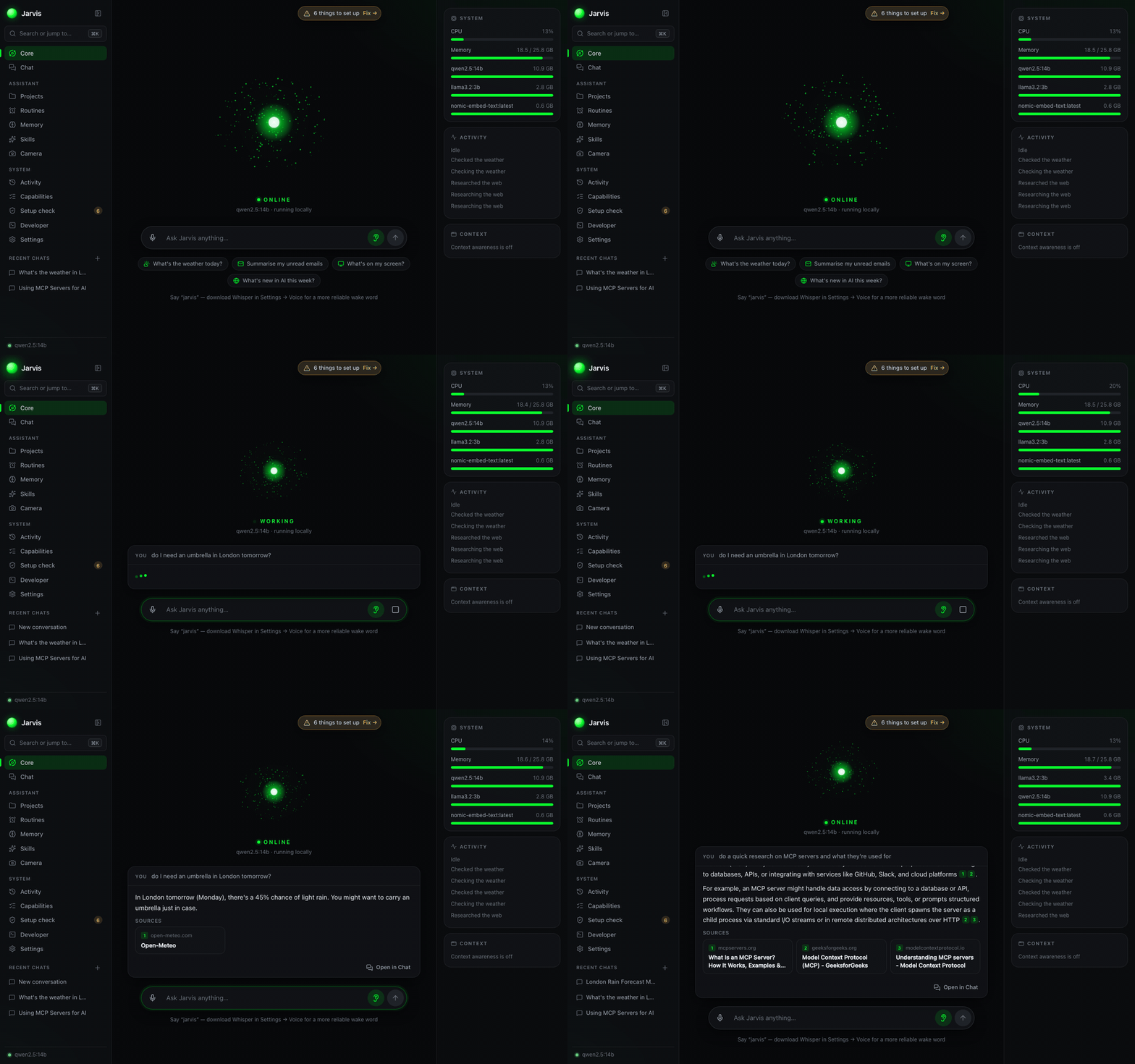
Every AI assistant wants your data in the cloud. Jarvis doesn't.
The Core — ask anything by voice or text; answers come with their sources, and your Mac's vitals sit alongside
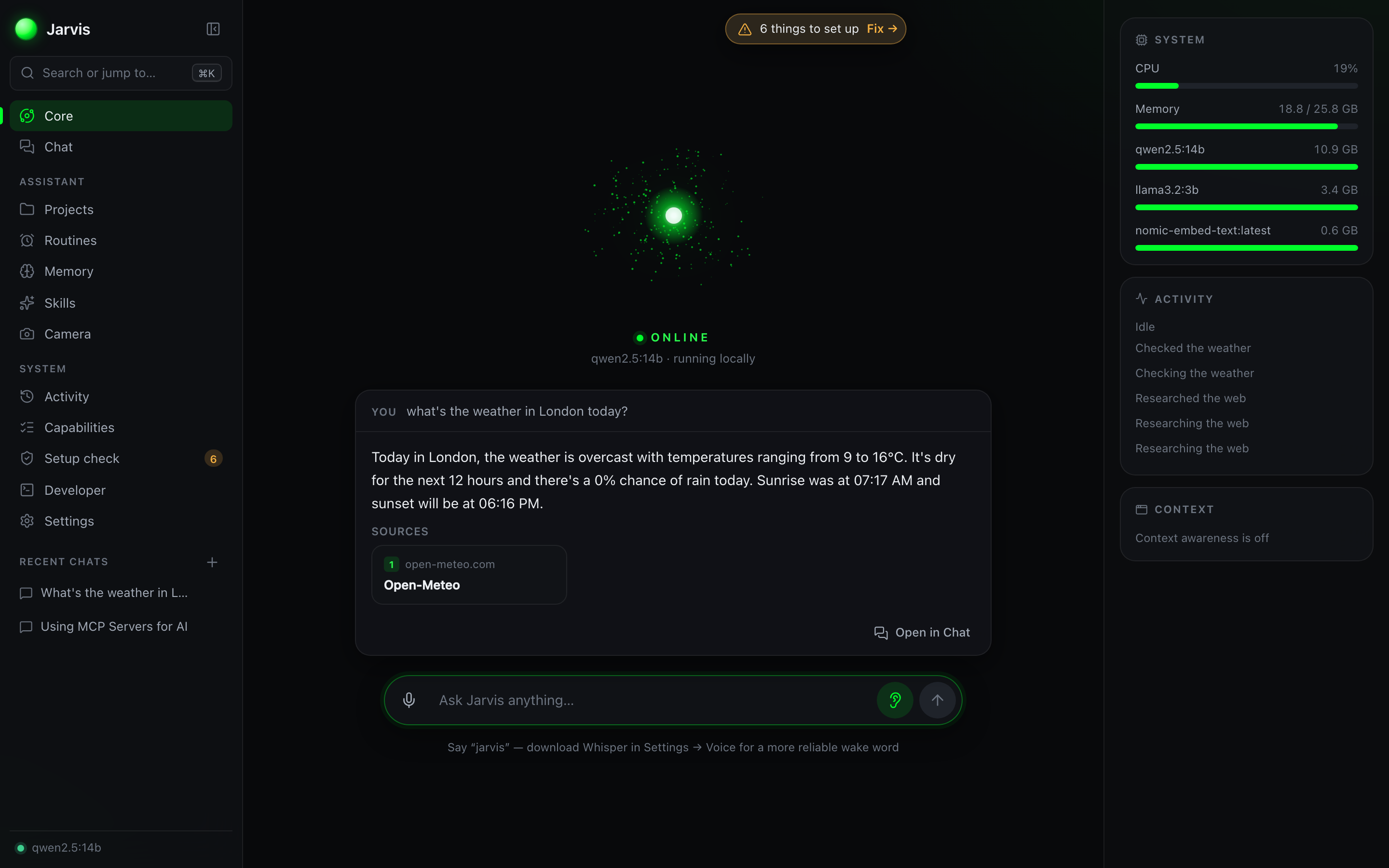
Research with sources — Jarvis searches the web, reads the best pages and cites every claim
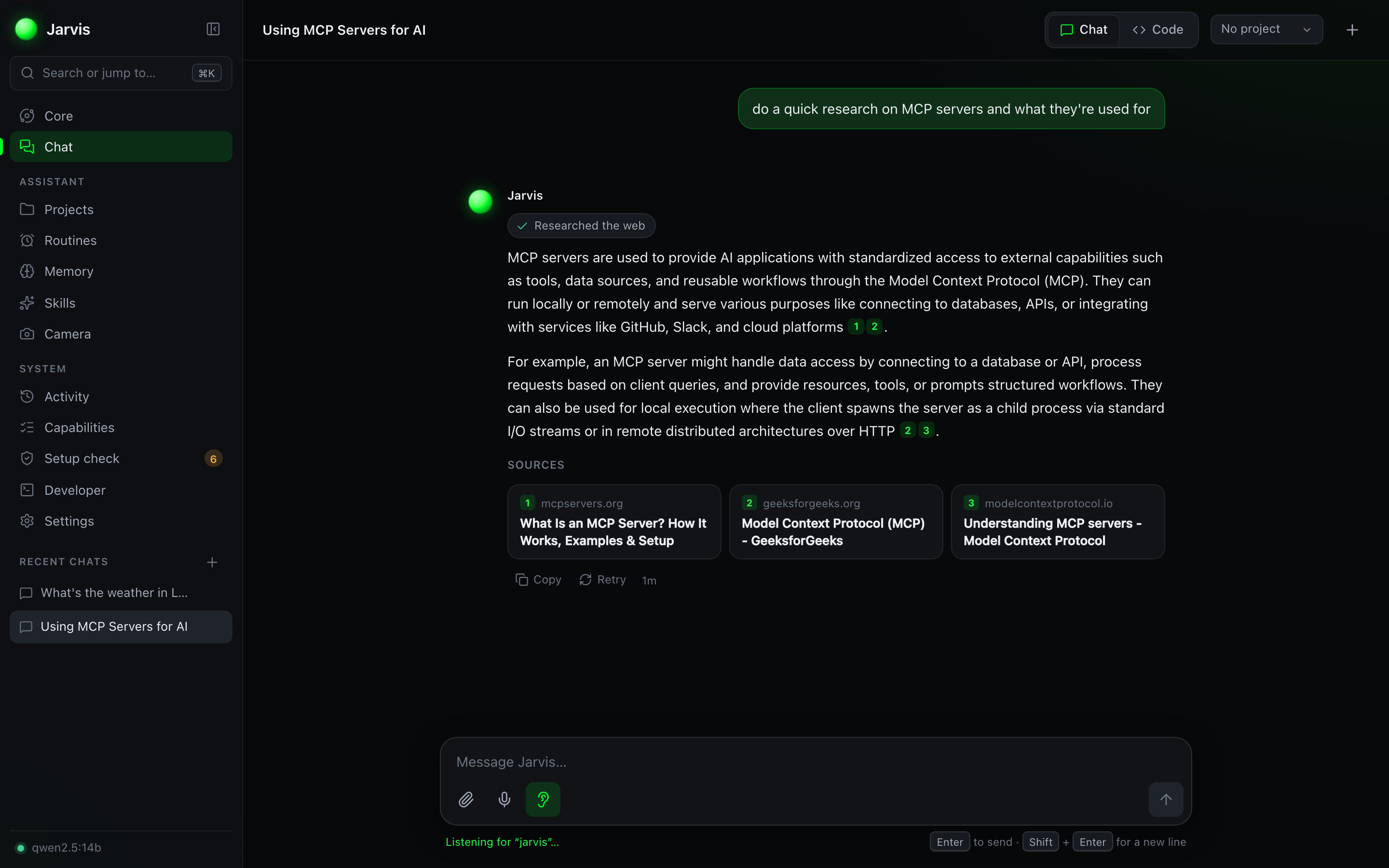
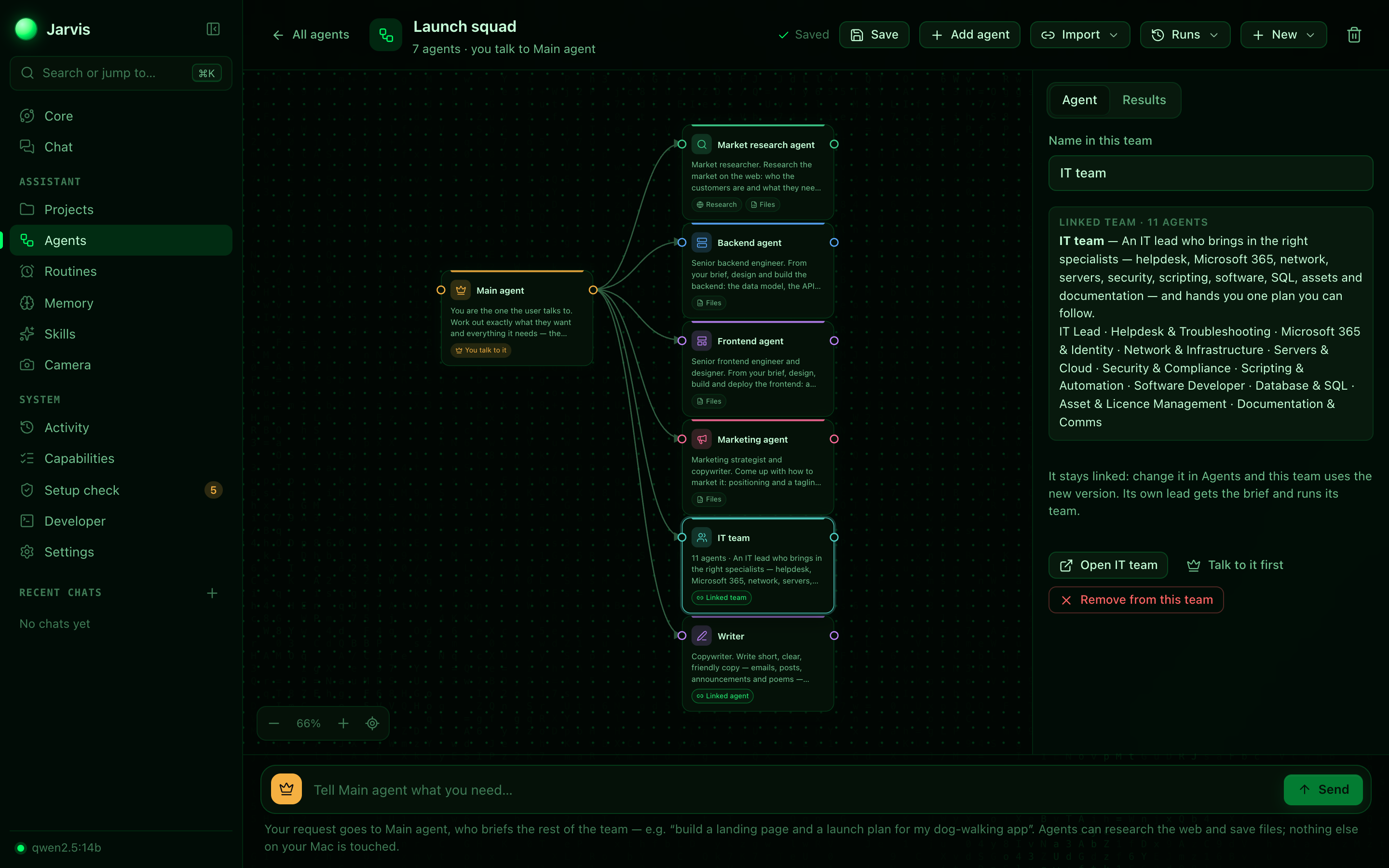
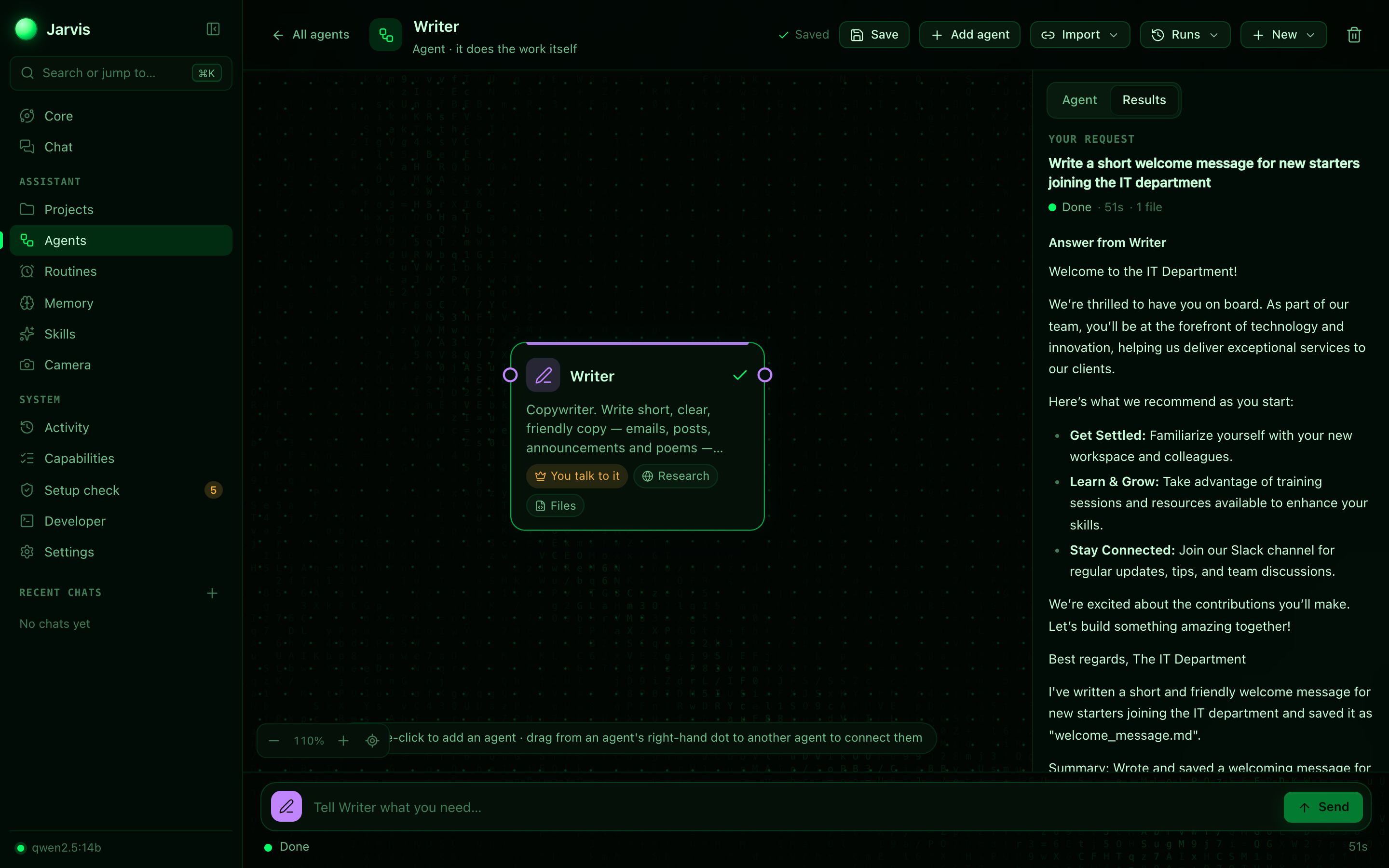
Agents — make an agent for a job, or a team of agents on a canvas, and bring agents and teams into bigger teams
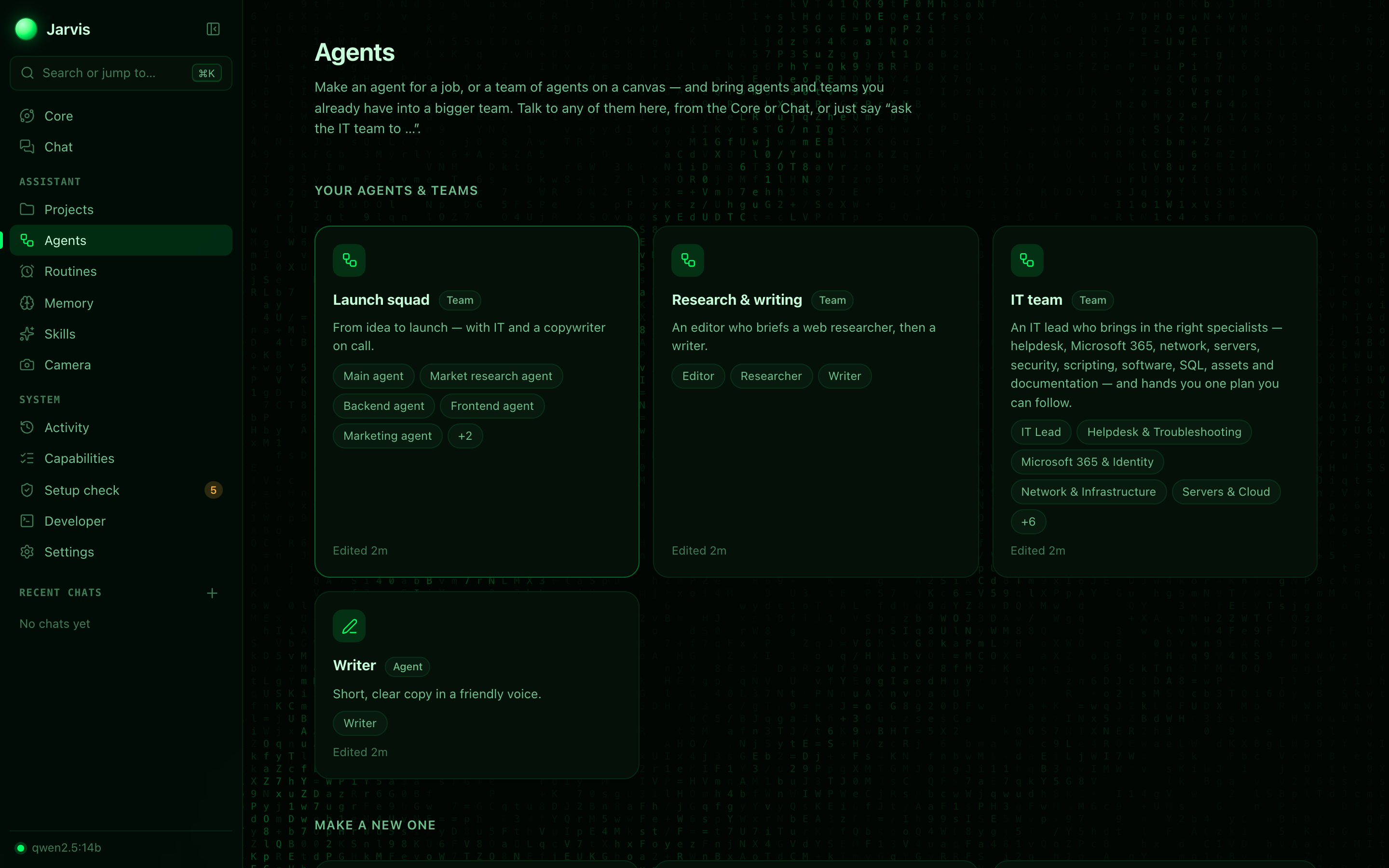
| A team with a whole IT team and a Writer linked in | A single agent's finished job, with the file it saved |
|---|---|
 |  |
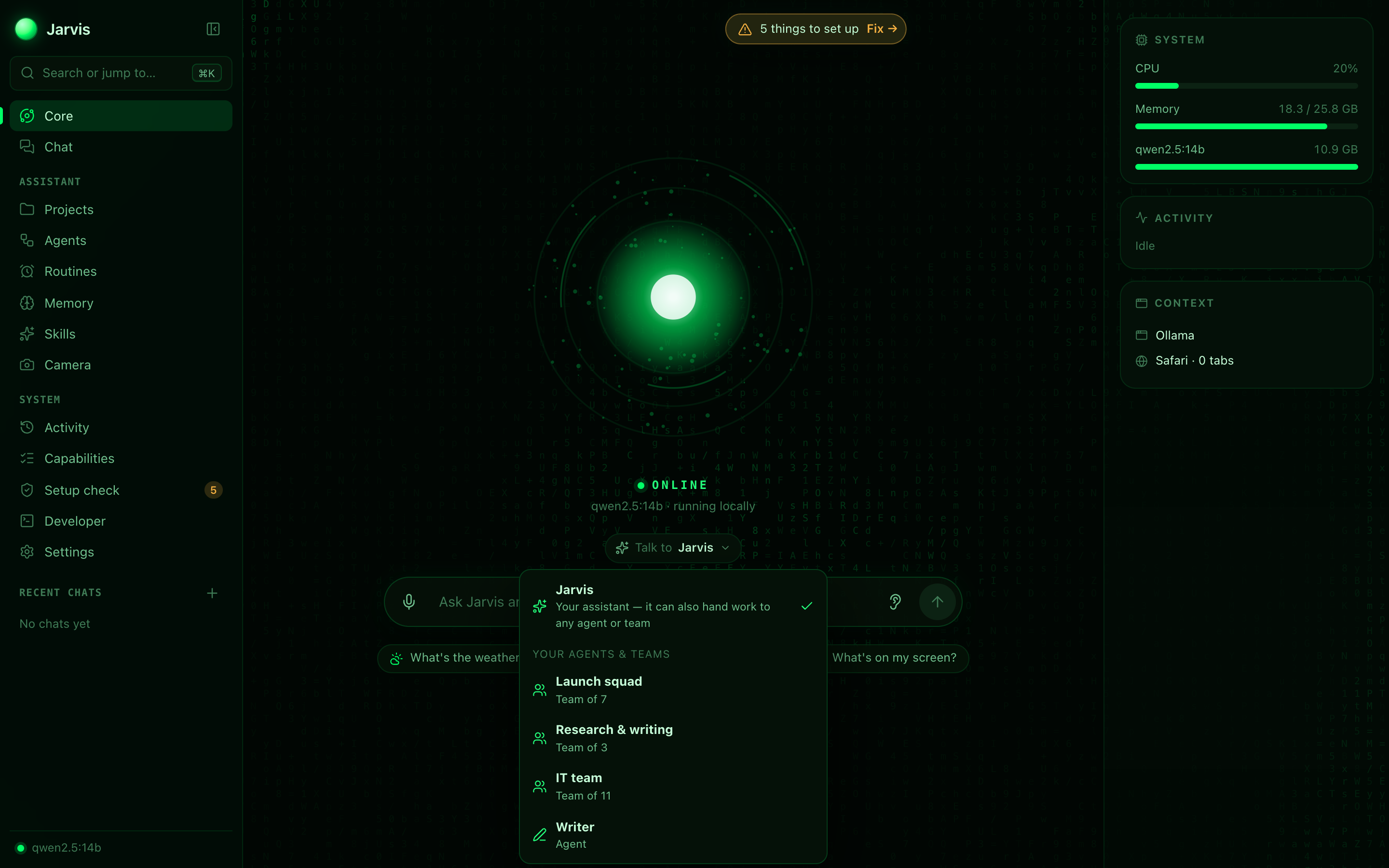
Talk to — choose who your message goes to: Jarvis, or any of your agents and teams (shown over the new glyph-field background)
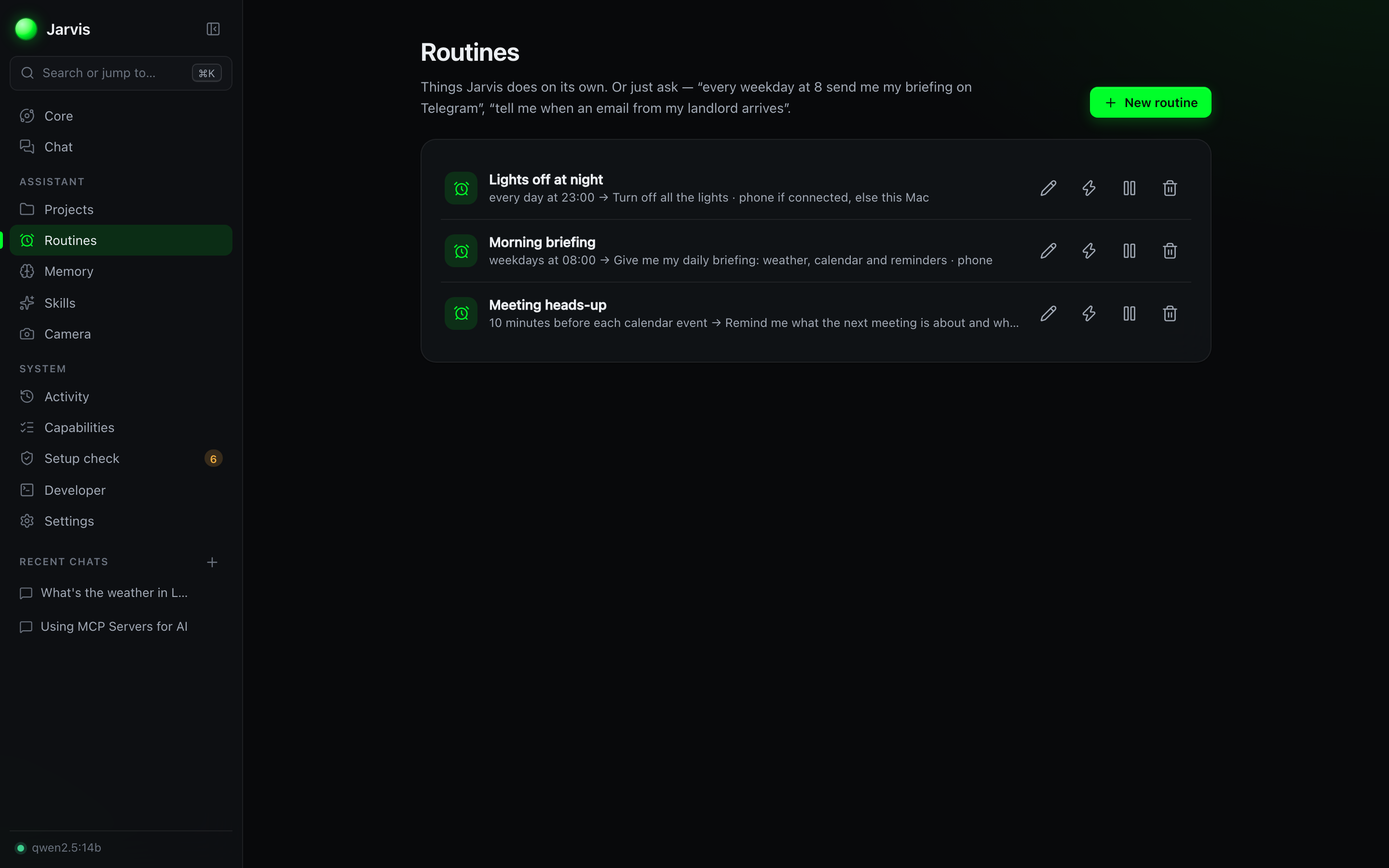
| Routines — things it does on its own | Setup check — every permission, one click to fix |
|---|---|
 | 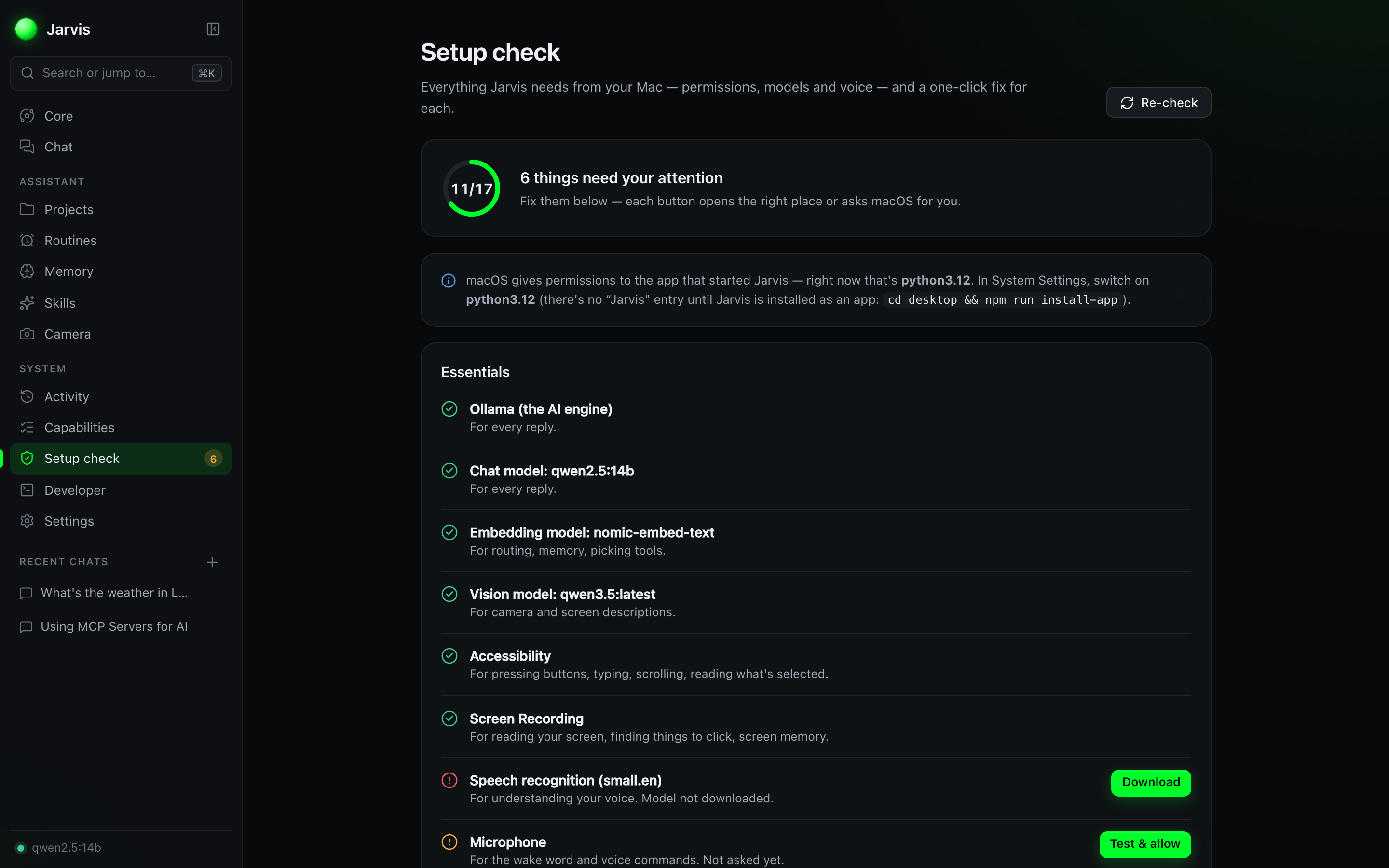 |
| Long-term Memory | Custom Skills |
|---|---|
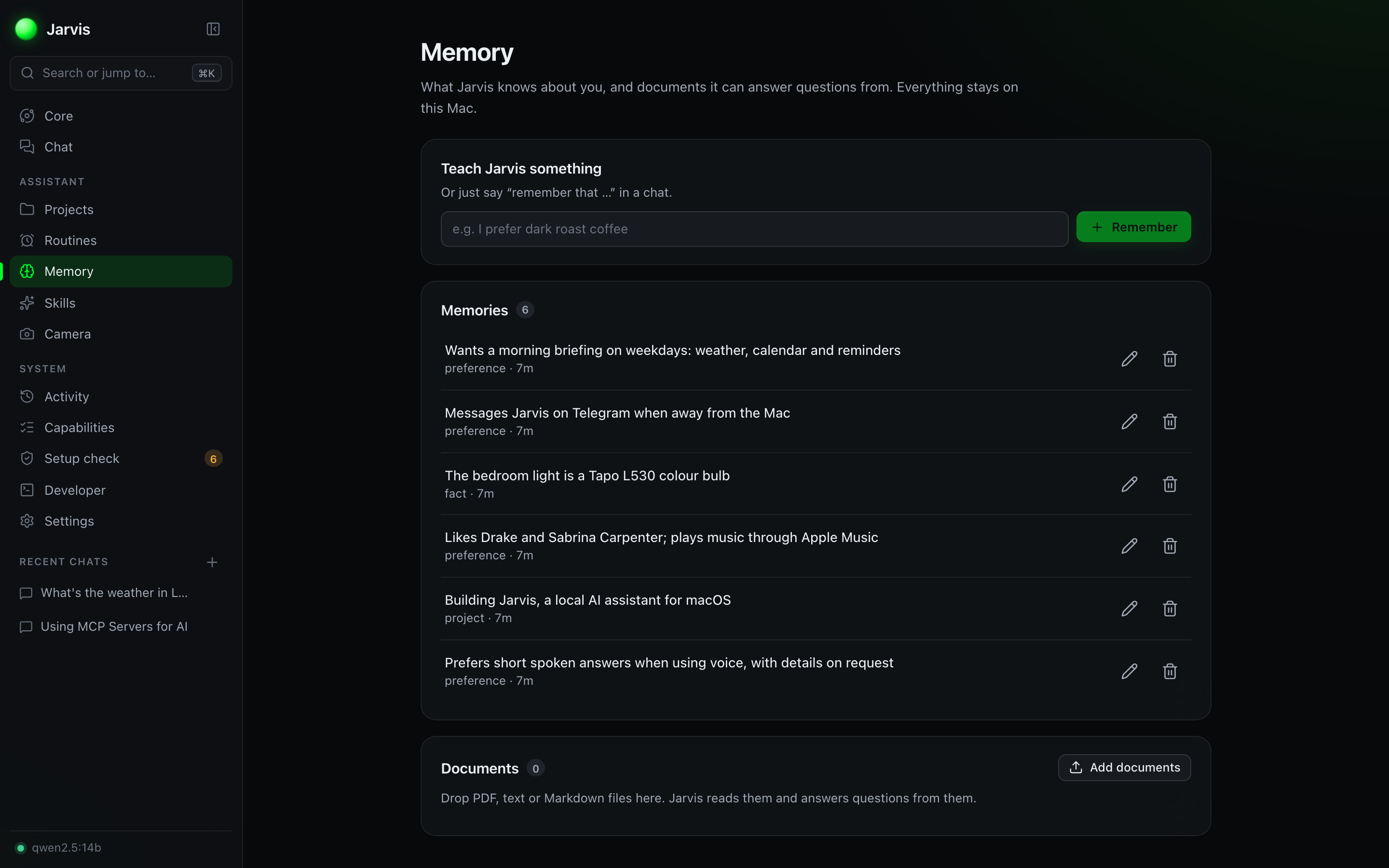 | 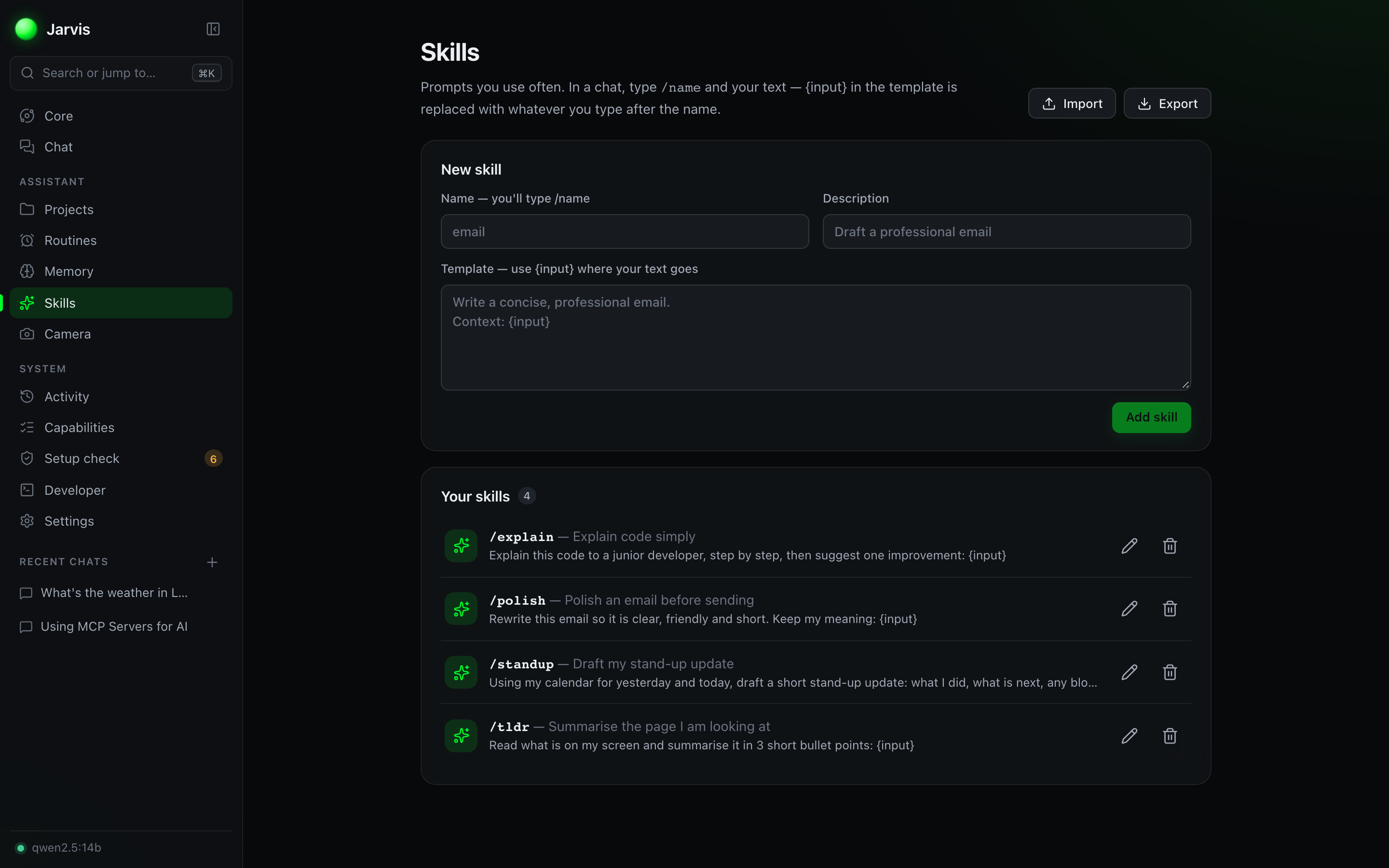 |
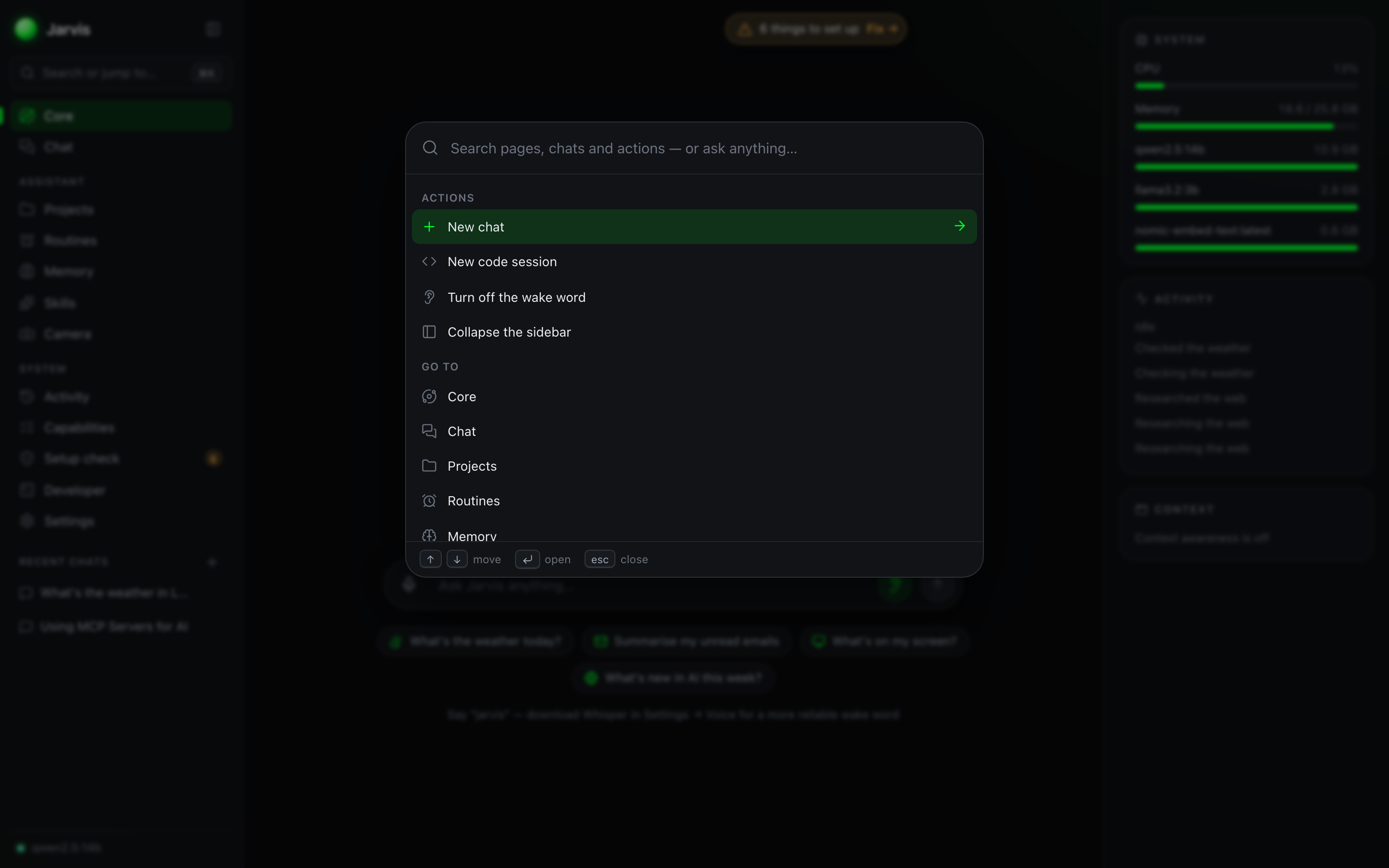
| Smart lights in Settings | ⌘K — jump anywhere, or just ask |
|---|---|
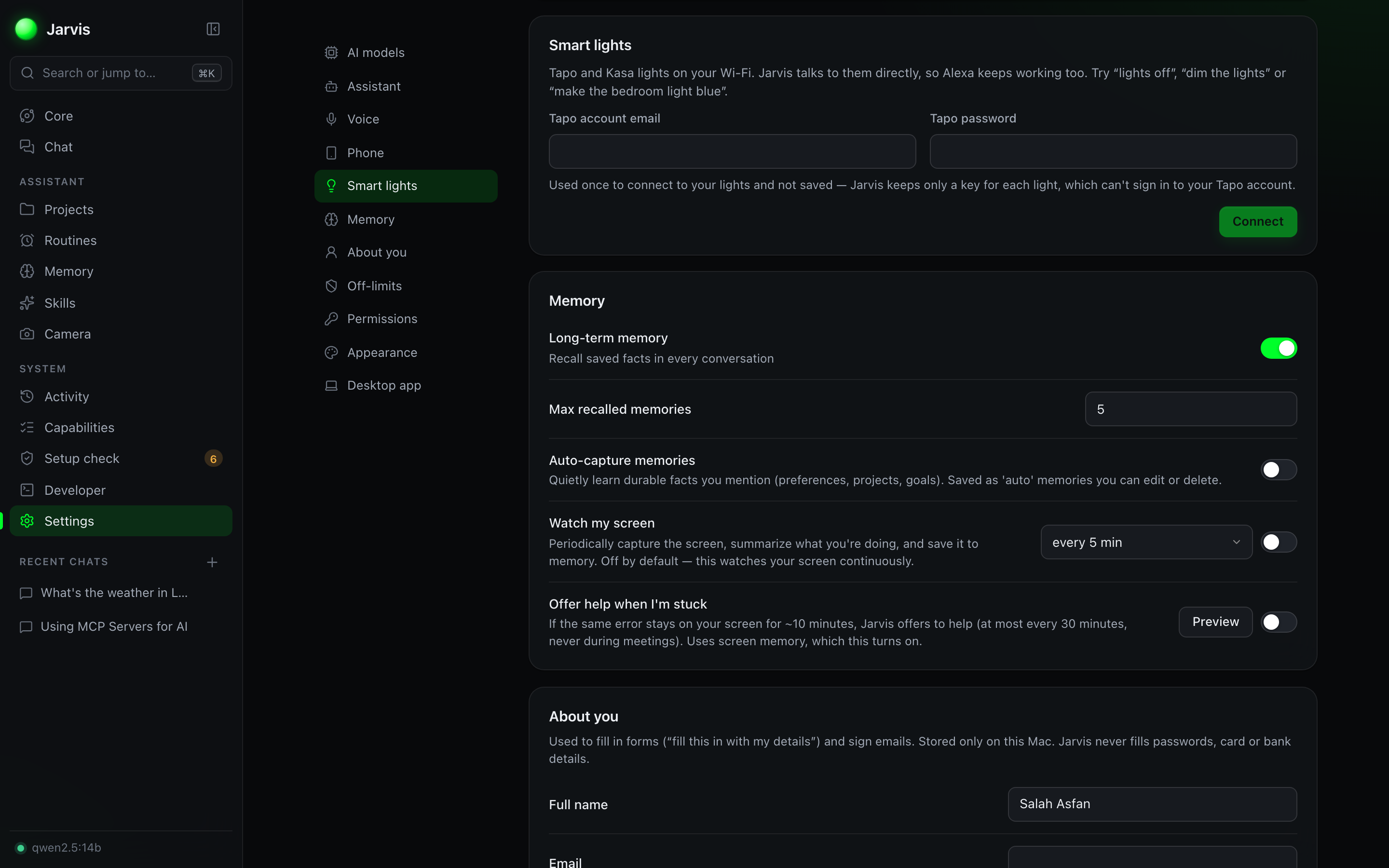 |  |
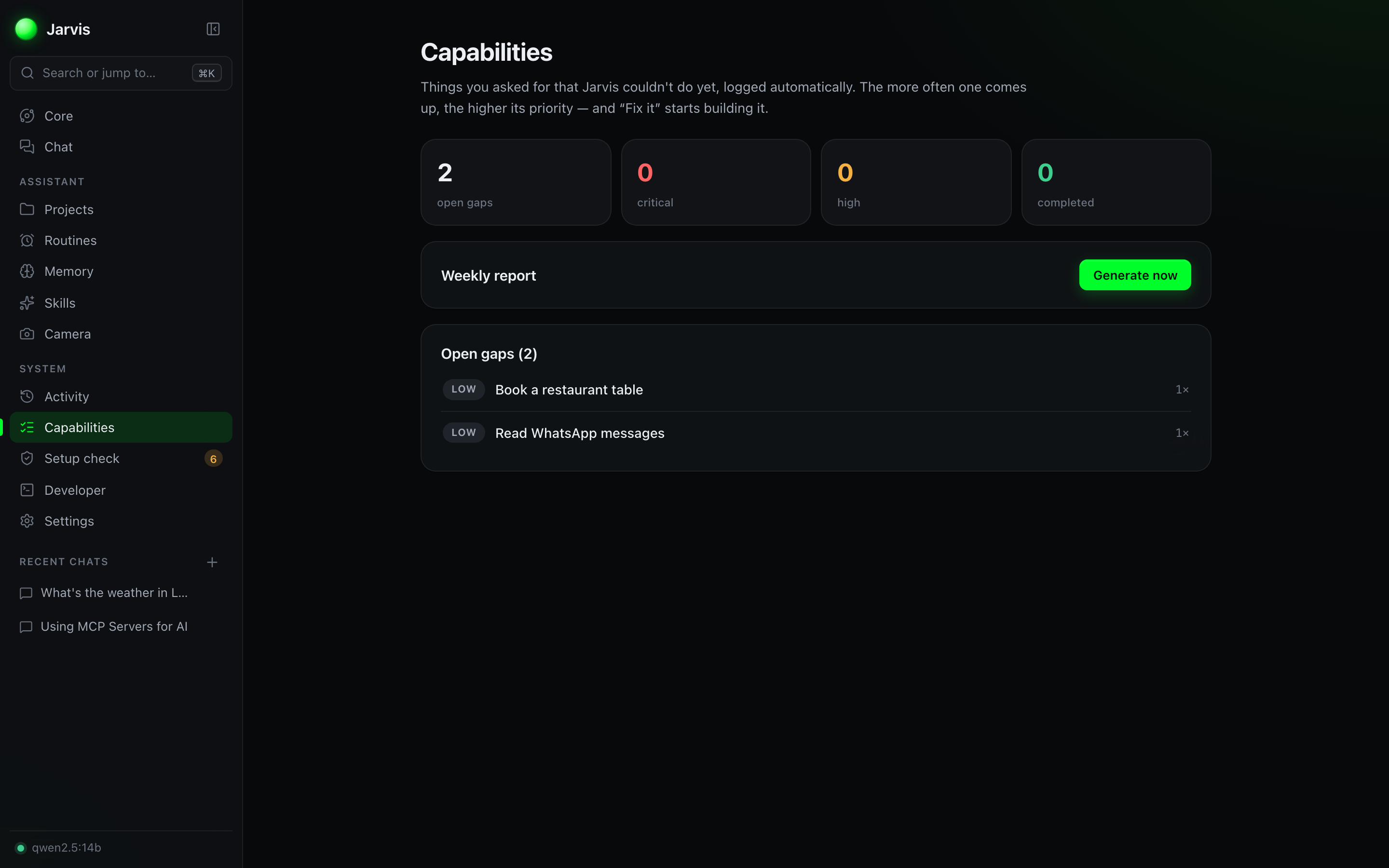
Self-improvement — what it couldn't do yet, logged and ranked so it can build it
🎙️ Voice
👁️ Vision
🦾 Mac Automation
|
🧑💻 Developer Workspace
🧠 Memory & Knowledge
🕵️ Research
🤖 Intelligence
|
Themes (hacker green, dark blue, cyberpunk, light), four Core designs, your own accent colour or picture — and a glyph field background: a quiet field of characters with waves of light drifting through it, rippling out from wherever you click.
Hit ⌥Space from any app to summon a floating command bar — ask about what's on your screen, get an answer, and get back to work without switching windows. Inside Jarvis, ⌘K jumps to any page, chat or action — or just asks.
"Jarvis, give me my daily briefing" → live weather, today's calendar, and your reminders, narrated.
Message Jarvis on Telegram from anywhere. It does the work on your Mac and replies in the chat:
.docx with sources, sends itTwo-minute setup — see Phone setup.
# 1. Python 3.11+  —  macOS's built-in python3 is 3.9, which can't run Jarvis
brew install [email protected]          # skip if `python3 --version` already says 3.11+

# 2. Install Ollama and pull a model (https://ollama.com/download)
ollama pull qwen2.5:14b

# 3. Clone and run everything with one command
git clone https://github.com/Salahasfan02/Jarvis.git
cd Jarvis
chmod +x start.sh && ./start.sh
start.sh finds a Python 3.11+ on its own, installs everything on the first run (and again whenever a git pull changes the dependencies), and retries an install that was interrupted.
Your browser opens at http://localhost:5173 and Jarvis is live. Press Ctrl+C (or ./stop.sh) to turn it off. Nothing auto-starts; it only runs when you start it.
🔧 Your model is picked for you. If the configured model (
llama3.1by default) isn't installed, Jarvis switches to one you have —qwen2.5:14babove. Change it anytime in Settings → Model.
🔐 macOS will ask for permissions. The first time Jarvis reads your screen, uses the camera, reads your calendar, or drives another app, macOS prompts for Screen Recording, Camera, Microphone, Calendars, Automation (Mail, Safari, Music) and Accessibility. Grant them in System Settings → Privacy & Security. Email features use the Mail app, so add your accounts (iCloud, Gmail, Outlook…) there.
The Electron shell is a wrapper around the running stack, not a standalone build — in dev it loads the Vite UI from http://localhost:5173, and it launches the backend using backend/.venv. So bring the stack up first:
./start.sh          # terminal 1 — leave this running

cd desktop          # terminal 2
npm install
npm start           # run it from the repo, or:
npm run install-app # build Jarvis.app, put it in Applications and open it
The desktop app adds a menu-bar icon, the ⌥Space quick command, a ⌘⇧J floating window, and "Open at Login."
Note that npm run package records the path to this clone's backend in ~/.jarvis/backend_path. The resulting Jarvis.app still needs this repo on disk — a fully self-contained bundle is on the roadmap.
# Terminal 1 — Ollama
ollama serve

# Terminal 2 — backend   (use an explicit 3.11+ interpreter, not bare `python3`)
cd backend && /opt/homebrew/bin/python3.12 -m venv .venv && .venv/bin/pip install -r requirements.txt
.venv/bin/python run.py            # → http://127.0.0.1:8765

# Terminal 3 — UI
cd frontend && npm install && npm run dev   # → http://localhost:5173
ollama pull nomic-embed-text   # semantic memory + smarter agent routing
ollama pull llama3.2:3b        # a small, fast helper for titles and background work
ollama pull qwen3.5            # camera & screen vision
Then open Settings to enable them, download the offline Whisper and human Kokoro voice models, pick your theme, and set your wake word.
cd desktop && npm run install-app builds Jarvis.app (with its own icon), signs it locally and
installs it in Applications. It starts Ollama if needed, only ever runs once, and can open at login
(Settings → Desktop app). It's a new app to macOS, so allow the microphone, camera, Accessibility,
Screen Recording, Calendars and Reminders once — Setup check lists anything still missing, with a
fix button for each (and a restart button when macOS needs one).
The installer signs with a certificate it makes once on your Mac (Jarvis Local Signing), so the permissions you grant survive every rebuild — no re-allowing after an update.
/newbot, pick a name, and copy the token it gives you./pair 123456 code shown there to your new bot from your phone — or press Open in Telegram if Telegram is on your Mac. That's it.Things to know:
~/Documents/Jarvis; files you send Jarvis land in ~/Downloads/Jarvis. /new starts a fresh conversation, /stop cancels.Things to know:
~/.jarvis/lights.json, readable only by you), which can't sign in to your Tapo account.ResolutionImpossible for onnxruntimeAn environment from an older setup was built with macOS's Python 3.9. Install a newer Python, delete the backend/.venv folder, and start again — start.sh rebuilds it with 3.11+:
brew install [email protected]
rm -rf backend/.venv && ./start.sh
The active model doesn't exist locally. Run ollama list to see what you actually have, then pick one of those in Settings → Model. The out-of-the-box default is llama3.1.
In dev mode it loads http://localhost:5173, so the Vite dev server has to be running — start the stack with ./start.sh before npm start.
Simple commands ("open YouTube", "pause") skip the model entirely. For everything else, the local model is the cost:
ollama pull qwen2.5:1.5b). Titles and background work then stop competing with your conversation.-1 keeps the model loaded, so replies never wait for it to load (uses RAM while Jarvis runs)../start.sh cleans up when you interrupt it from the terminal it's running in. If you launched it detached (nohup, &, or from another script), the backend and UI survive — use ./stop.sh, which kills by port instead. Add --all to stop Ollama too.
Missing macOS permissions. Open System Settings → Privacy & Security and grant Screen Recording, Camera, Microphone, and Accessibility to your terminal (or to Jarvis.app if you packaged it), then restart Jarvis. Setup check shows which ones are missing and opens the right page.
Playing from the Apple Music catalogue needs an Apple Music subscription, the Music app signed in, and Accessibility for Jarvis (it queues the song with Play Next). Songs already in your library play without either.
| OS | macOS on Apple Silicon (built & tested on an M-series Mac) |
| Ollama | with at least one model (e.g. qwen2.5:14b) |
| Python | 3.11+ — macOS's built-in python3 is 3.9 and will not install the backend. brew install [email protected] |
| Node.js | 18+ |
| RAM | 16 GB minimum, 24 GB+ recommended for larger models |
| Permissions | Screen Recording, Camera, Microphone, Accessibility, Calendars, Reminders (prompted on first use) · Local Network for smart lights |
| Optional | Apple Music subscription (play any song) · Tapo / Kasa smart lights · Telegram (phone access) |
💡 Model tip:
qwen2.5:14bis the sweet spot for tool-calling on a 16–24 GB Mac. The app is fully model-agnostic — switch models anytime in Settings, and even benchmark them on your hardware.
Jarvis is built to earn your trust:
Backend: FastAPI · Ollama · SQLite · faster-whisper (STT) · Kokoro (TTS) · Apple Vision (OCR) · pyobjc · trafilatura (reading web pages) · python-kasa (Tapo / Kasa lights) · Open-Meteo (weather) Frontend: React · TypeScript · Vite · Vitest · Lucide icons (ISC) Desktop: Electron (tray, global hotkeys, floating window), signed locally so permissions persist
Modular by design — new tools, agents, models, and integrations drop in without touching the core. See docs/architecture.md.
.app (bundled backend)PRs, ideas, and bug reports are welcome. Jarvis is designed to be extended — writing a new tool or plugin is a few lines of Python (see docs/architecture.md).
Run the tests (no Ollama needed):
cd backend && .venv/bin/pip install pytest && .venv/bin/python -m pytest   # 240+ backend tests, any OS
cd frontend && npm test                                                    # interface helpers (Vitest)
Check how well a model handles real requests (needs Ollama; tools are faked, nothing on your Mac is touched): cd backend && .venv/bin/python -m evals.run --model qwen2.5:14b — prints pass/fail and timing for nearly 100 requests like "email my CV to…", "send the weather you just gave me to my phone", "make the bedroom light blue" and "facetime mum".
If Jarvis is useful or just fun to poke at, drop a star — it helps other people find it and keeps the project going.
Jarvis is free and built in my spare time. If it saved you time or made you smile, you can buy me a coffee — it fuels the next late-night feature. Thank you! 🙏
PolyForm Noncommercial 1.0.0 — free for any noncommercial use: personal projects, hobby, research, education, and nonprofits. You can use, modify, and share it freely — just not sell it or use it commercially. Commercial use requires a separate license from the author.
🟢 A private, local AI assistant for macOS — voice, vision, and automation powered by local LLMs via Ollama. 100% on your machine. No cloud, no API keys.
See the codeVoice. Vision. Automation. Memory. 100% on your machine — no cloud, no API keys, no subscriptions.
Jarvis turns your MacBook into the AI assistant from the movies: talk to it, let it see your screen and camera, control your apps, remember everything about you, and get real work done — all powered by local LLMs through Ollama. Nothing ever leaves your Mac.
⭐ If this looks cool, star the repo — it genuinely helps.
Every AI assistant wants your data in the cloud. Jarvis doesn't.
The Core — ask anything by voice or text; answers come with their sources, and your Mac's vitals sit alongside
Research with sources — Jarvis searches the web, reads the best pages and cites every claim
Agents — make an agent for a job, or a team of agents on a canvas, and bring agents and teams into bigger teams
| A team with a whole IT team and a Writer linked in | A single agent's finished job, with the file it saved |
|---|---|
| |
Talk to — choose who your message goes to: Jarvis, or any of your agents and teams (shown over the new glyph-field background)
| Routines — things it does on its own | Setup check — every permission, one click to fix |
|---|---|
| |
| Long-term Memory | Custom Skills |
|---|---|
| |
| Smart lights in Settings | ⌘K — jump anywhere, or just ask |
|---|---|
| |
Self-improvement — what it couldn't do yet, logged and ranked so it can build it
🎙️ Voice
👁️ Vision
🦾 Mac Automation
|
🧑💻 Developer Workspace
🧠 Memory & Knowledge
🕵️ Research
🤖 Intelligence
|
Themes (hacker green, dark blue, cyberpunk, light), four Core designs, your own accent colour or picture — and a glyph field background: a quiet field of characters with waves of light drifting through it, rippling out from wherever you click.
Hit ⌥Space from any app to summon a floating command bar — ask about what's on your screen, get an answer, and get back to work without switching windows. Inside Jarvis, ⌘K jumps to any page, chat or action — or just asks.
"Jarvis, give me my daily briefing" → live weather, today's calendar, and your reminders, narrated.
Message Jarvis on Telegram from anywhere. It does the work on your Mac and replies in the chat:
.docx with sources, sends itTwo-minute setup — see Phone setup.
# 1. Python 3.11+  —  macOS's built-in python3 is 3.9, which can't run Jarvis
brew install [email protected]          # skip if `python3 --version` already says 3.11+

# 2. Install Ollama and pull a model (https://ollama.com/download)
ollama pull qwen2.5:14b

# 3. Clone and run everything with one command
git clone https://github.com/Salahasfan02/Jarvis.git
cd Jarvis
chmod +x start.sh && ./start.sh
start.sh finds a Python 3.11+ on its own, installs everything on the first run (and again whenever a git pull changes the dependencies), and retries an install that was interrupted.
Your browser opens at http://localhost:5173 and Jarvis is live. Press Ctrl+C (or ./stop.sh) to turn it off. Nothing auto-starts; it only runs when you start it.
🔧 Your model is picked for you. If the configured model (
llama3.1by default) isn't installed, Jarvis switches to one you have —qwen2.5:14babove. Change it anytime in Settings → Model.
🔐 macOS will ask for permissions. The first time Jarvis reads your screen, uses the camera, reads your calendar, or drives another app, macOS prompts for Screen Recording, Camera, Microphone, Calendars, Automation (Mail, Safari, Music) and Accessibility. Grant them in System Settings → Privacy & Security. Email features use the Mail app, so add your accounts (iCloud, Gmail, Outlook…) there.
The Electron shell is a wrapper around the running stack, not a standalone build — in dev it loads the Vite UI from http://localhost:5173, and it launches the backend using backend/.venv. So bring the stack up first:
./start.sh          # terminal 1 — leave this running

cd desktop          # terminal 2
npm install
npm start           # run it from the repo, or:
npm run install-app # build Jarvis.app, put it in Applications and open it
The desktop app adds a menu-bar icon, the ⌥Space quick command, a ⌘⇧J floating window, and "Open at Login."
Note that npm run package records the path to this clone's backend in ~/.jarvis/backend_path. The resulting Jarvis.app still needs this repo on disk — a fully self-contained bundle is on the roadmap.
# Terminal 1 — Ollama
ollama serve

# Terminal 2 — backend   (use an explicit 3.11+ interpreter, not bare `python3`)
cd backend && /opt/homebrew/bin/python3.12 -m venv .venv && .venv/bin/pip install -r requirements.txt
.venv/bin/python run.py            # → http://127.0.0.1:8765

# Terminal 3 — UI
cd frontend && npm install && npm run dev   # → http://localhost:5173
ollama pull nomic-embed-text   # semantic memory + smarter agent routing
ollama pull llama3.2:3b        # a small, fast helper for titles and background work
ollama pull qwen3.5            # camera & screen vision
Then open Settings to enable them, download the offline Whisper and human Kokoro voice models, pick your theme, and set your wake word.
cd desktop && npm run install-app builds Jarvis.app (with its own icon), signs it locally and
installs it in Applications. It starts Ollama if needed, only ever runs once, and can open at login
(Settings → Desktop app). It's a new app to macOS, so allow the microphone, camera, Accessibility,
Screen Recording, Calendars and Reminders once — Setup check lists anything still missing, with a
fix button for each (and a restart button when macOS needs one).
The installer signs with a certificate it makes once on your Mac (Jarvis Local Signing), so the permissions you grant survive every rebuild — no re-allowing after an update.
/newbot, pick a name, and copy the token it gives you./pair 123456 code shown there to your new bot from your phone — or press Open in Telegram if Telegram is on your Mac. That's it.Things to know:
~/Documents/Jarvis; files you send Jarvis land in ~/Downloads/Jarvis. /new starts a fresh conversation, /stop cancels.Things to know:
~/.jarvis/lights.json, readable only by you), which can't sign in to your Tapo account.ResolutionImpossible for onnxruntimeAn environment from an older setup was built with macOS's Python 3.9. Install a newer Python, delete the backend/.venv folder, and start again — start.sh rebuilds it with 3.11+:
brew install [email protected]
rm -rf backend/.venv && ./start.sh
The active model doesn't exist locally. Run ollama list to see what you actually have, then pick one of those in Settings → Model. The out-of-the-box default is llama3.1.
In dev mode it loads http://localhost:5173, so the Vite dev server has to be running — start the stack with ./start.sh before npm start.
Simple commands ("open YouTube", "pause") skip the model entirely. For everything else, the local model is the cost:
ollama pull qwen2.5:1.5b). Titles and background work then stop competing with your conversation.-1 keeps the model loaded, so replies never wait for it to load (uses RAM while Jarvis runs)../start.sh cleans up when you interrupt it from the terminal it's running in. If you launched it detached (nohup, &, or from another script), the backend and UI survive — use ./stop.sh, which kills by port instead. Add --all to stop Ollama too.
Missing macOS permissions. Open System Settings → Privacy & Security and grant Screen Recording, Camera, Microphone, and Accessibility to your terminal (or to Jarvis.app if you packaged it), then restart Jarvis. Setup check shows which ones are missing and opens the right page.
Playing from the Apple Music catalogue needs an Apple Music subscription, the Music app signed in, and Accessibility for Jarvis (it queues the song with Play Next). Songs already in your library play without either.
| OS | macOS on Apple Silicon (built & tested on an M-series Mac) |
| Ollama | with at least one model (e.g. qwen2.5:14b) |
| Python | 3.11+ — macOS's built-in python3 is 3.9 and will not install the backend. brew install [email protected] |
| Node.js | 18+ |
| RAM | 16 GB minimum, 24 GB+ recommended for larger models |
| Permissions | Screen Recording, Camera, Microphone, Accessibility, Calendars, Reminders (prompted on first use) · Local Network for smart lights |
| Optional | Apple Music subscription (play any song) · Tapo / Kasa smart lights · Telegram (phone access) |
💡 Model tip:
qwen2.5:14bis the sweet spot for tool-calling on a 16–24 GB Mac. The app is fully model-agnostic — switch models anytime in Settings, and even benchmark them on your hardware.
Jarvis is built to earn your trust:
Backend: FastAPI · Ollama · SQLite · faster-whisper (STT) · Kokoro (TTS) · Apple Vision (OCR) · pyobjc · trafilatura (reading web pages) · python-kasa (Tapo / Kasa lights) · Open-Meteo (weather) Frontend: React · TypeScript · Vite · Vitest · Lucide icons (ISC) Desktop: Electron (tray, global hotkeys, floating window), signed locally so permissions persist
Modular by design — new tools, agents, models, and integrations drop in without touching the core. See docs/architecture.md.
.app (bundled backend)PRs, ideas, and bug reports are welcome. Jarvis is designed to be extended — writing a new tool or plugin is a few lines of Python (see docs/architecture.md).
Run the tests (no Ollama needed):
cd backend && .venv/bin/pip install pytest && .venv/bin/python -m pytest   # 240+ backend tests, any OS
cd frontend && npm test                                                    # interface helpers (Vitest)
Check how well a model handles real requests (needs Ollama; tools are faked, nothing on your Mac is touched): cd backend && .venv/bin/python -m evals.run --model qwen2.5:14b — prints pass/fail and timing for nearly 100 requests like "email my CV to…", "send the weather you just gave me to my phone", "make the bedroom light blue" and "facetime mum".
If Jarvis is useful or just fun to poke at, drop a star — it helps other people find it and keeps the project going.
Jarvis is free and built in my spare time. If it saved you time or made you smile, you can buy me a coffee — it fuels the next late-night feature. Thank you! 🙏
PolyForm Noncommercial 1.0.0 — free for any noncommercial use: personal projects, hobby, research, education, and nonprofits. You can use, modify, and share it freely — just not sell it or use it commercially. Commercial use requires a separate license from the author.






