Self-hosted Garmin & Intervals.icu dashboard for your wall and phone: a verdict after every workout. · Live demo ↓
See the codeYour Garmin data on the wall — and one honest answer after every workout: did this session make me better?



▶ Try the demo: the wall and the phone app in your browser, with made-up data for two athletes. Nothing to install, nothing is sent anywhere.
A self-hosted dashboard for a tablet on your wall. It pulls your activities and health data from Garmin Connect, compares every new workout with your own similar sessions, and shows today's plan, your recovery and how each sport is trending — with a little training buddy that reacts to how you're doing.
I built it for my own hallway: a Raspberry Pi in the cupboard and a Samsung Galaxy Tab A8 on the wall. It's free, open source and runs entirely on your own network — no cloud, no account with me, no tracking.
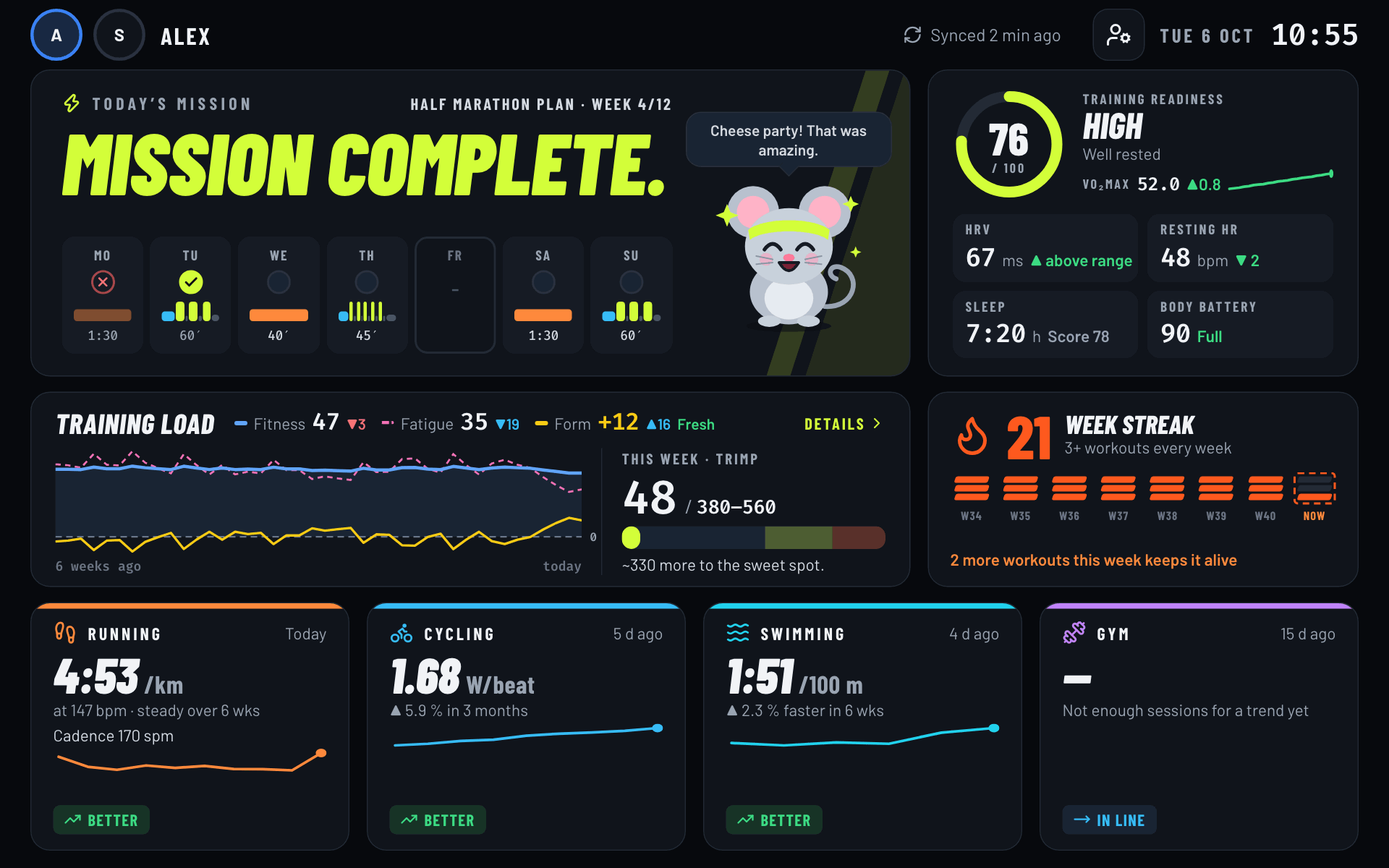
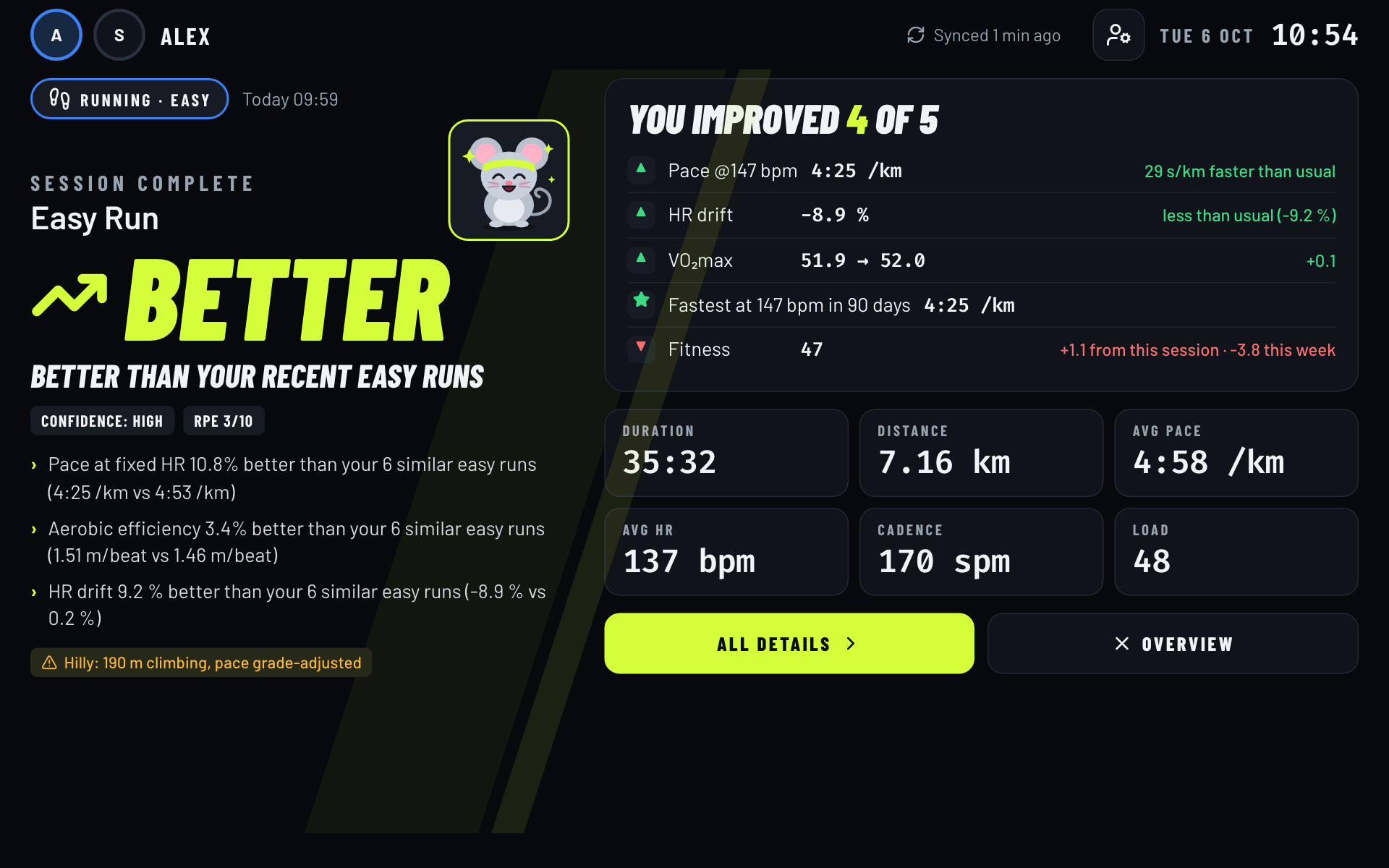
Screenshots use the built-in demo data.
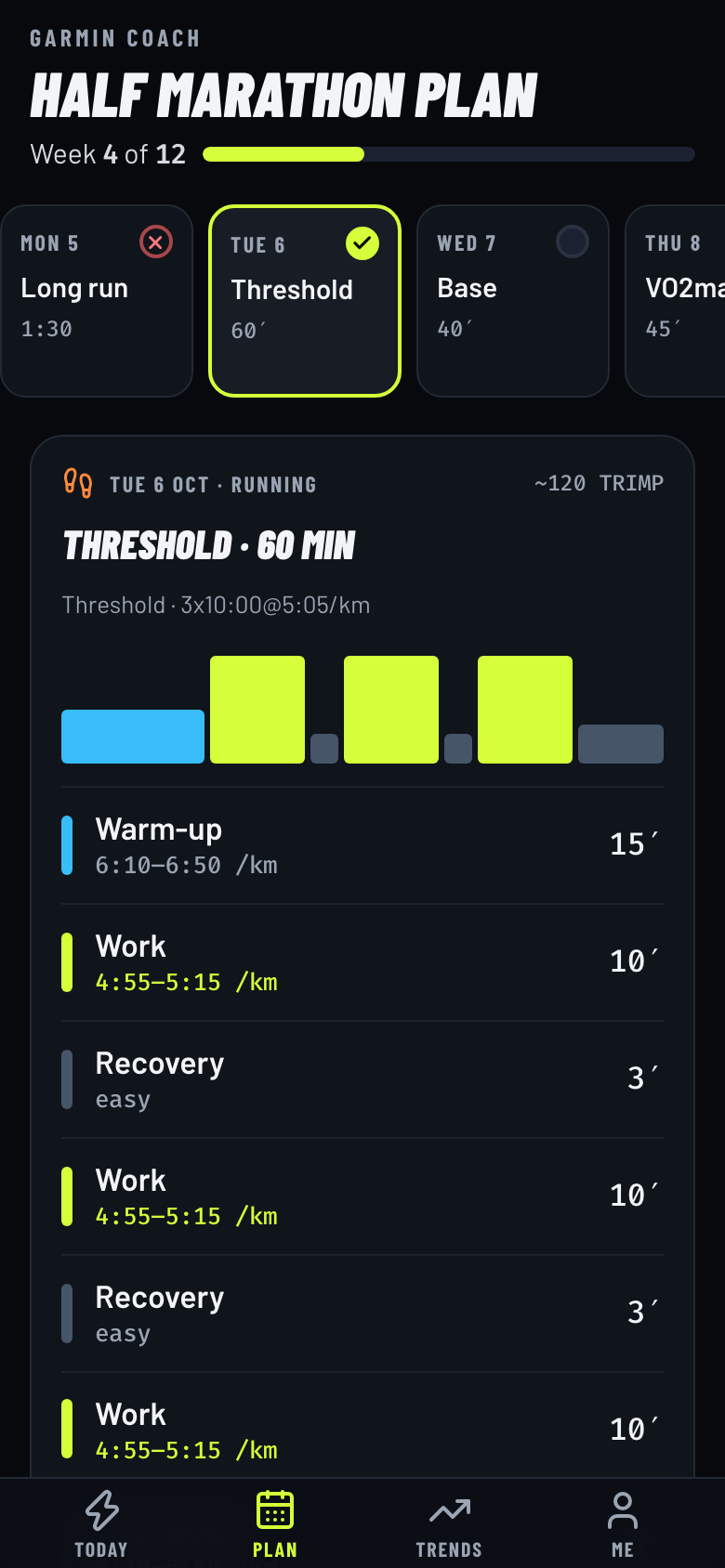
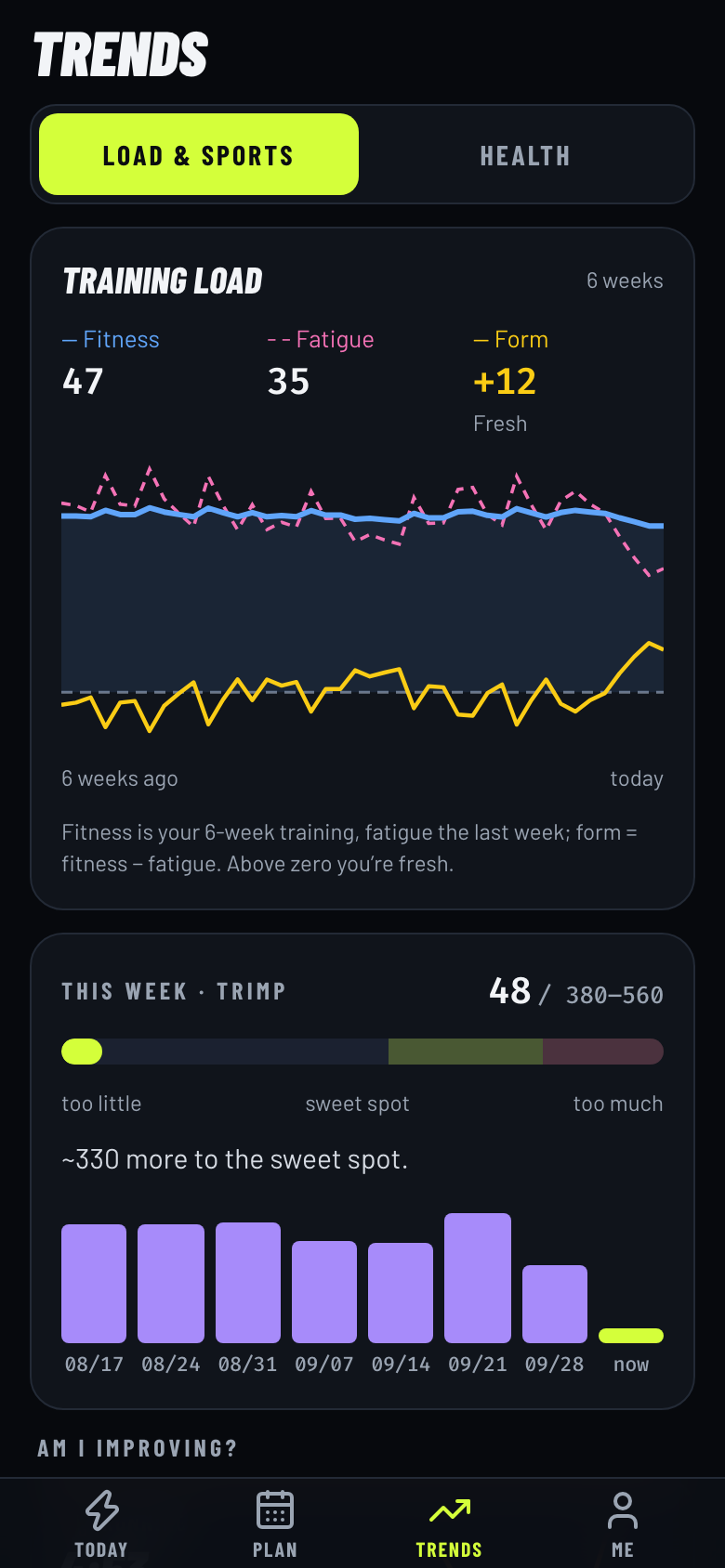
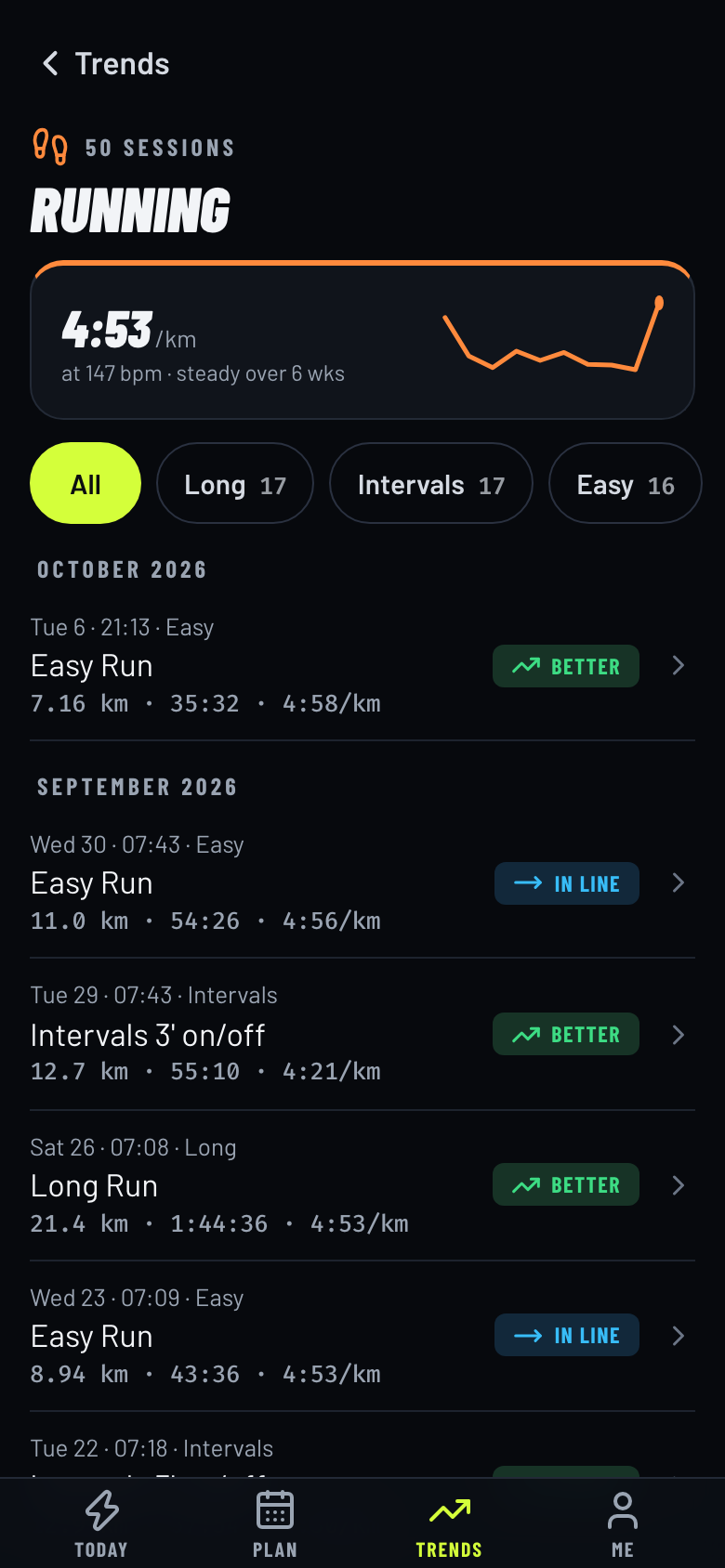
Open the same address on your phone (home Wi-Fi) and Fitvio becomes your personal training companion: pick yourself once, then four tabs — Today, Plan, Trends, Me. A fresh workout shows up as a verdict card on top of Today instead of taking over the screen, and nothing you do on the phone changes what the wall shows. Tap a sport for its whole history, month by month, filtered by type (easy, long, intervals …).
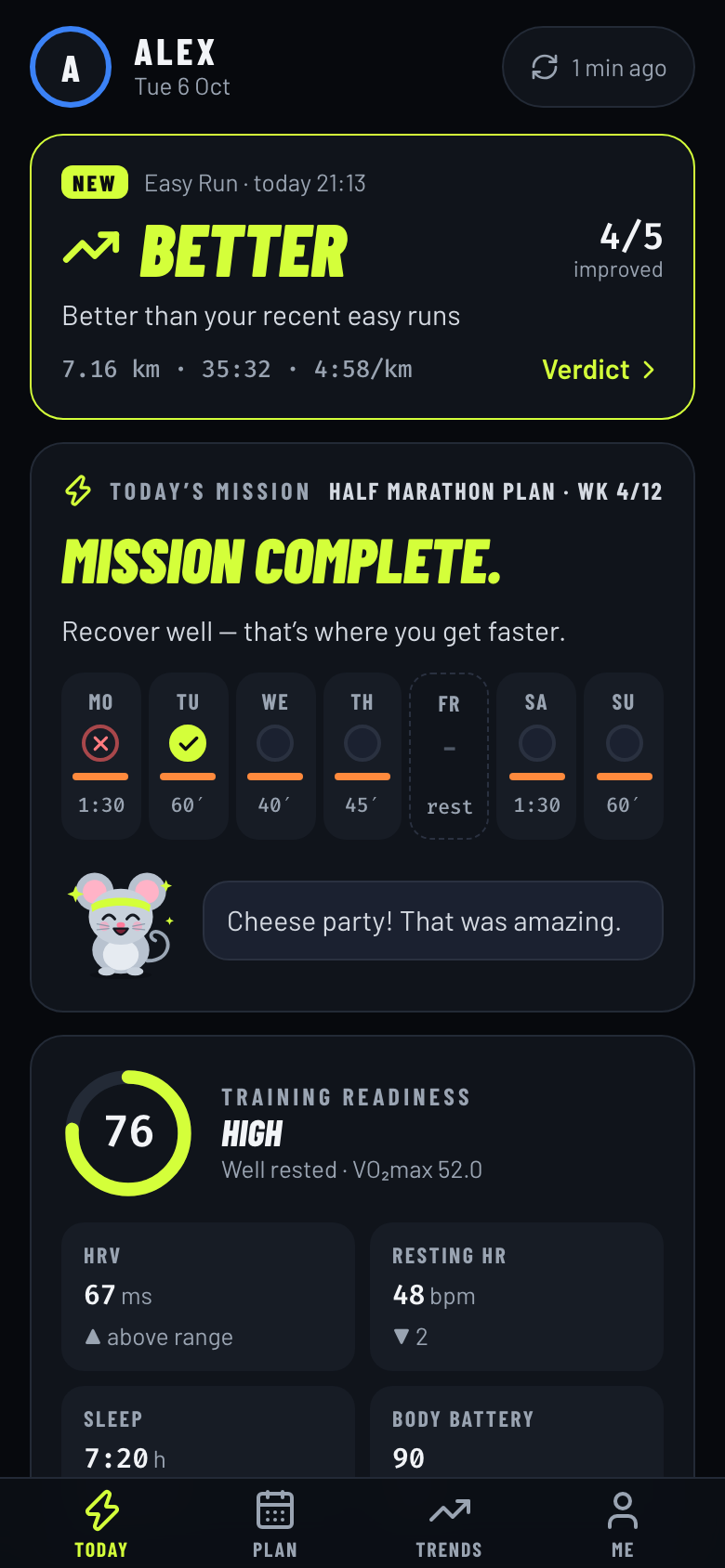
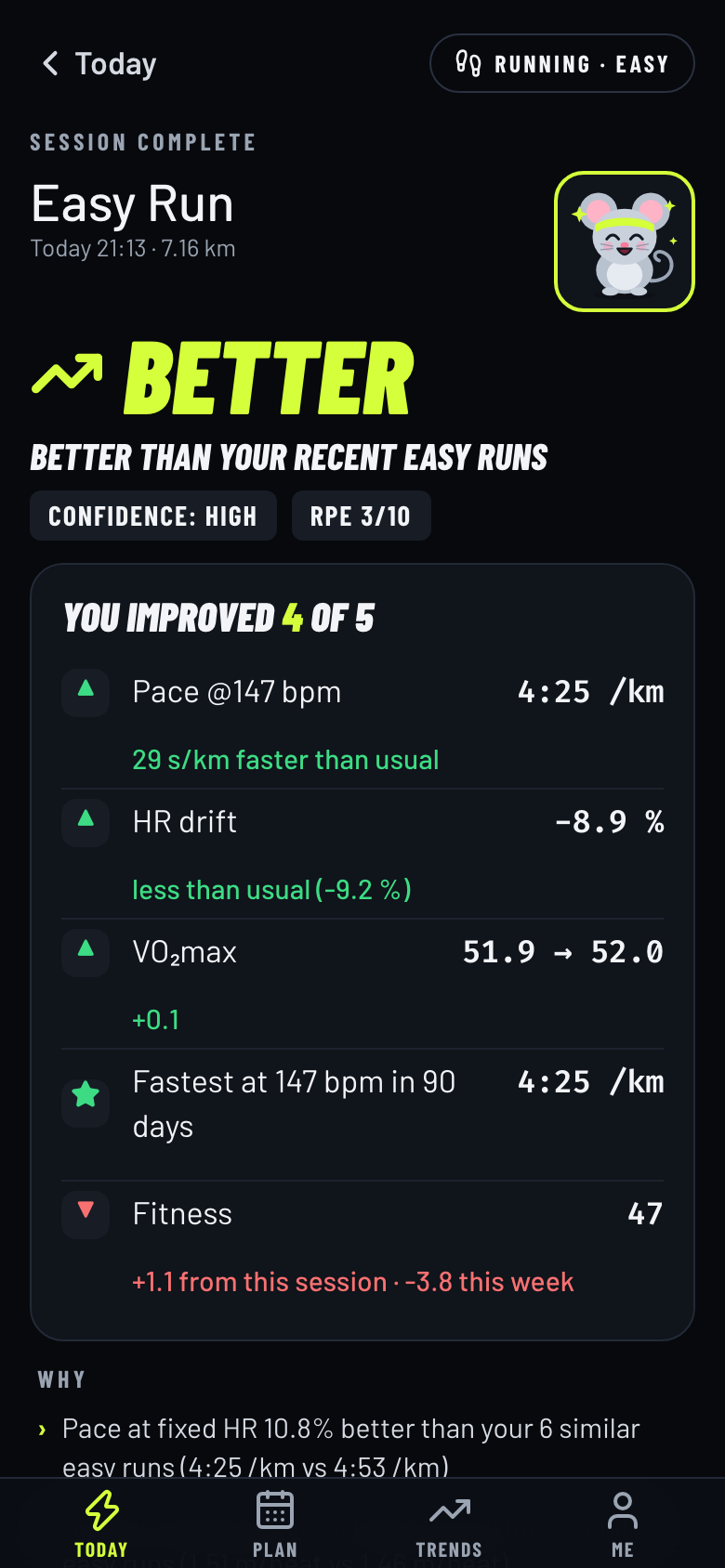
You need a machine in your home network with Docker (amd64 or arm64) and a Garmin Connect account.
mkdir fitvio && cd fitvio
curl -fsSLO https://raw.githubusercontent.com/romanbrej/fitvio/main/docker-compose.yml
mkdir -p data config && printf 'FITVIO_UID=%s\nFITVIO_GID=%s\nTZ=Europe/Berlin\n' "$(id -u)" "$(id -g)" > .env
docker compose up -d
Open http://<server-ip>:8765, sign in with your Garmin account, and watch your history arrive. That's it — the wall keeps itself in sync from now on. Put it on a tablet in kiosk mode (how).
Just want to look around? One command, no Garmin account, made-up data:
docker run --rm -p 8765:8765 -e FITVIO_CONFIG=/tmp/demo/users.json -e FITVIO_DB=/tmp/demo/app.db \
  ghcr.io/romanbrej/fitvio sh -c 'mkdir -p /tmp/demo && cp config/users.example.json /tmp/demo/users.json && fitvio demo && fitvio serve --host 0.0.0.0'
…then open http://localhost:8765.
Garmin watch → Garmin Connect → GarminDB (on your server) → fitvio: ingest, analyse, verdicts → wall (any browser)
New activities show up on the wall about 2–3 minutes after your watch syncs: the app checks Garmin for a new activity every 2 minutes and runs a quick differential sync; health data syncs hourly. More in How it works.
Which watches work? Any Garmin that syncs to Garmin Connect. Sport-specific numbers depend on your watch and sensors (power for cycling, SWOLF for swimming, reps and weight for gym).
Do I need Garmin Coach? No. Without a plan in your Garmin calendar the week strip just doesn't show; everything else works.
Does it work with two-factor login? Yes — Fitvio asks for the code when you connect.
What hardware do I need? Any always-on amd64 or arm64 machine with Docker: a Raspberry Pi, NAS, mini PC or home server. Prefer an SSD over an SD card. For the wall, any tablet with a browser in kiosk mode (I use Fully Kiosk Browser).
Can I see it outside my home? No, by design — it's built for your home network only. Don't expose it to the internet.
Where does my data go? Nowhere. Your Garmin login and data stay in the data/ folder on your server. Details in Security and privacy.
This is a young project and I'd love to hear how it works for you. Found a bug, a watch that behaves differently, or have an idea? Open an issue. Pull requests are welcome — Development gets you running with demo data in a few minutes.
| Setup and hosting | Docker, automatic updates, connecting Garmin, without Docker, putting it on the wall |
| How it works | Verdicts per sport, heat adjustment, the Garmin plan, the buddy, syncing, limitations |
| Security and privacy | What's stored where, how the web app is protected, reporting issues |
| Development | Local setup with demo data, tests, CLI, project layout |
Built on GarminDB, garminconnect and fitdecode.
Built with the help of Claude Code (an AI coding assistant); designed, reviewed and tested by me.
Fitvio is not affiliated with or endorsed by Garmin. It uses the unofficial Garmin Connect login (through GarminDB and garminconnect), which Garmin can change at any time. It is not a medical device — its verdicts are training feedback, not health advice.
Licensed under the GNU General Public License v2.0.
Self-hosted Garmin & Intervals.icu dashboard for your wall and phone: a verdict after every workout. · Live demo ↓
See the codeYour Garmin data on the wall — and one honest answer after every workout: did this session make me better?
▶ Try the demo: the wall and the phone app in your browser, with made-up data for two athletes. Nothing to install, nothing is sent anywhere.
A self-hosted dashboard for a tablet on your wall. It pulls your activities and health data from Garmin Connect, compares every new workout with your own similar sessions, and shows today's plan, your recovery and how each sport is trending — with a little training buddy that reacts to how you're doing.
I built it for my own hallway: a Raspberry Pi in the cupboard and a Samsung Galaxy Tab A8 on the wall. It's free, open source and runs entirely on your own network — no cloud, no account with me, no tracking.
Screenshots use the built-in demo data.
Open the same address on your phone (home Wi-Fi) and Fitvio becomes your personal training companion: pick yourself once, then four tabs — Today, Plan, Trends, Me. A fresh workout shows up as a verdict card on top of Today instead of taking over the screen, and nothing you do on the phone changes what the wall shows. Tap a sport for its whole history, month by month, filtered by type (easy, long, intervals …).
You need a machine in your home network with Docker (amd64 or arm64) and a Garmin Connect account.
mkdir fitvio && cd fitvio
curl -fsSLO https://raw.githubusercontent.com/romanbrej/fitvio/main/docker-compose.yml
mkdir -p data config && printf 'FITVIO_UID=%s\nFITVIO_GID=%s\nTZ=Europe/Berlin\n' "$(id -u)" "$(id -g)" > .env
docker compose up -d
Open http://<server-ip>:8765, sign in with your Garmin account, and watch your history arrive. That's it — the wall keeps itself in sync from now on. Put it on a tablet in kiosk mode (how).
Just want to look around? One command, no Garmin account, made-up data:
docker run --rm -p 8765:8765 -e FITVIO_CONFIG=/tmp/demo/users.json -e FITVIO_DB=/tmp/demo/app.db \
  ghcr.io/romanbrej/fitvio sh -c 'mkdir -p /tmp/demo && cp config/users.example.json /tmp/demo/users.json && fitvio demo && fitvio serve --host 0.0.0.0'
…then open http://localhost:8765.
Garmin watch → Garmin Connect → GarminDB (on your server) → fitvio: ingest, analyse, verdicts → wall (any browser)
New activities show up on the wall about 2–3 minutes after your watch syncs: the app checks Garmin for a new activity every 2 minutes and runs a quick differential sync; health data syncs hourly. More in How it works.
Which watches work? Any Garmin that syncs to Garmin Connect. Sport-specific numbers depend on your watch and sensors (power for cycling, SWOLF for swimming, reps and weight for gym).
Do I need Garmin Coach? No. Without a plan in your Garmin calendar the week strip just doesn't show; everything else works.
Does it work with two-factor login? Yes — Fitvio asks for the code when you connect.
What hardware do I need? Any always-on amd64 or arm64 machine with Docker: a Raspberry Pi, NAS, mini PC or home server. Prefer an SSD over an SD card. For the wall, any tablet with a browser in kiosk mode (I use Fully Kiosk Browser).
Can I see it outside my home? No, by design — it's built for your home network only. Don't expose it to the internet.
Where does my data go? Nowhere. Your Garmin login and data stay in the data/ folder on your server. Details in Security and privacy.
This is a young project and I'd love to hear how it works for you. Found a bug, a watch that behaves differently, or have an idea? Open an issue. Pull requests are welcome — Development gets you running with demo data in a few minutes.
| Setup and hosting | Docker, automatic updates, connecting Garmin, without Docker, putting it on the wall |
| How it works | Verdicts per sport, heat adjustment, the Garmin plan, the buddy, syncing, limitations |
| Security and privacy | What's stored where, how the web app is protected, reporting issues |
| Development | Local setup with demo data, tests, CLI, project layout |
Built on GarminDB, garminconnect and fitdecode.
Built with the help of Claude Code (an AI coding assistant); designed, reviewed and tested by me.
Fitvio is not affiliated with or endorsed by Garmin. It uses the unofficial Garmin Connect login (through GarminDB and garminconnect), which Garmin can change at any time. It is not a medical device — its verdicts are training feedback, not health advice.
Licensed under the GNU General Public License v2.0.





