A free, open-source alternative to Adobe Acrobat for Windows and macOS. Built on BentoPDF.
See the code
The free, open-source alternative to Adobe Acrobat for Windows and macOS.
Edit, sign, convert, organize, compress and protect PDFs in a familiar desktop workspace — offline, with no account, no subscription and no upsells.




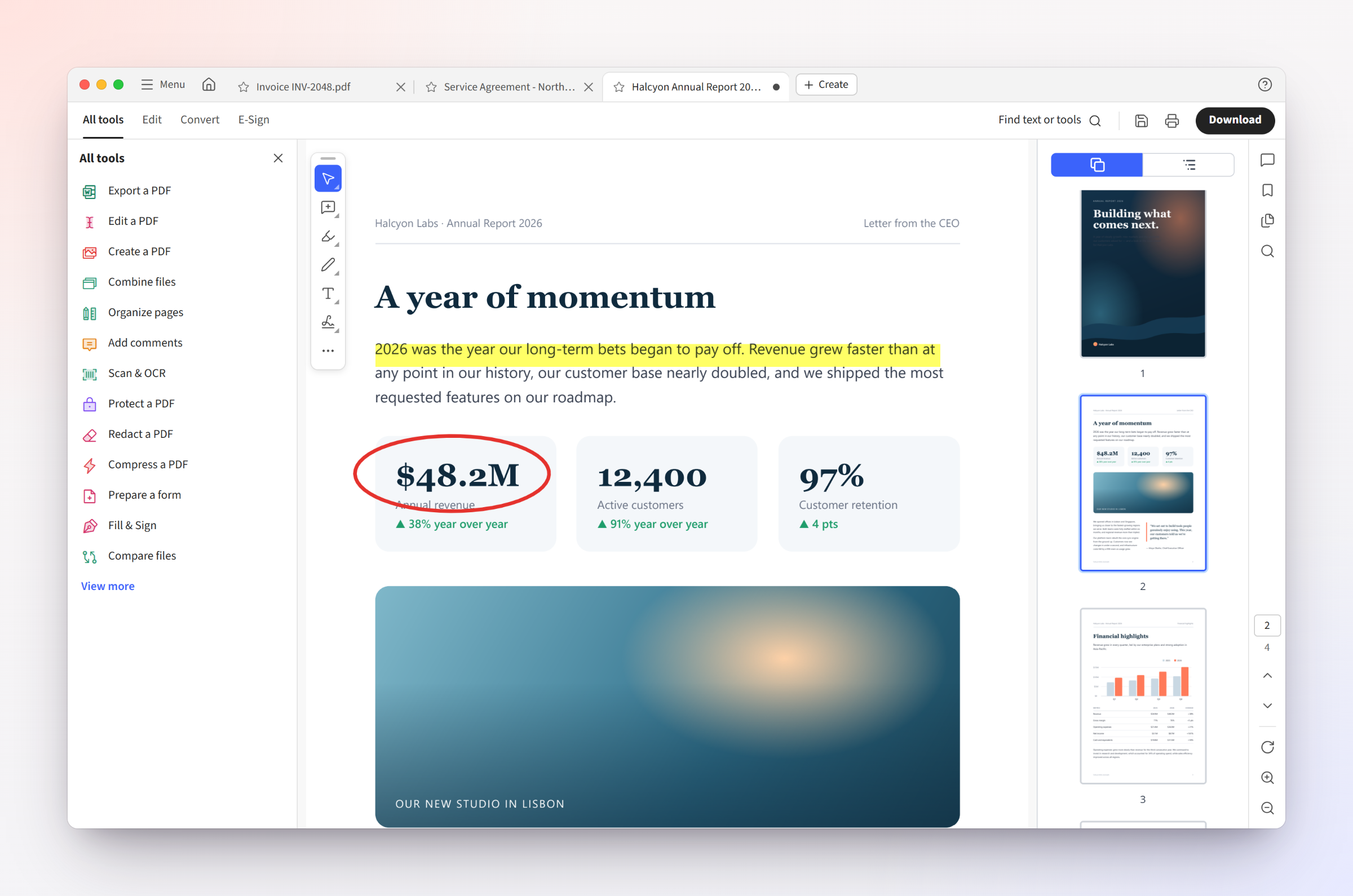
If you've used Acrobat, you already know how to use Paperwing: the same tabbed workspace, All tools panel, Edit / Convert / E-Sign tabs, floating quick-action toolbar and right-hand navigation rail — and the same keyboard shortcuts.
What you won't find: sign-in prompts, cloud nags, trial pop-ups, AI overlays, paywalled buttons or a monthly bill. Every feature is free, and your files never leave your computer.
| Paperwing | Acrobat Pro | |
|---|---|---|
| Price | Free, forever | Subscription |
| Account required | No | Yes |
| Works offline | Yes¹ | Partly |
| Upsell / AI pop-ups | None | Frequent |
| Open source | Yes (AGPL-3.0) | No |
| Portable (no install) on Windows | Yes | No |
| Familiar Acrobat-style workspace & shortcuts | Yes | — |
¹ A few tools fetch their engine once on first use; see Privacy.
Paperwing is an independent project and is not affiliated with or endorsed by Adobe. See Trademarks.
A complete PDF workspace
100+ tools from BentoPDF
Designed around Acrobat's most common complaints
Get the latest version from the Releases page.
| Platform | File | Notes |
|---|---|---|
| Windows — installer | Paperwing-Setup-<version>-x64.exe | Start-menu entry, file association, uninstaller |
| Windows — portable | Paperwing-Portable-<version>-win-x64.zip | Unzip anywhere and run Paperwing.exe; settings stay in the folder |
| macOS — Apple Silicon | Paperwing-<version>-mac-arm64.dmg | M1 / M2 / M3 / M4 Macs |
| macOS — Intel | Paperwing-<version>-mac-x64.dmg | Intel Macs |
Paperwing isn't code-signed yet, so Windows SmartScreen and macOS Gatekeeper will warn the first time you open it. See Installation for the one-time steps.
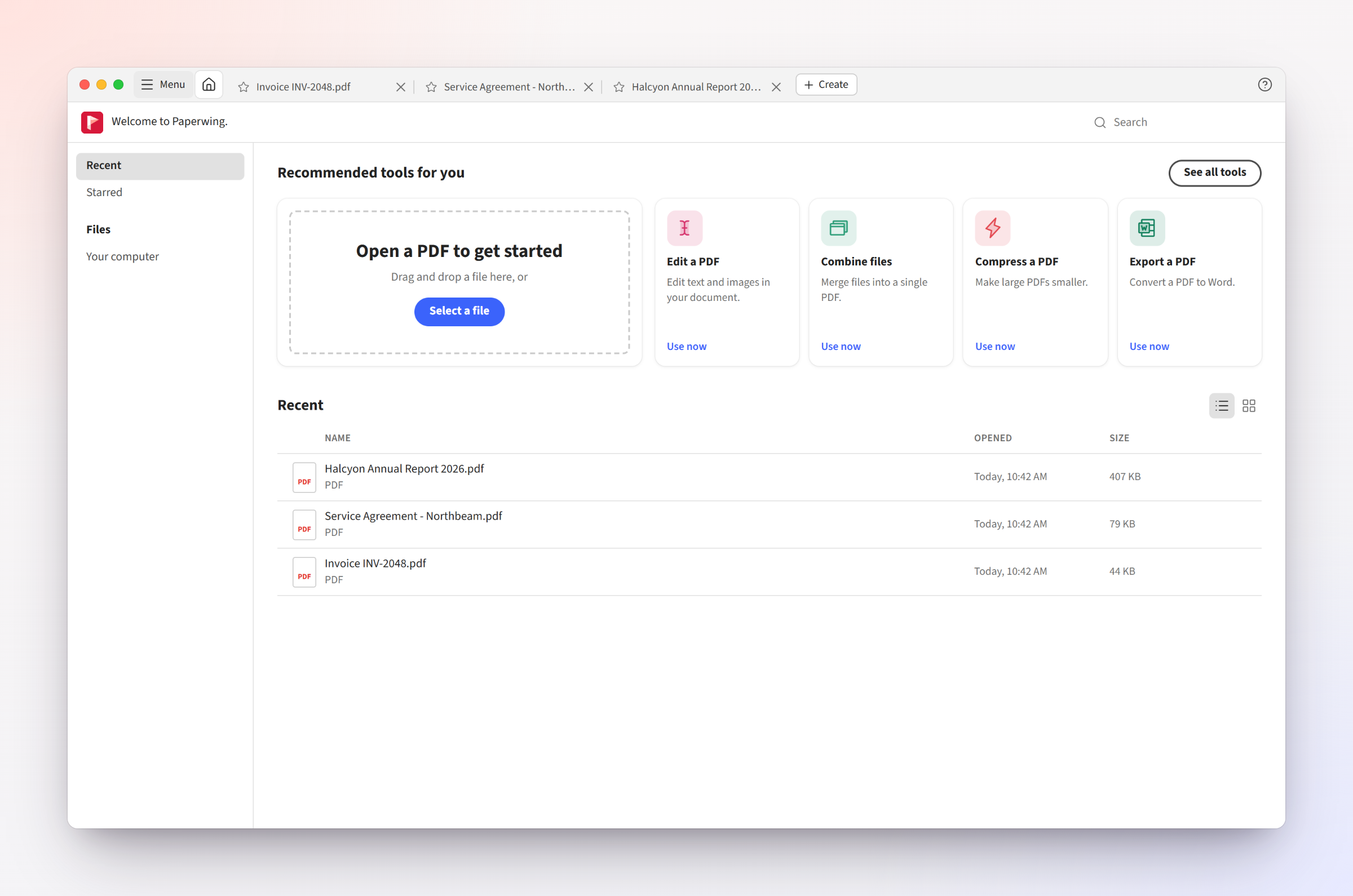 Home — recent and starred files, recommended tools | 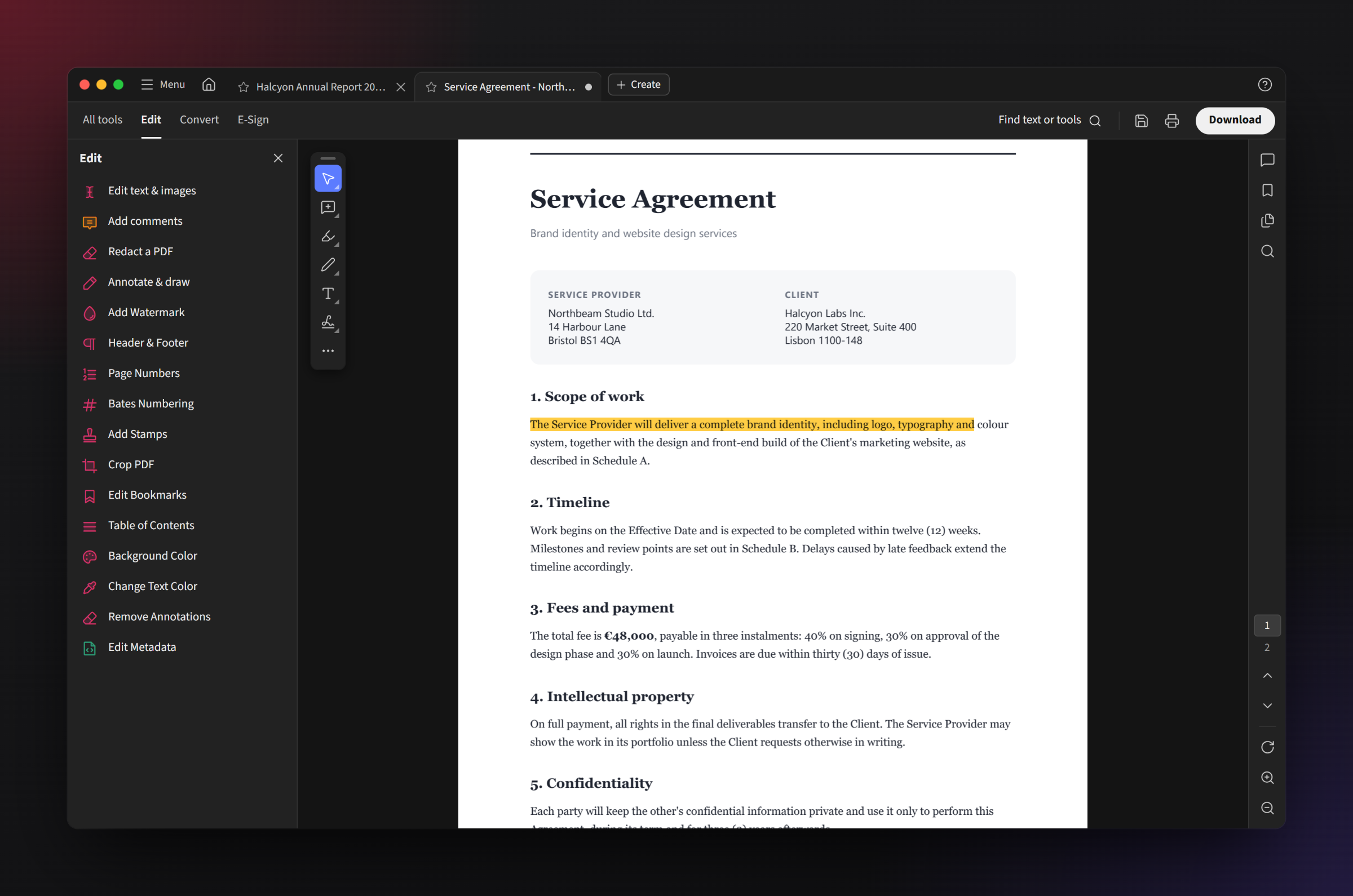 Dark mode — follows your system automatically |
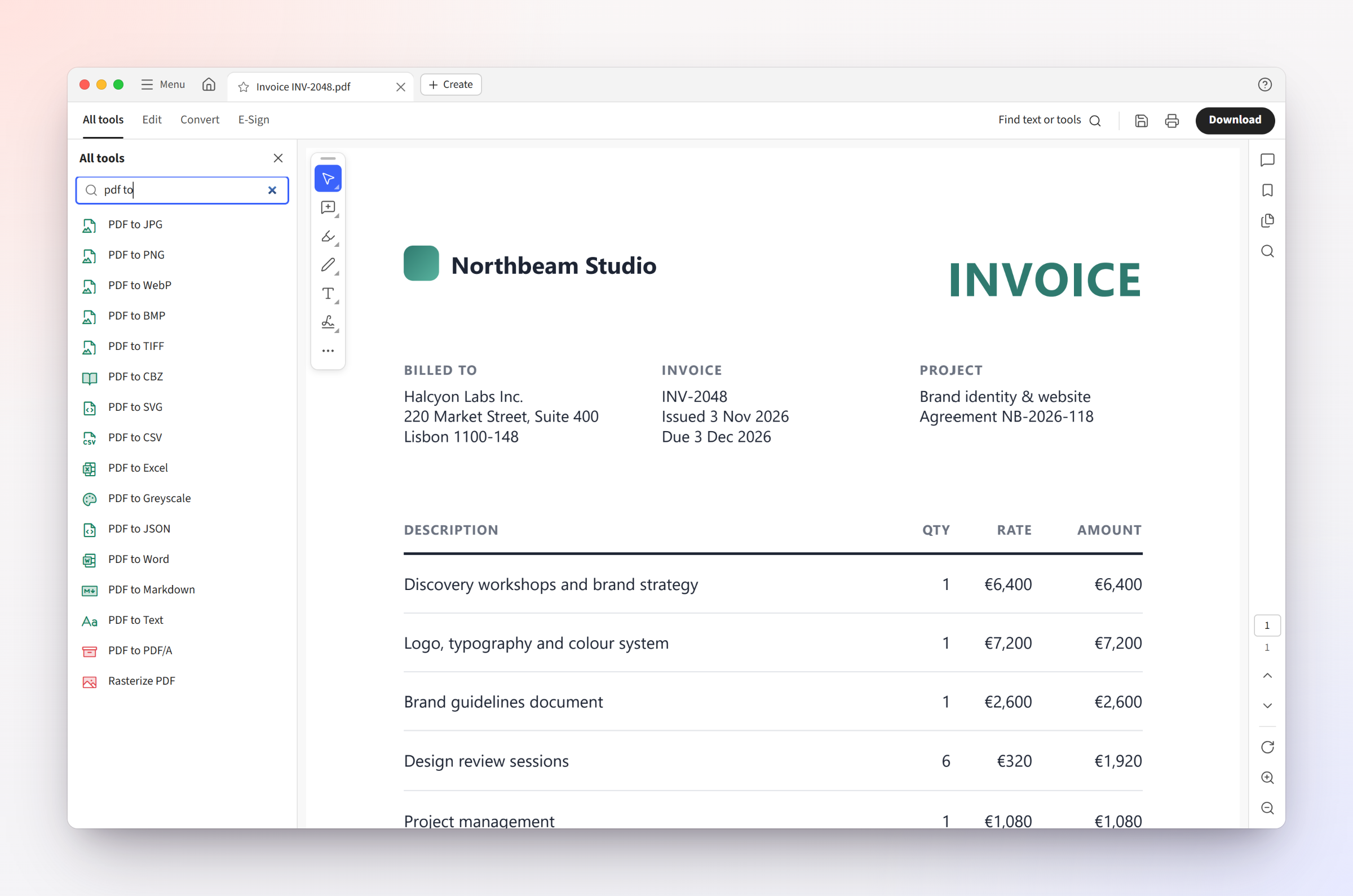 All tools sidebar — search and browse every tool | 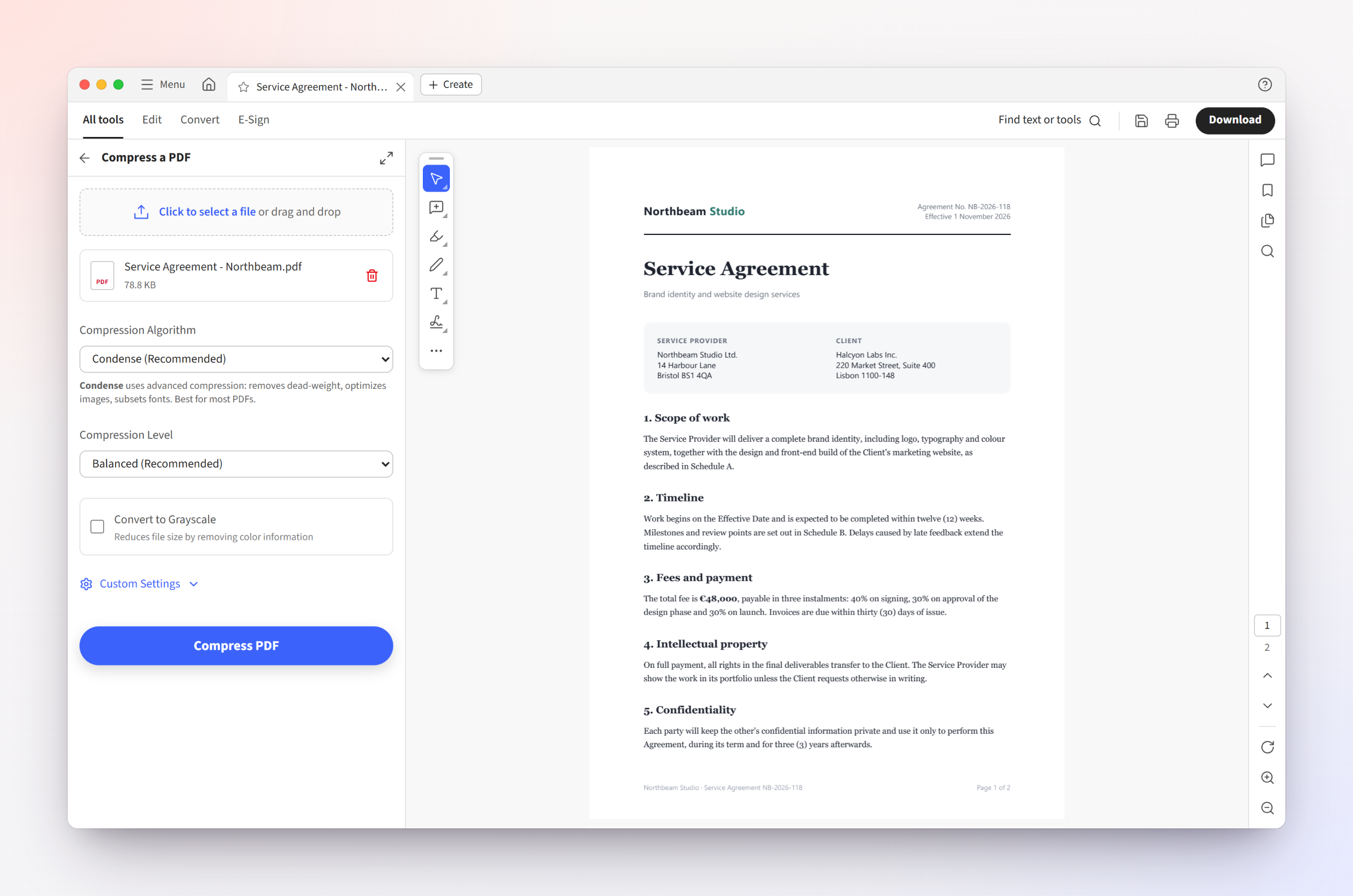 Tools on the open document — results open in a new tab |
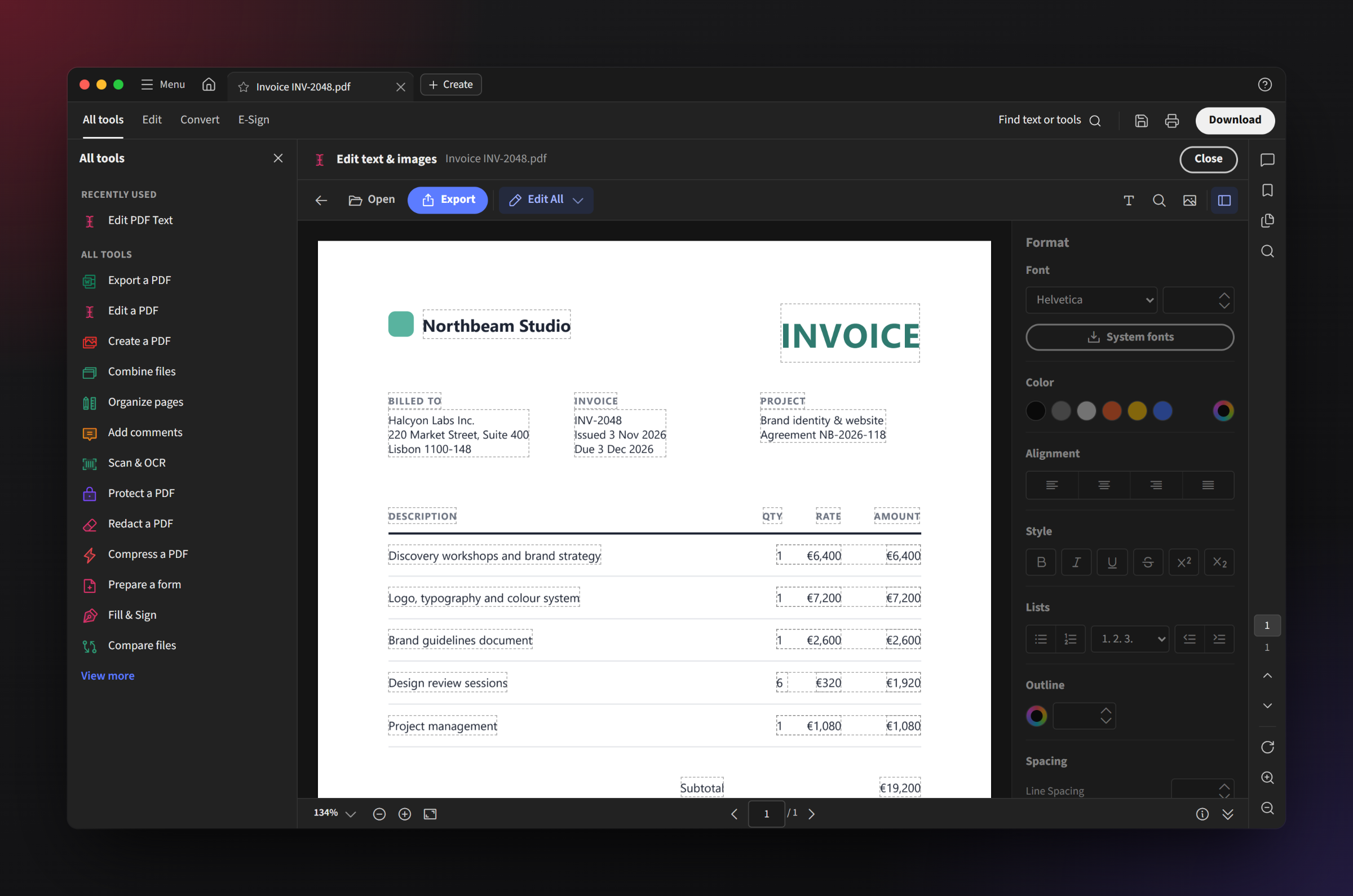 Edit text & images — right in the page | 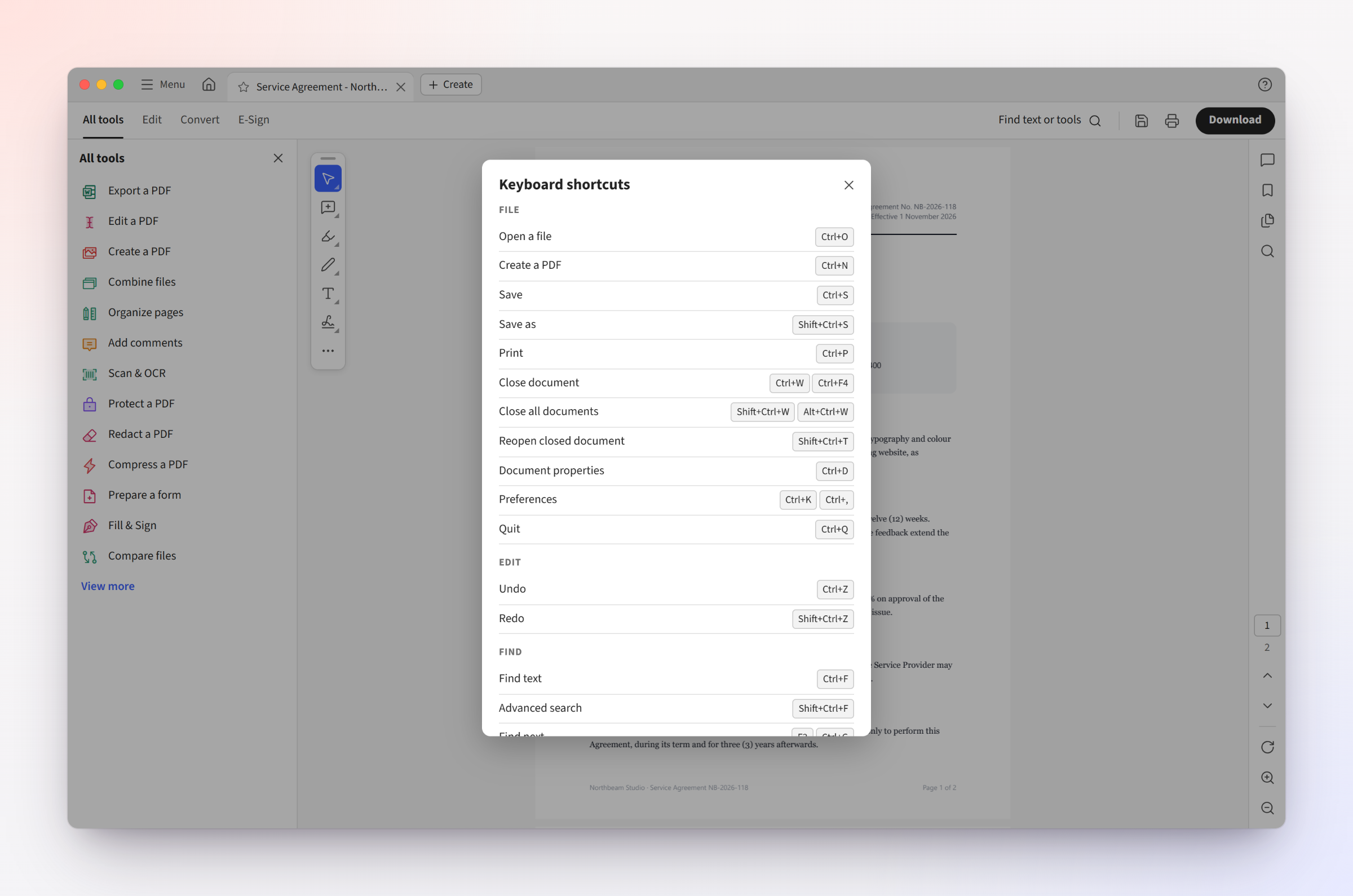 Acrobat shortcuts — including single-key tools |
Paperwing mirrors Acrobat's defaults (⌘ replaces Ctrl on macOS). A few favourites:
| Action | Shortcut |
|---|---|
| Open / Save / Save as | Ctrl+O · Ctrl+S · Shift+Ctrl+S |
| Find / find next | Ctrl+F · F3 |
| Zoom in / out / fit page / actual size | Ctrl+= · Ctrl+- · Ctrl+0 · Ctrl+1 |
| Rotate view | Shift+Ctrl++ / - |
| Page thumbnails / tools panel | F4 · Shift+F4 |
| Highlight · comment · draw · text box | U · S · D · X |
| Read mode · full screen | Ctrl+H · Ctrl+L |
| Search tools & commands | Shift+Ctrl+P |
The full list is in docs/SHORTCUTS.md and inside the app under Help ▸ Keyboard shortcuts.
All PDF processing happens on your computer. Paperwing has no accounts, analytics or telemetry. The only network requests it makes are:
Paperwing is a fork of BentoPDF. BentoPDF is a web app: each of its tools is a page that processes PDFs in the browser with open-source libraries compiled to WebAssembly, so nothing is uploaded. Paperwing keeps that code unchanged and adds three layers around it:
| Layer | What it does | Code |
|---|---|---|
| BentoPDF | All PDF work: the 100+ tools, plus the document viewer (EmbedPDF on PDFium), pdf-lib, PDF.js, qpdf, Tesseract OCR, LibreOffice and more | src/js, src/pages, public |
| Workspace | The Acrobat-style interface: tabs, Home, the searchable tools sidebar, the viewer workspace, shortcuts, preferences | app.html, src/acro/ |
| Integration | Restyles every BentoPDF tool page (light/dark, Acrobat look) and connects it to the workspace: passes the open file in and catches the result | src/reskin/, reskin/ |
| Desktop app | Electron: serves the built app from disk, native open/save dialogs, file associations, launch screen, portable mode | desktop/ |
When you open a PDF, it appears in BentoPDF's viewer. When you pick a tool, Paperwing loads that BentoPDF tool page beside the document and hands it your file. BentoPDF's code does the work on your computer, and Paperwing opens the result in a new tab or saves it where you choose.
Apart from two lines in vite.config.ts that register Paperwing's build plugin, BentoPDF's code is
included unmodified, so new BentoPDF releases can be merged in directly.
You need Node.js 22 or newer.
git clone https://github.com/rohanvijaykumar/paperwing.git
cd paperwing
npm ci                      # BentoPDF dependencies
cd desktop && npm ci        # desktop shell dependencies
npm run dev                 # build the web app and launch Paperwing
Packaging, testing and the release process are covered in docs/BUILDING.md.
Paperwing is built on BentoPDF by Alam and contributors. BentoPDF provides every one of the 100+ tools and all of the PDF processing, including its integration of PDFium, PDF.js, pdf-lib, qpdf, LibreOffice and more. Paperwing adds the desktop application and the Acrobat-style interface on top (see How Paperwing works).
If Paperwing is useful to you, please consider sponsoring BentoPDF's author ❤️
Full third-party notices are in NOTICE.md. BentoPDF's original README is preserved in docs/BENTOPDF.md.
Bug reports, ideas and pull requests are welcome — see CONTRIBUTING.md. Problems with an individual tool's output usually come from BentoPDF's tool code; we'll help route them upstream.
Paperwing is released under the GNU Affero General Public License v3.0, the same license as BentoPDF. You're free to use, study, modify and share it; if you distribute a modified version, you must make its source available under the same license.
Adobe and Acrobat are registered trademarks of Adobe Inc. Paperwing is not affiliated with, endorsed by or sponsored by Adobe. These names are used only to describe the kind of software Paperwing is an alternative to. Paperwing contains no Adobe code, logos, icons or fonts.
A free, open-source alternative to Adobe Acrobat for Windows and macOS. Built on BentoPDF.
See the code
The free, open-source alternative to Adobe Acrobat for Windows and macOS.
Edit, sign, convert, organize, compress and protect PDFs in a familiar desktop workspace — offline, with no account, no subscription and no upsells.
If you've used Acrobat, you already know how to use Paperwing: the same tabbed workspace, All tools panel, Edit / Convert / E-Sign tabs, floating quick-action toolbar and right-hand navigation rail — and the same keyboard shortcuts.
What you won't find: sign-in prompts, cloud nags, trial pop-ups, AI overlays, paywalled buttons or a monthly bill. Every feature is free, and your files never leave your computer.
| Paperwing | Acrobat Pro | |
|---|---|---|
| Price | Free, forever | Subscription |
| Account required | No | Yes |
| Works offline | Yes¹ | Partly |
| Upsell / AI pop-ups | None | Frequent |
| Open source | Yes (AGPL-3.0) | No |
| Portable (no install) on Windows | Yes | No |
| Familiar Acrobat-style workspace & shortcuts | Yes | — |
¹ A few tools fetch their engine once on first use; see Privacy.
Paperwing is an independent project and is not affiliated with or endorsed by Adobe. See Trademarks.
A complete PDF workspace
100+ tools from BentoPDF
Designed around Acrobat's most common complaints
Get the latest version from the Releases page.
| Platform | File | Notes |
|---|---|---|
| Windows — installer | Paperwing-Setup-<version>-x64.exe | Start-menu entry, file association, uninstaller |
| Windows — portable | Paperwing-Portable-<version>-win-x64.zip | Unzip anywhere and run Paperwing.exe; settings stay in the folder |
| macOS — Apple Silicon | Paperwing-<version>-mac-arm64.dmg | M1 / M2 / M3 / M4 Macs |
| macOS — Intel | Paperwing-<version>-mac-x64.dmg | Intel Macs |
Paperwing isn't code-signed yet, so Windows SmartScreen and macOS Gatekeeper will warn the first time you open it. See Installation for the one-time steps.
Home — recent and starred files, recommended tools | Dark mode — follows your system automatically |
All tools sidebar — search and browse every tool | Tools on the open document — results open in a new tab |
Edit text & images — right in the page | Acrobat shortcuts — including single-key tools |
Paperwing mirrors Acrobat's defaults (⌘ replaces Ctrl on macOS). A few favourites:
| Action | Shortcut |
|---|---|
| Open / Save / Save as | Ctrl+O · Ctrl+S · Shift+Ctrl+S |
| Find / find next | Ctrl+F · F3 |
| Zoom in / out / fit page / actual size | Ctrl+= · Ctrl+- · Ctrl+0 · Ctrl+1 |
| Rotate view | Shift+Ctrl++ / - |
| Page thumbnails / tools panel | F4 · Shift+F4 |
| Highlight · comment · draw · text box | U · S · D · X |
| Read mode · full screen | Ctrl+H · Ctrl+L |
| Search tools & commands | Shift+Ctrl+P |
The full list is in docs/SHORTCUTS.md and inside the app under Help ▸ Keyboard shortcuts.
All PDF processing happens on your computer. Paperwing has no accounts, analytics or telemetry. The only network requests it makes are:
Paperwing is a fork of BentoPDF. BentoPDF is a web app: each of its tools is a page that processes PDFs in the browser with open-source libraries compiled to WebAssembly, so nothing is uploaded. Paperwing keeps that code unchanged and adds three layers around it:
| Layer | What it does | Code |
|---|---|---|
| BentoPDF | All PDF work: the 100+ tools, plus the document viewer (EmbedPDF on PDFium), pdf-lib, PDF.js, qpdf, Tesseract OCR, LibreOffice and more | src/js, src/pages, public |
| Workspace | The Acrobat-style interface: tabs, Home, the searchable tools sidebar, the viewer workspace, shortcuts, preferences | app.html, src/acro/ |
| Integration | Restyles every BentoPDF tool page (light/dark, Acrobat look) and connects it to the workspace: passes the open file in and catches the result | src/reskin/, reskin/ |
| Desktop app | Electron: serves the built app from disk, native open/save dialogs, file associations, launch screen, portable mode | desktop/ |
When you open a PDF, it appears in BentoPDF's viewer. When you pick a tool, Paperwing loads that BentoPDF tool page beside the document and hands it your file. BentoPDF's code does the work on your computer, and Paperwing opens the result in a new tab or saves it where you choose.
Apart from two lines in vite.config.ts that register Paperwing's build plugin, BentoPDF's code is
included unmodified, so new BentoPDF releases can be merged in directly.
You need Node.js 22 or newer.
git clone https://github.com/rohanvijaykumar/paperwing.git
cd paperwing
npm ci                      # BentoPDF dependencies
cd desktop && npm ci        # desktop shell dependencies
npm run dev                 # build the web app and launch Paperwing
Packaging, testing and the release process are covered in docs/BUILDING.md.
Paperwing is built on BentoPDF by Alam and contributors. BentoPDF provides every one of the 100+ tools and all of the PDF processing, including its integration of PDFium, PDF.js, pdf-lib, qpdf, LibreOffice and more. Paperwing adds the desktop application and the Acrobat-style interface on top (see How Paperwing works).
If Paperwing is useful to you, please consider sponsoring BentoPDF's author ❤️
Full third-party notices are in NOTICE.md. BentoPDF's original README is preserved in docs/BENTOPDF.md.
Bug reports, ideas and pull requests are welcome — see CONTRIBUTING.md. Problems with an individual tool's output usually come from BentoPDF's tool code; we'll help route them upstream.
Paperwing is released under the GNU Affero General Public License v3.0, the same license as BentoPDF. You're free to use, study, modify and share it; if you distribute a modified version, you must make its source available under the same license.
Adobe and Acrobat are registered trademarks of Adobe Inc. Paperwing is not affiliated with, endorsed by or sponsored by Adobe. These names are used only to describe the kind of software Paperwing is an alternative to. Paperwing contains no Adobe code, logos, icons or fonts.





