
A fast, private PDF editor for your desktop, Mac, Windows or Linux.
Rust
0
27 commits
updated Oct 6, 2026
See what people are saying
README
BergPDF
A fast, private PDF editor for your desktop.
Edit, annotate, sign, measure, fill in forms and make scans searchable. Offline, no account, no tracking.
Download · Features · Install · Build it yourself · GPL-3.0
Why BergPDF
- Your documents stay on your computer. Everything core works offline. There is no account, no telemetry and no cloud. The optional AI features only send text when you press a button, to the provider you chose, with your own key. BergPDF can tell you when a newer version is published, but only if you allow it; it never downloads or installs anything by itself.
- Quick and light. A native app written in Rust: pages render in tiles (built with large drawings in mind), and there is no browser engine or runtime to install.
- Real editing, not just stamping. Change existing text and images in place, add text in the fonts you have installed, reorganise pages, and keep every change undoable.
- Free software. GPLv3: you can read the source, build it yourself and share it.
Features
Read and navigate Tabs, thumbnails, bookmarks, links, full-text search, fit page / fit width / any zoom, single or continuous pages, a dark page view, a command palette (Ctrl+K) and a right-click menu for what you can do right there. Pictures (PNG, JPEG) open as one-page PDFs. The interface is available in English, Dutch (Nederlands) and German (Deutsch); BergPDF follows your system language, or you pick one in Preferences.
Annotate Highlight, underline, strikeout, squiggly, sticky notes, text boxes, callouts (click the point, then place the box), stamps, rectangles, ellipses, lines, arrows, polygons and freehand drawing, with colour, opacity, line width and dash style. Text stays upright on rotated and landscape pages and can be turned in 90° steps. A comments panel lists everything.
Edit the document Edit existing text and images in place (for the font types BergPDF can safely rewrite; it tells you when it cannot), add new text and images, and rotate, delete, insert, duplicate, reorder, extract and merge pages. Choose from five bundled font families or any TrueType font installed on your computer.
Forms and signatures
Fill in form fields, flatten them, and decide whether copied pages keep their fields linked. Place a
handwritten signature, or sign digitally with a PKCS#12 certificate (.p12 / .pfx).
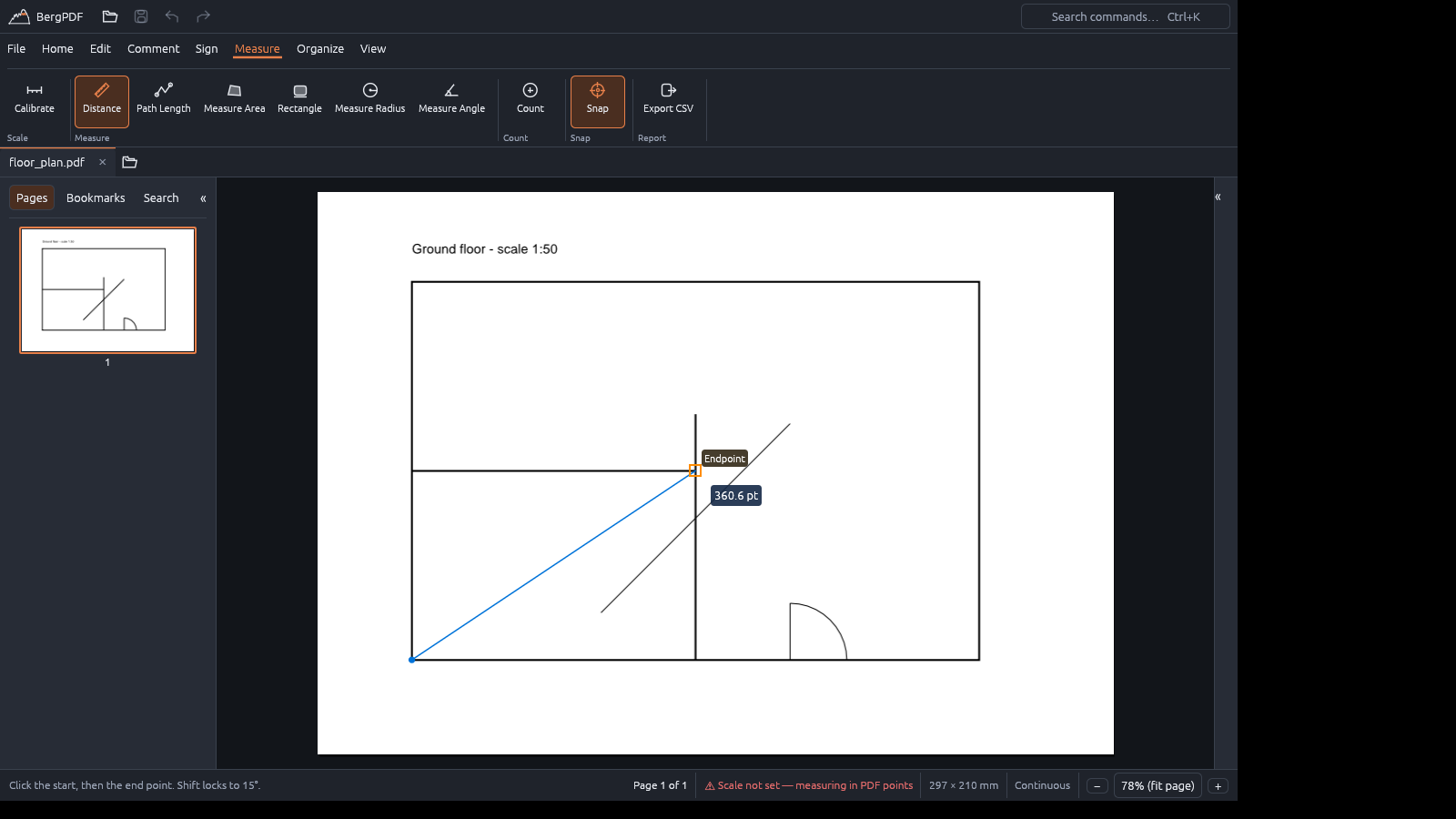
Measure Calibrate a scale, then measure distance, path length, area, rectangles, radius and angles, or count items by category. Measurements snap to the corners, ends, intersections and midpoints of technical drawings, and export to CSV.
Scans and archiving
- OCR turns a scanned page into searchable text with an invisible text layer. It runs on your computer.
- Save As Optimized shrinks files (lossless, balanced or smallest) and reports what it saved.
- Convert to PDF/A-2b for archiving, with a preview of the changes or the exact reason it cannot be done.
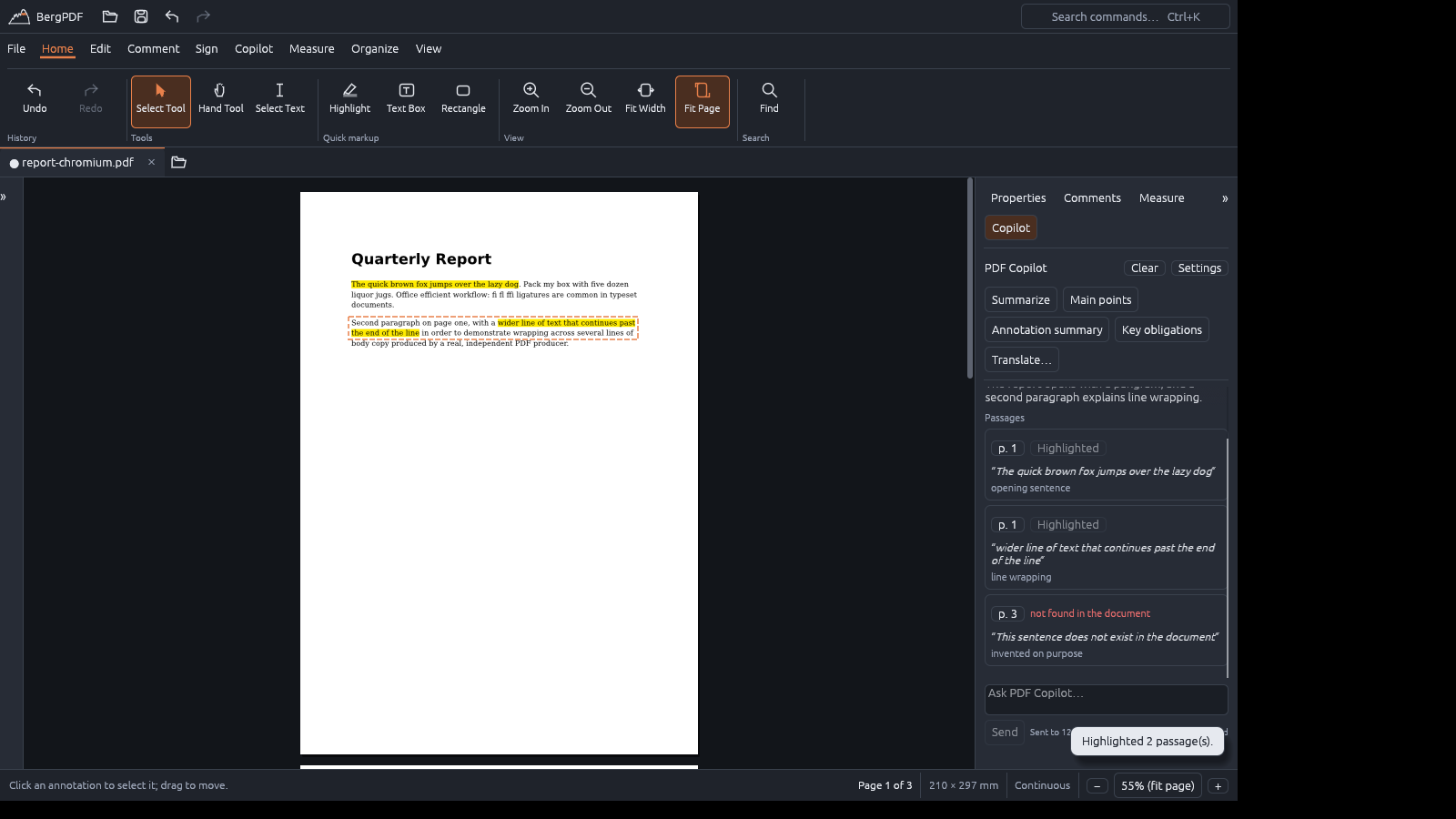
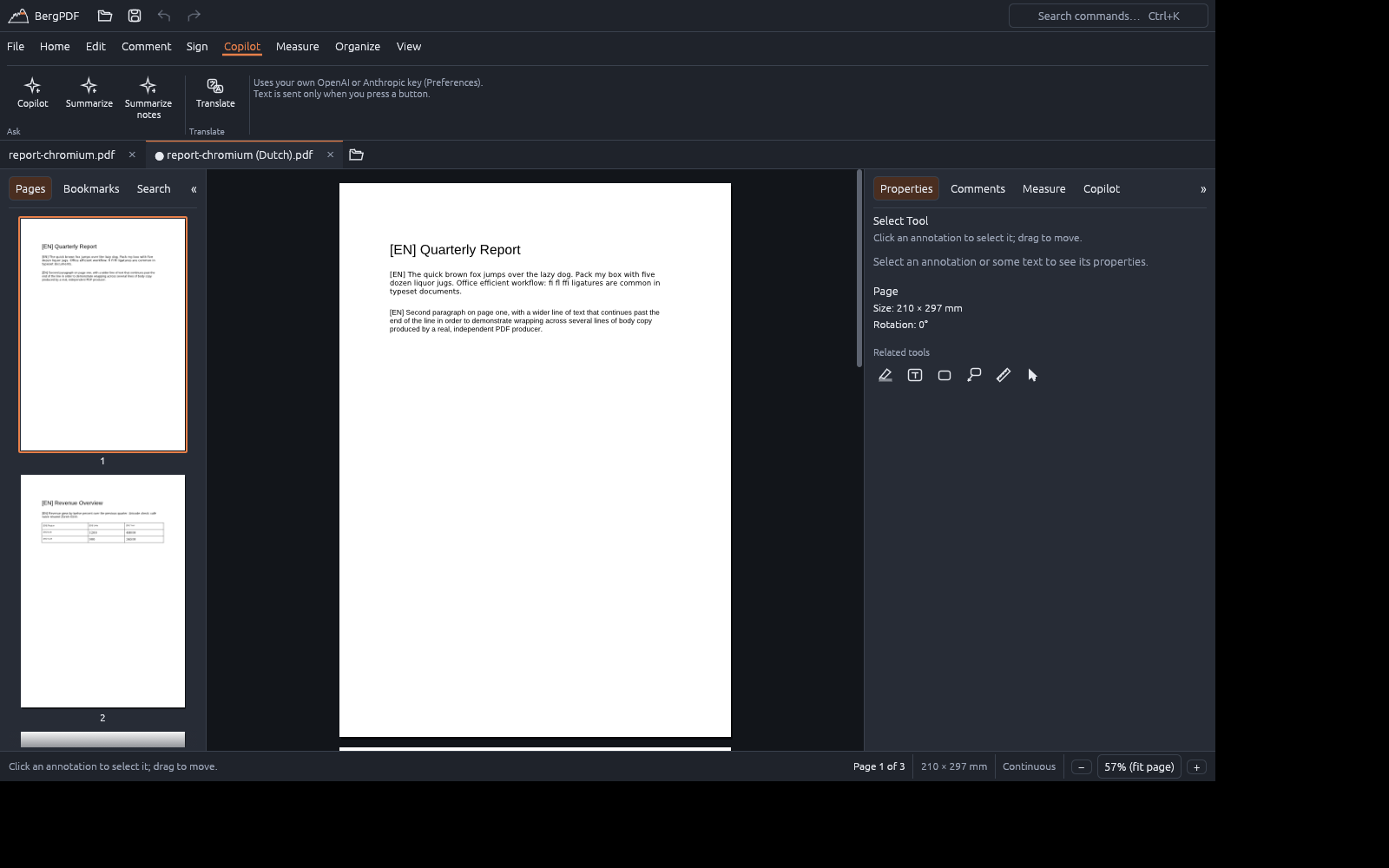
Optional: PDF Copilot and Translate (bring your own key: OpenAI, Anthropic, or a local server) Summarise a document or its comments, ask questions and get answers with page references and the quoted passages highlighted, explain a selected term, and translate a document in place: each paragraph is replaced where it stands, in a copy that opens in a new tab. Nothing is sent until you press a button, and your own document is never changed by it.
Safe by design Unlimited undo and redo, autosave with crash recovery, atomic saving that checks the result before replacing your file, and warnings instead of silent changes.
Install
Download the installer for your system from the Releases page and check its SHA-256 sum
against SHA256SUMS.txt.
| System | Download | Notes |
|---|---|---|
| Windows 11 (x86-64) | BergPDF_…-setup.exe | Installs for your user, no administrator rights needed. The installer asks whether to download the OCR models. |
| macOS (Apple Silicon) | BergPDF_….dmg | Drag BergPDF to Applications. |
| Linux (x86-64) | bergpdf_…_amd64.deb | sudo apt install ./bergpdf_…_amd64.deb. Needs an X11 or Wayland desktop with Vulkan or OpenGL. |
About the first start. BergPDF is a young project and the installers are not code-signed yet. Windows SmartScreen ("Windows protected your PC": choose More info → Run anyway) and macOS Gatekeeper (right-click the app, choose Open) will therefore warn you the first time. Verify the checksum and, if you prefer, build it yourself.
OCR models. Text recognition needs two small model files (about 12 MB). Say yes in the Windows installer, or use Download the OCR models the first time you run OCR; they are fetched once, checked against a fixed checksum and stored in your user folder. OCR currently recognises the basic Latin alphabet (accented letters are lost) and works best on straight, printed text.
If resizing or zooming feels slow on Windows, open Preferences ▸ Graphics to see which graphics adapter is used and to try another drawing API.
Status and limits
BergPDF is at version 0.1. It was developed and tested on Linux; the Windows and macOS builds are new, so expect
rough edges and please report them. Not (yet) available: secure redaction, password-protected
PDFs, printing, and trust validation of signature certificates (signatures are checked for integrity only).
The exact state of every feature, and how it was verified, is in docs/FEATURE_MATRIX.md.
Build it yourself
See DEVELOPING.md for compiling, testing and packaging.
Licence
BergPDF is free software under the GNU General Public License v3.0 or later (LICENSE). It comes
with no warranty. It uses open-source libraries (see docs/THIRD_PARTY_LICENSES.md)
and bundles the Liberation and DejaVu fonts under their own licences. The OCR models are separate files
from their own project and are not covered by the GPL (docs/DEPENDENCIES.md).
Contributions are welcome: see CONTRIBUTING.md.
Similar repos


A fast, private PDF editor for your desktop, Mac, Windows or Linux.
Rust
0
27 commits
updated Oct 6, 2026
See what people are saying
README
BergPDF
A fast, private PDF editor for your desktop.
Edit, annotate, sign, measure, fill in forms and make scans searchable. Offline, no account, no tracking.
Download · Features · Install · Build it yourself · GPL-3.0
Why BergPDF
- Your documents stay on your computer. Everything core works offline. There is no account, no telemetry and no cloud. The optional AI features only send text when you press a button, to the provider you chose, with your own key. BergPDF can tell you when a newer version is published, but only if you allow it; it never downloads or installs anything by itself.
- Quick and light. A native app written in Rust: pages render in tiles (built with large drawings in mind), and there is no browser engine or runtime to install.
- Real editing, not just stamping. Change existing text and images in place, add text in the fonts you have installed, reorganise pages, and keep every change undoable.
- Free software. GPLv3: you can read the source, build it yourself and share it.
Features
Read and navigate Tabs, thumbnails, bookmarks, links, full-text search, fit page / fit width / any zoom, single or continuous pages, a dark page view, a command palette (Ctrl+K) and a right-click menu for what you can do right there. Pictures (PNG, JPEG) open as one-page PDFs. The interface is available in English, Dutch (Nederlands) and German (Deutsch); BergPDF follows your system language, or you pick one in Preferences.
Annotate Highlight, underline, strikeout, squiggly, sticky notes, text boxes, callouts (click the point, then place the box), stamps, rectangles, ellipses, lines, arrows, polygons and freehand drawing, with colour, opacity, line width and dash style. Text stays upright on rotated and landscape pages and can be turned in 90° steps. A comments panel lists everything.
Edit the document Edit existing text and images in place (for the font types BergPDF can safely rewrite; it tells you when it cannot), add new text and images, and rotate, delete, insert, duplicate, reorder, extract and merge pages. Choose from five bundled font families or any TrueType font installed on your computer.
Forms and signatures
Fill in form fields, flatten them, and decide whether copied pages keep their fields linked. Place a
handwritten signature, or sign digitally with a PKCS#12 certificate (.p12 / .pfx).
Measure Calibrate a scale, then measure distance, path length, area, rectangles, radius and angles, or count items by category. Measurements snap to the corners, ends, intersections and midpoints of technical drawings, and export to CSV.
Scans and archiving
- OCR turns a scanned page into searchable text with an invisible text layer. It runs on your computer.
- Save As Optimized shrinks files (lossless, balanced or smallest) and reports what it saved.
- Convert to PDF/A-2b for archiving, with a preview of the changes or the exact reason it cannot be done.
Optional: PDF Copilot and Translate (bring your own key: OpenAI, Anthropic, or a local server) Summarise a document or its comments, ask questions and get answers with page references and the quoted passages highlighted, explain a selected term, and translate a document in place: each paragraph is replaced where it stands, in a copy that opens in a new tab. Nothing is sent until you press a button, and your own document is never changed by it.
Safe by design Unlimited undo and redo, autosave with crash recovery, atomic saving that checks the result before replacing your file, and warnings instead of silent changes.
Install
Download the installer for your system from the Releases page and check its SHA-256 sum
against SHA256SUMS.txt.
| System | Download | Notes |
|---|---|---|
| Windows 11 (x86-64) | BergPDF_…-setup.exe | Installs for your user, no administrator rights needed. The installer asks whether to download the OCR models. |
| macOS (Apple Silicon) | BergPDF_….dmg | Drag BergPDF to Applications. |
| Linux (x86-64) | bergpdf_…_amd64.deb | sudo apt install ./bergpdf_…_amd64.deb. Needs an X11 or Wayland desktop with Vulkan or OpenGL. |
About the first start. BergPDF is a young project and the installers are not code-signed yet. Windows SmartScreen ("Windows protected your PC": choose More info → Run anyway) and macOS Gatekeeper (right-click the app, choose Open) will therefore warn you the first time. Verify the checksum and, if you prefer, build it yourself.
OCR models. Text recognition needs two small model files (about 12 MB). Say yes in the Windows installer, or use Download the OCR models the first time you run OCR; they are fetched once, checked against a fixed checksum and stored in your user folder. OCR currently recognises the basic Latin alphabet (accented letters are lost) and works best on straight, printed text.
If resizing or zooming feels slow on Windows, open Preferences ▸ Graphics to see which graphics adapter is used and to try another drawing API.
Status and limits
BergPDF is at version 0.1. It was developed and tested on Linux; the Windows and macOS builds are new, so expect
rough edges and please report them. Not (yet) available: secure redaction, password-protected
PDFs, printing, and trust validation of signature certificates (signatures are checked for integrity only).
The exact state of every feature, and how it was verified, is in docs/FEATURE_MATRIX.md.
Build it yourself
See DEVELOPING.md for compiling, testing and packaging.
Licence
BergPDF is free software under the GNU General Public License v3.0 or later (LICENSE). It comes
with no warranty. It uses open-source libraries (see docs/THIRD_PARTY_LICENSES.md)
and bundles the Liberation and DejaVu fonts under their own licences. The OCR models are separate files
from their own project and are not covered by the GPL (docs/DEPENDENCIES.md).
Contributions are welcome: see CONTRIBUTING.md.