A terminal-based flamegraph viewer that receives profiling data via an OTLP gRPC endpoint and renders a live, interactive flamegraph in the terminal. It can be used to visualize profiling data generated by opentelemetry-ebpf-profiler.
0.0.0.0:4317, configurable via --port)Go · runtime)thread.name sample attribute/) with substring filtering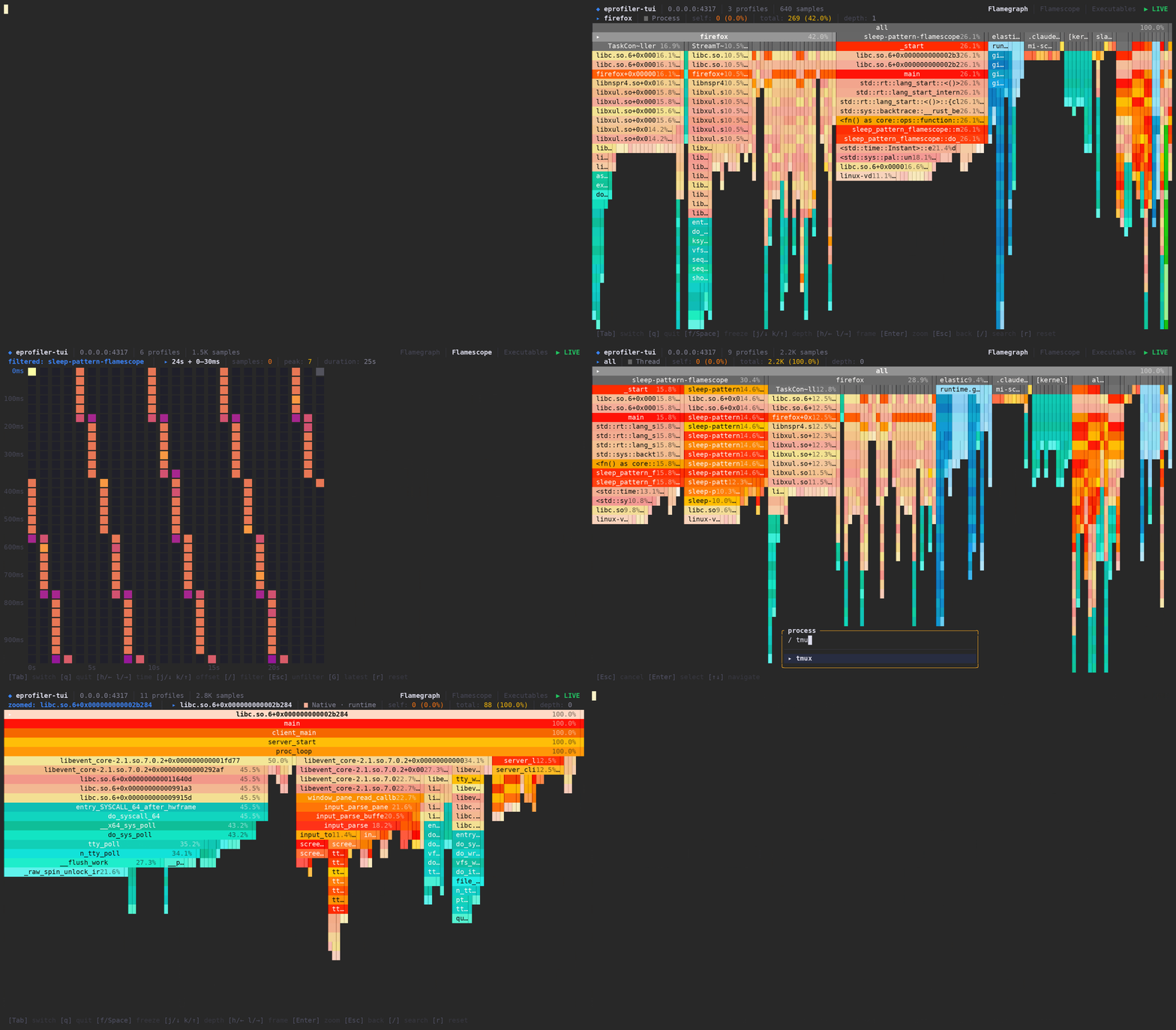
You don't need a Rust toolchain to try it out. Just run eprofiler-tui with Docker or Podman:
podman run -it -p 4317:4317 ghcr.io/rogercoll/eprofiler-tui:latest --data-dir /tmp
Replace
podmanwithdockerif preferred.
Alternatively, install from source with Cargo:
cargo install --git https://github.com/rogercoll/eprofiler-tui
The TUI will start and listen for OTLP profile data on port 4317. Point your OpenTelemetry profiling agent at localhost:4317.
To use a different port:
# With Cargo install:
eprofiler-tui --port 4318
| Option | Description |
|---|---|
-p, --port <PORT> | OTLP gRPC listen port (default: 4317) |
-d, --data-dir <PATH> | Symbol store directory (default: ~/.local/share/eprofiler-tui on Linux, ~/Library/Application Support/eprofiler-tui on macOS) |
-h, --help | Print help |
A standalone profile inspector for troubleshooting profiling pipelines. It receives OTLP profiles on a gRPC endpoint and displays each ExportProfilesServiceRequest as a paginated, color-coded view of the raw data: dictionary tables, resource attributes, scope metadata, profile fields, and fully resolved sample stacks.
eprofiler-tui debug
eprofiler-tui debug --port 4318
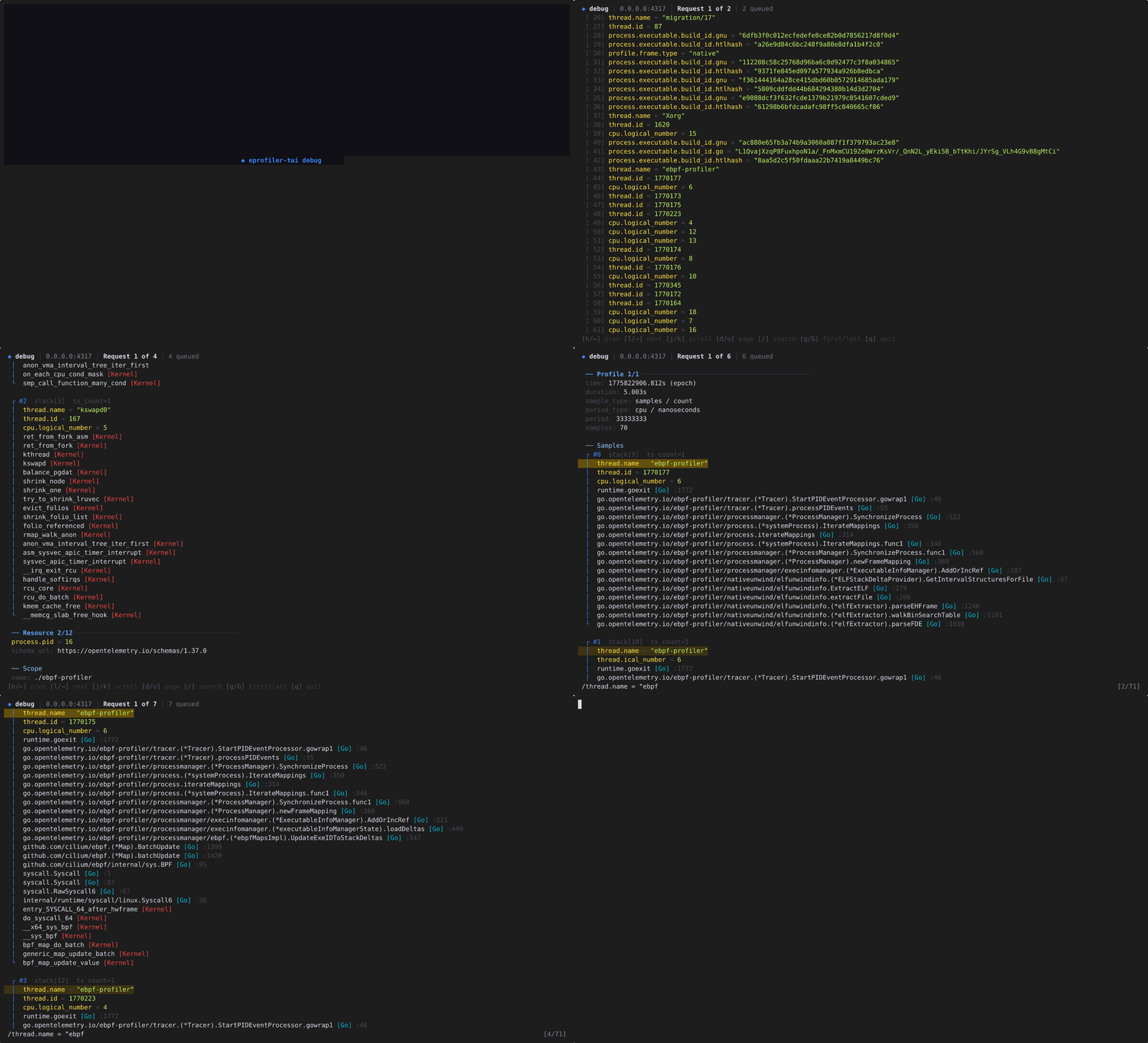
Navigate between requests like pages in a book with h/l. Each page shows the complete request: string table, mapping table, attribute table, function table, resource attributes, scope info, profile metadata, and every sample with its stack trace rendered as a tree with frame-type colors.
| Key | Action |
|---|---|
h / ← l / → | Previous / next request |
j / ↓ k / ↑ | Scroll down / up |
d / u | Page down / up |
g / G | Jump to first / last request |
/ | Search within current request |
n / N | Next / previous match |
q | Quit |
Requires Rust 2024 edition and protobuf definitions from the opentelemetry-proto submodule.
The symbolization feature (symblib) pulls in native C/C++ dependencies that need extra build tools:
cmake and make, used by the zydis disassembler crateg++ (or any C++ compiler) to build the C sources bundled with zydisprotobuf-compiler (protoc), used by prost-build to compile .proto definitions inside symblibgit submodule update --init
cargo build --release
Global: Tab switch tab, Ctrl-c / q quit.
Flamegraph tab
| Key | Action |
|---|---|
f / Space | Toggle freeze/live mode |
j / ↓ k / ↑ | Navigate depth |
h / ← l / → | Navigate siblings |
Enter / Esc (or Backspace) | Zoom in / out |
/ | Search threads |
r | Reset |
Flamescope tab (experimental)
| Key | Action |
|---|---|
h / ← l / → | Move between columns (pauses auto-scroll) |
j / ↓ k / ↑ | Move between rows |
G / End | Resume auto-scroll |
/ | Filter by thread |
Esc | Clear thread filter and resume auto-scroll |
r | Reset |
Executables tab (experimental, still being tested and might be removed to keep things simple)
| Key | Action |
|---|---|
j / ↓ k / ↑ | Navigate list |
Enter | Load symbols for selected executable |
/ | Add new executable by path |
r | Remove loaded symbols |
4,241 followers · starred Feb 2026
123 followers · starred Feb 2026
298 followers · starred Feb 2026
157 followers · starred Feb 2026
A terminal-based flamegraph viewer that receives profiling data via an OTLP gRPC endpoint and renders a live, interactive flamegraph in the terminal. It can be used to visualize profiling data generated by opentelemetry-ebpf-profiler.
0.0.0.0:4317, configurable via --port)Go · runtime)thread.name sample attribute/) with substring filtering
You don't need a Rust toolchain to try it out. Just run eprofiler-tui with Docker or Podman:
podman run -it -p 4317:4317 ghcr.io/rogercoll/eprofiler-tui:latest --data-dir /tmp
Replace
podmanwithdockerif preferred.
Alternatively, install from source with Cargo:
cargo install --git https://github.com/rogercoll/eprofiler-tui
The TUI will start and listen for OTLP profile data on port 4317. Point your OpenTelemetry profiling agent at localhost:4317.
To use a different port:
# With Cargo install:
eprofiler-tui --port 4318
| Option | Description |
|---|---|
-p, --port <PORT> | OTLP gRPC listen port (default: 4317) |
-d, --data-dir <PATH> | Symbol store directory (default: ~/.local/share/eprofiler-tui on Linux, ~/Library/Application Support/eprofiler-tui on macOS) |
-h, --help | Print help |
A standalone profile inspector for troubleshooting profiling pipelines. It receives OTLP profiles on a gRPC endpoint and displays each ExportProfilesServiceRequest as a paginated, color-coded view of the raw data: dictionary tables, resource attributes, scope metadata, profile fields, and fully resolved sample stacks.
eprofiler-tui debug
eprofiler-tui debug --port 4318
Navigate between requests like pages in a book with h/l. Each page shows the complete request: string table, mapping table, attribute table, function table, resource attributes, scope info, profile metadata, and every sample with its stack trace rendered as a tree with frame-type colors.
| Key | Action |
|---|---|
h / ← l / → | Previous / next request |
j / ↓ k / ↑ | Scroll down / up |
d / u | Page down / up |
g / G | Jump to first / last request |
/ | Search within current request |
n / N | Next / previous match |
q | Quit |
Requires Rust 2024 edition and protobuf definitions from the opentelemetry-proto submodule.
The symbolization feature (symblib) pulls in native C/C++ dependencies that need extra build tools:
cmake and make, used by the zydis disassembler crateg++ (or any C++ compiler) to build the C sources bundled with zydisprotobuf-compiler (protoc), used by prost-build to compile .proto definitions inside symblibgit submodule update --init
cargo build --release
Global: Tab switch tab, Ctrl-c / q quit.
Flamegraph tab
| Key | Action |
|---|---|
f / Space | Toggle freeze/live mode |
j / ↓ k / ↑ | Navigate depth |
h / ← l / → | Navigate siblings |
Enter / Esc (or Backspace) | Zoom in / out |
/ | Search threads |
r | Reset |
Flamescope tab (experimental)
| Key | Action |
|---|---|
h / ← l / → | Move between columns (pauses auto-scroll) |
j / ↓ k / ↑ | Move between rows |
G / End | Resume auto-scroll |
/ | Filter by thread |
Esc | Clear thread filter and resume auto-scroll |
r | Reset |
Executables tab (experimental, still being tested and might be removed to keep things simple)
| Key | Action |
|---|---|
j / ↓ k / ↑ | Navigate list |
Enter | Load symbols for selected executable |
/ | Add new executable by path |
r | Remove loaded symbols |
4,241 followers · starred Feb 2026
123 followers · starred Feb 2026
298 followers · starred Feb 2026
157 followers · starred Feb 2026