
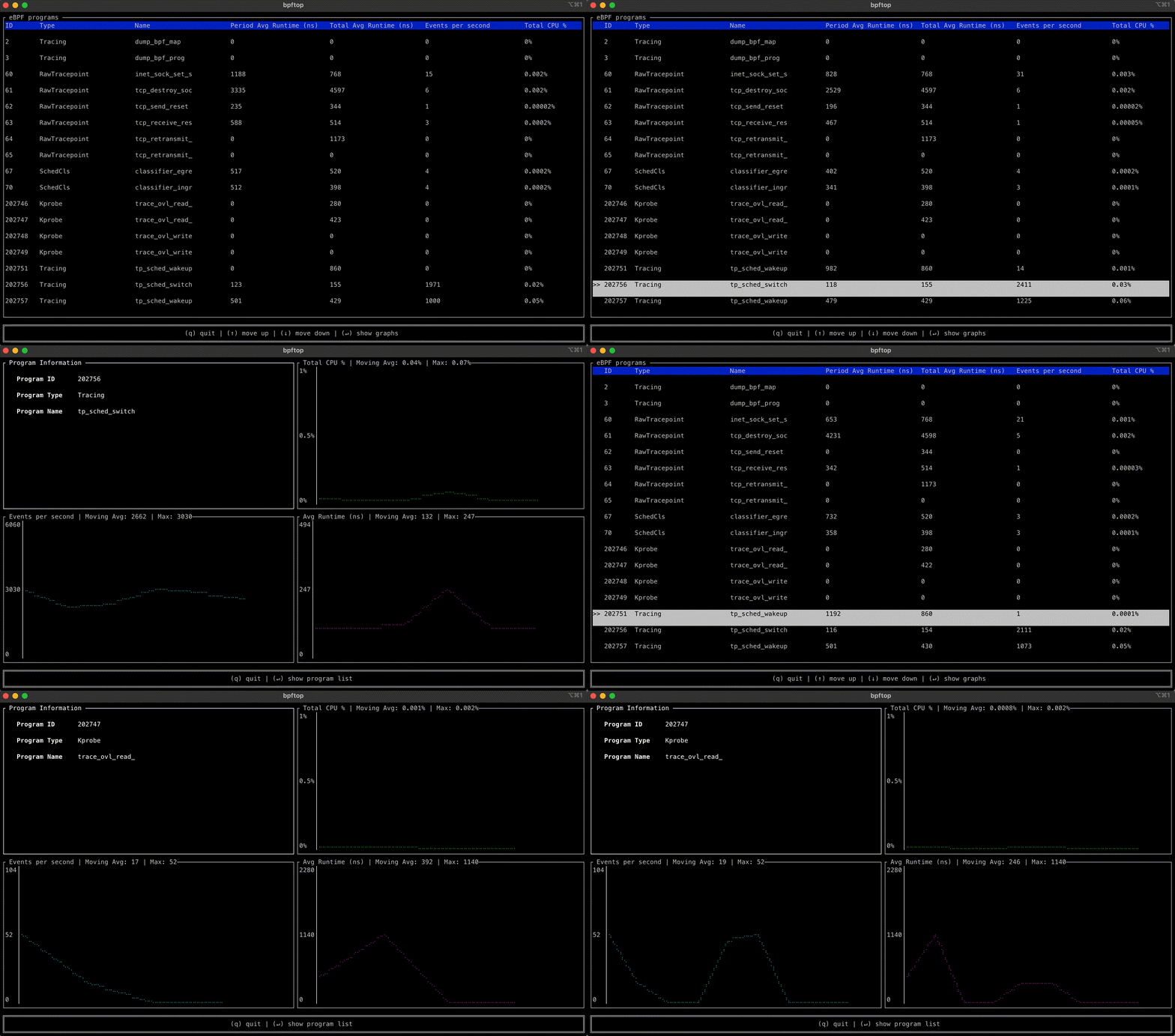
bpftop provides a dynamic real-time view of running eBPF programs. It displays the average runtime, events per second, and estimated total CPU % for each program.
See the codeREADME
bpftop

bpftop provides a dynamic real-time view of running eBPF programs. It displays the average runtime, events per second, and estimated total CPU % for each program. It also provides graphical views of these statistics over time. This tool minimizes overhead by enabling performance statistics only while it is active.
Installation
The install script downloads the latest release for your architecture (x86_64 or aarch64), verifies its SHA-256 against the digest published by GitHub, and installs it to ~/.local/bin (or /usr/local/bin when run as root):
curl -fsSL https://bpftop.sh/install | sh
Pass --version <tag> to pin a specific release or --bin-dir <path> to choose the install directory. Run the script with --help to see all options.
Or install via your distribution's package manager:

Fedora
You can install bpftop from the official repositories using dnf:
sudo dnf install bpftop
Arch Linux
You can install bpftop from the official repositories using pacman:
sudo pacman -S bpftop
Nix
Install bpftop from nixpkgs:
nix profile install nixpkgs#bpftop
Features
- Real-time monitoring: Displays a list of all running eBPF programs with ID, type, and name
- Performance metrics: Shows period and total average runtime, events per second, and estimated CPU utilization
- Interactive navigation: Navigate using arrow keys (↑/↓) or vim-style keys (j/k)
- Time-series graphs: Press Enter on a program to view graphical representations of performance metrics over time
- Program filtering: Press 'f' to filter programs by name or type
- Column sorting: Press 's' to sort by different columns (ascending/descending)
- Process information: Displays process names and PIDs that reference each eBPF program
- Scrollbar navigation: Automatically shows scrollbar when the program list exceeds terminal height
- Customizable refresh rate: Set update interval with
-d/--delayoption (1-3600 seconds) - Backward compatibility: Supports Linux kernels from version 5.8+ (older kernels via procfs)
- Minimal overhead: Enables statistics gathering only while active, automatically disables on exit
- Logging integration: Logs to systemd journal when available
Prerequisites
bpftoprequiressudoprivileges to run.- Linux kernel version 5.8 or later (older kernels supported via procfs fallback)
- The binary is dynamically linked to
libzandlibelf, so these libraries must be present on the systems where you intend to runbpftop. - For logging functionality: systemd/journald (optional, will gracefully fallback if not available)
Usage
Run the following command to start bpftop on your host:
sudo bpftop
Command-line Options
-d, --delay <SECONDS>: Set refresh interval (1-3600 seconds, default: 1)-h, --help: Show help information-V, --version: Show version information
Examples:
# Start with default 1-second refresh
sudo bpftop

# Update every 2 seconds
sudo bpftop -d 2

# Update every 5 seconds
sudo bpftop --delay 5
Interactive Controls
Once running, use these keyboard shortcuts:
Navigation:
↑/↓ork/j: Navigate up/down through the program listEnter: Switch to graphical view for the selected programq: Quit the application
Features:
f: Filter programs by name or types: Sort programs by different columns (use arrow keys to select column and direction)
In graph view:
Enterorq: Return to the main program list
Viewing Process Information
When you select a program, bpftop displays additional information including:
- Process names and PIDs that reference the selected eBPF program
- Detailed performance metrics and graphs
Logging
bpftop logs operational information to the systemd journal when available. You can view these logs using:
journalctl _COMM=bpftop
Common log entries include:
- Application startup and shutdown
- Kernel version information
- BPF statistics enablement status
- Error conditions and debugging information
Related links
How it works
bpftop uses the BPF_ENABLE_STATS BPF syscall command to enable global eBPF runtime statistics gathering, which is disabled by default to reduce performance overhead. It collects these statistics every second, calculating the average runtime, events per second, and estimated CPU utilization for each eBPF program within that sample period. This information is displayed in a top-like tabular format. Once bpftop terminates, it disables the statistics-gathering function by deleting the file descriptor returned by BPF_ENABLE_STATS.
Building from source
Prerequisites
Install required dependencies:
# Ubuntu/Debian
sudo apt-get install -y zlib1g-dev libelf-dev clang libbpf-dev

# Fedora/RHEL
sudo dnf install -y zlib-devel elfutils-libelf-devel clang libbpf-devel
Build Instructions
# Development build
cargo build

# Release build
cargo build --release
Alternatively, the repository ships a Nix flake with a pinned dev shell that includes clang, libbpf, and the Rust toolchain:
nix develop
cargo build --release
Troubleshooting
Common Issues
"This program must be run as root"
- Ensure you're running with
sudoprivileges. eBPF statistics collection requires root access.
No programs displayed
- This is normal if no eBPF programs are currently loaded on your system
- Try loading an eBPF program (e.g., using
bpftrace,bcc-tools, or other eBPF utilities) to see them in bpftop
Terminal display issues
- Ensure your terminal supports ANSI colors and has sufficient size
- Minimum recommended terminal size: 80x24 characters
Missing libraries error
- Install the required system dependencies:
libzandlibelf - On Ubuntu/Debian:
sudo apt-get install zlib1g-dev libelf-dev
Logging and Debugging
View application logs:
# View all bpftop logs
journalctl _COMM=bpftop

# Follow logs in real-time
journalctl _COMM=bpftop -f

# View logs from last boot
journalctl _COMM=bpftop -b
The logs include information about:
- Application startup and shutdown
- Kernel compatibility checks
- BPF statistics enablement method used
- Any errors or warnings encountered
Project History
This repository was formerly maintained by Netflix. It is now an independent project maintained by Jose Fernandez. Netflix is no longer affiliated with this tool's development.
Significant stargazers
(top 24 of 98)

2,189 followers · starred Feb 2024

2,767 followers · starred Feb 2024

405 followers · starred Feb 2024

623 followers · starred Feb 2024
Similar repos


bpftop provides a dynamic real-time view of running eBPF programs. It displays the average runtime, events per second, and estimated total CPU % for each program.
See the codeREADME
bpftop
bpftop provides a dynamic real-time view of running eBPF programs. It displays the average runtime, events per second, and estimated total CPU % for each program. It also provides graphical views of these statistics over time. This tool minimizes overhead by enabling performance statistics only while it is active.
Installation
The install script downloads the latest release for your architecture (x86_64 or aarch64), verifies its SHA-256 against the digest published by GitHub, and installs it to ~/.local/bin (or /usr/local/bin when run as root):
curl -fsSL https://bpftop.sh/install | sh
Pass --version <tag> to pin a specific release or --bin-dir <path> to choose the install directory. Run the script with --help to see all options.
Or install via your distribution's package manager:
Fedora
You can install bpftop from the official repositories using dnf:
sudo dnf install bpftop
Arch Linux
You can install bpftop from the official repositories using pacman:
sudo pacman -S bpftop
Nix
Install bpftop from nixpkgs:
nix profile install nixpkgs#bpftop
Features
- Real-time monitoring: Displays a list of all running eBPF programs with ID, type, and name
- Performance metrics: Shows period and total average runtime, events per second, and estimated CPU utilization
- Interactive navigation: Navigate using arrow keys (↑/↓) or vim-style keys (j/k)
- Time-series graphs: Press Enter on a program to view graphical representations of performance metrics over time
- Program filtering: Press 'f' to filter programs by name or type
- Column sorting: Press 's' to sort by different columns (ascending/descending)
- Process information: Displays process names and PIDs that reference each eBPF program
- Scrollbar navigation: Automatically shows scrollbar when the program list exceeds terminal height
- Customizable refresh rate: Set update interval with
-d/--delayoption (1-3600 seconds) - Backward compatibility: Supports Linux kernels from version 5.8+ (older kernels via procfs)
- Minimal overhead: Enables statistics gathering only while active, automatically disables on exit
- Logging integration: Logs to systemd journal when available
Prerequisites
bpftoprequiressudoprivileges to run.- Linux kernel version 5.8 or later (older kernels supported via procfs fallback)
- The binary is dynamically linked to
libzandlibelf, so these libraries must be present on the systems where you intend to runbpftop. - For logging functionality: systemd/journald (optional, will gracefully fallback if not available)
Usage
Run the following command to start bpftop on your host:
sudo bpftop
Command-line Options
-d, --delay <SECONDS>: Set refresh interval (1-3600 seconds, default: 1)-h, --help: Show help information-V, --version: Show version information
Examples:
# Start with default 1-second refresh
sudo bpftop

# Update every 2 seconds
sudo bpftop -d 2

# Update every 5 seconds
sudo bpftop --delay 5
Interactive Controls
Once running, use these keyboard shortcuts:
Navigation:
↑/↓ork/j: Navigate up/down through the program listEnter: Switch to graphical view for the selected programq: Quit the application
Features:
f: Filter programs by name or types: Sort programs by different columns (use arrow keys to select column and direction)
In graph view:
Enterorq: Return to the main program list
Viewing Process Information
When you select a program, bpftop displays additional information including:
- Process names and PIDs that reference the selected eBPF program
- Detailed performance metrics and graphs
Logging
bpftop logs operational information to the systemd journal when available. You can view these logs using:
journalctl _COMM=bpftop
Common log entries include:
- Application startup and shutdown
- Kernel version information
- BPF statistics enablement status
- Error conditions and debugging information
Related links
How it works
bpftop uses the BPF_ENABLE_STATS BPF syscall command to enable global eBPF runtime statistics gathering, which is disabled by default to reduce performance overhead. It collects these statistics every second, calculating the average runtime, events per second, and estimated CPU utilization for each eBPF program within that sample period. This information is displayed in a top-like tabular format. Once bpftop terminates, it disables the statistics-gathering function by deleting the file descriptor returned by BPF_ENABLE_STATS.
Building from source
Prerequisites
Install required dependencies:
# Ubuntu/Debian
sudo apt-get install -y zlib1g-dev libelf-dev clang libbpf-dev

# Fedora/RHEL
sudo dnf install -y zlib-devel elfutils-libelf-devel clang libbpf-devel
Build Instructions
# Development build
cargo build

# Release build
cargo build --release
Alternatively, the repository ships a Nix flake with a pinned dev shell that includes clang, libbpf, and the Rust toolchain:
nix develop
cargo build --release
Troubleshooting
Common Issues
"This program must be run as root"
- Ensure you're running with
sudoprivileges. eBPF statistics collection requires root access.
No programs displayed
- This is normal if no eBPF programs are currently loaded on your system
- Try loading an eBPF program (e.g., using
bpftrace,bcc-tools, or other eBPF utilities) to see them in bpftop
Terminal display issues
- Ensure your terminal supports ANSI colors and has sufficient size
- Minimum recommended terminal size: 80x24 characters
Missing libraries error
- Install the required system dependencies:
libzandlibelf - On Ubuntu/Debian:
sudo apt-get install zlib1g-dev libelf-dev
Logging and Debugging
View application logs:
# View all bpftop logs
journalctl _COMM=bpftop

# Follow logs in real-time
journalctl _COMM=bpftop -f

# View logs from last boot
journalctl _COMM=bpftop -b
The logs include information about:
- Application startup and shutdown
- Kernel compatibility checks
- BPF statistics enablement method used
- Any errors or warnings encountered
Project History
This repository was formerly maintained by Netflix. It is now an independent project maintained by Jose Fernandez. Netflix is no longer affiliated with this tool's development.
Similar repos
Significant stargazers
(top 24 of 98)
2,189 followers · starred Feb 2024
2,767 followers · starred Feb 2024
405 followers · starred Feb 2024
623 followers · starred Feb 2024