
Coding agent manager for GNOME: run Claude Code, Codex and shells in one native GTK window
Rust
1
150 commits
updated Sep 30, 2026
See what people are saying
README
agtk
agtk is a coding agent manager for GNOME. It runs Claude Code, Codex, Gemini and plain shells in one native window, grouped by project and git worktree.
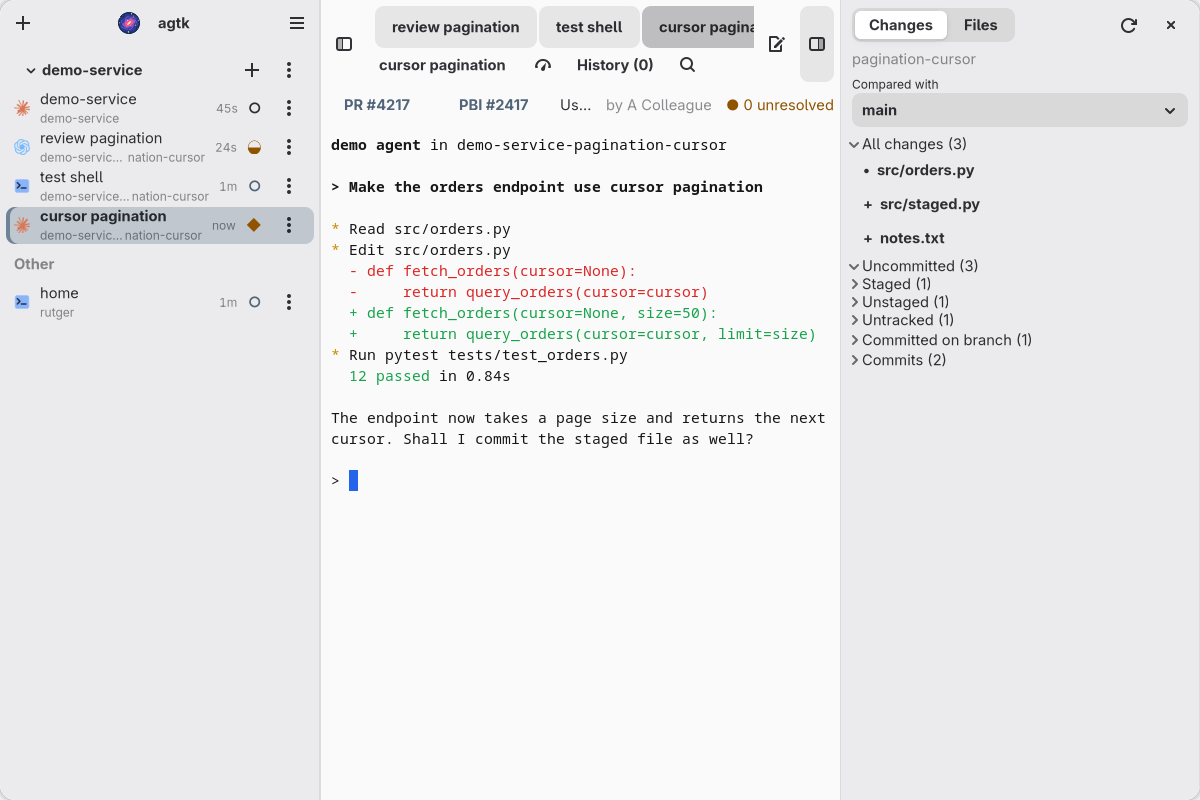
The sidebar shows every session and whether it is busy, waiting for you, or done. The terminal in the middle is a real VTE terminal. The Changes sidebar on the right shows what the agent changed in its worktree.
agtk is a personal project. I use it every day on Arch Linux with GNOME on Wayland. It is not tested on other setups, and things can change without notice.
Features
Sessions
- Sessions are grouped by project in the sidebar. Each project has buttons to launch, pin, resume, and manage worktrees and pull requests.
- Launch Claude, Codex, Gemini, a shell, or a custom command in an exact directory and worktree.
- Sessions keep running when the window closes, crashes, or is rebuilt. Start agtk again and it attaches to them.
- Each agent row shows a state: busy, waiting, ready, or idle. See Agent states.
- Resume a closed Claude or Codex conversation with
Ctrl+Shift+R. The list shows where each one stopped and which files it changed. - Restart Agent in the row menu stops an agent and resumes the same conversation, so an updated Claude or Codex takes over. Restart Idle Agents in the main menu does this for every agent that is between turns.
- Switch Claude model and effort with presets.
Terminal
- True color, search, copy and paste, and prompt history.
- Selected text is copied to the clipboard.
- Click a file path such as
src/main.rs:42:7to open it in the file viewer at that line. Click a URL to open it in the browser. Ctrl++andCtrl+-scale the font of the whole window.
Changes and files
- The Changes sidebar shows staged, unstaged, untracked, branch, and commit diffs. It is read only.
- Choose what to compare with: a branch, or a number of commits back.
- The Files page lists every file in the worktree, with a filter. Files open read only in the same viewer.
Worktrees
- Create a worktree with a generated branch name from the launch dialog.
- Remove a finished worktree safely. agtk saves uncommitted work and tags the branch tip before it deletes anything.
Integrations
- Azure DevOps pull requests: see PRs that need your attention, and start a review in the matching worktree.
- Emacs: open Magit or a branch review for the selected session.
- A command line tool (
agtkctl) and an MCP server (agtk-mcp) control agtk from scripts and agents. Both use a local socket. Nothing listens on the network.
Sessions do not survive a reboot, and terminal scrollback is not saved. After a reboot, press Enter in the terminal of an agent to resume its conversation.
Requirements
- Linux with GNOME on Wayland
- GTK 4.22, libadwaita 1.9, VTE 0.84, WebKitGTK 6.0, and SQLite
- Rust 1.92 or newer
- Node.js and npm, only to build the Changes viewer
On Arch Linux:
sudo pacman -S gtk4 libadwaita vte4 webkitgtk-6.0 sqlite rust nodejs npm
Optional tools:
claude,codex, orgeminifor the agents you want to run- The Azure CLI with the Azure DevOps extension, signed in, for pull requests
emacsclientfor the Emacs actions
Build and run
Clone the repository and run:
./start.sh
This builds the viewer and all binaries in debug mode, then starts agtk. Arguments are passed on to agtk.
To build and run by hand:
scripts/build-viewer.sh
cargo build --bins
./target/debug/agtk
Install
Install a release build and a GNOME launcher under ~/.local:
./scripts/install-local.sh
Then start "agtk" from the GNOME overview, or run ~/.local/bin/agtk.
- To install somewhere else, set
PREFIXto an absolute path. - To upgrade, run the installer again.
- To remove agtk, run
./scripts/uninstall-local.sh. Your saved sessions and settings are kept.
If agtk does not start from the overview, look in the user journal for its output.
Keyboard shortcuts
These work while the terminal has focus. Change them under Keyboard Shortcuts in the main menu.
| Action | Default |
|---|---|
| Launch in the selected session's project and worktree | Ctrl+Shift+Backquote |
| Close selected session | Ctrl+Shift+Q |
| Toggle sidebar | Ctrl+Shift+Backslash |
| Next or previous session | Ctrl+Shift+] or Ctrl+Shift+[ |
| Next ready session | Ctrl+Shift+Space |
| Back to last visited session | Ctrl+Shift+L |
| Resume a closed agent session | Ctrl+Shift+R |
| Reopen PR list | Alt+Shift+P |
| Switch Claude model preset | Ctrl+Shift+M |
| Copy or paste | Ctrl+Shift+C or Ctrl+Shift+V |
| Search terminal | Ctrl+Shift+F |
| Increase or decrease font size | Ctrl++ or Ctrl+- |
The Claude preset shortcut opens a chooser for the selected Claude session. Press the shortcut again to move to the next preset, Enter to apply it, and Escape to cancel. Apply a preset only when Claude is at an empty prompt.
Agent states
| Glyph | State | Meaning |
|---|---|---|
| ◐ | busy | The agent is working on a turn |
| ◆ | waiting | Blocked on you: a permission prompt, dialog, question, or usage limit |
| ● | ready | The turn finished and you have not viewed it yet |
| ○ | idle | Nothing is running, or you viewed the finished turn |
Selecting a ready session marks it as viewed. The timer shows how long the session has been in its state.
Claude sessions report their state through hooks that agtk generates. You do not need to change your Claude configuration. Codex and Gemini sessions are read from the screen once a second, with status rules ported from agent-manager.
Control from the command line
agtkctl prints JSON to stdout.
agtkctl state
agtkctl session create --kind codex --cwd /absolute/project
agtkctl session text SESSION_ID --lines 200
agtkctl session restart SESSION_ID
agtkctl ui inspect
agtkctl ui capture
agtkctl ui show changes
agtkctl ui diff SESSION_ID --scope unstaged --path src/main.rs
agtkctl pr list /absolute/project
agtkctl claude presets
agtkctl claude apply SESSION_ID opus-high
Run agtkctl --help to see every command. Add --instance NAME before the command to talk to another instance than default.
Processes inside a session get AGTK_INSTANCE, AGTK_SESSION_ID, and AGTK_CONTROL_SOCKET. A hook of your own can report the agent state:
agtkctl session state "$AGTK_SESSION_ID" busy
The states are busy, waiting, ready, and idle. Add --hook-input when the command runs as a Claude Code hook.
MCP
Add agtk-mcp to an MCP client as a local stdio server:
{
  "mcpServers": {
    "agtk": {
      "command": "/home/you/.local/bin/agtk-mcp",
      "args": ["--instance", "default"]
    }
  }
}
The tools cover sessions, terminal input and text, diffs, worktrees, recent conversations, Claude presets, Emacs actions, pull requests, and screenshots of the agtk window. The server never captures the rest of the desktop.
Where things are stored
- Settings and session data:
$XDG_STATE_HOME/agtk/default, or~/.local/state/agtk/default - Sockets:
$XDG_RUNTIME_DIR/agtk/default
To use another program for a tool, set AGTK_CLAUDE_BIN, AGTK_CODEX_BIN, AGTK_EMACSCLIENT, or AGTK_AZURE_BIN.
Development
agtk has four binaries:
agtkis the GTK window with the terminals.agtk-sessionruns one terminal process. This is why sessions survive a restart of the window.agtkctlis the command line tool.agtk-mcpis the MCP server.
Run the checks:
cargo fmt --all -- --check
cargo test --all-targets
cargo clippy --all-targets -- -D warnings
Render the UI without touching your running agtk or your desktop:
scripts/ui-preview.sh              # capture the main window and every dialog
scripts/ui-preview.sh --dark launch
The script needs mutter and sqlite3. It starts a private headless compositor and a separate instance with demo sessions, and prints the PNG paths. Add --keep to leave the instance running so you can drive it with agtkctl.
The UI tests use the same kind of compositor. Start one, then run:
AGTK_TEST_DISPLAY=$XDG_RUNTIME_DIR/DISPLAY_NAME cargo test --test native_ui -- --ignored --test-threads=1
License
MIT. See LICENSE.
Similar repos


Languages
Rust
97.4%
Shell
1.3%
JavaScript
1.2%
Coding agent manager for GNOME: run Claude Code, Codex and shells in one native GTK window
Rust
1
150 commits
updated Sep 30, 2026
See what people are saying
README
agtk
agtk is a coding agent manager for GNOME. It runs Claude Code, Codex, Gemini and plain shells in one native window, grouped by project and git worktree.
The sidebar shows every session and whether it is busy, waiting for you, or done. The terminal in the middle is a real VTE terminal. The Changes sidebar on the right shows what the agent changed in its worktree.
agtk is a personal project. I use it every day on Arch Linux with GNOME on Wayland. It is not tested on other setups, and things can change without notice.
Features
Sessions
- Sessions are grouped by project in the sidebar. Each project has buttons to launch, pin, resume, and manage worktrees and pull requests.
- Launch Claude, Codex, Gemini, a shell, or a custom command in an exact directory and worktree.
- Sessions keep running when the window closes, crashes, or is rebuilt. Start agtk again and it attaches to them.
- Each agent row shows a state: busy, waiting, ready, or idle. See Agent states.
- Resume a closed Claude or Codex conversation with
Ctrl+Shift+R. The list shows where each one stopped and which files it changed. - Restart Agent in the row menu stops an agent and resumes the same conversation, so an updated Claude or Codex takes over. Restart Idle Agents in the main menu does this for every agent that is between turns.
- Switch Claude model and effort with presets.
Terminal
- True color, search, copy and paste, and prompt history.
- Selected text is copied to the clipboard.
- Click a file path such as
src/main.rs:42:7to open it in the file viewer at that line. Click a URL to open it in the browser. Ctrl++andCtrl+-scale the font of the whole window.
Changes and files
- The Changes sidebar shows staged, unstaged, untracked, branch, and commit diffs. It is read only.
- Choose what to compare with: a branch, or a number of commits back.
- The Files page lists every file in the worktree, with a filter. Files open read only in the same viewer.
Worktrees
- Create a worktree with a generated branch name from the launch dialog.
- Remove a finished worktree safely. agtk saves uncommitted work and tags the branch tip before it deletes anything.
Integrations
- Azure DevOps pull requests: see PRs that need your attention, and start a review in the matching worktree.
- Emacs: open Magit or a branch review for the selected session.
- A command line tool (
agtkctl) and an MCP server (agtk-mcp) control agtk from scripts and agents. Both use a local socket. Nothing listens on the network.
Sessions do not survive a reboot, and terminal scrollback is not saved. After a reboot, press Enter in the terminal of an agent to resume its conversation.
Requirements
- Linux with GNOME on Wayland
- GTK 4.22, libadwaita 1.9, VTE 0.84, WebKitGTK 6.0, and SQLite
- Rust 1.92 or newer
- Node.js and npm, only to build the Changes viewer
On Arch Linux:
sudo pacman -S gtk4 libadwaita vte4 webkitgtk-6.0 sqlite rust nodejs npm
Optional tools:
claude,codex, orgeminifor the agents you want to run- The Azure CLI with the Azure DevOps extension, signed in, for pull requests
emacsclientfor the Emacs actions
Build and run
Clone the repository and run:
./start.sh
This builds the viewer and all binaries in debug mode, then starts agtk. Arguments are passed on to agtk.
To build and run by hand:
scripts/build-viewer.sh
cargo build --bins
./target/debug/agtk
Install
Install a release build and a GNOME launcher under ~/.local:
./scripts/install-local.sh
Then start "agtk" from the GNOME overview, or run ~/.local/bin/agtk.
- To install somewhere else, set
PREFIXto an absolute path. - To upgrade, run the installer again.
- To remove agtk, run
./scripts/uninstall-local.sh. Your saved sessions and settings are kept.
If agtk does not start from the overview, look in the user journal for its output.
Keyboard shortcuts
These work while the terminal has focus. Change them under Keyboard Shortcuts in the main menu.
| Action | Default |
|---|---|
| Launch in the selected session's project and worktree | Ctrl+Shift+Backquote |
| Close selected session | Ctrl+Shift+Q |
| Toggle sidebar | Ctrl+Shift+Backslash |
| Next or previous session | Ctrl+Shift+] or Ctrl+Shift+[ |
| Next ready session | Ctrl+Shift+Space |
| Back to last visited session | Ctrl+Shift+L |
| Resume a closed agent session | Ctrl+Shift+R |
| Reopen PR list | Alt+Shift+P |
| Switch Claude model preset | Ctrl+Shift+M |
| Copy or paste | Ctrl+Shift+C or Ctrl+Shift+V |
| Search terminal | Ctrl+Shift+F |
| Increase or decrease font size | Ctrl++ or Ctrl+- |
The Claude preset shortcut opens a chooser for the selected Claude session. Press the shortcut again to move to the next preset, Enter to apply it, and Escape to cancel. Apply a preset only when Claude is at an empty prompt.
Agent states
| Glyph | State | Meaning |
|---|---|---|
| ◐ | busy | The agent is working on a turn |
| ◆ | waiting | Blocked on you: a permission prompt, dialog, question, or usage limit |
| ● | ready | The turn finished and you have not viewed it yet |
| ○ | idle | Nothing is running, or you viewed the finished turn |
Selecting a ready session marks it as viewed. The timer shows how long the session has been in its state.
Claude sessions report their state through hooks that agtk generates. You do not need to change your Claude configuration. Codex and Gemini sessions are read from the screen once a second, with status rules ported from agent-manager.
Control from the command line
agtkctl prints JSON to stdout.
agtkctl state
agtkctl session create --kind codex --cwd /absolute/project
agtkctl session text SESSION_ID --lines 200
agtkctl session restart SESSION_ID
agtkctl ui inspect
agtkctl ui capture
agtkctl ui show changes
agtkctl ui diff SESSION_ID --scope unstaged --path src/main.rs
agtkctl pr list /absolute/project
agtkctl claude presets
agtkctl claude apply SESSION_ID opus-high
Run agtkctl --help to see every command. Add --instance NAME before the command to talk to another instance than default.
Processes inside a session get AGTK_INSTANCE, AGTK_SESSION_ID, and AGTK_CONTROL_SOCKET. A hook of your own can report the agent state:
agtkctl session state "$AGTK_SESSION_ID" busy
The states are busy, waiting, ready, and idle. Add --hook-input when the command runs as a Claude Code hook.
MCP
Add agtk-mcp to an MCP client as a local stdio server:
{
  "mcpServers": {
    "agtk": {
      "command": "/home/you/.local/bin/agtk-mcp",
      "args": ["--instance", "default"]
    }
  }
}
The tools cover sessions, terminal input and text, diffs, worktrees, recent conversations, Claude presets, Emacs actions, pull requests, and screenshots of the agtk window. The server never captures the rest of the desktop.
Where things are stored
- Settings and session data:
$XDG_STATE_HOME/agtk/default, or~/.local/state/agtk/default - Sockets:
$XDG_RUNTIME_DIR/agtk/default
To use another program for a tool, set AGTK_CLAUDE_BIN, AGTK_CODEX_BIN, AGTK_EMACSCLIENT, or AGTK_AZURE_BIN.
Development
agtk has four binaries:
agtkis the GTK window with the terminals.agtk-sessionruns one terminal process. This is why sessions survive a restart of the window.agtkctlis the command line tool.agtk-mcpis the MCP server.
Run the checks:
cargo fmt --all -- --check
cargo test --all-targets
cargo clippy --all-targets -- -D warnings
Render the UI without touching your running agtk or your desktop:
scripts/ui-preview.sh              # capture the main window and every dialog
scripts/ui-preview.sh --dark launch
The script needs mutter and sqlite3. It starts a private headless compositor and a separate instance with demo sessions, and prints the PNG paths. Add --keep to leave the instance running so you can drive it with agtkctl.
The UI tests use the same kind of compositor. Start one, then run:
AGTK_TEST_DISPLAY=$XDG_RUNTIME_DIR/DISPLAY_NAME cargo test --test native_ui -- --ignored --test-threads=1
License
MIT. See LICENSE.
Similar repos
Languages
Rust
97.4%
Shell
1.3%
JavaScript
1.2%