
Fast, native Windows 11 GUI for WSL Containers (WSLC) in Rust. Docker Desktop alternative.
See the codeSee what people are saying
README
RC Desktop
A small Windows app for managing containers running on WSL Containers (wslc.exe).
I wanted something like Docker Desktop or Rancher Desktop for wslc, without dragging a whole Electron app along. So this is Rust + Slint: it starts fast, uses little memory, and just calls wslc.exe underneath.
It's early and built for my own use, so expect rough edges.
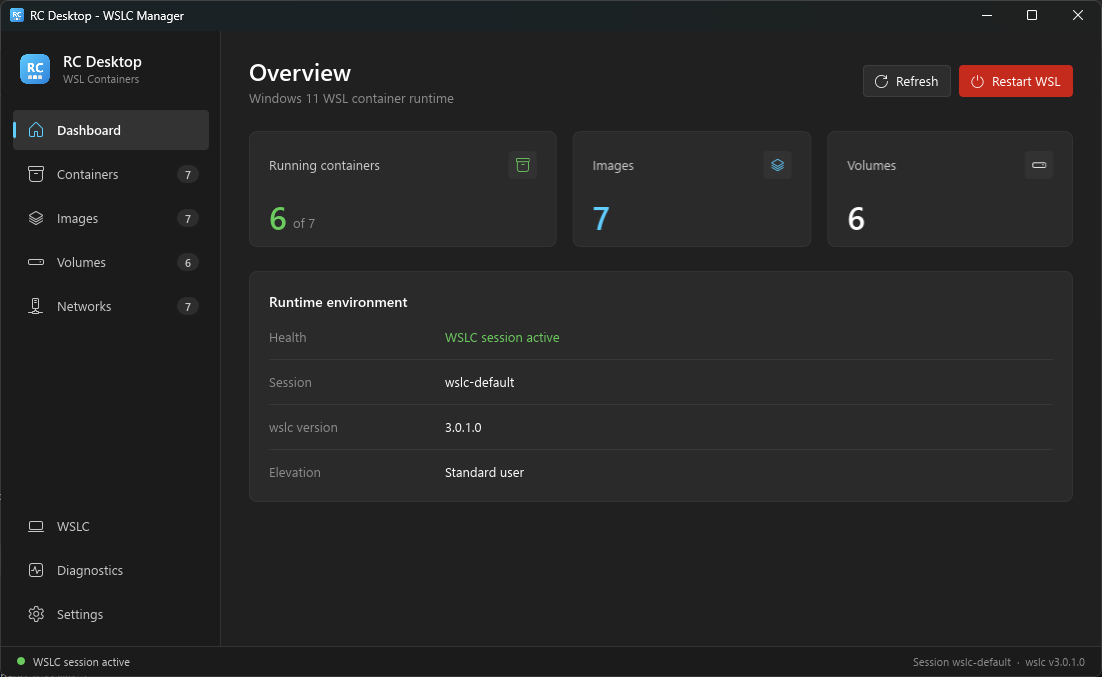
What it does
- Lists containers, with compose projects grouped into stacks you can start/stop at once, or remove like
compose down(containers and networks go, volumes stay) - Start, stop, restart and remove containers; view logs and
inspectoutput - Deploys new containers, Portainer-style, in three ways:
- Form: name, image, ports, env vars, volumes, network, CPU/memory limits and run options, with a preview of the equivalent
wslc run. Images have a "Run" button that opens it prefilled - Compose: paste or open a
docker-compose.ymland it's deployed with rcompose (rcompose up -d), with its output streamed into the app. wslc has no compose command of its own; rcompose ships with RC Desktop, and if it's missing the app offers to install it (per user, checksum verified, no admin rights) - docker run: paste a
docker run …command and it's converted towslc run
- Form: name, image, ports, env vars, volumes, network, CPU/memory limits and run options, with a preview of the equivalent
- Opens a shell in a container through Windows Terminal
- Lists, pulls and removes images; lists and deletes volumes and networks
- Published ports are links that open
http://localhost:<port>in your browser - A WSLC page with the runtime versions and sessions (
wslc info), one-click cleanup (container/image/network/volume prune), a shortcut to the wslc settings file and links to the docs - Shows the WSL session state and warns you if the app is running elevated
- Lives in the system tray: closing the window keeps it running there, the tooltip shows how many containers are up, and the menu has a shortcut to
wsl --shutdownwhen things get stuck - Can start with Windows (straight to the tray), set from the Settings page, the tray menu or the installer
One detail worth knowing: wslc doesn't like being called concurrently. Two calls at the same time can fail with ERROR_SHARING_VIOLATION (0x80070020). The app runs every command through a single queue and retries with backoff when that happens.
Installing
Download rcdesktop-setup.exe and run it. It installs RC Desktop for your user (no admin rights), with rcompose alongside it for Compose stacks, a Start menu shortcut and an uninstaller. Optionally it starts RC Desktop with Windows. It works on x64 and ARM64, and can optionally add rcompose to your PATH so you can use it from the terminal.
Prefer no installer? The release also has rcdesktop-x86_64-pc-windows-msvc.zip (and an aarch64 one): unzip it anywhere and run rcdesktop.exe. Keep rcompose.exe in the same folder.
You need Windows 11 with the WSL container preview (wslc.exe) installed.
Building from source
You need a recent Rust toolchain (1.80+).
cargo run --release
No wslc around, or just working on the UI? There's a mock mode with fake data:
cargo run -- --mock
# or
$env:RCDESKTOP_MOCK="1"; cargo run
Tests:
cargo test
Code layout
ui/– Slint files: the main window, theme, components and one file per viewsrc/wslc/– everything that talks towslc.exe: the command queue, output parsing and the mock clientsrc/domain/– plain types for containers, images, volumes, networks and the sessionsrc/rcompose.rs– finding, installing and running rcompose for Compose stackssrc/app.rs– glue between the Tokio worker and the Slint event loopsrc/tray.rs– system tray icon
License
MIT
Similar repos





Languages
Rust
55.2%
Slint
38.5%
HTML
3.2%
Inno Setup
1.6%
Fast, native Windows 11 GUI for WSL Containers (WSLC) in Rust. Docker Desktop alternative.
See the codeSee what people are saying
README
RC Desktop
A small Windows app for managing containers running on WSL Containers (wslc.exe).
I wanted something like Docker Desktop or Rancher Desktop for wslc, without dragging a whole Electron app along. So this is Rust + Slint: it starts fast, uses little memory, and just calls wslc.exe underneath.
It's early and built for my own use, so expect rough edges.
What it does
- Lists containers, with compose projects grouped into stacks you can start/stop at once, or remove like
compose down(containers and networks go, volumes stay) - Start, stop, restart and remove containers; view logs and
inspectoutput - Deploys new containers, Portainer-style, in three ways:
- Form: name, image, ports, env vars, volumes, network, CPU/memory limits and run options, with a preview of the equivalent
wslc run. Images have a "Run" button that opens it prefilled - Compose: paste or open a
docker-compose.ymland it's deployed with rcompose (rcompose up -d), with its output streamed into the app. wslc has no compose command of its own; rcompose ships with RC Desktop, and if it's missing the app offers to install it (per user, checksum verified, no admin rights) - docker run: paste a
docker run …command and it's converted towslc run
- Form: name, image, ports, env vars, volumes, network, CPU/memory limits and run options, with a preview of the equivalent
- Opens a shell in a container through Windows Terminal
- Lists, pulls and removes images; lists and deletes volumes and networks
- Published ports are links that open
http://localhost:<port>in your browser - A WSLC page with the runtime versions and sessions (
wslc info), one-click cleanup (container/image/network/volume prune), a shortcut to the wslc settings file and links to the docs - Shows the WSL session state and warns you if the app is running elevated
- Lives in the system tray: closing the window keeps it running there, the tooltip shows how many containers are up, and the menu has a shortcut to
wsl --shutdownwhen things get stuck - Can start with Windows (straight to the tray), set from the Settings page, the tray menu or the installer
One detail worth knowing: wslc doesn't like being called concurrently. Two calls at the same time can fail with ERROR_SHARING_VIOLATION (0x80070020). The app runs every command through a single queue and retries with backoff when that happens.
Installing
Download rcdesktop-setup.exe and run it. It installs RC Desktop for your user (no admin rights), with rcompose alongside it for Compose stacks, a Start menu shortcut and an uninstaller. Optionally it starts RC Desktop with Windows. It works on x64 and ARM64, and can optionally add rcompose to your PATH so you can use it from the terminal.
Prefer no installer? The release also has rcdesktop-x86_64-pc-windows-msvc.zip (and an aarch64 one): unzip it anywhere and run rcdesktop.exe. Keep rcompose.exe in the same folder.
You need Windows 11 with the WSL container preview (wslc.exe) installed.
Building from source
You need a recent Rust toolchain (1.80+).
cargo run --release
No wslc around, or just working on the UI? There's a mock mode with fake data:
cargo run -- --mock
# or
$env:RCDESKTOP_MOCK="1"; cargo run
Tests:
cargo test
Code layout
ui/– Slint files: the main window, theme, components and one file per viewsrc/wslc/– everything that talks towslc.exe: the command queue, output parsing and the mock clientsrc/domain/– plain types for containers, images, volumes, networks and the sessionsrc/rcompose.rs– finding, installing and running rcompose for Compose stackssrc/app.rs– glue between the Tokio worker and the Slint event loopsrc/tray.rs– system tray icon
License
MIT
Similar repos
Languages
Rust
55.2%
Slint
38.5%
HTML
3.2%
Inno Setup
1.6%