
Tray indicator for WSL2: on/off, CPU and memory, one-click shutdown
Rust
1
9 commits
updated Sep 16, 2026
README
wsl-tray



Windows tray icon that shows whether the WSL2 VM is running and how much CPU and memory it uses, with a menu entry that shuts it down.

It sits next to the clock like the keyboard-layout badge. Grey means the WSL2 VM is off; green, orange or red means it is running and shows how much of the machine it is using.

Left to right: off, running below 50 %, 50–75 %, above 75 %.
Percentages are relative to the whole machine (all logical cores, all physical
RAM), the same way Task Manager reports vmmemWSL. The colour follows whichever
of CPU or memory is higher.
Hover for the numbers:

Click (left or right) for the menu:
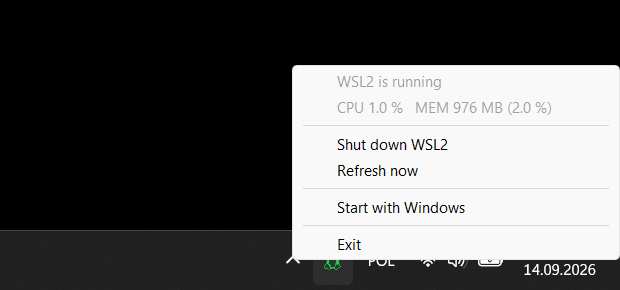
Shut down WSL2 runs wsl --shutdown after asking for confirmation.
Start with Windows adds or removes an entry under
HKCU\Software\Microsoft\Windows\CurrentVersion\Run.
Download




The buttons always fetch the latest release. Each
release has four
executables attached, wsl-tray-win11-x64.exe, wsl-tray-win11-arm64.exe,
wsl-tray-win10-x64.exe and wsl-tray-win10-arm64.exe, with a SHA256SUMS
file. There is nothing to install: put the file somewhere permanent, run it,
and tick Start with Windows in the menu if you want it back after a
reboot. It does not need administrator rights.
The Windows 11 and Windows 10 builds differ in one thing only: the name of
the VM process they look for, vmmemWSL or vmmem. If the icon stays grey
while a distribution is running, look the process up in Task Manager
(Details tab) and take the other build, or pass the name with -process.
On Windows 11 the icon shows up next to the clock on first run (the app sets
its own IsPromoted flag in HKCU\Control Panel\NotifyIconSettings, but only
if you have not already decided about it in Settings › Taskbar).
Sponsoring
If wsl-tray is useful to you, you can support its development:


Command line
wsl-tray.exe [-poll 5s] [-interval 30s] [-process vmmemWSL] [-log FILE] [-render-test DIR]
| Flag | Default | Meaning |
|---|---|---|
-poll | 5s | How often to check whether the VM process exists. Cheap. |
-interval | 30s | How often to refresh CPU and memory while the VM is running. |
-process | vmmemWSL (Windows 11 build), vmmem (Windows 10 build) | Name of the VM process. |
-log | – | Append one line per poll and menu action to this file. |
-render-test | – | Write the icon in every state and size as PNGs to this directory, then exit. |
Flags can be written as -poll 10s, -poll=10s or --poll 10s. Durations
are written like 30s, 1m30s or 250ms.
Resource usage
Measured on Windows 11 25H2, AMD Ryzen AI MAX+ 395 (32 logical cores, 48 GB), 125 % display scaling, with the release build from this repository.
| Executable | 282 KB (x64), 270 KB (ARM64) |
| Private memory | 2.5 MB at start, 3.9 MB after half an hour |
| Working set | 10 MB at start, ~19 MB once the menu and tooltip have been shown (shared theme and common-control DLLs) |
| Threads | 1 while idle; up to 3 more appear briefly for GDI and the thread pool, and one runs wsl --shutdown |
| One presence check | 3.8 ms for a full process-list snapshot (~250 processes) |
| Idle CPU | 1.1 ms of CPU per second over a 23-minute window with the VM running (0.11 % of one core, 0.003 % of the machine) |
The only dependency is windows-sys,
which contains nothing but extern declarations. There is no runtime, no COM,
no allocation on the poll path beyond reusing one buffer.
For comparison, the original Go version of this program was a 2.4 MB executable using 16 MB of private memory and 8 threads; the difference is the Go runtime.
Measure it yourself: cargo test --release -- --ignored --nocapture poll_cost
prints the per-poll cost on your machine.
How it works
- The VM shows up as a process called
vmmemWSL(vmmemon Windows 10). Its presence is the on/off signal.wsl --list --runningis not used because it says "no running distributions" while the VM is still alive and holding memory. - CPU and memory come from
NtQuerySystemInformation(SystemProcessInformation), the call Task Manager uses. It needs no handle to the process, which matters becausevmmemWSLruns as SYSTEM andOpenProcesson it is denied to a normal user. CPU is the difference in kernel+user time between two samples divided by wall time and the number of logical cores; memory is the process's working set. - The icon is the Font Awesome "linux" glyph, rasterized once into a small
coverage mask (
assets/tux.bin, generated bytools/gentux-rs) and scaled to the taskbar's icon size at run time. No font is involved, so it looks the same on every machine. wsl --shutdownis started withCreateProcessWand an explicitSystem32\wsl.exepath, without a console window.
Building
You need a stable Rust toolchain (1.88 or newer) with the MSVC target.
.\build.ps1
This runs cargo build --release and copies the result to .\wsl-tray.exe.
Run that copy rather than the one under target\: Windows refuses to
overwrite a running executable, so running from target\release makes the
next build fail while the tray app is open.
.\build.ps1 -Win10 (or cargo build --release --features win10) builds the
Windows 10 variant. The win10 feature does nothing but change the default of
-process from vmmemWSL to vmmem.
The exe icon, the application manifest (per-monitor DPI, common controls v6)
and the version resource are linked from pre-built objects in res\ (one per
architecture), so rc.exe is not needed. To regenerate them after editing
winres\:
go install github.com/tc-hib/go-winres@latest
go-winres make --in winres/winres.json --arch amd64,arm64 --out res/wsl-tray
Move-Item res\wsl-tray_windows_amd64.syso res\wsl-tray-amd64.res.obj -Force
Move-Item res\wsl-tray_windows_arm64.syso res\wsl-tray-arm64.res.obj -Force
To regenerate the icon mask after changing tools\gentux-rs\linux.svg or the
stroke width:
cd tools\gentux-rs
cargo run --release
Tests and CI
cargo test --release runs the unit tests, including one that samples live
processes on the machine. The GitHub Actions workflow builds the Windows 11
and Windows 10 variants for x64 and ARM64 on every push, runs the tests and
clippy, and attaches all four executables to a release when a v* tag is
pushed.
Layout
src/main.rs        window, tray icon, menu, autostart, Windows 11 promotion
src/monitor.rs     process sampling, wsl --shutdown
src/icon.rs        mask scaling, HICON creation, PNG output for -render-test
assets/tux.bin     icon mask (generated)
res/               resource objects; winres/ has their sources
tools/gentux-rs/   mask generator
docs/              screenshots
Each source file starts with a module comment that explains its part of the
program (the message flow and re-entrancy rules in main.rs, why the
process list is read the way it is in monitor.rs, the icon pipeline in
icon.rs). cargo doc --document-private-items --open renders all of it.
License
BSD 3-Clause, see LICENSE. The Tux glyph is the "linux" icon from Font Awesome Free, CC BY 4.0; see THIRD_PARTY_NOTICES.md.
Contributors

9 commits
See what people are saying
Similar repos


Languages
Rust
99.4%
Tray indicator for WSL2: on/off, CPU and memory, one-click shutdown
Rust
1
9 commits
updated Sep 16, 2026
README
wsl-tray
Windows tray icon that shows whether the WSL2 VM is running and how much CPU and memory it uses, with a menu entry that shuts it down.
It sits next to the clock like the keyboard-layout badge. Grey means the WSL2 VM is off; green, orange or red means it is running and shows how much of the machine it is using.
Left to right: off, running below 50 %, 50–75 %, above 75 %.
Percentages are relative to the whole machine (all logical cores, all physical
RAM), the same way Task Manager reports vmmemWSL. The colour follows whichever
of CPU or memory is higher.
Hover for the numbers:
Click (left or right) for the menu:
Shut down WSL2 runs wsl --shutdown after asking for confirmation.
Start with Windows adds or removes an entry under
HKCU\Software\Microsoft\Windows\CurrentVersion\Run.
Download
The buttons always fetch the latest release. Each
release has four
executables attached, wsl-tray-win11-x64.exe, wsl-tray-win11-arm64.exe,
wsl-tray-win10-x64.exe and wsl-tray-win10-arm64.exe, with a SHA256SUMS
file. There is nothing to install: put the file somewhere permanent, run it,
and tick Start with Windows in the menu if you want it back after a
reboot. It does not need administrator rights.
The Windows 11 and Windows 10 builds differ in one thing only: the name of
the VM process they look for, vmmemWSL or vmmem. If the icon stays grey
while a distribution is running, look the process up in Task Manager
(Details tab) and take the other build, or pass the name with -process.
On Windows 11 the icon shows up next to the clock on first run (the app sets
its own IsPromoted flag in HKCU\Control Panel\NotifyIconSettings, but only
if you have not already decided about it in Settings › Taskbar).
Sponsoring
If wsl-tray is useful to you, you can support its development:
Command line
wsl-tray.exe [-poll 5s] [-interval 30s] [-process vmmemWSL] [-log FILE] [-render-test DIR]
| Flag | Default | Meaning |
|---|---|---|
-poll | 5s | How often to check whether the VM process exists. Cheap. |
-interval | 30s | How often to refresh CPU and memory while the VM is running. |
-process | vmmemWSL (Windows 11 build), vmmem (Windows 10 build) | Name of the VM process. |
-log | – | Append one line per poll and menu action to this file. |
-render-test | – | Write the icon in every state and size as PNGs to this directory, then exit. |
Flags can be written as -poll 10s, -poll=10s or --poll 10s. Durations
are written like 30s, 1m30s or 250ms.
Resource usage
Measured on Windows 11 25H2, AMD Ryzen AI MAX+ 395 (32 logical cores, 48 GB), 125 % display scaling, with the release build from this repository.
| Executable | 282 KB (x64), 270 KB (ARM64) |
| Private memory | 2.5 MB at start, 3.9 MB after half an hour |
| Working set | 10 MB at start, ~19 MB once the menu and tooltip have been shown (shared theme and common-control DLLs) |
| Threads | 1 while idle; up to 3 more appear briefly for GDI and the thread pool, and one runs wsl --shutdown |
| One presence check | 3.8 ms for a full process-list snapshot (~250 processes) |
| Idle CPU | 1.1 ms of CPU per second over a 23-minute window with the VM running (0.11 % of one core, 0.003 % of the machine) |
The only dependency is windows-sys,
which contains nothing but extern declarations. There is no runtime, no COM,
no allocation on the poll path beyond reusing one buffer.
For comparison, the original Go version of this program was a 2.4 MB executable using 16 MB of private memory and 8 threads; the difference is the Go runtime.
Measure it yourself: cargo test --release -- --ignored --nocapture poll_cost
prints the per-poll cost on your machine.
How it works
- The VM shows up as a process called
vmmemWSL(vmmemon Windows 10). Its presence is the on/off signal.wsl --list --runningis not used because it says "no running distributions" while the VM is still alive and holding memory. - CPU and memory come from
NtQuerySystemInformation(SystemProcessInformation), the call Task Manager uses. It needs no handle to the process, which matters becausevmmemWSLruns as SYSTEM andOpenProcesson it is denied to a normal user. CPU is the difference in kernel+user time between two samples divided by wall time and the number of logical cores; memory is the process's working set. - The icon is the Font Awesome "linux" glyph, rasterized once into a small
coverage mask (
assets/tux.bin, generated bytools/gentux-rs) and scaled to the taskbar's icon size at run time. No font is involved, so it looks the same on every machine. wsl --shutdownis started withCreateProcessWand an explicitSystem32\wsl.exepath, without a console window.
Building
You need a stable Rust toolchain (1.88 or newer) with the MSVC target.
.\build.ps1
This runs cargo build --release and copies the result to .\wsl-tray.exe.
Run that copy rather than the one under target\: Windows refuses to
overwrite a running executable, so running from target\release makes the
next build fail while the tray app is open.
.\build.ps1 -Win10 (or cargo build --release --features win10) builds the
Windows 10 variant. The win10 feature does nothing but change the default of
-process from vmmemWSL to vmmem.
The exe icon, the application manifest (per-monitor DPI, common controls v6)
and the version resource are linked from pre-built objects in res\ (one per
architecture), so rc.exe is not needed. To regenerate them after editing
winres\:
go install github.com/tc-hib/go-winres@latest
go-winres make --in winres/winres.json --arch amd64,arm64 --out res/wsl-tray
Move-Item res\wsl-tray_windows_amd64.syso res\wsl-tray-amd64.res.obj -Force
Move-Item res\wsl-tray_windows_arm64.syso res\wsl-tray-arm64.res.obj -Force
To regenerate the icon mask after changing tools\gentux-rs\linux.svg or the
stroke width:
cd tools\gentux-rs
cargo run --release
Tests and CI
cargo test --release runs the unit tests, including one that samples live
processes on the machine. The GitHub Actions workflow builds the Windows 11
and Windows 10 variants for x64 and ARM64 on every push, runs the tests and
clippy, and attaches all four executables to a release when a v* tag is
pushed.
Layout
src/main.rs        window, tray icon, menu, autostart, Windows 11 promotion
src/monitor.rs     process sampling, wsl --shutdown
src/icon.rs        mask scaling, HICON creation, PNG output for -render-test
assets/tux.bin     icon mask (generated)
res/               resource objects; winres/ has their sources
tools/gentux-rs/   mask generator
docs/              screenshots
Each source file starts with a module comment that explains its part of the
program (the message flow and re-entrancy rules in main.rs, why the
process list is read the way it is in monitor.rs, the icon pipeline in
icon.rs). cargo doc --document-private-items --open renders all of it.
License
BSD 3-Clause, see LICENSE. The Tux glyph is the "linux" icon from Font Awesome Free, CC BY 4.0; see THIRD_PARTY_NOTICES.md.
See what people are saying
Similar repos
Contributors
9 commits
Languages
Rust
99.4%