
Docker on Windows without Docker Desktop or WSL: a standalone container manager with its own tiny Linux machine. 4x less memory, local HTTPS for every container, no telemetry.
See the codeSee what people are saying
README
 Solon
Solon
Version française : README.fr.md.





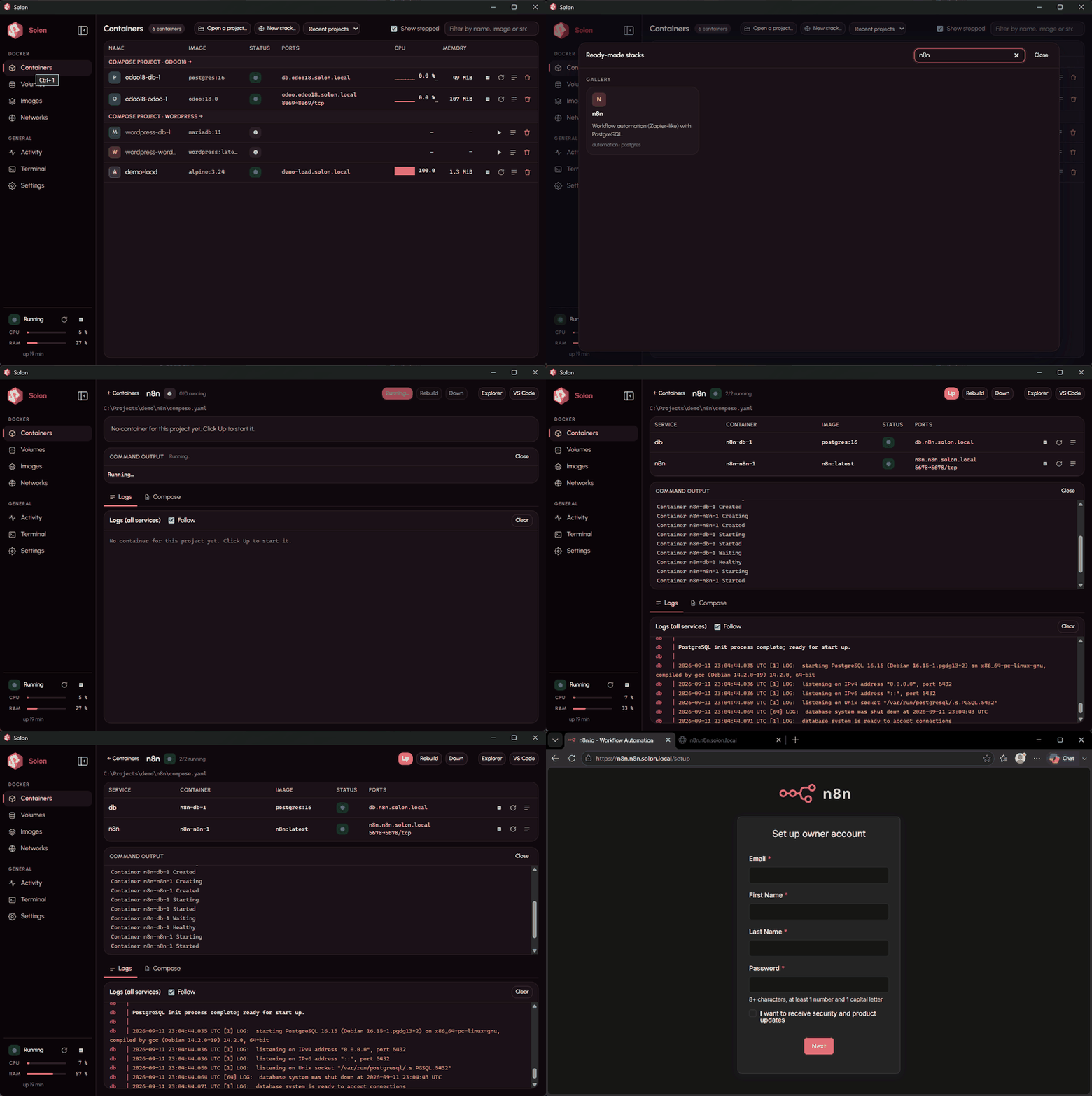
A stack in one click: New stack… → n8n → Create and start → the browser opens on its https://…solon.local address.
Solon is a standalone container manager for Windows, in the spirit of OrbStack: one installer, no software prerequisite to install yourself, and a complete Docker engine that boots in a few seconds inside a tiny, invisible Linux machine managed entirely by Solon.
Solon is not a front-end for an existing Docker Desktop. It replaces it: Docker engine, Compose, images, volumes, networks, terminal, logs, a system-tray icon, and a few things nothing else does on Windows.
Project status (26 September 2026): 0.1.13, thirteen releases in three weeks, written by one person. It runs my own projects every day, and it has been tested on exactly two machines: a Windows 11 Pro PC and a fresh Windows 11 Home VM. The installer is not code-signed yet (SmartScreen warning; SHA-256 published with every release). Expect rough edges on hardware I do not have — and please tell me where it breaks. That issue is the most useful place to start; ideas and pull requests are just as welcome.
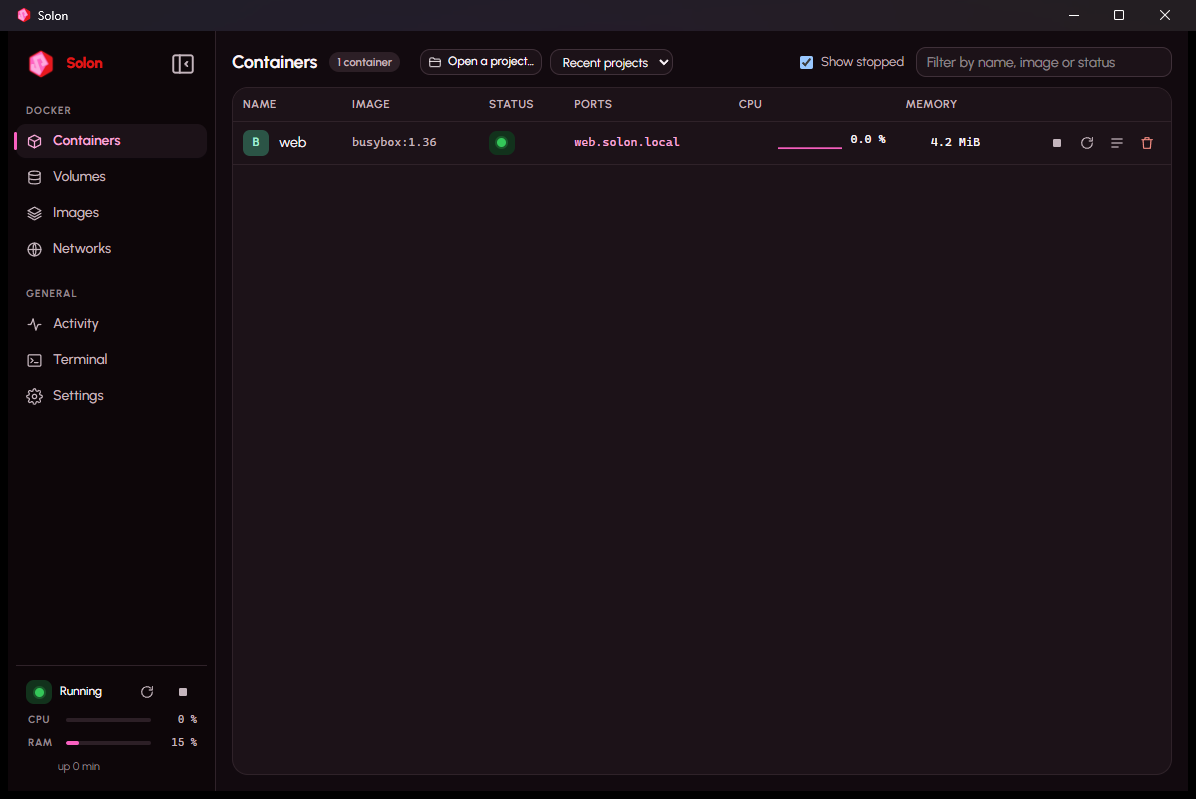
What Solon does
- Starts a Docker engine (dockerd, containerd, runc, Compose) ready ~2.5 s after you ask for it.
- Exposes the Docker API on
\\.\pipe\solon; the bundleddockeranddocker composecommands are already on yourPATHand point at Solon, and any other Docker CLI works with adocker context. - Relays published ports to
localhostwith no configuration. - Shares your Windows folders on demand:
docker run -v C:\...,--mount, Compose projects, exactly like Docker Desktop, through solonfs, Solon's own file sharing, measured 4 to 94 times faster than the 9P sharing used by WSL2 and Docker Desktop. - Addresses that always work: every running container is reachable at
https://<name>.solon.local(andhttps://<service>.<project>.solon.localfor Compose), whether it publishes a port or not, with a certificate your browser trusts (a local certificate authority created on first use). Container IPs (10.90.x.y) are reachable directly from Windows too. - Wake on demand: a container reached through Solon that receives no traffic for ten minutes is paused (zero CPU, memory kept); the next request wakes it in a fraction of a second before being served. Databases and background workers that only talk internally are never touched.
- Files tab for containers and volumes: browse, copy to Windows, send files or folders (buttons or drag-and-drop from Explorer), create folders, delete. Works even when the image has no shell.
- Debug shell into any container, including "distroless" images with no shell: a toolbox (bash, curl, dig, ps, strace, tcpdump, jq, vim…) that shares the container's processes, network and volumes.
- Activity: live CPU, memory, storage and network of the engine and of each container.
- Compose projects: services, merged logs, Up / Down / Rebuild with live output, open in Explorer or VS Code.
- Idle memory (engine + service): 430 to 520 MB measured for 2 GB allocated; unused memory is returned to Windows automatically.
- No telemetry, no outgoing network request other than what your containers and your
docker pullask for.
Benchmark: performance, footprint and features
Performance: Docker Desktop vs Solon
Same machine (Windows 11 Pro, 24 logical cores, NVMe), same Compose stack (a Python web application and its PostgreSQL 16
database, bench/compose.yaml), each engine with its default settings: Docker Desktop 4.66.1 on WSL2 with every core
and 6.6 GB visible to containers; Solon 0.1.0 with 22 processors and 2 GB. Docker Desktop was measured on
3 September 2026, then uninstalled from the test machine; Solon was re-measured on 10 September 2026 with the
same script. Details and raw numbers: docs/measurements.md.
| Docker Desktop | Solon | ||
|---|---|---|---|
| Engine ready after you ask for it | 6.1 s | 2.6 to 3.4 s (1.1 s when the machine is still up) | 2× faster |
| Memory at rest, no container | 1,998 MB | 430 to 520 MB | 4× lighter |
| Memory with the web app + PostgreSQL running, at rest | 5,146 MB | 1,196 MB | 4× lighter |
compose down then up -d, images present | 7.1 s | 5.2 s | |
The web app answers after up | 1.5 s | 1.0 to 2.5 s | same |
| Login page of the web app, average of 5 loads | 27 to 46 ms | 48 to 88 ms | same |
| Initialise the app's database with sample data (CPU, mostly single-threaded) | 13.6 s | 12.9 to 13.4 s | same |
Synchronous writes on a Docker volume (pg_test_fsync, fdatasync / fsync) | 154 / 79 ops/s | 240 to 290 / 132 to 137 ops/s | 1.7× faster |
| Windows folder mounted in a container, 5,000 files (listing / attributes / reads / writes) | 9P | solonfs: 6.6× / 94× / 3.6 to 9× / 4× faster | |
docker run --rm busybox true, warm | not measured | 0.55 s |
What this says, honestly: Solon wins clearly on what costs you every day (start-up time, memory, file sharing, disk writes); on pure CPU work the two engines are equivalent; web latency is identical. Both keep the guest's disk cache in memory: Solon is capped by its allocation (2 GB by default), Docker Desktop grew to 5 GB.
Reproduce it: powershell -ExecutionPolicy Bypass -File bench\bench.ps1 on the engine your docker command
points at (-Docker "C:\Program Files\Solon\bin\docker.exe" for Solon). The script only touches a Compose
project named solon-bench on port 18069 and removes it when done.
Footprint
Solon measured on 13 September 2026 (0.1.11, three containers running); Docker Desktop measured on the same machine on 3 September; the other two from their documentation (marked published).
| Solon | Docker Desktop | Podman Desktop | Rancher Desktop | |
|---|---|---|---|---|
| Installer | 102 MB | ≈ 600 MB (published) | ≈ 100 MB + WSL machine (published) | ≈ 500 MB (published) |
| Installed on disk | 406 MB (Linux image 310, docker CLI 73, Solon 22) | 6 GB required (published) | 500 MB + 2 to 10 GB of images (published) | not published |
| Memory at rest, no container | 430 to 520 MB | 1,998 MB | WSL 2 machine, up to 50 % of RAM by default (published) | half of CPU and RAM by default (published) |
| Memory with a web app + PostgreSQL running | 1,196 MB | 5,146 MB | not measured | not measured |
| Needs WSL 2 | no (own Hyper-V machine) | yes (or legacy Hyper-V backend) | yes | yes |
Features compared
Solon as of 0.1.12; the others as documented in September 2026. "Partial" means it exists with a caveat.
| Solon | Docker Desktop | Podman Desktop | Rancher Desktop | |
|---|---|---|---|---|
Official docker CLI and Compose, no alias | yes | yes | partial: compatible socket, some differences | yes (moby) |
| Works without WSL 2 | yes | partial: legacy Hyper-V backend | no | no |
| Windows Home | yes (Virtual Machine Platform) | yes (WSL 2) | yes | yes |
https://<service>.<project>.solon.local for every container, trusted local certificate | yes | no | no | no |
| Projects page: address, environment, ports checked before Up, filtered logs | yes | partial: Compose list | partial: Compose list | no |
| One environment per Git branch, volumes copied | yes | no | no | no |
| Project backup and restore, volumes included | yes | partial: third-party extension | no | no |
| Idle containers paused, woken on demand | yes | partial: Resource Saver pauses the whole machine | no | no |
| Windows folders shared with solonfs (4 to 94× faster than 9P) | yes | no: 9P through WSL 2 | no: 9P | no: 9P |
| Find Compose projects on the disk (7 s on 928 GB) | yes | no | no | no |
| Projects restarted after a Windows restart or an update | yes | partial: Docker restart policy | partial | partial |
| VS Code Dev Containers | yes, verified | yes | partial: docker path setting | yes |
| Kubernetes built in | no | yes | partial: Kind / Minikube extensions | yes (K3s) |
| Windows containers | no | yes | no | no |
| Extensions marketplace | no | yes | yes | no |
| Free for companies | yes (Apache 2.0) | paid above 250 employees or $10M revenue | yes (Apache 2.0) | yes (Apache 2.0) |
| Signed installer | not yet | yes | yes | yes |
Requirements
| Requirement | Detail |
|---|---|
| Windows | Windows 11 or Windows 10 22H2, any edition, Home included. Pro, Enterprise and Education use Hyper-V; Home uses the Virtual Machine Platform, which the installer enables (one restart). Verified on Windows 11 Home 25H2. On Home the legacy 9P file-sharing fallback is unavailable; the default sharing works. |
| CPU | Hardware virtualization enabled in the BIOS/UEFI: Intel VT-x ("Intel Virtualization Technology") or AMD-V ("SVM Mode"). |
| Memory | 8 GB recommended (4 GB minimum). Solon gives the engine 2 GB by default, adjustable in Settings. |
| Disk | ~400 MB for Solon and its Linux image, plus a dynamic data disk (64 GB maximum by default, used on demand). |
| Windows features | "Hyper-V" and "Virtual Machine Platform". The installer enables them; a reboot may be required. |
Solon coexists with WSL2 and Docker Desktop: it uses neither their pipe, nor their networks, nor your default
docker context.
Installation
Installer
Download Solon_<version>_x64-setup.exe from the releases and
check its SHA-256 against the value published with the release. The installer asks for elevation once, then:
enables the required Windows features (a reboot may be requested), installs the SolonService service, copies
the Linux image and creates the shortcut. Silent install: Solon_<version>_x64-setup.exe /S.
The installer is not signed yet: SmartScreen shows "Windows protected your PC"; click "More info" then
"Run anyway". The signing chain is ready (installer/sign.ps1, tauri.signed.conf.json) and will be enabled
as soon as a certificate is available.
Uninstall: Settings → Apps → Solon. The uninstaller stops the engine, removes the service and asks before
deleting your images and volumes (%ProgramData%\Solon); by default they are kept.
From source (developers)
Prerequisites: Rust stable (≥ 1.85), Node 22, and Solon itself installed (the engine's Linux image is built inside a Solon container: no WSL needed). An administrator Windows session is only needed for the console mode.
# 1. Guest agent (cross-compiled from Windows, no C toolchain)
rustup target add x86_64-unknown-linux-musl
cargo build --release -p solon-agent --target x86_64-unknown-linux-musl

# 2. Linux image (reused kernel + Alpine root filesystem + initrd), built in a Solon container (~15 s)
docker run --rm -v "${PWD}:/work" -w /work public.ecr.aws/docker/library/alpine:3.24 sh -c "apk add -q bash curl python3 e2fsprogs coreutils tar grep findutils gzip; SKIP_KERNEL=1 SOLON_IMAGE_VERSION=0.1.0-dev.N bash image/build.sh /work/target/x86_64-unknown-linux-musl/release/solon-agent"
#    (the kernel itself is compiled once with image/kernel/build-kernel.sh, ~7 min, in the same kind of container)

# 3. Service and application (the installer embeds image/out/<version>, see tauri.conf.json)
cargo build --release -p solon-service
cd apps\desktop && npm install && npm run tauri build
Development mode without installing: solon-service.exe console in an administrator terminal, then
cd apps\desktop; npm run tauri dev.
Using Solon
The left menu has two groups: Docker (Projects, Containers, Volumes, Images, Networks) and General
(Activity, Terminal, Settings). The button at the top (or Ctrl+B) collapses it to icons. The block at the bottom shows
the engine state, its uptime and two mini gauges (CPU, RAM). The tray icon carries a green, orange, red or grey
dot depending on the engine state.
- Projects (home): one card per Compose project with its state, its main address
(
https://web.blog.solon.local, copyable, with the lock), its services, Open / Up / Stop / Details. Folders opened before but not running are listed too; containers started outside a project sit in "Other containers". With nothing yet, the page offers three ways to start: open a folder, choose a stack, try hello-world. The project page adds an Environment tab: the.envand theenvironment:blocks ofcompose.yaml, plus the published ports, editable without touching the YAML. - Back up and restore a project: "Back up…" on a project page writes one zip with the Compose files,
the
.envand the data of every volume (taken directly from the engine, running or not); "Restore a backup…" on the Projects home recreates the volumes and files in the folder you choose, then Up. - Ports checked before Up: a host port already taken on this PC stops Up before anything starts, with "Use 8081 instead" (the file is edited for you) or "Up anyway".
- Find projects on this PC: one click reads the file table of your internal drives (a few seconds,
administrator rights of the service, nothing leaves the PC) and lists every folder with a
compose.yaml, aDockerfileor adevcontainer.json, minus dependency, cache and system folders. Tick the ones to keep. - One environment per Git branch: on a project whose folder is a Git repository, tick "One environment
per branch" next to the branch name. Each branch then gets its own containers, volumes and addresses
(
web.blog-feature-login.solon.local). Switch branch in your terminal and Solon offers to stop the old environment and start the new one, with or without a copy of the old branch's data. - Restart what was running: when the engine stops (Windows restart, install, Stop from Solon), Solon
remembers the projects and containers that were running and starts them again once the engine is back;
Docker alone only does that for
restart: alwayscontainers. Settings → engine, on by default. - Containers: live list with CPU and memory, filter, Compose groups, icon actions, streamed logs,
terminal, inspection. A published port is a link, and so is the local domain. Compose projects live
here: "Open a project…" picks a folder containing
compose.yaml, and clicking a group header opens the project screen (services, merged logs, Up / Down / Rebuild with live output, Explorer, VS Code). - Ready-made stacks and project detection: "New stack…" opens a gallery: starter kits that
generate a project on first start (Django + PostgreSQL, Flask + Redis, FastAPI + PostgreSQL, Next.js), ready-made
apps (WordPress, PostgreSQL, MariaDB, MongoDB, Redis, n8n, Nextcloud, Ghost, Gitea, Uptime Kuma, Jupyter Lab,
static Nginx site) and developer tools (Mailpit): pick one, choose a folder, review the generated
compose.yaml, "Create and start". Opening a folder that has no Compose file makes Solon look at what it contains (package.json, requirements.txt, Dockerfile, composer.json, go.mod, Cargo.toml, pom.xml, .csproj, Gemfile…) and propose an environment for it, editable before creation. Nothing is ever overwritten. - Container page: Overview (image, command, dates, restart policy, networks, ports, mounts, environment, labels, file copy), Logs (All / Warnings / Errors filters with counts, search, wrap, colours; on a project, one chip per service), Files, Terminal, Debug shell, Inspect. Start, stop, restart, remove and "Keep awake" in the header.
- Images, Volumes, Networks: list, create, inspect, remove (always with confirmation). Volumes have a Files browser.
- Activity: the engine's CPU, memory, storage and network with one-minute curves, then each running container with CPU, memory, network rates and a CPU curve.
- Terminal (
Ctrl+\``): a root shell inside the Linux engine itself, fordocker,ps,df,dmesg`… - Search
Ctrl+K: containers, images, volumes, networks, projects, engine actions, sections.Ctrl+1toCtrl+8switch sections.Ctrl+Alt+Sfrom any application brings Solon to the front with the search open. - Settings: language (English by default, French), appearance (light, dark, follow Windows), accent colour (Solon blue or the Windows accent), engine memory and processors (all cores minus two by default), storage limit, start at sign-in, sleep of idle containers, legacy file sharing fallback, diagnostic export.
- Windows notifications: container exited with an error (outside actions you made in Solon), engine failed or restarting, engine disk 90 % full.
- Diagnostic (Settings → Export a diagnostic…): a zip with logs, state, settings, prerequisites and
docker infoto attach to a bug report. No credentials are included. - Tray: one click opens the menu: engine state, each project with Start / Restart / Stop, then the loose containers, open Solon, start or stop the engine, quit. Closing the window keeps Solon in the tray.
Bundled docker and docker compose
The installer puts C:\Program Files\Solon\bin first on the PATH. It contains the official Docker CLI
and the Compose plugin (Apache-2.0, versions in bin\NOTICE-third-party.txt) behind a small docker.exe
launcher that points them at the Solon engine. In a new terminal:
docker version
docker compose -f examples\wordpress\compose.yaml up -d
The launcher respects your choices: -H, --context, DOCKER_HOST or DOCKER_CONTEXT win, so Docker
Desktop stays reachable if you keep it (docker context use desktop-linux). With another Docker CLI:
docker context create solon --docker host=npipe:////./pipe/solon
docker context use solon
If Docker Desktop is installed, the CLI uses the Windows credential manager and may send stale Docker Hub credentials ("unauthorized: incorrect username or password"). Run
docker logoutor test with an emptyDOCKER_CONFIG; this is not related to Solon.
VS Code Dev Containers
The Dev Containers extension works with Solon as is: it uses the docker on your PATH, which is Solon's.
Open a folder that has .devcontainer/devcontainer.json, run "Dev Containers: Reopen in Container", and VS Code
builds or pulls the image, starts the container with the folder mounted at /workspaces/<name>, installs its
server inside and connects. Forwarded ports work, postCreateCommand runs, and the container appears in Solon's
Containers list (and in "Find projects on this PC"). Nothing to configure; if you had set
dev.containers.dockerPath for Docker Desktop, remove it. Tested with @devcontainers/cli 0.89 and the
mcr.microsoft.com/devcontainers/base:alpine image.
The Containers view (extension ms-azuretools.vscode-containers) refreshes live through docker events.
The extension arms that listener once, at startup, and gives up after three immediate failures. Solon's
Docker pipe exists as soon as the Solon service starts and docker waits while the engine boots, so a VS Code
window restored at logon keeps live refresh. If Solon is updated while VS Code is open, the pipe vanishes for a
few seconds and that window falls back to a refresh every minute and the Refresh button: run
Developer: Reload Window to get live refresh back.
Shared Windows folders: how it works
Windows folders mounted into containers (-v C:\..., Compose projects) go through solonfs, Solon's file
system: a server on the Windows side, a client on the Linux side, and a protocol that fetches a whole folder in
one question instead of one per file. Measured on 5,000 files against Windows 9P sharing (the one used by WSL2
and Docker Desktop): listing 6.6× faster, attributes 94× faster, reads 3.6 to 9× faster, writes 4× faster.
Details and method: docs/measurements.md.
- Files appear as owned by
rootwith0777/0666;chmodandchownare accepted and ignored (Windows has no POSIX permissions), as with Docker Desktop. - A change made on the Windows side is visible in the container within 1.5 s.
- For dependencies and databases, always prefer Docker volumes: they live on Solon's disk at native speed (20 to 50 ms for the same 5,000 files).
- Fallback: Settings → "Use the legacy Windows file sharing (9P)" restores the old mechanism at the next
engine start. The old share also stays mounted under
/mnt/host9p/<letter>inside the machine.
Troubleshooting
Step-by-step guide for the most common problems (SmartScreen, reboot after enabling Hyper-V, port already in
use, container that exits at once, network and solon.local addresses, disk space):
https://v94lere.github.io/solon/troubleshooting/. To report a problem, attach the zip from
Settings → Diagnostic → "Export a diagnostic…" (logs, state, settings, docker info; no credentials).
Error messages carry a stable code; logs are in %ProgramData%\Solon\logs (service) and can be copied
from the error screen.
| Code | Cause | What to do |
|---|---|---|
VIRTUALIZATION_DISABLED_IN_FIRMWARE | VT-x / AMD-V disabled | Enable virtualization in the BIOS/UEFI (Advanced, CPU or Security tab), reboot. |
WINDOWS_FEATURE_MISSING | Hyper-V or Virtual Machine Platform disabled | Reinstall Solon (the installer enables them) or, in an administrator PowerShell: Enable-WindowsOptionalFeature -Online -FeatureName Microsoft-Hyper-V,VirtualMachinePlatform -All, then reboot. |
WINDOWS_FEATURE_BLOCKED_BY_POLICY | Company policy (WSUS, GPO) refuses the feature | Ask your administrator to enable Microsoft-Hyper-V and VirtualMachinePlatform. |
HYPERVISOR_NOT_RUNNING | Windows hypervisor not started | Uninstall old VirtualBox/VMware (< 6.1 / < 15.5), check bcdedit /enum (hypervisorlaunchtype Auto), do not run Solon in a VM without nested virtualization. |
HOST_COMPUTE_SERVICE_UNAVAILABLE | vmcompute or hns service stopped or missing | Reboot Windows; otherwise reinstall Solon. |
BLOCKED_BY_SECURITY_SOFTWARE | Antivirus / EDR blocks the disks or the service | Add %ProgramData%\Solon and the installation folder to the exclusions. |
INSUFFICIENT_PRIVILEGES | The service does not run with the expected rights | Reinstall Solon (the service must run as LocalSystem). |
IMAGE_CORRUPTED | Engine files missing or SHA-256 mismatch | Reinstall Solon. |
DATA_DISK_ERROR | data.vhdx cannot be created or opened | Check disk space and antivirus exclusions; as a last resort rename %ProgramData%\Solon\data.vhdx (loses Docker data). |
VM_BOOT_TIMEOUT, AGENT_UNREACHABLE, ENGINE_UNREACHABLE | The machine does not answer | Restart the engine; read solon-service.log; report with the log. |
| No network from containers | Corporate VPN or IP range conflict | Solon picks a free range among 172.30.0.0/24… and sets the MTU to 1400; some VPNs (AnyConnect, GlobalProtect) still block virtual adapters: disable the VPN to test, then report. |
| "The Solon service is not running" | Service stopped | sc start SolonService as administrator, or reinstall. |
Power loss or hard shutdown: at the next start Solon checks and repairs the data disk (fsck), then restarts
the engine. Unsynced writes of the last two seconds may be lost, as on any Linux machine.
Known limitations (0.1)
- UDP published ports are not relayed to
localhost(TCP only). - One engine per machine, no multiple profiles.
- Not signed (SmartScreen warning). No silent update: Solon tells you when a new version exists
(Settings → Updates, one request to github.com, can be turned off). Install update downloads the
installer, checks its SHA-256 against the release's
SHA256SUMS.txt, then Windows asks you to allow the install; Solon reopens and restarts what was running. Nothing installs without you. - A sleeping container does not run its internal scheduled tasks until something calls it; use "Keep awake" on its page if that matters.
curl.exeon Windows rejects the local HTTPS certificates unless you pass--ssl-no-revoke(same as mkcert); browsers and .NET accept them.
Where it is going, and where you can help
Solon is young and the list of what is left to do is longer than the list of what is done. These are the next things I want to build, each with an issue you can comment on or take:
- Update images from the app (#3): a badge when a newer image exists, one button to pull and recreate.
- Import from Docker Desktop (#4): find its volumes and copy them into Solon, so switching costs nothing.
- Relay UDP published ports (#5), the last gap against
docker run -p. - Hot reload from Windows (#7): tell the container when a Windows file changes, so Vite, nodemon and Odoo's reloader notice.
- Windows 10, tested rather than assumed.
- A signed installer: the certificate sponsor asked for community traction first, so this one depends on people finding the project useful.
Good places to start are the issues labelled good first issue
and help wanted. CONTRIBUTING.md builds the whole
thing in one command, and documentation, translations and bug reproductions count as much as code.
Documentation
ARCHITECTURE.md: technical choices (HCS virtualization, Linux image, HvSocket, solonfs, network), measured results block by block, risk register. In French.docs/guide-fonctionnel.md: the functional guide, screen by screen. In French.docs/measurements.md: every measurement and established fact. In French.bench/: the comparison script and its Compose stack (see the benchmark above).site/: the presentation website (Astro, static), published to GitHub Pages by theSiteworkflow.tests/e2e/: end-to-end scenarios.CONTRIBUTING.md: how to contribute;SECURITY.md: how to report a vulnerability;CODE_OF_CONDUCT.md.
Licence
Apache License 2.0, see LICENSE and NOTICE. Solon bundles third-party software (Docker CLI, Docker
Compose, a Linux kernel, Alpine Linux packages, Rust and npm dependencies, the Urbanist font) under their own
licences: see THIRD-PARTY.md.
Contributors

171 commits
Similar repos


Languages
Rust
53.0%
TypeScript
35.1%
CSS
4.2%
PowerShell
3.8%
Astro
1.6%
Shell
1.2%
Docker on Windows without Docker Desktop or WSL: a standalone container manager with its own tiny Linux machine. 4x less memory, local HTTPS for every container, no telemetry.
See the codeSee what people are saying
README
Solon
Version française : README.fr.md.
A stack in one click: New stack… → n8n → Create and start → the browser opens on its https://…solon.local address.
Solon is a standalone container manager for Windows, in the spirit of OrbStack: one installer, no software prerequisite to install yourself, and a complete Docker engine that boots in a few seconds inside a tiny, invisible Linux machine managed entirely by Solon.
Solon is not a front-end for an existing Docker Desktop. It replaces it: Docker engine, Compose, images, volumes, networks, terminal, logs, a system-tray icon, and a few things nothing else does on Windows.
Project status (26 September 2026): 0.1.13, thirteen releases in three weeks, written by one person. It runs my own projects every day, and it has been tested on exactly two machines: a Windows 11 Pro PC and a fresh Windows 11 Home VM. The installer is not code-signed yet (SmartScreen warning; SHA-256 published with every release). Expect rough edges on hardware I do not have — and please tell me where it breaks. That issue is the most useful place to start; ideas and pull requests are just as welcome.
What Solon does
- Starts a Docker engine (dockerd, containerd, runc, Compose) ready ~2.5 s after you ask for it.
- Exposes the Docker API on
\\.\pipe\solon; the bundleddockeranddocker composecommands are already on yourPATHand point at Solon, and any other Docker CLI works with adocker context. - Relays published ports to
localhostwith no configuration. - Shares your Windows folders on demand:
docker run -v C:\...,--mount, Compose projects, exactly like Docker Desktop, through solonfs, Solon's own file sharing, measured 4 to 94 times faster than the 9P sharing used by WSL2 and Docker Desktop. - Addresses that always work: every running container is reachable at
https://<name>.solon.local(andhttps://<service>.<project>.solon.localfor Compose), whether it publishes a port or not, with a certificate your browser trusts (a local certificate authority created on first use). Container IPs (10.90.x.y) are reachable directly from Windows too. - Wake on demand: a container reached through Solon that receives no traffic for ten minutes is paused (zero CPU, memory kept); the next request wakes it in a fraction of a second before being served. Databases and background workers that only talk internally are never touched.
- Files tab for containers and volumes: browse, copy to Windows, send files or folders (buttons or drag-and-drop from Explorer), create folders, delete. Works even when the image has no shell.
- Debug shell into any container, including "distroless" images with no shell: a toolbox (bash, curl, dig, ps, strace, tcpdump, jq, vim…) that shares the container's processes, network and volumes.
- Activity: live CPU, memory, storage and network of the engine and of each container.
- Compose projects: services, merged logs, Up / Down / Rebuild with live output, open in Explorer or VS Code.
- Idle memory (engine + service): 430 to 520 MB measured for 2 GB allocated; unused memory is returned to Windows automatically.
- No telemetry, no outgoing network request other than what your containers and your
docker pullask for.
Benchmark: performance, footprint and features
Performance: Docker Desktop vs Solon
Same machine (Windows 11 Pro, 24 logical cores, NVMe), same Compose stack (a Python web application and its PostgreSQL 16
database, bench/compose.yaml), each engine with its default settings: Docker Desktop 4.66.1 on WSL2 with every core
and 6.6 GB visible to containers; Solon 0.1.0 with 22 processors and 2 GB. Docker Desktop was measured on
3 September 2026, then uninstalled from the test machine; Solon was re-measured on 10 September 2026 with the
same script. Details and raw numbers: docs/measurements.md.
| Docker Desktop | Solon | ||
|---|---|---|---|
| Engine ready after you ask for it | 6.1 s | 2.6 to 3.4 s (1.1 s when the machine is still up) | 2× faster |
| Memory at rest, no container | 1,998 MB | 430 to 520 MB | 4× lighter |
| Memory with the web app + PostgreSQL running, at rest | 5,146 MB | 1,196 MB | 4× lighter |
compose down then up -d, images present | 7.1 s | 5.2 s | |
The web app answers after up | 1.5 s | 1.0 to 2.5 s | same |
| Login page of the web app, average of 5 loads | 27 to 46 ms | 48 to 88 ms | same |
| Initialise the app's database with sample data (CPU, mostly single-threaded) | 13.6 s | 12.9 to 13.4 s | same |
Synchronous writes on a Docker volume (pg_test_fsync, fdatasync / fsync) | 154 / 79 ops/s | 240 to 290 / 132 to 137 ops/s | 1.7× faster |
| Windows folder mounted in a container, 5,000 files (listing / attributes / reads / writes) | 9P | solonfs: 6.6× / 94× / 3.6 to 9× / 4× faster | |
docker run --rm busybox true, warm | not measured | 0.55 s |
What this says, honestly: Solon wins clearly on what costs you every day (start-up time, memory, file sharing, disk writes); on pure CPU work the two engines are equivalent; web latency is identical. Both keep the guest's disk cache in memory: Solon is capped by its allocation (2 GB by default), Docker Desktop grew to 5 GB.
Reproduce it: powershell -ExecutionPolicy Bypass -File bench\bench.ps1 on the engine your docker command
points at (-Docker "C:\Program Files\Solon\bin\docker.exe" for Solon). The script only touches a Compose
project named solon-bench on port 18069 and removes it when done.
Footprint
Solon measured on 13 September 2026 (0.1.11, three containers running); Docker Desktop measured on the same machine on 3 September; the other two from their documentation (marked published).
| Solon | Docker Desktop | Podman Desktop | Rancher Desktop | |
|---|---|---|---|---|
| Installer | 102 MB | ≈ 600 MB (published) | ≈ 100 MB + WSL machine (published) | ≈ 500 MB (published) |
| Installed on disk | 406 MB (Linux image 310, docker CLI 73, Solon 22) | 6 GB required (published) | 500 MB + 2 to 10 GB of images (published) | not published |
| Memory at rest, no container | 430 to 520 MB | 1,998 MB | WSL 2 machine, up to 50 % of RAM by default (published) | half of CPU and RAM by default (published) |
| Memory with a web app + PostgreSQL running | 1,196 MB | 5,146 MB | not measured | not measured |
| Needs WSL 2 | no (own Hyper-V machine) | yes (or legacy Hyper-V backend) | yes | yes |
Features compared
Solon as of 0.1.12; the others as documented in September 2026. "Partial" means it exists with a caveat.
| Solon | Docker Desktop | Podman Desktop | Rancher Desktop | |
|---|---|---|---|---|
Official docker CLI and Compose, no alias | yes | yes | partial: compatible socket, some differences | yes (moby) |
| Works without WSL 2 | yes | partial: legacy Hyper-V backend | no | no |
| Windows Home | yes (Virtual Machine Platform) | yes (WSL 2) | yes | yes |
https://<service>.<project>.solon.local for every container, trusted local certificate | yes | no | no | no |
| Projects page: address, environment, ports checked before Up, filtered logs | yes | partial: Compose list | partial: Compose list | no |
| One environment per Git branch, volumes copied | yes | no | no | no |
| Project backup and restore, volumes included | yes | partial: third-party extension | no | no |
| Idle containers paused, woken on demand | yes | partial: Resource Saver pauses the whole machine | no | no |
| Windows folders shared with solonfs (4 to 94× faster than 9P) | yes | no: 9P through WSL 2 | no: 9P | no: 9P |
| Find Compose projects on the disk (7 s on 928 GB) | yes | no | no | no |
| Projects restarted after a Windows restart or an update | yes | partial: Docker restart policy | partial | partial |
| VS Code Dev Containers | yes, verified | yes | partial: docker path setting | yes |
| Kubernetes built in | no | yes | partial: Kind / Minikube extensions | yes (K3s) |
| Windows containers | no | yes | no | no |
| Extensions marketplace | no | yes | yes | no |
| Free for companies | yes (Apache 2.0) | paid above 250 employees or $10M revenue | yes (Apache 2.0) | yes (Apache 2.0) |
| Signed installer | not yet | yes | yes | yes |
Requirements
| Requirement | Detail |
|---|---|
| Windows | Windows 11 or Windows 10 22H2, any edition, Home included. Pro, Enterprise and Education use Hyper-V; Home uses the Virtual Machine Platform, which the installer enables (one restart). Verified on Windows 11 Home 25H2. On Home the legacy 9P file-sharing fallback is unavailable; the default sharing works. |
| CPU | Hardware virtualization enabled in the BIOS/UEFI: Intel VT-x ("Intel Virtualization Technology") or AMD-V ("SVM Mode"). |
| Memory | 8 GB recommended (4 GB minimum). Solon gives the engine 2 GB by default, adjustable in Settings. |
| Disk | ~400 MB for Solon and its Linux image, plus a dynamic data disk (64 GB maximum by default, used on demand). |
| Windows features | "Hyper-V" and "Virtual Machine Platform". The installer enables them; a reboot may be required. |
Solon coexists with WSL2 and Docker Desktop: it uses neither their pipe, nor their networks, nor your default
docker context.
Installation
Installer
Download Solon_<version>_x64-setup.exe from the releases and
check its SHA-256 against the value published with the release. The installer asks for elevation once, then:
enables the required Windows features (a reboot may be requested), installs the SolonService service, copies
the Linux image and creates the shortcut. Silent install: Solon_<version>_x64-setup.exe /S.
The installer is not signed yet: SmartScreen shows "Windows protected your PC"; click "More info" then
"Run anyway". The signing chain is ready (installer/sign.ps1, tauri.signed.conf.json) and will be enabled
as soon as a certificate is available.
Uninstall: Settings → Apps → Solon. The uninstaller stops the engine, removes the service and asks before
deleting your images and volumes (%ProgramData%\Solon); by default they are kept.
From source (developers)
Prerequisites: Rust stable (≥ 1.85), Node 22, and Solon itself installed (the engine's Linux image is built inside a Solon container: no WSL needed). An administrator Windows session is only needed for the console mode.
# 1. Guest agent (cross-compiled from Windows, no C toolchain)
rustup target add x86_64-unknown-linux-musl
cargo build --release -p solon-agent --target x86_64-unknown-linux-musl

# 2. Linux image (reused kernel + Alpine root filesystem + initrd), built in a Solon container (~15 s)
docker run --rm -v "${PWD}:/work" -w /work public.ecr.aws/docker/library/alpine:3.24 sh -c "apk add -q bash curl python3 e2fsprogs coreutils tar grep findutils gzip; SKIP_KERNEL=1 SOLON_IMAGE_VERSION=0.1.0-dev.N bash image/build.sh /work/target/x86_64-unknown-linux-musl/release/solon-agent"
#    (the kernel itself is compiled once with image/kernel/build-kernel.sh, ~7 min, in the same kind of container)

# 3. Service and application (the installer embeds image/out/<version>, see tauri.conf.json)
cargo build --release -p solon-service
cd apps\desktop && npm install && npm run tauri build
Development mode without installing: solon-service.exe console in an administrator terminal, then
cd apps\desktop; npm run tauri dev.
Using Solon
The left menu has two groups: Docker (Projects, Containers, Volumes, Images, Networks) and General
(Activity, Terminal, Settings). The button at the top (or Ctrl+B) collapses it to icons. The block at the bottom shows
the engine state, its uptime and two mini gauges (CPU, RAM). The tray icon carries a green, orange, red or grey
dot depending on the engine state.
- Projects (home): one card per Compose project with its state, its main address
(
https://web.blog.solon.local, copyable, with the lock), its services, Open / Up / Stop / Details. Folders opened before but not running are listed too; containers started outside a project sit in "Other containers". With nothing yet, the page offers three ways to start: open a folder, choose a stack, try hello-world. The project page adds an Environment tab: the.envand theenvironment:blocks ofcompose.yaml, plus the published ports, editable without touching the YAML. - Back up and restore a project: "Back up…" on a project page writes one zip with the Compose files,
the
.envand the data of every volume (taken directly from the engine, running or not); "Restore a backup…" on the Projects home recreates the volumes and files in the folder you choose, then Up. - Ports checked before Up: a host port already taken on this PC stops Up before anything starts, with "Use 8081 instead" (the file is edited for you) or "Up anyway".
- Find projects on this PC: one click reads the file table of your internal drives (a few seconds,
administrator rights of the service, nothing leaves the PC) and lists every folder with a
compose.yaml, aDockerfileor adevcontainer.json, minus dependency, cache and system folders. Tick the ones to keep. - One environment per Git branch: on a project whose folder is a Git repository, tick "One environment
per branch" next to the branch name. Each branch then gets its own containers, volumes and addresses
(
web.blog-feature-login.solon.local). Switch branch in your terminal and Solon offers to stop the old environment and start the new one, with or without a copy of the old branch's data. - Restart what was running: when the engine stops (Windows restart, install, Stop from Solon), Solon
remembers the projects and containers that were running and starts them again once the engine is back;
Docker alone only does that for
restart: alwayscontainers. Settings → engine, on by default. - Containers: live list with CPU and memory, filter, Compose groups, icon actions, streamed logs,
terminal, inspection. A published port is a link, and so is the local domain. Compose projects live
here: "Open a project…" picks a folder containing
compose.yaml, and clicking a group header opens the project screen (services, merged logs, Up / Down / Rebuild with live output, Explorer, VS Code). - Ready-made stacks and project detection: "New stack…" opens a gallery: starter kits that
generate a project on first start (Django + PostgreSQL, Flask + Redis, FastAPI + PostgreSQL, Next.js), ready-made
apps (WordPress, PostgreSQL, MariaDB, MongoDB, Redis, n8n, Nextcloud, Ghost, Gitea, Uptime Kuma, Jupyter Lab,
static Nginx site) and developer tools (Mailpit): pick one, choose a folder, review the generated
compose.yaml, "Create and start". Opening a folder that has no Compose file makes Solon look at what it contains (package.json, requirements.txt, Dockerfile, composer.json, go.mod, Cargo.toml, pom.xml, .csproj, Gemfile…) and propose an environment for it, editable before creation. Nothing is ever overwritten. - Container page: Overview (image, command, dates, restart policy, networks, ports, mounts, environment, labels, file copy), Logs (All / Warnings / Errors filters with counts, search, wrap, colours; on a project, one chip per service), Files, Terminal, Debug shell, Inspect. Start, stop, restart, remove and "Keep awake" in the header.
- Images, Volumes, Networks: list, create, inspect, remove (always with confirmation). Volumes have a Files browser.
- Activity: the engine's CPU, memory, storage and network with one-minute curves, then each running container with CPU, memory, network rates and a CPU curve.
- Terminal (
Ctrl+\``): a root shell inside the Linux engine itself, fordocker,ps,df,dmesg`… - Search
Ctrl+K: containers, images, volumes, networks, projects, engine actions, sections.Ctrl+1toCtrl+8switch sections.Ctrl+Alt+Sfrom any application brings Solon to the front with the search open. - Settings: language (English by default, French), appearance (light, dark, follow Windows), accent colour (Solon blue or the Windows accent), engine memory and processors (all cores minus two by default), storage limit, start at sign-in, sleep of idle containers, legacy file sharing fallback, diagnostic export.
- Windows notifications: container exited with an error (outside actions you made in Solon), engine failed or restarting, engine disk 90 % full.
- Diagnostic (Settings → Export a diagnostic…): a zip with logs, state, settings, prerequisites and
docker infoto attach to a bug report. No credentials are included. - Tray: one click opens the menu: engine state, each project with Start / Restart / Stop, then the loose containers, open Solon, start or stop the engine, quit. Closing the window keeps Solon in the tray.
Bundled docker and docker compose
The installer puts C:\Program Files\Solon\bin first on the PATH. It contains the official Docker CLI
and the Compose plugin (Apache-2.0, versions in bin\NOTICE-third-party.txt) behind a small docker.exe
launcher that points them at the Solon engine. In a new terminal:
docker version
docker compose -f examples\wordpress\compose.yaml up -d
The launcher respects your choices: -H, --context, DOCKER_HOST or DOCKER_CONTEXT win, so Docker
Desktop stays reachable if you keep it (docker context use desktop-linux). With another Docker CLI:
docker context create solon --docker host=npipe:////./pipe/solon
docker context use solon
If Docker Desktop is installed, the CLI uses the Windows credential manager and may send stale Docker Hub credentials ("unauthorized: incorrect username or password"). Run
docker logoutor test with an emptyDOCKER_CONFIG; this is not related to Solon.
VS Code Dev Containers
The Dev Containers extension works with Solon as is: it uses the docker on your PATH, which is Solon's.
Open a folder that has .devcontainer/devcontainer.json, run "Dev Containers: Reopen in Container", and VS Code
builds or pulls the image, starts the container with the folder mounted at /workspaces/<name>, installs its
server inside and connects. Forwarded ports work, postCreateCommand runs, and the container appears in Solon's
Containers list (and in "Find projects on this PC"). Nothing to configure; if you had set
dev.containers.dockerPath for Docker Desktop, remove it. Tested with @devcontainers/cli 0.89 and the
mcr.microsoft.com/devcontainers/base:alpine image.
The Containers view (extension ms-azuretools.vscode-containers) refreshes live through docker events.
The extension arms that listener once, at startup, and gives up after three immediate failures. Solon's
Docker pipe exists as soon as the Solon service starts and docker waits while the engine boots, so a VS Code
window restored at logon keeps live refresh. If Solon is updated while VS Code is open, the pipe vanishes for a
few seconds and that window falls back to a refresh every minute and the Refresh button: run
Developer: Reload Window to get live refresh back.
Shared Windows folders: how it works
Windows folders mounted into containers (-v C:\..., Compose projects) go through solonfs, Solon's file
system: a server on the Windows side, a client on the Linux side, and a protocol that fetches a whole folder in
one question instead of one per file. Measured on 5,000 files against Windows 9P sharing (the one used by WSL2
and Docker Desktop): listing 6.6× faster, attributes 94× faster, reads 3.6 to 9× faster, writes 4× faster.
Details and method: docs/measurements.md.
- Files appear as owned by
rootwith0777/0666;chmodandchownare accepted and ignored (Windows has no POSIX permissions), as with Docker Desktop. - A change made on the Windows side is visible in the container within 1.5 s.
- For dependencies and databases, always prefer Docker volumes: they live on Solon's disk at native speed (20 to 50 ms for the same 5,000 files).
- Fallback: Settings → "Use the legacy Windows file sharing (9P)" restores the old mechanism at the next
engine start. The old share also stays mounted under
/mnt/host9p/<letter>inside the machine.
Troubleshooting
Step-by-step guide for the most common problems (SmartScreen, reboot after enabling Hyper-V, port already in
use, container that exits at once, network and solon.local addresses, disk space):
https://v94lere.github.io/solon/troubleshooting/. To report a problem, attach the zip from
Settings → Diagnostic → "Export a diagnostic…" (logs, state, settings, docker info; no credentials).
Error messages carry a stable code; logs are in %ProgramData%\Solon\logs (service) and can be copied
from the error screen.
| Code | Cause | What to do |
|---|---|---|
VIRTUALIZATION_DISABLED_IN_FIRMWARE | VT-x / AMD-V disabled | Enable virtualization in the BIOS/UEFI (Advanced, CPU or Security tab), reboot. |
WINDOWS_FEATURE_MISSING | Hyper-V or Virtual Machine Platform disabled | Reinstall Solon (the installer enables them) or, in an administrator PowerShell: Enable-WindowsOptionalFeature -Online -FeatureName Microsoft-Hyper-V,VirtualMachinePlatform -All, then reboot. |
WINDOWS_FEATURE_BLOCKED_BY_POLICY | Company policy (WSUS, GPO) refuses the feature | Ask your administrator to enable Microsoft-Hyper-V and VirtualMachinePlatform. |
HYPERVISOR_NOT_RUNNING | Windows hypervisor not started | Uninstall old VirtualBox/VMware (< 6.1 / < 15.5), check bcdedit /enum (hypervisorlaunchtype Auto), do not run Solon in a VM without nested virtualization. |
HOST_COMPUTE_SERVICE_UNAVAILABLE | vmcompute or hns service stopped or missing | Reboot Windows; otherwise reinstall Solon. |
BLOCKED_BY_SECURITY_SOFTWARE | Antivirus / EDR blocks the disks or the service | Add %ProgramData%\Solon and the installation folder to the exclusions. |
INSUFFICIENT_PRIVILEGES | The service does not run with the expected rights | Reinstall Solon (the service must run as LocalSystem). |
IMAGE_CORRUPTED | Engine files missing or SHA-256 mismatch | Reinstall Solon. |
DATA_DISK_ERROR | data.vhdx cannot be created or opened | Check disk space and antivirus exclusions; as a last resort rename %ProgramData%\Solon\data.vhdx (loses Docker data). |
VM_BOOT_TIMEOUT, AGENT_UNREACHABLE, ENGINE_UNREACHABLE | The machine does not answer | Restart the engine; read solon-service.log; report with the log. |
| No network from containers | Corporate VPN or IP range conflict | Solon picks a free range among 172.30.0.0/24… and sets the MTU to 1400; some VPNs (AnyConnect, GlobalProtect) still block virtual adapters: disable the VPN to test, then report. |
| "The Solon service is not running" | Service stopped | sc start SolonService as administrator, or reinstall. |
Power loss or hard shutdown: at the next start Solon checks and repairs the data disk (fsck), then restarts
the engine. Unsynced writes of the last two seconds may be lost, as on any Linux machine.
Known limitations (0.1)
- UDP published ports are not relayed to
localhost(TCP only). - One engine per machine, no multiple profiles.
- Not signed (SmartScreen warning). No silent update: Solon tells you when a new version exists
(Settings → Updates, one request to github.com, can be turned off). Install update downloads the
installer, checks its SHA-256 against the release's
SHA256SUMS.txt, then Windows asks you to allow the install; Solon reopens and restarts what was running. Nothing installs without you. - A sleeping container does not run its internal scheduled tasks until something calls it; use "Keep awake" on its page if that matters.
curl.exeon Windows rejects the local HTTPS certificates unless you pass--ssl-no-revoke(same as mkcert); browsers and .NET accept them.
Where it is going, and where you can help
Solon is young and the list of what is left to do is longer than the list of what is done. These are the next things I want to build, each with an issue you can comment on or take:
- Update images from the app (#3): a badge when a newer image exists, one button to pull and recreate.
- Import from Docker Desktop (#4): find its volumes and copy them into Solon, so switching costs nothing.
- Relay UDP published ports (#5), the last gap against
docker run -p. - Hot reload from Windows (#7): tell the container when a Windows file changes, so Vite, nodemon and Odoo's reloader notice.
- Windows 10, tested rather than assumed.
- A signed installer: the certificate sponsor asked for community traction first, so this one depends on people finding the project useful.
Good places to start are the issues labelled good first issue
and help wanted. CONTRIBUTING.md builds the whole
thing in one command, and documentation, translations and bug reproductions count as much as code.
Documentation
ARCHITECTURE.md: technical choices (HCS virtualization, Linux image, HvSocket, solonfs, network), measured results block by block, risk register. In French.docs/guide-fonctionnel.md: the functional guide, screen by screen. In French.docs/measurements.md: every measurement and established fact. In French.bench/: the comparison script and its Compose stack (see the benchmark above).site/: the presentation website (Astro, static), published to GitHub Pages by theSiteworkflow.tests/e2e/: end-to-end scenarios.CONTRIBUTING.md: how to contribute;SECURITY.md: how to report a vulnerability;CODE_OF_CONDUCT.md.
Licence
Apache License 2.0, see LICENSE and NOTICE. Solon bundles third-party software (Docker CLI, Docker
Compose, a Linux kernel, Alpine Linux packages, Rust and npm dependencies, the Urbanist font) under their own
licences: see THIRD-PARTY.md.
Similar repos
Contributors
171 commits
Languages
Rust
53.0%
TypeScript
35.1%
CSS
4.2%
PowerShell
3.8%
Astro
1.6%
Shell
1.2%