Example of robots that can be exported with onshape-to-robot tool
See the codeHere you will find several examples of robots that were design to be exported properly using the onshape-to-robot tool.
Have a look at the design-time considerations to understand better the constraints to export your robot.
Before testing, in a nutshell, you need onshape-to-robot:
pip install onshape-to-robot
This repository contains both config.json file and resulting export. You can use the following commands to visualize
the result:
# Start PyBullet simulation
onshape-to-robot-bullet directory
# Start MuJoCo simulation
onshape-to-robot-mujoco directory

Description: Very simple design and minimalistic configuration
onshape-to-robot-bullet 2wheels_urdfonshape-to-robot-mujoco 2wheels_mujococonfig.json
continuous with URDF format, and velocity controlled in MuJoCowheel2 has the _inv suffix, which changes its direction making both wheels spin in same direction
when same sign of order is given**
Description: Robot with 4 degrees of freedom, one prismatic (linear) joint and 3 rotations
onshape-to-robot-bullet -f adjustable_height_arm_urdf (note: -f is passed to fix the base to the ground)onshape-to-robot-mujoco adjustable_height_arm_mujococonfig.json
frame_tip) attached to the tip of the armno_collision_meshes
Description: an omnidirectional robot from the robot-soccer-kit project.
onshape-to-robot-bullet rsk_urdfonshape-to-robot-mujoco rsk_mujococonfig.json

Description: 12 DOF quadruped robot, design similar to the Metabot open-source project using XL-320 servos.
onshape-to-robot-bullet quadruped_urdfonshape-to-robot-mujoco quadruped_mujococonfig.json
trunk_frame) and in the tip of one leg (tip_frame)leg_tip)
Description: 12 DOF dog robot, made for fun with MX-64 servos (was actually built)
onshape-to-robot-bullet dogonshape-to-robot-mujoco dog
Description: 20 DOF humanoid robot, snapshot of 2019 Sigmaban model from team Rhoban, used at RoboCup kid size
onshape-to-robot-bullet sigmaban2019_urdfonshape-to-robot-mujoco sigmaban2019_mujococonfig.json
trunk_frame), in feet (right_foot_frame, left_foot_frame), the camera
(camera_frame), the head base (head_base_frame) and some location to use Vive tracker for ground-truth (vive_frame`).
Description: Orbita is a type of spherical parallel manipulator with 3 DOFs.
onshape-to-robot-mujoco field_mujococonfig.json

Description: This is not actually a robot, but an environment that is designed in Onshape and can be converted into an URDF file
onshape-to-robot-bullet field_urdfonshape-to-robot-mujoco field_mujococonfig.json
no_dynamics is passedadd_dummy_base_link option is added in URDF to ensure there is only one root node.use_fixed_links option is set to true so that the colors of different sub-part are keptRead the instructions from the onshape-to-robot repository, especially
be sure to have the API key registered and set as environment variable before running onshape-to-robot.
To get the same results, you might need openscad and meshlab installed.
sudo apt-get install openscad meshlab
Else, pure shape approximation and meshes simplification might be disabled.
ERROR (403) while using OnShape API ?If you want to export the robots yourself, you need to have the rights to access to the assembly. Thus, if you want to re-run the import for the examples in this repository, you will have to make your own copy of the document. Fortunately, this is quite simple because it is just about clicking on that button on top left:
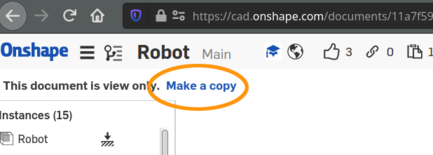
Then, update the url parameter in config.json of the robot to match the new document created where you own the robot
design.
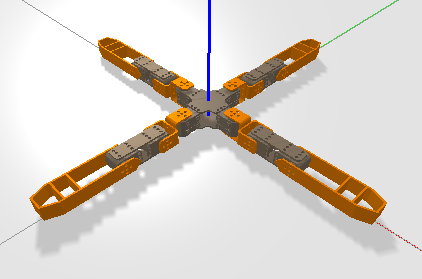
Actually, pyBullet does only keep one color per link currently in the viewer. This is a known limitation that does not affect your physical simulations. (https://github.com/bulletphysics/bullet3/issues/2650)
For instance, the quadruped robot above will look like this:
779 followers · starred Nov 2023
Example of robots that can be exported with onshape-to-robot tool
See the codeHere you will find several examples of robots that were design to be exported properly using the onshape-to-robot tool.
Have a look at the design-time considerations to understand better the constraints to export your robot.
Before testing, in a nutshell, you need onshape-to-robot:
pip install onshape-to-robot
This repository contains both config.json file and resulting export. You can use the following commands to visualize
the result:
# Start PyBullet simulation
onshape-to-robot-bullet directory
# Start MuJoCo simulation
onshape-to-robot-mujoco directory
Description: Very simple design and minimalistic configuration
onshape-to-robot-bullet 2wheels_urdfonshape-to-robot-mujoco 2wheels_mujococonfig.json
continuous with URDF format, and velocity controlled in MuJoCowheel2 has the _inv suffix, which changes its direction making both wheels spin in same direction
when same sign of order is given**
Description: Robot with 4 degrees of freedom, one prismatic (linear) joint and 3 rotations
onshape-to-robot-bullet -f adjustable_height_arm_urdf (note: -f is passed to fix the base to the ground)onshape-to-robot-mujoco adjustable_height_arm_mujococonfig.json
frame_tip) attached to the tip of the armno_collision_meshes
Description: an omnidirectional robot from the robot-soccer-kit project.
onshape-to-robot-bullet rsk_urdfonshape-to-robot-mujoco rsk_mujococonfig.json
Description: 12 DOF quadruped robot, design similar to the Metabot open-source project using XL-320 servos.
onshape-to-robot-bullet quadruped_urdfonshape-to-robot-mujoco quadruped_mujococonfig.json
trunk_frame) and in the tip of one leg (tip_frame)leg_tip)
Description: 12 DOF dog robot, made for fun with MX-64 servos (was actually built)
onshape-to-robot-bullet dogonshape-to-robot-mujoco dog
Description: 20 DOF humanoid robot, snapshot of 2019 Sigmaban model from team Rhoban, used at RoboCup kid size
onshape-to-robot-bullet sigmaban2019_urdfonshape-to-robot-mujoco sigmaban2019_mujococonfig.json
trunk_frame), in feet (right_foot_frame, left_foot_frame), the camera
(camera_frame), the head base (head_base_frame) and some location to use Vive tracker for ground-truth (vive_frame`).
Description: Orbita is a type of spherical parallel manipulator with 3 DOFs.
onshape-to-robot-mujoco field_mujococonfig.json
Description: This is not actually a robot, but an environment that is designed in Onshape and can be converted into an URDF file
onshape-to-robot-bullet field_urdfonshape-to-robot-mujoco field_mujococonfig.json
no_dynamics is passedadd_dummy_base_link option is added in URDF to ensure there is only one root node.use_fixed_links option is set to true so that the colors of different sub-part are keptRead the instructions from the onshape-to-robot repository, especially
be sure to have the API key registered and set as environment variable before running onshape-to-robot.
To get the same results, you might need openscad and meshlab installed.
sudo apt-get install openscad meshlab
Else, pure shape approximation and meshes simplification might be disabled.
ERROR (403) while using OnShape API ?If you want to export the robots yourself, you need to have the rights to access to the assembly. Thus, if you want to re-run the import for the examples in this repository, you will have to make your own copy of the document. Fortunately, this is quite simple because it is just about clicking on that button on top left:
Then, update the url parameter in config.json of the robot to match the new document created where you own the robot
design.
Actually, pyBullet does only keep one color per link currently in the viewer. This is a known limitation that does not affect your physical simulations. (https://github.com/bulletphysics/bullet3/issues/2650)
For instance, the quadruped robot above will look like this:
779 followers · starred Nov 2023



