Universal Manipulation Interface: In-The-Wild Robot Teaching Without In-The-Wild Robots
See the code[Project page] [Paper] [Hardware Guide] [Data Collection Instruction] [SLAM repo] [SLAM docker]
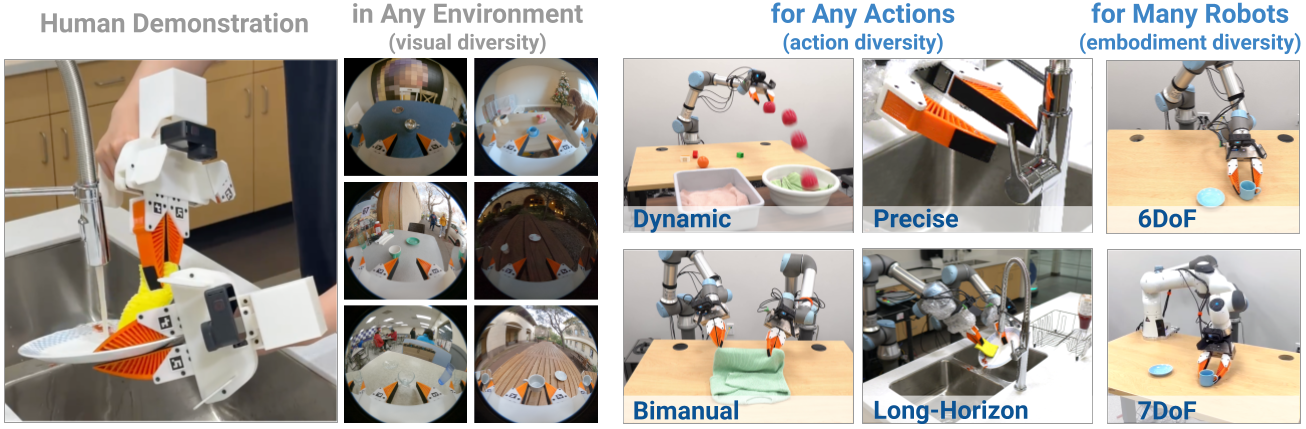
Cheng Chi1,2, Zhenjia Xu1,2, Chuer Pan1, Eric Cousineau3, Benjamin Burchfiel3, Siyuan Feng3,
Russ Tedrake3, Shuran Song1,2
1Stanford University, 2Columbia University, 3Toyota Research Institute
Only tested on Ubuntu 22.04
Install docker following the official documentation and finish linux-postinstall.
Install system-level dependencies:
$ sudo apt install -y libosmesa6-dev libgl1-mesa-glx libglfw3 patchelf
We recommend Miniforge instead of the standard anaconda distribution for faster installation:
$ mamba env create -f conda_environment.yaml
Activate environment
$ conda activate umi
(umi)$
Download example data
(umi)$ wget --recursive --no-parent --no-host-directories --cut-dirs=2 --relative --reject="index.html*" https://real.stanford.edu/umi/data/example_demo_session/
Run SLAM pipeline
(umi)$ python run_slam_pipeline.py example_demo_session

...
Found following cameras:
camera_serial
C3441328164125    5
Name: count, dtype: int64
Assigned camera_idx: right=0; left=1; non_gripper=2,3...
             camera_serial  gripper_hw_idx                                     example_vid
camera_idx
0           C3441328164125               0  demo_C3441328164125_2024.01.10_10.57.34.882133
99% of raw data are used.
defaultdict(<function main.<locals>.<lambda> at 0x7f471feb2310>, {})
n_dropped_demos 0
For this dataset, 99% of the data are useable (successful SLAM), with 0 demonstrations dropped. If your dataset has a low SLAM success rate, double check if you carefully followed our data collection instruction.
Despite our significant effort on robustness improvement, OBR_SLAM3 is still the most fragile part of UMI pipeline. If you are an expert in SLAM, please consider contributing to our fork of OBR_SLAM3 which is specifically optimized for UMI workflow.
Generate dataset for training.
(umi)$ python scripts_slam_pipeline/07_generate_replay_buffer.py -o example_demo_session/dataset.zarr.zip example_demo_session
Single-GPU training. Tested to work on RTX3090 24GB.
(umi)$ python train.py --config-name=train_diffusion_unet_timm_umi_workspace task.dataset_path=example_demo_session/dataset.zarr.zip
Multi-GPU training.
(umi)$ accelerate --num_processes <ngpus> train.py --config-name=train_diffusion_unet_timm_umi_workspace task.dataset_path=example_demo_session/dataset.zarr.zip
Downloading in-the-wild cup arrangement dataset (processed).
(umi)$ wget https://real.stanford.edu/umi/data/zarr_datasets/cup_in_the_wild.zarr.zip
Multi-GPU training.
(umi)$ accelerate --num_processes <ngpus> train.py --config-name=train_diffusion_unet_timm_umi_workspace task.dataset_path=cup_in_the_wild.zarr.zip
In this section, we will demonstrate our real-world deployment/evaluation system with the cup arrangement policy. While this policy setup only requires a single arm and camera, the our system supports up to 2 arms and unlimited number of cameras.
Build deployment hardware according to our Hardware Guide.
Setup UR5 with teach pendant:
If you are using Franka, follow this instruction.
Setup WSG50 gripper with web interface:
/user/cmd_measure.lua you just uploaded.Setup GoPro:

Setup 3Dconnexion SpaceMouse:
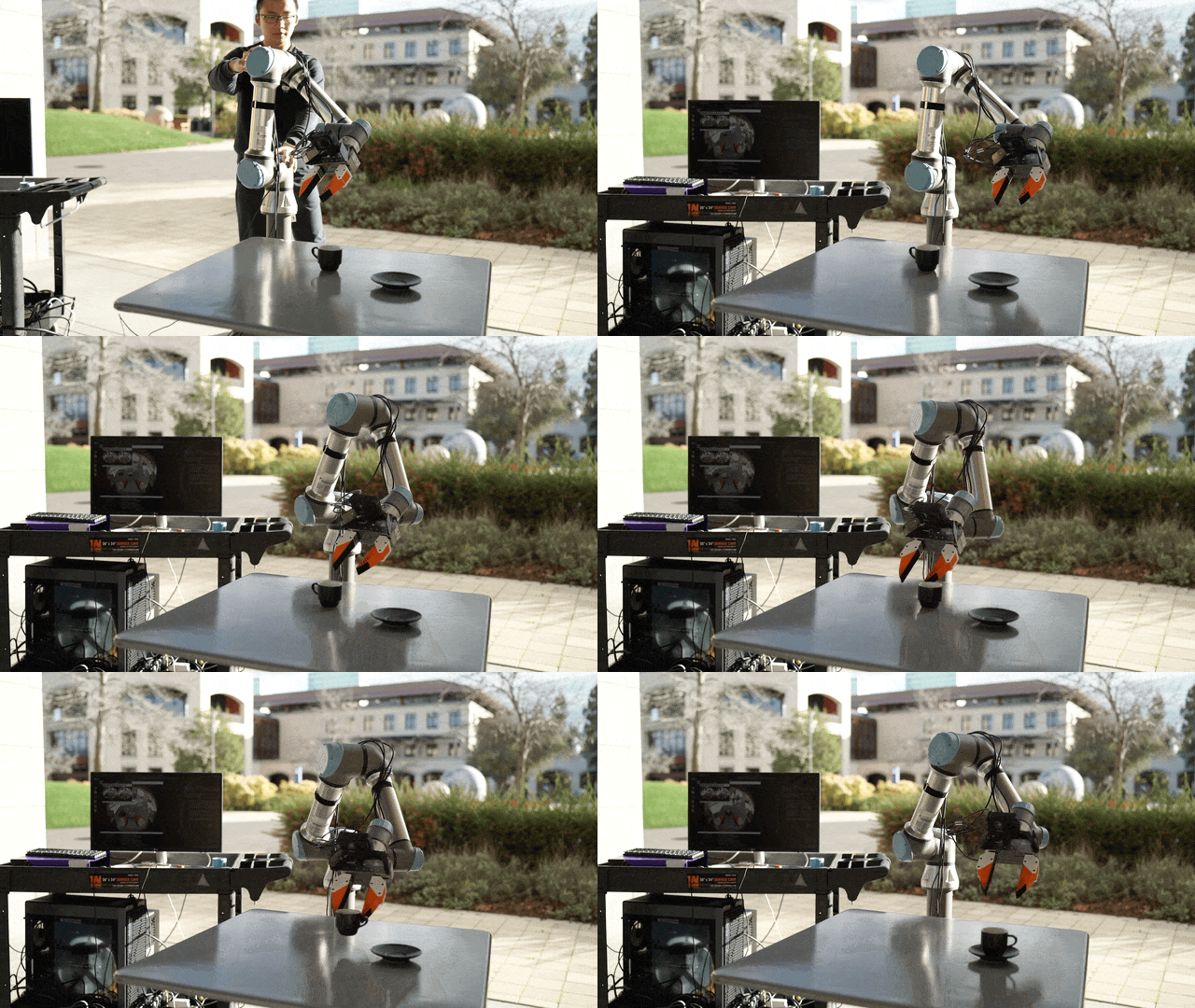
sudo apt install libspnav-dev spacenavdsudo systemctl start spacenavdOur in-the-wild cup arragement policy is trained with the distribution of "espresso cup with saucer" on Amazon across 30 different locations around Stanford. We created a Amazon shopping list for all cups used for training. We published the processed Zarr dataset and pre-trained checkpoint (finetuned CLIP ViT-L backbone).
Download pre-trained checkpoint.
(umi)$ wget https://real.stanford.edu/umi/data/pretrained_models/cup_wild_vit_l_1img.ckpt
Grant permission to the HDMI capture card.
(umi)$ sudo chmod -R 777 /dev/bus/usb
Launch eval script.
(umi)$ python eval_real.py --robot_config=example/eval_robots_config.yaml -i cup_wild_vit_l.ckpt -o data/eval_cup_wild_example
After the script started, use your spacemouse to control the robot and the gripper (spacemouse buttons). Press C to start the policy. Press S to stop.
If everything are setup correctly, your robot should be able to rotate the cup and placing it onto the saucer, anywhere 🎉
Known issue ⚠️: The policy doesn't work well under direct sunlight, since the dataset was collected during a rainiy week at Stanford.
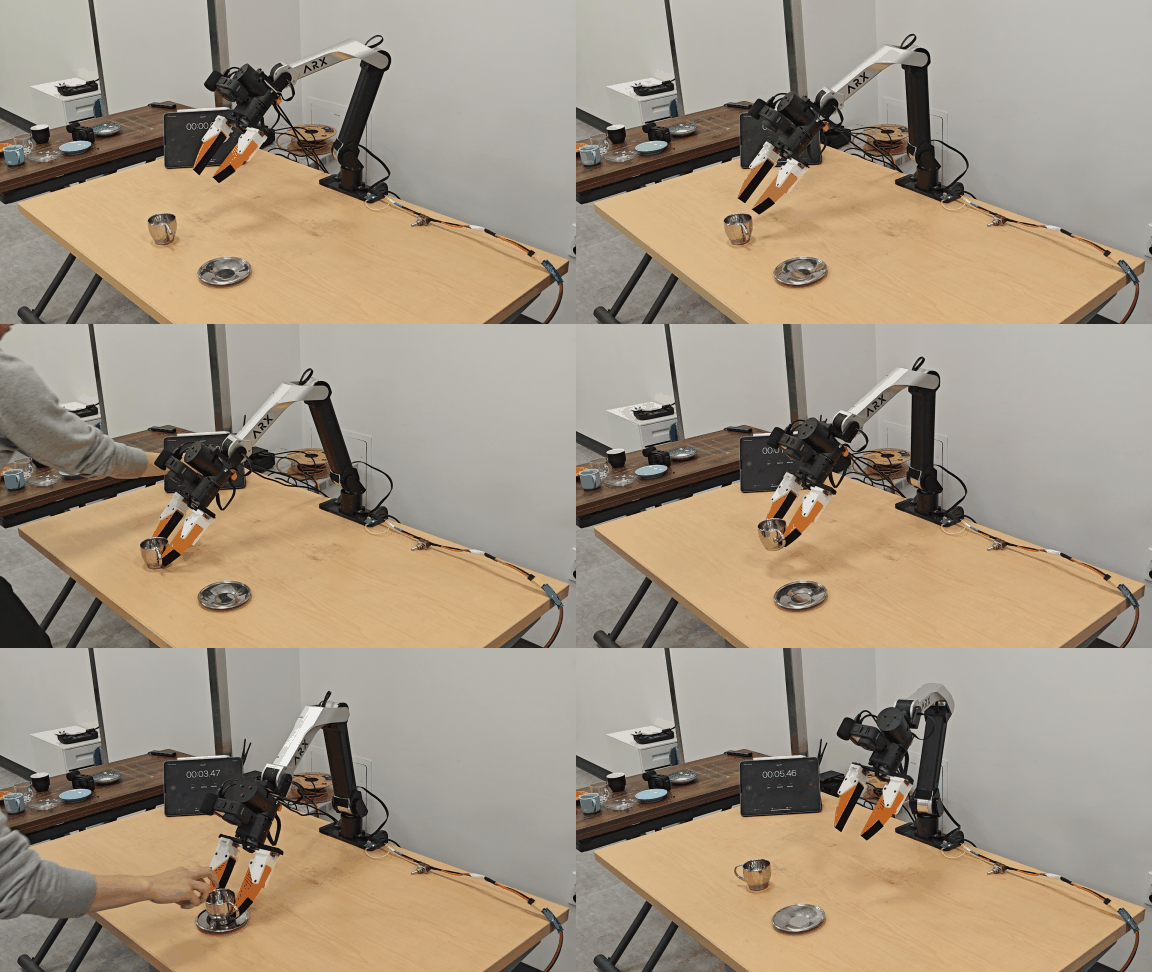
Please follow umi-on-legs for hardware modification and umi-arx for detailed policy deployment instructions.
This repository is released under the MIT license. See LICENSE for additional details.
277 followers · starred Mar 2026
683 followers · starred Jul 2026
127 followers · starred Jul 2025
82 followers · starred Apr 2026
Universal Manipulation Interface: In-The-Wild Robot Teaching Without In-The-Wild Robots
See the code[Project page] [Paper] [Hardware Guide] [Data Collection Instruction] [SLAM repo] [SLAM docker]
Cheng Chi1,2, Zhenjia Xu1,2, Chuer Pan1, Eric Cousineau3, Benjamin Burchfiel3, Siyuan Feng3,
Russ Tedrake3, Shuran Song1,2
1Stanford University, 2Columbia University, 3Toyota Research Institute
Only tested on Ubuntu 22.04
Install docker following the official documentation and finish linux-postinstall.
Install system-level dependencies:
$ sudo apt install -y libosmesa6-dev libgl1-mesa-glx libglfw3 patchelf
We recommend Miniforge instead of the standard anaconda distribution for faster installation:
$ mamba env create -f conda_environment.yaml
Activate environment
$ conda activate umi
(umi)$
Download example data
(umi)$ wget --recursive --no-parent --no-host-directories --cut-dirs=2 --relative --reject="index.html*" https://real.stanford.edu/umi/data/example_demo_session/
Run SLAM pipeline
(umi)$ python run_slam_pipeline.py example_demo_session

...
Found following cameras:
camera_serial
C3441328164125    5
Name: count, dtype: int64
Assigned camera_idx: right=0; left=1; non_gripper=2,3...
             camera_serial  gripper_hw_idx                                     example_vid
camera_idx
0           C3441328164125               0  demo_C3441328164125_2024.01.10_10.57.34.882133
99% of raw data are used.
defaultdict(<function main.<locals>.<lambda> at 0x7f471feb2310>, {})
n_dropped_demos 0
For this dataset, 99% of the data are useable (successful SLAM), with 0 demonstrations dropped. If your dataset has a low SLAM success rate, double check if you carefully followed our data collection instruction.
Despite our significant effort on robustness improvement, OBR_SLAM3 is still the most fragile part of UMI pipeline. If you are an expert in SLAM, please consider contributing to our fork of OBR_SLAM3 which is specifically optimized for UMI workflow.
Generate dataset for training.
(umi)$ python scripts_slam_pipeline/07_generate_replay_buffer.py -o example_demo_session/dataset.zarr.zip example_demo_session
Single-GPU training. Tested to work on RTX3090 24GB.
(umi)$ python train.py --config-name=train_diffusion_unet_timm_umi_workspace task.dataset_path=example_demo_session/dataset.zarr.zip
Multi-GPU training.
(umi)$ accelerate --num_processes <ngpus> train.py --config-name=train_diffusion_unet_timm_umi_workspace task.dataset_path=example_demo_session/dataset.zarr.zip
Downloading in-the-wild cup arrangement dataset (processed).
(umi)$ wget https://real.stanford.edu/umi/data/zarr_datasets/cup_in_the_wild.zarr.zip
Multi-GPU training.
(umi)$ accelerate --num_processes <ngpus> train.py --config-name=train_diffusion_unet_timm_umi_workspace task.dataset_path=cup_in_the_wild.zarr.zip
In this section, we will demonstrate our real-world deployment/evaluation system with the cup arrangement policy. While this policy setup only requires a single arm and camera, the our system supports up to 2 arms and unlimited number of cameras.
Build deployment hardware according to our Hardware Guide.
Setup UR5 with teach pendant:
If you are using Franka, follow this instruction.
Setup WSG50 gripper with web interface:
/user/cmd_measure.lua you just uploaded.Setup GoPro:
Setup 3Dconnexion SpaceMouse:
sudo apt install libspnav-dev spacenavdsudo systemctl start spacenavdOur in-the-wild cup arragement policy is trained with the distribution of "espresso cup with saucer" on Amazon across 30 different locations around Stanford. We created a Amazon shopping list for all cups used for training. We published the processed Zarr dataset and pre-trained checkpoint (finetuned CLIP ViT-L backbone).
Download pre-trained checkpoint.
(umi)$ wget https://real.stanford.edu/umi/data/pretrained_models/cup_wild_vit_l_1img.ckpt
Grant permission to the HDMI capture card.
(umi)$ sudo chmod -R 777 /dev/bus/usb
Launch eval script.
(umi)$ python eval_real.py --robot_config=example/eval_robots_config.yaml -i cup_wild_vit_l.ckpt -o data/eval_cup_wild_example
After the script started, use your spacemouse to control the robot and the gripper (spacemouse buttons). Press C to start the policy. Press S to stop.
If everything are setup correctly, your robot should be able to rotate the cup and placing it onto the saucer, anywhere 🎉
Known issue ⚠️: The policy doesn't work well under direct sunlight, since the dataset was collected during a rainiy week at Stanford.
Please follow umi-on-legs for hardware modification and umi-arx for detailed policy deployment instructions.
This repository is released under the MIT license. See LICENSE for additional details.
277 followers · starred Mar 2026
683 followers · starred Jul 2026
127 followers · starred Jul 2025
82 followers · starred Apr 2026



