Project Page | Models | Dataset
🌎English | 🇨🇳中文
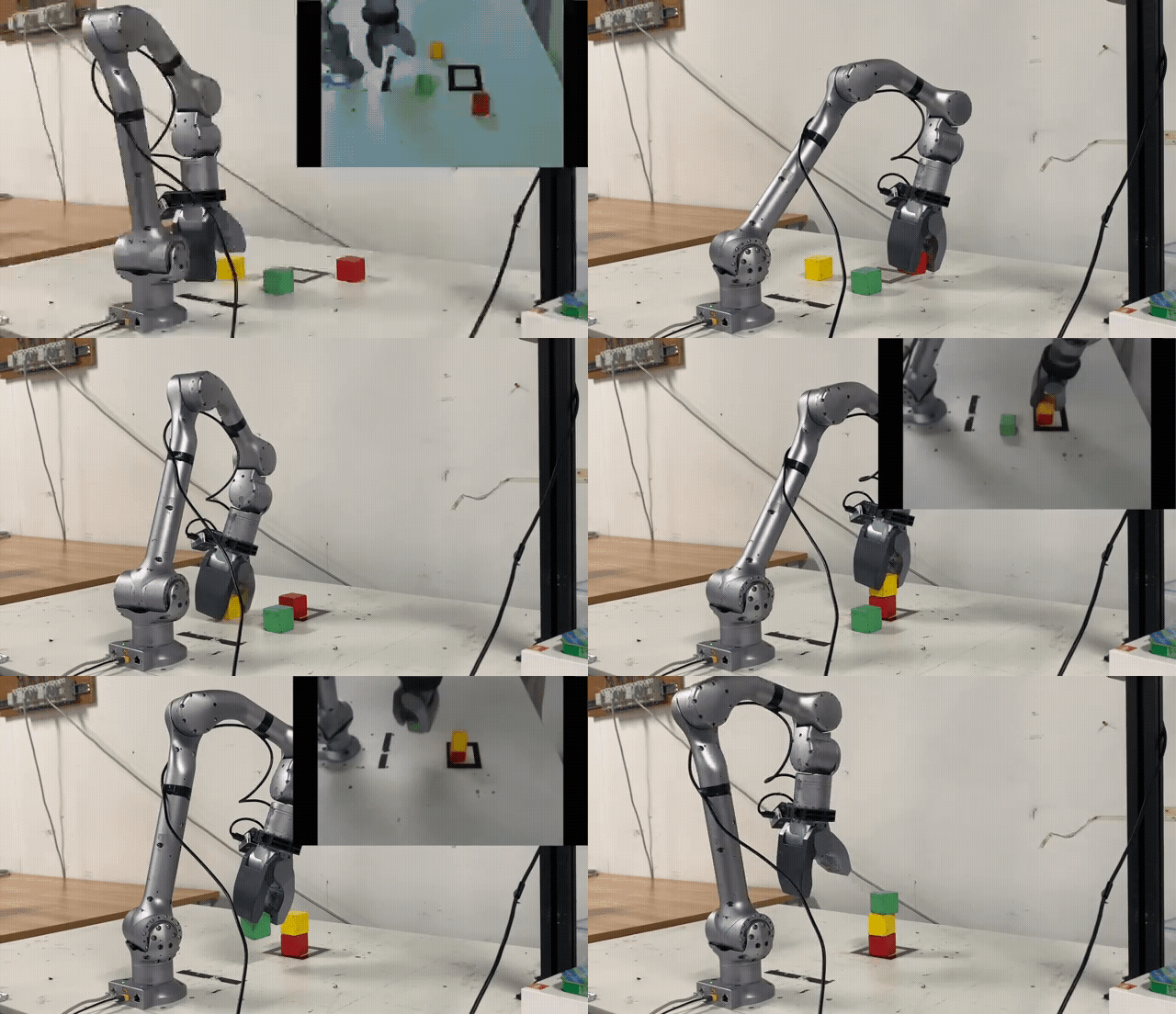 | 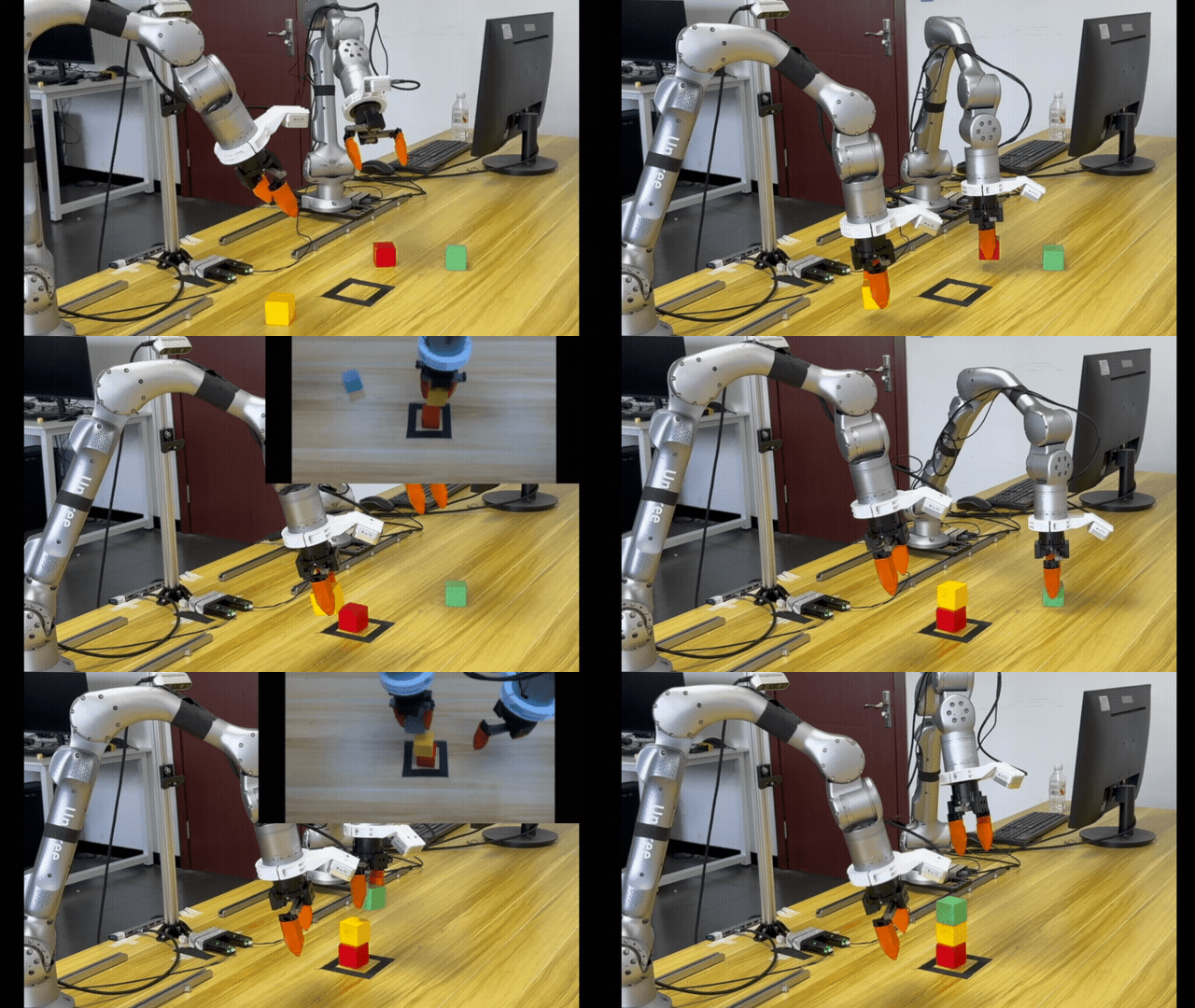 |
|---|---|
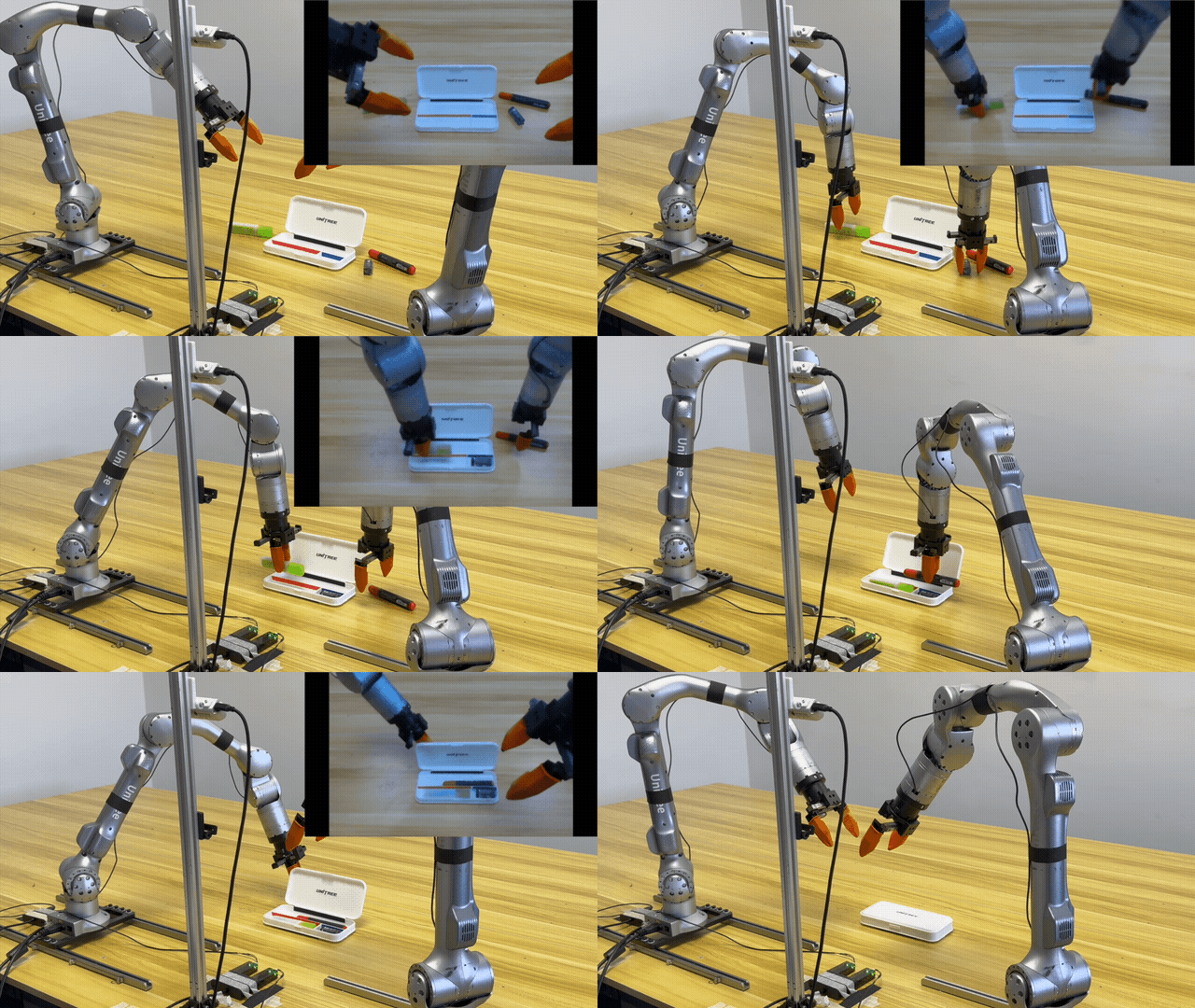 | 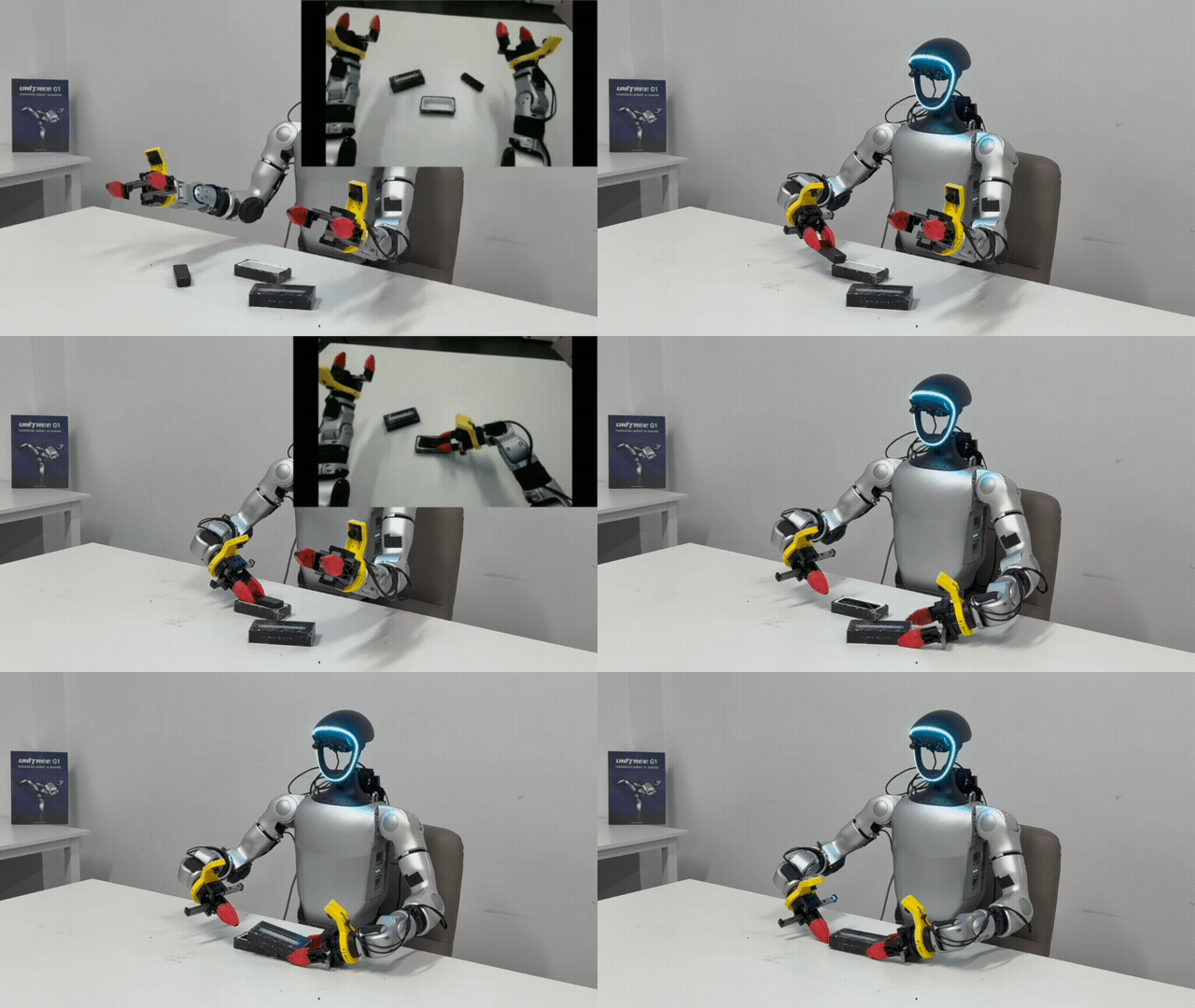 |
Note: the top-right window shows the world model’s pretion of future action videos.
conda create -n unifolm-wma python==3.10.18
conda activate unifolm-wma

conda install pinocchio=3.2.0 -c conda-forge -y
conda install ffmpeg=7.1.1 -c conda-forge

git clone --recurse-submodules https://github.com/unitreerobotics/unifolm-world-model-action.git

# If you already downloaded the repo:
cd unifolm-world-model-action
git submodule update --init --recursive

pip install -e .

cd external/dlimp
pip install -e .
| Model | Description | Link |
|---|---|---|
| $\text{UnifoLM-WMA-0}_{Base}$ | Fine-tuned on Open-X dataset. | HuggingFace |
| $\text{UnifoLM-WMA-0}_{Dual}$ | Fine-tuned on five Unitree opensource dataset in both decision-making and simulation modes. | HuggingFace |
In our experiments, we consider the following five opensource dataset:
| Dataset | Robot | Link |
|---|---|---|
| Z1_StackBox | Unitree Z1 | Huggingface |
| Z1_DualArm_StackBox | Unitree Z1 | Huggingface |
| Z1_DualArm_StackBox_V2 | Unitree Z1 | Huggingface |
| Z1_DualArm_Cleanup_Pencils | Unitree Z1 | Huggingface |
| G1_Pack_Camera | Unitree G1 | Huggingface |
This dataset is collected using the Unitree G1 robot with a 7-DOF dexterous arm, covering a variety of table-top manipulation tasks in both single-arm and dual-arm settings. It is suitable for training video generation models, world models, and other downstream applications. Each episode lasts approximately 30 seconds. Available image resolutions: 256×256 and 128×128.
| Dataset | Robot | Link |
|---|---|---|
| G1_Dex1_DiverseManip_DualArm_256x256 | Unitree G1 | Huggingface |
| G1_Dex1_DiverseManip_DualArm_128x128 | Unitree G1 | Huggingface |
| G1_Dex1_DiverseManip_SingleArm_256x256 | Unitree G1 | Huggingface |
| G1_Dex1_DiverseManip_SingleArm_128x128 | Unitree G1 | Huggingface |
To train on your own dataset, first to have the data following the Huggingface LeRobot V2.1 dataset format. Assume the dataset’s source directory structure is as follows:
source_dir/
    ├── dataset1_name
    ├── dataset2_name
    ├── dataset3_name
    └── ...
Then, convert a dataset to the required format using the command below:
cd prepare_data
python prepare_training_data.py \
    --source_dir /path/to/your/source_dir \
    --target_dir /path/to/save/the/converted/data \
    --dataset_name "dataset1_name" \
    --robot_name "a tag of the robot in the dataset" # e.g, Unitree Z1 Robot Arm or Unitree G1 Robot with Gripper.
The resulting data structure (Note: model training only supports input from the main-view camera. If the dataset includes multiple views, remove the corresponding values from the data_dir column in the CSV file.
target_dir/
    ├── videos
    │     ├──dataset1_name
    │     │   ├──camera_view_dir
    │     │       ├── 0.mp4
    │     │       ├── 1.mp4
    │     │       └── ...
    │     └── ...
    ├── transitions
    │    ├── dataset1_name
    │        ├── meta_data
    │        ├── 0.h5
    │        ├── 1.h5
    │        └── ...
    └──  dataset1_name.csv
A. Our training strategy is outlined as follows:
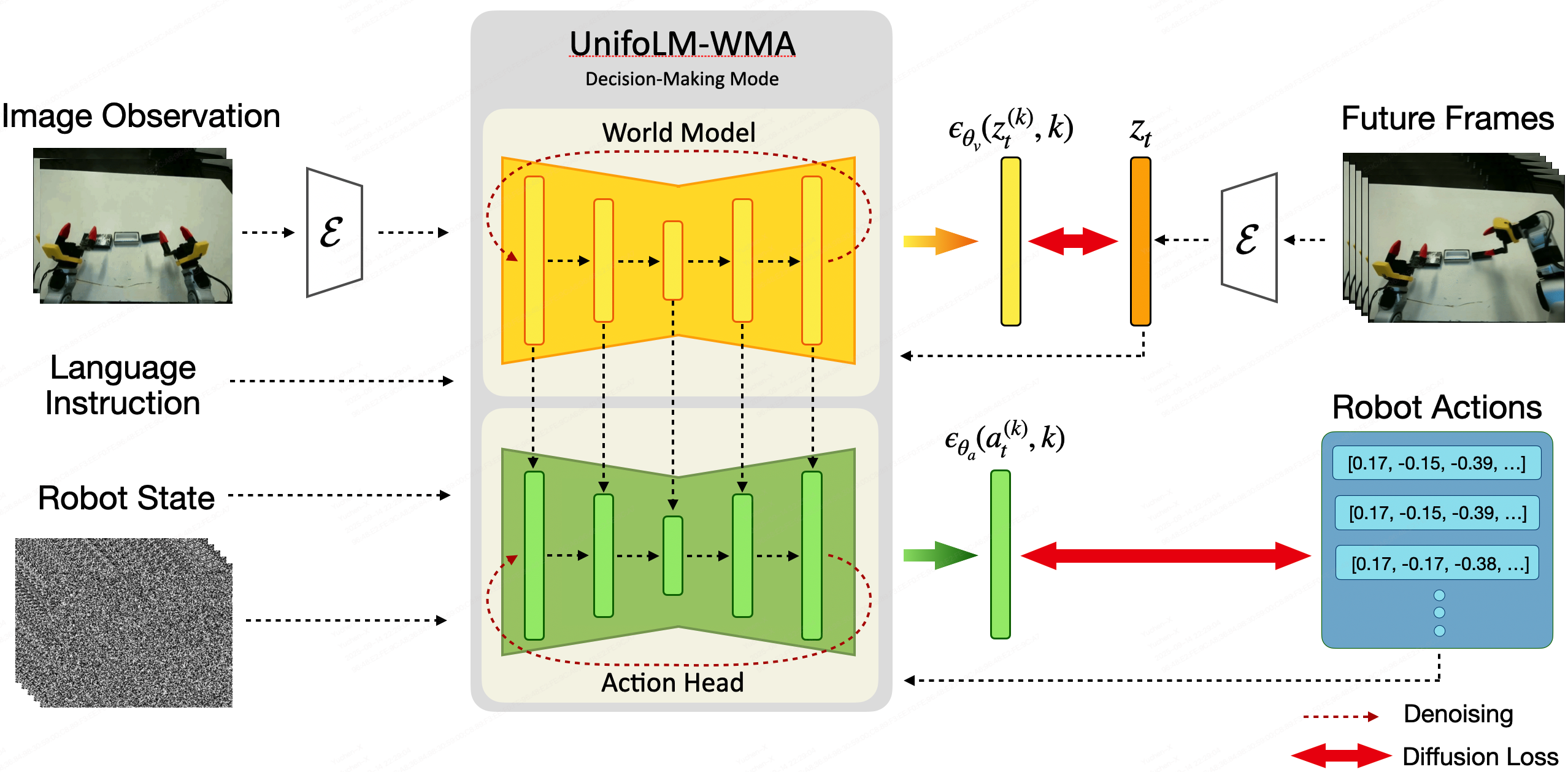
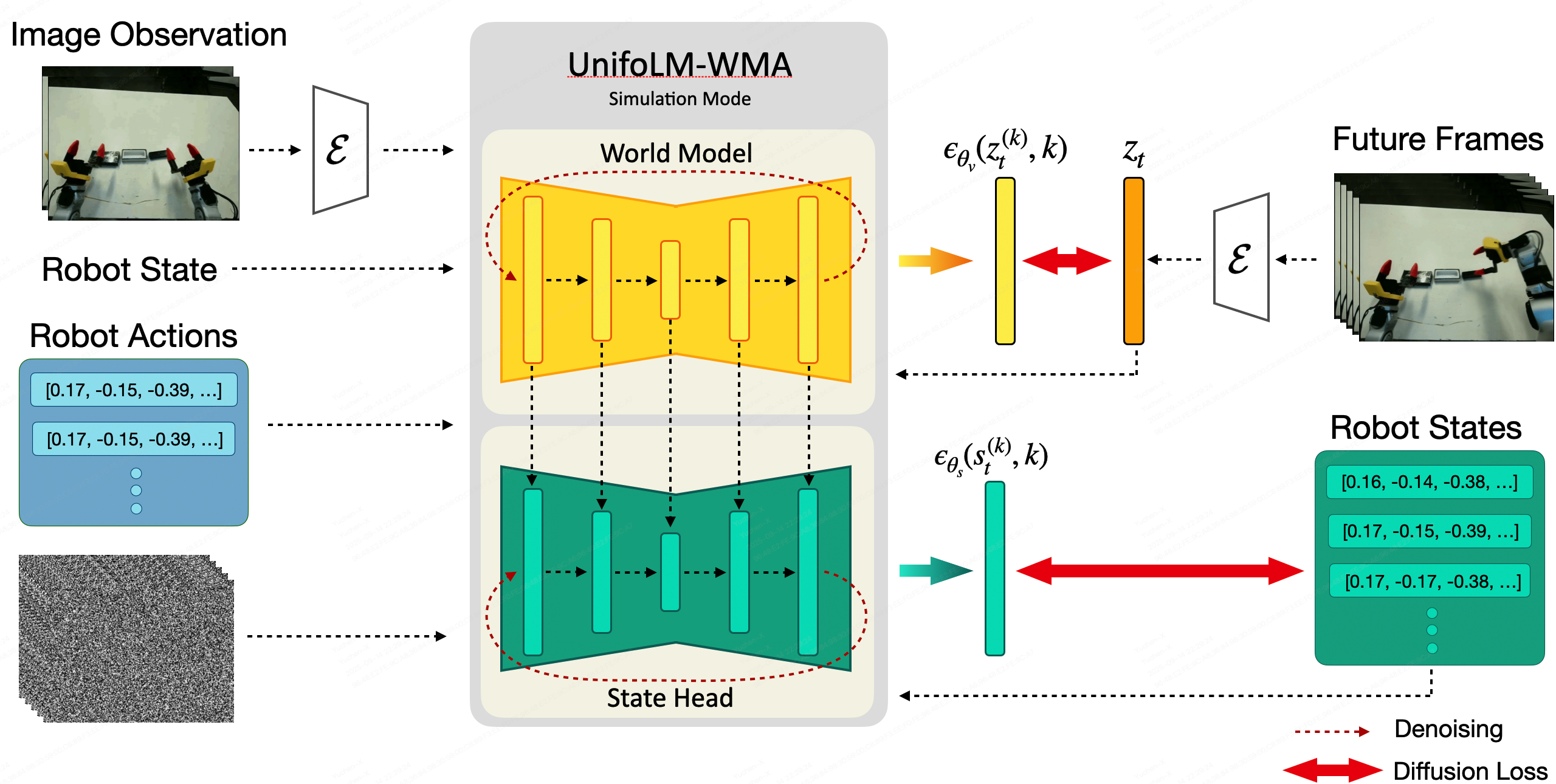
Note: If you only require $\text{UnifoLM-WMA}$ to operate in a single mode, you may skip the corresponding step.
B. To conduct training on a single or multiple datasets, please follow the steps below:
agent_state_dim and agent_action_dim in configs/train/config.yaml ;pretrained_checkpoint, we recommend using the checkpoint " $\text{UnifoLM-WMA-0}_{Base}$ " fine-tuned on the Open-X dataset;
model:
    pretrained_checkpoint: /path/to/pretrained/checkpoint;
    ...
    decision_making_only: True # Train the world model only in decision-making mode. If False, jointly train it in both decision-making and simulation modes.
    ...
data:
    ...
    train:
        ...
        data_dir: /path/to/training/dataset/directory
    dataset_and_weights: # list the name of each dataset below and make sure the summation of weights is 1.0
        dataset1_name: 0.2
        dataset2_name: 0.2
        dataset3_name: 0.2
        dataset4_name: 0.2
        dataset5_name: 0.2
experiment_name, save_root variables in scripts/train.sh;bash scripts/train.sh
To run the world model in an interactive simulation mode, follow these steps:
world_model_interaction_prompts/
  ├── images
  │    ├── dataset1_name
  │    │       ├── 0.png     # Image prompt
  │    │       └── ...
  │    └── ...
  ├── transitions
  │    ├── dataset1_name
  │    │       ├── meta_data # Used for normalization
  │    │       ├── 0.h       # Robot state and action data; in interaction mode,
  │    │       │             # only used to retrieve the robot state corresponding
  │    │       │             # to the image prompt
  │    │       └── ...
  │    └── ...
  ├──  dataset1_name.csv     # File for loading image prompts, text instruction and corresponding robot states
  └── ...
pretrained_checkpoint(e.g, $\text{UnifoLM-WMA-0}_{Dual}$) and data_dir in configs/inference/world_model_interaction.yamlcheckpoint, res_dir and prompt_dir in scripts/run_world_model_interaction.sh, and specify all the dataset's name in datasets=(...). Then, launch the inference with the command:
bash scripts/run_world_model_interaction.sh
In this setup, inference is performed on a server, while a robot client gathers observations from the real-robot and sends them to the server to query actions. The process unfolds through the following steps:
ckpt, res_dir, datasets in scripts/run_real_eval_server.sh;data_dir and dataset_and_weights in config/inference/world_model_decision_making.yaml;conda activate unifolm-wma
cd unifolm-world-model-action
bash scripts/run_real_eval_server.sh
unitree_deploy conda environment, install the required packages, launch the controllers or services on the real-robot.ssh user_name@remote_server_IP -CNg -L 8000:127.0.0.1:8000
unitree_deploy/robot_client.py script to start inference:cd unitree_deploy
python scripts/robot_client.py --robot_type "g1_dex1" --action_horizon 16 --exe_steps 16 --observation_horizon 2 --language_instruction "pack black camera into box" --output_dir ./results --control_freq 15
Here's a high-level overview of the project's code structure and core components:
unitree-world-model/
    ├── assets                      # Media assets such as GIFs, images, and demo videos
    ├── configs                     # Configuration files for training and inference
    │    ├── inference
    │    └──  train
    ├── examples                    # Example inputs and prompts for running inference
    ├── external                    # External packages
    ├── prepare_data                # Scripts for dataset preprocessing and format conversion
    ├── scripts                     # Main scripts for training, evaluation, and deployment
    ├── src
    │    ├──unitree_worldmodel      # Core Python package for the Unitree world model
    │    │      ├── data            # Dataset loading, transformations, and dataloaders
    │    │      ├── models          # Model architectures and backbone definitions
    │    │      ├── modules         # Custom model modules and components
    │    │      └──  utils          # Utility functions and common helpers
    └── unitree_deploy              # Deployment code
Lots of code are inherited from DynamiCrafter, Diffusion Policy, ACT and HPT.
@misc{unifolm-wma-0,
  author       = {Unitree},
  title        = {UnifoLM-WMA-0: A World-Model-Action (WMA) Framework under UnifoLM Family},
  year         = {2025},
}
61,643 followers · starred Sep 2025
296 followers · starred Sep 2025
596 followers · starred Nov 2025
69 followers · starred Sep 2025
Project Page | Models | Dataset
🌎English | 🇨🇳中文
| |
|---|---|
| |
Note: the top-right window shows the world model’s pretion of future action videos.
conda create -n unifolm-wma python==3.10.18
conda activate unifolm-wma

conda install pinocchio=3.2.0 -c conda-forge -y
conda install ffmpeg=7.1.1 -c conda-forge

git clone --recurse-submodules https://github.com/unitreerobotics/unifolm-world-model-action.git

# If you already downloaded the repo:
cd unifolm-world-model-action
git submodule update --init --recursive

pip install -e .

cd external/dlimp
pip install -e .
| Model | Description | Link |
|---|---|---|
| $\text{UnifoLM-WMA-0}_{Base}$ | Fine-tuned on Open-X dataset. | HuggingFace |
| $\text{UnifoLM-WMA-0}_{Dual}$ | Fine-tuned on five Unitree opensource dataset in both decision-making and simulation modes. | HuggingFace |
In our experiments, we consider the following five opensource dataset:
| Dataset | Robot | Link |
|---|---|---|
| Z1_StackBox | Unitree Z1 | Huggingface |
| Z1_DualArm_StackBox | Unitree Z1 | Huggingface |
| Z1_DualArm_StackBox_V2 | Unitree Z1 | Huggingface |
| Z1_DualArm_Cleanup_Pencils | Unitree Z1 | Huggingface |
| G1_Pack_Camera | Unitree G1 | Huggingface |
This dataset is collected using the Unitree G1 robot with a 7-DOF dexterous arm, covering a variety of table-top manipulation tasks in both single-arm and dual-arm settings. It is suitable for training video generation models, world models, and other downstream applications. Each episode lasts approximately 30 seconds. Available image resolutions: 256×256 and 128×128.
| Dataset | Robot | Link |
|---|---|---|
| G1_Dex1_DiverseManip_DualArm_256x256 | Unitree G1 | Huggingface |
| G1_Dex1_DiverseManip_DualArm_128x128 | Unitree G1 | Huggingface |
| G1_Dex1_DiverseManip_SingleArm_256x256 | Unitree G1 | Huggingface |
| G1_Dex1_DiverseManip_SingleArm_128x128 | Unitree G1 | Huggingface |
To train on your own dataset, first to have the data following the Huggingface LeRobot V2.1 dataset format. Assume the dataset’s source directory structure is as follows:
source_dir/
    ├── dataset1_name
    ├── dataset2_name
    ├── dataset3_name
    └── ...
Then, convert a dataset to the required format using the command below:
cd prepare_data
python prepare_training_data.py \
    --source_dir /path/to/your/source_dir \
    --target_dir /path/to/save/the/converted/data \
    --dataset_name "dataset1_name" \
    --robot_name "a tag of the robot in the dataset" # e.g, Unitree Z1 Robot Arm or Unitree G1 Robot with Gripper.
The resulting data structure (Note: model training only supports input from the main-view camera. If the dataset includes multiple views, remove the corresponding values from the data_dir column in the CSV file.
target_dir/
    ├── videos
    │     ├──dataset1_name
    │     │   ├──camera_view_dir
    │     │       ├── 0.mp4
    │     │       ├── 1.mp4
    │     │       └── ...
    │     └── ...
    ├── transitions
    │    ├── dataset1_name
    │        ├── meta_data
    │        ├── 0.h5
    │        ├── 1.h5
    │        └── ...
    └──  dataset1_name.csv
A. Our training strategy is outlined as follows:
Note: If you only require $\text{UnifoLM-WMA}$ to operate in a single mode, you may skip the corresponding step.
B. To conduct training on a single or multiple datasets, please follow the steps below:
agent_state_dim and agent_action_dim in configs/train/config.yaml ;pretrained_checkpoint, we recommend using the checkpoint " $\text{UnifoLM-WMA-0}_{Base}$ " fine-tuned on the Open-X dataset;
model:
    pretrained_checkpoint: /path/to/pretrained/checkpoint;
    ...
    decision_making_only: True # Train the world model only in decision-making mode. If False, jointly train it in both decision-making and simulation modes.
    ...
data:
    ...
    train:
        ...
        data_dir: /path/to/training/dataset/directory
    dataset_and_weights: # list the name of each dataset below and make sure the summation of weights is 1.0
        dataset1_name: 0.2
        dataset2_name: 0.2
        dataset3_name: 0.2
        dataset4_name: 0.2
        dataset5_name: 0.2
experiment_name, save_root variables in scripts/train.sh;bash scripts/train.sh
To run the world model in an interactive simulation mode, follow these steps:
world_model_interaction_prompts/
  ├── images
  │    ├── dataset1_name
  │    │       ├── 0.png     # Image prompt
  │    │       └── ...
  │    └── ...
  ├── transitions
  │    ├── dataset1_name
  │    │       ├── meta_data # Used for normalization
  │    │       ├── 0.h       # Robot state and action data; in interaction mode,
  │    │       │             # only used to retrieve the robot state corresponding
  │    │       │             # to the image prompt
  │    │       └── ...
  │    └── ...
  ├──  dataset1_name.csv     # File for loading image prompts, text instruction and corresponding robot states
  └── ...
pretrained_checkpoint(e.g, $\text{UnifoLM-WMA-0}_{Dual}$) and data_dir in configs/inference/world_model_interaction.yamlcheckpoint, res_dir and prompt_dir in scripts/run_world_model_interaction.sh, and specify all the dataset's name in datasets=(...). Then, launch the inference with the command:
bash scripts/run_world_model_interaction.sh
In this setup, inference is performed on a server, while a robot client gathers observations from the real-robot and sends them to the server to query actions. The process unfolds through the following steps:
ckpt, res_dir, datasets in scripts/run_real_eval_server.sh;data_dir and dataset_and_weights in config/inference/world_model_decision_making.yaml;conda activate unifolm-wma
cd unifolm-world-model-action
bash scripts/run_real_eval_server.sh
unitree_deploy conda environment, install the required packages, launch the controllers or services on the real-robot.ssh user_name@remote_server_IP -CNg -L 8000:127.0.0.1:8000
unitree_deploy/robot_client.py script to start inference:cd unitree_deploy
python scripts/robot_client.py --robot_type "g1_dex1" --action_horizon 16 --exe_steps 16 --observation_horizon 2 --language_instruction "pack black camera into box" --output_dir ./results --control_freq 15
Here's a high-level overview of the project's code structure and core components:
unitree-world-model/
    ├── assets                      # Media assets such as GIFs, images, and demo videos
    ├── configs                     # Configuration files for training and inference
    │    ├── inference
    │    └──  train
    ├── examples                    # Example inputs and prompts for running inference
    ├── external                    # External packages
    ├── prepare_data                # Scripts for dataset preprocessing and format conversion
    ├── scripts                     # Main scripts for training, evaluation, and deployment
    ├── src
    │    ├──unitree_worldmodel      # Core Python package for the Unitree world model
    │    │      ├── data            # Dataset loading, transformations, and dataloaders
    │    │      ├── models          # Model architectures and backbone definitions
    │    │      ├── modules         # Custom model modules and components
    │    │      └──  utils          # Utility functions and common helpers
    └── unitree_deploy              # Deployment code
Lots of code are inherited from DynamiCrafter, Diffusion Policy, ACT and HPT.
@misc{unifolm-wma-0,
  author       = {Unitree},
  title        = {UnifoLM-WMA-0: A World-Model-Action (WMA) Framework under UnifoLM Family},
  year         = {2025},
}
61,643 followers · starred Sep 2025
296 followers · starred Sep 2025
596 followers · starred Nov 2025
69 followers · starred Sep 2025



