
README
Genie Envisioner v1.0: A Unified World Foundation Platform for Robotic Manipulation
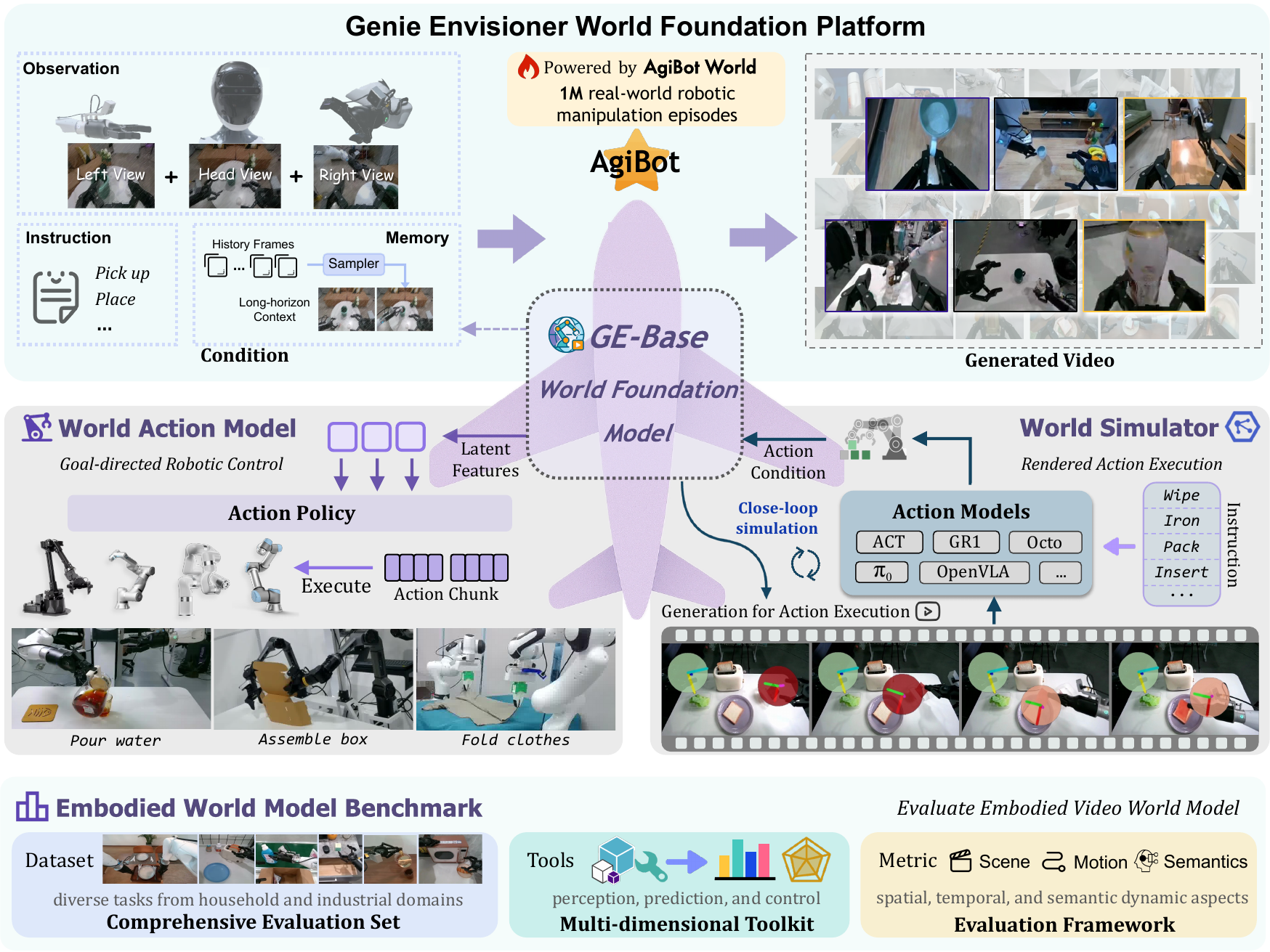


This repo is the official implementation of Genie Envisioner: A Unified World Foundation Platform for Robotic Manipulation.
News
-
[2026.09.10] 📄 Genie Envisioner - Act v2.0 is released.
-
[2026.05.28] 📄 Genie Envisioner - Sim v2.0 is released.
-
[2025.12.18] 📚️ The weights of GE-Act trained on Calvin is released.
-
[2025.12.18] 📚️ The instruction for evaluating GE-Act on Simulation Bench is released.
-
[2025.10.22] 🚀 Pretrained Weights of GE-Sim(Cosmos2-based version) have been released. The released GE-Sim model is pretrained on AgiBotWorld.
-
[2025.10.22] 🚀 Example results and codes of GE-Sim (the latest version based on Cosmos2) have been released. Detailed usage can be found in GE-Sim and the example results can be found in Example results of GE-sim.
-
[2025.10.17] 📄 The technical report Genie Envisioner: A Unified World Foundation Platform for Robotic Manipulation has been updated. More experimental results for GE-Act are provided.
-
[2025.08.14] 🚀 Weights of GE_base have been released.
-
[2025.08.13] 🚀 Codes of Genie Envisioner has been released.
-
[2025.08.08] 📄 The technical report Genie Envisioner: A Unified World Foundation Platform for Robotic Manipulation has been released.
-
[2025.05.16] 🚀 EWMB (Embodied World Model Benchmark) has been released.
TODO
- Release inference & training code
- Release model weights
- Support more backbone models
Getting started
Setup
git clone https://github.com/AgibotTech/Genie-Envisioner.git
conda create -n genie_envisioner python=3.10.4
conda activate genie_envisioner
pip install -r requirements.txt
Training
GE-Act Post-Training
-
Download the pretrained weights of GE-Base-fast and the weights of tokenizer and vae used in LTX_Video from HuggingFace, and modify the model weight config in
configs/ltx_model/video_model.yaml:pretrained_model_name_or_path: PATH/TO/PRETRAINED_WEIGHTS_OF_VAE_AND_TOKENIZER diffusion_model: model_path: PATH/TO/GE_base_{version}.safetensorsNote: If you are only performing the post training phase, you do not need to download the complete LTX model weights. You only need to download the weights for the text_encoder, tokenizer and VAE, as well as the model_index.json, and place them in the same directory.
-
Build your own LeRoBot dataset following the instruction in LeRoBot.
File Structure Example:
ROOT_PATH_TO_YOUR_DATASETS/ ├── DATASETNAME/ │ ├── data/ │ │ ├── episode_000000.parquet │ │ ├── episode_000001.parquet │ │ ├── ... │ │ └── episode_{:06d}.parquet │ ├── meta/ │ │ ├── episodes_stats.jsonl │ │ ├── episodes.jsonl │ │ ├── tasks.json │ │ └── info.json │ └── videos/ │ ├── chunk-000/ │ | ├── observation.images.top_head │ | | ├── episode_000000.mp4 │ | | ├── episode_000001.mp4 │ | | ├── ... │ | | └── episode_{:06d}.mp4 │ | ├── observation.images.hand_left │ | | ├── episode_000000.mp4 │ | | └── ... │ | └── observation.images.hand_right │ | | ├── episode_000000.mp4 │ | └── ... | └── ... └── ... -
Calculate the action statistics. We provide an example script for LeRoBot-like datasets
scripts/get_statistics.pyand you can run the script as bellow:python scripts/get_statistics.py --data_root PATH/TO/YOUR/DATASET --data_name $DATASETNAM --data_type joint --action_key action --state_key observation.state --save_path PATH/OF/FILE.jsonAfter running the script, you can get a json file of statistics. You can specific the path of json file in configs:
data:
    train:
        ...
        stat_file: PATH/OF/FILE.json
    val:
        ...
        stat_file: PATH/OF/FILE.json
Content of the json file:
{ "DATASETNAME_joint": { "mean": [ 0, ... ], "std":[ 1, ... ] }, "DATASETNAME_delta_joint": { "mean": [ 0, ... ], "std":[ 1, ... ] } "DATASETNAME_state_joint": { "mean": [ 0, ... ], "std":[ 1, ... ] } } -
Task-specific video adaption
As mentioned in our paper, although GE-base has zero-shot capability, for the unseen robots or customized new tasks, we recommend performing this step of video adaptation to achieve better performance.
- Modify the config in
configs/ltx_model/video_model_lerobot.yaml. More details of dataset can be found indata/utils/*_dataset.py:
data: train / val: data_roots: [ROOT_PATH_TO_YOUR_DATASETS, ] domains: [DATASETNAME, ] # rewrite to the camera names used in your dataset valid_cam: ["observation.images.top_head", "observation.images.hand_left", "observation.images.hand_right"] ...- Disable action-model as bellow in
configs/ltx_model/video_model_lerobot.yaml:
return_action: False return_video: True train_mode: 'video_only' diffusion_model: config: action_expert: False- Run
bash scripts/train.sh main.py configs/ltx_model/video_model_lerobot.yaml - Modify the config in
-
Action Post-Training
- Modify the config in
configs/ltx_model/policy_model_lerobot.yaml
diffusion_model:
    model_path: PATH_TO_VIDEO_POST_TRAINING_CHECKPOINT_SAFETENSOR
data:
    train / val:
        data_roots:   [ROOT_PATH_TO_YOUR_DATASETS, ]
        domains:      [DATASETNAME, ]
        # rewrite to the camera names used in your dataset
        valid_cam:    ["observation.images.top_head", "observation.images.hand_left", "observation.images.hand_right"]
        # rewrite to the keys used in your dataset
        action_key:   "action"
        state_key:    "observation.state"
        action_type:  "absolute"  # "absolute", "delta" or "relative"
        action_space: "joint"
        ...
More details of dataset can be found in data/utils/*_dataset.py
- Enable action-model as bellow in
configs/ltx_model/policy_model_lerobot.yaml:
return_action: True return_video: False train_mode: 'action_full' diffusion_model: config: action_expert: True- Run
bash scripts/train.sh main.py configs/ltx_model/policy_model_lerobot.yaml - Modify the config in
GE-Act on Simulation Benchmark
The instruction for evaluating GE-Act on simulation benchmarks is released.
GE-base Pre-Training
You can also train GE-base on your own database. Here, we take training on AgiBotWorld as an example:
-
Download 🤗AgiBotWorld
-
Modify dataset config in
configs/ltx_model/video_model.yaml:data: train / val: data_roots: ["path/to/agibot-world/AgiBotWorld-Beta", ] task_info_root: ["path/to/agibot-world/AgiBotWorld-Beta/task_info", ] domains: ["agibotworld", ] ... dataset_info_cache_path: "path/to/save/dataset_meta_info_cache" -
Download the weights of tokenizer and vae used in LTX_Video from HuggingFace and the pretrained ltx-video-2b-v0.9, and modify the model weight config in
configs/ltx_model/video_model.yaml:pretrained_model_name_or_path: PATH/TO/PRETRAINED_WEIGHTS_OF_VAE_AND_TOKENIZER diffusion_model: model_path: PATH/TO/PRETRAINED_MODEL.safetensor -
Pre-train Video-Model
bash scripts/train.sh main.py configs/ltx_model/video_model.yaml
Validation
Predict actions and draw an open-loop verification diagram
bash scripts/infer.sh main.py \
    configs/ltx_model/policy_model_lerobot.yaml \
    path/to/trained/checkpoint.safetensors \
    path/to/save/outputs \
    DATASETNAME
GE-Act Deployment
We provide a simple example of deploying GE-Act server based on openpi:
# GE-Act server
# modify $IP_ADDRESS_OF_SERVER to your ip address and modify $DOMAIN_NAME to DATASETNAME
bash web_infer_scripts/run_server.sh

# A simple client that send random observations
bash web_infer_scripts/run_simple_client.sh
Video Generation
You can generate videos as bellow:
bash scripts/infer.sh main.py \
    configs/ltx_model/video_model_infer_slow.yaml \
    path/to/trained/checkpoint.safetensors \
    path/to/save/outputs \
    DATASETNAME
We also provide two examples in video_gen_examples and a simple script to generate videos. As described in our paper, the video generation model takes sparse memory frames as input. Therefore, each sample in video_gen_examples includes four multi-view images sampled from history frames.
python video_gen_examples/infer.py \
    --config_file configs/ltx_model/video_model_infer_slow.yaml \
    --image_root video_gen_examples/sample_0 \
    --prompt_txt_file video_gen_examples/sample_0/prompt.txt \
    --output_path path/to/save/results
As detailed in our paper, we provide two pre-trained video generation models:
- GE-Base-slow (Mid-Range frequency video generation, synchronized with action dynamics)
- GE-Base-fast (Low-Frequency video generation optimized for low-latency applications)
When utilizing these models, please select the appropriate configuration file and ensure the diffusion_model.model_path parameter correctly points to your chosen model weights
GE-Sim Inference
We provide an example script gesim_video_gen_examples/infer_gesim.py for GE-Sim inference. For simplicity, this script directly load extrinsics, intrinsics and actions from .npy files.
We also provide an example data-conversion script gesim_video_gen_examples/get_example_gesim_inputs.py that reorganizes the data in AgiBotWorld to fit the data format used in gesim_video_gen_examples/infer_gesim.py.
# 1. Convert an episode to .npy files or build your custom data
#    If you only want to use the provided example data in gesim_video_gen_examples/sample_0, you can skip this step.

python gesim_video_gen_examples/get_example_gesim_inputs.py --data_root=${YOUR_AGIBOTWORLD_ROOT} --task_id=${TASK_id} --episode_id=${EPI_ID} --save_root=gesim_video_gen_examples/sample_0 --valid_start=0 --valid_end=300

# 2. Download the weights of GE-Sim(cosmos-based version) from https://modelscope.cn/models/agibot_world/Genie-Envisioner/file/view/master/ge_sim_cosmos_v0.1.safetensors

# 3. Download the scheduler config and the weights of text_encoder, tokenizers and vae of nvidia/Cosmos-Predict2-2B-Video2World from https://huggingface.co/nvidia/Cosmos-Predict2-2B-Video2World

# 4. Modify the PATH in configs/cosmos_model/acwm_cosmos.yaml

# 5. Run the following command

python gesim_video_gen_examples/infer_gesim.py \
    --config_file=configs/cosmos_model/acwm_cosmos.yaml \
    --image_root=gesim_video_gen_examples/sample_0 \
    --extrinsic_root=gesim_video_gen_examples/sample_0 \
    --intrinsic_root=gesim_video_gen_examples/sample_0 \
    --action_path=gesim_video_gen_examples/sample_0/actions.npy \
    --output_path=gesim_video_gen_examples/sample_0_res
We provide an example function of obtaining camera-to-base extrinsics of all frames when only the action sequence and the camera-to-base extrinsc of the first frame are available. Detailed usage is provided in gesim_video_gen_examples/get_example_gesim_inputs.py
import scipy
from scipy.spatial.transform import Rotation

def get_cam2base(poses, init_pose=None, init_c2b=None, c2e=None):
    """
    poses:    T*7 ndarray. The following end-effection poses: T*{xyz+quat(xyzw)}
    c2e:      4x4 ndarray. The camera-to-end extrinsic
    init_pose:  7 ndarray. The initial pose: {xyz+quat(xyzw)}
    init_c2b: 4x4 ndarray. The camera-to-base extrinsic of the first frame
    """

    ### when c2e is not provided, we need to obtain c2e from init_pose and init_c2b first
    assert((init_c2b is not None and init_pose is not None) or (c2e is not None))

    ###    cam2base = end2base @ cam2end = pose @ cam2end
    ### -> cam2end = pose^-1 @ cam2base

    if c2e is None:
        ### the first pose matrix (= end-to-base) of left or right end-effector
        pose_mat = np.eye(4)
        pose_mat[:3,:3] = Rotation.from_quat(init_pose[3:7]).as_matrix()
        pose_mat[:3,3] = init_pose[:3]

        ### Get cam2end from the first pose matrix and the first cam2base matrix
        c2e = np.dot(np.linalg.inv(pose_mat), init_c2b)

    ### Get cam2base extrinsics of each frame
    c2bs = []
    for _i in range(poses.shape[0]):
        pose_mat = np.eye(4)
        pose_mat[:3,:3] = Rotation.from_quat(poses[_i, 3:7]).as_matrix()
        pose_mat[:3,3] = poses[_i, :3]
        c2b = np.dot(pose_mat, c2e)
        c2bs.append(c2b)
    c2bs = np.stack(c2bs, axis=0)
    return c2bs
Example results of GE-sim
Example results of interaction with objects
Example results of artificial trajectories
Citation
@article{liao2025genie,
  title={Genie Envisioner: A Unified World Foundation Platform for Robotic Manipulation},
  author={Liao, Yue and Zhou, Pengfei and Huang, Siyuan and Yang, Donglin and Chen, Shengcong and Jiang, Yuxin and Hu, Yue and Cai, Jingbin and Liu, Si and Luo, Jianlan, Chen Liliang, Yan Shuicheng, Yao Maoqing, Ren Guanghui},
  journal={arXiv preprint arXiv:2508.05635},
  year={2025}
}
Acknowledgment
-
The Genie-Envisioner team 🤗 for building Genie Envisioner Paper.
-
The previous version EnerVerse of Genie-Envisioner. Paper
-
The Cosmos Model Github
License
Codes in the directory models/ltx_models, models/cosmos_models, models/pipeline and web_infer_utils/openpi_client are modified from Diffusers, LTX-Video, Cosmos and openpi, which means these codes under Apache License 2.0.
Other data and codes within this repo are under CC BY-NC-SA 4.0.
Contributors

30 commits

7 commits
Similar repos





Languages
Python
99.4%
README
Genie Envisioner v1.0: A Unified World Foundation Platform for Robotic Manipulation
This repo is the official implementation of Genie Envisioner: A Unified World Foundation Platform for Robotic Manipulation.
News
-
[2026.09.10] 📄 Genie Envisioner - Act v2.0 is released.
-
[2026.05.28] 📄 Genie Envisioner - Sim v2.0 is released.
-
[2025.12.18] 📚️ The weights of GE-Act trained on Calvin is released.
-
[2025.12.18] 📚️ The instruction for evaluating GE-Act on Simulation Bench is released.
-
[2025.10.22] 🚀 Pretrained Weights of GE-Sim(Cosmos2-based version) have been released. The released GE-Sim model is pretrained on AgiBotWorld.
-
[2025.10.22] 🚀 Example results and codes of GE-Sim (the latest version based on Cosmos2) have been released. Detailed usage can be found in GE-Sim and the example results can be found in Example results of GE-sim.
-
[2025.10.17] 📄 The technical report Genie Envisioner: A Unified World Foundation Platform for Robotic Manipulation has been updated. More experimental results for GE-Act are provided.
-
[2025.08.14] 🚀 Weights of GE_base have been released.
-
[2025.08.13] 🚀 Codes of Genie Envisioner has been released.
-
[2025.08.08] 📄 The technical report Genie Envisioner: A Unified World Foundation Platform for Robotic Manipulation has been released.
-
[2025.05.16] 🚀 EWMB (Embodied World Model Benchmark) has been released.
TODO
- Release inference & training code
- Release model weights
- Support more backbone models
Getting started
Setup
git clone https://github.com/AgibotTech/Genie-Envisioner.git
conda create -n genie_envisioner python=3.10.4
conda activate genie_envisioner
pip install -r requirements.txt
Training
GE-Act Post-Training
-
Download the pretrained weights of GE-Base-fast and the weights of tokenizer and vae used in LTX_Video from HuggingFace, and modify the model weight config in
configs/ltx_model/video_model.yaml:pretrained_model_name_or_path: PATH/TO/PRETRAINED_WEIGHTS_OF_VAE_AND_TOKENIZER diffusion_model: model_path: PATH/TO/GE_base_{version}.safetensorsNote: If you are only performing the post training phase, you do not need to download the complete LTX model weights. You only need to download the weights for the text_encoder, tokenizer and VAE, as well as the model_index.json, and place them in the same directory.
-
Build your own LeRoBot dataset following the instruction in LeRoBot.
File Structure Example:
ROOT_PATH_TO_YOUR_DATASETS/ ├── DATASETNAME/ │ ├── data/ │ │ ├── episode_000000.parquet │ │ ├── episode_000001.parquet │ │ ├── ... │ │ └── episode_{:06d}.parquet │ ├── meta/ │ │ ├── episodes_stats.jsonl │ │ ├── episodes.jsonl │ │ ├── tasks.json │ │ └── info.json │ └── videos/ │ ├── chunk-000/ │ | ├── observation.images.top_head │ | | ├── episode_000000.mp4 │ | | ├── episode_000001.mp4 │ | | ├── ... │ | | └── episode_{:06d}.mp4 │ | ├── observation.images.hand_left │ | | ├── episode_000000.mp4 │ | | └── ... │ | └── observation.images.hand_right │ | | ├── episode_000000.mp4 │ | └── ... | └── ... └── ... -
Calculate the action statistics. We provide an example script for LeRoBot-like datasets
scripts/get_statistics.pyand you can run the script as bellow:python scripts/get_statistics.py --data_root PATH/TO/YOUR/DATASET --data_name $DATASETNAM --data_type joint --action_key action --state_key observation.state --save_path PATH/OF/FILE.jsonAfter running the script, you can get a json file of statistics. You can specific the path of json file in configs:
data:
    train:
        ...
        stat_file: PATH/OF/FILE.json
    val:
        ...
        stat_file: PATH/OF/FILE.json
Content of the json file:
{ "DATASETNAME_joint": { "mean": [ 0, ... ], "std":[ 1, ... ] }, "DATASETNAME_delta_joint": { "mean": [ 0, ... ], "std":[ 1, ... ] } "DATASETNAME_state_joint": { "mean": [ 0, ... ], "std":[ 1, ... ] } } -
Task-specific video adaption
As mentioned in our paper, although GE-base has zero-shot capability, for the unseen robots or customized new tasks, we recommend performing this step of video adaptation to achieve better performance.
- Modify the config in
configs/ltx_model/video_model_lerobot.yaml. More details of dataset can be found indata/utils/*_dataset.py:
data: train / val: data_roots: [ROOT_PATH_TO_YOUR_DATASETS, ] domains: [DATASETNAME, ] # rewrite to the camera names used in your dataset valid_cam: ["observation.images.top_head", "observation.images.hand_left", "observation.images.hand_right"] ...- Disable action-model as bellow in
configs/ltx_model/video_model_lerobot.yaml:
return_action: False return_video: True train_mode: 'video_only' diffusion_model: config: action_expert: False- Run
bash scripts/train.sh main.py configs/ltx_model/video_model_lerobot.yaml - Modify the config in
-
Action Post-Training
- Modify the config in
configs/ltx_model/policy_model_lerobot.yaml
diffusion_model:
    model_path: PATH_TO_VIDEO_POST_TRAINING_CHECKPOINT_SAFETENSOR
data:
    train / val:
        data_roots:   [ROOT_PATH_TO_YOUR_DATASETS, ]
        domains:      [DATASETNAME, ]
        # rewrite to the camera names used in your dataset
        valid_cam:    ["observation.images.top_head", "observation.images.hand_left", "observation.images.hand_right"]
        # rewrite to the keys used in your dataset
        action_key:   "action"
        state_key:    "observation.state"
        action_type:  "absolute"  # "absolute", "delta" or "relative"
        action_space: "joint"
        ...
More details of dataset can be found in data/utils/*_dataset.py
- Enable action-model as bellow in
configs/ltx_model/policy_model_lerobot.yaml:
return_action: True return_video: False train_mode: 'action_full' diffusion_model: config: action_expert: True- Run
bash scripts/train.sh main.py configs/ltx_model/policy_model_lerobot.yaml - Modify the config in
GE-Act on Simulation Benchmark
The instruction for evaluating GE-Act on simulation benchmarks is released.
GE-base Pre-Training
You can also train GE-base on your own database. Here, we take training on AgiBotWorld as an example:
-
Download 🤗AgiBotWorld
-
Modify dataset config in
configs/ltx_model/video_model.yaml:data: train / val: data_roots: ["path/to/agibot-world/AgiBotWorld-Beta", ] task_info_root: ["path/to/agibot-world/AgiBotWorld-Beta/task_info", ] domains: ["agibotworld", ] ... dataset_info_cache_path: "path/to/save/dataset_meta_info_cache" -
Download the weights of tokenizer and vae used in LTX_Video from HuggingFace and the pretrained ltx-video-2b-v0.9, and modify the model weight config in
configs/ltx_model/video_model.yaml:pretrained_model_name_or_path: PATH/TO/PRETRAINED_WEIGHTS_OF_VAE_AND_TOKENIZER diffusion_model: model_path: PATH/TO/PRETRAINED_MODEL.safetensor -
Pre-train Video-Model
bash scripts/train.sh main.py configs/ltx_model/video_model.yaml
Validation
Predict actions and draw an open-loop verification diagram
bash scripts/infer.sh main.py \
    configs/ltx_model/policy_model_lerobot.yaml \
    path/to/trained/checkpoint.safetensors \
    path/to/save/outputs \
    DATASETNAME
GE-Act Deployment
We provide a simple example of deploying GE-Act server based on openpi:
# GE-Act server
# modify $IP_ADDRESS_OF_SERVER to your ip address and modify $DOMAIN_NAME to DATASETNAME
bash web_infer_scripts/run_server.sh

# A simple client that send random observations
bash web_infer_scripts/run_simple_client.sh
Video Generation
You can generate videos as bellow:
bash scripts/infer.sh main.py \
    configs/ltx_model/video_model_infer_slow.yaml \
    path/to/trained/checkpoint.safetensors \
    path/to/save/outputs \
    DATASETNAME
We also provide two examples in video_gen_examples and a simple script to generate videos. As described in our paper, the video generation model takes sparse memory frames as input. Therefore, each sample in video_gen_examples includes four multi-view images sampled from history frames.
python video_gen_examples/infer.py \
    --config_file configs/ltx_model/video_model_infer_slow.yaml \
    --image_root video_gen_examples/sample_0 \
    --prompt_txt_file video_gen_examples/sample_0/prompt.txt \
    --output_path path/to/save/results
As detailed in our paper, we provide two pre-trained video generation models:
- GE-Base-slow (Mid-Range frequency video generation, synchronized with action dynamics)
- GE-Base-fast (Low-Frequency video generation optimized for low-latency applications)
When utilizing these models, please select the appropriate configuration file and ensure the diffusion_model.model_path parameter correctly points to your chosen model weights
GE-Sim Inference
We provide an example script gesim_video_gen_examples/infer_gesim.py for GE-Sim inference. For simplicity, this script directly load extrinsics, intrinsics and actions from .npy files.
We also provide an example data-conversion script gesim_video_gen_examples/get_example_gesim_inputs.py that reorganizes the data in AgiBotWorld to fit the data format used in gesim_video_gen_examples/infer_gesim.py.
# 1. Convert an episode to .npy files or build your custom data
#    If you only want to use the provided example data in gesim_video_gen_examples/sample_0, you can skip this step.

python gesim_video_gen_examples/get_example_gesim_inputs.py --data_root=${YOUR_AGIBOTWORLD_ROOT} --task_id=${TASK_id} --episode_id=${EPI_ID} --save_root=gesim_video_gen_examples/sample_0 --valid_start=0 --valid_end=300

# 2. Download the weights of GE-Sim(cosmos-based version) from https://modelscope.cn/models/agibot_world/Genie-Envisioner/file/view/master/ge_sim_cosmos_v0.1.safetensors

# 3. Download the scheduler config and the weights of text_encoder, tokenizers and vae of nvidia/Cosmos-Predict2-2B-Video2World from https://huggingface.co/nvidia/Cosmos-Predict2-2B-Video2World

# 4. Modify the PATH in configs/cosmos_model/acwm_cosmos.yaml

# 5. Run the following command

python gesim_video_gen_examples/infer_gesim.py \
    --config_file=configs/cosmos_model/acwm_cosmos.yaml \
    --image_root=gesim_video_gen_examples/sample_0 \
    --extrinsic_root=gesim_video_gen_examples/sample_0 \
    --intrinsic_root=gesim_video_gen_examples/sample_0 \
    --action_path=gesim_video_gen_examples/sample_0/actions.npy \
    --output_path=gesim_video_gen_examples/sample_0_res
We provide an example function of obtaining camera-to-base extrinsics of all frames when only the action sequence and the camera-to-base extrinsc of the first frame are available. Detailed usage is provided in gesim_video_gen_examples/get_example_gesim_inputs.py
import scipy
from scipy.spatial.transform import Rotation

def get_cam2base(poses, init_pose=None, init_c2b=None, c2e=None):
    """
    poses:    T*7 ndarray. The following end-effection poses: T*{xyz+quat(xyzw)}
    c2e:      4x4 ndarray. The camera-to-end extrinsic
    init_pose:  7 ndarray. The initial pose: {xyz+quat(xyzw)}
    init_c2b: 4x4 ndarray. The camera-to-base extrinsic of the first frame
    """

    ### when c2e is not provided, we need to obtain c2e from init_pose and init_c2b first
    assert((init_c2b is not None and init_pose is not None) or (c2e is not None))

    ###    cam2base = end2base @ cam2end = pose @ cam2end
    ### -> cam2end = pose^-1 @ cam2base

    if c2e is None:
        ### the first pose matrix (= end-to-base) of left or right end-effector
        pose_mat = np.eye(4)
        pose_mat[:3,:3] = Rotation.from_quat(init_pose[3:7]).as_matrix()
        pose_mat[:3,3] = init_pose[:3]

        ### Get cam2end from the first pose matrix and the first cam2base matrix
        c2e = np.dot(np.linalg.inv(pose_mat), init_c2b)

    ### Get cam2base extrinsics of each frame
    c2bs = []
    for _i in range(poses.shape[0]):
        pose_mat = np.eye(4)
        pose_mat[:3,:3] = Rotation.from_quat(poses[_i, 3:7]).as_matrix()
        pose_mat[:3,3] = poses[_i, :3]
        c2b = np.dot(pose_mat, c2e)
        c2bs.append(c2b)
    c2bs = np.stack(c2bs, axis=0)
    return c2bs
Example results of GE-sim
Example results of interaction with objects
Example results of artificial trajectories
Citation
@article{liao2025genie,
  title={Genie Envisioner: A Unified World Foundation Platform for Robotic Manipulation},
  author={Liao, Yue and Zhou, Pengfei and Huang, Siyuan and Yang, Donglin and Chen, Shengcong and Jiang, Yuxin and Hu, Yue and Cai, Jingbin and Liu, Si and Luo, Jianlan, Chen Liliang, Yan Shuicheng, Yao Maoqing, Ren Guanghui},
  journal={arXiv preprint arXiv:2508.05635},
  year={2025}
}
Acknowledgment
-
The Genie-Envisioner team 🤗 for building Genie Envisioner Paper.
-
The previous version EnerVerse of Genie-Envisioner. Paper
-
The Cosmos Model Github
License
Codes in the directory models/ltx_models, models/cosmos_models, models/pipeline and web_infer_utils/openpi_client are modified from Diffusers, LTX-Video, Cosmos and openpi, which means these codes under Apache License 2.0.
Other data and codes within this repo are under CC BY-NC-SA 4.0.
Similar repos
Contributors
30 commits
7 commits
Languages
Python
99.4%