X-Sim: Cross-Embodiment Learning via Real-to-Sim-to-Real
Python
73
18 commits
updated Jan 8, 2026
* Equal Contribution
Cornell University


X-Sim/
├── real_to_sim/
│   ├── FoundationPose/                    # Object Tracking
│   ├── collect_human_demo.py              # Human Data Collection Script
├── simulation/
│   ├── ManiSkill/                    # ManiSkill simulation environment
│   ├── scripts/                     # RL training and data generation scripts
├── diffusion_policy/
│   ├── scripts/                    # Diffusion policy training and evaluation
│   ├── cfgs/                      # Configuration files
│   ├── utils/                     # Shared utilities for diffusion policy
├── run_pipeline.py               # Automated pipeline execution script
├── setup.sh                      # Installation script
└── README.md                     # Project documentation
bash setup.sh
# Create conda env & install packages & download assets
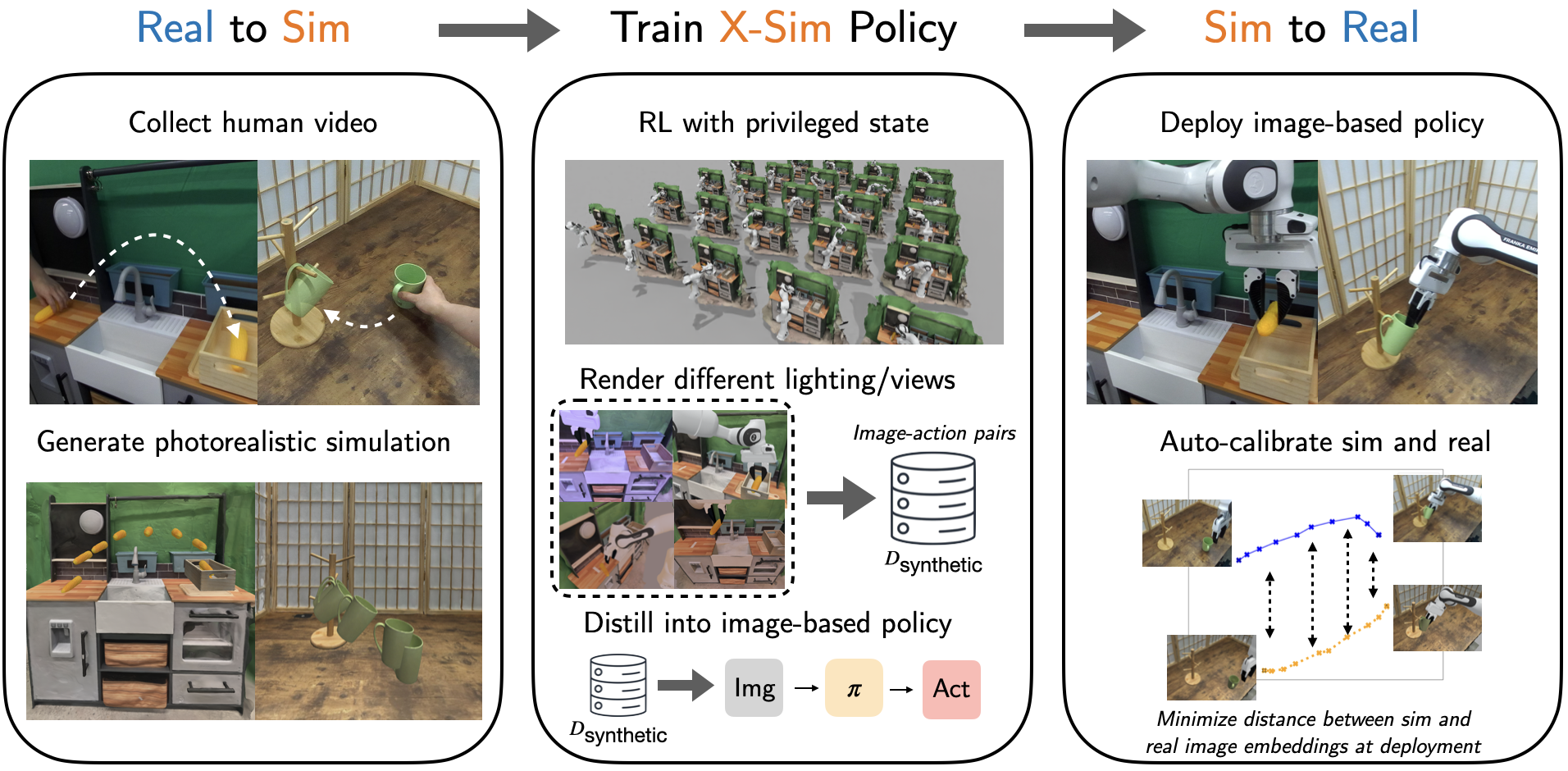
X-Sim's pipeline consists of three main phases:
For detailed instructions on environment scanning, object tracking, and human demo collection, see our Real-to-Sim Pipeline Documentation.
Run the complete X-Sim pipeline for any task with a single command:
python run_pipeline.py --env_id "Mustard-Place"
What this does:
Output: All results saved to experiments/pipeline/<task_name>/
X-Sim supports the following manipulation tasks:
| Task Name | Environment ID | Description |
|---|---|---|
| Mustard Place | Mustard-Place | Place mustard on left side of kitchen |
| Corn in Basket | Corn-in-Basket | Place corn into basket |
| Letter Arrange | Letter-Arrange | Arrange letters next to each other |
| Shoe on Rack | Shoe-on-Rack | Place shoe onto shoe rack |
| Mug Insert | Mug-Insert | Insert mug into holder |
To add your own tasks, refer to files in simulation/ManiSkill/mani_skill/envs/tasks/xsim_envs
Before training, you need to capture and process real-world data. See our Real-to-Sim Pipeline Documentation for:
Train reinforcement learning policies with object-centric rewards:
cd simulation
python -m scripts.rl_training \
    --env_id="<TASK_NAME>" \
    --exp-name="<EXPERIMENT_NAME>" \
    --num_envs=1024 \
    --seed=0 \
    --total_timesteps=<TIMESTEPS> \
    --num_steps=<STEPS> \
    --num_eval_steps=<EVAL_STEPS>
Generate demonstration trajectories using the trained RL policies:
cd simulation
python -m scripts.data_generation_rgb \
    --evaluate \
    --num_trajectories=<NUM_TRAJ> \
    --trajectory_length=<TRAJ_LENGTH> \
    --randomize_init_config \
    --checkpoint="<PATH_TO_RL_CHECKPOINT>" \
    --env_id="<TASK_NAME>-Eval" \
    --randomize_camera
Train diffusion policies on the synthetic demonstration data:
cd diffusion_policy
python -m scripts.dp_training_rgb \
    --config_path=cfgs/sim2real.yaml \
    --dp.use_aux_loss=0 \
    --save_dir=<SAVE_DIRECTORY> \
    --dataset.paths=["<PATH_TO_SYNTHETIC_DATA>"] \
    --eval.env_id="<TASK_NAME>-Eval" \
    --eval_freq=5 \
    --eval.num_episodes=10 \
    --num_epoch=60 \
    --epoch_len=10000
Create real-sim paired RGB dataset using real rollout data and replaying it in sim:
cd diffusion_policy
python -m scripts.auto_calibration \
    --input_dir="<PATH_TO_REAL_ROLLOUTS>" \
    --env_id="<TASK_NAME>-Eval"
Note: You should adapt diffusion_policy/scripts/eval_dp.py to your robot hardware for real-world deployment.
Fine-tune the policy with calibration auxiliary loss:
cd diffusion_policy
python -m scripts.dp_training_rgb \
    --config_path=cfgs/sim2real.yaml \
    --dp.use_aux_loss=1 \
    --dp.aux_loss_weight=0.1 \
    --dp.distance_type="contrastive_cosine" \
    --save_dir=<SAVE_DIRECTORY> \
    --dataset.paths=["<PATH_TO_SYNTHETIC_DATA>"] \
    --dataset.real_pairing="<PATH_TO_REAL_DATA>" \
    --dataset.sim_pairing="<PATH_TO_SIM_PAIRING>" \
    --eval.env_id="<TASK_NAME>-Eval" \
    --eval_freq=5 \
    --eval.num_episodes=10 \
    --epoch_len=10000 \
    --num_epoch=60
Evaluate trained diffusion policies:
cd diffusion_policy
python -m scripts.eval_dp \
    --checkpoint_path="<PATH_TO_DP_CHECKPOINT>" \
    --env_id="<TASK_NAME>-Eval" \
    --save-videos
If you find this work useful, please cite:
@article{dan2025xsim,
    title={X-Sim: Cross-Embodiment Learning via Real-to-Sim-to-Real},
    author={Prithwish Dan and Kushal Kedia and Angela Chao and Edward Weiyi Duan and Maximus Adrian Pace and Wei-Chiu Ma and Sanjiban Choudhury},
    year={2025},
    eprint={2505.07096},
    archivePrefix={arXiv},
    primaryClass={cs.RO},
    url={https://arxiv.org/abs/2505.07096}
}
For more information, visit our project page.
X-Sim: Cross-Embodiment Learning via Real-to-Sim-to-Real
Python
73
18 commits
updated Jan 8, 2026
* Equal Contribution
Cornell University
X-Sim/
├── real_to_sim/
│   ├── FoundationPose/                    # Object Tracking
│   ├── collect_human_demo.py              # Human Data Collection Script
├── simulation/
│   ├── ManiSkill/                    # ManiSkill simulation environment
│   ├── scripts/                     # RL training and data generation scripts
├── diffusion_policy/
│   ├── scripts/                    # Diffusion policy training and evaluation
│   ├── cfgs/                      # Configuration files
│   ├── utils/                     # Shared utilities for diffusion policy
├── run_pipeline.py               # Automated pipeline execution script
├── setup.sh                      # Installation script
└── README.md                     # Project documentation
bash setup.sh
# Create conda env & install packages & download assets
X-Sim's pipeline consists of three main phases:
For detailed instructions on environment scanning, object tracking, and human demo collection, see our Real-to-Sim Pipeline Documentation.
Run the complete X-Sim pipeline for any task with a single command:
python run_pipeline.py --env_id "Mustard-Place"
What this does:
Output: All results saved to experiments/pipeline/<task_name>/
X-Sim supports the following manipulation tasks:
| Task Name | Environment ID | Description |
|---|---|---|
| Mustard Place | Mustard-Place | Place mustard on left side of kitchen |
| Corn in Basket | Corn-in-Basket | Place corn into basket |
| Letter Arrange | Letter-Arrange | Arrange letters next to each other |
| Shoe on Rack | Shoe-on-Rack | Place shoe onto shoe rack |
| Mug Insert | Mug-Insert | Insert mug into holder |
To add your own tasks, refer to files in simulation/ManiSkill/mani_skill/envs/tasks/xsim_envs
Before training, you need to capture and process real-world data. See our Real-to-Sim Pipeline Documentation for:
Train reinforcement learning policies with object-centric rewards:
cd simulation
python -m scripts.rl_training \
    --env_id="<TASK_NAME>" \
    --exp-name="<EXPERIMENT_NAME>" \
    --num_envs=1024 \
    --seed=0 \
    --total_timesteps=<TIMESTEPS> \
    --num_steps=<STEPS> \
    --num_eval_steps=<EVAL_STEPS>
Generate demonstration trajectories using the trained RL policies:
cd simulation
python -m scripts.data_generation_rgb \
    --evaluate \
    --num_trajectories=<NUM_TRAJ> \
    --trajectory_length=<TRAJ_LENGTH> \
    --randomize_init_config \
    --checkpoint="<PATH_TO_RL_CHECKPOINT>" \
    --env_id="<TASK_NAME>-Eval" \
    --randomize_camera
Train diffusion policies on the synthetic demonstration data:
cd diffusion_policy
python -m scripts.dp_training_rgb \
    --config_path=cfgs/sim2real.yaml \
    --dp.use_aux_loss=0 \
    --save_dir=<SAVE_DIRECTORY> \
    --dataset.paths=["<PATH_TO_SYNTHETIC_DATA>"] \
    --eval.env_id="<TASK_NAME>-Eval" \
    --eval_freq=5 \
    --eval.num_episodes=10 \
    --num_epoch=60 \
    --epoch_len=10000
Create real-sim paired RGB dataset using real rollout data and replaying it in sim:
cd diffusion_policy
python -m scripts.auto_calibration \
    --input_dir="<PATH_TO_REAL_ROLLOUTS>" \
    --env_id="<TASK_NAME>-Eval"
Note: You should adapt diffusion_policy/scripts/eval_dp.py to your robot hardware for real-world deployment.
Fine-tune the policy with calibration auxiliary loss:
cd diffusion_policy
python -m scripts.dp_training_rgb \
    --config_path=cfgs/sim2real.yaml \
    --dp.use_aux_loss=1 \
    --dp.aux_loss_weight=0.1 \
    --dp.distance_type="contrastive_cosine" \
    --save_dir=<SAVE_DIRECTORY> \
    --dataset.paths=["<PATH_TO_SYNTHETIC_DATA>"] \
    --dataset.real_pairing="<PATH_TO_REAL_DATA>" \
    --dataset.sim_pairing="<PATH_TO_SIM_PAIRING>" \
    --eval.env_id="<TASK_NAME>-Eval" \
    --eval_freq=5 \
    --eval.num_episodes=10 \
    --epoch_len=10000 \
    --num_epoch=60
Evaluate trained diffusion policies:
cd diffusion_policy
python -m scripts.eval_dp \
    --checkpoint_path="<PATH_TO_DP_CHECKPOINT>" \
    --env_id="<TASK_NAME>-Eval" \
    --save-videos
If you find this work useful, please cite:
@article{dan2025xsim,
    title={X-Sim: Cross-Embodiment Learning via Real-to-Sim-to-Real},
    author={Prithwish Dan and Kushal Kedia and Angela Chao and Edward Weiyi Duan and Maximus Adrian Pace and Wei-Chiu Ma and Sanjiban Choudhury},
    year={2025},
    eprint={2505.07096},
    archivePrefix={arXiv},
    primaryClass={cs.RO},
    url={https://arxiv.org/abs/2505.07096}
}
For more information, visit our project page.



