
A 21M-parameter LM with a 16.8M-row product-key memory: as good as a 114M dense model and runs with the table on an SSD. Triton kernels for ROCm and CUDA.
Python
1
112 commits
updated Oct 6, 2026
See what people are saying
README
sparse-memory-lm



What happens if you give a tiny language model a really big lookup table?
I trained a small Llama-style model (21M parameters) and added a product-key memory to it: a table with up to 16.8 million learned vectors, of which the model only reads a few hundred per token. Then I measured what that is actually worth, what it costs, and whether the table even has to sit in GPU memory. Most of this ran on my own PC (Radeon RX 9070). The big runs were on rented cloud GPUs, about 70 dollars in total.
Before every run I wrote down what would count as a success. Some things worked out, some didn't. Both are in here. The full lab notebook with every criterion, every number and every mishap is REPORT.md (in German).
Look inside the table · Model on Hugging Face · Try it on your GPU · I'm looking for bigger GPUs
Short version
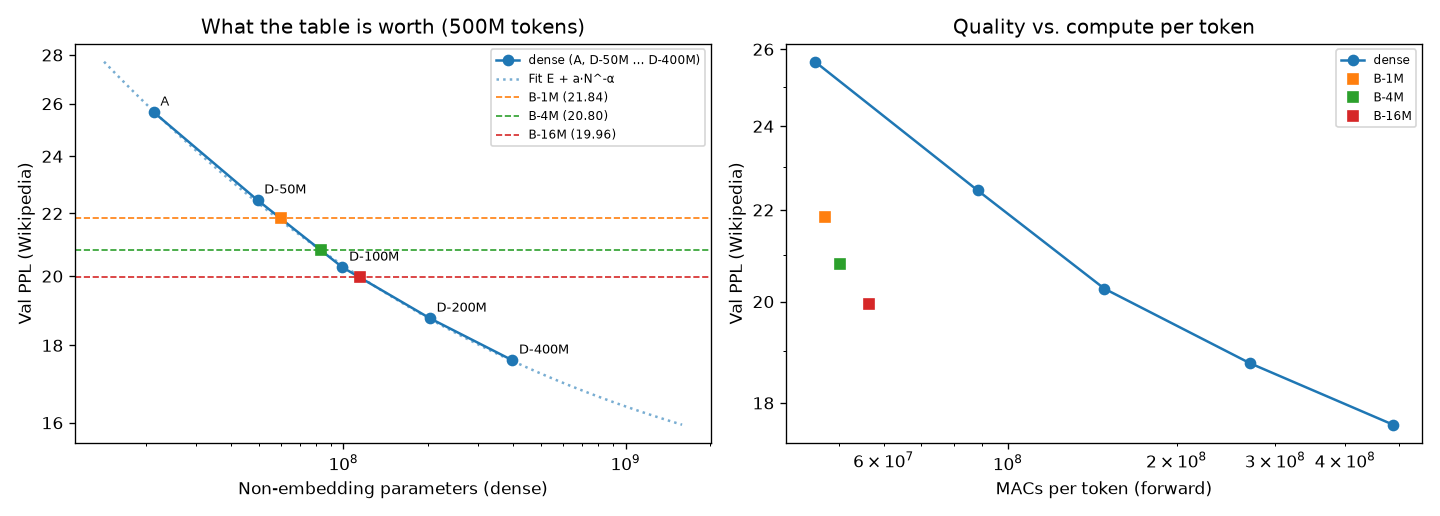
- Training from scratch: the 16.8M-row table makes the 21M model about as good as a normal 114M model trained on the same data. Per token it does roughly a third of the compute.
- Bigger keeps helping: going from 1M to 4M to 16M rows gives about 1.4x "equivalent model size" per step, and it isn't flattening out yet.
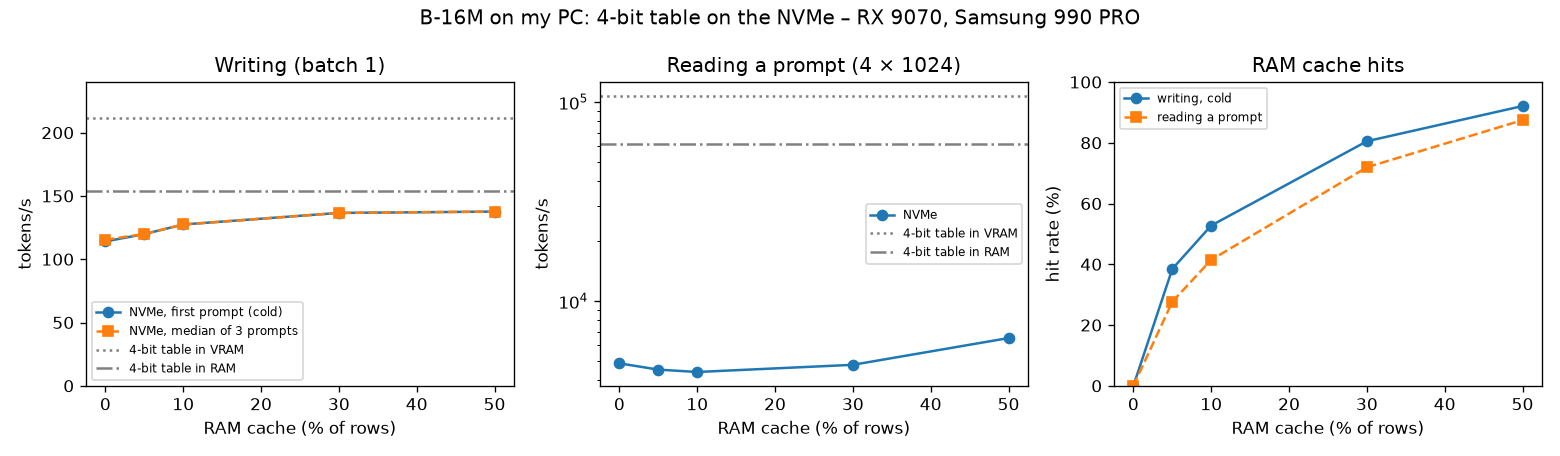
- Generating text doesn't need the table in VRAM: from RAM or straight off an NVMe SSD the model still writes 114 to 154 tokens/s on my PC, with the same output. Reading long prompts is a different story.
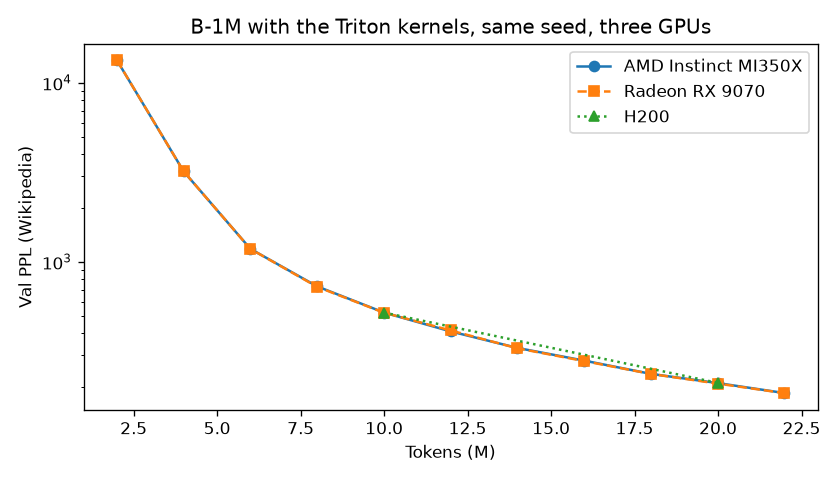
- Portable kernels: the same hand-written Triton kernels run on three very different GPUs and give the same training curve up to float rounding: a consumer Radeon (RDNA4), AMD's data-centre MI350X (CDNA4) and NVIDIA H100/H200 (Hopper).
- Adding a table to a finished model didn't work: on Qwen3.5-0.8B it was no better than a small dense add-on with the same compute. Its perplexity on the training articles dropped a lot, but in a fact test it wasn't any better on those articles than on ones it had never seen.
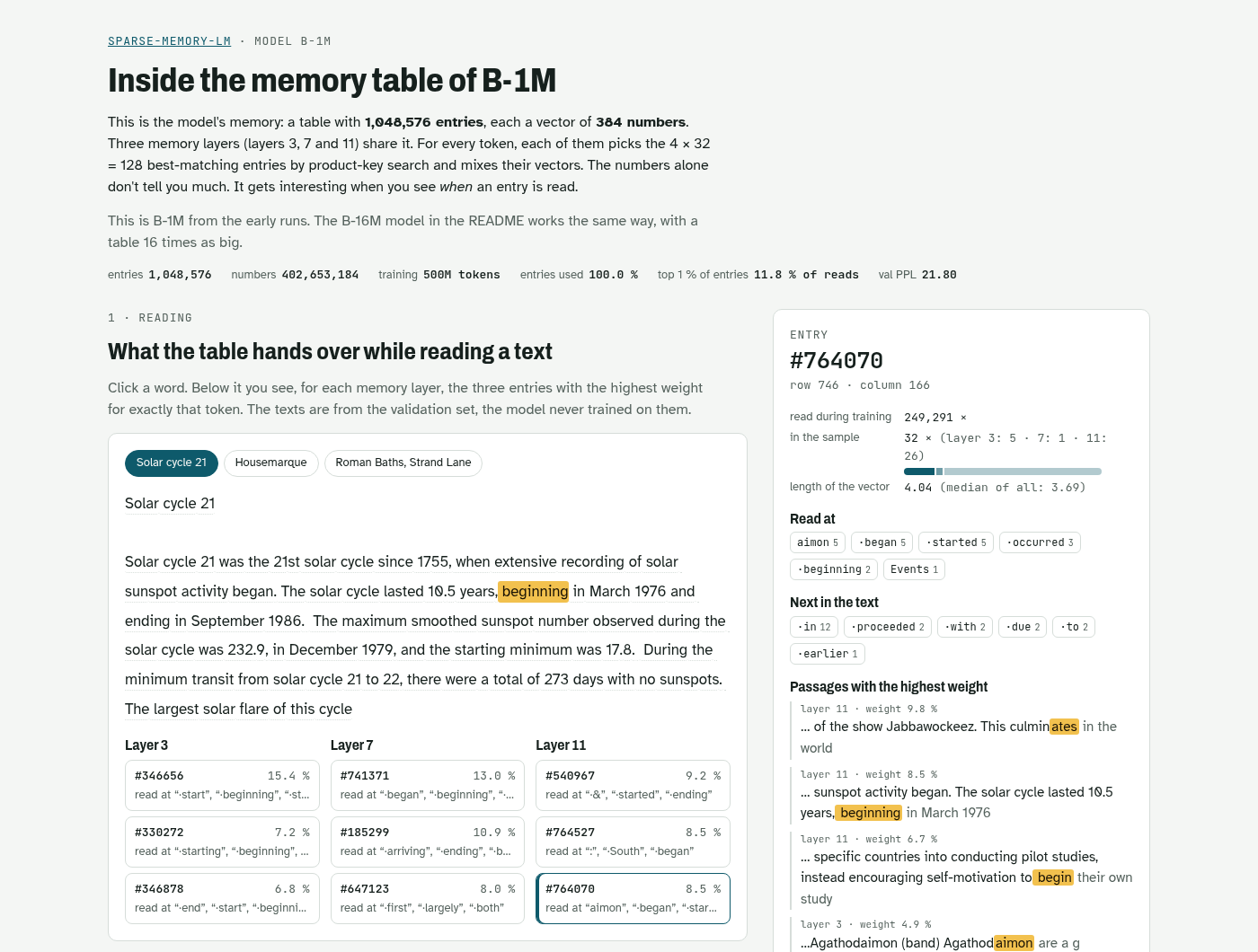
Look inside the table: on this page you can click any word of a Wikipedia text and see which of the 1M entries of B-1M the model reads for it, browse a map of the whole table, and look at single entries: where they get read and what their 384 numbers look like.
Try it
The kernels on your GPU
About five minutes, most of it is the PyTorch download. Nothing else to download: the tests and the benchmark use
random data. Checked from a fresh clone on my RX 9070 with Python 3.14 and the official rocm7.2 wheel:
git clone https://github.com/re133/sparse-memory-lm.git && cd sparse-memory-lm
python3 -m venv .venv
.venv/bin/pip install torch --index-url https://download.pytorch.org/whl/rocm7.2
.venv/bin/pip install -r requirements.txt
.venv/bin/python -m pytest -q tests                  # ~1 min
.venv/bin/python scripts/kernel_speedup.py           # ~40 s
What the last command printed on my card (the first run also shows a few gcc warnings while Triton compiles its launchers, those are harmless):
AMD Radeon RX 9070 (gfx1201), 16 GiB | PyTorch 2.14.1+rocm7.2 (HIP 7.2.53211) | Triton 3.8.0 | Python 3.14.7

                              train step  train tok/s  prefill tok/s  decode tok/s  peak GiB
no table (A)                       333 ms       98,341        438,762           199       7.9
B-1M-sparse, PyTorch               787 ms       41,652        168,342           161      10.5
B-1M-sparse, Triton kernels        512 ms       64,027        295,060           203      10.5

kernels vs PyTorch: training 1.54x, prefill 1.75x, decode 1.26x
with the kernels the table model trains at 65% of the speed of the model without a table
- What it measures: random weights, one training step on 32 x 1024 tokens, a prompt of 16 x 1024 tokens, and batch-1 generation. Speed only, the tests check that the kernels compute the right thing.
- Radeon: use the
rocm7.2wheel. Withrocm7.1one test aborts on my card (docs/rocm-issues). On the MI350X I usedrocm7.1with Python 3.12, and there everything passed. - Distro PyTorch: if your distro ships PyTorch for ROCm (I normally use CachyOS's
python-pytorch-rocm), create the venv with--system-site-packagesand skip the torch line. - NVIDIA: plain
pip install torch. The tests passed on an H200; the benchmark script itself I've only run on the RX 9070 so far.
B-16M writing text with its table on the SSD
The trained B-16M model is on Hugging Face: the 16.8M-row table in 4 bit (3.2 GB) plus the rest of the model. The 4-bit table scores 19.98 validation PPL, against 19.96 for the full fp32 one.
.venv/bin/pip install huggingface_hub
.venv/bin/python scripts/demo_generate.py --download --table nvme     # 3.7 GB into data/tables/B-16M
.venv/bin/python scripts/demo_generate.py --table vram -i            # table in VRAM, your own prompts
With the rocm7.2 wheel from above (other PyTorch builds sample a different text):
loaded in 1.5 s, table in nvme: 0.27 GiB VRAM, 1.8 GiB RAM + 3.8 GiB mapped files

Isaac Newton

Sir Isaac Newton was born on 14 November 1803, the son of the Rev. Samuel Newton of Basing, Middlesex, and his
wife Elizabeth, daughter of William Wilberforce of Westmorland. He was educated at Harrow and Trinity College,
Cambridge. He matriculated at Magdalen College, Oxford, on 11 June 1841. He was ordained in 1844. [...]

[200 tokens in 1.48 s = 135 tok/s, table in nvme, peak 0.42 GiB VRAM, 2.5 GiB RAM + 3.9 GiB mapped files]
- Memory: the table has 6.4B parameters and stays on the SSD. The GPU only holds the rest of the model (0.3 GB) plus the rows the current token reads. "Mapped files" are pages of the table file in Linux's page cache, which Linux drops again when it needs the memory.
- Same text everywhere:
--table ramand--table vram(~200 tok/s) write the same text. With the pip wheel the logits can differ in the last bits between the modes (see above), so a sampled text could in rare cases go its own way. - Quality: fluent Wikipedia English, but the facts are made up. This Newton was born in 1803 and became an
army chaplain. It's a small model trained on 500M tokens, it's here to show what the table costs to run, not what it
knows. Prompts work best like the training articles:
"Title\n\nFirst words".
Results
Training from scratch
All models saw the same 500M Wikipedia tokens and are scored on the same held-out Wikipedia articles. The memory models share one table between three memory layers.
| Model | Params used per token | Table | Val PPL | As good as a dense model with |
|---|---|---|---|---|
| A (no table) | 21M | 25.67 | ||
| B-1M | 23M | 0.4B | 21.84 | ~60M params |
| B-4M | 26M | 1.6B | 20.80 | ~83M params |
| B-16M | 33M | 6.4B | 19.96 | ~114M params (106 to 123M) |
The "as good as" column comes from dense models with 50M, 100M, 200M and 400M parameters (non-embedding) that I trained on exactly the same data, interpolated on a log-log curve. The range in brackets shows how far the value moves if every perplexity is off by ±0.4% (the seed noise I measured on the 1M model). It's a sensitivity range, not a confidence interval.
Catches:
- Equal compute time: this compares models at equal tokens. At equal training time on my GPU, B-1M was only 3% ahead of the plain model, because the memory layers make every step slower.
- Memory: B-16M needed about 101 GB of GPU memory to train.
- Other text: on WikiText-103, which is formatted differently, the advantage is smaller (B-16M ~ 95M).
Running the 16.8M table on my PC
B-16M with the table in VRAM, in RAM, or as a 4-bit file on an NVMe SSD (Samsung 990 PRO, memory-mapped, with a RAM cache for the rows that get read most):
| Table in | Writing (batch 1) | Reading a long prompt | VRAM used |
|---|---|---|---|
| VRAM | 212 to 216 tok/s | 108,000 tok/s | 3.6 GiB (4-bit) / 13.1 GiB (bf16) |
| RAM | 139 to 154 tok/s | 19,000 to 62,000 tok/s | 0.5 GiB |
| NVMe | 114 to 138 tok/s | 1,500 to 6,500 tok/s | 0.5 GiB |
All three compute the same: same perplexity down to the last digit, and with my PyTorch build (Triton 3.5) the
logits are bit-identical too (check). With the pip wheel (Triton 3.8) the
kernel sums in a slightly different order for the small staging table than for the full one, so logits can differ
in the last bits. Both are equally close to an exact fp64 sum, and the generated tokens stayed the same
(check). VRAM is the whole card as rocm-smi reports it, desktop
included. When writing, the slow part isn't
the SSD but the three round trips between GPU and CPU per token: even with no cache at all the NVMe version is only
18% slower than RAM. When reading a prompt every token needs ~270 different rows, and every missed row costs a
whole 4 KB page from the SSD. That's where it falls apart.
Adding a table to Qwen3.5-0.8B
Setup:
- Qwen stays frozen. Three extra memory blocks (1M-row table) sit behind its layers, each with a gate that starts at zero, so at the start the model is bit-for-bit the original Qwen.
- Training data: 55M tokens of Wikipedia articles created after Qwen was released (dated by page id, so roughly), two passes.
- Compared against Qwen alone (Q) and against a small dense add-on with the same compute (Q+D).
| Q | Q + table | Q + dense | |
|---|---|---|---|
| PPL on new, held-out articles | 12.98 | 10.09 | 10.01 |
| PPL on the training articles | 13.36 | 5.64 | 9.38 |
| Fact test, training articles (exact fill-in) | 4.8% | 10.2% | 7.8% |
| Fact test, articles never seen | 4.0% | 10.2% | 8.0% |
| MMLU | 49.7 | 47.0 | 49.6 |
What came out:
- No gain over the dense add-on: the table helps on new text exactly as much as the dense add-on does. That's adapting to Wikipedia, not the table.
- No sign of learned facts: its perplexity on the training articles fell far more than with the dense add-on, but in the fact test it was only 2.4 points ahead of the dense version on those articles, and 2.2 points ahead on articles it had never seen. So it didn't recall facts from its training articles any better. My bar for "it learned new facts" was +10 points. Where in the add-on the training text ended up (table, keys, projections) I didn't test.
- Side effects: it also cost some MMLU, the dense add-on didn't.
How it works
-
Base model: Llama-style decoder, d=384, 12 layers, 6 heads, SwiGLU, RoPE, RMSNorm, GPT-2 tokenizer (
smlm/model.py). -
Memory layers: in layers 3, 7 and 11 the FFN is replaced by a memory layer (
smlm/pkm.py), following Lample et al. 2019 and Meta's Memory Layers at Scale.- 4 heads, each picking the exact top 32 out of n² product keys.
- BatchNorm on the query, softmax over the 32, the "swilu" output path.
- One value table shared by all three layers.
-
Training the table: row-sparse gradients and a lazy Adam that only touches the rows read in a step (
smlm/sparse_values.py). Same quality as dense Adam on the table, faster, and much less memory. -
Triton kernels (
smlm/kernels.py), on ROCm and CUDA, matching the PyTorch reference up to float rounding:- the backward pass of the table lookup
- the product-key selection
- the lookup itself for fp32, bf16 or 4-bit tables
- the fused lazy Adam step
- a graph-captured decode path
On the RX 9070 this made training 1.47x faster and brought batch-1 decoding to the speed of the plain model (the table model replays its memory layers as graphs, the plain model runs without graphs). What each kernel does, how much it brings and where its limits are: docs/kernels.md.
-
Table outside the GPU:
smlm/offload.py. -
Qwen add-on:
smlm/qwen_memory.py.
Running it yourself
Set up the venv as in Try it, then:
.venv/bin/python cloud/fetch_data.py                 # WikiText-103 + Wikipedia at pinned revisions, sha256-checked

# plain model and B-1M on 500M Wikipedia tokens
.venv/bin/python -m smlm.train --model A --out_dir runs/A --data wikipedia --tokens 500e6 --extra_val wikitext103
.venv/bin/python -m smlm.train --model B-1M-sparse --mem_impl triton --value_lr 2.4e-3 --out_dir runs/B-1M \
    --data wikipedia --tokens 500e6 --extra_val wikitext103
Bigger runs:
B-4M-sparseandB-16M-sparseneed ~29 GB and ~101 GB of GPU memory.- The dense comparison models are
D-50M…D-400M. - Everything I ran in the cloud, including a one-command Runpod setup with budget guard, lives in
cloud/andscripts/run_*.py(notes in German: docs/notes/CLOUD.md).
Table outside the GPU: scripts/convert_table.py turns a checkpoint into bf16 / 4-bit table files, and
scripts/bench_offload.py runs the measurements above.
Qwen experiment:
- Separate environment:
pip install -r requirements-qwen.txt. - Data:
scripts/prepare_qwen_data.py. Fact test:scripts/make_fact_cloze.py. Training:scripts/train_qwen_memory.py. Evaluation:scripts/eval_*.py,scripts/qwen_step3_eval.py. - Model in
models/Qwen3.5-0.8BorQWEN_DIR, data indata/qwen_wikiorQWEN_DATA.
Runs on AMD Instinct too
I also ran the whole thing on an AMD Instinct MI350X (288 GB, rented for ~3 dollars):
- Tests: all 107 tests pass, Triton kernels included, with no code changes.
- Same numbers: the same training run gives the same validation curve as on my RX 9070 and on an H200.
- Kernels: they make B-1M 1.6x faster to train and 1.9x faster at reading prompts than plain PyTorch on that card.
- One card: the full B-16M model trains on a single GPU at ~113k tokens/s.
Details: REPORT.md, section "AMD Instinct MI350X".
Notes for AMD / ROCm
Everything was built and tested on an RX 9070 (gfx1201, ROCm 7.2, Triton 3.5) and gives the same results on an MI350X (gfx950, ROCm 7.1, Triton 3.7), an H100 and an H200. Two things to know on consumer AMD cards:
- Atomics are slow:
tl.atomic_addon fp32 compiles to the native instruction, but it's about 8x slower than a plain store (repro). Sorting by row and only using atomics at program borders took one kernel from 17 ms to 2.7 ms. - Batch-1 decoding is launch-bound: replaying the memory layer as a HIP graph fixed that, not faster kernels.
More in docs/rocm-issues.
What this doesn't show
- Scale: it's a small model on at most 500M tokens. I don't know how this behaves at 1B+ parameters.
- Seeds: one seed each for the big tables and the dense comparison models. The seed noise I measured elsewhere is about 0.4%.
- Learning rate: I didn't tune it for each dense model size, which probably makes the table look a bit better than it is.
- Equal tokens vs. equal time: equal tokens isn't equal time. On my hardware the table mostly pays off in quality per token, not in quality per hour.
- Offloading code: the RAM/NVMe paths are plain Python/NumPy. There's room for a lot more speed there.
- BatchNorm on the query: during training it normalises with the statistics of the whole batch, so a token's memory lookup is very slightly influenced by later tokens. All perplexities here are measured in eval mode with running statistics, where that doesn't happen, but training losses aren't strictly causal.
What's next
Everything here ran on one gaming GPU and about 70 dollars of rented cloud time. The question I'd really like to answer is whether the table still pays off at a size people actually use: a model around 1B parameters, a table with tens of millions of rows, trained on tens of billions of tokens. That's beyond what I can rent. It needs a multi-GPU machine for a good while, and the table with its optimizer state doesn't fit on one GPU anymore (B-16M already needed 101 GB).
What I'd do with more compute:
- Scale up: a ~1B model from scratch, with and without the table, on the same data, compared at equal tokens and at equal GPU hours.
- Bigger tables: 64M rows and more, with the table split over several GPUs or kept off the GPU.
- More seeds for the results above, so the ranges become real error bars.
If you have GPUs to spare, AMD Instinct or anything else, I'd love to hear from you. The kernels already run on MI350X, H100 and H200 without changes. I'd run it the same way as here: success criteria written down before each run, and the results published whatever they turn out to be.
Contact: fechner.leon [at] protonmail.com, Discord fechyyyyy, or open an issue in this repo.
Related work
- Lample et al., Large Memory Layers with Product Keys, NeurIPS 2019.
- Berges et al., Memory Layers at Scale, 2024. They showed memory layers beating dense models at much larger scale. This repo is a small, open counterpart, plus the offloading measurements and the Qwen experiment.
- Cheng et al., Conditional Memory via Scalable Lookup: A New Axis of Sparsity for Large Language Models (Engram), 2026. Also a big lookup table next to the model, but its rows are picked by the last few input tokens (n-grams). So it's known before the layer runs which rows will be needed, and they can be prefetched from host memory while the GPU works on something else. Product keys pick the rows from the hidden state, so here that's only known once the layer is reached. Prefetching would hide the waiting, though, not the reading: with the table on the SSD, long prompts are slow here mainly because every missed row costs a whole 4 KB page.
- Qwen Team, Qwen3.5, 2026 (Qwen3.5-0.8B, Apache 2.0).
License
- Code: Apache 2.0 (LICENSE).
- Datasets: WikiText-103 and Wikipedia (CC BY-SA) are downloaded by the scripts, not included.
- data/qwen_fact_cloze.jsonl: contains short excerpts from English Wikipedia articles (CC BY-SA 4.0, © Wikipedia contributors; titles and page ids included).
- Qwen3.5-0.8B: used as is (Apache 2.0) and not redistributed.
- B-16M weights: not in the repo, they're on Hugging Face (Apache 2.0, trained on Wikipedia text).
Similar repos


A 21M-parameter LM with a 16.8M-row product-key memory: as good as a 114M dense model and runs with the table on an SSD. Triton kernels for ROCm and CUDA.
Python
1
112 commits
updated Oct 6, 2026
See what people are saying
README
sparse-memory-lm
What happens if you give a tiny language model a really big lookup table?
I trained a small Llama-style model (21M parameters) and added a product-key memory to it: a table with up to 16.8 million learned vectors, of which the model only reads a few hundred per token. Then I measured what that is actually worth, what it costs, and whether the table even has to sit in GPU memory. Most of this ran on my own PC (Radeon RX 9070). The big runs were on rented cloud GPUs, about 70 dollars in total.
Before every run I wrote down what would count as a success. Some things worked out, some didn't. Both are in here. The full lab notebook with every criterion, every number and every mishap is REPORT.md (in German).
Look inside the table · Model on Hugging Face · Try it on your GPU · I'm looking for bigger GPUs
Short version
- Training from scratch: the 16.8M-row table makes the 21M model about as good as a normal 114M model trained on the same data. Per token it does roughly a third of the compute.
- Bigger keeps helping: going from 1M to 4M to 16M rows gives about 1.4x "equivalent model size" per step, and it isn't flattening out yet.
- Generating text doesn't need the table in VRAM: from RAM or straight off an NVMe SSD the model still writes 114 to 154 tokens/s on my PC, with the same output. Reading long prompts is a different story.
- Portable kernels: the same hand-written Triton kernels run on three very different GPUs and give the same training curve up to float rounding: a consumer Radeon (RDNA4), AMD's data-centre MI350X (CDNA4) and NVIDIA H100/H200 (Hopper).
- Adding a table to a finished model didn't work: on Qwen3.5-0.8B it was no better than a small dense add-on with the same compute. Its perplexity on the training articles dropped a lot, but in a fact test it wasn't any better on those articles than on ones it had never seen.
Look inside the table: on this page you can click any word of a Wikipedia text and see which of the 1M entries of B-1M the model reads for it, browse a map of the whole table, and look at single entries: where they get read and what their 384 numbers look like.
Try it
The kernels on your GPU
About five minutes, most of it is the PyTorch download. Nothing else to download: the tests and the benchmark use
random data. Checked from a fresh clone on my RX 9070 with Python 3.14 and the official rocm7.2 wheel:
git clone https://github.com/re133/sparse-memory-lm.git && cd sparse-memory-lm
python3 -m venv .venv
.venv/bin/pip install torch --index-url https://download.pytorch.org/whl/rocm7.2
.venv/bin/pip install -r requirements.txt
.venv/bin/python -m pytest -q tests                  # ~1 min
.venv/bin/python scripts/kernel_speedup.py           # ~40 s
What the last command printed on my card (the first run also shows a few gcc warnings while Triton compiles its launchers, those are harmless):
AMD Radeon RX 9070 (gfx1201), 16 GiB | PyTorch 2.14.1+rocm7.2 (HIP 7.2.53211) | Triton 3.8.0 | Python 3.14.7

                              train step  train tok/s  prefill tok/s  decode tok/s  peak GiB
no table (A)                       333 ms       98,341        438,762           199       7.9
B-1M-sparse, PyTorch               787 ms       41,652        168,342           161      10.5
B-1M-sparse, Triton kernels        512 ms       64,027        295,060           203      10.5

kernels vs PyTorch: training 1.54x, prefill 1.75x, decode 1.26x
with the kernels the table model trains at 65% of the speed of the model without a table
- What it measures: random weights, one training step on 32 x 1024 tokens, a prompt of 16 x 1024 tokens, and batch-1 generation. Speed only, the tests check that the kernels compute the right thing.
- Radeon: use the
rocm7.2wheel. Withrocm7.1one test aborts on my card (docs/rocm-issues). On the MI350X I usedrocm7.1with Python 3.12, and there everything passed. - Distro PyTorch: if your distro ships PyTorch for ROCm (I normally use CachyOS's
python-pytorch-rocm), create the venv with--system-site-packagesand skip the torch line. - NVIDIA: plain
pip install torch. The tests passed on an H200; the benchmark script itself I've only run on the RX 9070 so far.
B-16M writing text with its table on the SSD
The trained B-16M model is on Hugging Face: the 16.8M-row table in 4 bit (3.2 GB) plus the rest of the model. The 4-bit table scores 19.98 validation PPL, against 19.96 for the full fp32 one.
.venv/bin/pip install huggingface_hub
.venv/bin/python scripts/demo_generate.py --download --table nvme     # 3.7 GB into data/tables/B-16M
.venv/bin/python scripts/demo_generate.py --table vram -i            # table in VRAM, your own prompts
With the rocm7.2 wheel from above (other PyTorch builds sample a different text):
loaded in 1.5 s, table in nvme: 0.27 GiB VRAM, 1.8 GiB RAM + 3.8 GiB mapped files

Isaac Newton

Sir Isaac Newton was born on 14 November 1803, the son of the Rev. Samuel Newton of Basing, Middlesex, and his
wife Elizabeth, daughter of William Wilberforce of Westmorland. He was educated at Harrow and Trinity College,
Cambridge. He matriculated at Magdalen College, Oxford, on 11 June 1841. He was ordained in 1844. [...]

[200 tokens in 1.48 s = 135 tok/s, table in nvme, peak 0.42 GiB VRAM, 2.5 GiB RAM + 3.9 GiB mapped files]
- Memory: the table has 6.4B parameters and stays on the SSD. The GPU only holds the rest of the model (0.3 GB) plus the rows the current token reads. "Mapped files" are pages of the table file in Linux's page cache, which Linux drops again when it needs the memory.
- Same text everywhere:
--table ramand--table vram(~200 tok/s) write the same text. With the pip wheel the logits can differ in the last bits between the modes (see above), so a sampled text could in rare cases go its own way. - Quality: fluent Wikipedia English, but the facts are made up. This Newton was born in 1803 and became an
army chaplain. It's a small model trained on 500M tokens, it's here to show what the table costs to run, not what it
knows. Prompts work best like the training articles:
"Title\n\nFirst words".
Results
Training from scratch
All models saw the same 500M Wikipedia tokens and are scored on the same held-out Wikipedia articles. The memory models share one table between three memory layers.
| Model | Params used per token | Table | Val PPL | As good as a dense model with |
|---|---|---|---|---|
| A (no table) | 21M | 25.67 | ||
| B-1M | 23M | 0.4B | 21.84 | ~60M params |
| B-4M | 26M | 1.6B | 20.80 | ~83M params |
| B-16M | 33M | 6.4B | 19.96 | ~114M params (106 to 123M) |
The "as good as" column comes from dense models with 50M, 100M, 200M and 400M parameters (non-embedding) that I trained on exactly the same data, interpolated on a log-log curve. The range in brackets shows how far the value moves if every perplexity is off by ±0.4% (the seed noise I measured on the 1M model). It's a sensitivity range, not a confidence interval.
Catches:
- Equal compute time: this compares models at equal tokens. At equal training time on my GPU, B-1M was only 3% ahead of the plain model, because the memory layers make every step slower.
- Memory: B-16M needed about 101 GB of GPU memory to train.
- Other text: on WikiText-103, which is formatted differently, the advantage is smaller (B-16M ~ 95M).
Running the 16.8M table on my PC
B-16M with the table in VRAM, in RAM, or as a 4-bit file on an NVMe SSD (Samsung 990 PRO, memory-mapped, with a RAM cache for the rows that get read most):
| Table in | Writing (batch 1) | Reading a long prompt | VRAM used |
|---|---|---|---|
| VRAM | 212 to 216 tok/s | 108,000 tok/s | 3.6 GiB (4-bit) / 13.1 GiB (bf16) |
| RAM | 139 to 154 tok/s | 19,000 to 62,000 tok/s | 0.5 GiB |
| NVMe | 114 to 138 tok/s | 1,500 to 6,500 tok/s | 0.5 GiB |
All three compute the same: same perplexity down to the last digit, and with my PyTorch build (Triton 3.5) the
logits are bit-identical too (check). With the pip wheel (Triton 3.8) the
kernel sums in a slightly different order for the small staging table than for the full one, so logits can differ
in the last bits. Both are equally close to an exact fp64 sum, and the generated tokens stayed the same
(check). VRAM is the whole card as rocm-smi reports it, desktop
included. When writing, the slow part isn't
the SSD but the three round trips between GPU and CPU per token: even with no cache at all the NVMe version is only
18% slower than RAM. When reading a prompt every token needs ~270 different rows, and every missed row costs a
whole 4 KB page from the SSD. That's where it falls apart.
Adding a table to Qwen3.5-0.8B
Setup:
- Qwen stays frozen. Three extra memory blocks (1M-row table) sit behind its layers, each with a gate that starts at zero, so at the start the model is bit-for-bit the original Qwen.
- Training data: 55M tokens of Wikipedia articles created after Qwen was released (dated by page id, so roughly), two passes.
- Compared against Qwen alone (Q) and against a small dense add-on with the same compute (Q+D).
| Q | Q + table | Q + dense | |
|---|---|---|---|
| PPL on new, held-out articles | 12.98 | 10.09 | 10.01 |
| PPL on the training articles | 13.36 | 5.64 | 9.38 |
| Fact test, training articles (exact fill-in) | 4.8% | 10.2% | 7.8% |
| Fact test, articles never seen | 4.0% | 10.2% | 8.0% |
| MMLU | 49.7 | 47.0 | 49.6 |
What came out:
- No gain over the dense add-on: the table helps on new text exactly as much as the dense add-on does. That's adapting to Wikipedia, not the table.
- No sign of learned facts: its perplexity on the training articles fell far more than with the dense add-on, but in the fact test it was only 2.4 points ahead of the dense version on those articles, and 2.2 points ahead on articles it had never seen. So it didn't recall facts from its training articles any better. My bar for "it learned new facts" was +10 points. Where in the add-on the training text ended up (table, keys, projections) I didn't test.
- Side effects: it also cost some MMLU, the dense add-on didn't.
How it works
-
Base model: Llama-style decoder, d=384, 12 layers, 6 heads, SwiGLU, RoPE, RMSNorm, GPT-2 tokenizer (
smlm/model.py). -
Memory layers: in layers 3, 7 and 11 the FFN is replaced by a memory layer (
smlm/pkm.py), following Lample et al. 2019 and Meta's Memory Layers at Scale.- 4 heads, each picking the exact top 32 out of n² product keys.
- BatchNorm on the query, softmax over the 32, the "swilu" output path.
- One value table shared by all three layers.
-
Training the table: row-sparse gradients and a lazy Adam that only touches the rows read in a step (
smlm/sparse_values.py). Same quality as dense Adam on the table, faster, and much less memory. -
Triton kernels (
smlm/kernels.py), on ROCm and CUDA, matching the PyTorch reference up to float rounding:- the backward pass of the table lookup
- the product-key selection
- the lookup itself for fp32, bf16 or 4-bit tables
- the fused lazy Adam step
- a graph-captured decode path
On the RX 9070 this made training 1.47x faster and brought batch-1 decoding to the speed of the plain model (the table model replays its memory layers as graphs, the plain model runs without graphs). What each kernel does, how much it brings and where its limits are: docs/kernels.md.
-
Table outside the GPU:
smlm/offload.py. -
Qwen add-on:
smlm/qwen_memory.py.
Running it yourself
Set up the venv as in Try it, then:
.venv/bin/python cloud/fetch_data.py                 # WikiText-103 + Wikipedia at pinned revisions, sha256-checked

# plain model and B-1M on 500M Wikipedia tokens
.venv/bin/python -m smlm.train --model A --out_dir runs/A --data wikipedia --tokens 500e6 --extra_val wikitext103
.venv/bin/python -m smlm.train --model B-1M-sparse --mem_impl triton --value_lr 2.4e-3 --out_dir runs/B-1M \
    --data wikipedia --tokens 500e6 --extra_val wikitext103
Bigger runs:
B-4M-sparseandB-16M-sparseneed ~29 GB and ~101 GB of GPU memory.- The dense comparison models are
D-50M…D-400M. - Everything I ran in the cloud, including a one-command Runpod setup with budget guard, lives in
cloud/andscripts/run_*.py(notes in German: docs/notes/CLOUD.md).
Table outside the GPU: scripts/convert_table.py turns a checkpoint into bf16 / 4-bit table files, and
scripts/bench_offload.py runs the measurements above.
Qwen experiment:
- Separate environment:
pip install -r requirements-qwen.txt. - Data:
scripts/prepare_qwen_data.py. Fact test:scripts/make_fact_cloze.py. Training:scripts/train_qwen_memory.py. Evaluation:scripts/eval_*.py,scripts/qwen_step3_eval.py. - Model in
models/Qwen3.5-0.8BorQWEN_DIR, data indata/qwen_wikiorQWEN_DATA.
Runs on AMD Instinct too
I also ran the whole thing on an AMD Instinct MI350X (288 GB, rented for ~3 dollars):
- Tests: all 107 tests pass, Triton kernels included, with no code changes.
- Same numbers: the same training run gives the same validation curve as on my RX 9070 and on an H200.
- Kernels: they make B-1M 1.6x faster to train and 1.9x faster at reading prompts than plain PyTorch on that card.
- One card: the full B-16M model trains on a single GPU at ~113k tokens/s.
Details: REPORT.md, section "AMD Instinct MI350X".
Notes for AMD / ROCm
Everything was built and tested on an RX 9070 (gfx1201, ROCm 7.2, Triton 3.5) and gives the same results on an MI350X (gfx950, ROCm 7.1, Triton 3.7), an H100 and an H200. Two things to know on consumer AMD cards:
- Atomics are slow:
tl.atomic_addon fp32 compiles to the native instruction, but it's about 8x slower than a plain store (repro). Sorting by row and only using atomics at program borders took one kernel from 17 ms to 2.7 ms. - Batch-1 decoding is launch-bound: replaying the memory layer as a HIP graph fixed that, not faster kernels.
More in docs/rocm-issues.
What this doesn't show
- Scale: it's a small model on at most 500M tokens. I don't know how this behaves at 1B+ parameters.
- Seeds: one seed each for the big tables and the dense comparison models. The seed noise I measured elsewhere is about 0.4%.
- Learning rate: I didn't tune it for each dense model size, which probably makes the table look a bit better than it is.
- Equal tokens vs. equal time: equal tokens isn't equal time. On my hardware the table mostly pays off in quality per token, not in quality per hour.
- Offloading code: the RAM/NVMe paths are plain Python/NumPy. There's room for a lot more speed there.
- BatchNorm on the query: during training it normalises with the statistics of the whole batch, so a token's memory lookup is very slightly influenced by later tokens. All perplexities here are measured in eval mode with running statistics, where that doesn't happen, but training losses aren't strictly causal.
What's next
Everything here ran on one gaming GPU and about 70 dollars of rented cloud time. The question I'd really like to answer is whether the table still pays off at a size people actually use: a model around 1B parameters, a table with tens of millions of rows, trained on tens of billions of tokens. That's beyond what I can rent. It needs a multi-GPU machine for a good while, and the table with its optimizer state doesn't fit on one GPU anymore (B-16M already needed 101 GB).
What I'd do with more compute:
- Scale up: a ~1B model from scratch, with and without the table, on the same data, compared at equal tokens and at equal GPU hours.
- Bigger tables: 64M rows and more, with the table split over several GPUs or kept off the GPU.
- More seeds for the results above, so the ranges become real error bars.
If you have GPUs to spare, AMD Instinct or anything else, I'd love to hear from you. The kernels already run on MI350X, H100 and H200 without changes. I'd run it the same way as here: success criteria written down before each run, and the results published whatever they turn out to be.
Contact: fechner.leon [at] protonmail.com, Discord fechyyyyy, or open an issue in this repo.
Related work
- Lample et al., Large Memory Layers with Product Keys, NeurIPS 2019.
- Berges et al., Memory Layers at Scale, 2024. They showed memory layers beating dense models at much larger scale. This repo is a small, open counterpart, plus the offloading measurements and the Qwen experiment.
- Cheng et al., Conditional Memory via Scalable Lookup: A New Axis of Sparsity for Large Language Models (Engram), 2026. Also a big lookup table next to the model, but its rows are picked by the last few input tokens (n-grams). So it's known before the layer runs which rows will be needed, and they can be prefetched from host memory while the GPU works on something else. Product keys pick the rows from the hidden state, so here that's only known once the layer is reached. Prefetching would hide the waiting, though, not the reading: with the table on the SSD, long prompts are slow here mainly because every missed row costs a whole 4 KB page.
- Qwen Team, Qwen3.5, 2026 (Qwen3.5-0.8B, Apache 2.0).
License
- Code: Apache 2.0 (LICENSE).
- Datasets: WikiText-103 and Wikipedia (CC BY-SA) are downloaded by the scripts, not included.
- data/qwen_fact_cloze.jsonl: contains short excerpts from English Wikipedia articles (CC BY-SA 4.0, © Wikipedia contributors; titles and page ids included).
- Qwen3.5-0.8B: used as is (Apache 2.0) and not redistributed.
- B-16M weights: not in the repo, they're on Hugging Face (Apache 2.0, trained on Wikipedia text).