An Agentic AI Framework for Network Security & Monitoring
JavaScript
36
50 commits
updated Jul 29, 2026



NetMoniAI is an agentic AI framework for automatic network monitoring and security that integrates decentralized analysis with lightweight centralized coordination. The framework consists of autonomous micro-agents at each node for local traffic analysis, and a central controller that aggregates insights to detect coordinated attacks.
📄 Paper: NetMoniAI: An Agentic AI Framework for Network Security & Monitoring
🔗 GitHub: https://github.com/pzambare3/NetMoniAI
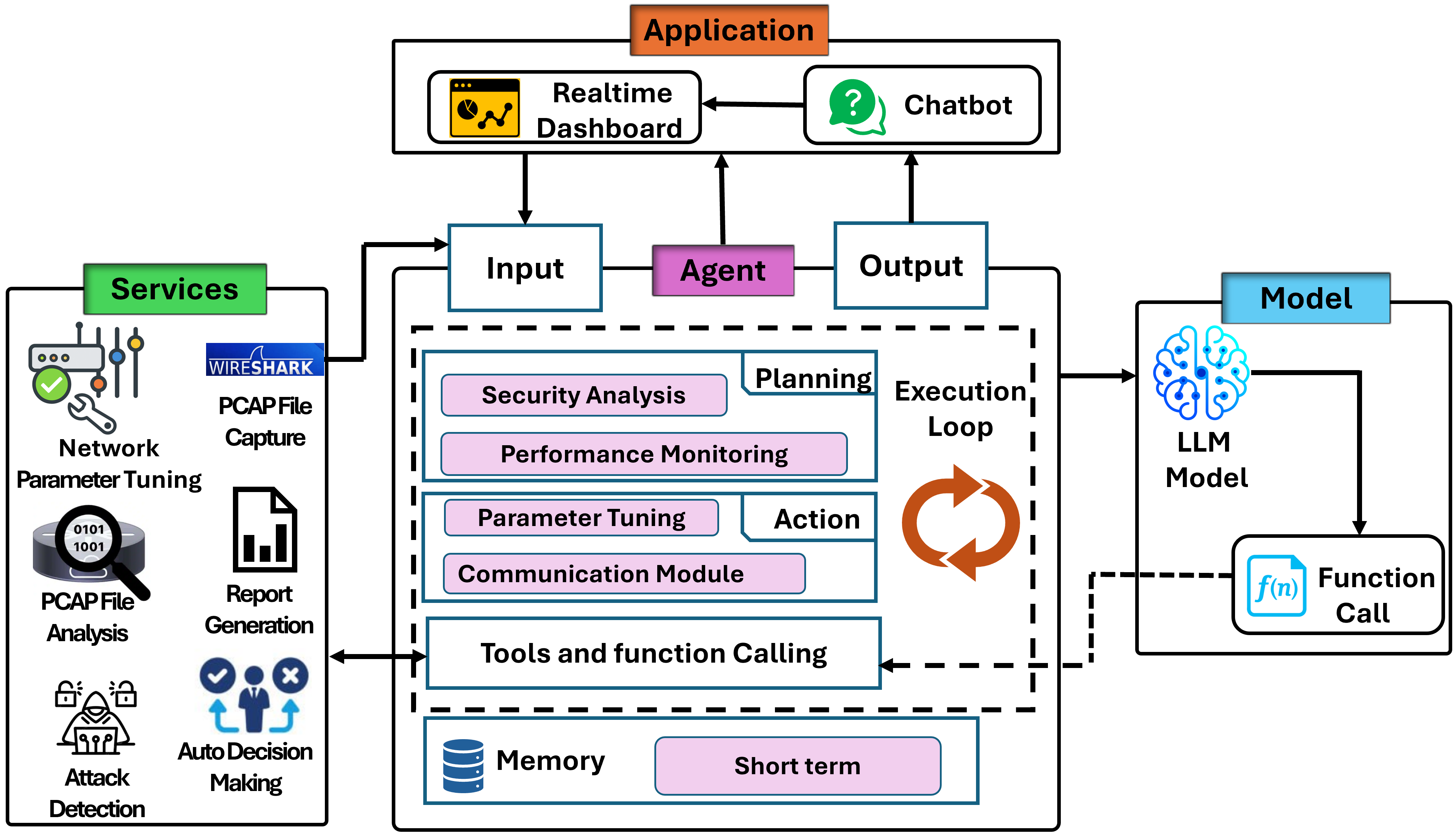
Each node runs an integrated agent pipeline with specialized modules:
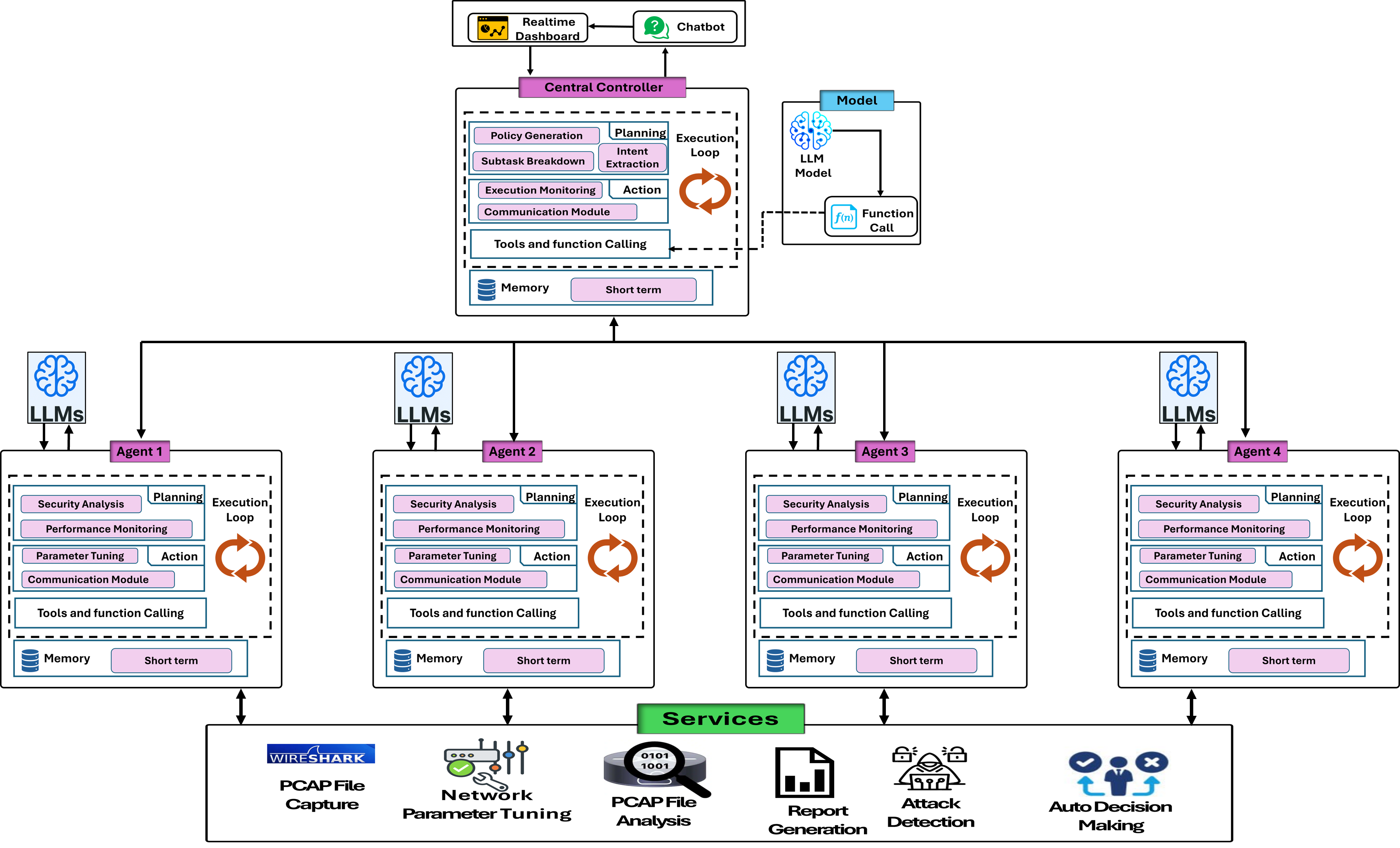
Aggregates node reports to detect coordinated attacks:
Note: Code uses "Global Controller" (gc prefix) which refers to the Central Controller in the paper.
NetMoniAI/
├── backend/                    # FastAPI backend
│   ├── app.py                 # Main application (local agent mode)
│   ├── appWebsocket.py        # WebSocket server
│   ├── analyze_nodes.py       # Offline PCAP batch analysis
│   ├── config.py              # Configuration
│   ├── nw_agents/             # Agent implementations
│   ├── tools/                 # PCAP analysis utilities
│   ├── segregated/            # PCAP storage (NS-3 outputs)
│   ├── requirements.txt       # Python dependencies
│   └── *.xml                  # NS-3 simulation scenarios
│
├── frontend/                   # React application
│   ├── src/
│   │   ├── components/        # UI components
│   │   │   ├── GlobalControllerDashboard.js
│   │   │   ├── LocalControllerDashboard.js
│   │   │   └── NetworkVisualizer.js
│   │   └── services/          # API clients
│   ├── public/
│   │   ├── nodes_data.json    # Demo 8-node topology
│   │   └── packets_data.json  # Demo packet flows
│   ├── jsons/                 # Additional demo datasets
│   └── package.json
│   └── README.md              # Frontend-specific notes (if any)
│
├── paper/
│   └── figures/               # Architecture diagrams from paper
│
├── requirements.txt           # (root if used)
└── .gitignore
If you later see CORS or connection issues, it’s usually a URL/port mismatch between the frontend and backend.
# from repo root
cd backend

# create & activate a virtualenv
# Windows (PowerShell)
python -m venv .venv
. .venv/Scripts/Activate.ps1

# macOS/Linux
# python3 -m venv .venv
# source .venv/bin/activate

# install deps
pip install -r requirements.txt
Create a .env (optional, recommended). Open backend/config.py to see recognized variables (ports, log level, API keys). Example:
# backend/.env (example)
APP_HOST=0.0.0.0
APP_PORT=8000
LOG_LEVEL=INFO
# If you use any LLM/API keys, define them here too
# OPENAI_API_KEY=...
Run the REST API (option A):
# from repo root so module imports resolve
uvicorn backend.app:app --reload --host 0.0.0.0 --port 8000
Run a separate WebSocket server (option B, only if your design splits them):
# check appWebsocket.py for the actual port/path used
python backend/appWebsocket.py
If your WebSocket is integrated into the same FastAPI app, you only need the first command.
# in a new terminal, from repo root
cd frontend
npm install
Configure environment for API/WS URLs (either via .env or update src/apiService.js):
# frontend/.env (example)
REACT_APP_API_URL=http://localhost:8000
REACT_APP_WS_URL=ws://localhost:8001
Start the dev server:
npm start
Open http://localhost:3000 in your browser.
The system automatically monitors network performance. When anomalies are detected (high latency, packet loss), agents:
Process PCAP files from NS-3 simulations:
cd backend
python analyze_nodes.py
This script:
segregated/segregated_pcaps*POST /gcreport)The analyze_nodes.py script handles:
The frontend can run independently using demo JSON files:
frontend/public/nodes_data.json - 8-node scenariofrontend/jsons/jsons-20-nodes/ - 20-node scenarioJust start the frontend without the backend to explore the UI.
| Endpoint | Method | Description |
|---|---|---|
/gcreport | POST | Submit node analysis report |
/gcstatuses | GET | Get all node statuses |
/gccorrelation | GET | Get attacker/victim correlation |
/gctimeline | GET | Get recent event timeline |
/ws | WebSocket | Real-time metrics and alerts |
Example: Submit Report
import requests

report = {
    "node_ip": "192.168.1.4",
    "threat_type": "ddos_flood",
    "severity": "high",
    "summary": "High-volume TCP traffic detected"
}

response = requests.post("http://localhost:8000/gcreport", json=report)
print(response.json())
# {"message": "Report for 192.168.1.4 received", "role": "victim"}
Example: Get Correlation
response = requests.get("http://localhost:8000/gccorrelation")
data = response.json()

print(f"Attackers: {data['attackers']}")
print(f"Victims: {data['victims']}")
backend/tools/)pcap_analyzer.py - Parse and extract features from PCAP filesattack_detection.py - Heuristic-based attack detectiondata_collection.py - Metrics aggregationExample:
python backend/tools/pcap_analyzer.py path/to/capture.pcap
NS-3 scenario XMLs are included in backend/:
dos-simulation-animation.xml - DoS attack scenariosyn-flood-animation.xml - SYN flood scenarioNetMoniAI was evaluated in two environments:
tc utility, macOS Network Link ConditionerKey Achievements:
The framework supports multiple LLM backends, but changing models requires code modifications:
Supported Models:
To switch models, edit backend/nw_agents/SecurityAnalysisAgent.py:
# Example: Change from Gemini to GPT
# Locate the model initialization section and update:

# FROM (Gemini):
import google.generativeai as genai
genai.configure(api_key=os.getenv("GEMINI_API_KEY"))
model = genai.GenerativeModel('gemini-pro')

# TO (GPT):
from openai import OpenAI
client = OpenAI(api_key=os.getenv("OPENAI_API_KEY"))
# Update inference calls accordingly
Important: Model selection is hardcoded in agent implementations and not configurable via environment variables.
Modify thresholds in backend/config.py or via environment variables:
# backend/config.py
LATENCY_THRESHOLD = float(os.getenv("LATENCY_THRESHOLD", 200))  # ms
PACKET_LOSS_THRESHOLD = float(os.getenv("PACKET_LOSS_THRESHOLD", 5))  # %
CAPTURE_DURATION = int(os.getenv("CAPTURE_DURATION", 25))  # seconds
The analyze_nodes.py script implements rate limiting for Gemini API:
REQUESTS_PER_MINUTE = 5
REQUESTS_PER_DAY = 25
MAX_RETRIES = 3
backend/agent_app.log - Agent activity logsbackend/network_metrics.log - Performance metricsbackend/metrics_metrics.log - Metric collection logsbackend/history.json - Event history snapshotsbackend/history_backup.json - Backup snapshotsThese files help with debugging and reviewing prior events.
LLM Model Not Working
backend/.envSecurityAnalysisAgent.pyCORS Errors
REACT_APP_API_URL matches backend host/portWebSocket Not Connecting
REACT_APP_WS_URL matches backend WebSocket endpoint/wsModule Import Issues
uvicorn backend.app:appWindows PowerShell venv Activation
.\.venv\Scripts\Activate.ps1Set-ExecutionPolicy -Scope CurrentUser RemoteSignedNote: This section is only needed if deploying NetMoniAI to a production server. For local development and research purposes, use the Quick Start guide above.
cd frontend
npm run build

# The build folder can be served with any static file server:
# - nginx
# - Apache
# - serve (npm package): npx serve -s build
# Install gunicorn
pip install gunicorn

# Run with multiple workers for better performance
gunicorn -w 4 -k uvicorn.workers.UvicornWorker backend.app:app --bind 0.0.0.0:8000

# Or use uvicorn directly (single worker)
uvicorn backend.app:app --host 0.0.0.0 --port 8000 --workers 4
If you use NetMoniAI in your research, please cite:
@article{zambare2025netmoniai,
  title={NetMoniAI: An Agentic AI Framework for Network Security \& Monitoring},
  author={Zambare, Pallavi and Thanikella, Venkata Nikhil and
          Kottur, Nikhil Padmanabh and Akula, Sree Akhil and Liu, Ying},
  journal={arXiv preprint arXiv:2508.10052},
  year={2025}
}
This project is dual-licensed under:
SPDX-License-Identifier: MIT OR Apache-2.0
We welcome contributions! Please:
git checkout -b feature/amazing-featuregit commit -m 'Add amazing feature'git push origin feature/amazing-featureAn Agentic AI Framework for Network Security & Monitoring
JavaScript
36
50 commits
updated Jul 29, 2026
NetMoniAI is an agentic AI framework for automatic network monitoring and security that integrates decentralized analysis with lightweight centralized coordination. The framework consists of autonomous micro-agents at each node for local traffic analysis, and a central controller that aggregates insights to detect coordinated attacks.
📄 Paper: NetMoniAI: An Agentic AI Framework for Network Security & Monitoring
🔗 GitHub: https://github.com/pzambare3/NetMoniAI
Each node runs an integrated agent pipeline with specialized modules:
Aggregates node reports to detect coordinated attacks:
Note: Code uses "Global Controller" (gc prefix) which refers to the Central Controller in the paper.
NetMoniAI/
├── backend/                    # FastAPI backend
│   ├── app.py                 # Main application (local agent mode)
│   ├── appWebsocket.py        # WebSocket server
│   ├── analyze_nodes.py       # Offline PCAP batch analysis
│   ├── config.py              # Configuration
│   ├── nw_agents/             # Agent implementations
│   ├── tools/                 # PCAP analysis utilities
│   ├── segregated/            # PCAP storage (NS-3 outputs)
│   ├── requirements.txt       # Python dependencies
│   └── *.xml                  # NS-3 simulation scenarios
│
├── frontend/                   # React application
│   ├── src/
│   │   ├── components/        # UI components
│   │   │   ├── GlobalControllerDashboard.js
│   │   │   ├── LocalControllerDashboard.js
│   │   │   └── NetworkVisualizer.js
│   │   └── services/          # API clients
│   ├── public/
│   │   ├── nodes_data.json    # Demo 8-node topology
│   │   └── packets_data.json  # Demo packet flows
│   ├── jsons/                 # Additional demo datasets
│   └── package.json
│   └── README.md              # Frontend-specific notes (if any)
│
├── paper/
│   └── figures/               # Architecture diagrams from paper
│
├── requirements.txt           # (root if used)
└── .gitignore
If you later see CORS or connection issues, it’s usually a URL/port mismatch between the frontend and backend.
# from repo root
cd backend

# create & activate a virtualenv
# Windows (PowerShell)
python -m venv .venv
. .venv/Scripts/Activate.ps1

# macOS/Linux
# python3 -m venv .venv
# source .venv/bin/activate

# install deps
pip install -r requirements.txt
Create a .env (optional, recommended). Open backend/config.py to see recognized variables (ports, log level, API keys). Example:
# backend/.env (example)
APP_HOST=0.0.0.0
APP_PORT=8000
LOG_LEVEL=INFO
# If you use any LLM/API keys, define them here too
# OPENAI_API_KEY=...
Run the REST API (option A):
# from repo root so module imports resolve
uvicorn backend.app:app --reload --host 0.0.0.0 --port 8000
Run a separate WebSocket server (option B, only if your design splits them):
# check appWebsocket.py for the actual port/path used
python backend/appWebsocket.py
If your WebSocket is integrated into the same FastAPI app, you only need the first command.
# in a new terminal, from repo root
cd frontend
npm install
Configure environment for API/WS URLs (either via .env or update src/apiService.js):
# frontend/.env (example)
REACT_APP_API_URL=http://localhost:8000
REACT_APP_WS_URL=ws://localhost:8001
Start the dev server:
npm start
Open http://localhost:3000 in your browser.
The system automatically monitors network performance. When anomalies are detected (high latency, packet loss), agents:
Process PCAP files from NS-3 simulations:
cd backend
python analyze_nodes.py
This script:
segregated/segregated_pcaps*POST /gcreport)The analyze_nodes.py script handles:
The frontend can run independently using demo JSON files:
frontend/public/nodes_data.json - 8-node scenariofrontend/jsons/jsons-20-nodes/ - 20-node scenarioJust start the frontend without the backend to explore the UI.
| Endpoint | Method | Description |
|---|---|---|
/gcreport | POST | Submit node analysis report |
/gcstatuses | GET | Get all node statuses |
/gccorrelation | GET | Get attacker/victim correlation |
/gctimeline | GET | Get recent event timeline |
/ws | WebSocket | Real-time metrics and alerts |
Example: Submit Report
import requests

report = {
    "node_ip": "192.168.1.4",
    "threat_type": "ddos_flood",
    "severity": "high",
    "summary": "High-volume TCP traffic detected"
}

response = requests.post("http://localhost:8000/gcreport", json=report)
print(response.json())
# {"message": "Report for 192.168.1.4 received", "role": "victim"}
Example: Get Correlation
response = requests.get("http://localhost:8000/gccorrelation")
data = response.json()

print(f"Attackers: {data['attackers']}")
print(f"Victims: {data['victims']}")
backend/tools/)pcap_analyzer.py - Parse and extract features from PCAP filesattack_detection.py - Heuristic-based attack detectiondata_collection.py - Metrics aggregationExample:
python backend/tools/pcap_analyzer.py path/to/capture.pcap
NS-3 scenario XMLs are included in backend/:
dos-simulation-animation.xml - DoS attack scenariosyn-flood-animation.xml - SYN flood scenarioNetMoniAI was evaluated in two environments:
tc utility, macOS Network Link ConditionerKey Achievements:
The framework supports multiple LLM backends, but changing models requires code modifications:
Supported Models:
To switch models, edit backend/nw_agents/SecurityAnalysisAgent.py:
# Example: Change from Gemini to GPT
# Locate the model initialization section and update:

# FROM (Gemini):
import google.generativeai as genai
genai.configure(api_key=os.getenv("GEMINI_API_KEY"))
model = genai.GenerativeModel('gemini-pro')

# TO (GPT):
from openai import OpenAI
client = OpenAI(api_key=os.getenv("OPENAI_API_KEY"))
# Update inference calls accordingly
Important: Model selection is hardcoded in agent implementations and not configurable via environment variables.
Modify thresholds in backend/config.py or via environment variables:
# backend/config.py
LATENCY_THRESHOLD = float(os.getenv("LATENCY_THRESHOLD", 200))  # ms
PACKET_LOSS_THRESHOLD = float(os.getenv("PACKET_LOSS_THRESHOLD", 5))  # %
CAPTURE_DURATION = int(os.getenv("CAPTURE_DURATION", 25))  # seconds
The analyze_nodes.py script implements rate limiting for Gemini API:
REQUESTS_PER_MINUTE = 5
REQUESTS_PER_DAY = 25
MAX_RETRIES = 3
backend/agent_app.log - Agent activity logsbackend/network_metrics.log - Performance metricsbackend/metrics_metrics.log - Metric collection logsbackend/history.json - Event history snapshotsbackend/history_backup.json - Backup snapshotsThese files help with debugging and reviewing prior events.
LLM Model Not Working
backend/.envSecurityAnalysisAgent.pyCORS Errors
REACT_APP_API_URL matches backend host/portWebSocket Not Connecting
REACT_APP_WS_URL matches backend WebSocket endpoint/wsModule Import Issues
uvicorn backend.app:appWindows PowerShell venv Activation
.\.venv\Scripts\Activate.ps1Set-ExecutionPolicy -Scope CurrentUser RemoteSignedNote: This section is only needed if deploying NetMoniAI to a production server. For local development and research purposes, use the Quick Start guide above.
cd frontend
npm run build

# The build folder can be served with any static file server:
# - nginx
# - Apache
# - serve (npm package): npx serve -s build
# Install gunicorn
pip install gunicorn

# Run with multiple workers for better performance
gunicorn -w 4 -k uvicorn.workers.UvicornWorker backend.app:app --bind 0.0.0.0:8000

# Or use uvicorn directly (single worker)
uvicorn backend.app:app --host 0.0.0.0 --port 8000 --workers 4
If you use NetMoniAI in your research, please cite:
@article{zambare2025netmoniai,
  title={NetMoniAI: An Agentic AI Framework for Network Security \& Monitoring},
  author={Zambare, Pallavi and Thanikella, Venkata Nikhil and
          Kottur, Nikhil Padmanabh and Akula, Sree Akhil and Liu, Ying},
  journal={arXiv preprint arXiv:2508.10052},
  year={2025}
}
This project is dual-licensed under:
SPDX-License-Identifier: MIT OR Apache-2.0
We welcome contributions! Please:
git checkout -b feature/amazing-featuregit commit -m 'Add amazing feature'git push origin feature/amazing-feature


