Python
14
4,164 commits
updated Oct 19, 2026
Turn "dumb" security cameras into an intelligent threat detection system — 100% local, no cloud APIs required.
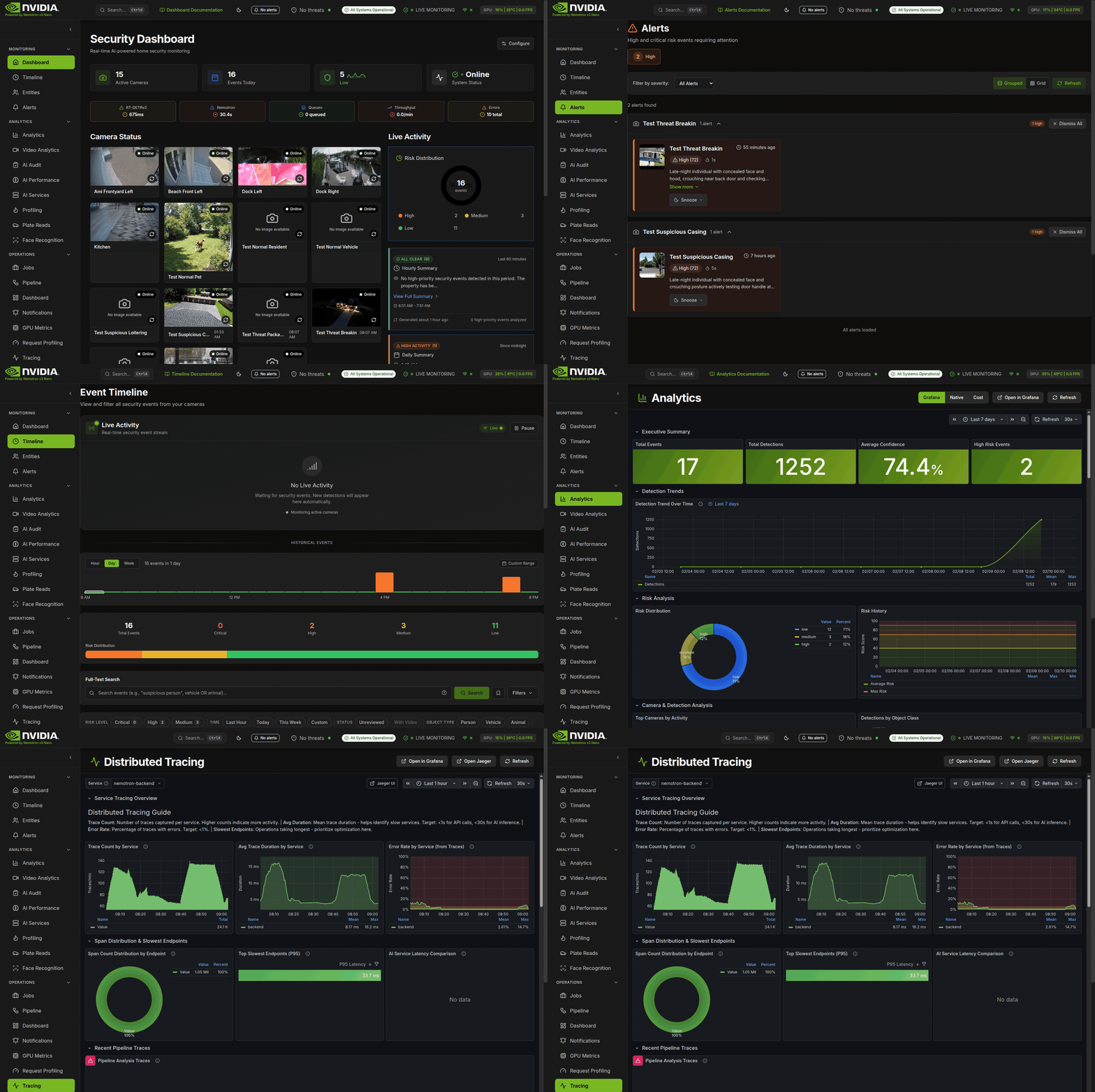
| Dashboard | Timeline | Entities |
|---|---|---|
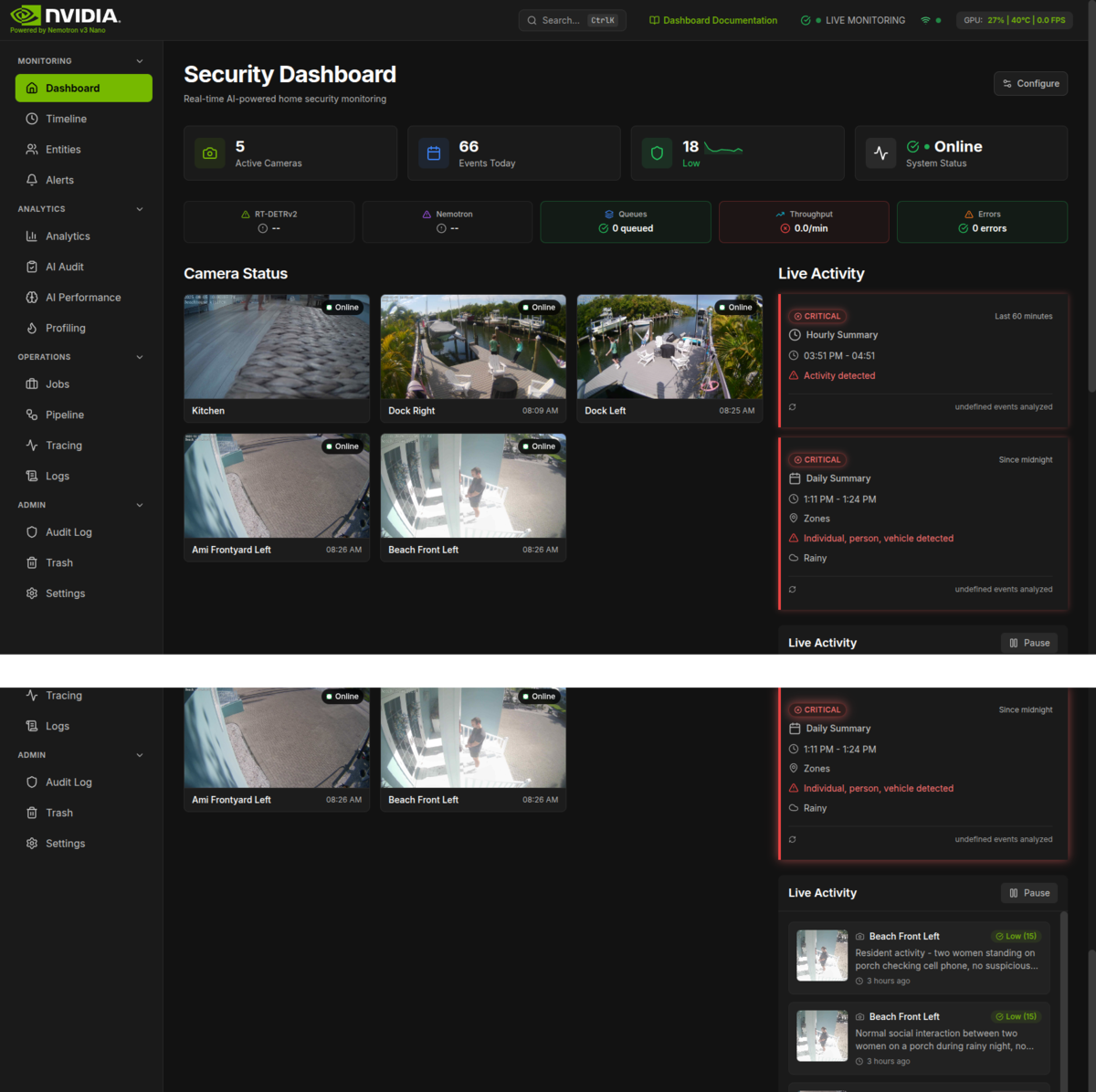 | 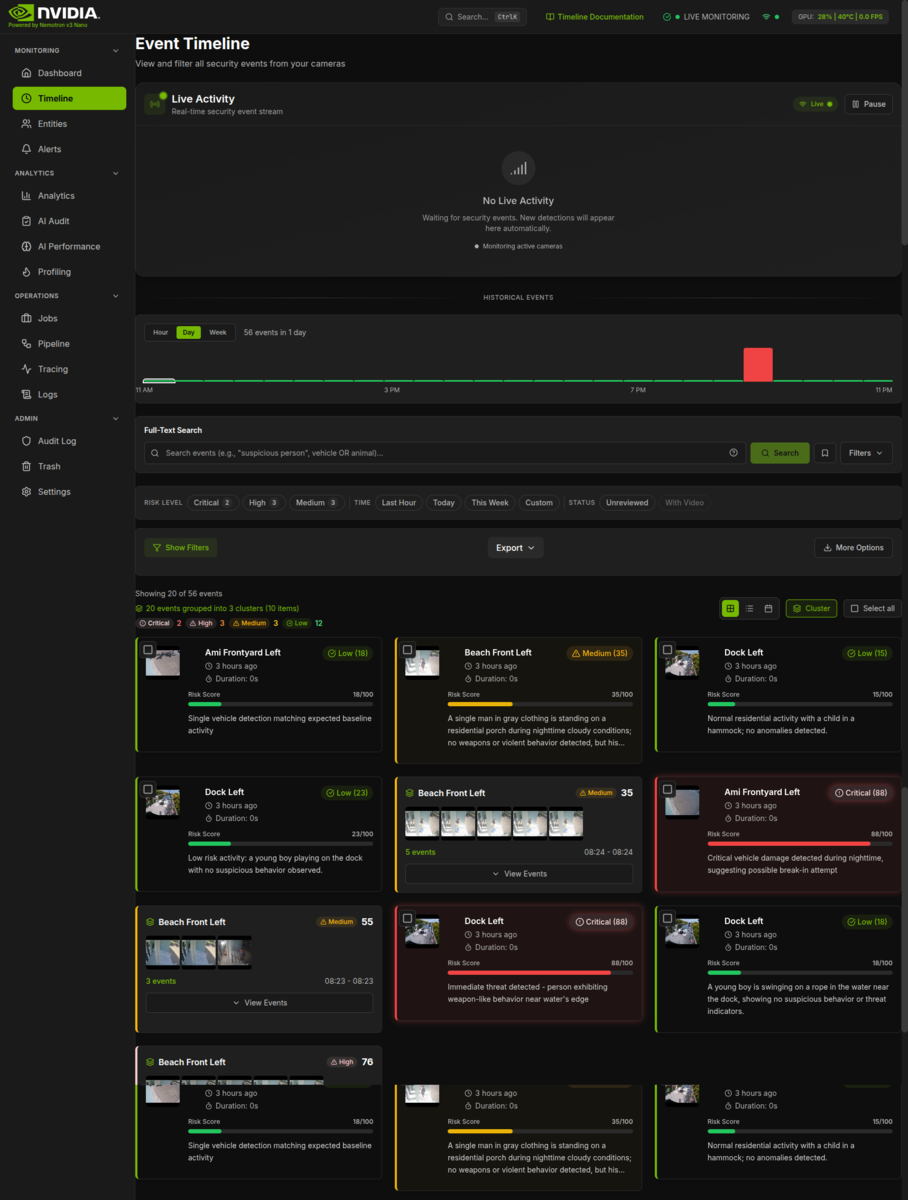 | 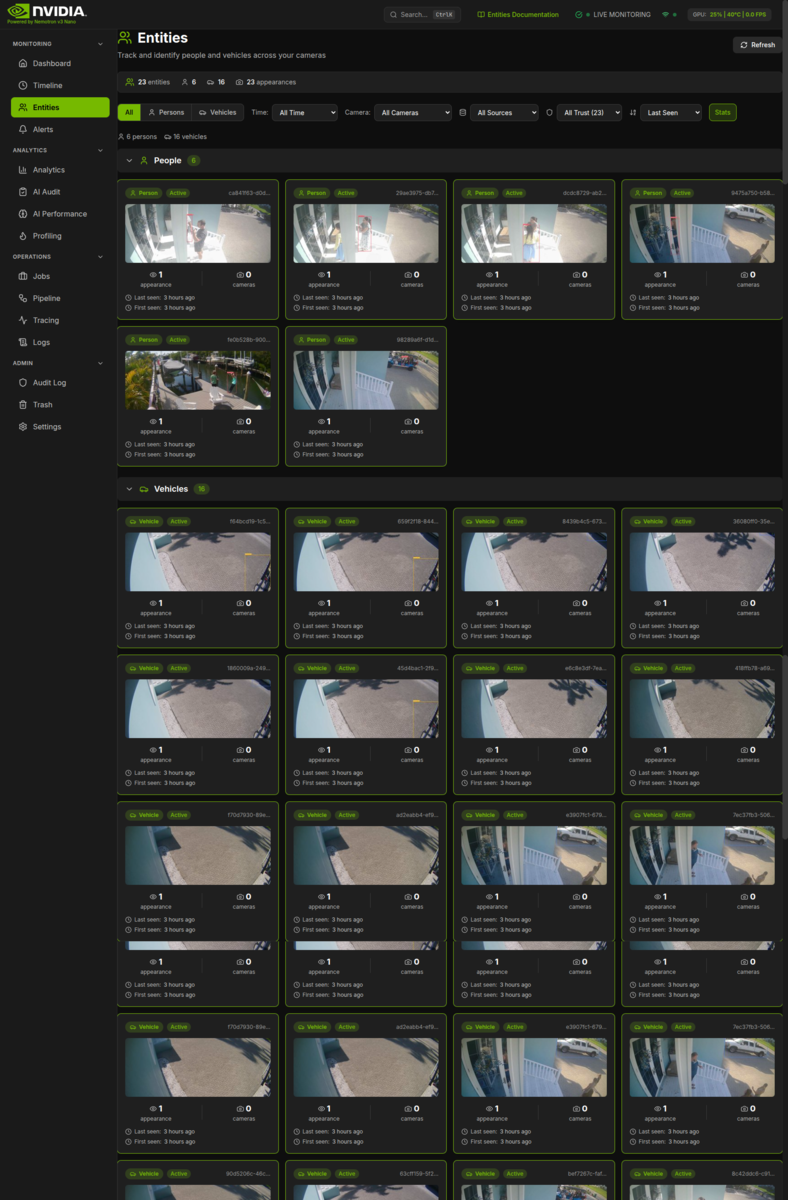 |
| Alerts | Analytics | AI Performance |
|---|---|---|
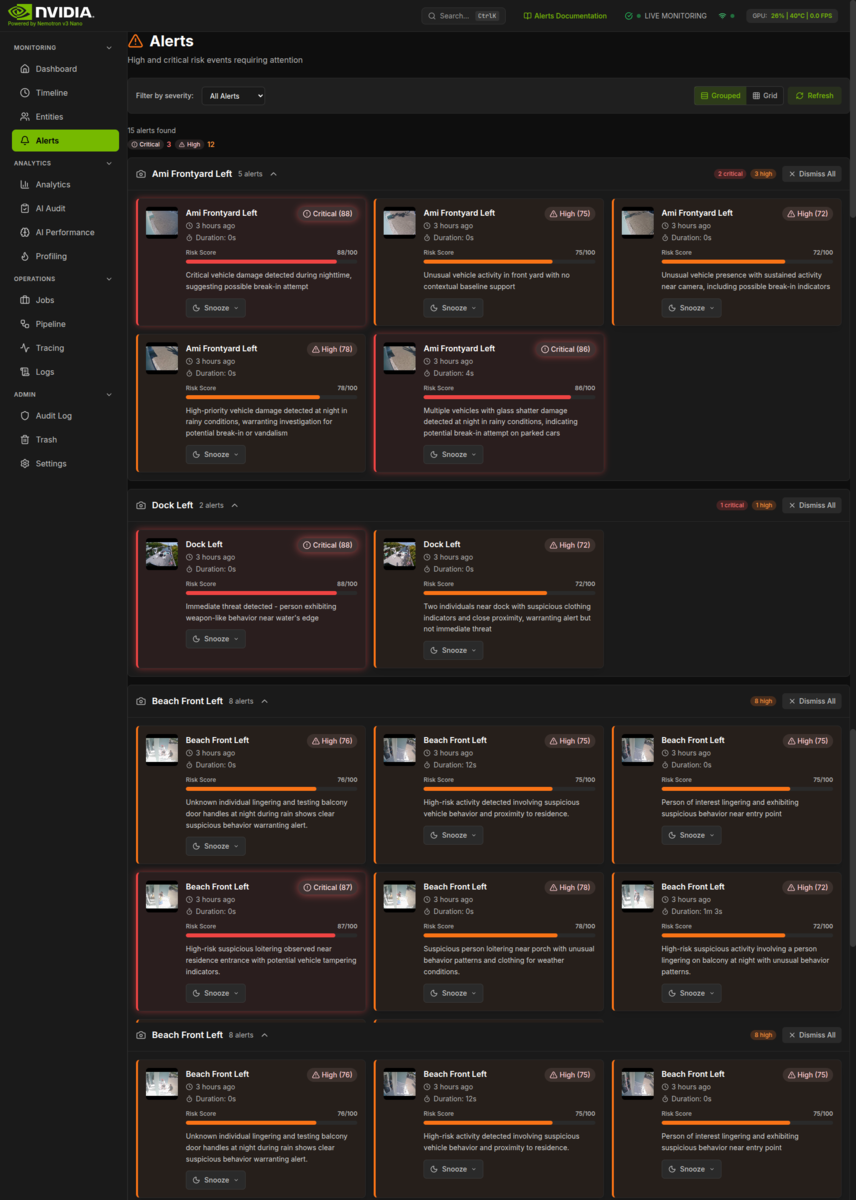 | 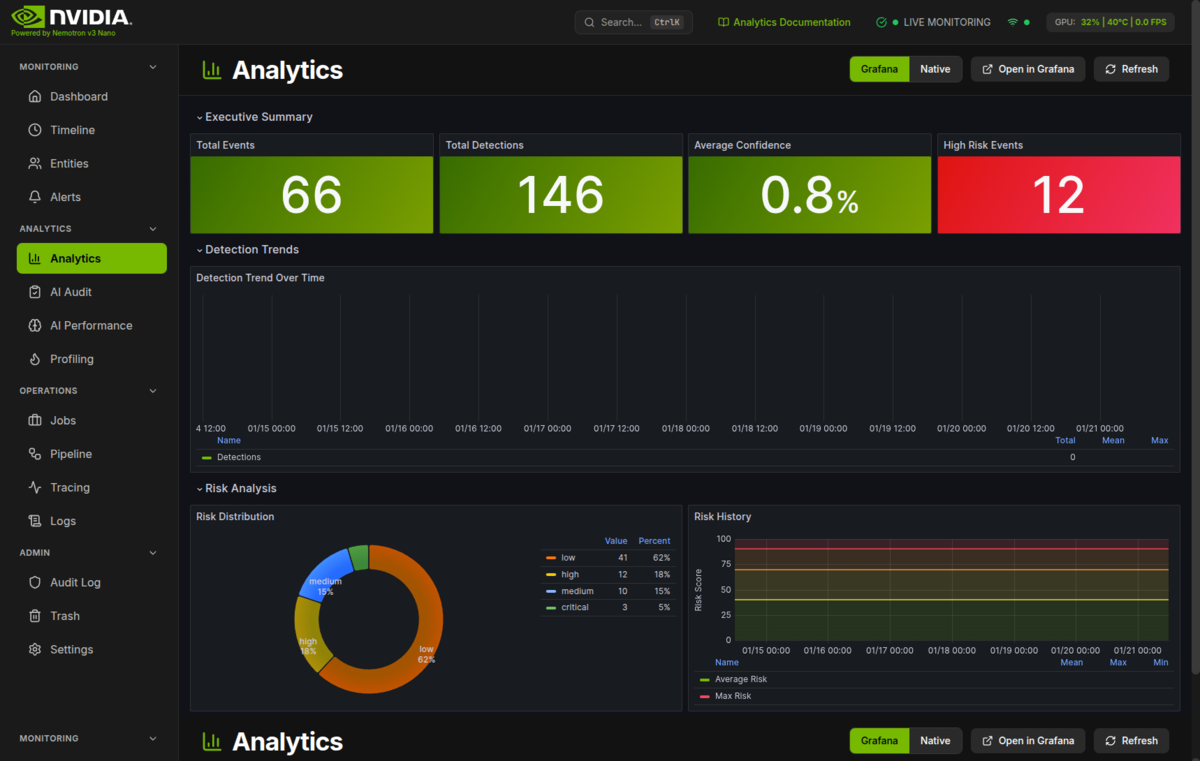 | 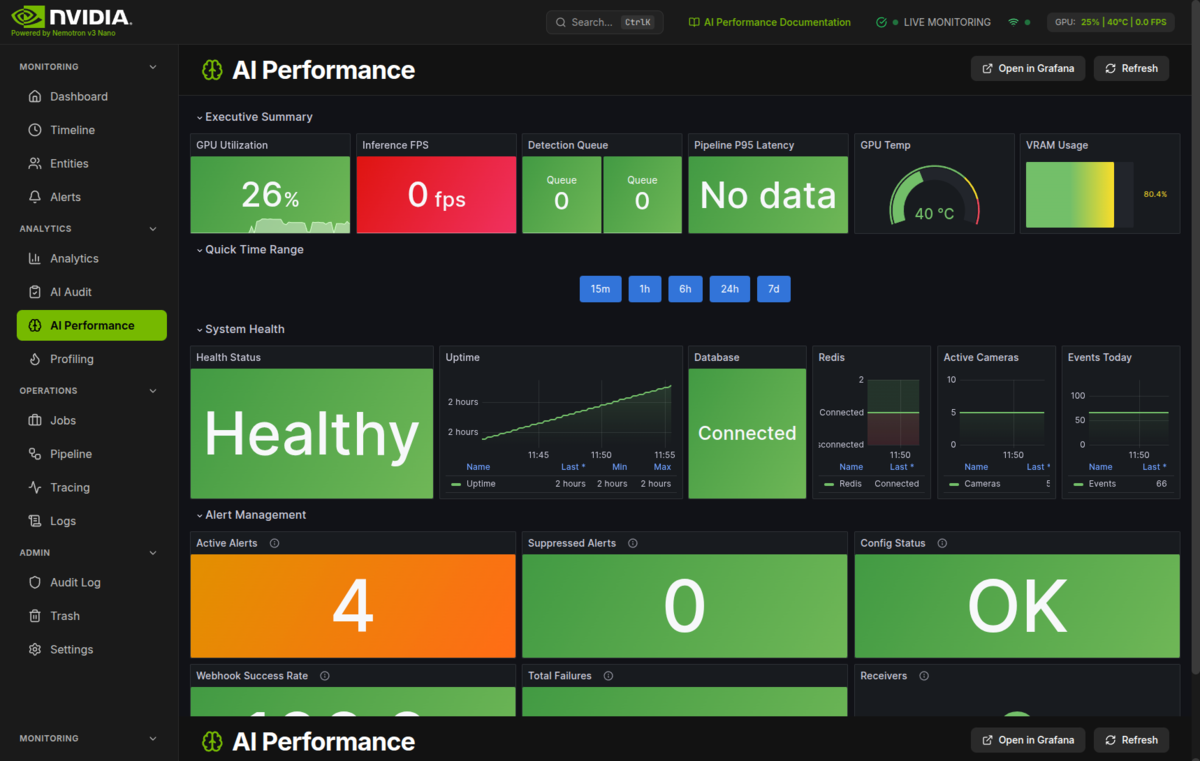 |
| Profiling | Tracing | Operations |
|---|---|---|
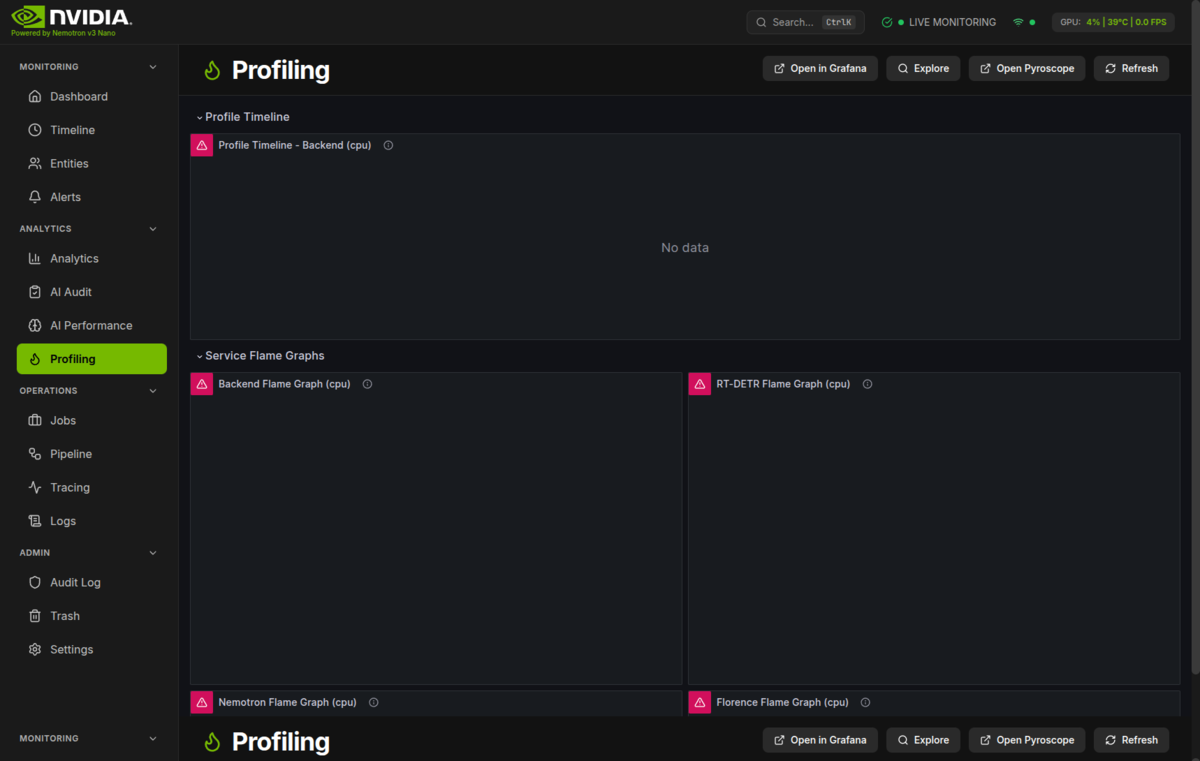 | 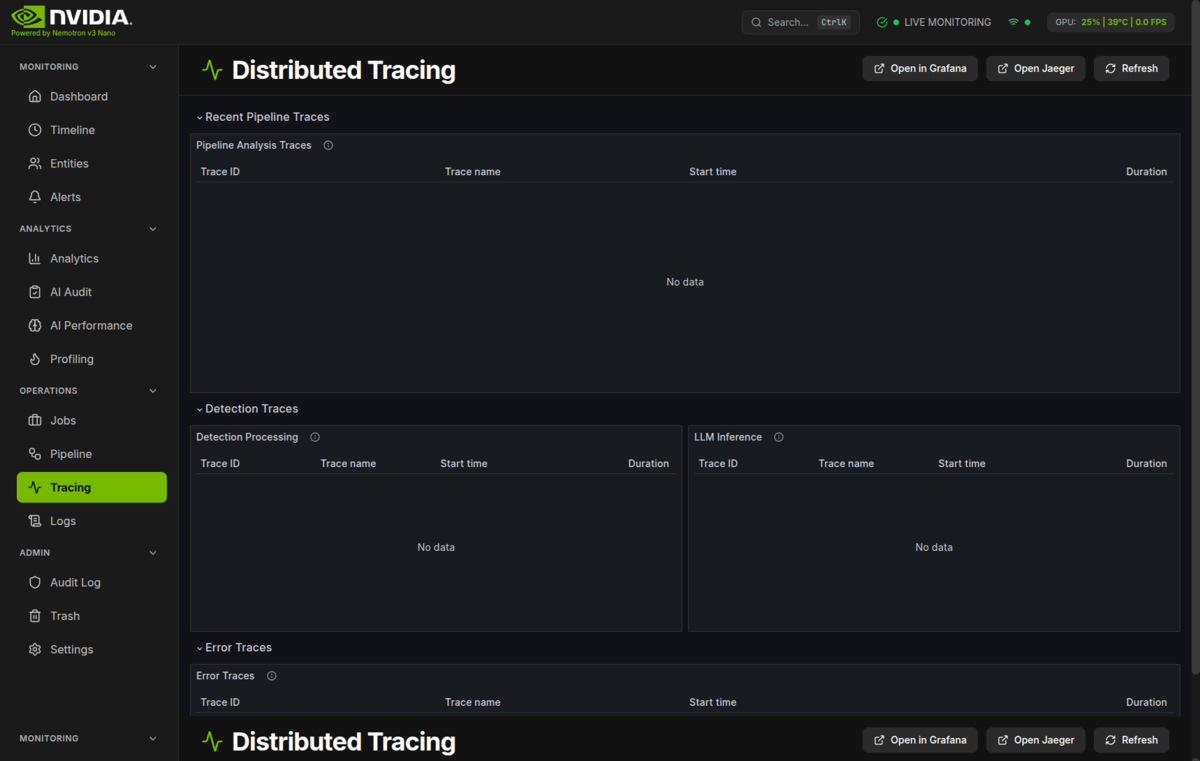 | 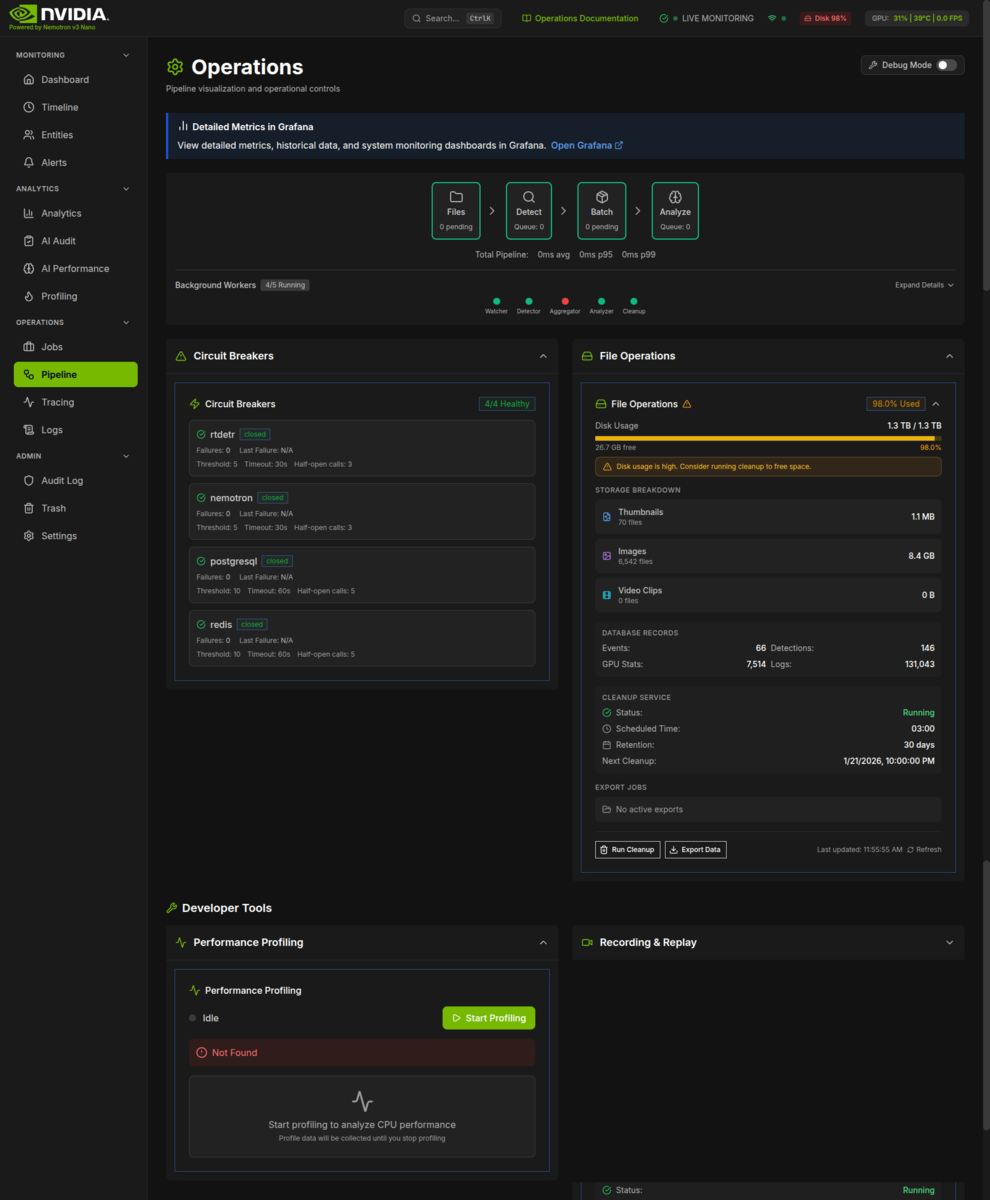 |






| I want to… | Start here |
|---|---|
| Browse the full docs | Documentation Site |
| Run this at home | User Hub |
| Deploy and maintain it | Operator Hub |
| Contribute / extend the code | Developer Hub |
| Work on it as an AI agent | AGENTS.md — the root instruction file (read it); most code directories carry their own AGENTS.md, and llms.txt is the condensed machine-readable map |
The brain of this system is a vision-language model that assesses every event — VlmAnalyzer
asks the ai-vlm llama.cpp serve for a verdict on each batch. Model identity is config
(VLM_MODEL_PATH), not code. It runs entirely on your hardware:
| Specification | Value | Why It Matters |
|---|---|---|
| Weights | GGUF pair, host-mounted, never baked | VLM_MODEL_PATH / VLM_MMPROJ_PATH in .env |
| Serving model | Qwen3VL-8B-Instruct-Q4_K_M + mmproj-Qwen3VL-8B-Instruct-Q8_0 | shipped default; both are overridable config |
| VRAM Required | config-driven — see VRAM Requirements | sized per card; VLM_GPU_LAYERS=auto offloads |
| Context Window | 32,768 tokens (VLM_CTX_SIZE) | Split 2 ways: 16,384 per slot, concurrent analyses |
| Inference Engine | llama.cpp (ai-vlm, container port 8098) | Optimized C++ with CUDA acceleration |
Also included:
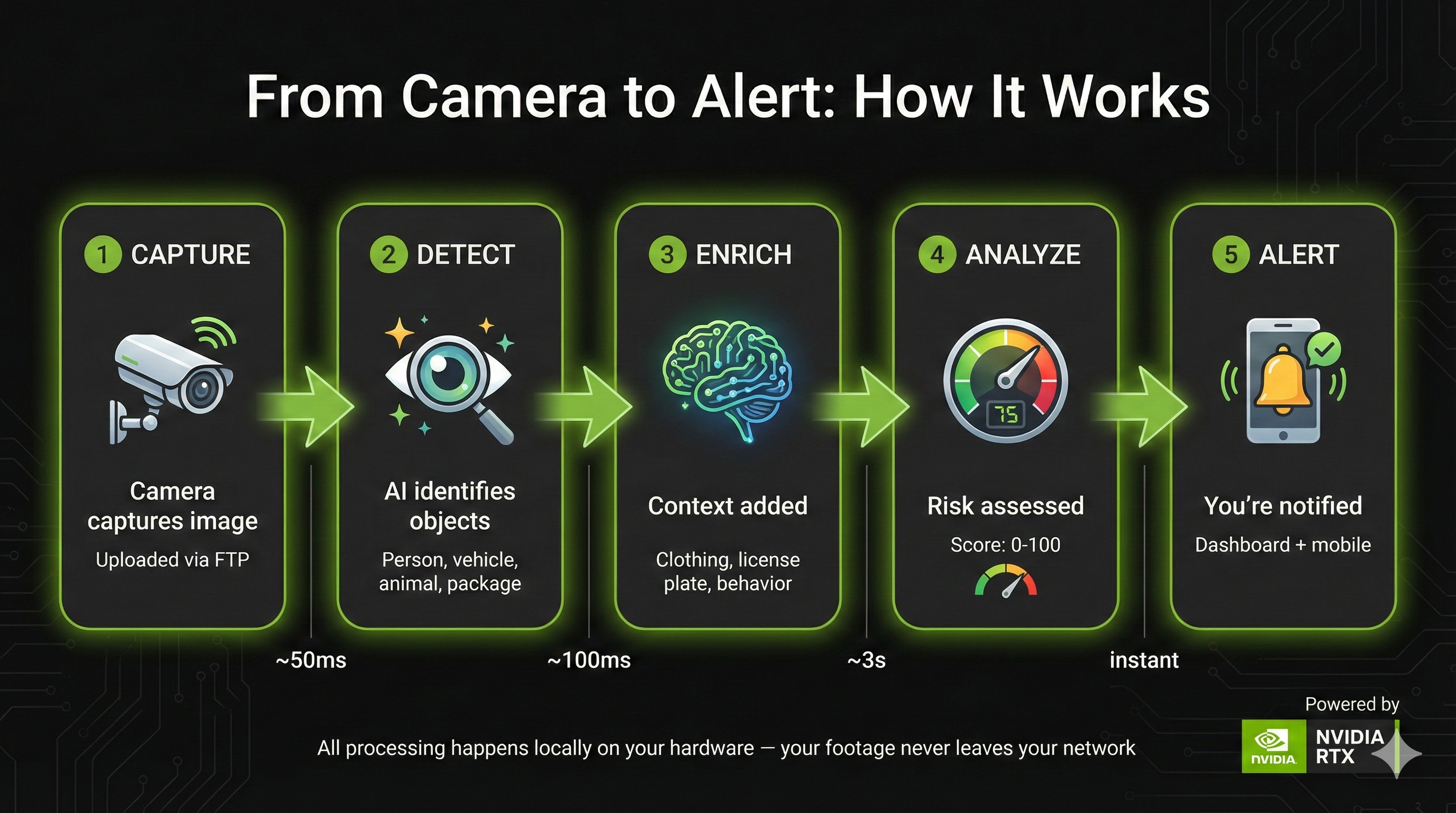
The system provides comprehensive video analytics capabilities:
| Feature | Description | Documentation |
|---|---|---|
| Object Detection | YOLO26 detects people, vehicles, animals, objects | Object detection |
| Scene Understanding | The VLM describes and assesses each event | Scene understanding |
| Anomaly Detection | Learned activity baselines flag unusual patterns | Anomaly detection |
| Feature | Description | Documentation |
|---|---|---|
| Detection Zones | Define areas for focused monitoring | Creating zones |
| Dwell Time Tracking | Monitor how long objects remain in zones | Dwell time |
| Line Crossing | Detect zone entry/exit events | Line crossing |
| Household Integration | Link zones to household members | Households |
| Feature | Description | Documentation |
|---|---|---|
| Face Detection | Detect faces within person detections | Face detection |
| Person Re-ID | Track individuals across cameras | Re-identification |
| License Plates | Plate detection and OCR | License plates |
| Vehicle Detection | YOLO26 vehicle classes (car, truck, bus, …) | Vehicle analysis |
All four live on the Analytics API:
| Endpoint | Description |
|---|---|
/api/analytics/detection-trends | Daily detection counts |
/api/analytics/risk-history | Risk level distribution |
/api/analytics/camera-uptime | Camera performance metrics |
/api/analytics/object-distribution | Object type breakdown |
models.yml is the single source of truth for every model the system downloads and loads — name, download size, VRAM footprint, and which service runs it. The tables below are drawn from it, except where a model runs inside the gateway's Triton process instead of the backend model zoo (that process is budgeted in VRAM Requirements; the Triton-served rows' vram_mb — e.g. osnet 100, threat 300 — cover only the backend-side load).
| Service | Engine | Port | What it serves |
|---|---|---|---|
ai-gateway | FastAPI + NVIDIA Triton (TensorRT / ONNX) | 8090 | Routers /yolo26 (object detection) and /enrich-lt (readiness lane) |
ai-vlm | llama.cpp llama-server | 8098 | POST /v1/chat/completions — the per-event verdict |
The VLM runs in the default compose set (up -d starts it; until UR-18 it sat
behind a compose profile that had to be named explicitly) and the backend
soft-depends on it (docker-compose.prod.yml:639-651 lists postgres, redis,
ai-gateway and go2rtc, never ai-vlm; the dial is the
AI_VLM_URL env var at :554 — the backend has no depends_on entry
for it, so the backend degrades instead of failing to boot). ai-gateway's
Triton repository holds exactly {yolo26, reid, threat}; GATEWAY_MODEL_SET accepts only
vlm and hard-raises on anything else. ai-vlm is the only LLM service; there is no
ai-llm.
Three YOLO26 variants ship (n/s/m; m is the default). Measured end-to-end latency, RTX A5500 at 640x640, batch 1 — details and throughput curves in YOLO26 Benchmarks:
| Variant | Latency (batch 1) | FPS | Best For |
|---|---|---|---|
| YOLO26m | 138.84ms | 7.2 | Default, best accuracy |
| YOLO26s | 73.74ms | 13.6 | Maximum throughput per frame |
| YOLO26n | 44.83ms | 22.3 | Lightweight, edge deployment |
Three in-process lookup legs run alongside every VLM verdict and answer identity
questions (whose face, which plate, which person) against your own registrations.
The rest of the catalogue backs those legs and the Triton models the gateway serves.
Backend-zoo models become resident at boot when BACKEND_MODEL_PRELOAD=true loads
their enabled: true + preload: true rows; nothing loads them on demand at runtime,
and a leg whose model is absent answers unavailable instead. Nothing evicts: the zoo
has no eviction pass, so never_evict/priority rows are parsed but have no consumer
(see backend/main.py's preload note). Complete models.yml inventory:
| Model | Purpose | VRAM | Notes |
|---|---|---|---|
| yolo26 | Primary object detection | Triton (yolo26) | enabled: false in the zoo; gateway export reads the .pt |
| osnet-ain-x1-0 | Person re-ID embeddings | ~100MB | enabled: true; preload: true |
| face-detector-scrfd | Face detection (CPU onnxruntime) | 0 (CPU) | low priority; preload: true |
| face-recognizer | Face embeddings (CPU onnxruntime) | 0 (CPU) | low priority; preload: true |
| threat-detection-yolov8n | Weapon detection (knives, guns, bats) | ~300MB | Triton threat; opted in via GATEWAY_ENABLE_THREAT |
| yolo11-face | Face detection on person crops | ~200MB | backend |
| yolo11-license-plate | License plate detection | ~300MB | backend |
| fast-alpr | Plate detection + OCR (ONNX) | ~28MB | library fetches at runtime |
| paddleocr | Text recognition | ~100MB | plates are handled by fast-alpr |
| yolo26-general | General scene detection | ~400MB | enabled: false — weights not released |
Every model carries a priority in models.yml — the intended eviction order
for a future VRAM-budget pass. No eviction pass exists today, so the field
is parsed into ModelConfig and read by nobody (the contract is documented in
docs/reference/models.md):
never_evict: true is the intended pin (no live row sets it)preload: true is honored: it loads the row at startup alongside
enabled: true — today osnet + the two face rows# Download the models the setup_lib rule selects (5 of the 10 live
# models.yml rows, 763MB of models.yml size_mb — the script header carries the
# exact re-derivation, and a guard test pins the fetch list to the rule).
# Reads only the AI_MODELS_PATH shell variable (not .env — export it to match
# setup.py's choice, below) and the target must already exist and be writable:
# setup.py sudo-creates it; otherwise sudo mkdir -p + chown first.
./ai/download_models.sh
# Custom models directory (default /export/ai_models; the containers mount this)
AI_MODELS_PATH=/path/to/models ./ai/download_models.sh
Sizing is dominated by the VLM identity in VLM_MODEL_PATH / VLM_MMPROJ_PATH:
VLM_GPU_LAYERS=auto (default) offloads as many layers as the card allows, so
there is no fixed tier table. Budget the GGUF pair's layers, the gateway's Triton
process, and ~1.0GB of lookup-model headroom — the full table lives in
VRAM Requirements.
The backend ModelManager (backend/services/model_zoo.py) exposes an
@asynccontextmanager load() that releases VRAM on exit, but in production the only
load trigger is the boot preload sweep (BACKEND_MODEL_PRELOAD=true in
backend/main.py's lifespan) — no runtime path calls load(); a leg whose model is
absent answers unavailable. Preloaded models stay resident until shutdown
(unload_all() runs in the same lifespan), and the zoo has no eviction pass; the HTTP
load/unload endpoints return 501 because Triton models are resident by design
(--model-control-mode=none).
curl http://localhost:8000/api/system/models
curl http://localhost:8000/api/system/models/<name>/status
[!NOTE] The status API reads ai-gateway health — Triton readiness unioned across the mounted routers (
/yolo26,/enrich-lt) plus in-process state from the backend ModelManager for models without a Triton mapping. Load/unload (POST /api/system/models/<name>/loadand/unload) return 501 by design: Triton runs with--model-control-mode=none, gateway models are resident, and the gateway exposes no preload/unload surface — seebackend/api/routes/model_management.pyfor the full semantics.vram-summarysumsmodels.yml's estimatedvram_mbper router; Triton does not expose per-model VRAM over HTTP.
| Component | Minimum | Recommended | This Project Uses |
|---|---|---|---|
| GPU VRAM | Whatever fits detection (24GB reference hardware recommended; the VLM offloads to CPU via VLM_GPU_LAYERS on smaller cards, slower) | 24GB | RTX A5500 (24GB) — reference hardware, not a requirement |
| System RAM | 32GB | 64GB+ | 128GB |
| Storage | 20GB (weights + DB) | 100GB+ (weights + DB + RETENTION_DAYS video) | models.yml has 10 catalogue rows totalling ~1.4GB of size_mb estimates; the shared download rule selects 5 of them (763 MB). download_models.sh provisions that 763 MB plus the read-only GGUF pair you mount into ai-vlm via VLM_MODEL_PATH / VLM_MMPROJ_PATH, whose size is whatever model you pick. Disk is dominated by recorded video (RETENTION_DAYS, default 30), not weights |
| CPU | 8 cores | 16+ cores | AMD Ryzen 9 |
GPU residency is dominated by the GGUF pair named in VLM_MODEL_PATH /
VLM_MMPROJ_PATH: VLM_GPU_LAYERS=auto (default) offloads as many layers as the
card allows, so a smaller card still boots — more of the VLM runs on CPU, slower.
The gateway's resident Triton models (yolo26, reid, plus threat when
GATEWAY_ENABLE_THREAT=true) and the lookup vram_mb rows are itemized in
VRAM Requirements.
[!NOTE] > No published GPU residency figure exists for this stack. Residency is config-driven — size the VLM with
VLM_MODEL_PATH/VLM_MMPROJ_PATHandVLM_GPU_LAYERS, then measure your own card (nvidia-smi, or the gateway's/metrics). A number from another card does not transfer here.
| Resource | Usage |
|---|---|
| GPU Memory | config-driven — see the note above; no fixed figure is published |
| System RAM | 47 GB of deploy.resources.limits.memory across the 19 services that start by default (71 GB if every profile is enabled); host minimum 32 GB |
| Containers | 21 (19 start by default — ai-llm-vllm and dcgm-exporter need a profile; of the 19, foscam-init exits after its chown, so 18 stay up) |
| Open Ports | 8444/8080 (UI HTTPS/HTTP), 8000 (API), 8090 (AI gateway), 8098 (VLM engine) — all AI ports bound to 127.0.0.1 |
[!TIP] > Tight on VRAM?
VLM_GPU_LAYERSis the dial: lower it and more of the VLM runs on CPU RAM, slower but functional. The system degrades gracefully.
Prerequisites: Linux host + NVIDIA GPU + Podman with GPU passthrough (the docker CLI works as a shim only via the optional podman-docker package)
# 1. Run setup — generates .env from .env.example with your ports, paths and secrets,
#    offers to download the models, and ends by deploying the stack
python setup.py

# 2. Download AI models (763 MB — the 5 rows the shared setup_lib rule selects
#    from models.yml; minutes on a fast connection. The VLM GGUF pair is separate:
#    you place it at VLM_MODEL_PATH / VLM_MMPROJ_PATH yourself, ledger D5).
#    Skip if you let setup.py do it. The script reads only the AI_MODELS_PATH shell
#    variable — not .env — so match what setup.py wrote, and the target directory
#    must already exist and be writable (setup.py sudo-creates it).
AI_MODELS_PATH=$(grep -m1 ^AI_MODELS_PATH .env | cut -d= -f2-) ./ai/download_models.sh

# 3. Start everything (you only need this if setup.py's auto-deploy was skipped —
#    reboot prompt, --defaults, or Ctrl-C; see the note below for PODMAN_SOCKET)
podman compose -f docker-compose.prod.yml up -d
[!NOTE] This project targets Podman: the compose file uses Podman-specific keys (
userns_mode: keep-id,:Umount flags, CDIdevices:), so plaindocker composedoes not run it as-is.backendandalloyalso hard-requirePODMAN_SOCKETin.env;python setup.py deployappends it automatically. If you skipped the deploy phase, enable the socket first:systemctl --user enable --now podman.socket echo "PODMAN_SOCKET=/run/user/$(id -u)/podman/podman.sock" >> .env
Verify:
curl http://localhost:8000/api/system/health   # Backend health
open http://localhost:8080                     # Dashboard (HTTP)
# Or: open https://localhost:8444              # Dashboard (HTTPS; enable with SSL_ENABLED=true)
Then open the dashboard: first run requires you to register the first admin account (the API returns 503 for everything except setup and health until you do).
[!TIP] Run just core services:
podman compose -f docker-compose.prod.yml up -d postgres redis backend frontend ai-gateway ai-vlm(ai-gatewayserves detection on/yolo26;ai-vlmis in the default set, so a plainup -dstarts it too — no flag needed.)
The monitoring ships in the same compose file — no separate stack to start. The URLs below all
bind 127.0.0.1 by default, the dashboard included, so open them on the host itself (or forward an
SSH tunnel). Set EXPOSE_LAN=true and re-run setup.py to publish the frontend's ports on
0.0.0.0 for LAN clients, which arms the auth gate; fence that with your firewall.
| Where | URL | Notes |
|---|---|---|
| Dashboard | http://localhost:8080 / https://localhost:8444 | HTTPS needs SSL_ENABLED=true |
| API docs | http://localhost:8000/docs | FastAPI Swagger UI |
| Grafana | http://localhost:3002 or https://<host>:8444/grafana/ | Anonymous access: on by default (unexposed mode). setup.py turns it off when EXPOSE_LAN=true, and /grafana/ then requires the app login — one login serves the UI and the dashboards (O1.11); off if you cp .env.example .env (the example ships false) |
| Prometheus | http://localhost:9090 | Metrics and alerting rules |
| Alertmanager | http://localhost:9093 | Delivered alerts |
| Loki | http://localhost:3100 | Log aggregation (queried through Grafana) |
| Tempo | http://localhost:3200 | Distributed traces |
| Pyroscope | http://localhost:4040 | Continuous profiling |
Port numbers come from .env (GRAFANA_PORT, PROMETHEUS_PORT, …). Full guide:
Monitoring & Observability.
# What's up / what's down (this project uses Podman)
podman ps -a --format "table {{.Names}}\t{{.Status}}"
podman compose -f docker-compose.prod.yml ps

# Logs — a whole service, or one container
podman compose -f docker-compose.prod.yml logs --tail=50 backend
# backend has no container_name: the real name is <project>-backend-1 (compose v2)
# or <project>_backend_1 (podman-compose v1) — discover it:
podman logs --tail=50 "$(podman ps --format '{{.Names}}' | grep -E -- '[-_]backend[-_]?[0-9]?$')"

# Restart one service without touching the rest
podman compose -f docker-compose.prod.yml restart backend
Host-run dev-mode logs land in logs/backend.log (./scripts/dev.sh logs tails it).
Health endpoints, cheapest first — health/live answers without touching dependencies:
| Endpoint | What it tells you |
|---|---|
http://localhost:8000/api/system/health/live | Backend process is alive |
http://localhost:8000/api/system/health | Backend + dependency status |
http://localhost:8000/api/system/health/full | Every dependency, no timeouts |
http://localhost:8090/health | AI gateway (Triton, mounted routers) |
http://localhost:8098/health | VLM engine (llama.cpp) — starts with the default up -d |
A /health 200 from ai-vlm proves the server answers, not that it loaded the
mmproj projector. Check podman logs ai-vlm 2>&1 | grep -i mmproj when verdicts
arrive as verification_failed with a NULL risk score.
Service control and self-healing details: Service Control.
Runs backend and frontend as host processes for fast iteration; Redis and
PostgreSQL come from containers, AI containers stay as they are. Needs uv
(curl -LsSf https://astral.sh/uv/install.sh | sh), Node 24+, and Python 3.14
(requires-python in pyproject.toml) on the host.
# 1. One-time setup
python setup.py
uv sync --extra dev            # Python deps (repo-root .venv — dev.sh sources this one)
cd frontend && npm ci          # Frontend deps (CI uses npm; bun.lock + bunfig.toml exist — if you use bun, `bun run test`, never `bun test`; see frontend/bunfig.toml)

# 2. PostgreSQL — dev.sh does NOT start it, and the backend dies on boot without it
#    (init_db in the FastAPI lifespan). .env's DATABASE_URL/REDIS_URL point at the
#    container hostnames `postgres`/`redis`, so run a dev container and override:
podman run -d --name dev-postgres \
  -e POSTGRES_USER=security -e POSTGRES_DB=security \
  -e POSTGRES_PASSWORD="$(grep -m1 ^POSTGRES_PASSWORD .env | cut -d= -f2-)" \
  -p 127.0.0.1:5432:5432 docker.io/library/postgres:16-alpine
export DATABASE_URL="postgresql+asyncpg://security:$(grep -m1 ^POSTGRES_PASSWORD .env | cut -d= -f2-)@localhost:5432/security"
export REDIS_URL=redis://localhost:6379/0

# 3. Start Redis + backend (uvicorn :8000) + frontend (Vite dev server :8444, HTTPS)
./scripts/dev.sh start
./scripts/dev.sh status        # Also: stop | restart | logs
dev.sh starts Redis with the docker CLI; on a Podman host give it the
docker-compatible socket (systemctl --user enable --now podman.socket + the
podman-docker shim, or export DOCKER_HOST=unix:///run/user/$UID/podman/podman.sock)
or run a system Redis (sudo systemctl start redis) — otherwise start aborts
(set -e) before backend/frontend launch. ./scripts/dev.sh redis manages just
Redis.
Open https://localhost:8444 — Vite pins 8444 with strictPort; HTTPS needs a
cert provider (@vitejs/plugin-basic-ssl — https: true alone no longer
auto-generates a cert, the TLS handshake just fails). It proxies /api and
/ws to the backend on port 8000. (frontend/vite.config.ts.)
Useful when iterating on AI model code directly on the host. The host-run detector
replaces only the gateway's /yolo26 router — the /enrich-lt readiness lane still needs
the ai-gateway container. (Triton inside ai-gateway serves yolo26; the archived
standalone GPU image build recipe lived in the retired ai-yolo26-image tree; recover it from git history.)
# Start the AI servers on the host (separate terminals)
./ai/start_detector.sh   # YOLO26 — reads PORT/YOLO26_PORT, defaults to 8090
# The reasoning engine has no host-run script: the shipped llama.cpp serve is the
# ai-vlm container — start it with
#   podman compose -f docker-compose.prod.yml up -d ai-vlm

# Then point the HOST-RUN backend (dev.sh) at them. The host detector serves its
# endpoints at the root (/health, /detect), so no router suffix — and these exports
# never reach a containerized backend (compose hardcodes the AI gateway URLs —
# AI_VLM_URL is the interpolated exception; no env_file).
export YOLO26_URL=http://localhost:8090
# The /enrich-lt lane (threat + re-ID Triton models, published on 127.0.0.1:8090 by
# the ai-gateway container) is read as a readiness target by
# backend/api/routes/model_management.py. Leave USE_AI_GATEWAY=false (the Settings
# default): with it true the detector client ignores YOLO26_URL and sends detection
# back to the gateway.
export ENRICHMENT_LIGHT_URL=http://localhost:8090/enrich-lt
If instead the backend itself runs in a container, host.docker.internal resolves
only on macOS/Docker Desktop; on Linux Podman use host.containers.internal or the
host IP, and note the compose file hardcodes the AI gateway URLs (AI_VLM_URL is
interpolated — it is the one that reaches the container from .env), so override them with a
compose environment: entry or an override file — a shell export is not enough.
See AI Configuration for the per-platform hostnames.
[!WARNING] Do not run these while the
ai-gatewaycontainer is up — they will fight over port 8090. The host-run detector defaults to 8090, which is also theai-gatewayhost port. To keepai-gatewayup for the/enrich-ltlane, run the detector on a free port instead:YOLO26_PORT=8095 ./ai/start_detector.shwithexport YOLO26_URL=http://localhost:8095.
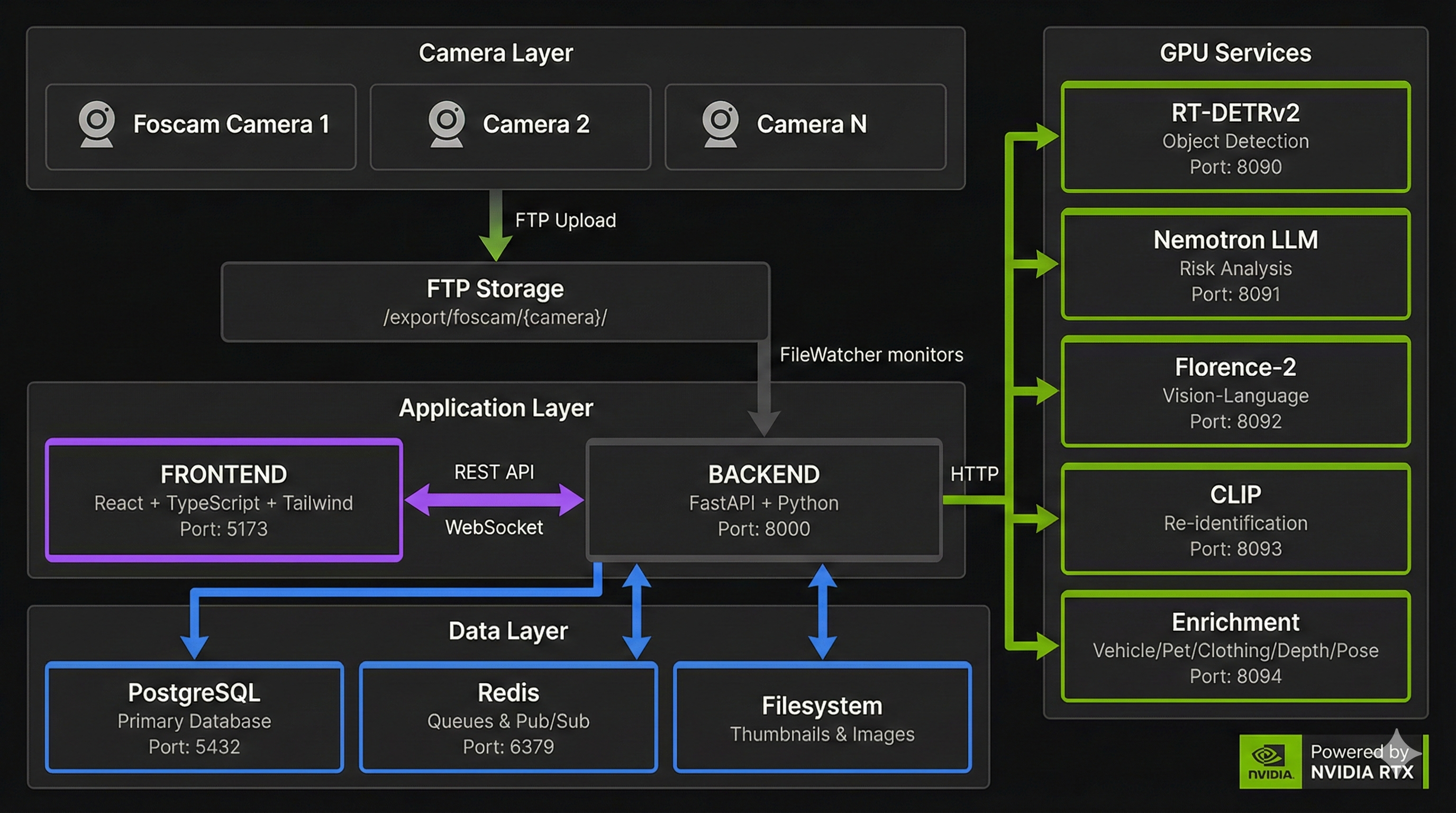
| Layer | Stack | Key Files |
|---|---|---|
| Frontend | React + TypeScript + Tailwind | frontend/src/services/api.ts |
| Backend | FastAPI + SQLAlchemy + Redis | backend/services/, backend/api/ |
| AI Services | llama.cpp + Triton + FastAPI | ai/gateway/ (Triton routers), ai/vlm/ (llama.cpp serve) |
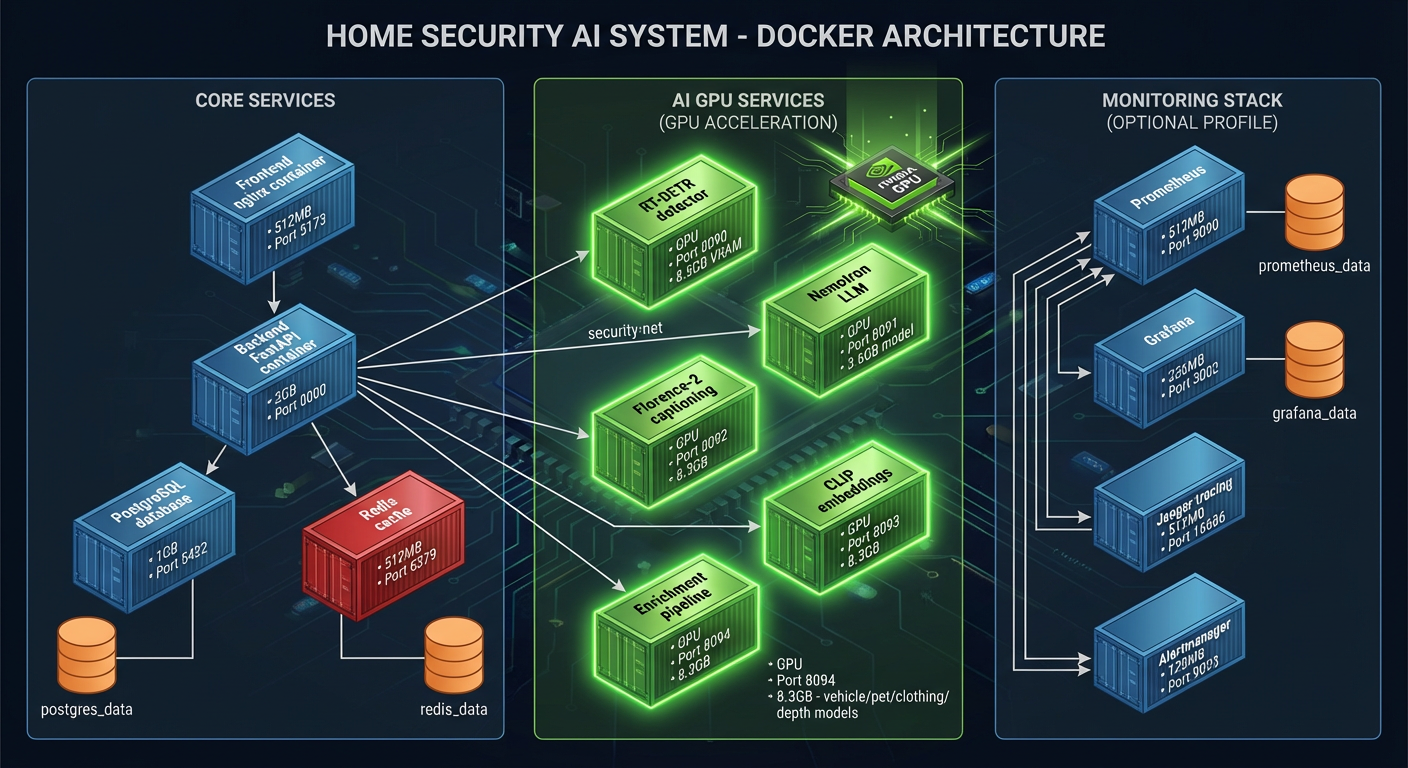
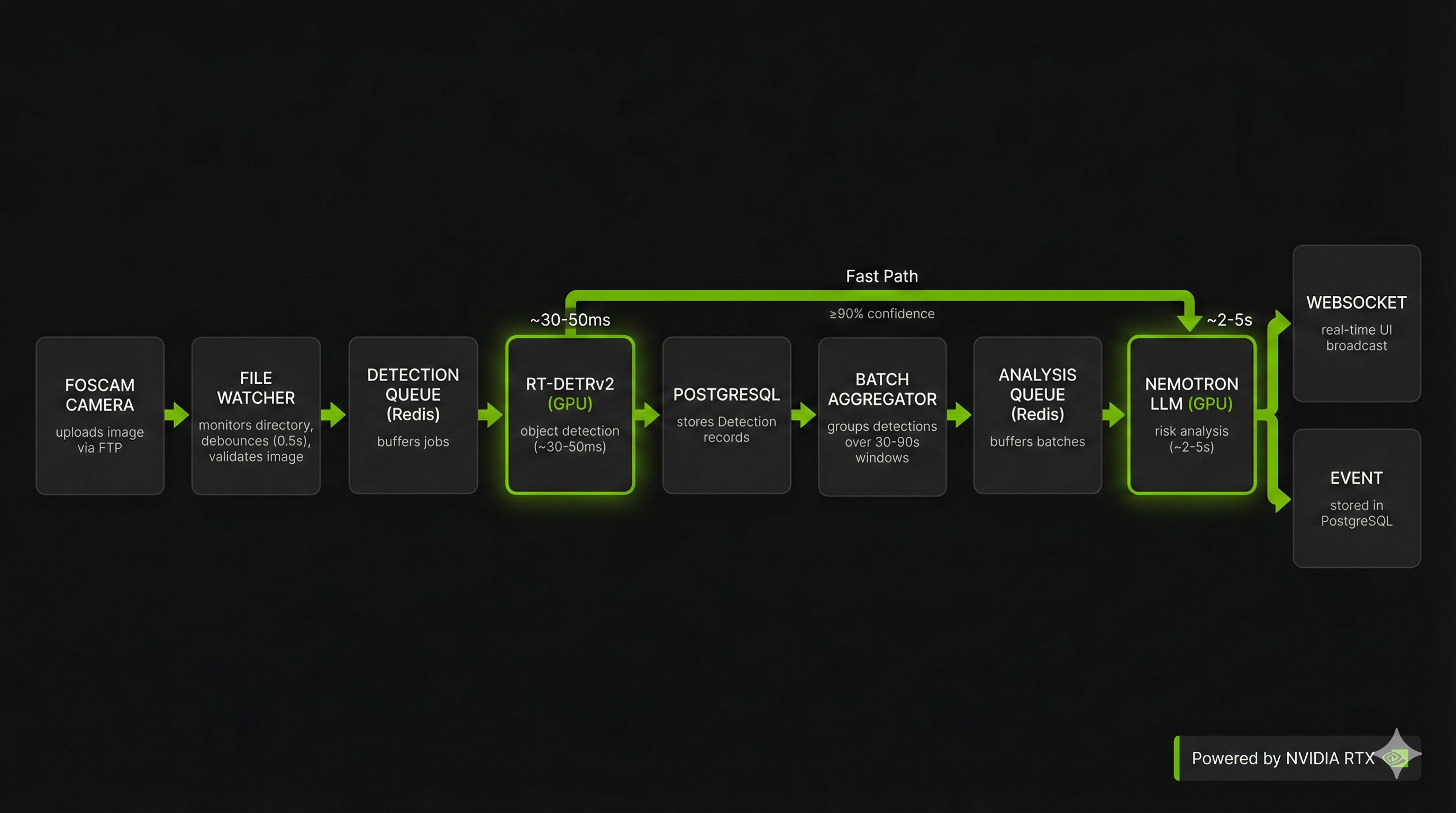
Detailed Documentation:
| Hub | Description |
|---|---|
| Architecture Hub | Complete system architecture documentation |
| Security | Input validation, data protection, OWASP |
| Dataflows | End-to-end data traces, pipeline timing |
| Detection Pipeline | YOLO26 integration, image processing |
| AI Orchestration | VLM verdict path, batch processing |
Cameras upload images/videos to:
/export/foscam/{camera_name}/
You can:
/export/foscamvsftpd.conf, Dockerfile, docker-compose-wrapper.sh, install-systemd.sh from git history). It is not wired into any compose file today; it briefly was (added at bd5ef70a7, removed at d585135e7, 2025-12-31 to 2026-01-02).[!NOTE] In production containers, the host camera path is mounted to
/camerasand the backend usesFOSCAM_BASE_PATH=/cameras.
Source of truth: Environment Variable Reference
Common settings:
| Variable | Purpose | Containerized deploy |
|---|---|---|
FOSCAM_BASE_PATH | Camera upload directory (host path) | Read from .env by compose (bind-mount source); inside the container it's forced to /cameras |
YOLO26_URL, ENRICHMENT_LIGHT_URL | AI gateway router endpoints (port 8090) | Compose hardcodes these to http://ai-gateway:8090/<route>; your .env values are ignored (host runs only) |
AI_VLM_URL | VLM engine endpoint (port 8098) | Interpolated (${AI_VLM_URL:-http://ai-vlm:8098}) — your .env value lands; default is the container DNS name (host runs: set it) |
RETENTION_DAYS | Event retention (days; default 30) | Not passed to the backend container — add an environment: entry or an override file, or edits silently keep the default |
BATCH_WINDOW_SECONDS | Detection batching window | Not passed to the backend container — same caveat |
API_KEY_ENABLED | Enable API key auth (off by default) | Not passed to the backend container — same caveat |
FILE_WATCHER_POLLING | Use polling (Docker mounts) | Passed through by compose — the only knob here that works out of the box |
[!NOTE] The prod compose file has no
env_file:and mounts no.env, and.dockerignoreexcludes it — so theenv_file=".env"inbackend/core/config.pyresolves to a path inside the image that doesn't exist. Only variables compose interpolates with${...}, or names in theenvironment:list, reach the container. Host-run dev mode (./scripts/dev.sh) reads.envdirectly, where all of these work.
This MVP is designed for single-user, trusted LAN deployments.
EXPOSE_LAN unset, API endpoints need no credential.EXPOSE_LAN=true when anything beyond this machine reaches the UI: every request then needs the
login session or an API key, except health, setup and login. Admin/destructive routes carry their own guards.See: Admin Security Guide
Start with the Developer Hub, then:
./scripts/validate.sh # Full validation (lint + typecheck + tests)
Issue tracking: Linear
Licensed under Apache License 2.0. See LICENSE.
Ultralytics YOLO · Qwen3-VL · llama.cpp · NVIDIA Triton · FastAPI · Tremor
Python
14
4,164 commits
updated Oct 19, 2026
Turn "dumb" security cameras into an intelligent threat detection system — 100% local, no cloud APIs required.
| Dashboard | Timeline | Entities |
|---|---|---|
| | |
| Alerts | Analytics | AI Performance |
|---|---|---|
| | |
| Profiling | Tracing | Operations |
|---|---|---|
| | |
| I want to… | Start here |
|---|---|
| Browse the full docs | Documentation Site |
| Run this at home | User Hub |
| Deploy and maintain it | Operator Hub |
| Contribute / extend the code | Developer Hub |
| Work on it as an AI agent | AGENTS.md — the root instruction file (read it); most code directories carry their own AGENTS.md, and llms.txt is the condensed machine-readable map |
The brain of this system is a vision-language model that assesses every event — VlmAnalyzer
asks the ai-vlm llama.cpp serve for a verdict on each batch. Model identity is config
(VLM_MODEL_PATH), not code. It runs entirely on your hardware:
| Specification | Value | Why It Matters |
|---|---|---|
| Weights | GGUF pair, host-mounted, never baked | VLM_MODEL_PATH / VLM_MMPROJ_PATH in .env |
| Serving model | Qwen3VL-8B-Instruct-Q4_K_M + mmproj-Qwen3VL-8B-Instruct-Q8_0 | shipped default; both are overridable config |
| VRAM Required | config-driven — see VRAM Requirements | sized per card; VLM_GPU_LAYERS=auto offloads |
| Context Window | 32,768 tokens (VLM_CTX_SIZE) | Split 2 ways: 16,384 per slot, concurrent analyses |
| Inference Engine | llama.cpp (ai-vlm, container port 8098) | Optimized C++ with CUDA acceleration |
Also included:
The system provides comprehensive video analytics capabilities:
| Feature | Description | Documentation |
|---|---|---|
| Object Detection | YOLO26 detects people, vehicles, animals, objects | Object detection |
| Scene Understanding | The VLM describes and assesses each event | Scene understanding |
| Anomaly Detection | Learned activity baselines flag unusual patterns | Anomaly detection |
| Feature | Description | Documentation |
|---|---|---|
| Detection Zones | Define areas for focused monitoring | Creating zones |
| Dwell Time Tracking | Monitor how long objects remain in zones | Dwell time |
| Line Crossing | Detect zone entry/exit events | Line crossing |
| Household Integration | Link zones to household members | Households |
| Feature | Description | Documentation |
|---|---|---|
| Face Detection | Detect faces within person detections | Face detection |
| Person Re-ID | Track individuals across cameras | Re-identification |
| License Plates | Plate detection and OCR | License plates |
| Vehicle Detection | YOLO26 vehicle classes (car, truck, bus, …) | Vehicle analysis |
All four live on the Analytics API:
| Endpoint | Description |
|---|---|
/api/analytics/detection-trends | Daily detection counts |
/api/analytics/risk-history | Risk level distribution |
/api/analytics/camera-uptime | Camera performance metrics |
/api/analytics/object-distribution | Object type breakdown |
models.yml is the single source of truth for every model the system downloads and loads — name, download size, VRAM footprint, and which service runs it. The tables below are drawn from it, except where a model runs inside the gateway's Triton process instead of the backend model zoo (that process is budgeted in VRAM Requirements; the Triton-served rows' vram_mb — e.g. osnet 100, threat 300 — cover only the backend-side load).
| Service | Engine | Port | What it serves |
|---|---|---|---|
ai-gateway | FastAPI + NVIDIA Triton (TensorRT / ONNX) | 8090 | Routers /yolo26 (object detection) and /enrich-lt (readiness lane) |
ai-vlm | llama.cpp llama-server | 8098 | POST /v1/chat/completions — the per-event verdict |
The VLM runs in the default compose set (up -d starts it; until UR-18 it sat
behind a compose profile that had to be named explicitly) and the backend
soft-depends on it (docker-compose.prod.yml:639-651 lists postgres, redis,
ai-gateway and go2rtc, never ai-vlm; the dial is the
AI_VLM_URL env var at :554 — the backend has no depends_on entry
for it, so the backend degrades instead of failing to boot). ai-gateway's
Triton repository holds exactly {yolo26, reid, threat}; GATEWAY_MODEL_SET accepts only
vlm and hard-raises on anything else. ai-vlm is the only LLM service; there is no
ai-llm.
Three YOLO26 variants ship (n/s/m; m is the default). Measured end-to-end latency, RTX A5500 at 640x640, batch 1 — details and throughput curves in YOLO26 Benchmarks:
| Variant | Latency (batch 1) | FPS | Best For |
|---|---|---|---|
| YOLO26m | 138.84ms | 7.2 | Default, best accuracy |
| YOLO26s | 73.74ms | 13.6 | Maximum throughput per frame |
| YOLO26n | 44.83ms | 22.3 | Lightweight, edge deployment |
Three in-process lookup legs run alongside every VLM verdict and answer identity
questions (whose face, which plate, which person) against your own registrations.
The rest of the catalogue backs those legs and the Triton models the gateway serves.
Backend-zoo models become resident at boot when BACKEND_MODEL_PRELOAD=true loads
their enabled: true + preload: true rows; nothing loads them on demand at runtime,
and a leg whose model is absent answers unavailable instead. Nothing evicts: the zoo
has no eviction pass, so never_evict/priority rows are parsed but have no consumer
(see backend/main.py's preload note). Complete models.yml inventory:
| Model | Purpose | VRAM | Notes |
|---|---|---|---|
| yolo26 | Primary object detection | Triton (yolo26) | enabled: false in the zoo; gateway export reads the .pt |
| osnet-ain-x1-0 | Person re-ID embeddings | ~100MB | enabled: true; preload: true |
| face-detector-scrfd | Face detection (CPU onnxruntime) | 0 (CPU) | low priority; preload: true |
| face-recognizer | Face embeddings (CPU onnxruntime) | 0 (CPU) | low priority; preload: true |
| threat-detection-yolov8n | Weapon detection (knives, guns, bats) | ~300MB | Triton threat; opted in via GATEWAY_ENABLE_THREAT |
| yolo11-face | Face detection on person crops | ~200MB | backend |
| yolo11-license-plate | License plate detection | ~300MB | backend |
| fast-alpr | Plate detection + OCR (ONNX) | ~28MB | library fetches at runtime |
| paddleocr | Text recognition | ~100MB | plates are handled by fast-alpr |
| yolo26-general | General scene detection | ~400MB | enabled: false — weights not released |
Every model carries a priority in models.yml — the intended eviction order
for a future VRAM-budget pass. No eviction pass exists today, so the field
is parsed into ModelConfig and read by nobody (the contract is documented in
docs/reference/models.md):
never_evict: true is the intended pin (no live row sets it)preload: true is honored: it loads the row at startup alongside
enabled: true — today osnet + the two face rows# Download the models the setup_lib rule selects (5 of the 10 live
# models.yml rows, 763MB of models.yml size_mb — the script header carries the
# exact re-derivation, and a guard test pins the fetch list to the rule).
# Reads only the AI_MODELS_PATH shell variable (not .env — export it to match
# setup.py's choice, below) and the target must already exist and be writable:
# setup.py sudo-creates it; otherwise sudo mkdir -p + chown first.
./ai/download_models.sh
# Custom models directory (default /export/ai_models; the containers mount this)
AI_MODELS_PATH=/path/to/models ./ai/download_models.sh
Sizing is dominated by the VLM identity in VLM_MODEL_PATH / VLM_MMPROJ_PATH:
VLM_GPU_LAYERS=auto (default) offloads as many layers as the card allows, so
there is no fixed tier table. Budget the GGUF pair's layers, the gateway's Triton
process, and ~1.0GB of lookup-model headroom — the full table lives in
VRAM Requirements.
The backend ModelManager (backend/services/model_zoo.py) exposes an
@asynccontextmanager load() that releases VRAM on exit, but in production the only
load trigger is the boot preload sweep (BACKEND_MODEL_PRELOAD=true in
backend/main.py's lifespan) — no runtime path calls load(); a leg whose model is
absent answers unavailable. Preloaded models stay resident until shutdown
(unload_all() runs in the same lifespan), and the zoo has no eviction pass; the HTTP
load/unload endpoints return 501 because Triton models are resident by design
(--model-control-mode=none).
curl http://localhost:8000/api/system/models
curl http://localhost:8000/api/system/models/<name>/status
[!NOTE] The status API reads ai-gateway health — Triton readiness unioned across the mounted routers (
/yolo26,/enrich-lt) plus in-process state from the backend ModelManager for models without a Triton mapping. Load/unload (POST /api/system/models/<name>/loadand/unload) return 501 by design: Triton runs with--model-control-mode=none, gateway models are resident, and the gateway exposes no preload/unload surface — seebackend/api/routes/model_management.pyfor the full semantics.vram-summarysumsmodels.yml's estimatedvram_mbper router; Triton does not expose per-model VRAM over HTTP.
| Component | Minimum | Recommended | This Project Uses |
|---|---|---|---|
| GPU VRAM | Whatever fits detection (24GB reference hardware recommended; the VLM offloads to CPU via VLM_GPU_LAYERS on smaller cards, slower) | 24GB | RTX A5500 (24GB) — reference hardware, not a requirement |
| System RAM | 32GB | 64GB+ | 128GB |
| Storage | 20GB (weights + DB) | 100GB+ (weights + DB + RETENTION_DAYS video) | models.yml has 10 catalogue rows totalling ~1.4GB of size_mb estimates; the shared download rule selects 5 of them (763 MB). download_models.sh provisions that 763 MB plus the read-only GGUF pair you mount into ai-vlm via VLM_MODEL_PATH / VLM_MMPROJ_PATH, whose size is whatever model you pick. Disk is dominated by recorded video (RETENTION_DAYS, default 30), not weights |
| CPU | 8 cores | 16+ cores | AMD Ryzen 9 |
GPU residency is dominated by the GGUF pair named in VLM_MODEL_PATH /
VLM_MMPROJ_PATH: VLM_GPU_LAYERS=auto (default) offloads as many layers as the
card allows, so a smaller card still boots — more of the VLM runs on CPU, slower.
The gateway's resident Triton models (yolo26, reid, plus threat when
GATEWAY_ENABLE_THREAT=true) and the lookup vram_mb rows are itemized in
VRAM Requirements.
[!NOTE] > No published GPU residency figure exists for this stack. Residency is config-driven — size the VLM with
VLM_MODEL_PATH/VLM_MMPROJ_PATHandVLM_GPU_LAYERS, then measure your own card (nvidia-smi, or the gateway's/metrics). A number from another card does not transfer here.
| Resource | Usage |
|---|---|
| GPU Memory | config-driven — see the note above; no fixed figure is published |
| System RAM | 47 GB of deploy.resources.limits.memory across the 19 services that start by default (71 GB if every profile is enabled); host minimum 32 GB |
| Containers | 21 (19 start by default — ai-llm-vllm and dcgm-exporter need a profile; of the 19, foscam-init exits after its chown, so 18 stay up) |
| Open Ports | 8444/8080 (UI HTTPS/HTTP), 8000 (API), 8090 (AI gateway), 8098 (VLM engine) — all AI ports bound to 127.0.0.1 |
[!TIP] > Tight on VRAM?
VLM_GPU_LAYERSis the dial: lower it and more of the VLM runs on CPU RAM, slower but functional. The system degrades gracefully.
Prerequisites: Linux host + NVIDIA GPU + Podman with GPU passthrough (the docker CLI works as a shim only via the optional podman-docker package)
# 1. Run setup — generates .env from .env.example with your ports, paths and secrets,
#    offers to download the models, and ends by deploying the stack
python setup.py

# 2. Download AI models (763 MB — the 5 rows the shared setup_lib rule selects
#    from models.yml; minutes on a fast connection. The VLM GGUF pair is separate:
#    you place it at VLM_MODEL_PATH / VLM_MMPROJ_PATH yourself, ledger D5).
#    Skip if you let setup.py do it. The script reads only the AI_MODELS_PATH shell
#    variable — not .env — so match what setup.py wrote, and the target directory
#    must already exist and be writable (setup.py sudo-creates it).
AI_MODELS_PATH=$(grep -m1 ^AI_MODELS_PATH .env | cut -d= -f2-) ./ai/download_models.sh

# 3. Start everything (you only need this if setup.py's auto-deploy was skipped —
#    reboot prompt, --defaults, or Ctrl-C; see the note below for PODMAN_SOCKET)
podman compose -f docker-compose.prod.yml up -d
[!NOTE] This project targets Podman: the compose file uses Podman-specific keys (
userns_mode: keep-id,:Umount flags, CDIdevices:), so plaindocker composedoes not run it as-is.backendandalloyalso hard-requirePODMAN_SOCKETin.env;python setup.py deployappends it automatically. If you skipped the deploy phase, enable the socket first:systemctl --user enable --now podman.socket echo "PODMAN_SOCKET=/run/user/$(id -u)/podman/podman.sock" >> .env
Verify:
curl http://localhost:8000/api/system/health   # Backend health
open http://localhost:8080                     # Dashboard (HTTP)
# Or: open https://localhost:8444              # Dashboard (HTTPS; enable with SSL_ENABLED=true)
Then open the dashboard: first run requires you to register the first admin account (the API returns 503 for everything except setup and health until you do).
[!TIP] Run just core services:
podman compose -f docker-compose.prod.yml up -d postgres redis backend frontend ai-gateway ai-vlm(ai-gatewayserves detection on/yolo26;ai-vlmis in the default set, so a plainup -dstarts it too — no flag needed.)
The monitoring ships in the same compose file — no separate stack to start. The URLs below all
bind 127.0.0.1 by default, the dashboard included, so open them on the host itself (or forward an
SSH tunnel). Set EXPOSE_LAN=true and re-run setup.py to publish the frontend's ports on
0.0.0.0 for LAN clients, which arms the auth gate; fence that with your firewall.
| Where | URL | Notes |
|---|---|---|
| Dashboard | http://localhost:8080 / https://localhost:8444 | HTTPS needs SSL_ENABLED=true |
| API docs | http://localhost:8000/docs | FastAPI Swagger UI |
| Grafana | http://localhost:3002 or https://<host>:8444/grafana/ | Anonymous access: on by default (unexposed mode). setup.py turns it off when EXPOSE_LAN=true, and /grafana/ then requires the app login — one login serves the UI and the dashboards (O1.11); off if you cp .env.example .env (the example ships false) |
| Prometheus | http://localhost:9090 | Metrics and alerting rules |
| Alertmanager | http://localhost:9093 | Delivered alerts |
| Loki | http://localhost:3100 | Log aggregation (queried through Grafana) |
| Tempo | http://localhost:3200 | Distributed traces |
| Pyroscope | http://localhost:4040 | Continuous profiling |
Port numbers come from .env (GRAFANA_PORT, PROMETHEUS_PORT, …). Full guide:
Monitoring & Observability.
# What's up / what's down (this project uses Podman)
podman ps -a --format "table {{.Names}}\t{{.Status}}"
podman compose -f docker-compose.prod.yml ps

# Logs — a whole service, or one container
podman compose -f docker-compose.prod.yml logs --tail=50 backend
# backend has no container_name: the real name is <project>-backend-1 (compose v2)
# or <project>_backend_1 (podman-compose v1) — discover it:
podman logs --tail=50 "$(podman ps --format '{{.Names}}' | grep -E -- '[-_]backend[-_]?[0-9]?$')"

# Restart one service without touching the rest
podman compose -f docker-compose.prod.yml restart backend
Host-run dev-mode logs land in logs/backend.log (./scripts/dev.sh logs tails it).
Health endpoints, cheapest first — health/live answers without touching dependencies:
| Endpoint | What it tells you |
|---|---|
http://localhost:8000/api/system/health/live | Backend process is alive |
http://localhost:8000/api/system/health | Backend + dependency status |
http://localhost:8000/api/system/health/full | Every dependency, no timeouts |
http://localhost:8090/health | AI gateway (Triton, mounted routers) |
http://localhost:8098/health | VLM engine (llama.cpp) — starts with the default up -d |
A /health 200 from ai-vlm proves the server answers, not that it loaded the
mmproj projector. Check podman logs ai-vlm 2>&1 | grep -i mmproj when verdicts
arrive as verification_failed with a NULL risk score.
Service control and self-healing details: Service Control.
Runs backend and frontend as host processes for fast iteration; Redis and
PostgreSQL come from containers, AI containers stay as they are. Needs uv
(curl -LsSf https://astral.sh/uv/install.sh | sh), Node 24+, and Python 3.14
(requires-python in pyproject.toml) on the host.
# 1. One-time setup
python setup.py
uv sync --extra dev            # Python deps (repo-root .venv — dev.sh sources this one)
cd frontend && npm ci          # Frontend deps (CI uses npm; bun.lock + bunfig.toml exist — if you use bun, `bun run test`, never `bun test`; see frontend/bunfig.toml)

# 2. PostgreSQL — dev.sh does NOT start it, and the backend dies on boot without it
#    (init_db in the FastAPI lifespan). .env's DATABASE_URL/REDIS_URL point at the
#    container hostnames `postgres`/`redis`, so run a dev container and override:
podman run -d --name dev-postgres \
  -e POSTGRES_USER=security -e POSTGRES_DB=security \
  -e POSTGRES_PASSWORD="$(grep -m1 ^POSTGRES_PASSWORD .env | cut -d= -f2-)" \
  -p 127.0.0.1:5432:5432 docker.io/library/postgres:16-alpine
export DATABASE_URL="postgresql+asyncpg://security:$(grep -m1 ^POSTGRES_PASSWORD .env | cut -d= -f2-)@localhost:5432/security"
export REDIS_URL=redis://localhost:6379/0

# 3. Start Redis + backend (uvicorn :8000) + frontend (Vite dev server :8444, HTTPS)
./scripts/dev.sh start
./scripts/dev.sh status        # Also: stop | restart | logs
dev.sh starts Redis with the docker CLI; on a Podman host give it the
docker-compatible socket (systemctl --user enable --now podman.socket + the
podman-docker shim, or export DOCKER_HOST=unix:///run/user/$UID/podman/podman.sock)
or run a system Redis (sudo systemctl start redis) — otherwise start aborts
(set -e) before backend/frontend launch. ./scripts/dev.sh redis manages just
Redis.
Open https://localhost:8444 — Vite pins 8444 with strictPort; HTTPS needs a
cert provider (@vitejs/plugin-basic-ssl — https: true alone no longer
auto-generates a cert, the TLS handshake just fails). It proxies /api and
/ws to the backend on port 8000. (frontend/vite.config.ts.)
Useful when iterating on AI model code directly on the host. The host-run detector
replaces only the gateway's /yolo26 router — the /enrich-lt readiness lane still needs
the ai-gateway container. (Triton inside ai-gateway serves yolo26; the archived
standalone GPU image build recipe lived in the retired ai-yolo26-image tree; recover it from git history.)
# Start the AI servers on the host (separate terminals)
./ai/start_detector.sh   # YOLO26 — reads PORT/YOLO26_PORT, defaults to 8090
# The reasoning engine has no host-run script: the shipped llama.cpp serve is the
# ai-vlm container — start it with
#   podman compose -f docker-compose.prod.yml up -d ai-vlm

# Then point the HOST-RUN backend (dev.sh) at them. The host detector serves its
# endpoints at the root (/health, /detect), so no router suffix — and these exports
# never reach a containerized backend (compose hardcodes the AI gateway URLs —
# AI_VLM_URL is the interpolated exception; no env_file).
export YOLO26_URL=http://localhost:8090
# The /enrich-lt lane (threat + re-ID Triton models, published on 127.0.0.1:8090 by
# the ai-gateway container) is read as a readiness target by
# backend/api/routes/model_management.py. Leave USE_AI_GATEWAY=false (the Settings
# default): with it true the detector client ignores YOLO26_URL and sends detection
# back to the gateway.
export ENRICHMENT_LIGHT_URL=http://localhost:8090/enrich-lt
If instead the backend itself runs in a container, host.docker.internal resolves
only on macOS/Docker Desktop; on Linux Podman use host.containers.internal or the
host IP, and note the compose file hardcodes the AI gateway URLs (AI_VLM_URL is
interpolated — it is the one that reaches the container from .env), so override them with a
compose environment: entry or an override file — a shell export is not enough.
See AI Configuration for the per-platform hostnames.
[!WARNING] Do not run these while the
ai-gatewaycontainer is up — they will fight over port 8090. The host-run detector defaults to 8090, which is also theai-gatewayhost port. To keepai-gatewayup for the/enrich-ltlane, run the detector on a free port instead:YOLO26_PORT=8095 ./ai/start_detector.shwithexport YOLO26_URL=http://localhost:8095.
| Layer | Stack | Key Files |
|---|---|---|
| Frontend | React + TypeScript + Tailwind | frontend/src/services/api.ts |
| Backend | FastAPI + SQLAlchemy + Redis | backend/services/, backend/api/ |
| AI Services | llama.cpp + Triton + FastAPI | ai/gateway/ (Triton routers), ai/vlm/ (llama.cpp serve) |
Detailed Documentation:
| Hub | Description |
|---|---|
| Architecture Hub | Complete system architecture documentation |
| Security | Input validation, data protection, OWASP |
| Dataflows | End-to-end data traces, pipeline timing |
| Detection Pipeline | YOLO26 integration, image processing |
| AI Orchestration | VLM verdict path, batch processing |
Cameras upload images/videos to:
/export/foscam/{camera_name}/
You can:
/export/foscamvsftpd.conf, Dockerfile, docker-compose-wrapper.sh, install-systemd.sh from git history). It is not wired into any compose file today; it briefly was (added at bd5ef70a7, removed at d585135e7, 2025-12-31 to 2026-01-02).[!NOTE] In production containers, the host camera path is mounted to
/camerasand the backend usesFOSCAM_BASE_PATH=/cameras.
Source of truth: Environment Variable Reference
Common settings:
| Variable | Purpose | Containerized deploy |
|---|---|---|
FOSCAM_BASE_PATH | Camera upload directory (host path) | Read from .env by compose (bind-mount source); inside the container it's forced to /cameras |
YOLO26_URL, ENRICHMENT_LIGHT_URL | AI gateway router endpoints (port 8090) | Compose hardcodes these to http://ai-gateway:8090/<route>; your .env values are ignored (host runs only) |
AI_VLM_URL | VLM engine endpoint (port 8098) | Interpolated (${AI_VLM_URL:-http://ai-vlm:8098}) — your .env value lands; default is the container DNS name (host runs: set it) |
RETENTION_DAYS | Event retention (days; default 30) | Not passed to the backend container — add an environment: entry or an override file, or edits silently keep the default |
BATCH_WINDOW_SECONDS | Detection batching window | Not passed to the backend container — same caveat |
API_KEY_ENABLED | Enable API key auth (off by default) | Not passed to the backend container — same caveat |
FILE_WATCHER_POLLING | Use polling (Docker mounts) | Passed through by compose — the only knob here that works out of the box |
[!NOTE] The prod compose file has no
env_file:and mounts no.env, and.dockerignoreexcludes it — so theenv_file=".env"inbackend/core/config.pyresolves to a path inside the image that doesn't exist. Only variables compose interpolates with${...}, or names in theenvironment:list, reach the container. Host-run dev mode (./scripts/dev.sh) reads.envdirectly, where all of these work.
This MVP is designed for single-user, trusted LAN deployments.
EXPOSE_LAN unset, API endpoints need no credential.EXPOSE_LAN=true when anything beyond this machine reaches the UI: every request then needs the
login session or an API key, except health, setup and login. Admin/destructive routes carry their own guards.See: Admin Security Guide
Start with the Developer Hub, then:
./scripts/validate.sh # Full validation (lint + typecheck + tests)
Issue tracking: Linear
Licensed under Apache License 2.0. See LICENSE.
Ultralytics YOLO · Qwen3-VL · llama.cpp · NVIDIA Triton · FastAPI · Tremor





